
EHR Data Entry Automation: FHIR-Powered Approaches That Eliminate Manual Input

Digital Growth Lead
Writes about healthcare technology, interoperability, and AI-driven transformation across modern care systems.
Part of our complete guide to EHR Software Development: Ultimate Guide for 2026.
Every clinician knows the feeling: a patient is sitting across the desk, describing symptoms that need attention, and instead of maintaining eye contact and building rapport, the physician is clicking through EHR screens, copying insurance details from a faxed referral, and manually keying in medication lists that already exist in another system. This is not a technology problem waiting for a clever browser extension. It is an interoperability problem that demands an architectural solution.
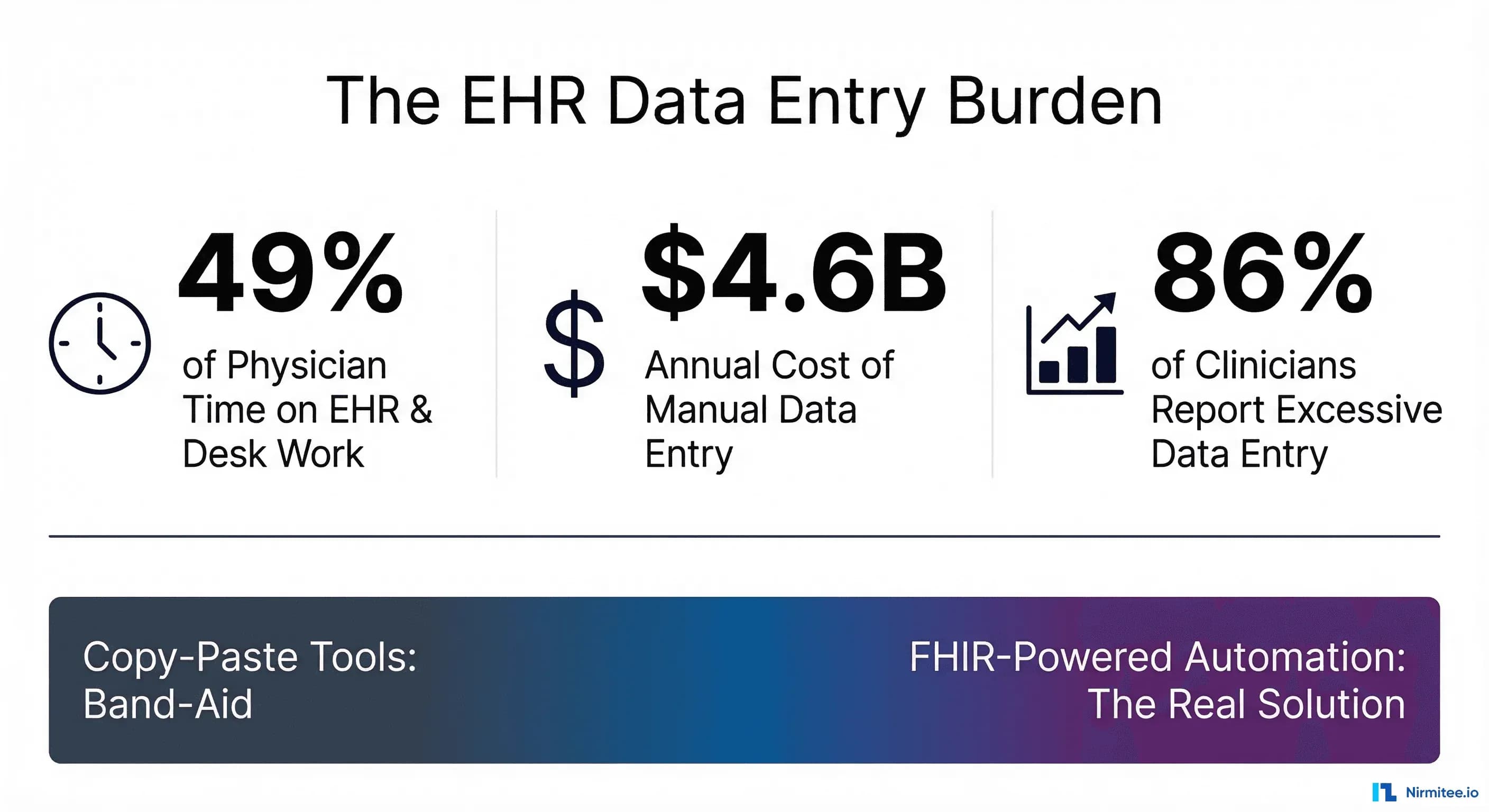
The data entry burden in healthcare is staggering. According to a landmark Annals of Internal Medicine time-motion study cited by the AMA, physicians spend 49.2% of their clinic day on EHR and desk work versus just 27% on face-to-face clinical time. A 2025 scoping review in the Journal of Evaluation in Clinical Practice found that 86.9% of clinicians surveyed at three major institutions identified excessive data entry as their primary EHR concern. The annual cost of this manual entry burden across U.S. healthcare exceeds $4.6 billion, driven by redundant keying, error correction, and rework from data entry mistakes that cascade into claim denials.
Tools like Magical's Chrome extension address this by enabling copy-paste between browser tabs. While that approach solves surface-level friction, it introduces deeper problems: brittle selectors that break when EHR interfaces update, no data validation or clinical coding, no interoperability with downstream systems, and zero audit trail for HIPAA compliance. It is the digital equivalent of a Post-it note workaround in a system that needs plumbing.
The real solution is API-driven automation using FHIR (Fast Healthcare Interoperability Resources), the HL7 standard that enables structured, validated, interoperable data exchange between healthcare systems. This article presents six proven approaches to EHR data entry automation, each grounded in standards-based integration rather than browser-level hacks.
Why Copy-Paste Tools Are a Band-Aid
Before exploring the architectural solutions, it is worth understanding exactly why clipboard-based automation fails in healthcare contexts:
- No data validation: Copy-paste moves raw text. It cannot validate that an ICD-10 code is current, that a medication dosage falls within safe ranges, or that a patient identifier matches the correct record. FHIR resources carry structured data with built-in validation through resource profiles and terminology bindings.
- No interoperability: Text copied from one browser tab to another does not generate HL7 messages, trigger downstream workflows, or update connected systems. FHIR write-back operations propagate changes across the care continuum.
- No audit trail: HIPAA requires that access to Protected Health Information (PHI) be logged with timestamps, user identity, and purpose. Browser extension activity occurs outside the EHR's audit infrastructure, creating compliance blind spots.
- Brittle by design: Screen-scraping tools depend on HTML element IDs and CSS selectors that change with every EHR update. FHIR APIs provide versioned, stable interfaces with backward compatibility guarantees.
- No clinical decision support: Copy-paste cannot trigger drug interaction alerts, flag duplicate orders, or enforce evidence-based care pathways. FHIR-integrated CDS Hooks fire in real time as structured data enters the system.
The fundamental gap is that copy-paste operates at the presentation layer, while clinical data automation must operate at the data layer. That distinction is not academic; it determines whether automation improves or undermines patient safety.
The Six Approaches to FHIR-Powered Data Entry Automation
1. FHIR-Based Form Pre-Population (Questionnaire/QuestionnaireResponse)
The most direct path to eliminating manual data entry is FHIR's Structured Data Capture (SDC) implementation guide, which defines how to pre-populate form fields from existing patient data using the $populate operation.
How It Works
A FHIR Questionnaire resource defines the form structure. Each question item includes initialExpression extensions containing FHIRPath expressions that map to existing data. When a clinician opens the form, the FHIR server:
- Receives the
$populaterequest with the patient's context - Executes FHIRPath expressions against the patient's existing resources (Patient, Condition, MedicationRequest, Coverage, etc.)
- Returns a QuestionnaireResponse with fields pre-filled
- The clinician reviews, corrects if needed, and submits
Implementation Example
Here is a simplified Questionnaire resource with pre-population expressions for a patient intake form:
{
  "resourceType": "Questionnaire",
  "id": "patient-intake-prepop",
  "status": "active",
  "subjectType": ["Patient"],
  "item": [
    {
      "linkId": "patient-name",
      "text": "Patient Name",
      "type": "string",
      "extension": [{
        "url": "http://hl7.org/fhir/uv/sdc/StructureDefinition/sdc-questionnaire-initialExpression",
        "valueExpression": {
          "language": "text/fhirpath",
          "expression": "%patient.name.first().given.first() + ' ' + %patient.name.first().family"
        }
      }]
    },
    {
      "linkId": "dob",
      "text": "Date of Birth",
      "type": "date",
      "extension": [{
        "url": "http://hl7.org/fhir/uv/sdc/StructureDefinition/sdc-questionnaire-initialExpression",
        "valueExpression": {
          "language": "text/fhirpath",
          "expression": "%patient.birthDate"
        }
      }]
    },
    {
      "linkId": "active-medications",
      "text": "Current Medications",
      "type": "string",
      "repeats": true,
      "extension": [{
        "url": "http://hl7.org/fhir/uv/sdc/StructureDefinition/sdc-questionnaire-initialExpression",
        "valueExpression": {
          "language": "text/fhirpath",
          "expression": "%medicationRequests.medication.concept.coding.display"
        }
      }]
    }
  ]
}
After the clinician submits, the $extract operation converts the QuestionnaireResponse back into discrete FHIR resources (Observations, Conditions, etc.) that flow into the clinical record without any manual transcription.
Real-World Impact
Organizations implementing SDC-based pre-population report 60-80% reduction in form completion time for standard intake workflows. The key advantage over copy-paste: every field carries structured codes (SNOMED CT, LOINC, RxNorm), enabling downstream analytics, CDS, and quality reporting that unstructured text cannot support.
2. HL7 ADT-Driven Registration Auto-Fill
Patient registration is one of the highest-volume data entry workflows in healthcare. Every admission, transfer, and discharge generates demographic and insurance data that staff must enter into the EHR. HL7v2 ADT (Admit-Discharge-Transfer) messages have carried this data between hospital systems for decades, and modern integration can eliminate manual registration entirely.
The ADT-to-FHIR Pipeline
When a patient arrives and is registered in any upstream system (scheduling, kiosk, health information exchange), an ADT^A04 (Register a Patient) message is generated containing:
- PID segment: Patient demographics (name, DOB, address, SSN, phone, race, ethnicity, language)
- PV1 segment: Visit information (attending physician, admit date, patient class, room/bed)
- IN1/IN2 segments: Insurance details (payer name, policy number, group number, subscriber)
- NK1 segment: Next of kin and emergency contacts
- GT1 segment: Guarantor information for billing
An integration engine like Mirth Connect or Rhapsody receives this message, parses each segment, and creates corresponding FHIR resources:
// HL7v2 PID segment to FHIR Patient resource mapping
MSH|^~\&|SCHEDULING|HOSP|EHR|HOSP|20260319||ADT^A04|MSG001|P|2.5
PID|1||MRN12345^^^HOSP||Smith^John^A||19850315|M|||123 Main St^^Springfield^IL^62704||2175551234

// Maps to FHIR Patient:
{
  "resourceType": "Patient",
  "identifier": [{"system": "urn:oid:1.2.3.4", "value": "MRN12345"}],
  "name": [{"family": "Smith", "given": ["John", "A"]}],
  "birthDate": "1985-03-15",
  "gender": "male",
  "address": [{"line": ["123 Main St"], "city": "Springfield", "state": "IL", "postalCode": "62704"}],
  "telecom": [{"system": "phone", "value": "2175551234"}]
}
The EHR registration form receives this FHIR Patient resource and auto-populates every field. Registration staff verify rather than type, reducing per-patient registration time from 8-12 minutes to under 2 minutes.
3. NLP Extraction From Referral Documents
Referral documents arrive as faxed PDFs, scanned letters, and unstructured clinical notes. Staff currently read these documents and manually key relevant information into the EHR. Natural Language Processing (NLP) combined with FHIR resource generation eliminates this transcription step.
The NLP-to-FHIR Pipeline
Modern clinical NLP systems (such as those studied by the AMA and deployed in enterprise settings) perform entity extraction on referral documents:
- Document ingestion: PDF/image arrives via Direct messaging, fax server, or health information exchange
- OCR + text extraction: Document is converted to machine-readable text
- Clinical NER (Named Entity Recognition): The NLP model identifies diagnoses (ICD-10), medications (RxNorm), procedures (CPT), lab values (LOINC), and provider information (NPI)
- FHIR resource generation: Extracted entities are mapped to FHIR resources: Condition, MedicationRequest, Procedure, Observation, Practitioner
- Confidence scoring: Each extracted value carries a confidence score; values below threshold are flagged for human review
- EHR integration: High-confidence resources pre-populate the referral intake form; flagged items appear as suggestions
// Example NLP extraction output as FHIR Condition
{
  "resourceType": "Condition",
  "clinicalStatus": {
    "coding": [{"system": "http://terminology.hl7.org/CodeSystem/condition-clinical", "code": "active"}]
  },
  "code": {
    "coding": [{
      "system": "http://hl7.org/fhir/sid/icd-10-cm",
      "code": "E11.9",
      "display": "Type 2 diabetes mellitus without complications"
    }],
    "text": "Type 2 Diabetes"
  },
  "subject": {"reference": "Patient/mrn-12345"},
  "extension": [{
    "url": "http://example.org/fhir/nlp-confidence",
    "valueDecimal": 0.94
  }]
}
Healthcare organizations deploying NLP-to-FHIR pipelines report 70-85% reduction in referral processing time and a 40% decrease in data entry errors compared to manual transcription, because NLP maps to coded terminologies rather than free text.
4. SMART on FHIR Apps for Contextual Data Entry
SMART on FHIR (Substitutable Medical Applications and Reusable Technologies) provides a standards-based framework for launching third-party applications within the EHR context. For data entry automation, SMART apps can present specialized, context-aware interfaces that are dramatically more efficient than generic EHR forms.
How SMART Apps Reduce Data Entry
A SMART on FHIR app launches within the EHR and automatically receives the current patient context through the OAuth 2.0 launch flow. It can then:
- Pull existing data: Read the patient's demographics, active problems, medications, and recent encounters via FHIR APIs, eliminating re-entry of known information
- Present specialized forms: A dermatology intake app shows skin-specific fields; a cardiology app shows relevant cardiac history. This replaces navigating through 15 generic EHR tabs
- Apply clinical logic: Auto-calculate BMI from height/weight, derive risk scores from existing data, and suggest appropriate screening orders based on age and conditions
- Write structured data back: FHIR write operations create Observation, Condition, and Procedure resources directly in the EHR without manual transcription
// SMART on FHIR launch — retrieve patient context
GET /fhir/Patient/12345
Authorization: Bearer {access_token}

// App reads existing conditions to pre-populate review
GET /fhir/Condition?patient=12345&clinical-status=active

// App writes new observation (auto-calculated BMI)
POST /fhir/Observation
{
  "resourceType": "Observation",
  "status": "final",
  "code": {"coding": [{"system": "http://loinc.org", "code": "39156-5", "display": "BMI"}]},
  "subject": {"reference": "Patient/12345"},
  "valueQuantity": {"value": 24.7, "unit": "kg/m2", "system": "http://unitsofmeasure.org", "code": "kg/m2"},
  "effectiveDateTime": "2026-03-19T10:30:00Z"
}
Epic's App Orchard, Oracle Health's Marketplace, and athenahealth's Marketplace all support SMART on FHIR app launches. A single SMART app can work across all three platforms without EHR-specific customization, a level of portability impossible with screen-scraping approaches.
5. Voice-to-Structured-Data (Ambient Capture to FHIR Resources)
Ambient clinical documentation represents the frontier of data entry elimination. Instead of typing or clicking, clinicians simply talk to the patient, and an AI system converts the conversation into structured clinical data.
The Ambient-to-FHIR Pipeline
Solutions like Nuance DAX (Dragon Ambient eXperience), now deeply integrated with Microsoft Azure and Epic, capture physician-patient conversations and produce structured outputs:
- Audio capture: Ambient microphone records the clinical encounter (with patient consent)
- Speech-to-text: ASR (Automatic Speech Recognition) generates a conversation transcript
- Clinical NLU: Natural Language Understanding identifies the chief complaint, history of present illness, review of systems, assessment, and plan
- FHIR resource generation: The system creates structured resources:
- Encounter: Visit type, reason for visit, participants
- Condition: Diagnoses mentioned with ICD-10 codes
- MedicationRequest: Prescriptions discussed with RxNorm codes
- Observation: Vital signs and clinical findings with LOINC codes
- Procedure: Procedures ordered with CPT codes
- DocumentReference: The full clinical note for human review
- Clinician review: The physician reviews the generated note and structured data, making corrections before signing
A cohort study published in PMC found that Nuance DAX reduced documentation time by 50% and saved clinicians an average of 7 minutes per encounter. At scale, a physician seeing 20 patients per day recovers over 2 hours daily of time previously spent on data entry.
The critical architectural point: ambient systems that output FHIR resources integrate natively with any EHR supporting SMART on FHIR and standard FHIR write APIs. Systems that only output free-text notes still require manual coding and structured data entry for billing, quality measures, and CDS.
6. OCR + AI for Insurance Card Scanning
Insurance verification is one of the most error-prone manual data entry workflows. Front desk staff transcribe member IDs, group numbers, payer names, and plan details from physical or photographed insurance cards, with error rates that directly impact claim denial rates.
The OCR-to-FHIR Pipeline
AI-powered OCR systems like those deployed by athenahealth combine optical character recognition with semantic understanding:
- Image capture: Patient photographs their insurance card using a mobile app, kiosk, or check-in tablet
- OCR extraction: AI extracts text fields: member ID, group number, payer name, plan type, RxBIN, copay amounts
- Semantic validation: The system validates extracted data against payer databases and standard formats (e.g., validating that the payer ID matches a known clearinghouse entry)
- FHIR Coverage resource creation: Validated data maps to a FHIR Coverage resource
- Real-time eligibility check: An automated 270/271 EDI transaction verifies active coverage before the patient reaches the exam room
// OCR-extracted insurance data as FHIR Coverage resource
{
  "resourceType": "Coverage",
  "status": "active",
  "subscriber": {"reference": "Patient/12345"},
  "beneficiary": {"reference": "Patient/12345"},
  "payor": [{"display": "Aetna"}],
  "class": [
    {"type": {"coding": [{"code": "group"}]}, "value": "GRP-78901", "name": "Employer Group Plan"},
    {"type": {"coding": [{"code": "plan"}]}, "value": "PPO-GOLD", "name": "PPO Gold"}
  ],
  "identifier": [{"system": "http://aetna.com/member", "value": "W123456789"}],
  "period": {"start": "2026-01-01", "end": "2026-12-31"}
}
Healthcare organizations using AI-powered insurance card scanning report 92% accuracy rates on initial extraction and 35-50% reduction in registration-related claim denials. The time savings are significant: manual insurance entry averages 3-5 minutes per patient; OCR scanning completes in under 10 seconds.
Integration Patterns With Major EHRs
Each of the six automation approaches above requires different integration patterns depending on the target EHR. Here is how the major U.S. EHR vendors support data entry automation:
Epic Integration
Epic provides the most mature FHIR implementation through Epic Interconnect, its web services layer. Key integration points for data entry automation:
- FHIR R4 APIs: Full read/write support for Patient, Condition, Observation, MedicationRequest, Coverage, and Questionnaire resources
- Epic Bridges: HL7v2 interface engine for ADT, ORM, ORU, and SIU messages
- App Orchard: SMART on FHIR app marketplace with single-sign-on launch from MyChart and Hyperspace
- MyChart patient intake: Pre-visit questionnaires that pre-populate from existing patient data
- DAX Copilot integration: Native ambient AI documentation through the Microsoft/Nuance partnership
Oracle Health (formerly Cerner) Integration
Oracle Health's Millennium platform supports modern data entry automation through:
- FHIR R4 APIs: Comprehensive resource support with bulk data export capabilities
- Open Interface: HL7v2 message routing with transformation capabilities
- PowerForms: Structured documentation forms that can be pre-populated via API
- Oracle Health Marketplace: SMART on FHIR app distribution and certification
- Oracle Clinical Digital Assistant: Voice-powered clinical documentation
athenahealth Integration
athenahealth's cloud-native architecture provides:
- FHIR R4 APIs: Patient-facing and clinical data APIs through the athenahealth Marketplace
- Native ADT support: Built-in HL7v2 interfaces for registration automation
- AI-powered OCR: Built-in insurance card scanning with real-time eligibility verification
- Marketplace apps: SMART on FHIR app ecosystem for specialized data capture
- Abridge integration: Ambient AI documentation partnership
Data Validation and Quality Assurance
Automating data entry without automated validation simply moves errors from human typing to machine extraction. Every automation approach above requires a quality assurance layer:
FHIR Profile Validation
FHIR profiles define constraints that auto-populated data must satisfy before acceptance. For U.S. healthcare, the US Core Implementation Guide specifies mandatory elements, terminology bindings, and cardinality rules. Every resource generated by automation should be validated against the relevant profile before writing to the EHR:
// US Core Patient profile validation checks
// Must have: identifier, name, gender, birthDate
// Must use: US Core Race, Ethnicity, Birth Sex extensions
// Terminology: gender must be from AdministrativeGender value set

POST /fhir/Patient/$validate
Content-Type: application/fhir+json

{
  "resourceType": "Parameters",
  "parameter": [{
    "name": "resource",
    "resource": {
      "resourceType": "Patient",
      "meta": {"profile": ["http://hl7.org/fhir/us/core/StructureDefinition/us-core-patient"]},
      "identifier": [{"system": "http://hospital.example/mrn", "value": "12345"}],
      "name": [{"family": "Smith", "given": ["John"]}],
      "gender": "male",
      "birthDate": "1985-03-15"
    }
  }]
}
Terminology Validation
Automated systems must validate that extracted codes are current and appropriate:
- ICD-10-CM codes: Validate against the current fiscal year code set (codes are updated annually on October 1)
- RxNorm codes: Verify against the monthly NLM release; check for deprecated or retired concepts
- SNOMED CT codes: Validate against the US Edition, ensuring concepts are active and in the appropriate hierarchy
- LOINC codes: Verify observation codes match the expected value type and units
Duplicate Detection
Automated data entry can create duplicate records if the same patient arrives through multiple channels (HL7 ADT from scheduling, OCR from kiosk, and NLP from a referral fax). Implement FHIR Patient matching using probabilistic algorithms that compare identifiers, demographics, and contact information before creating new resources.
HIPAA Considerations for Automated Data Flows
Every automated data entry pipeline processes PHI and must comply with HIPAA Security Rule requirements. Key considerations specific to automation:
Access Controls
- SMART on FHIR scopes: Use granular OAuth 2.0 scopes (e.g.,
patient/Patient.read,patient/Observation.write) to enforce least-privilege access for automation services - Service accounts: Automated processes should use dedicated service accounts with audit logging, not individual clinician credentials
- Role-based restrictions: An insurance OCR service should only access Coverage and Patient resources, not clinical notes or mental health records
Encryption Requirements
- In transit: All FHIR API calls must use TLS 1.2 or higher. HL7v2 messages should be transmitted over VPN or TLS-wrapped MLLP (Minimal Lower Layer Protocol)
- At rest: OCR images, NLP input documents, and voice recordings must be encrypted with AES-256 and deleted after processing per data retention policies
Business Associate Agreements
Any third-party service processing PHI in the automation pipeline requires a BAA:
- Cloud OCR providers (Azure Document Intelligence, Google Healthcare API)
- NLP/AI services (Azure OpenAI, AWS Comprehend Medical)
- Ambient voice platforms (Nuance DAX, Abridge, Suki)
- Integration engine cloud hosting (Mirth Connect on AWS, Rhapsody SaaS)
Audit Logging
Every automated data entry event must generate an audit log entry containing: the automation service identity, the patient whose data was accessed/modified, the specific resources read and written, the timestamp, and the triggering event (ADT message, OCR scan, voice encounter). FHIR AuditEvent resources provide a standards-based format for this logging.
Implementation Guide: From Zero to Automated Data Entry
Phase 1: Foundation (Weeks 1-4)
- FHIR endpoint setup: Establish FHIR R4 server connectivity with the target EHR (Epic Interconnect, Oracle Health Open APIs, or athenahealth APIs)
- HL7v2 interface configuration: Configure ADT feeds from scheduling and registration systems through your integration engine
- Authentication infrastructure: Implement SMART on FHIR OAuth 2.0 backend services authorization with appropriate scopes
- Data mapping and validation: Define FHIR profiles, create terminology validation rules, and build patient matching logic
Phase 2: Core Automation (Weeks 5-8)
- Questionnaire pre-population: Deploy SDC-based pre-populated forms for the highest-volume intake workflows (new patient registration, annual wellness visits, pre-operative assessments)
- ADT auto-registration: Activate HL7v2 ADT-to-FHIR conversion for automatic registration form filling from upstream system feeds
- Insurance card OCR: Integrate AI-powered card scanning at check-in kiosks and patient mobile app
- Form field mapping: Map pre-populated data to specific EHR form fields, ensuring coded data (ICD-10, RxNorm, SNOMED CT) populates correctly
Phase 3: Advanced Features (Weeks 9-12)
- NLP referral extraction: Deploy clinical NLP pipeline for incoming referral documents, with confidence-based routing to human review queues
- Voice-to-FHIR pipeline: Pilot ambient documentation in high-volume clinics (primary care, urgent care) with structured FHIR resource output
- SMART app deployment: Launch specialty-specific data entry apps through the EHR's app marketplace
- Quality dashboards: Build monitoring for auto-population accuracy rates, error frequencies, and clinician override patterns
Phase 4: Optimization (Ongoing)
- Error rate monitoring: Track and reduce auto-population errors using clinician correction patterns as training signals
- Clinician feedback loops: Survey users monthly, adjust pre-population logic based on specialty-specific needs
- New form templates: Expand pre-populated Questionnaire resources to cover additional workflows (referral intake, procedure consent, discharge planning)
- Compliance audits: Quarterly review of automated data flows against HIPAA Security Rule and organizational policies
Measuring Success: KPIs for Data Entry Automation
Effective measurement requires baseline data before automation deployment. Track these KPIs:
| KPI | Baseline (Manual) | Target (Automated) | Measurement Method |
|---|---|---|---|
| Registration time per patient | 8-12 minutes | 1-2 minutes | EHR timestamp analysis |
| Data entry errors per 1,000 encounters | 45-65 | 8-15 | Audit log review |
| Claim denial rate (registration-related) | 8-12% | 2-4% | RCM system reporting |
| Clinician documentation time per encounter | 16 minutes | 6-8 minutes | Time-motion study |
| Insurance eligibility verification time | 3-5 minutes | 10 seconds | OCR system metrics |
| Referral processing turnaround | 24-48 hours | 2-4 hours | Workflow queue timestamps |
| Clinician satisfaction (EHR usability) | 35-45% | 60-75% | Annual survey (SUS score) |
The Bottom Line: Architecture Over Workarounds
The difference between browser-based copy-paste and FHIR-powered automation is the difference between duct tape and plumbing. Both move data from point A to point B. Only one does it reliably, securely, and in a way that supports the complex workflows healthcare demands.
Copy-paste tools solve a real frustration, and that frustration is valid. But the $4.6 billion annual data entry burden will not be solved at the browser layer. It requires integration at the protocol layer: FHIR APIs for structured data exchange, HL7v2 for legacy system compatibility, NLP for unstructured document processing, SMART on FHIR for context-aware apps, voice AI for ambient capture, and OCR for document digitization.
Healthcare organizations that invest in these architectural approaches do not just save time on data entry. They build the foundation for real-time clinical decision support, automated quality reporting, seamless care coordination, and the kind of interoperability that the 21st Century Cures Act and ONC regulations now mandate.
The question is not whether to automate EHR data entry. It is whether to automate it at the right layer of the stack.
Ready to scale?
Talk to our healthcare engineering team about building, integrating, and shipping faster.
Frequently Asked Questions
What is EHR data entry automation?
How much time do physicians spend on EHR data entry?
Why are copy-paste browser tools a bad solution for EHR data entry?
How does FHIR form pre-population work?
Can patient registration be fully automated with HL7 ADT messages?
How does Nirmitee.io approach healthcare software development?