EDI 835 vs 837: Claim vs Remittance Files in Healthcare

Digital Growth Lead
Writes about healthcare technology, interoperability, and AI-driven transformation across modern care systems.
Part of our complete guide to the race to a touchless revenue cycle.
Updated November 2026
835 vs 837 in one line: the 837 is the claim a provider sends to a payer to ask for payment, and the 835 is the payer's electronic remittance advice (ERA) that comes back after the claim is decided. The 837 says "please pay for these services"; the 835 says what was paid, what was adjusted and why, and what the patient owes.
835 vs 837: Side-by-Side Comparison
Both are HIPAA standard X12 transactions, and they sit at opposite ends of one claim cycle. Read the table row by row to see who sends each file, which way it travels and which implementation guide it follows.
| 837 (the claim) | 835 (the remittance) | |
|---|---|---|
| X12 name | Health Care Claim | Health Care Claim Payment/Advice, also called the electronic remittance advice (ERA) |
| What it does | Submits claim billing or encounter information from a provider to a payer | Makes a payment, sends a remittance advice, or both, from a health plan to a provider |
| Who sends it | The provider or its billing service, usually through a clearinghouse | The payer, often through a clearinghouse |
| Direction | Provider to payer | Payer to provider |
| When | After the visit is coded and billed | After the payer adjudicates the claim |
| Versions | 837P professional, 837I institutional, 837D dental | One 835 for all claim types |
| Implementation guide (GS08) | 837P 005010X222A1, 837I 005010X223A2, 837D 005010X224A2 | 005010X221A1 |
| Key segments | CLM (claim), HI (diagnoses), SV1 / SV2 / SV3 (service lines) | BPR (payment), TRN (trace number), CLP (claim), SVC (service line), CAS (adjustments), PLB (provider-level adjustments) |
| Money it carries | Billed charges (CLM02 and each line charge) | Paid amount (CLP04), patient responsibility (CLP05), every adjustment by group and reason code, and the payment total (BPR02) |
| What comes back | A 999 for file syntax, a 277CA for claim acceptance, then the 835 | No acknowledgment is required; the provider matches BPR and TRN to the bank deposit or check |
| Links to the other file by | CLM01 patient control number; REF*6R line item control number | CLP01 returns CLM01; REF*6R in loop 2110 returns the line number |
| Paper equivalent | CMS-1500 (837P), UB-04 (837I), ADA dental claim form (837D) | The paper remittance advice sent with a check |
| FHIR resource | Claim | ExplanationOfBenefit |
Sources for the table: X12's transaction set definitions, 45 CFR 162.1102 and 162.1602, and the CMS Medicare companion guides. HIPAA adopts the base 5010 guides; the A1 and A2 errata versions above are the GS08 values Medicare expects, and New York Medicaid names 005010X224A2 for dental claims.
Whether you write it as 837 vs 835 or 835/837, the 835 and 837 files in healthcare work as a pair: the EDI 837 transaction asks to be paid and the 835 transaction answers.
If you need these files flowing in your own product, our clearinghouse integration services team builds the 837, 999, 277CA and 835 handling end to end. Our team works inside a live Waystar X12 claims pipeline (837P, 835, 270/271, 276/277 and 999); we are ISO 27001:2022 certified and sign BAAs. For how claims, eligibility, denials and posting fit together, see our revenue cycle management guide.
Watch: X12 EDI Explained From Basics to Advanced: How to Read Any Healthcare X12 File (9:03).
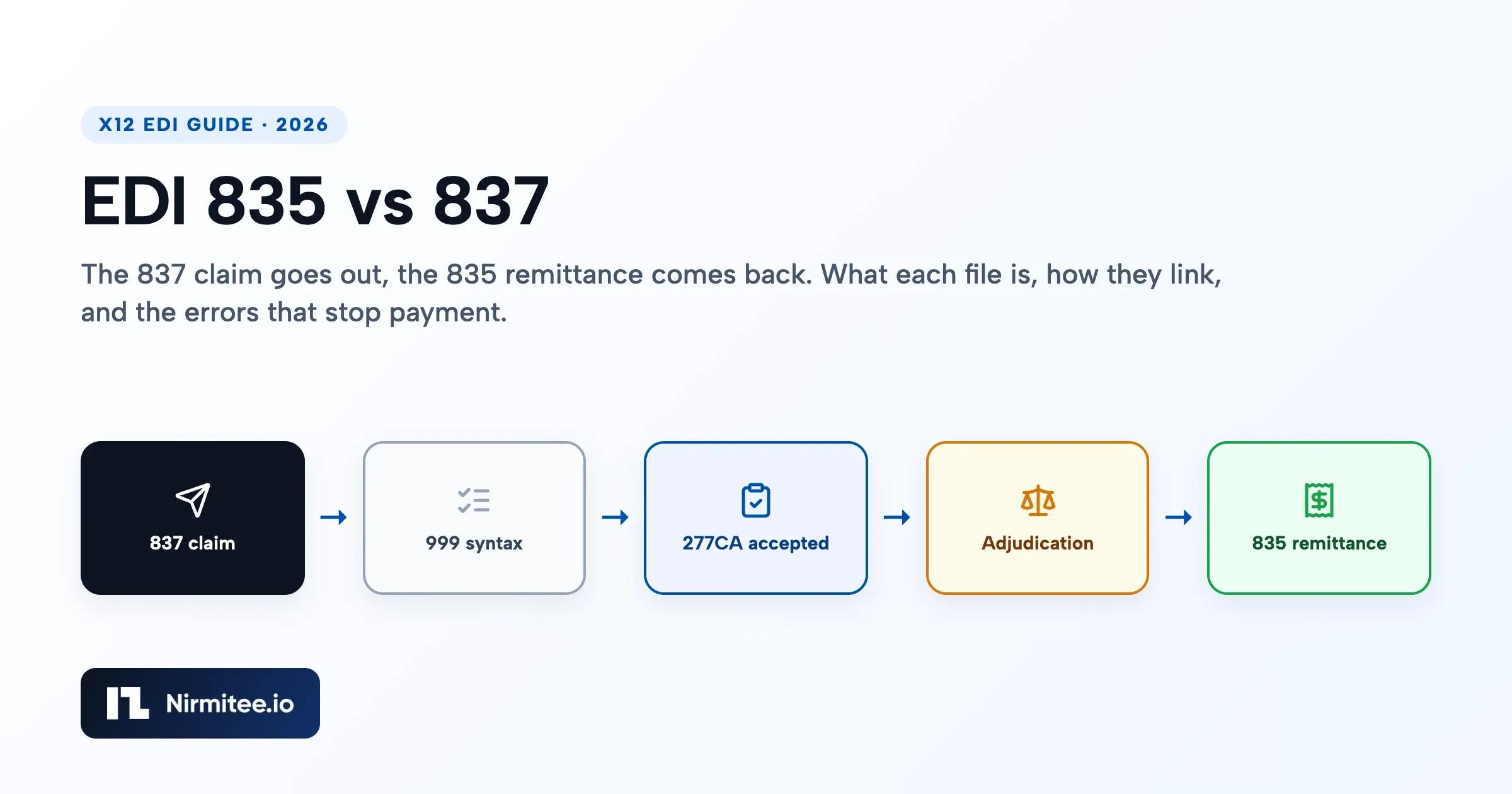
How the 837, 999, 277CA and 835 Flow Together
The 837 goes out first, two acknowledgments come back, and the 835 arrives only after the payer adjudicates the claim. If the file or the claim is rejected on the way in, the payer never decides it, so no 835 will ever come for it.
- 837 claim: the provider or its clearinghouse sends the claim file.
- TA1 (only if the envelope fails or one was requested in ISA14): the receiver could not read the ISA/IEA interchange. Fix and resend the whole interchange.
- 999 implementation acknowledgment (005010X231A1): says whether each transaction set passed X12 syntax checks. A rejected 999 means the payer never saw the claims inside it.
- 277CA claim acknowledgment (005010X214): says claim by claim whether each one was accepted into the payer's adjudication system or rejected at the front door.
- Adjudication: the payer decides. During this time you can ask for status with a 276 and get a 277 back.
- 835 remittance (005010X221A1): reports payment, adjustments and patient responsibility, alongside an EFT or a check.
Medicare's contractors use exactly this set for 5010 claims: the TA1, the 999 and the 277CA replaced the proprietary error reports they used before. One trap we hit in production: the 277CA and the payer's 277 claim status response both start with ST*277. Route them on BHT06 (TH on the 277CA, DG on a claim status response), never on ST01 alone. Our Waystar clearinghouse guide covers 277 vs 277CA in depth.
| Step | Transaction | Guide ID | Answers the question | Matches back to the 837 by |
|---|---|---|---|---|
| 1 | 837P / 837I / 837D | X222A1 / X223A2 / X224A2 | Please pay for these services | (the original) |
| 2 | TA1 | part of X231 | Could you open the envelope? | ISA13 interchange control number |
| 3 | 999 | 005010X231A1 | Is the syntax valid? | GS06 and ST02 control numbers |
| 4 | 277CA | 005010X214 | Was each claim accepted for processing? | Patient control number (CLM01) and trace numbers |
| 5 | 276 / 277 | 005010X212 | Where is my claim now? | Patient control number and payer claim number |
| 6 | 835 | 005010X221A1 | What was paid, adjusted and owed? | CLP01 = CLM01; REF*6R per line |
How an 835 Links Back to Its 837
An 835 points back to the 837 through identifiers the provider sent, because the two files share no file ID. CLP01 in the 835 returns the patient control number from CLM01 in the 837, and REF*6R in the 835 service line loop (2110) returns the line item control number sent in REF*6R in the 837 service line loop (2400).
- Claim level: CLP01 = CLM01. Keep CLM01 short and unique. Medicare stores and returns only the first 20 characters of the patient control number, so a longer value will not match on the way back.
- Line level: X12 interpretations say the payer returns your REF*6R value on the 835 when you sent one and the payer adjudicates by line. The 837 REF*6R is optional for the submitter, so send it if you want clean line matching.
- Payer side: CLP07 carries the payer's own claim control number. Store it. A replacement (CLM05-3 = 7) or void (CLM05-3 = 8) claim quotes it in REF*F8. Medicare's 837P companion guide requires CLM05-3 = 1 (original), so check each payer's companion guide before sending a replacement.
The two files are not one to one. One 835 usually covers many claims from many 837 batches, grouped by payment. One claim can appear in more than one 835: a reversal (CLP02 = 22) followed by a corrected payment, or a primary payer's 835 followed later by the secondary payer's. X12's guidance is that the reversal comes first, repeats the original group and reason codes, and negates the original amounts. Match on CLP01 plus the line-level REF*6R, and never assume the 835 arrives in the order you sent the 837s.
A Synthetic 837P Example, Line by Line
Here is a short 837P for one office visit with two service lines, built only from test values. It passes structural validation against the 005010X222A1 map in pyx12 (an open-source X12 validator); that check covers segment order, required elements and counts, so we checked the money by hand.
ISA*00*          *00*          *ZZ*SUBMITTER01    *ZZ*CLEARHOUSE01   *261103*0930*^*00501*000000101*1*T*:~
GS*HC*SUBMITTER01*CLEARHOUSE01*20261103*0930*101*X*005010X222A1~
ST*837*0001*005010X222A1~
BHT*0019*00*BATCH0001*20261103*0930*CH~
NM1*41*2*EXAMPLE BILLING SERVICE*****46*SUBMITTER01~
PER*IC*BILLING DESK*TE*5555550100~
NM1*40*2*EXAMPLE CLEARINGHOUSE*****46*CLEARHOUSE01~
HL*1**20*1~
NM1*85*2*EXAMPLE FAMILY CLINIC*****XX*1234567893~
N3*100 SAMPLE STREET~
N4*ANYTOWN*IL*606010000~
REF*EI*990000001~
HL*2*1*22*0~
SBR*P*18*GRP0001******CI~
NM1*IL*1*SAMPLE*ALEX****MI*MBR000001~
N3*200 TEST AVENUE~
N4*ANYTOWN*IL*60602~
DMG*D8*19850115*F~
NM1*PR*2*EXAMPLE HEALTH PLAN*****PI*PAYER01~
CLM*SYNTH-1001*210***11:B:1*Y*A*Y*Y~
HI*ABK:J069~
LX*1~
SV1*HC:99213*125*UN*1***1~
DTP*472*D8*20261028~
REF*6R*LINE-0001~
LX*2~
SV1*HC:87880*85*UN*1***1~
DTP*472*D8*20261028~
REF*6R*LINE-0002~
SE*28*0001~
GE*1*101~
IEA*1*000000101~| Segment | What it says here |
|---|---|
| ISA / GS / ST | Envelope. ISA15 = T marks a test file, ISA14 = 1 asks for a TA1, GS08 and ST03 name the 837P guide 005010X222A1 |
| NM1*85 | Billing provider with NPI 1234567893 (qualifier XX) |
| SBR / NM1*IL / NM1*PR | Primary coverage (SBR01 = P), the subscriber's member ID, and the payer ID |
| CLM | Patient control number SYNTH-1001, total charge 210, place of service 11 (office), frequency 1 (original) |
| HI | Principal diagnosis J06.9 (ABK). X12 sends ICD-10 codes without the decimal point |
| SV1 + DTP*472 + REF*6R | CPT 99213 for 125 and CPT 87880 for 85, each with a service date and a line item control number |
| SE | 28 segments from ST to SE. A wrong count is a 999 rejection |
About the test values: 1234567893 passes the NPI check-digit rule (the Luhn formula with the 80840 prefix) and returned no provider in the NPPES registry when we searched it on November 4, 2026. Never use a real provider's NPI in examples or tests.
The Matching 835 Example and the Math
This 835 answers the 837 above: the payer paid 132.40, the patient owes a 20.00 copay, and the rest is a contractual write-off. Every amount balances, which is the first check an 835 parser should run.
ISA*00*          *00*          *ZZ*CLEARHOUSE01   *ZZ*SUBMITTER01    *261117*0800*^*00501*000000555*0*T*:~
GS*HP*CLEARHOUSE01*SUBMITTER01*20261117*0800*555*X*005010X221A1~
ST*835*0001~
BPR*I*132.4*C*CHK************20261118~
TRN*1*CHK00012345*1990000001~
DTM*405*20261117~
N1*PR*EXAMPLE HEALTH PLAN~
N3*1 PAYER WAY~
N4*ANYTOWN*IL*60603~
PER*BL*EDI SUPPORT*TE*5555550199~
N1*PE*EXAMPLE FAMILY CLINIC*XX*1234567893~
REF*TJ*990000001~
LX*1~
CLP*SYNTH-1001*1*210*132.4*20*12*PCN26310000001*11*1~
NM1*QC*1*SAMPLE*ALEX****MI*MBR000001~
SVC*HC:99213*125*95**1~
DTM*472*20261028~
CAS*CO*45*10~
CAS*PR*3*20~
REF*6R*LINE-0001~
AMT*B6*115~
SVC*HC:87880*85*37.4**1~
DTM*472*20261028~
CAS*CO*45*47.6~
REF*6R*LINE-0002~
AMT*B6*37.4~
SE*25*0001~
GE*1*555~
IEA*1*000000555~| Check | Calculation | Result |
|---|---|---|
| Line 1 balances | 125 billed = 95 paid + 10 (CO-45) + 20 (PR-3) | Yes |
| Line 2 balances | 85 billed = 37.40 paid + 47.60 (CO-45) | Yes |
| Claim balances | 210 billed (CLP03) = 132.40 paid (CLP04) + 20 patient (CLP05) + 57.60 contractual | Yes |
| Payment total | BPR02 132.40 = sum of CLP04 minus any PLB adjustments (none here) | Yes |
| Link to the 837 | CLP01 SYNTH-1001 = CLM01; REF*6R LINE-0001 and LINE-0002 echo the 837 lines | Matched |
CO-45 is "charge exceeds fee schedule/maximum allowable or contracted/legislated fee arrangement" and PR-3 is "co-payment amount" in X12's claim adjustment reason code list. For a plain-English walkthrough of a single remittance, see our 835 file example.
837P vs 837I vs 837D: Which Claim File You Send
The claim type decides the 837 version: professional services go on the 837P, facility services on the 837I, and dental services on the 837D. Each has its own implementation guide, so test each one you support separately.
| 837P (professional) | 837I (institutional) | 837D (dental) | |
|---|---|---|---|
| Used by | Physicians, clinics and other professional billers | Hospitals, skilled nursing facilities, home health and other facilities | Dental practices |
| Paper form | CMS-1500 | UB-04 | ADA dental claim form |
| GS08 | 005010X222A1 | 005010X223A2 | 005010X224A2 |
| Service line segment | SV1 (CPT/HCPCS) | SV2 (revenue code, optional HCPCS) | SV3 (CDT), with TOO for tooth number |
| Where the setting goes | CLM05-1 place of service code | CLM05-1 facility type code from the UB-04 type of bill; CLM05-3 is the frequency digit | CLM05-1 place of service code |
Inside an 835: The Segments and Codes That Matter
Five segments carry almost everything a billing system posts from an 835: BPR, TRN, CLP, SVC and CAS. PLB adds provider-level money that belongs to no single claim. Payers usually send 835 files in batches, one per payment, each covering many claims.
- BPR: the payment. BPR02 is the total, BPR04 the method (for example ACH or CHK), BPR16 the payment date.
- TRN: the reassociation trace number. For EFT payments HIPAA puts the same TRN in the ACH CCD+ addenda record, which is how you match the 835 to the deposit.
- CLP: one claim's outcome. CLP01 patient control number, CLP02 claim status, CLP03 billed, CLP04 paid, CLP05 patient responsibility, CLP07 payer claim control number.
- SVC: one service line, with billed and paid amounts and units.
- CAS: adjustments. The group code appears once, then up to six reason, amount and quantity triplets.
- PLB: provider-level adjustments such as recoupments or interest that change the check total without belonging to a claim in this file.
CLP02 Claim Status Codes
| CLP02 | Meaning | What your system should do |
|---|---|---|
| 1 | Processed as primary | Post payment and adjustments; bill the secondary payer if there is one |
| 2 | Processed as secondary | Post as the secondary payment |
| 3 | Processed as tertiary | Post as the tertiary payment |
| 4 | Denied | Route to the denial work queue with its reason codes |
| 19, 20, 21 | Processed as primary, secondary or tertiary, forwarded to additional payer(s) | Post, and do not resubmit to the next payer unless the payer's guide says to |
| 22 | Reversal of previous payment | Back out the earlier posting before posting any corrected claim that follows |
CAS Group Codes
X12's current claim adjustment group code list has four codes: CO, OA, PI and PR. The old CR group from earlier versions is not used in 5010; reversals use CLP02 = 22 instead.
| Group | Name | Who carries the amount |
|---|---|---|
| CO | Contractual Obligation | The provider; do not bill the patient |
| PR | Patient Responsibility | The patient (for example PR-1 deductible, PR-2 coinsurance, PR-3 copay) |
| OA | Other Adjustment | Neither of the above; review before writing off |
| PI | Payor Initiated Reduction | The provider, by the payer's decision; review for appeal |
Medicare contractors send only CO, OA and PR on their 835s; they do not use PI. Reason codes come from X12's claim adjustment reason code (CARC) list; our denial codes guide explains the common ones in plain English. Some CARCs tell you to look at the 835 Healthcare Policy Identification Segment (a REF in loop 2110) for the payer policy behind the adjustment.
Common 835 and 837 Errors and How to Fix Them
Most 837 problems are data errors that a 999 or a 277CA reports within a day, and most 835 problems are posting errors on your side. Find which acknowledgment caught the problem first; that tells you where to look.
| Problem | Where it shows up | Fix |
|---|---|---|
| SE count does not match the segments sent | 999 rejection | Count segments from ST to SE inclusive; generate SE last |
| Wrong GS08 version for the payer | 999 or TA1 rejection | Send the errata version the payer's companion guide names (for Medicare, X222A1 or X223A2) |
| ISA06 or ISA08 not padded to 15 characters | TA1 rejection | ISA is fixed width; never trim it |
| Claim total does not equal the sum of line charges | 277CA or payer edit rejection | Set CLM02 to the sum of the service line charges |
| NPI with 9 digits or a bad check digit | 277CA rejection | Send the 10-digit NPI and confirm it in NPPES |
| Impossible date, such as September 31 | 999 rejection | Validate CCYYMMDD dates (for example 20260401 for April 1, 2026) before you build the file |
| Diagnosis pointer points at an empty HI position (in an 837 claim, diagnosis codes are linked to service lines using the pointers in SV107) | 277CA or payer rejection | Each SV1 pointer must reference a diagnosis present in HI |
| Claim filed too late | Denial on the 835 | Medicare requires filing within 1 calendar year of the date of service, 365 days or 366 in a leap year (42 CFR 424.44); check each payer's contract |
| CAS parsed as if every triplet had its own group code | Wrong buckets after posting | Read the group code once from CAS01, then the triplets |
| 835 total does not match the deposit | Reconciliation gap | Match BPR02 and TRN02 to the EFT addenda, and post PLB adjustments separately |
| No 835 ever arrives | Silence | Check the 999 and 277CA for a rejection, then send a 276 status inquiry |
Annotated 837P Excerpt With Three Errors
The synthetic excerpt below contains three errors a clearinghouse or payer would reject. Spotting them is a good test for a claim scrubber.
CLM*SYNTH1001*150***11:B:1*Y*A*Y*Y~
HI*ABK:J069~
NM1*82*1*SAMPLE*JANE****XX*123456789~
LX*1~
SV1*HC:99213*100*UN*1***1~
DTP*472*D8*20260931~
LX*2~
SV1*HC:87880*40*UN*1***1~
DTP*472*D8*20260915~| Line | Error | Fix |
|---|---|---|
| CLM02 = 150 | Claim total does not equal the line charges (100 + 40 = 140) | Set CLM02 to 140, or correct the line charges |
| NM109 = 123456789 | Rendering provider NPI has 9 digits; an NPI is 10 digits with a check digit | Send the provider's 10-digit NPI and confirm it in NPPES |
| DTP03 = 20260931 | September 31 does not exist | Send the real date of service in CCYYMMDD |
Paste any file into our free EDI Inspector, a free 835 viewer that decodes each segment and code in the browser, and see our EDI testing guide for catching these errors before a clearinghouse does. There is no EDI 835 sample file to download: copy the sample 837 and 835 above straight into the inspector.
The Other HIPAA Transactions Around the 835 and 837
HIPAA names a standard X12 transaction for each step of a claim, from eligibility before the visit to payment after it. CMS enforces these standards, and a health plan must conduct a standard transaction when an entity asks it to (45 CFR 162.925).
| Transaction | Purpose | Direction | HIPAA guide (45 CFR part 162) |
|---|---|---|---|
| 270 / 271 | Eligibility inquiry and response | Provider to payer, then back | 005010X279 (errata X279A1) |
| 278 | Prior authorization (services review) request and response | Provider to payer, then back | 005010X217 (errata X217E1) |
| 837P / 837I / 837D | Claim or encounter | Provider to payer | 005010X222, X223 (A1), X224 (A1); GS08 X222A1, X223A2, X224A2 |
| 276 / 277 | Claim status inquiry and response | Provider to payer, then back | 005010X212 (errata X212E1) |
| 835 | Payment and remittance advice | Payer to provider | 005010X221 (errata X221A1) |
| 834 | Benefit enrollment and maintenance | Plan sponsor to health plan | 005010X220 |
| 820 | Premium payment | Plan sponsor to health plan | 005010X218 |
What is a 277 file in healthcare? It is the payer's claim status message. As a 277 response it answers a 276 inquiry; as a 277CA it tells you whether each claim on an 837 was accepted for processing. Its status category codes follow X12's list: A1 means received, A2 accepted into the adjudication system, A3 returned as unprocessable, F1 finalized and paid, F2 finalized and denied, F4 adjudication complete with no payment forthcoming.
What does "not certified" mean on a 278? It means the payer did not approve the requested service as submitted. The service can still be appealed or resubmitted with more clinical information, following that payer's process. Payer portals, such as Availity's service review tools, report the same decision. For eligibility before the visit, see our insurance eligibility verification guide.
Reading 835 and 837 Files in Code
Take the delimiters from the ISA segment, split segments on the terminator, and read CAS as one group code followed by triplets. The short Python below parses the sample 835 above and runs the balancing check; we ran it before publishing.
from decimal import Decimal

def segments(raw: str):
    """Split an X12 file using the delimiters declared in its ISA segment."""
    raw = raw.lstrip()
    elem, comp, term = raw[3], raw[104], raw[105]
    for seg in raw.split(term):
        seg = seg.strip()
        if seg:
            yield seg.split(elem), comp

def read_835(raw: str):
    claims, claim, line = [], None, None
    for el, comp in segments(raw):
        tag = el[0]
        if tag == "CLP":
            claim = {"pcn": el[1], "status": el[2], "billed": Decimal(el[3]),
                     "paid": Decimal(el[4]), "payer_icn": el[7], "lines": [], "adj": []}
            claims.append(claim); line = None
        elif tag == "SVC" and claim:
            line = {"code": el[1].split(comp)[1], "billed": Decimal(el[2]),
                    "paid": Decimal(el[3]), "line_id": None, "adj": []}
            claim["lines"].append(line)
        elif tag == "CAS" and claim:
            group = el[1]                      # the group code appears once
            target = line["adj"] if line else claim["adj"]
            for i in range(2, len(el), 3):     # then reason, amount, quantity triplets
                if el[i]:
                    target.append((group, el[i], Decimal(el[i + 1])))
        elif tag == "REF" and el[1] == "6R" and line:
            line["line_id"] = el[2]            # echoes REF*6R from the 837 loop 2400
    return claims

def balances(claim) -> bool:
    """Billed = paid + every adjustment, at claim level and on each line."""
    lines_ok = all(l["billed"] == l["paid"] + sum(a[2] for a in l["adj"]) for l in claim["lines"])
    adj = sum(a[2] for a in claim["adj"]) + sum(a[2] for l in claim["lines"] for a in l["adj"])
    return lines_ok and claim["billed"] == claim["paid"] + adj
On the sample it returns claim SYNTH-1001, status 1, paid 132.40, both line IDs, and balanced: True; changing one paid amount makes it return False. Use Decimal for money, never float. In production you also need loop tracking (the same NM1 means different things in different loops), PLB handling and the 999 and 277CA readers. Our X12 EDI guide for developers covers envelopes, loops and parsing in more depth.
835 and 837 in FHIR
In FHIR R4, an 837 maps most closely to the Claim resource and an 835 claim payment to ExplanationOfBenefit. X12 is still the HIPAA standard for claims and remittance, so FHIR versions of these files are usually built for other uses, such as payer data exchange with patients under the CARIN Blue Button implementation guide.
| X12 | FHIR R4 resource | Notes |
|---|---|---|
| 837 CLM, HI, SV1 | Claim (diagnosis, item) | CLM01 becomes a Claim identifier |
| 835 CLP, SVC, CAS | ExplanationOfBenefit (item.adjudication) | One CLP maps to one ExplanationOfBenefit; CAS reason codes map to adjudication reasons |
| 270 / 271 | CoverageEligibilityRequest / CoverageEligibilityResponse | Eligibility |
Getting 835s and 837s Flowing in Production
Code is the smaller part of going live; enrollment and trading partner setup take longer. Plan these steps from the first week.
- Clearinghouse account and trading partner IDs. Your ISA05/06 and ISA07/08 values are registered with the clearinghouse before the first test file.
- Payer enrollment. Claims, ERA (835) and EFT are enrolled per payer and per provider. In our experience this is weeks of paperwork, so gate go-live dates on it. HIPAA adopted the CAQH CORE operating rules for EFT and remittance, including standard enrollment data for ERA and EFT (45 CFR 162.1603).
- Test files. Send 837s with ISA15 = T, and confirm you can read every 999, 277CA and 835 that comes back, including rejections.
- Routing by content. Route inbound files by ISA and ST01 (and BHT06 for 277s), not by file name.
- Posting rules. Decide how each CAS group and CLP02 value posts before the first live 835. Our payment posting software comparison and denial root cause guide cover what happens after posting.
- Security. Sign a BAA with the clearinghouse, encrypt files in transit and at rest, and keep PHI out of logs.
A common question is how to get claims data out of a payer portal programmatically. The standard route is the transactions themselves: enroll for ERA to receive 835s, and send 276 inquiries to receive 277 status responses, through a clearinghouse or a direct payer connection.
Need EDI 835 and 837 development services for healthcare? We build 837 generation, 999 and 277CA handling, 835 parsing and posting, and reconciliation for EHRs, practice management systems and billing platforms. Tell us your clearinghouse, the transactions involved and where the flow stops, and leave patient data out of what you send. Talk to our clearinghouse integration team.
Where is your claims integration getting stuck?
Tell us your clearinghouse, transaction types and the stage that is blocking you. Discuss acknowledgment handling, retries, claim-status tracking and remittance reconciliation with our integration team.
Frequently Asked Questions
What is the difference between 835 and 837 files?
Which comes first, the 835 or the 837?
What are 835 and 837 files in medical billing?
How does an 835 match back to an 837?
What is the difference between 837P and 837I?
What is a 277 file in healthcare?
Why did I get no 835 for a claim I sent on an 837?
What do the CLP02 claim status codes in an 835 mean?