Healthcare Security Checklist Your Auditor Will Ask For

Founder & CEO
15+ years building healthcare technology. Led 100+ EHR integrations, FHIR implementations, and clinical AI deployments.
You've built a solid product. Your FHIR APIs work. Your demo is polished. The hospital's clinical team loves it. Then, two weeks before the contract is supposed to close, the security team sends over a questionnaire. It's 50 to 100 questions long, and your CTO has 10 days to respond.
If you've never been through this, it feels like an ambush. But every hospital, health system, and enterprise payer runs a security review before it lets a vendor near patient data. There's no opting out of it, and it's the single biggest deal-killer for healthtech startups chasing their first enterprise contract.
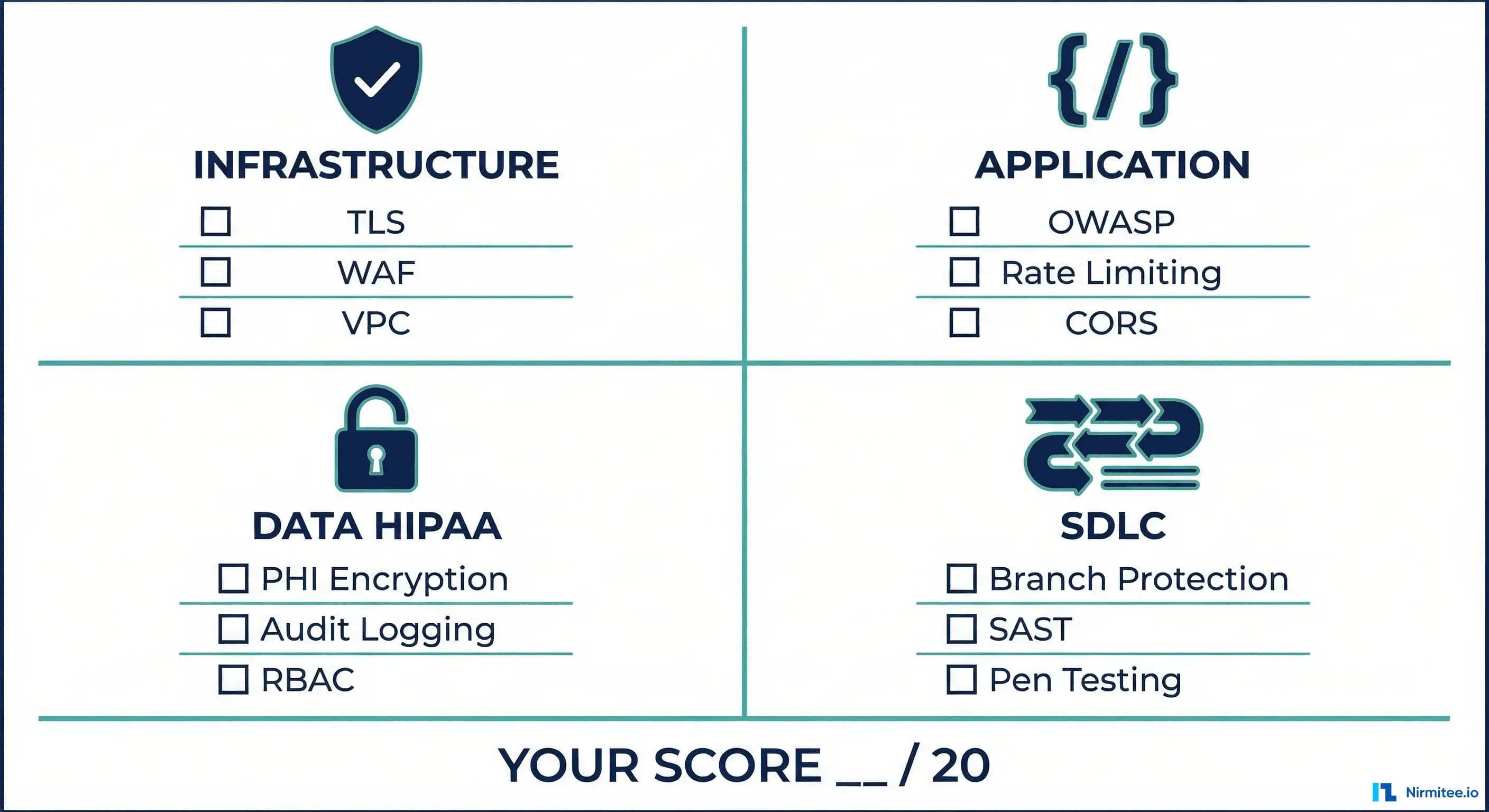
But those 50 to 100 questions almost always come down to about 20 items. We've read dozens of these questionnaires, from 200-bed community hospitals to top-10 health systems, and the core criteria barely move. They map back to the HIPAA Security Rule, HITRUST CSF controls, and SOC 2 trust service criteria.
We've distilled them into a scoreable checklist. Each item is worth 1 point. Total score: /20. Most Series A healthtech startups we work with score 8 to 12 on their first pass. Here's how to get to 18+.
Section 1: Infrastructure (5 Points)
Infrastructure is the foundation everything else sits on. Auditors start here because a misconfiguration at this layer exposes everything above it. Miss any of these five and the review usually stalls before it gets going.
1. TLS 1.2+ Everywhere (1 Point)
Every connection, external and internal, has to use TLS 1.2 or higher. This isn't just your public-facing API. It covers:
- Service-to-service communication within your VPC
- Database connections (PostgreSQL, MySQL, MongoDB)
- Cache layer connections (Redis, Memcached)
- Message queue connections (RabbitMQ, Kafka)
- Third-party API calls (payment processors, analytics, email)
Common failure: Internal services talking over plaintext HTTP because "it's inside the VPC." Auditors ask about internal traffic encryption specifically. A compromised instance inside your VPC can sniff plaintext traffic, and that's not a theoretical attack.
Verify your TLS configuration:
# Check TLS version on your endpoints
openssl s_client -connect api.yourapp.com:443 -tls1_2

# Check for weak cipher suites
nmap --script ssl-enum-ciphers -p 443 api.yourapp.com

# Verify no plaintext listeners
netstat -tlnp | grep -v ':443\|:5432\|:6379'
2. WAF and DDoS Protection (1 Point)
A Web Application Firewall and DDoS mitigation have to sit in front of all public-facing endpoints. This isn't optional for healthcare apps. A DDoS attack on a healthcare platform is a patient safety problem, not just a business continuity one.
- AWS: AWS WAF + AWS Shield Standard (free) or Shield Advanced
- Cloudflare: WAF + DDoS protection (even the free tier provides basic DDoS mitigation)
- GCP: Cloud Armor
Auditors will ask for your WAF rule set and whether you've customized rules for healthcare-specific attack patterns (e.g., FHIR endpoint abuse, bulk data export exploitation).
3. VPC and Network Segmentation (1 Point)
Your database must not be publicly accessible. This sounds obvious, but misconfigured security groups are the number one finding in AWS security audits. Proper network segmentation means:
- Database instances in private subnets with no internet gateway
- Application servers in private subnets behind a load balancer
- Bastion host or VPN for administrative access (no direct SSH to production)
- Security groups scoped to the minimum required ports and source IPs
# Check if RDS is publicly accessible
aws rds describe-db-instances \
  --query 'DBInstances[*].[DBInstanceIdentifier,PubliclyAccessible]' \
  --output table

# Check security groups for 0.0.0.0/0 ingress
aws ec2 describe-security-groups \
  --query 'SecurityGroups[?IpPermissions[?IpRanges[?CidrIp==`0.0.0.0/0`]]].[GroupId,GroupName]' \
  --output table
4. SSH Key Rotation (1 Point)
SSH keys must be rotated quarterly at a minimum. No shared keys across team members. No keys without passphrases. Auditors will ask for your key rotation policy and evidence of execution.
- Use AWS SSM Session Manager or GCP OS Login instead of raw SSH where possible
- If SSH is necessary, use short-lived certificates (HashiCorp Vault SSH backend)
- Maintain a key inventory — know exactly which keys grant access to which systems
- Revoke keys immediately when team members leave
Common failure: A single SSH key shared across the engineering team, created two years ago, with no passphrase. This is a zero-point answer on any security questionnaire.
5. No Public Storage Buckets (1 Point)
S3 buckets, GCS buckets, and Azure Blob containers must not be publicly accessible. Public buckets are behind some of the largest healthcare data breaches on record. Check for them proactively and keep checking:
# Find all public S3 buckets in your account
aws s3api list-buckets --query 'Buckets[].Name' --output text | \
  tr '\t' '\n' | while read bucket; do
    acl=$(aws s3api get-bucket-acl --bucket "$bucket" 2>/dev/null)
    policy=$(aws s3api get-bucket-policy-status --bucket "$bucket" 2>/dev/null)
    if echo "$policy" | grep -q '"IsPublic": true'; then
      echo "PUBLIC: $bucket"
    fi
  done

# Enable S3 Block Public Access at the account level
aws s3control put-public-access-block \
  --account-id $(aws sts get-caller-identity --query Account --output text) \
  --public-access-block-configuration \
  BlockPublicAcls=true,IgnorePublicAcls=true,BlockPublicPolicy=true,RestrictPublicBuckets=true
Section 2: Application Security (5 Points)
Application-layer security is where most startups have the biggest gaps. Infrastructure can be configured correctly with Terraform modules; application security requires ongoing engineering discipline.
6. OWASP Top 10 Addressed (1 Point)
The auditor will ask whether you've evaluated your application against the current OWASP Top 10. They don't expect perfection. They expect awareness and a plan to fix what you find. The items that matter most for healthcare applications:
- A01 Broken Access Control: Can a patient access another patient's records by manipulating resource IDs? FHIR APIs are particularly vulnerable here — test with different patient contexts.
- A02 Cryptographic Failures: PHI transmitted or stored without encryption. Check for plaintext PHI in logs, error messages, and debug endpoints.
- A03 Injection: SQL injection, NoSQL injection, LDAP injection. Parameterized queries everywhere. No string concatenation for database queries.
- A07 SSRF: Server-Side Request Forgery. If your application fetches external resources (e.g., SMART on FHIR endpoints), validate and restrict target URLs.
- A10 SSRF (Server-Side Request Forgery): Particularly relevant for FHIR-based applications that resolve external references.
Document your assessment. The auditor wants to see that you've systematically reviewed each category, not just said: "We use parameterized queries."
7. Input Validation on All Endpoints (1 Point)
Every API endpoint must validate input, not just the user-facing forms. That includes:
- FHIR resource validation (are incoming resources valid FHIR R4?)
- Query parameter validation (length limits, type checking, allowed characters)
- File upload validation (type, size, content scanning)
- Webhook payload validation (signature verification, schema validation)
Common failure: The patient-facing API has thorough input validation, but the internal admin API accepts anything. Auditors specifically ask about internal endpoints because they're often the weakest attack surface.
8. Rate Limiting on Auth Endpoints (1 Point)
Authentication endpoints must have rate limiting to prevent credential stuffing, brute force attacks, and token abuse. Minimum requirements:
- Login endpoint: 10 attempts per minute per IP, 5 per minute per account
- Token endpoint: 30 requests per minute per client
- Password reset: 3 requests per hour per account
- Account lockout after 5 failed attempts with exponential backoff
# Example: nginx rate limiting for auth endpoints
limit_req_zone $binary_remote_addr zone=auth:10m rate=10r/m;

server {
    location /auth/token {
        limit_req zone=auth burst=5 nodelay;
        limit_req_status 429;
        proxy_pass http://backend;
    }
}
Without rate limiting, an attacker can spray thousands of stolen credential pairs against your login endpoint. Healthcare credentials sell for 10x the price of financial credentials on dark markets because of the breadth of PII and insurance data they unlock.
9. CORS Properly Configured (1 Point)
Cross-Origin Resource Sharing headers must be configured with specific allowed origins. Never use Access-Control-Allow-Origin: * On any endpoint that serves authenticated content or PHI.
- Whitelist specific domains (your frontend, your mobile app's web views)
- Do not reflect the Origin header without validation
- Restrict
Access-Control-Allow-Methodsto methods actually used - Set
Access-Control-Allow-Credentials: trueonly when needed, and never with a wildcard origin
Auditors will often test this by sending a request with a random Origin header and checking whether your API reflects it back. This is an instant fail.
10. Content Security Policy Headers (1 Point)
CSP headers prevent cross-site scripting, clickjacking, and data injection attacks. For healthcare applications, they're especially important because patient portals are prime targets for XSS attacks aimed at session hijacking.
# Minimum CSP header for a healthcare application
Content-Security-Policy: default-src 'self';
  script-src 'self';
  style-src 'self' 'unsafe-inline';
  img-src 'self' data: https:;
  font-src 'self';
  connect-src 'self' https://api.yourdomain.com;
  frame-ancestors 'none';
  base-uri 'self';
  form-action 'self';

# Additional recommended headers
X-Content-Type-Options: nosniff
X-Frame-Options: DENY
Strict-Transport-Security: max-age=31536000; includeSubDomains
Referrer-Policy: strict-origin-when-cross-origin
Section 3: Data Protection and HIPAA (5 Points)
This is where auditors spend the most time. Data protection isn't a single control. It's a stack of safeguards that lean on each other, and missing any one of them can sink you regardless of how you scored elsewhere.
11. PHI Encrypted at Rest — AES-256 (1 Point)
All PHI must be encrypted at rest using AES-256 or equivalent. This applies to:
- Primary database (RDS encryption, Azure SQL TDE, GCP CMEK)
- Read replicas and standby instances
- Database backups and snapshots
- File storage (S3 server-side encryption, EBS volume encryption)
- Search indices (Elasticsearch/OpenSearch encryption at rest)
- Cache layers containing PHI (encrypted Redis, encrypted ElastiCache)
Key management: Use AWS KMS, GCP Cloud KMS, or Azure Key Vault. Don't manage encryption keys yourself. Auditors will ask about key rotation, and KMS services handle this automatically with annual rotation.
12. PHI Encrypted in Transit — TLS 1.2+ (1 Point)
This overlaps with Infrastructure item 1, but the focus here is specifically on PHI data flows. Map every path that PHI takes through your system and verify TLS on each hop:
- Client to API gateway
- API gateway to application server
- Application server to database
- Application server to cache
- Application server to third-party services (any service that receives PHI)
- Backup processes and data export paths
Create a data flow diagram showing every PHI transit path and the encryption status of each hop. Auditors love this one. It shows you've actually thought about how data moves, not just ticked a compliance box.
13. Access Audit Logging for Every PHI Access (1 Point)
Every access to PHI must be logged with: who accessed it, what data was accessed, when the access occurred, where the access originated (IP, device), and why (the clinical or business justification).
// Audit log entry structure
{
  "eventId": "uuid-v4",
  "timestamp": "2026-03-13T14:22:00Z",
  "actor": {
    "userId": "dr-smith-1234",
    "role": "physician",
    "ip": "10.0.1.42",
    "userAgent": "Mozilla/5.0..."
  },
  "action": "READ",
  "resource": {
    "type": "Patient",
    "id": "patient-789",
    "fields": ["name", "dob", "medications"]
  },
  "context": {
    "encounterId": "encounter-456",
    "reason": "scheduled-visit"
  }
}
Common failure: Audit logging is console.log("User accessed patient record"). That isn't audit logging. It's not structured, not queryable, not tamper-evident, and it captures none of the required fields. Use a dedicated audit log system: append-only, immutable, and retained for at least 6 years, which is the HIPAA requirement.
14. Role-Based Access Control with MFA for Admin (1 Point)
Access to PHI must be role-based with the principle of least privilege. Administrative access requires multi-factor authentication. Specific requirements:
- Defined roles with documented permissions (clinician, nurse, admin, billing, patient)
- No shared accounts — every user has a unique identity
- MFA enforced for all administrative functions (user management, configuration changes, data export)
- MFA enforced for remote access (VPN, SSH, cloud console)
- Session timeouts appropriate for healthcare (15 minutes for admin, configurable for clinical based on workflow)
- Regular access reviews — quarterly at minimum — with evidence of revocations
Auditors will ask for a role matrix showing which roles can access which data elements. They'll also ask for evidence of your last access review and any changes made as a result.
15. BAAs with All Subprocessors (1 Point)
You need a Business Associate Agreement with every vendor that touches PHI. Not just your cloud provider. Every single one. The list usually includes:
- Cloud provider: AWS, GCP, Azure (all offer BAAs)
- Error tracking: Sentry, Datadog, New Relic (do they receive PHI in error logs?)
- Analytics: Mixpanel, Amplitude, Segment (do they receive user identifiers linked to patients?)
- Email/SMS: SendGrid, Twilio (if sending appointment reminders with patient names)
- Payment processing: Stripe (if processing patient payments linked to health services)
- AI/ML providers: OpenAI, Anthropic, Google AI (if sending any PHI to LLM APIs)
Most common audit failure in this entire checklist: No BAA with your error tracking tool. Your Sentry instance is capturing stack traces that include patient names, MRNs, and diagnoses. That's a HIPAA violation. Either sign a BAA with Sentry or configure your error tracking to strip all PHI before transmission.
Section 4: SDLC and Security Operations (5 Points)
Auditors increasingly evaluate your development practices, not just your production environment. A secure application today can become insecure tomorrow without secure development practices.
16. Branch Protection — No Direct Push to Main (1 Point)
Your main/production branch must have branch protection rules enforced:
- No direct pushes to main — all changes via pull request
- At least one approval is required before the merge
- Status checks must pass before merge (CI pipeline, tests, linting)
- No force pushes to the main
- Administrators are not exempt from these rules
This is one of the easiest items on the checklist. Five minutes to configure in GitHub or GitLab. Yet we regularly see startups skip it, including companies running PHI in production.
17. Code Review Required for All PRs (1 Point)
Every pull request must be reviewed by at least one engineer who did not author the code. The auditor wants to see:
- A documented code review policy
- Evidence of reviews (PR history showing reviewer comments and approvals)
- Security-focused review criteria (input validation, auth checks, PHI handling)
- No self-merges in the PR history
For healthcare-critical code paths (auth, PHI access, data export), consider requiring two reviewers. Document which paths are considered critical and why.
18. SAST Scanning in CI (1 Point)
Static Application Security Testing must run automatically on every pull request. The scanner should block merges on high-severity findings. Recommended tools:
- Semgrep: Free tier covers most needs, excellent custom rule support for healthcare-specific patterns
- CodeQL: Free for public repos, available via GitHub Advanced Security for private repos
- SonarQube: Community edition is free, good for overall code quality, plus security
# Example: GitHub Actions workflow with Semgrep
name: Security Scan
on: [pull_request]
jobs:
  semgrep:
    runs-on: ubuntu-latest
    steps:
      - uses: actions/checkout@v4
      - uses: returntocorp/semgrep-action@v1
        with:
          config: >-
            p/owasp-top-ten
            p/r2c-security-audit
            p/hipaa
The key is automation. Manual security reviews catch architecture issues; automated scanning catches implementation bugs. You need both.
19. Container Image Scanning (1 Point)
If you deploy containers (and most startups do), every image must be scanned for vulnerabilities before deployment. This includes base image vulnerabilities, dependency vulnerabilities, and configuration issues.
- Trivy: Open source, fast, comprehensive (OS packages + application dependencies)
- Snyk Container: Good integration with CI/CD, developer-friendly fix suggestions
- AWS ECR scanning: Built-in basic scanning, or enhanced scanning via Inspector
# Scan with Trivy before pushing to registry
trivy image --severity HIGH,CRITICAL --exit-code 1 myapp:latest

# Block deployment if critical CVEs found
trivy image --severity CRITICAL --exit-code 1 --ignore-unfixed myapp:latest
Set a policy: no critical CVEs in production images. High-severity CVEs must be remediated within 30 days. Document exceptions with risk acceptance.
20. Penetration Test Within Last 12 Months (1 Point)
A third-party penetration test must have happened within the last 12 months. Internal testing doesn't count. The auditor wants a report from an independent firm.
- Scope must include all externally facing endpoints and the application layer
- Must include authenticated testing (the tester gets valid credentials)
- The report must document findings, severity ratings, and remediation status
- Critical and high findings must be remediated (or have documented risk acceptance)
Cost: $15K to $40K for a typical healthtech application. Budget for it annually. Some health systems will accept SOC 2 Type II in lieu of a pen test for initial evaluation, but most will eventually require both.
This is the most commonly missing item on the checklist for early-stage startups. It's also the hardest to fix in a hurry. You can't schedule, run, remediate, and re-test in a week, so start the process well before you need the report.
Score Yourself
Add up your points across all four sections. Here's what your score means:
- 18-20: Enterprise-ready. You'll pass most hospital security reviews with minor follow-up questions. You're in the top 10% of healthtech vendors we've evaluated.
- 14-17: Good foundation. You have real security maturity but specific gaps that sophisticated buyers will flag. Addressable in 4-8 weeks with focused effort.
- 10-13: Risky. Hospitals will raise material concerns during the review. You may still close deals with smaller facilities, but large health systems will pause procurement until gaps are addressed.
- Below 10: Not ready for healthcare enterprise sales. You need a structured security improvement program before pursuing hospital contracts. Attempting to sell at this stage wastes sales cycles and damages your reputation.
The Most Common Failures
Across the dozens of healthtech security assessments we've conducted, these items fail most often:
- No penetration test — the most common gap. Startups plan to do it "next quarter" indefinitely.
- No BAAs with subprocessors — especially error tracking, analytics, and AI/ML providers. Teams don't realize that Sentry is receiving PHI in stack traces.
- Audit logging is
console.log— unstructured, not immutable, missing required fields, and retained for days instead of years. - CORS is wildcard —
Access-Control-Allow-Origin: *on the API because "it was easier during development" and nobody changed it. - No container scanning — images built from base images with known critical CVEs that have been public for months.
Quick Wins: Fix This Week
If your score isn't where it needs to be, these five can be knocked out in a single sprint, with no architectural changes and no major engineering investment:
- Enable RDS encryption: If you're on AWS and your database isn't encrypted, create an encrypted snapshot, restore from it, and switch your connection string. Downtime: 15-30 minutes. Difficulty: low.
- Add rate limiting to /auth endpoints: If you're behind nginx or an API gateway, this is a configuration change. If you're using Express,
express-rate-limittakes 10 minutes to implement. If you're using Go/Echo, middleware takes 20 minutes.
- Set CSP headers: Start with a report-only policy to identify violations, then enforce. Most frameworks have middleware for this. It's a few lines of configuration.
- Enable branch protection: GitHub Settings, Branches, Add branch protection rule. Five minutes. Zero engineering effort. Immediate compliance improvement.
- Audit your BAA status: Make a list of every vendor/service your application sends data to. Check which ones have a BAA signed. For those without, either sign one, strip PHI before sending, or switch to a BAA-covered alternative.
Beyond the Checklist
A perfect score here doesn't mean you're done. It means you've covered the baseline auditors evaluate. Real security is an ongoing practice: threat modeling, incident response planning, training your team, and keeping up as the threats change.
But getting to 18+ on this checklist does something important: it gets you past the security review and into the contract negotiation. And that's where the revenue is.
Not sure where you stand? Nirmitee offers a free healthcare security assessment. We'll walk through these 20 items with your engineering team, flag the gaps, and build a prioritized remediation roadmap. No sales pitch. Just a practical read from engineers who've sat through hundreds of these reviews.
Building interoperable healthcare systems is complex. Our Healthcare Interoperability Solutions team has deep experience shipping production integrations.
Ready to scale?
Talk to our healthcare engineering team about building, integrating, and shipping faster.
Frequently Asked Questions
What is a healthcare vendor security questionnaire?
What infrastructure security controls do hospital auditors check first?
Why is internal traffic encryption required for HIPAA compliance reviews?
Which OWASP Top 10 risks matter most for healthcare and FHIR applications?
How do healthtech startups typically score on hospital security checklists?
How does Nirmitee.io approach healthcare software development?