
HL7 Integration: How It Works, Key Message Types, and Implementation Playbook

Software Development Expert
Writes about software development, scalable architecture, and practical problem-solving across modern digital products. Focuses on turning complex technical ideas into clear, real-world solutions.
Part of our complete guide to a guide to HL7.
If you need the building block first, our guide to what an HL7 interface is walks through one interface end to end: MLLP, acknowledgements, sample messages and what one costs to build.
Why Healthcare IT Projects Stall at Integration
You can build the most beautiful EHR, the smartest clinical decision support system, or the most patient-friendly portal — but if it can't reliably exchange data with the rest of the hospital's technology ecosystem, it's dead on arrival.
Integration is where healthcare IT projects most often slip. It's not the software that fails — it's the connections between software. And at the heart of those connections sits HL7.
This guide is for healthcare leaders who need to understand — and get right — the practical mechanics of HL7 integration. Not theory, but the specific message types, architecture decisions, implementation phases, and vendor choices that determine whether your integration project succeeds or fails.
If you're new to HL7, start with our foundational guide: HL7 fundamentals.
How HL7 Integration Actually Works
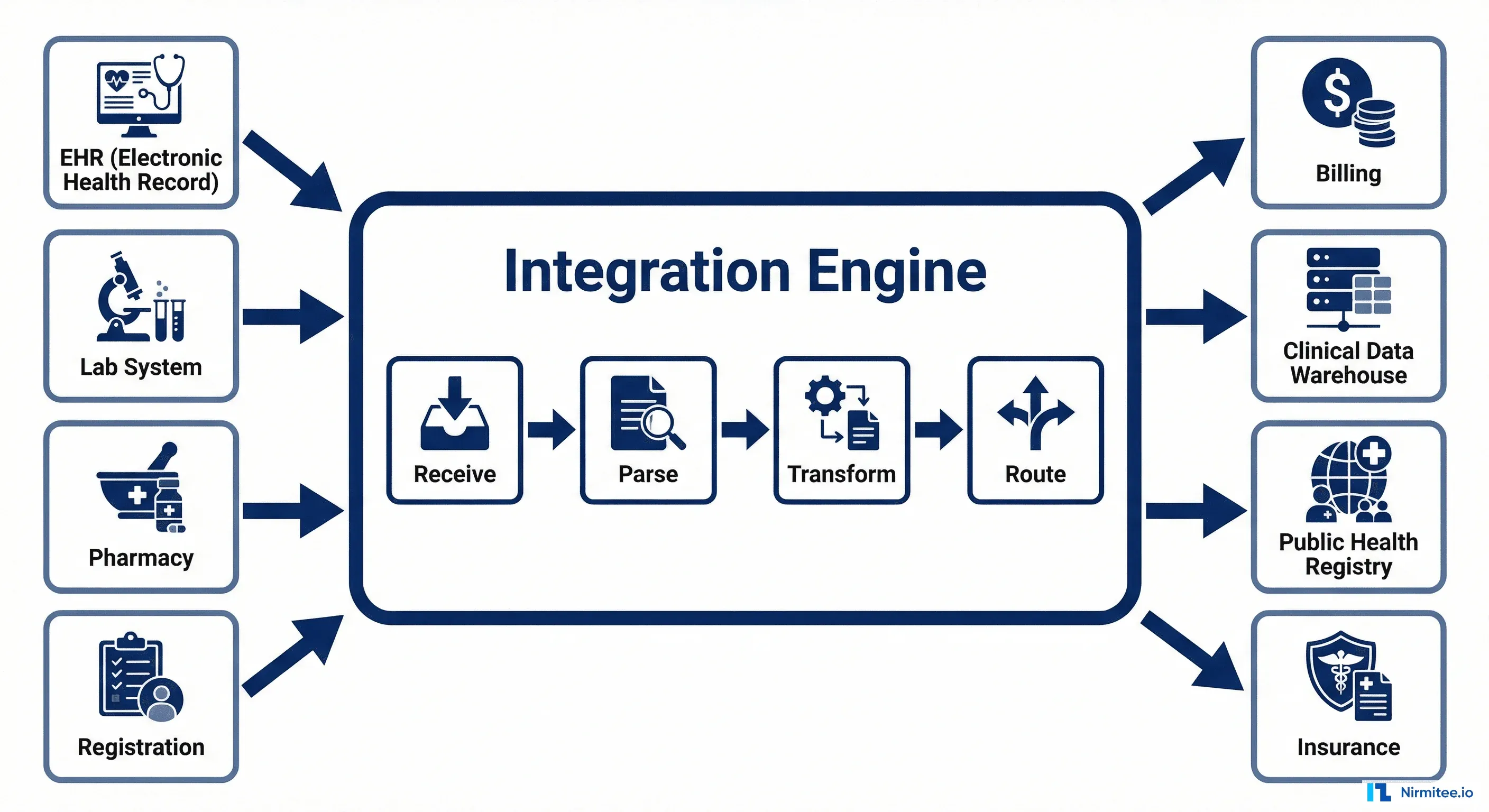
At its core, HL7 integration connects healthcare systems through a central piece of middleware called an integration engine (also known as an interface engine or integration hub). This engine is the traffic controller of your healthcare data flow.
The integration engine performs four critical functions:
- Receive: Listens for incoming HL7 messages from source systems. In HL7 v2, this typically happens over MLLP (a TCP-based protocol). In FHIR, it's standard HTTPS REST calls.
- Parse: Breaks the incoming message into its component parts — segments, fields, and values — so they can be read and manipulated.
- Transform: Maps data from the source format to the destination format. This is where the heavy lifting happens — field mapping, value translation, code conversion, and data enrichment.
- Route: Sends the transformed message to the correct destination system(s). A single incoming message might need to go to multiple destinations — an ADT message from registration goes to the EHR, lab, pharmacy, and billing simultaneously.
The key insight: An integration engine doesn't just pass messages through — it translates them. System A might send the patient's name as "Smith, John" while System B expects "JOHN SMITH." The engine handles this transformation automatically, thousands of times per hour, without human intervention.
The 5 HL7 Message Types Every Healthcare Organization Uses
HL7 defines hundreds of message types, but five account for over 90% of all healthcare integration traffic. If you understand these five, you understand the data backbone of any hospital.
1. ADT — Admit, Discharge, Transfer
ADT messages are the foundation of hospital data flow. They fire every time a patient's status changes — check-in, admission, room transfer, discharge, or information update. Every downstream system (lab, pharmacy, billing) depends on ADT messages to know who the patient is and where they are. If ADT breaks, everything breaks.
2. ORM — Orders
When a physician orders a lab test, imaging study, or procedure, an ORM message carries that order from the EHR to the fulfilling system. ORM messages contain the specifics: what test, for which patient, how urgent, and any special instructions.
3. ORU — Observation Results
ORU messages carry results back — lab values, radiology reports, vital signs. This is the return leg of the order cycle. ORU messages include not just the values, but reference ranges, abnormal flags, and the interpreting physician's information.
4. DFT — Detail Financial Transaction
Every billable event generates a DFT message that flows to the billing and revenue cycle system. DFT messages capture procedure codes, diagnosis codes, and charge amounts. Getting DFT integration right directly impacts revenue.
5. SIU — Scheduling Information Unsolicited
SIU messages communicate appointment scheduling events — bookings, cancellations, reschedules, and no-shows. They keep scheduling systems, patient portals, and reminder systems synchronized.
Integration Patterns: Point-to-Point vs Hub-and-Spoke vs ESB
How you architect your HL7 integrations has a massive impact on cost, maintainability, and scalability. There are three primary patterns, and choosing the wrong one is one of the most expensive mistakes in healthcare IT.
Point-to-Point
Each system connects directly to every other system it needs to communicate with. With 6 systems, that's 15 unique interfaces. With 10 systems, it's 45. With 20 systems (common in a mid-size hospital), it's 190 interfaces to build and maintain. This approach starts simple but becomes a maintenance nightmare at scale — often called "spaghetti integration."
Hub-and-Spoke
All systems connect to a central integration engine. With 6 systems, you need only 6 interfaces instead of 15. Adding a new system means building one interface instead of five. This is the standard architecture for most healthcare organizations and the sweet spot of simplicity vs. capability.
Enterprise Service Bus (ESB)
An evolution of hub-and-spoke that adds event-driven routing, message queuing, and advanced monitoring. Systems publish events to the bus, and subscribers receive only the events they care about. This is the right choice for large health systems with 50+ interfaces, real-time requirements, and cloud infrastructure.
Our recommendation: If you have fewer than 20 systems, hub-and-spoke with a modern integration engine is the right choice. Don't over-engineer.
Deep Dive: The ADT Message Lifecycle
ADT is the most critical message type in healthcare integration because every other system depends on it. Understanding the full ADT event lifecycle helps you design robust interfaces and troubleshoot issues faster.
The most important ADT events and when they fire:
- A04 (Register): Patient registers but isn't admitted — outpatient visits, ED triage. This creates the patient encounter in downstream systems.
- A01 (Admit): Patient is formally admitted to a bed. This triggers bed management, dietary, nursing assignment, and charge accrual.
- A02 (Transfer): Patient moves from one unit to another — ICU to step-down, for example. Updates location in all systems.
- A08 (Update): Patient demographic information changes — corrected name spelling, updated insurance, new phone number. The most frequently sent ADT event.
- A03 (Discharge): Patient leaves the facility. Triggers final billing, discharge summary generation, and follow-up scheduling.
The cancel events (A11, A12, A13) are equally important. Mistakes happen — a patient is admitted to the wrong unit, or a discharge is entered prematurely. Cancel events undo the original action and are critical for data integrity.
Lab Order Round Trip: The Most Common Integration
The ORM-to-ORU lab order cycle is the single most common HL7 integration in healthcare. If you're implementing HL7 for the first time, this is almost certainly where you'll start.
Here's what happens end-to-end:
- Physician orders a CBC (Complete Blood Count) in the EHR. The EHR generates an ORM^O01 message containing the patient ID, ordered test codes (using LOINC), priority level, and any special instructions.
- Integration engine receives the ORM, validates required fields, transforms the test codes from the EHR's internal format to the lab system's format, and routes to the Lab Information System (LIS).
- The LIS receives the order and creates a worklist entry. The lab technician collects the specimen and processes it.
- Results are ready. The LIS generates an ORU^R01 message with the test results — hemoglobin, white blood cell count, platelet count — along with reference ranges and abnormal flags.
- Integration engine routes the ORU back to the EHR, where results appear in the patient's chart. If any value is flagged as critical (e.g., dangerously low hemoglobin), the engine can trigger an immediate clinical alert.
- Billing gets a DFT^P03 with the charge for the lab work — typically routed simultaneously by the integration engine.
Common failure point: The lab system rejects the order because a required field (like specimen type) is missing. A well-designed integration handles this with an acknowledgment message (ACK/NAK) that notifies the ordering physician to correct and resubmit.
Implementation Playbook: 4 Phases to Go-Live
A successful HL7 integration project follows a disciplined four-phase approach. Skipping phases — particularly Discovery and Testing — is the most common cause of project failure.
Phase 1: Discovery (4 weeks)
This is where you define what you're building and why. Interview stakeholders from every department affected. Inventory every system that will participate. Map current workflows — both digital and paper-based. Document every message type needed, every field mapping, and every edge case. Define your SLAs: how fast must messages be delivered? What's the acceptable error rate? What happens during downtime?
The mistake to avoid: Rushing through discovery to start building. Every hour invested here saves 5-10 hours in Build and Test.
Phase 2: Build (6-8 weeks)
Configure your integration engine channels. Write message transforms — the field-by-field mapping between source and destination formats. Build error handling: what happens when a required field is missing, when a destination system is offline, when a message is malformed? Set up monitoring dashboards so your team can see message flow, error rates, and system health in real time.
Phase 3: Test (3-4 weeks)
Unit test each interface with synthetic data. Run integration tests with all systems connected in a staging environment. Conduct load testing — can the engine handle peak volumes (typically 8-10 AM when clinics open)? Perform User Acceptance Testing (UAT) where clinical and administrative staff validate that the data flows match their workflows. Finally, a security audit to ensure PHI is encrypted in transit and access is logged.
Phase 4: Go-Live (2 weeks)
Run the new integration in parallel with existing processes for at least one week. Validate that messages flow correctly and results match between old and new systems. Cut over to production. Monitor 24/7 for the first week with dedicated support. Complete knowledge transfer to the operations team.
Total timeline: 15-18 weeks for a typical integration project with 5-10 interfaces. Complex multi-site deployments may take 6-12 months.
Choosing Your Integration Engine: 2026 Comparison
Your choice of integration engine is the most consequential technology decision in your HL7 integration strategy. Here's how the major options compare in 2026.
Mirth Connect (NextGen Connect) is the open-source standard — free to use, massive community, and handles HL7 v2 and FHIR well. Best for organizations with technical teams who can self-manage. The downside: you're responsible for hosting, scaling, and patching.
Rhapsody (InterSystems) is the enterprise gold standard — battle-tested at the largest health systems, excellent support, and the deepest HL7 feature set. It comes with an enterprise price tag, but for organizations where integration uptime is mission-critical, the investment is justified.
Cloud-native options (AWS HealthLake, Google Cloud Healthcare API) are the emerging choice for organizations already on cloud infrastructure. They handle FHIR natively and scale automatically, but HL7 v2 support requires additional middleware.
How to choose: If budget is constrained and you have technical talent, start with Mirth Connect. If you need enterprise support and have complex requirements, evaluate Rhapsody and Corepoint. If you're cloud-first with primarily FHIR use cases, look at the cloud-native options.
Top 10 Integration Failures and How to Avoid Them
After working with healthcare organizations across the US on integration projects, we've identified the root causes that account for the majority of failures. They cluster into four categories.
Data Failures
- Wrong field mapping — The most common failure. A field that means "visit number" in System A is mapped to "account number" in System B. This corrupts data silently.
- Character encoding mismatch — System A sends UTF-8, System B expects ASCII. Special characters (accents in patient names, degree symbols in temperatures) break or disappear.
- Missing required segments — The source system doesn't send a segment that the destination requires. The message is rejected or, worse, processed with missing data.
Process Failures
- Skipped UAT — Going live without clinical staff validating the data flow. Technical tests pass, but the workflow doesn't match how people actually work.
- No parallel run — Cutting over from old to new without running both simultaneously. If the new integration has issues, there's no safety net.
- Undocumented workflows — Critical data flows that exist as institutional knowledge but were never documented during discovery. They surface as failures after go-live.
Technology Failures
- Wrong engine for the scale — Using a lightweight tool for enterprise-scale traffic, or over-engineering with an ESB when a simple hub-and-spoke would suffice.
- No monitoring — Messages fail silently because no one set up alerts. By the time the problem is discovered, days of data may be missing.
- Single point of failure — The integration engine has no redundancy. When it goes down, all hospital data flow stops.
People Failures
- No HL7 expertise on the team — Treating HL7 integration as general software development. It requires specialized knowledge of healthcare messaging standards, clinical workflows, and compliance requirements.
Getting Integration Right
HL7 integration is not glamorous work, but it is the foundation that every other healthcare technology initiative depends on. Get it right, and your systems work together seamlessly — clinicians have the data they need, billing captures every charge, and patients experience coordinated care. Get it wrong, and you face data gaps, revenue leakage, compliance violations, and clinical safety risks.
The organizations that succeed at integration share three traits: they invest in discovery, they choose the right architecture for their scale, and they work with people who've done it before.
If your organization is planning or struggling with an HL7 integration project, our healthcare integration team can help — from assessment through go-live and beyond.
Ready to scale?
Talk to our healthcare engineering team about building, integrating, and shipping faster.
Frequently Asked Questions
What is HL7 integration and how does it work?
What are the most common HL7 message types?
What is the difference between point-to-point and hub-and-spoke HL7 integration?
Why do healthcare IT projects fail at integration?
Why are ADT messages so important in HL7 integration?
How does Nirmitee.io approach healthcare software development?