
How AI Agents Actually Work in Production Systems

Founder & CEO
15+ years building healthcare technology. Founder & CEO of Nirmitee.io, whose teams deliver EHR integrations, FHIR and HL7 platforms, ABDM and NHCX connectivity, and clinical AI for health systems and healthtech companies.
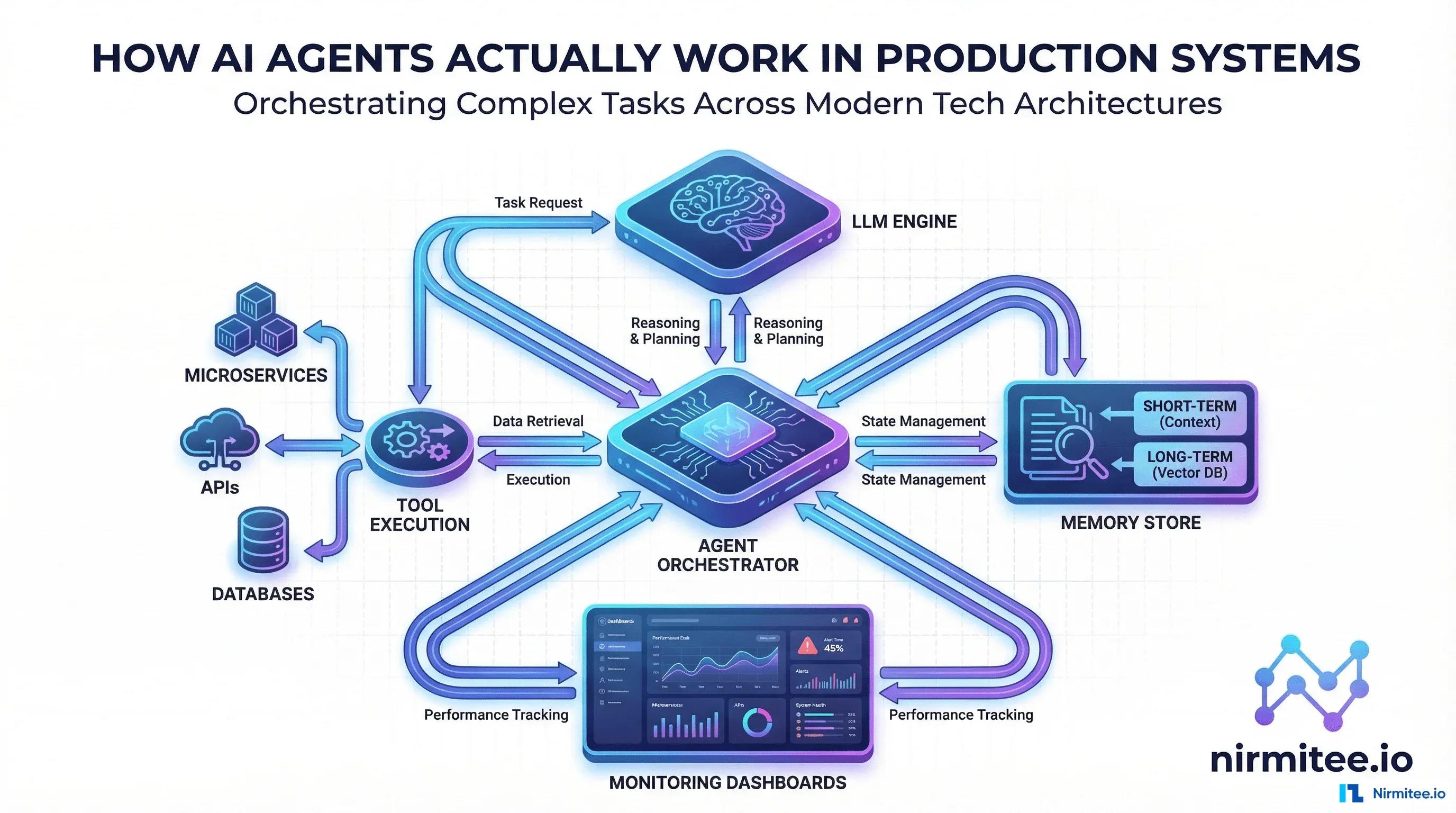
Your VP of Product just asked: Can we add AI agents to our platform? You nodded confidently. But between that meeting and actually shipping an AI agent system in production, there is a canyon of complexity that most blog posts gloss over. Before promising that feature, use our questions for assessing AI product value to examine what it will actually do.
This is the guide we wish we had when Nirmitee.io started building production AI agent systems for enterprise clients. No hype. No hand-waving. Just the real architecture, patterns, failure modes, and operational lessons from systems handling thousands of agent interactions daily.
What an AI Agent Actually Is (Not What Twitter Thinks)
Strip away the marketing, and a production AI agent is a software system with three properties:
- Autonomy — it decides its own next action based on context, not a hardcoded script
- Tool access — it can call APIs, query databases, read files, and modify external state
- Goal orientation — it works toward an objective, adapting its approach when things go wrong
That is it. An AI agent is an LLM in a loop with tools and a goal. Everything else — memory, planning, multi-agent collaboration — is optimization on top of these three primitives.
The difference between a chatbot and an agent? A chatbot answers questions. An agent does things. When a customer says cancel my subscription and prorate the refund, a chatbot explains how. An agent actually cancels the subscription, calculates the prorate, initiates the refund, and sends the confirmation email.
The Production Architecture Nobody Talks About
Every production AI agent system we have built at Nirmitee has five layers. Miss any one of them and you will be debugging at 3 AM:
Layer 1: The Orchestration Core
This is the brain. It receives a user request, maintains conversation state, and runs the agent loop: Observe - Think - Act - Observe. The orchestrator decides when to call the LLM, when to execute a tool, and critically — when to stop.
Key decisions at this layer:
- Maximum iterations — agents can loop forever without a cap. We set hard limits (typically 10-15 steps) and soft limits (cost thresholds)
- Timeout handling — what happens when an external API takes 30 seconds? The agent needs graceful degradation, not a crash
- State management — the full conversation history, tool results, and intermediate reasoning must be persisted and recoverable
Layer 2: The Tool Execution Layer
This is where agents interact with the real world. Every tool is a function the agent can call — Stripe for payments, Salesforce for CRM, PostgreSQL for data, SendGrid for email.
The critical insight: tools must be idempotent wherever possible. If an agent retries a failed step, you do not want to charge a customer twice. Every tool needs:
- Clear input/output schemas (so the LLM knows how to call them)
- Idempotency keys for state-changing operations
- Rate limiting independent of the agent loop
- Detailed error messages (not just 500 Internal Server Error)
Layer 3: The Memory and Context System
Production agents need three types of memory:
- Working memory — the current conversation and recent tool results (fits in the LLM context window)
- Short-term memory — session state that persists across multiple interactions (Redis/DynamoDB)
- Long-term memory — user preferences, past interactions, learned patterns (vector database + structured storage)
The biggest mistake teams make: stuffing everything into the LLM context window. Context windows are expensive and have hard limits. Use retrieval-augmented generation (RAG) to pull in relevant context on demand, not dump everything upfront.
Layer 4: The Guardrails and Safety Layer
This is non-negotiable for production. Every agent action passes through guardrails:
- Input validation — reject prompt injections, jailbreak attempts, and out-of-scope requests
- Output validation — ensure responses do not leak PII, contain hallucinated data, or violate compliance rules
- Action authorization — the agent proposes actions, but a policy engine approves them. A customer support agent should not be able to issue a $50,000 refund
- Human-in-the-loop triggers — define clear escalation paths for high-stakes decisions
Layer 5: Observability and Monitoring
You cannot operate what you cannot observe. Production agent systems need:
- Trace logging — every step of the agent loop (thought, tool call, result) with correlation IDs
- Cost tracking — LLM token usage per interaction, broken down by model and step
- Latency monitoring — p50/p95/p99 for end-to-end agent execution and per-tool calls
- Success/failure rates — did the agent achieve the user goal? Not just did it respond
- Drift detection — are agent behaviors changing over time as models update?
Three Agent Patterns That Actually Work in Production
After building dozens of agent systems, we have found that 90% of production use cases fit one of three patterns:
Pattern 1: ReAct (Reason + Act)
The agent alternates between reasoning about the situation and taking action. Each action produces an observation that feeds back into reasoning.
Best for: Customer support, troubleshooting, data investigation — tasks where the next step depends on what you just learned.
Example flow:
- Think: User wants to know why their order is delayed. Let me check the order status.
- Act: Call getOrderStatus(order_id=ORD-4521)
- Observe: Order stuck in processing since 3 days ago
- Think: Processing for 3 days is abnormal. Let me check the payment status.
- Act: Call getPaymentStatus(order_id=ORD-4521)
- Observe: Payment failed — card declined
- Think: Root cause found. Inform the user and offer to update payment method.
Pattern 2: Plan-and-Execute
The agent creates a complete plan upfront, then executes each step sequentially. If a step fails, it replans.
Best for: Complex multi-step workflows — data pipeline setup, report generation, onboarding flows — where the steps are mostly predictable.
Why it works: Users can review and approve the plan before execution. This builds trust and gives a clear progress indicator (Step 3 of 7).
Pattern 3: Multi-Agent Collaboration
Multiple specialized agents work together, each handling a specific domain. A router agent delegates tasks to specialist agents.
Best for: Complex systems where no single prompt can cover all domains — e.g., an enterprise assistant that handles IT tickets, HR questions, and expense reports through different specialist agents.
Critical lesson: Do not over-architect this. Start with a single agent and split only when the prompt gets unmanageable (typically beyond 15-20 tools). Premature multi-agent architecture adds coordination overhead without benefit.
The Five Production Failures We Have Seen (And How to Prevent Them)
1. The Infinite Loop
What happens: Agent gets stuck retrying a failed tool call, burning tokens and time.
Prevention: Hard iteration limits, exponential backoff on retries, circuit breakers on individual tools.
2. The Hallucinated Action
What happens: Agent invents a tool that does not exist or calls a real tool with fabricated parameters.
Prevention: Strict schema validation on every tool call. If the function name or parameters do not match the schema, reject immediately — do not let the LLM freestyle.
3. The Context Window Explosion
What happens: Long conversations or large tool responses fill the context window, causing truncation of critical information.
Prevention: Summarize long tool responses, implement sliding window context management, use RAG instead of stuffing everything in.
4. The Cascading Permission Escalation
What happens: Agent chains together individually-safe actions to achieve an unsafe outcome (e.g., reading one user email to answer another user question).
Prevention: Per-action authorization, not just per-session. Every tool call is evaluated against the current user permissions.
5. The Silent Degradation
What happens: Agent success rate drops from 94% to 78% over two weeks, but nobody notices because there are no alerts.
Prevention: Define SLOs for agent performance (success rate, latency, cost per interaction) and alert on breaches. Treat your agent like any other production service.
Getting Started: A Practical Roadmap
If you are a product or engineering leader evaluating AI agents for your product, here is the approach we recommend at Nirmitee.io:
- Week 1-2: Identify one high-value, low-risk use case. Customer support triage, internal knowledge search, or data report generation are great starting points.
- Week 3-4: Build a proof-of-concept with the ReAct pattern. Use a managed LLM API (Claude, GPT-4), connect 3-5 tools, and run it with internal users only.
- Week 5-6: Add guardrails and observability. This is where most teams skip ahead and regret it. Input/output validation, cost tracking, and trace logging are prerequisites for production.
- Week 7-8: Controlled rollout. Start with 5% of traffic, monitor obsessively, iterate on prompts and tool schemas based on real failure modes.
The teams that succeed with AI agents treat them as software systems first and AI second. The LLM is just one component. The orchestration, tooling, safety, and operations around it are what make it production-ready.
Build AI Agents That Actually Ship
At Nirmitee.io, we have helped enterprises across healthcare, fintech, and SaaS build AI agent systems that run in production — not just demos that impress in a meeting. Our team brings deep expertise in agent architecture, LLM optimization, and the operational discipline needed to keep these systems reliable at scale.
Ready to build? Talk to our AI engineering team about your use case. We will help you cut through the hype and ship something real.
From architecture to production, our healthcare product engineering services team builds healthcare platforms that perform at scale. We also offer specialized Agentic AI for Healthcare services. Talk to our team to get started.
Related reading
For more insights, explore our guides on AI agents in healthcare: an overview and FHIR in Modern Healthcare.
You may also find value in EHR Software Development Guide and Building a Healthtech App.
Ready to scale?
Talk to our healthcare engineering team about building, integrating, and shipping faster.
Frequently Asked Questions
What is an AI agent in production systems?
What is the difference between a chatbot and an AI agent?
What architecture layers does a production AI agent system need?
Which AI agent design patterns work best in production?
How do you keep AI agents safe and controlled in production?
How does Nirmitee.io approach healthcare software development?