Every Mirth Connect deployment in production encounters failed messages. Whether a downstream EHR goes offline for maintenance, a lab instrument sends a malformed HL7 message, or a JavaScript transformer throws an exception on an unexpected segment, message failures are not a question of if but when. The difference between a well-run integration engine and a liability comes down to one thing: how your team handles those failures.
In healthcare, the stakes are uniquely high. A lost ADT message means an inaccurate patient census. A dropped ORM means a medication order never reaches pharmacy. A missing ORU means a clinician never sees a critical lab result. According to HIPAA Journal, organizations must retain compliance documentation for a minimum of six years, and message audit trails fall squarely within that requirement.
This guide covers a production-grade approach to dead letter queues (DLQs), automated retry with exponential backoff, manual replay workflows, alerting, root cause categorization, compliance safeguards, and message archival strategies for Mirth Connect. Every pattern described here has been proven in high-volume healthcare integration environments processing millions of HL7 messages daily.
Why Messages Fail in Production
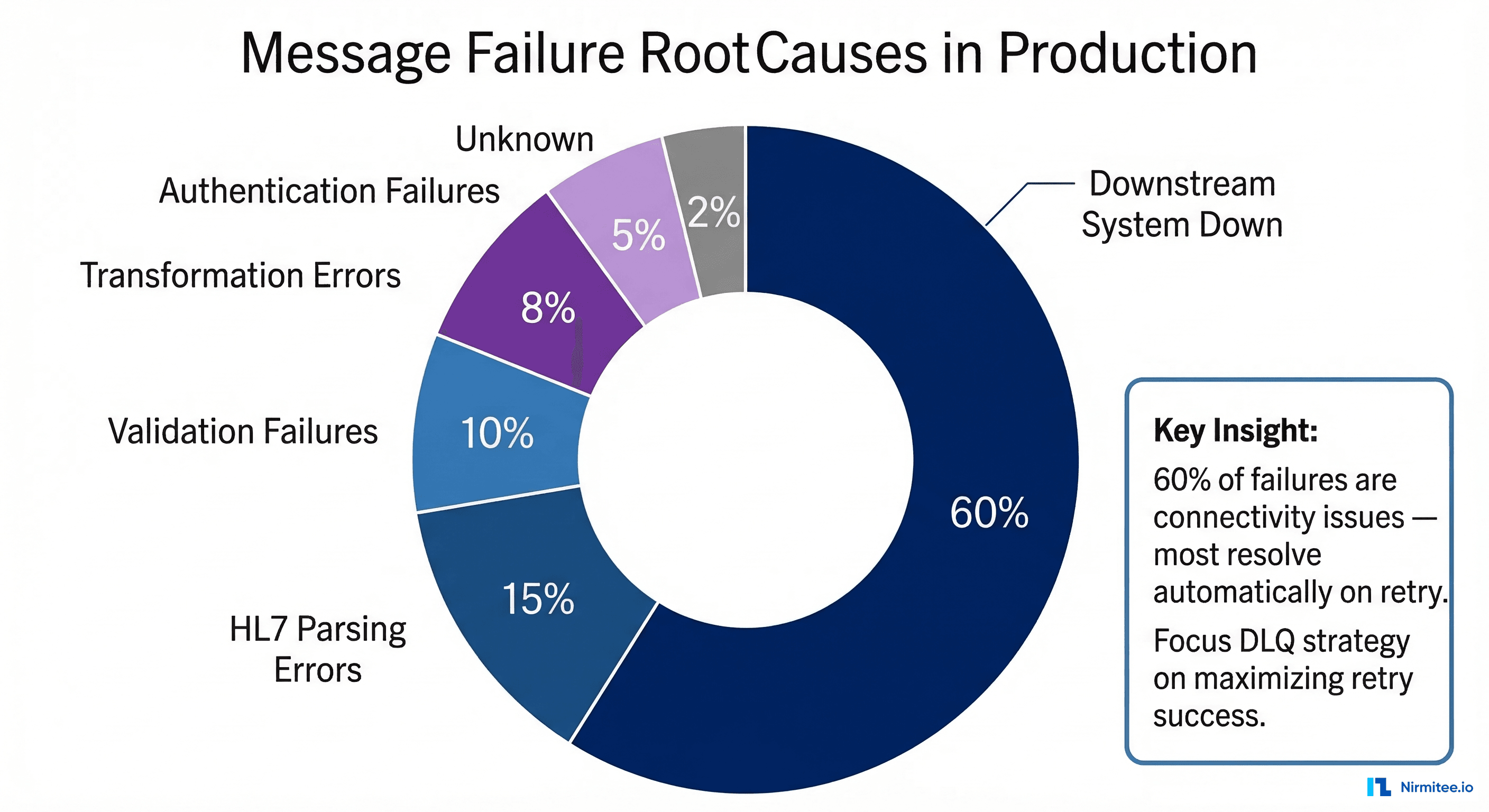
Before designing a DLQ strategy, you need to understand the failure landscape. In our experience across dozens of production Mirth deployments, message failures fall into six categories with remarkably consistent distribution:
Downstream System Unavailable (60% of failures) — The single largest cause. EHR systems go down for patches, PACS servers restart during storage maintenance, and pharmacy systems experience database locks during nightly backups. These are transient failures that resolve on their own, and a well-designed retry strategy handles the vast majority automatically.
HL7 Parsing Errors (15%) — Malformed messages from source systems cause parsing failures in Mirth's transformer. Common culprits include missing MSH segment terminators, non-standard delimiters (a lab instrument sending | where MSH-1 declares ^), embedded carriage returns within OBX-5 observation values, and encoding mismatches where a system sends Windows-1252 characters in a stream declared as UTF-8.
Validation Failures (10%) — Messages that parse correctly but fail business validation rules: a PID segment missing a required Medical Record Number, an ORC without an ordering provider, or a PV1 with an invalid patient class code. These indicate data quality issues at the source and typically require human intervention.
Transformation Errors (8%) — JavaScript exceptions in Mirth channel transformers. A common pattern is code that accesses msg['PID']['PID.3']['PID.3.1'].toString() without null-checking, throwing a TypeError when a message lacks PID-3. Code template changes deployed without testing against the full range of production message variants are another frequent cause.
Authentication Failures (5%) — Expired credentials, rotated API keys, revoked certificates, or OAuth token timeouts on REST API destinations. Common in environments using HTTPS with certificate-based auth.
Unknown/Intermittent (2%) — Sporadic JVM issues, database connection pool exhaustion, or transient network blips that cannot be deterministically categorized.
Designing a Dead Letter Queue Channel
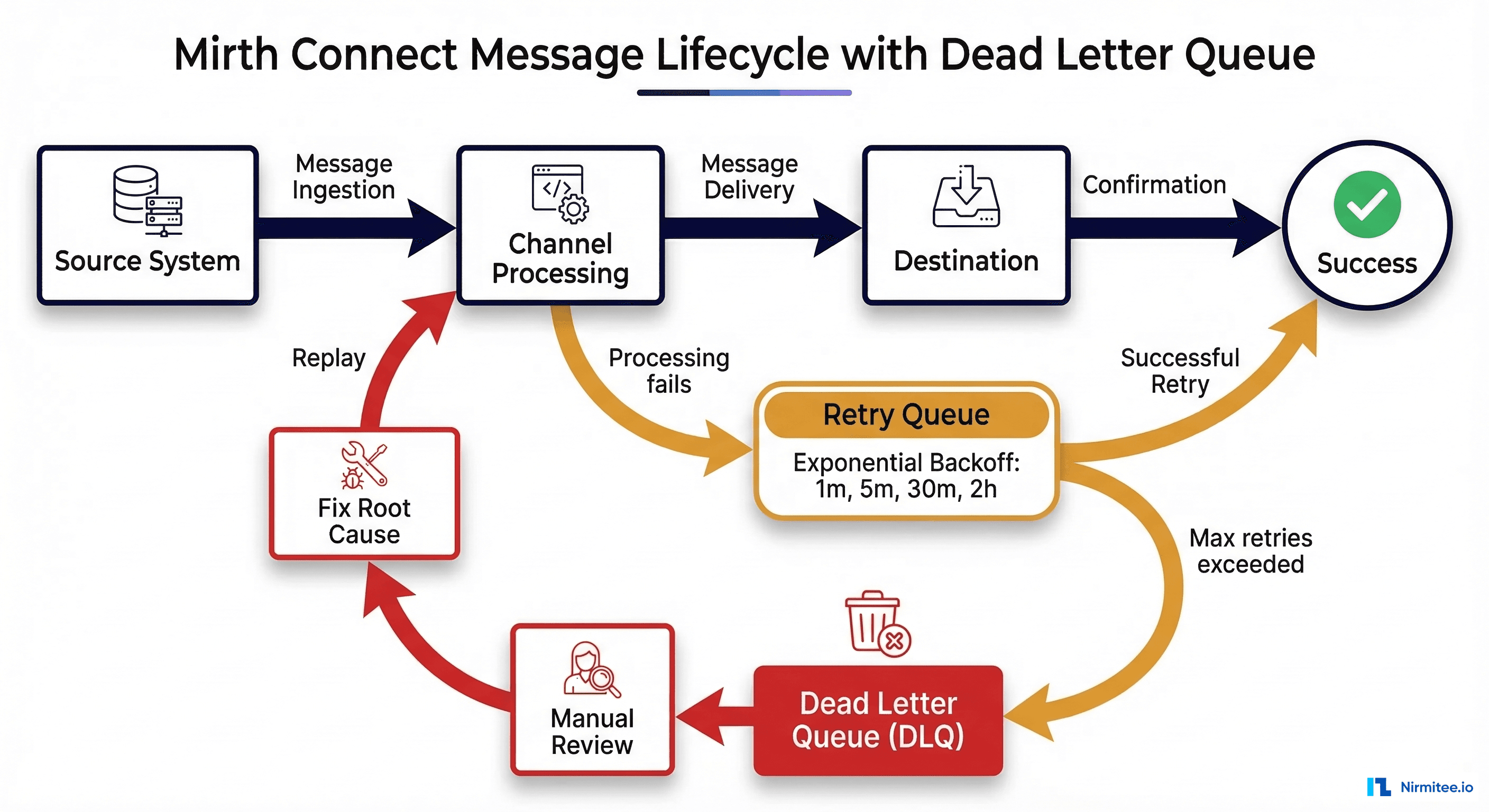
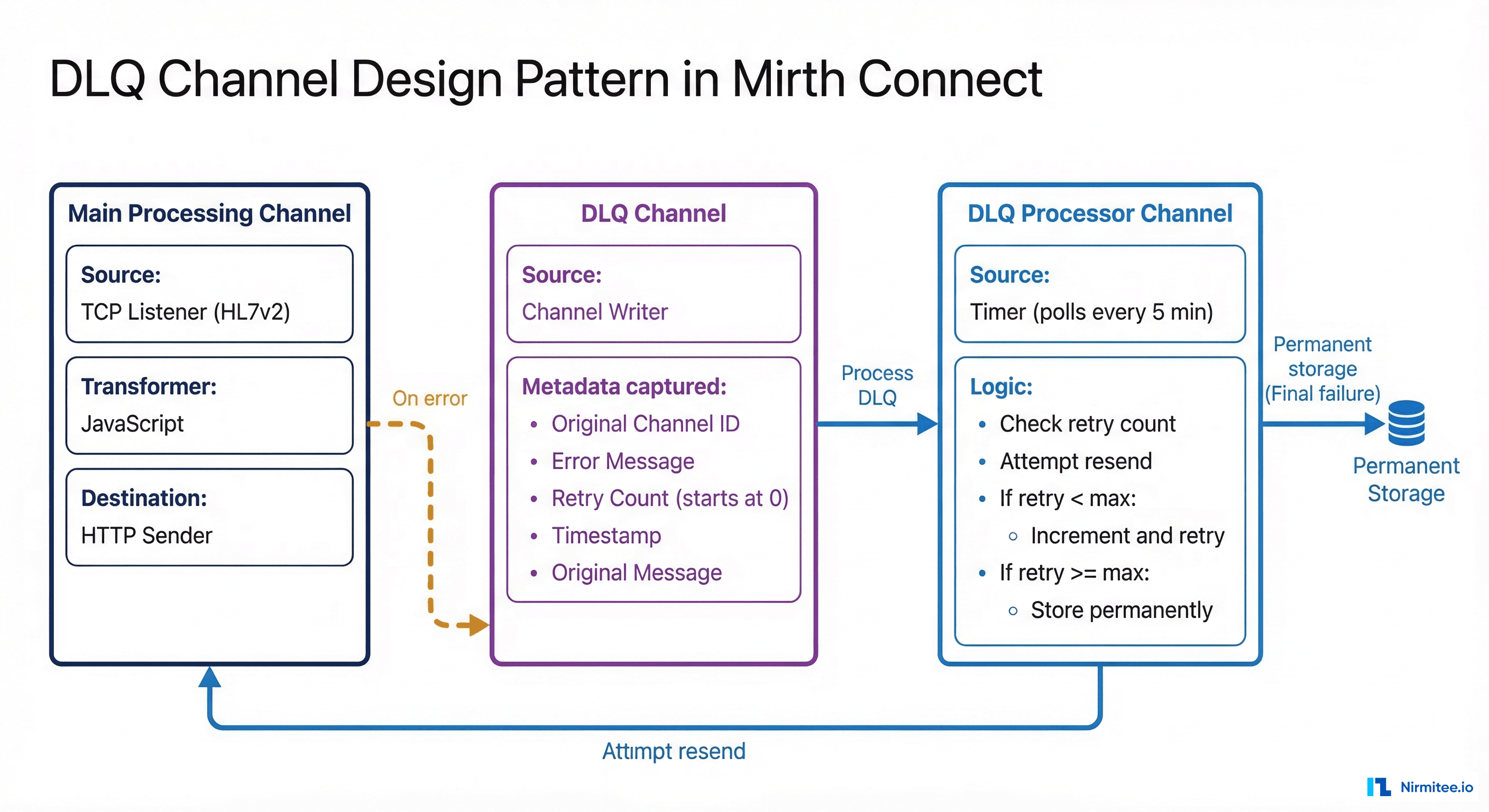
A dead letter queue in Mirth Connect is not a built-in feature with a toggle switch. It is an architectural pattern implemented as a dedicated channel (or set of channels) that captures messages that have exhausted all retry attempts. The DLQ pattern gives your operations team a centralized place to review, diagnose, and replay failed messages without losing a single one.
DLQ Channel Architecture
The pattern consists of three channels working together. First, your Main Processing Channel receives HL7 messages (via TCP/MLLP listener, file reader, or HTTP listener), transforms them, and sends them to the destination. On error, instead of simply logging and moving on, it writes the failed message to the DLQ channel. Second, the DLQ Holding Channel uses a Channel Writer source that receives failed messages along with metadata: original channel ID, error message, retry count, and timestamp. Messages sit here awaiting either automated retry or manual review. Third, the DLQ Processor Channel runs on a polling timer, attempts retries with exponential backoff, and permanently stores messages that exceed the maximum retry count.
DLQ Channel Configuration
The DLQ holding channel uses a Channel Writer source and a Database Writer destination to persist messages. Here is the channel configuration:
<channel>
  <name>DLQ_Holding_Channel</name>
  <sourceConnector>
    <transportName>Channel Writer</transportName>
  </sourceConnector>
  <destinationConnectors>
    <connector>
      <transportName>Database Writer</transportName>
      <properties>
        <url>jdbc:postgresql://localhost:5432/mirth_dlq</url>
        <query>INSERT INTO dead_letter_queue
          (original_channel_id, error_message, retry_count,
           max_retries, raw_message, created_at, status)
          VALUES (${dlq_channel_id}, ${dlq_error},
                  0, 4, ${dlq_raw_message}, NOW(), 'PENDING')</query>
      </properties>
    </connector>
  </destinationConnectors>
</channel>
Error Handler in the Main Channel
In your main processing channel's postprocessor script, add logic to route failed messages to the DLQ channel with full metadata context:
// Postprocessor: route failed messages to DLQ with metadata
if (responseStatus == ERROR || responseStatus == QUEUED) {
    var dlqChannelId = 'your-dlq-channel-id';
    var metadata = {
        originalChannelId: channelId,
        originalChannelName: channelName,
        originalMessageId: connectorMessage.getMessageId(),
        errorMessage: responseErrorMessage || 'Unknown error',
        errorType: classifyError(responseErrorMessage),
        timestamp: new Date().toISOString(),
        retryCount: 0,
        maxRetries: 4
    };

    var dlqEnvelope = JSON.stringify({
        metadata: metadata,
        originalMessage: connectorMessage.getRawData()
    });

    router.routeMessage(dlqChannelId, dlqEnvelope);
    logger.info('Routed to DLQ: ' + metadata.originalMessageId);
}
Automated Retry with Exponential Backoff
Not every failed message belongs in the DLQ permanently. The majority of failures — the 60% caused by downstream system downtime — will succeed on retry once the destination recovers. The critical principle is retrying intelligently, not hammering a down system with thousands of messages per second, which only delays recovery.
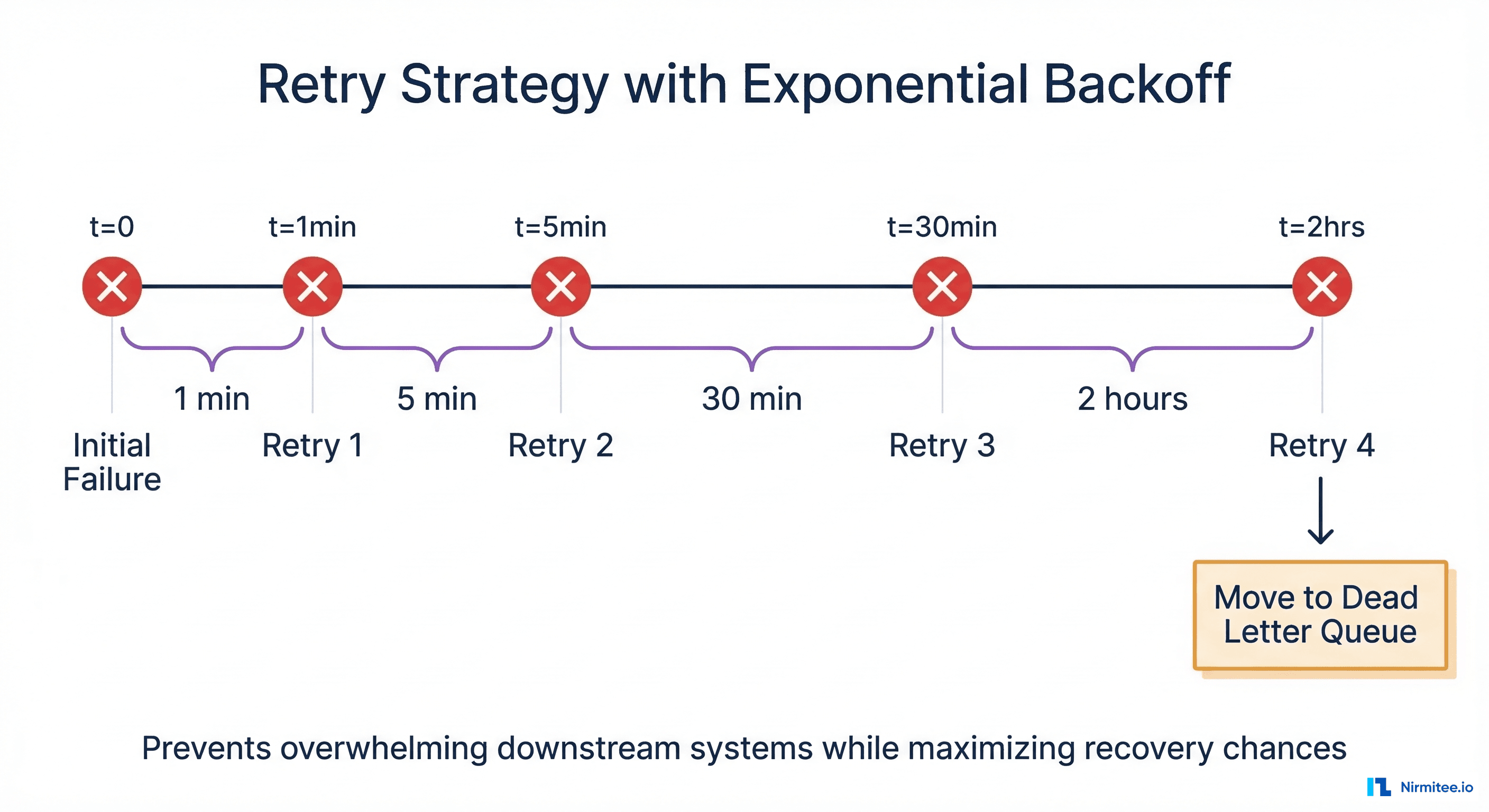
Exponential backoff increases the wait time between each successive retry attempt, preventing your Mirth instance from overwhelming a recovering downstream system. Our recommended production schedule:
- Retry 1: 1 minute after initial failure
- Retry 2: 5 minutes after Retry 1
- Retry 3: 30 minutes after Retry 2
- Retry 4: 2 hours after Retry 3
- After Retry 4 fails: Move to permanent DLQ for manual review
This schedule provides approximately 2.5 hours of automated recovery time, which is sufficient to cover most scheduled maintenance windows and brief outages before requiring human intervention.
Retry Logic in JavaScript
The DLQ Processor Channel runs on a 60-second polling timer and executes this retry logic against the DLQ database:
// DLQ Processor — Source Transformer (timer-triggered)
var dbConn = DatabaseConnectionFactory.createDatabaseConnection(
    'org.postgresql.Driver',
    'jdbc:postgresql://localhost:5432/mirth_dlq',
    'mirth_user', 'mirth_password'
);

try {
    var retryBackoffs = [60, 300, 1800, 7200]; // seconds: 1m, 5m, 30m, 2h
    var now = new Date();

    var pending = dbConn.executeCachedQuery(
        "SELECT id, original_channel_id, raw_message, retry_count, " +
        "max_retries, last_retry_at FROM dead_letter_queue " +
        "WHERE status = 'PENDING' ORDER BY created_at ASC LIMIT 50"
    );

    while (pending.next()) {
        var dlqId = pending.getInt('id');
        var retryCount = pending.getInt('retry_count');
        var maxRetries = pending.getInt('max_retries');
        var lastRetry = pending.getTimestamp('last_retry_at');
        var channelId = pending.getString('original_channel_id');
        var rawMsg = pending.getString('raw_message');

        // Check if enough time has elapsed for this retry
        var backoff = retryBackoffs[Math.min(retryCount,
                      retryBackoffs.length - 1)];
        var nextRetry = lastRetry
            ? new Date(lastRetry.getTime() + (backoff * 1000))
            : new Date(0);
        if (now.getTime() < nextRetry.getTime()) continue;

        try {
            router.routeMessage(channelId, rawMsg);
            // Success — mark resolved
            dbConn.executeUpdate(
                "UPDATE dead_letter_queue SET status='RESOLVED', " +
                "resolved_at=NOW(), retry_count=" + (retryCount+1) +
                " WHERE id=" + dlqId);
            logger.info('DLQ retry SUCCESS: id=' + dlqId);
        } catch (e) {
            var newCount = retryCount + 1;
            if (newCount >= maxRetries) {
                dbConn.executeUpdate(
                    "UPDATE dead_letter_queue SET status='DEAD', " +
                    "retry_count=" + newCount +
                    ", last_retry_at=NOW() WHERE id=" + dlqId);
                alertOnDLQ(dlqId, channelId, e.message);
            } else {
                dbConn.executeUpdate(
                    "UPDATE dead_letter_queue SET retry_count=" +
                    newCount + ", last_retry_at=NOW() WHERE id=" + dlqId);
            }
        }
    }
} finally { dbConn.close(); }
Manual Replay Workflows
Automated retry handles transient failures, but some messages require human intervention. When a message enters the permanent DLQ (status = 'DEAD'), an operations engineer needs to investigate the root cause, fix it, and replay the message. Here is the structured workflow production teams should follow:
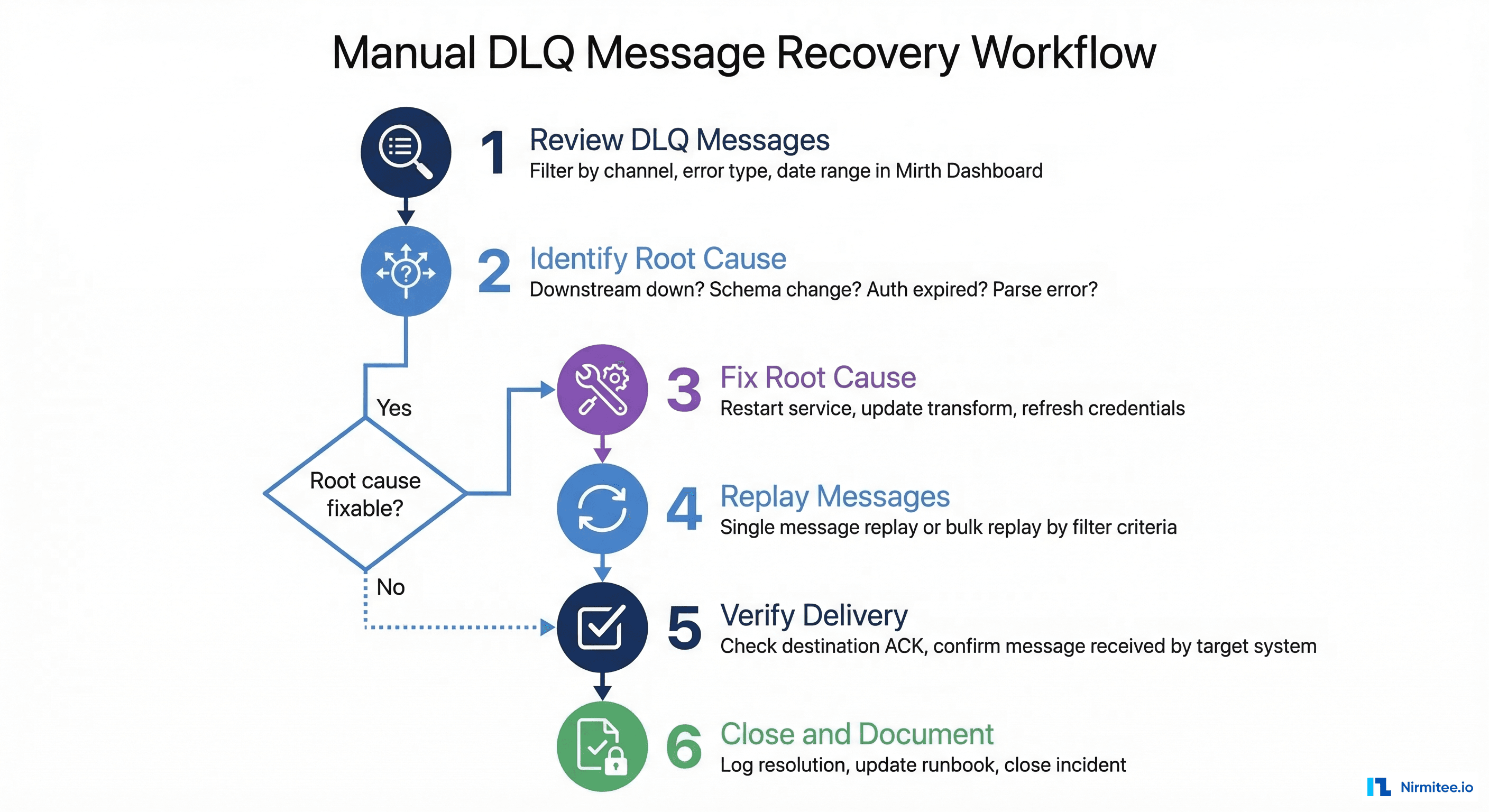
Step 1: Review DLQ messages. Filter messages by error type, channel, and date range in the Mirth Dashboard or query the DLQ database directly. Group by error type to spot patterns — if 50 messages all failed with "connection refused" from the same channel, you have a single root cause to fix.
Step 2: Identify root cause. Check whether the downstream system is back online, whether a schema changed at the destination, whether credentials expired, or whether a parsing issue requires a source system fix.
Step 3: Fix root cause. Restart the down service, update the channel transformer for schema changes, refresh credentials, or add preprocessing logic to sanitize malformed messages.
Step 4: Replay messages. Use single-message "Reprocess" in the Mirth message browser, bulk "Reprocess Results" for all messages matching a filter, or reset DLQ database status for automated pickup:
-- Bulk replay: reset failed messages for re-processing
UPDATE dead_letter_queue
SET status = 'PENDING', retry_count = 0, last_retry_at = NULL
WHERE status = 'DEAD'
    AND original_channel_id = 'target-channel-id'
    AND created_at > '2026-03-15 00:00:00';
Step 5: Verify delivery. Confirm successful delivery by checking destination ACKs in the message browser. Cross-reference with the receiving system to ensure messages were processed.
Step 6: Document. Log what failed, why, what was fixed, and how many messages were replayed. This builds your team's operational knowledge base and informs prevention strategies.
Alerting on Persistent Failures
A DLQ is useless if nobody knows messages are accumulating in it. Production Mirth deployments need a multi-tiered alerting strategy that escalates based on severity and duration:
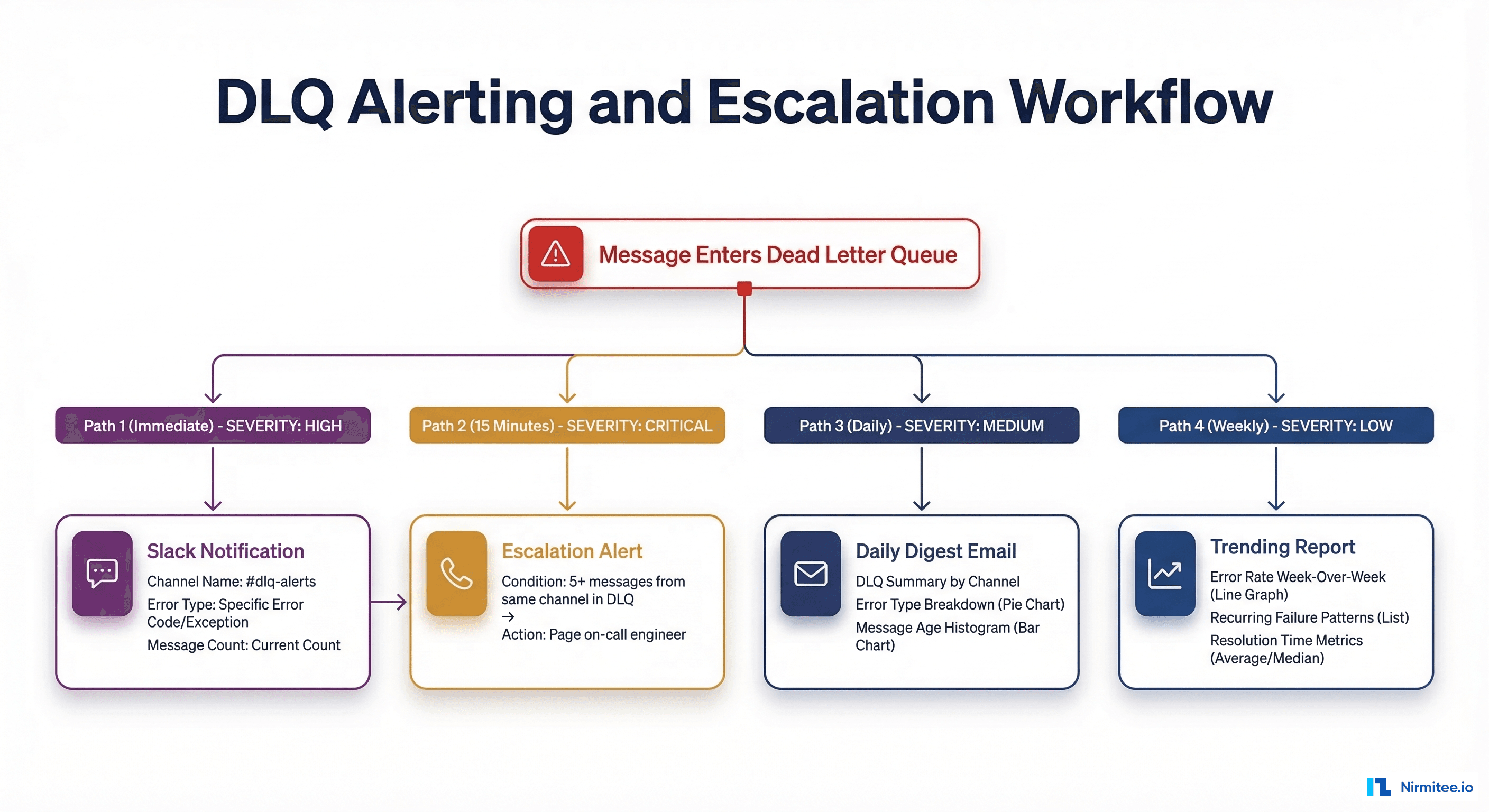
Immediate alerts: Send a Slack or Teams notification when a message enters the permanent DLQ with the channel name, error type, and message count. 15-minute escalation: If 5+ messages from the same channel hit DLQ within 15 minutes, page the on-call engineer — this pattern indicates a systemic issue, not an isolated bad message. Daily digest: Email summary of all DLQ messages grouped by channel and error type, with messages older than 24 hours highlighted for urgency. Weekly trending: Error rate comparison week-over-week to catch gradual degradation before it becomes a crisis.
Root Cause Categorization
Raw error messages in Mirth are often cryptic Java stack traces. Building a classification system transforms that noise into actionable intelligence. Deploy this function in your channel postprocessors to automatically tag every failure:
function classifyError(errorMessage) {
    if (!errorMessage) return 'UNKNOWN';
    var msg = errorMessage.toLowerCase();
    if (msg.indexOf('connection refused') > -1 ||
        msg.indexOf('socket timeout') > -1 ||
        msg.indexOf('unreachable') > -1) return 'CONNECTIVITY';
    if (msg.indexOf('parsing') > -1 ||
        msg.indexOf('malformed') > -1) return 'PARSING';
    if (msg.indexOf('required field') > -1 ||
        msg.indexOf('validation') > -1) return 'VALIDATION';
    if (msg.indexOf('typeerror') > -1 ||
        msg.indexOf('null pointer') > -1) return 'TRANSFORMATION';
    if (msg.indexOf('401') > -1 ||
        msg.indexOf('unauthorized') > -1) return 'AUTHENTICATION';
    return 'UNKNOWN';
}
With categorized errors, you can build dashboards showing failure distribution over time, identify which error types are trending upward, and prioritize engineering effort. If 60% of your failures are connectivity-related and most resolve automatically on retry, your DLQ strategy is working. If transformation errors are climbing, your team needs to add better null-checking and test coverage in the channel transformers.
Compliance: Why Message Loss Is Not an Option
In healthcare integration, a lost message is not just a technical incident — it is a patient safety event. The CMS Interoperability rule and the ONC 21st Century Cures Act mandate reliable data exchange between healthcare systems. A DLQ strategy is not just operational hygiene — it is a compliance requirement.
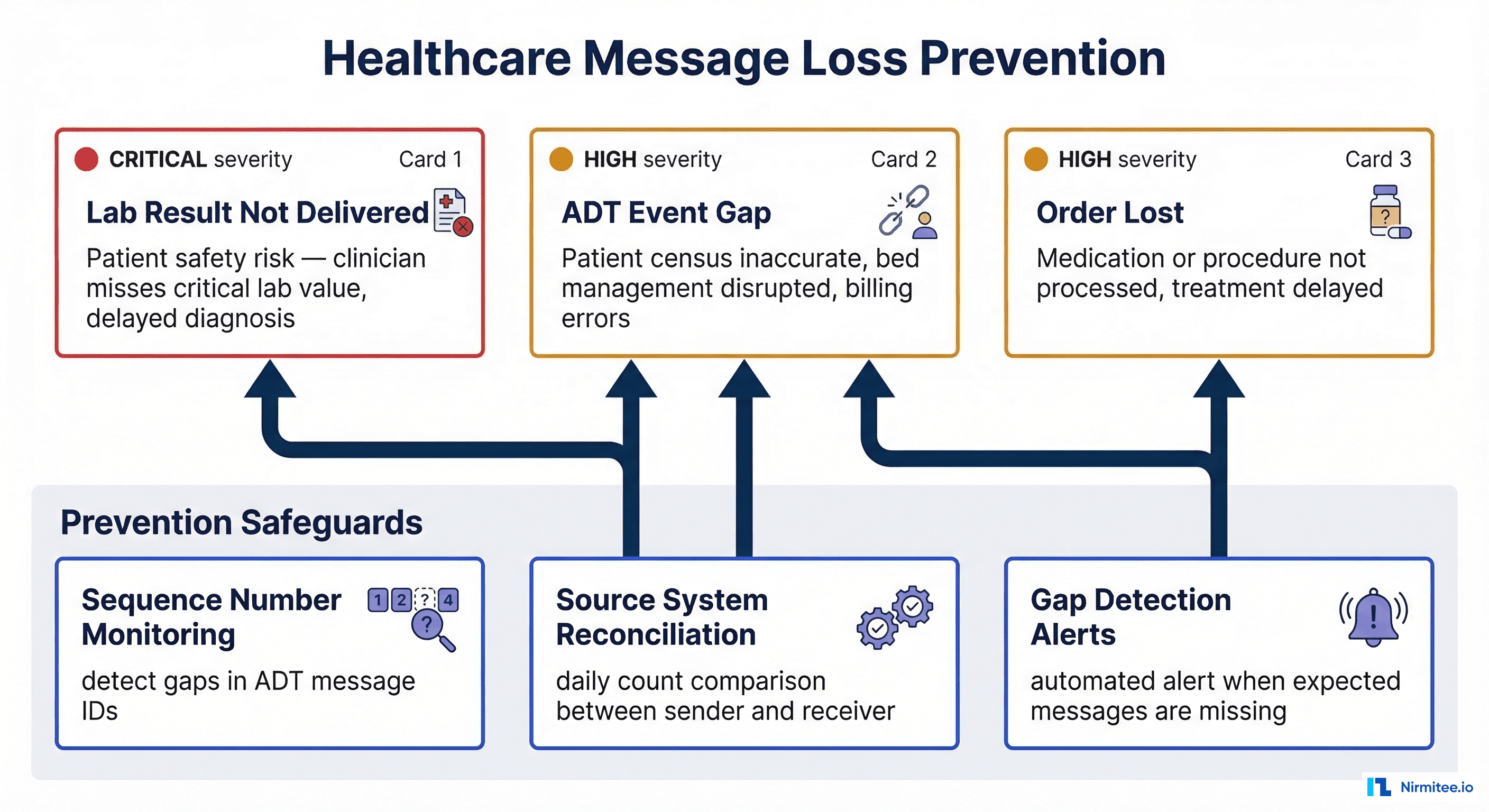
Consider the real-world impact: a missed ORU with a critical potassium value of 6.8 mEq/L that never reaches the ordering clinician is a direct patient safety risk and potential JCAHO sentinel event. A lost ADT discharge (A03) leaves the downstream census system showing the patient as still admitted, disrupting bed management and generating incorrect billing. A dropped ORM means a stat medication order never reaches the pharmacy, delaying time-sensitive treatment.
To prevent these scenarios, implement three safeguards: sequence number monitoring that tracks MSH-13 values to detect gaps in ADT message IDs, daily source system reconciliation that compares message counts between the sender's outbound log and Mirth's received count, and gap detection alerts that trigger automatically when expected messages are missing from a sequence.
Message Archival and Retention
DLQ messages contain PHI (Protected Health Information) and are subject to HIPAA retention requirements. While HIPAA's six-year rule technically applies to compliance documentation, HL7 messages containing PHI also fall under state-specific medical record retention laws that can extend to 7-10 years.
Structure your archival in tiers: Active DLQ (0-30 days) in the primary database for immediate access and replay; warm archive (30 days - 1 year) in compressed secondary storage, searchable but not instant; cold archive (1-7 years) in encrypted, immutable storage like S3 Glacier or Azure Archive; and automated purge at 7+ years with an audit log of the deletion. A Mirth instance processing 500,000 messages per day will generate roughly 1-2 GB of DLQ data monthly at a 1-2% error rate. HL7 messages compress at approximately 10:1 ratios due to their repetitive text structure. Encrypt all archives at rest with AES-256 and restrict access to integration team members with a documented operational need.
Building production-grade Mirth Connect infrastructure requires deep expertise in HL7 interface engine design, healthcare interoperability standards, and operational resilience patterns. At Nirmitee, our integration engineers have deployed and operated Mirth Connect at scale for US healthcare organizations, implementing the DLQ patterns, retry strategies, and compliance safeguards covered in this guide. If your team is planning a Mirth deployment or facing message reliability challenges, reach out for a consultation.
Frequently Asked Questions
How many retries should I configure before moving a message to the DLQ?
Four retries with exponential backoff (1 min, 5 min, 30 min, 2 hours) cover the vast majority of transient failures, providing approximately 2.5 hours of automated recovery. For mission-critical feeds like lab results, you can extend to 5-6 retries with longer backoffs up to 24 hours, but beyond that, human intervention is almost certainly required.
Should I use Mirth's built-in queue or a custom DLQ database?
Both. Use Mirth's built-in destination queue ("Queue on failure" mode) for immediate, short-term retries within the channel. Use a custom DLQ database for persistent storage, cross-channel visibility, root cause categorization, compliance-grade reporting, and long-term archival. The built-in queue is fast but does not provide the metadata enrichment needed for systematic root cause analysis.
How do I handle PHI in DLQ messages during debugging?
Never copy DLQ messages to insecure locations such as email, Slack, or local developer machines. Use Mirth's built-in message browser with role-based access control for all investigations. If you need to share message samples for troubleshooting, de-identify them first by stripping PID segments or replacing PHI fields with synthetic data. Document all PHI access in your HIPAA audit trail.