Epic FHIR Integration Step-by-Step: Auth, Sandbox Setup, and Production Gotchas (2026)

CTO & Co-Founder
CTO & Co-Founder at Nirmitee.io. Architects healthcare integrations across FHIR, SMART on FHIR, ABDM and NHCX, writing from production experience taking hospital software from sandbox to go-live.
You know you need Epic FHIR. Now you need to actually build it. This is the implementation guide — not the overview. Step-by-step sandbox setup, OAuth token flow, common auth failures, and the production gotchas that nobody documents until your go-live breaks. This guide is for developers in implementation mode, not for strategic scoping.
All Epic modules in one place: see our Epic modules list for what each module does and where apps integrate.
This post goes deep on the FHIR API. For how FHIR fits alongside SMART apps, HL7 v2 interfaces and backend services, read our overview of how to integrate with Epic.
This is that page. A developer-grade, step-by-step guide to FHIR integration with Epic: the three authentication flows and when to use each, the sandbox-to-production client-ID lifecycle, what's free versus gated, and the real gotchas that quietly cost teams days. We build this layer for a living, and our open-source FHIR server passes the ONC g(10) / Inferno SMART App Launch suite 47 of 47, so the guidance here is from shipping it, not summarizing a spec.
One framing to start with, from interoperability veteran Brendan Keeler: "Much of what you might read in the FHIR specification and say 'Wow, I'm pumped to use that' isn't actually available in the wild." Epic exposes a real, standardized FHIR R4 API. It also bends, gates, and configures it per customer. Knowing which is which is the whole job. If Epic is one of several EHRs on your roadmap, our EHR integration API comparison of Epic, Oracle Health, athenahealth and eClinicalWorks shows how those differences play out vendor by vendor, and our eClinicalWorks integration walkthrough covers the ambulatory side.
Epic FHIR integration, step by step
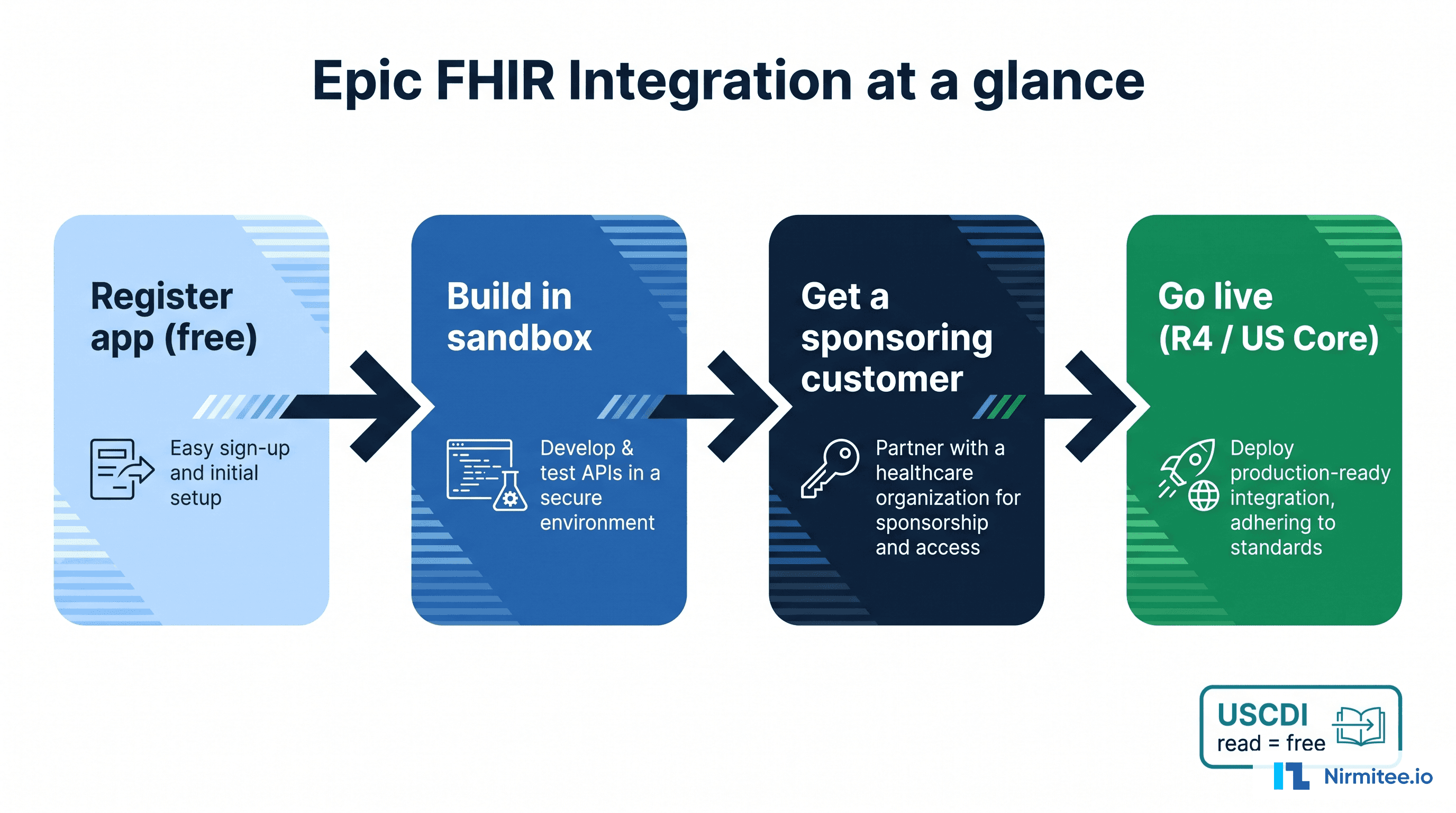
Here is the whole implementation process in seven steps. Every step is unpacked in the sections that follow, including the parts the official docs leave out.
- Scope the integration. List the FHIR resources you need (Patient, Observation, MedicationRequest, DocumentReference), decide whether you need read, write, or bulk access, and identify who triggers the data flow — a clinician, a patient, or a server. That last answer determines your authentication flow.
- Register your app on fhir.epic.com. Registration is free and generates two client IDs: a non-production (NONPROD) ID for the sandbox and a production ID that stays inert until a real customer enables it.
- Pick the right authentication flow. SMART EHR Launch for apps embedded in the clinician’s chart, SMART Standalone Launch with PKCE for patient-facing apps, and Backend Services with a signed RS384 JWT for system-to-system jobs with no user.
- Build and test against the R4 sandbox. Point at
https://fhir.epic.com/interconnect-fhir-oauth/api/FHIR/R4/with Epic’s synthetic test patients, and expect registration changes to take up to a day to propagate. - Line up a sponsoring customer. There is no self-serve path to production. The customer signs the open.epic API Subscription Agreement and puts you through their vendor security review.
- Go live in the customer’s environment. Their Epic admin downloads your production client ID into their system; you switch to their production FHIR base URL and re-validate everything against real data.
- Harden for production. Handle empty must-support fields, follow bundle
nextlinks instead of reconstructing them, refresh tokens proactively, and monitor per-site variation — every Epic site is configured differently.
That is the map. Now the terrain.
Epic's two free front doors
Two Epic sites do the work, and both are free to use:
- open.epic.com — the broad developer hub: the open API documentation, 750+ no-cost interfaces, and the home of the open.epic API Subscription Agreement (the org-level license a customer signs).
- fhir.epic.com (Epic on FHIR) — the FHIR-specific portal: where you register your app, get client IDs, and use the R4 sandbox with SMART on FHIR and CDS Hooks.
They overlap and cross-link, so treat the split as functional rather than a hard wall. You'll use both.
What Epic's FHIR API actually gives you
Epic's standardized API is FHIR R4 (4.0.1), conformant to the US Core implementation guide. The no-cost surface tracks USCDI v3 (US Core 6.1.0) today, with Epic building toward newer USCDI versions. That's the floor every Epic customer must expose under the 21st Century Cures Act, and it covers the clinical resources most apps need.
The resources you'll work with most: Patient, Encounter, Condition, Observation, MedicationRequest, AllergyIntolerance, Immunization, Procedure, DiagnosticReport, DocumentReference, CarePlan, and Coverage. A note that bites teams later: US Core "must support" means the server is capable of populating an element when data is present, not that the field is always there. Build for missing data from day one. For clinical notes specifically, our guide to retrieving clinical notes with FHIR DocumentReference shows what Epic, Oracle Health and athenahealth return and how to fetch the note text itself.
Which authentication flow you need
Epic standardizes on SMART on FHIR and OAuth 2.0, and supports three flows. Picking the wrong one is the most common early misstep, so match it to how your app actually runs. Epic's live discovery document (/.well-known/smart-configuration) confirms support for EHR launch, standalone launch, public and confidential clients, PKCE (S256 only), refresh tokens, and both v1 and v2 SMART scopes.
- App launches inside the clinician's chart (Hyperdrive/Hyperspace) → SMART EHR Launch. Epic passes you the patient and encounter context.
- App runs on the patient's own device (a MyChart user, a phone) → SMART Standalone Patient Launch with PKCE, and request
offline_accessif you need refresh tokens. - No human in the loop (analytics, batch sync, server-to-server) → Backend Services: the
client_credentialsflow with a signed JWT (private_key_jwt).
SMART App Launch (EHR and standalone)
The provider-facing flow: Epic opens your registered launch URL with two query parameters, launch (a one-time, EHR-generated token signifying an active session) and iss (the customer's FHIR base URL). Your app reads iss, fetches its .well-known/smart-configuration, then runs the authorization-code flow with PKCE, echoing the launch value and the launch scope. The token response carries context: patient, encounter, and more.
For a patient-facing standalone app, it's the same endpoints with a public client (no secret), PKCE required (Epic supports S256 only), patient/ scopes, and offline_access for refresh tokens. Access tokens are short-lived (commonly under an hour), so treat them as opaque and refresh proactively rather than reacting to a 401. If your patient app also books visits, see our walkthrough of FHIR appointment booking with Slot and Appointment resources, including what Epic supports for scheduling.
Backend Services (system-to-system)
For server integrations with no user, you authenticate with a signed JWT instead of a secret.
- Pre-register a public key (or JWK Set URL) for that specific Epic customer. Keys are per customer and per environment.
- Build a JWT signed with RS384. The
expclaim must be in the future and no more than 5 minutes out;jtimust be unique. - POST to the token endpoint with
grant_type=client_credentialsand thejwt-bearerclient assertion. - Receive an access token scoped to
system/scopes (e.g.system/Observation.rs), valid about an hour.
The sandbox and the client-ID lifecycle
Register your app on fhir.epic.com and Epic generates two client IDs automatically: a non-production (NONPROD) ID that works against the sandbox, and a production ID that only works in a real customer's production environment. Mixing them up is a classic source of invalid_client.
Build against the R4 sandbox (base URL https://fhir.epic.com/interconnect-fhir-oauth/api/FHIR/R4/) with the fictitious test patients Epic provides. One quirk every team hits: registration changes take time to propagate. As one developer put it on the SMART-on-FHIR list, "the Epic sandbox is notorious for configuration update delays — folks often find that their 'oauth2 errors' have been magically fixed by waiting a day or two."
Then comes the gate that catches everyone. Your production client ID does nothing until a real customer turns it on. The prerequisites: you've registered the app and marked it ready for production, and the customer has signed the open.epic API Subscription Agreement (org-level, one-time). Then someone at the customer with the right Epic security point downloads your client by its ID into their environment. As an Epic-integration engineer described a stuck production call, "the client ids needs to be downloaded into the health system's environment." Until that happens, the sandbox is as far as you get.
For listing and the marketplace: App Orchard is retired. The marketplace is now Showroom, with a self-attested Connection Hub tier (around $500/year, requires at least one live customer) and a paid Vendor Services membership for proprietary APIs and support. We cover the full access path in our companion guide on how to get your app into Epic.
The gotchas that cost teams days
These are the ones that don't appear in the happy-path docs, drawn from Epic's own engineers on the FHIR implementers list and from teams who've shipped:
- A 403 is almost always a scope/registration problem, not a bad token. Epic returns
"The access token provided is valid, but is not authorized for this service."Your granted access is the intersection of the scopes you request and the Incoming APIs registered on your client. And.readis not.search— register the interaction you actually use. _countis a ceiling, not a floor, and_revincludecan blow up the response. A_countof 100 can still return a bundle of 10,000+. Follow the bundle'snextlink as returned; don't reconstruct it.- Patient search needs strong demographics. Epic rejects under-specified searches — for Observation, an Epic engineer noted "we expect a patient and code or patient and category," not a patient-only search.
- Bulk export groups are defined out-of-band. Per Epic's Cooper Thompson, "the healthcare organization's admin (not Epic staff) will define the group, and send you the group ID via email," and there's a throttle — request a group too soon and you get "requested this Group too recently." Epic also may not populate
meta.lastUpdatedon bulk records, which breaks naive incremental sync. - Must-support fields are routinely empty in production even when they pass certification in the sandbox. The sandbox is optimized to prove conformance, not to mirror messy real data.
- Every site is a snowflake. Keeler again: "Site-specific variations on code sets or content can and will break your assumptions." One customer supports a search parameter another rejects.
Write-back and bulk data: what's gated
Reading standardized data is the easy, free part. Writing and bulk access are governed:
- Write-back is supported but gated. DocumentReference (notes) and Observation (for patient-facing readings, e.g. RPM) can be written, but writes are more controlled and context-dependent than reads, and need proper metadata plus clinical sign-off. Where FHIR write isn't available (orders, billing), teams fall back to HL7 v2 through an interface engine.
- Bulk export ($export) runs through Backend Services with
system/scopes and is scoped with the customer's Epic team — group export is the norm, and it's asynchronous (submit, poll, download NDJSON).
What's free, and what's gated
The most damaging myth is that Epic charges a fortune to read data. It does not. Because the Cures Act made certified standardized APIs mandatory, Epic exposes the USCDI read surface as free, standardized FHIR.
Free is the USCDI v3 read APIs, the R4 sandbox, and patient/EHR launch. Gated is everything beyond the standardized floor: write-back, bulk at scale, non-USCDI resources, a Showroom/Connection Hub listing, and per-customer sponsorship. The standardized read APIs are identical across vendors and free; the value and the friction are everything outside that floor. This is also where the g(10) / Inferno conversation lives — passing the Inferno test kit shows your software conforms to that standardized API criterion, which is exactly the rigor we hold our own open-source FHIR server to (47/47 on SMART App Launch).
How long it takes, and how to de-risk it
The FHIR build is rarely the slow part. Access is. Production access waits on a sponsoring customer and their security review, and their Epic IT team is often backlogged months. For the full phase-by-phase breakdown, see our guide to how long Epic integration really takes.
The teams that get through cleanly do three things: they pick the right auth flow up front, they validate against real, messy data instead of the sandbox, and they line up a sponsoring customer before they write production code. That's the work our healthcare interoperability solutions team does every day, building the FHIR, HL7 and X12 connection layer so your engineers stay on your product, and our custom healthcare software development team can build the app around it. Talk to our team to pressure-test your Epic FHIR scope before you commit a timeline.
New to Epic integrations and need the strategic overview first? See: Epic FHIR Integration: The Complete Guide for Healthcare App Builders and Digital Health Platforms
Explore Epic integration
Epic module integrations
- Epic Bridges Integration
- Epic Radiant Integration for Radiology Workflows, Imaging
- Epic Resolute integration
- Epic Cupid Integration for Cardiology Workflows &
- Epic Beacon Integration for Oncology Workflows & Treatment
Epic APIs and app launch
- Multi-EHR FHIR Facade
- Building a Multi-EHR Integration Layer
- Why 'FHIR Compliant' Doesn't Mean Interoperable
- Epic Third-Party & API Integration: How Apps Connect to Epic
- Getting Through Epic Showroom
Cost, planning and delivery
- How to Get Your App Into Epic (2026)
- How Long Does Epic Integration Really Take
- Passing Epic's Vendor Security Review
- CDS Hooks in Production
- Epic and Oracle Health Mobile Integration
Ready to scale?
Talk to our healthcare engineering team about building, integrating, and shipping faster.
Frequently Asked Questions
What are the steps to implement Epic FHIR integration?
What is Epic on FHIR?
How do I authenticate to the Epic FHIR API?
Is the Epic FHIR API free?
Does Epic support FHIR R4 or DSTU2?
How do I get production access to Epic's FHIR API?
Can I write data back to Epic via FHIR?