
FHIR CapabilityStatement Explained: How to Read What an EHR's API Can Actually Do

CTO & Co-Founder
CTO & Co-Founder at Nirmitee.io. Architects healthcare integrations across FHIR, SMART on FHIR, ABDM and NHCX, writing from production experience taking hospital software from sandbox to go-live.
Part of our complete guide to EHR Software Development: Ultimate Guide for 2026.
Every FHIR Server Tells You What It Can Do — If You Know Where to Look
You're building a healthcare integration. You've got a FHIR server URL from your EHR vendor. Now what? Do you start guessing which resources are supported? Trial-and-error your way through search parameters? Hope the documentation is up to date?
Teams that want this built rather than researched can work with our FHIR integration team.
There's a better way. Every conformant FHIR server exposes a single endpoint — GET /metadata — that returns a machine-readable document describing exactly what that server can do. It's called the CapabilityStatement (known as Conformance in FHIR DSTU2), and it's the single most underused tool in the FHIR developer's toolkit.
According to the ONC's 2024 Interoperability Report, over 96% of hospitals now offer FHIR APIs. Yet integration teams routinely spend weeks discovering API capabilities through manual testing — capabilities that were machine-readable all along. This guide will teach you to read CapabilityStatements like a native speaker, compare vendor implementations programmatically, and build automated compatibility checkers that save your team hundreds of hours.
What Is a CapabilityStatement?
A CapabilityStatement is a FHIR resource (type CapabilityStatement) that documents the functionality of a FHIR server. Think of it as the API's self-description — a contract between the server and any client that connects to it.
Every FHIR server MUST support the capabilities interaction, which means responding to GET [base]/metadata with a CapabilityStatement resource. This is defined in the FHIR specification's RESTful API section.
The Top-Level Structure
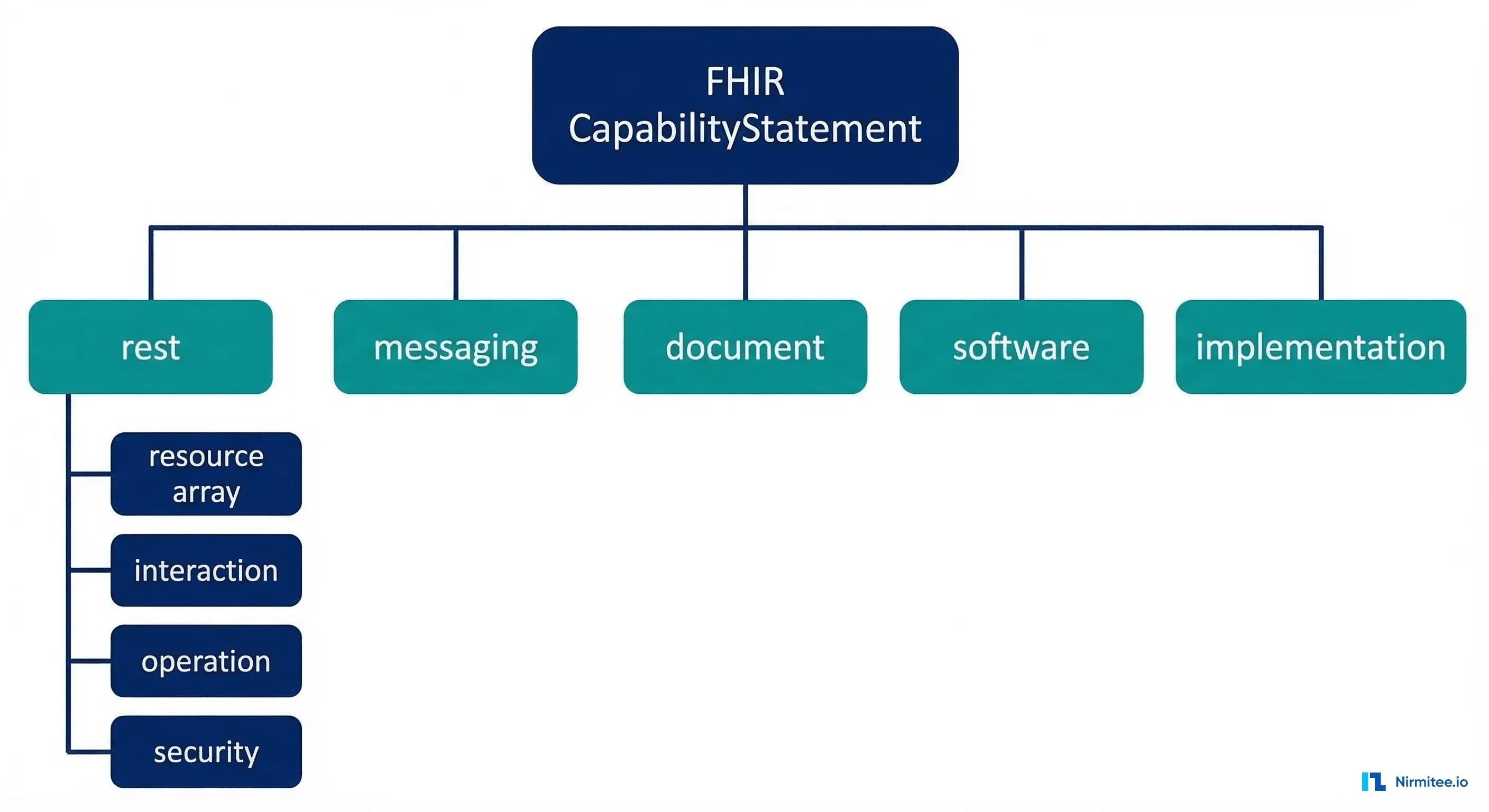
A CapabilityStatement contains these key sections:
{
  "resourceType": "CapabilityStatement",
  "status": "active",
  "date": "2026-01-15",
  "publisher": "Example Health System",
  "kind": "instance",
  "fhirVersion": "4.0.1",
  "format": ["json", "xml"],
  "rest": [
    {
      "mode": "server",
      "security": { ... },
      "resource": [ ... ],
      "interaction": [ ... ],
      "operation": [ ... ]
    }
  ]
}
The critical fields at the top level include:
| Field | Purpose | Why It Matters |
|---|---|---|
fhirVersion | FHIR spec version (e.g., 4.0.1) | Determines which resources and features are available |
format | Supported serialization formats | Most servers support JSON; some also support XML |
kind | "instance" for live servers, "capability" for abstract | Only "instance" describes a real, running server |
rest | Array of REST endpoint configurations | Contains everything about resources, search, and auth |
implementationGuide | IGs the server conforms to | Tells you if US Core, SMART, Bulk Data are supported |
Dissecting the rest.resource Array
The rest[0].resource array is where the real value lives. Each entry describes one FHIR resource type and everything the server supports for it.
A Real Resource Entry
Here's what a typical Patient resource entry looks like in a production CapabilityStatement:
{
  "type": "Patient",
  "supportedProfile": [
    "http://hl7.org/fhir/us/core/StructureDefinition/us-core-patient"
  ],
  "interaction": [
    { "code": "read" },
    { "code": "search-type" },
    { "code": "vread" }
  ],
  "searchParam": [
    {
      "name": "family",
      "type": "string",
      "documentation": "A portion of the family name"
    },
    {
      "name": "given",
      "type": "string"
    },
    {
      "name": "birthdate",
      "type": "date"
    },
    {
      "name": "identifier",
      "type": "token"
    },
    {
      "name": "_id",
      "type": "token"
    },
    {
      "name": "gender",
      "type": "token"
    }
  ],
  "searchInclude": ["Patient:general-practitioner"],
  "searchRevInclude": ["Observation:patient", "Condition:patient"]
}
Key Fields in Each Resource Entry
| Field | What It Tells You | Example |
|---|---|---|
type | The FHIR resource name | "Patient", "Observation", "Encounter" |
supportedProfile | Which profiles (like US Core) are supported | US Core Patient, US Core AllergyIntolerance |
interaction | Which CRUD operations work | read, search-type, create, update, delete |
searchParam | Which search parameters you can query | name, birthdate, identifier, _lastUpdated |
searchInclude | Which _include parameters work | Patient:organization, MedicationRequest:medication |
searchRevInclude | Which _revinclude parameters work | Observation:patient, Condition:subject |
operation | Custom operations for this resource | $everything, $validate, $match |
Understanding Interaction Types
FHIR defines interactions at three levels, and the CapabilityStatement documents which ones a server supports.
Instance-Level Interactions
These operate on a specific resource instance (identified by ID):
- read —
GET [base]/Patient/123— Retrieve a single resource - vread —
GET [base]/Patient/123/_history/2— Retrieve a specific version - update —
PUT [base]/Patient/123— Replace an existing resource - patch —
PATCH [base]/Patient/123— Partially modify a resource - delete —
DELETE [base]/Patient/123— Remove a resource - history-instance —
GET [base]/Patient/123/_history— Version history
Type-Level Interactions
These operate on a resource type (not a specific instance):
- create —
POST [base]/Patient— Create a new resource - search-type —
GET [base]/Patient?name=Smith— Search within a type - history-type —
GET [base]/Patient/_history— History of all instances
Whole-System Interactions
Documented at rest[0].interaction (not inside a resource entry):
- transaction —
POST [base]with Bundle — Atomic multi-resource operations - batch —
POST [base]with Bundle — Non-atomic batch processing - search-system —
GET [base]?_type=Patient,Observation— Cross-type search - history-system —
GET [base]/_history— History across all types
Reading the Security Section
The rest[0].security section is critical for understanding authentication requirements before you write a single line of integration code. For FHIR servers implementing SMART on FHIR, this section contains the OAuth 2.0 endpoint URLs.
{
  "security": {
    "cors": true,
    "service": [
      {
        "coding": [
          {
            "system": "http://terminology.hl7.org/CodeSystem/restful-security-service",
            "code": "SMART-on-FHIR"
          }
        ]
      }
    ],
    "extension": [
      {
        "url": "http://fhir-registry.smarthealthit.org/StructureDefinition/oauth-uris",
        "extension": [
          {
            "url": "authorize",
            "valueUri": "https://ehr.example.com/auth/authorize"
          },
          {
            "url": "token",
            "valueUri": "https://ehr.example.com/auth/token"
          },
          {
            "url": "register",
            "valueUri": "https://ehr.example.com/auth/register"
          }
        ]
      }
    ]
  }
}
Extracting the OAuth URLs from this nested extension structure is one of the most common tasks when integrating with EHR FHIR APIs. The SMART on FHIR specification also defines a .well-known/smart-configuration endpoint that provides a simpler JSON format for the same information, but the CapabilityStatement is the canonical source defined by the base FHIR specification.
Comparing EHR CapabilityStatements: Epic vs. Oracle Health vs. HAPI
Not all CapabilityStatements are created equal. The differences between major EHR vendors reveal important architectural decisions that affect your integration strategy.
| Capability | Epic (Aug 2025) | Oracle Health (Cerner) | HAPI FHIR (Open Source) |
|---|---|---|---|
| FHIR Version | R4 (4.0.1) | R4 (4.0.1) | R4, R5, R6 (configurable) |
| Resource Types | ~78 | ~62 | All ~150+ (configurable) |
| US Core Profiles | Full conformance | Full conformance | Optional via IG loader |
| SMART on FHIR | v1 and v2 | v1 and v2 | Via interceptor plugin |
| Bulk Data Export | $export (Group, System) | $export (limited) | Full $export support |
| Custom Operations | $everything, $docref, $match | $everything, $autogen-ccd | All extensible via Java |
| Search Chaining | Limited (_has, _include) | Some support | Full chaining and _filter |
| Versioned Reads (vread) | Yes | Yes | Yes |
| Patch Support | JSON Patch | JSON Patch | JSON Patch, FHIRPath Patch |
What These Differences Mean in Practice
If your app relies on _revinclude to fetch a patient's observations in a single query, you need to verify that the target EHR supports it. Epic's CapabilityStatement might list searchRevInclude for some resources but not others. Oracle Health may not support it at all for certain resource types. These are the details that turn a working prototype into a production failure — and they're all discoverable from the CapabilityStatement.
For teams building multi-vendor FHIR applications, we've covered the broader strategy in our guide on FHIR implementation guides and US Core conformance.
Building a CapabilityStatement Parser in Python
Let's build a practical tool that fetches a server's CapabilityStatement and generates a human-readable capability report. This is the kind of automation that saves integration teams days of manual API exploration.
#!/usr/bin/env python3
"""FHIR CapabilityStatement Analyzer"""
import requests
import json
import sys
from collections import defaultdict

class CapabilityAnalyzer:
    def __init__(self, base_url):
        self.base_url = base_url.rstrip('/')
        self.capability = None

    def fetch(self):
        """Fetch the CapabilityStatement from /metadata."""
        url = f"{self.base_url}/metadata"
        headers = {"Accept": "application/fhir+json"}
        resp = requests.get(url, headers=headers, timeout=30)
        resp.raise_for_status()
        self.capability = resp.json()
        return self.capability

    def get_server_info(self):
        """Extract top-level server information."""
        cap = self.capability
        return {
            "fhir_version": cap.get("fhirVersion", "unknown"),
            "publisher": cap.get("publisher", "unknown"),
            "status": cap.get("status", "unknown"),
            "date": cap.get("date", "unknown"),
            "software": cap.get("software", {}).get("name", "unknown"),
            "formats": cap.get("format", []),
        }

    def get_resources(self):
        """Extract all supported resource types with capabilities."""
        resources = {}
        rest = self.capability.get("rest", [{}])[0]
        for res in rest.get("resource", []):
            rtype = res.get("type")
            resources[rtype] = {
                "interactions": [i["code"] for i in res.get("interaction", [])],
                "search_params": [
                    {"name": sp["name"], "type": sp.get("type", "unknown")}
                    for sp in res.get("searchParam", [])
                ],
                "profiles": res.get("supportedProfile", []),
                "includes": res.get("searchInclude", []),
                "rev_includes": res.get("searchRevInclude", []),
                "operations": [
                    op.get("name") for op in res.get("operation", [])
                ],
            }
        return resources

    def get_security_info(self):
        """Extract SMART on FHIR OAuth endpoints."""
        rest = self.capability.get("rest", [{}])[0]
        security = rest.get("security", {})
        oauth_urls = {}
        for ext in security.get("extension", []):
            if "oauth-uris" in ext.get("url", ""):
                for sub_ext in ext.get("extension", []):
                    oauth_urls[sub_ext["url"]] = sub_ext.get("valueUri", "")
        services = []
        for svc in security.get("service", []):
            for coding in svc.get("coding", []):
                services.append(coding.get("code", ""))
        return {
            "cors": security.get("cors", False),
            "services": services,
            "oauth_urls": oauth_urls,
        }

    def generate_report(self):
        """Generate a human-readable capability report."""
        info = self.get_server_info()
        resources = self.get_resources()
        security = self.get_security_info()

        lines = []
        lines.append("=" * 70)
        lines.append("FHIR Server Capability Report")
        lines.append(f"Server: {self.base_url}")
        lines.append("=" * 70)
        lines.append(f"FHIR Version:  {info['fhir_version']}")
        lines.append(f"Publisher:     {info['publisher']}")
        lines.append(f"Software:      {info['software']}")
        lines.append(f"Formats:       {', '.join(info['formats'])}")
        lines.append(f"Total Resources: {len(resources)}")
        lines.append("")
        lines.append("--- Security ---")
        lines.append(f"CORS: {security['cors']}")
        lines.append(f"Services: {', '.join(security['services'])}")
        for key, url in security['oauth_urls'].items():
            lines.append(f"  {key}: {url}")
        lines.append("")
        lines.append("--- Resource Summary ---")
        lines.append(f"{'Resource':<25} {'Interactions':<35} {'Search Params'}")
        lines.append("-" * 80)
        for rtype, caps in sorted(resources.items()):
            interactions = ", ".join(caps["interactions"])
            param_count = len(caps["search_params"])
            lines.append(f"{rtype:<25} {interactions:<35} {param_count} params")

        return "\n".join(lines)

if __name__ == "__main__":
    url = sys.argv[1] if len(sys.argv) > 1 else "https://hapi.fhir.org/baseR4"
    analyzer = CapabilityAnalyzer(url)
    analyzer.fetch()
    print(analyzer.generate_report())
Running this against a public HAPI FHIR server produces a complete inventory of supported resources, search parameters, and security configuration — information that would take hours to compile manually.
Building an Automated Compatibility Checker
The real power of CapabilityStatements emerges when you build automation around them. Here's a compatibility checker that validates whether a target FHIR server meets your application's requirements.
#!/usr/bin/env python3
"""Check if a FHIR server meets your app's requirements."""
import yaml
import json

# Define your app's requirements in YAML
APP_REQUIREMENTS = """
required_resources:
  Patient:
    interactions: [read, search-type]
    search_params: [family, given, birthdate, identifier]
  Observation:
    interactions: [read, search-type, create]
    search_params: [patient, category, code, date]
  Condition:
    interactions: [read, search-type]
    search_params: [patient, clinical-status, category]
  MedicationRequest:
    interactions: [read, search-type]
    search_params: [patient, status, authoredon]
required_security:
  - SMART-on-FHIR
required_operations:
  Patient: [$everything]
"""

class CompatibilityChecker:
    def __init__(self, requirements_yaml, capability_json):
        self.reqs = yaml.safe_load(requirements_yaml)
        self.cap = capability_json
        self.results = {"passed": [], "failed": [], "warnings": []}

    def check(self):
        self._check_resources()
        self._check_security()
        self._check_operations()
        return self.results

    def _check_resources(self):
        rest = self.cap.get("rest", [{}])[0]
        server_resources = {
            r["type"]: r for r in rest.get("resource", [])
        }
        for rtype, reqs in self.reqs.get("required_resources", {}).items():
            if rtype not in server_resources:
                self.results["failed"].append(
                    f"Resource '{rtype}' not supported"
                )
                continue
            server_res = server_resources[rtype]
            server_interactions = [
                i["code"] for i in server_res.get("interaction", [])
            ]
            server_params = [
                sp["name"] for sp in server_res.get("searchParam", [])
            ]
            for interaction in reqs.get("interactions", []):
                if interaction in server_interactions:
                    self.results["passed"].append(
                        f"{rtype}.{interaction} supported"
                    )
                else:
                    self.results["failed"].append(
                        f"{rtype}.{interaction} NOT supported"
                    )
            for param in reqs.get("search_params", []):
                if param in server_params:
                    self.results["passed"].append(
                        f"{rtype}?{param} supported"
                    )
                else:
                    self.results["failed"].append(
                        f"{rtype}?{param} NOT supported"
                    )

    def _check_security(self):
        rest = self.cap.get("rest", [{}])[0]
        security = rest.get("security", {})
        server_services = []
        for svc in security.get("service", []):
            for coding in svc.get("coding", []):
                server_services.append(coding.get("code", ""))
        for req_svc in self.reqs.get("required_security", []):
            if req_svc in server_services:
                self.results["passed"].append(f"Security: {req_svc}")
            else:
                self.results["failed"].append(
                    f"Security: {req_svc} missing"
                )

    def _check_operations(self):
        rest = self.cap.get("rest", [{}])[0]
        server_resources = {
            r["type"]: r for r in rest.get("resource", [])
        }
        for rtype, ops in self.reqs.get("required_operations", {}).items():
            if rtype in server_resources:
                server_ops = [
                    o.get("name")
                    for o in server_resources[rtype].get("operation", [])
                ]
                for op in ops:
                    op_name = op.lstrip("$")
                    if op_name in server_ops:
                        self.results["passed"].append(
                            f"{rtype}.{op} operation available"
                        )
                    else:
                        self.results["warnings"].append(
                            f"{rtype}.{op} operation not found"
                        )

# Usage:
# checker = CompatibilityChecker(APP_REQUIREMENTS, capability_json)
# results = checker.check()
# print(f"Passed: {len(results['passed'])}")
# print(f"Failed: {len(results['failed'])}")
# print(f"Warnings: {len(results['warnings'])}")
This approach transforms CapabilityStatement analysis from a manual exercise into a CI/CD gate. Run it before deployment to verify that your target EHR environment supports every resource, interaction, and search parameter your application requires.
Common Pitfalls When Reading CapabilityStatements
After working with dozens of EHR FHIR implementations, here are the traps that catch developers most often:
1. Assuming the CapabilityStatement Is Complete
Some servers (particularly older Cerner deployments) don't list every supported search parameter in their CapabilityStatement. A parameter might work in practice, but not appear in /metadata. Always treat the CapabilityStatement as a minimum guarantee, not an exhaustive inventory.
2. Ignoring Profile Constraints
A server might support the Patient resource but require the US Core Patient profile. If you send a base FHIR Patient without the required extensions (like race and ethnicity for US Core), the server may reject your create/update operations. Check supportedProfile carefully.
3. Confusing "search-type" with "search-system"
Having search-type in a resource's interactions means you can search within that resource type (GET /Patient?name=Smith). Having search-system in the rest[0].interaction array means you can search across all types (GET /?_type=Patient,Observation). They have different capabilities at different levels.
4. Not Checking the Date
CapabilityStatements have a date field. If it's years old, the server may have been updated without updating the CapabilityStatement. This is common in custom-built FHIR servers. Cross-reference with the vendor's documentation.
5. Missing the Extensions
Critical information often hides in FHIR extensions. The SMART on FHIR OAuth URLs, for example, are in a nested extension structure — not a top-level field. Always parse extensions, especially the http://fhir-registry.smarthealthit.org/StructureDefinition/oauth-uris extension for security configuration.
For a deeper understanding of how FHIR resource validation interacts with CapabilityStatement conformance, see our guide on FHIR resource validation.
Practical Workflow: From /metadata to Working Integration
Here's the step-by-step process we recommend for any new FHIR integration project:
- Fetch /metadata — Start by programmatically retrieving the CapabilityStatement. Store it locally for reference.
- Check FHIR version — Verify
fhirVersion. R4 (4.0.1) is the current US regulatory standard. Some servers still serve DSTU2 (1.0.2) or STU3 (3.0.2). - Inventory resources — List every resource in
rest[0].resource. Map this against your application's requirements. - Validate search parameters — For each resource you need, confirm the search parameters exist. This is where most integration projects hit unexpected gaps.
- Extract auth endpoints — Parse the security section for SMART on FHIR OAuth URLs. These are required before you can authenticate.
- Check operations — Look for
$everything,$export,$validate, and other custom operations that can simplify your integration. - Test and verify — The CapabilityStatement is a promise, not a guarantee. Test critical capabilities against the live server.
Teams implementing SMART on FHIR authorization will find that the CapabilityStatement's security section provides the OAuth endpoints needed for the initial app registration and launch sequence.
Advanced: Multi-Server Capability Diffing
When building apps that need to work across multiple EHR environments (Epic, Oracle, Meditech, etc.), a capability diff tool becomes essential:
def diff_capabilities(cap_a, cap_b, label_a="Server A", label_b="Server B"):
    """Compare two CapabilityStatements and report differences."""
    rest_a = cap_a.get("rest", [{}])[0]
    rest_b = cap_b.get("rest", [{}])[0]

    resources_a = {r["type"] for r in rest_a.get("resource", [])}
    resources_b = {r["type"] for r in rest_b.get("resource", [])}

    only_a = resources_a - resources_b
    only_b = resources_b - resources_a
    common = resources_a & resources_b

    print(f"Resources only in {label_a}: {len(only_a)}")
    for r in sorted(only_a):
        print(f"  + {r}")

    print(f"\nResources only in {label_b}: {len(only_b)}")
    for r in sorted(only_b):
        print(f"  + {r}")

    print(f"\nCommon resources: {len(common)}")
    print(f"\nSearch parameter differences in common resources:")

    res_map_a = {r["type"]: r for r in rest_a.get("resource", [])}
    res_map_b = {r["type"]: r for r in rest_b.get("resource", [])}

    for rtype in sorted(common):
        params_a = {sp["name"] for sp in res_map_a[rtype].get("searchParam", [])}
        params_b = {sp["name"] for sp in res_map_b[rtype].get("searchParam", [])}
        diff_a = params_a - params_b
        diff_b = params_b - params_a
        if diff_a or diff_b:
            print(f"\n  {rtype}:")
            if diff_a:
                print(f"    Only {label_a}: {', '.join(sorted(diff_a))}")
            if diff_b:
                print(f"    Only {label_b}: {', '.join(sorted(diff_b))}")
This diff approach is especially valuable when migrating between EHR vendors — a process that Health Affairs estimates costs hospitals $5-10M per migration. Knowing exactly which capabilities differ upfront prevents costly mid-migration surprises.
Ready to scale?
Talk to our healthcare engineering team about building, integrating, and shipping faster.
Frequently Asked Questions
What is the FHIR CapabilityStatement endpoint?
How do I find which FHIR resources an EHR supports?
What is the difference between CapabilityStatement and Conformance in FHIR?
How do I extract SMART on FHIR OAuth URLs from a CapabilityStatement?
Can I use the CapabilityStatement to auto-generate API client code?
Why does the CapabilityStatement sometimes not match actual server behavior?


