Part of our complete guide to FHIR fundamentals.
Every health system faces the same dilemma: modern apps want FHIR. The EHR speaks HL7v2. A full migration takes years and costs millions. But CMS interoperability mandates, third-party app ecosystems, and patient access requirements can't wait that long.
The FHIR facade pattern solves this. You build an API gateway that exposes a standards-compliant FHIR REST interface to the outside world while translating every request to HL7v2 messages behind the scenes. Your legacy systems remain untouched. Your modern consumers get the API they expect. You buy time to plan a real migration on your terms.
This guide walks through the complete architecture: request translation, response mapping, caching, rate limiting, SMART on FHIR authentication layered over legacy auth, and when this pattern makes sense versus a full migration. We include working code for the translation layer because this is an engineering blog, not a slide deck.
The Facade Pattern: Why It Works for Healthcare
The facade pattern isn't new to software engineering. It's a structural design pattern that provides a simplified interface to a complex subsystem. What makes it particularly powerful in healthcare is the nature of the problem: you have stable, mission-critical legacy systems that handle millions of clinical transactions daily, and you need to expose their data through a completely different API paradigm without disrupting operations.
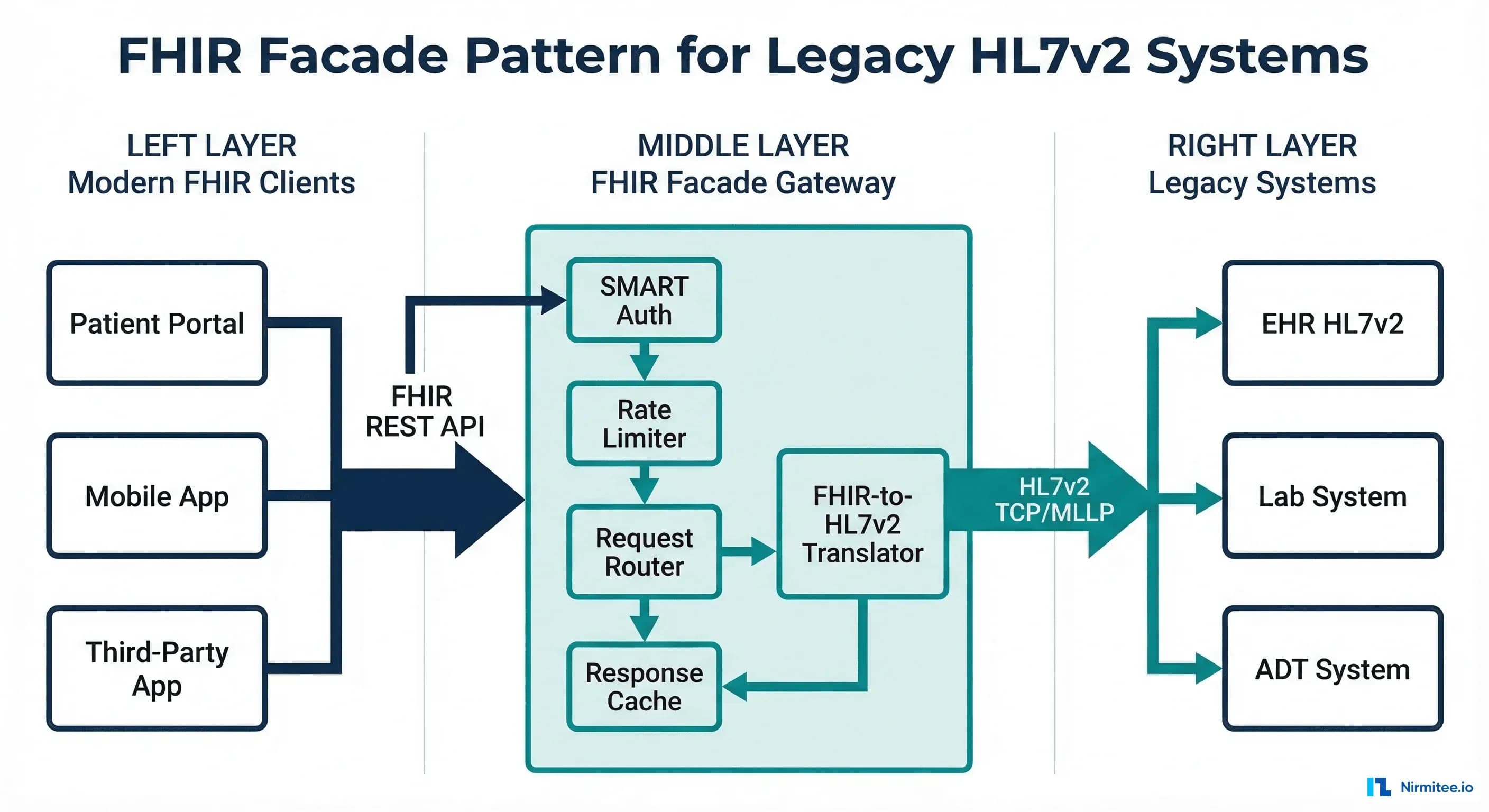
The FHIR facade acts as an API gateway between two worlds. On the client side, it speaks FHIR R4 REST — JSON payloads, RESTful URLs, SMART on FHIR OAuth2 authentication. On the backend side, it speaks HL7v2 — pipe-delimited messages, TCP/MLLP connections, facility-based access control. The facade handles all translation, caching, and protocol bridging.
This pattern is already used in production at scale. Epic's FHIR API is fundamentally a facade over their proprietary data model. Cerner's (now Oracle Health) R4 API translates to their internal Millennium architecture. The difference is that they built it into their product — you're building it as a standalone layer because your EHR vendor either doesn't offer a FHIR API or offers one that's too limited for your use cases.
Architecture Overview
A production FHIR facade has six key components, each serving a distinct function in the request-response lifecycle:
- SMART on FHIR Auth Layer — OAuth2 authorization server with SMART scopes, sitting in front of all FHIR endpoints
- FHIR Request Router — Parses incoming FHIR REST requests (GET, POST, PUT, DELETE) and routes to the appropriate handler
- Translation Engine — Converts FHIR operations into HL7v2 messages and vice versa
- Cache Layer — Multi-tier caching to minimize expensive HL7v2 queries
- Rate Limiter — Protects the legacy backend from being overwhelmed by modern API traffic patterns
- HL7v2 Client — MLLP connection pool to legacy systems with circuit breaker protection
Let's examine each component in detail, starting with the translation engine — the heart of the facade.
Request Translation: FHIR to HL7v2
The most complex part of the facade is mapping FHIR REST operations to HL7v2 messages. FHIR uses a RESTful paradigm (GET/POST/PUT/DELETE on resources), while HL7v2 uses a message-based paradigm (specific message types for specific operations). The mapping isn't always one-to-one.
Patient Search: FHIR GET to QBP^Q22
The most common FHIR operation — searching for patients — maps to an HL7v2 QBP^Q22 (Query by Parameter) message. Here's the translation logic:
// FHIR request: GET /fhir/Patient?identifier=MRN|123456&given=John
// Translates to HL7v2 QBP^Q22

func translatePatientSearch(params url.Values) (string, error) {
    msg := buildMSH("QBP", "Q22", "Q22")

    // QPD segment - Query Parameter Definition
    qpd := "QPD|Q22^Find Candidates^HL7nnnn|"
    queryTag := generateQueryTag()
    qpd += queryTag

    // Map FHIR search params to QPD fields
    if identifier := params.Get("identifier"); identifier != "" {
        // FHIR: identifier=MRN|123456
        parts := strings.SplitN(identifier, "|", 2)
        // QPD-3: Patient ID (maps to PID-3)
        qpd += "|@PID.3.1^" + parts[len(parts)-1]
    }
    if given := params.Get("given"); given != "" {
        qpd += "|@PID.5.2^" + given  // Given name → PID-5.2
    }
    if family := params.Get("family"); family != "" {
        qpd += "|@PID.5.1^" + family  // Family name → PID-5.1
    }
    if birthdate := params.Get("birthdate"); birthdate != "" {
        // FHIR: 1990-01-15 → HL7: 19900115
        qpd += "|@PID.7^" + strings.ReplaceAll(birthdate, "-", "")
    }

    msg += "\r" + qpd
    msg += "\r" + "RCP|I|10^RD"  // Response Control: Immediate, max 10
    return msg, nil
}
Observation Query: FHIR GET to QBP^Q11
Lab results and vital signs follow a similar pattern but use a different HL7v2 query type. A FHIR request like GET /fhir/Observation?patient=123&category=laboratory translates to a QBP^Q11 query filtered by patient identifier and observation category. The facade maps FHIR category codes (laboratory, vital-signs, social-history) to HL7v2 result status and observation identifier patterns.
Write Operations: FHIR POST to ORM^O01
Write operations are trickier. A FHIR POST /fhir/ServiceRequest translates to an HL7v2 ORM^O01 (order message). The facade must map FHIR resource fields to ORC (Common Order) and OBR (Observation Request) segments, generate compliant message control IDs, and handle the asynchronous HL7v2 acknowledgment flow (ORR response) in a synchronous FHIR request-response model.
Response Mapping: HL7v2 to FHIR
Response mapping is where the real complexity lives. An HL7v2 RSP^K22 response can contain dozens of segments that need to be parsed, validated, and assembled into a FHIR Bundle.
PID Segment to FHIR Patient
The PID (Patient Identification) segment maps to the FHIR Patient resource. The mapping is extensive — PID has 40 fields, and most map to specific FHIR Patient elements:
func pidToFHIRPatient(pid *hl7.PID) *fhir.Patient {
    patient := &fhir.Patient{
        ResourceType: "Patient",
        ID:           generateFHIRId(pid.PatientID),
    }

    // PID-3: Patient Identifier List → Patient.identifier
    for _, cx := range pid.PatientIdentifierList {
        patient.Identifier = append(patient.Identifier, fhir.Identifier{
            System: mapAssigningAuthority(cx.AssigningAuthority),
            Value:  cx.IDNumber,
            Type: &fhir.CodeableConcept{
                Coding: []fhir.Coding{{
                    System: "http://terminology.hl7.org/CodeSystem/v2-0203",
                    Code:   cx.IdentifierTypeCode,
                }},
            },
        })
    }

    // PID-5: Patient Name → Patient.name
    for _, xpn := range pid.PatientName {
        patient.Name = append(patient.Name, fhir.HumanName{
            Family: xpn.FamilyName,
            Given:  []string{xpn.GivenName},
            Use:    mapNameType(xpn.NameTypeCode), // L→official, M→maiden
        })
    }

    // PID-7: Date of Birth → Patient.birthDate
    if pid.DateOfBirth != "" {
        patient.BirthDate = formatHL7Date(pid.DateOfBirth)
    }

    // PID-8: Sex → Patient.gender
    patient.Gender = mapAdministrativeSex(pid.Sex) // M→male, F→female

    // PID-11: Address → Patient.address
    for _, xad := range pid.PatientAddress {
        patient.Address = append(patient.Address, fhir.Address{
            Line:       []string{xad.StreetAddress},
            City:       xad.City,
            State:      xad.State,
            PostalCode: xad.ZipCode,
            Country:    xad.Country,
        })
    }

    // PID-13: Phone → Patient.telecom
    if pid.PhoneHome != "" {
        patient.Telecom = append(patient.Telecom, fhir.ContactPoint{
            System: "phone",
            Value:  pid.PhoneHome,
            Use:    "home",
        })
    }

    return patient
}
Assembling the FHIR Bundle
When the HL7v2 response contains multiple patient records, the facade assembles them into a FHIR Bundle with type searchset. Each patient becomes a Bundle entry with a fullUrl and a search.mode of match. The Bundle also includes pagination links (self, next) if the result set exceeds the requested page size — mapping from the HL7v2 DSC (Continuation Pointer) segment.
The Caching Layer
Without caching, a FHIR facade is painfully slow. Every FHIR GET request requires an HL7v2 round-trip over MLLP — typically 200-500ms for patient queries and 500ms-2s for complex observation queries. Modern FHIR clients make dozens of calls per page load. Without caching, a single patient chart view could take 10+ seconds.
A production facade needs three caching layers:
Layer 1: HTTP Response Cache
Use standard HTTP caching headers (ETag, Last-Modified, Cache-Control) so clients and CDN edges can cache responses. For relatively static resources like Patient demographics, set Cache-Control: max-age=300 (5 minutes). For frequently changing resources like Observation (lab results), use Cache-Control: no-cache with ETag validation — the client always asks, but the facade returns 304 Not Modified if nothing changed.
Layer 2: FHIR Resource Cache (Redis)
Cache assembled FHIR resources in Redis, keyed by resource type and identifier. This avoids both the HL7v2 round-trip and the translation computation. Set TTLs by resource type: Patient demographics (10 min), AllergyIntolerance (5 min), Observation (2 min), Encounter (1 min for active encounters). When an ADT message arrives via a separate HL7v2 feed, invalidate the relevant cache entries proactively.
Layer 3: Translation Cache
Cache the mapping lookups that the translation engine uses repeatedly: OID-to-URI mappings, code system translations (LOINC codes, SNOMED mappings), and HL7v2 table values to FHIR ValueSet conversions. These change rarely and can be cached for hours or even days. A warm translation cache alone can reduce per-request overhead by 30-50ms.
Rate Limiting: Protecting Legacy Systems
Legacy HL7v2 systems were designed for a world of 50-100 concurrent interface connections, each sending messages at a controlled rate. A FHIR API exposes these systems to a fundamentally different traffic pattern: hundreds of concurrent HTTP connections, each capable of sending dozens of requests per second. Without rate limiting, a single misbehaving FHIR client can overwhelm the legacy backend.
The facade's rate limiter must operate at multiple levels:
- Per-client rate limiting: Each registered SMART client gets a token bucket with a configurable rate (e.g., 100 requests/minute for standard clients, 1000/minute for bulk data clients)
- Per-resource rate limiting: Expensive queries (Observation searches with date ranges, _include parameters) get lower limits than simple reads (Patient by ID)
- Backend protection: A global rate limiter caps the total HL7v2 query rate to what the legacy system can handle — typically 50-200 queries/second depending on the system
- Circuit breaker: If the legacy system response time exceeds a threshold (e.g., 5 seconds), the circuit breaker opens and the facade returns HTTP 503 with a Retry-After header instead of queuing unbounded requests
SMART on FHIR Auth Over Legacy Systems
One of the most valuable aspects of the facade pattern is adding modern OAuth2-based authentication to legacy systems that have no concept of it. Legacy HL7v2 systems typically use connection-level security: if you can establish a TCP connection to the MLLP port and your MSH-3 (Sending Application) and MSH-4 (Sending Facility) match the expected values, you're in.
The facade bridges this gap by implementing a full SMART on FHIR authorization server:
- Client registration: Third-party apps register as SMART clients with the facade, receiving client_id/client_secret credentials
- Authorization flow: Users authenticate through the facade's authorization endpoint, selecting which patient context and scopes to grant
- Token issuance: The facade issues access tokens containing SMART scopes (patient/Patient.read, patient/Observation.read, etc.)
- Scope enforcement: Every FHIR request is validated against the access token's scopes. A token with
patient/Patient.readcan only access Patient resources for the patient in context - Backend translation: The facade translates the authorized scope into HL7v2 query filters — ensuring that the QBP query sent to the legacy system only requests data the user is authorized to see
This is exactly how production SMART implementations work at organizations that haven't upgraded to a FHIR-native EHR. The facade becomes the OAuth2 boundary, and the legacy system never needs to know about tokens or scopes.
FHIR Resource Coverage: What to Expose First
You don't need to implement all 150+ FHIR R4 resource types. Most FHIR clients need a small subset. Prioritize based on CMS interoperability requirements and actual client demand:
Tier 1: Must-Have (Weeks 1-4)
These five resources cover 80% of FHIR client use cases and are required for US Core compliance:
- Patient — Maps from PID segment. Every FHIR interaction starts here.
- Encounter — Maps from PV1 (Patient Visit) segment. Required for context.
- Condition — Maps from DG1 (Diagnosis) segment. Clinical problem list.
- Observation — Maps from OBX (Observation Result) segment. Labs and vitals.
- MedicationRequest — Maps from RXE/RXO (Pharmacy) segments. Active medications.
Tier 2: High Value (Months 2-3)
- AllergyIntolerance — Maps from AL1 segment. Patient safety critical.
- Procedure — Maps from PR1 segment. Surgical and procedure history.
- DiagnosticReport — Maps from OBR/OBX segments. Lab report containers.
- DocumentReference — Maps from TXA (Document) segment. Clinical documents.
Tier 3: Extended Coverage (Months 4+)
- Coverage — Maps from IN1/IN2 (Insurance) segments. Payer information.
- Immunization — Maps from RXA (Pharmacy Administration) segment.
- CarePlan — Often requires composite data from multiple HL7v2 message types.
When to Use a Facade vs. Full Migration
The facade isn't always the right answer. Here's the honest decision framework:
Choose the facade when:
- You need FHIR compliance in under 6 months (CMS deadlines, app marketplace requirements)
- Your legacy EHR is stable and well-understood — replacing it isn't planned for 3+ years
- Read operations dominate (80%+ of traffic is FHIR GET, not POST/PUT)
- You have 5-10 FHIR resources to expose, not 50
- Budget is $200K-500K, not $2M+
Choose full migration when:
- You're replacing the EHR anyway (e.g., switching from a legacy system to Epic or Oracle Health)
- Write operations are a primary use case (clinical decision support, order entry)
- You need to support complex FHIR operations (_everything, $validate, bulk data export)
- The legacy system is end-of-life or actively degrading
- You have 18+ months and adequate budget
The hybrid path (recommended): Start with a facade for immediate FHIR compliance and third-party app support. Use the facade's translation logic as the basis for incremental migration — as you move data domains to FHIR-native storage, the facade routes those queries to the new store instead of translating to HL7v2. Over 2-3 years, the facade gradually becomes a thin proxy to your FHIR-native platform, and the legacy HL7v2 backend becomes read-only archive.
Production Considerations
Error Handling and HL7v2 NACK Mapping
HL7v2 negative acknowledgments (NACKs) must map to appropriate FHIR OperationOutcome resources. An AE (Application Error) in the MSA segment maps to HTTP 500 with an OperationOutcome containing error severity. An AR (Application Reject) maps to HTTP 400 (bad request). A CR (Communication Reject) maps to HTTP 503 (service unavailable). Every error response should include enough detail in the OperationOutcome.diagnostics field for the FHIR client to understand what went wrong — without exposing internal HL7v2 implementation details.
Connection Pool Management
MLLP connections to legacy systems are expensive to establish and should be pooled. Configure a connection pool per destination system with: minimum idle connections (2-5), maximum connections (20-50 depending on legacy system capacity), connection timeout (5s), idle timeout (5 min), and health check interval (30s). Monitor pool exhaustion as a leading indicator of legacy system stress.
Observability
Instrument every layer of the facade. Key metrics to track: translation latency (FHIR-to-HL7v2 and back), cache hit rates per tier, HL7v2 round-trip time per destination, error rates by FHIR resource type, and active connection count per legacy system. Use distributed tracing (OpenTelemetry) to trace a single FHIR request through the auth layer, cache check, translation, HL7v2 query, and response assembly. When a request is slow, you need to know exactly which component is the bottleneck.
Conformance and CapabilityStatement
Your facade must publish a FHIR CapabilityStatement at /fhir/metadata that accurately describes which resources, search parameters, and operations it supports. Don't claim to support search parameters that the underlying HL7v2 query doesn't implement. A common mistake is claiming to support _include and _revinclude when the legacy system can't do joined queries — resulting in empty includes that confuse clients. Be honest in your CapabilityStatement; FHIR clients rely on it for discovery.
Struggling with healthcare data exchange? Our Healthcare Interoperability Solutions practice helps organizations connect clinical systems at scale. We also offer specialized product engineering for healthcare teams. Talk to our team to get started.
Frequently Asked QuestionsHow does performance compare to a native FHIR server?
With a warm cache, a well-built facade can match native FHIR server performance for read operations (15-50ms response times). Without cache, you're bound by the HL7v2 round-trip (200-500ms). Write operations are inherently slower due to the synchronous-to-asynchronous translation. For benchmarking context, a native FHIR server on PostgreSQL typically achieves 5-15ms for indexed reads.
Can the facade handle FHIR Bulk Data Export?
With caveats. Bulk Data Export ($export) requires assembling large NDJSON files from potentially millions of records. Doing this through HL7v2 query-by-query is impractical. Most facade implementations handle Bulk Data by running batch HL7v2 extracts during off-hours, pre-building the NDJSON files, and serving them from object storage. This is a common approach even for native FHIR servers — the export is always an asynchronous background job.
What about FHIR Subscriptions and real-time notifications?
This is where the facade shines unexpectedly. If your integration engine already processes real-time HL7v2 messages (ADT, ORM, ORU), you can feed these into the facade's translation engine to generate FHIR Subscription notifications. An ADT^A01 (admission) becomes a FHIR Encounter create notification. An ORU^R01 (lab result) becomes an Observation notification. The facade transforms HL7v2 events into FHIR webhook payloads in real-time.
How do we handle patient matching across the facade?
The facade must maintain a consistent identifier mapping between HL7v2 patient IDs and FHIR resource IDs. The simplest approach: use the MRN from PID-3 as the FHIR Patient.id (or a deterministic hash of it). Store this mapping in a persistent registry. For organizations using an MPI (Master Patient Index), the facade should query the MPI to resolve identifiers before translating to HL7v2 queries.
Conclusion
The FHIR facade pattern isn't a compromise — it's a pragmatic architecture that lets you participate in the modern healthcare app ecosystem without rewriting your backend. Health systems that implemented facade patterns in 2024-2025 were able to meet CMS Patient Access API requirements, onboard third-party apps, and support health tech startup integrations — all while their legacy HL7v2 systems continued operating unchanged.
The key to success is treating the facade as production infrastructure, not a prototype. That means proper caching, rate limiting, error handling, observability, and auth. Built correctly, the facade becomes the foundation for an incremental FHIR migration rather than a dead-end workaround.
Building a FHIR facade or planning a FHIR migration? At Nirmitee, we've built FHIR facades for health systems with 50+ legacy interfaces. We can assess your HL7v2 landscape and deliver a working facade prototype in 4-6 weeks. Let's talk architecture.