Healthcare API Security: OAuth 2.0, SMART on FHIR, and HIPAA Compliance Guide

Digital Growth Lead
Writes about healthcare technology, interoperability, and AI-driven transformation across modern care systems.
Part of our complete guide to HIPAA compliance requirements for developers.
Healthcare APIs handle the most sensitive data in any industry: protected health information (PHI). A single misconfigured endpoint can expose patient records, trigger HIPAA violations carrying penalties up to $1.9 million per incident, and permanently damage organizational trust. According to the 2025 IBM Cost of a Data Breach Report, healthcare data breaches cost an average of $10.93 million per incident — the highest of any sector for the 13th consecutive year.
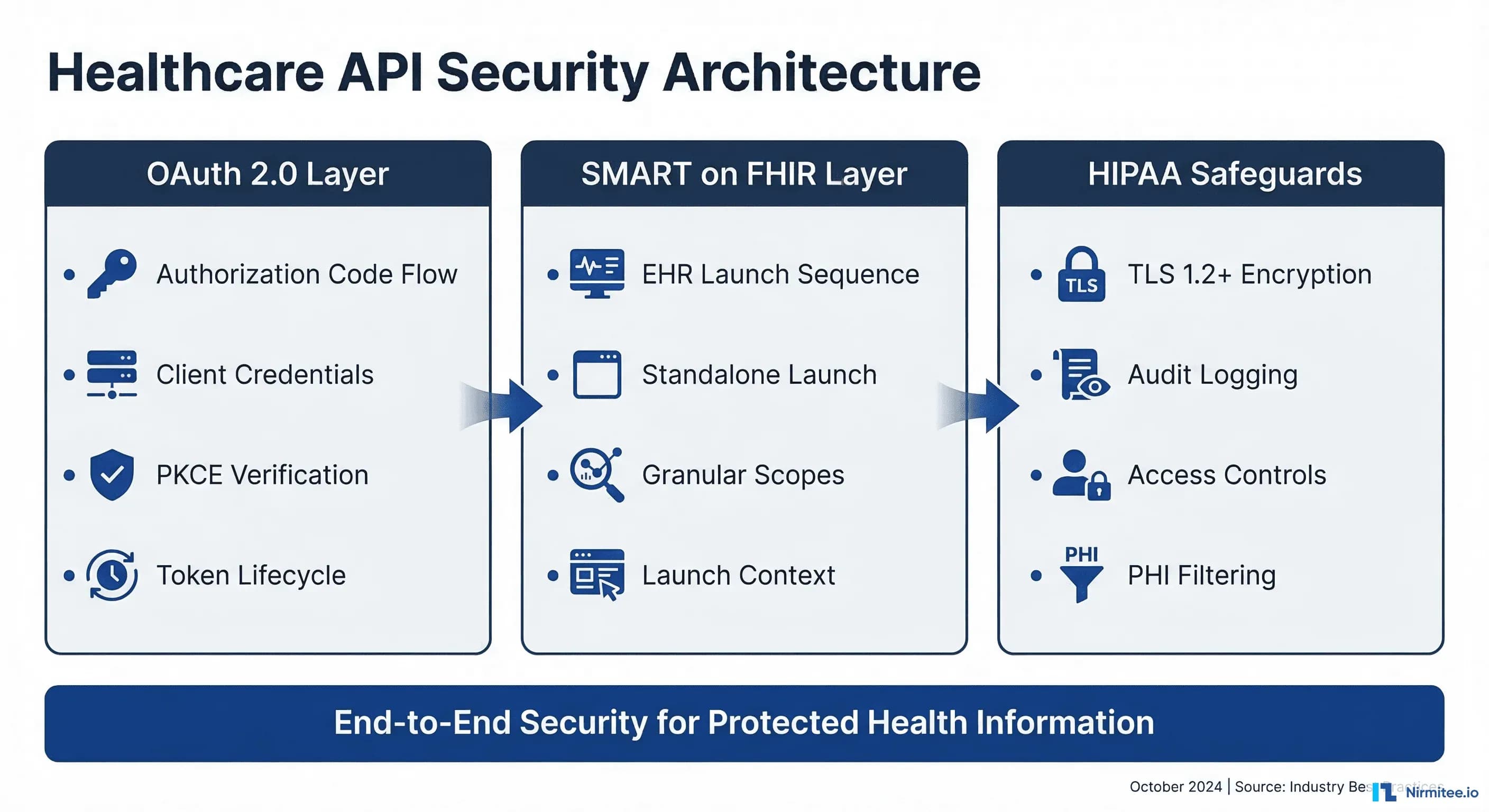
This guide provides a complete, implementation-ready framework for securing healthcare APIs. We cover OAuth 2.0 authentication flows, SMART on FHIR launch sequences, HIPAA technical safeguards, and defense-in-depth strategies that engineering teams can deploy immediately. Whether you are building a patient portal, an EHR-integrated clinical app, or a backend data pipeline, this guide gives you the specific configurations, code examples, and compliance patterns you need.
Related Reading
For more insights, explore our guides on Healthcare API Revenue Center: FHIR Monetization and FHIR in Modern Healthcare.
You may also find value in EHR Software Development Guide and Building a Healthtech App.
OAuth 2.0 for Healthcare APIs: Choosing the Right Flow
OAuth 2.0 is the foundation of modern healthcare API security. The SMART on FHIR specification builds directly on OAuth 2.0, making it the mandatory authentication framework for FHIR-compliant systems. But not all OAuth flows are appropriate for healthcare. Selecting the wrong flow creates security gaps that auditors will flag and attackers will exploit.
Authorization Code Flow with PKCE
The authorization code flow with Proof Key for Code Exchange (PKCE) is the recommended flow for any healthcare application where a user is present. That covers a clinician accessing patient records through an EHR-embedded app as well as a patient viewing their health data in a mobile portal.
PKCE eliminates the authorization code interception attack vector. Instead of relying solely on a client secret (which cannot be safely stored in mobile or single-page applications), the client generates a cryptographic code verifier and challenge at the start of each authorization request. The authorization server verifies the proof at the token exchange step, ensuring that only the original requester can exchange the code for tokens.
Here is a complete implementation of the SMART on FHIR authorization code flow with PKCE:
// Step 1: Generate PKCE code verifier and challenge
function generateCodeVerifier() {
  const array = new Uint8Array(32);
  crypto.getRandomValues(array);
  return base64UrlEncode(array);
}

function generateCodeChallenge(verifier) {
  const encoder = new TextEncoder();
  const data = encoder.encode(verifier);
  return crypto.subtle.digest('SHA-256', data)
    .then(hash => base64UrlEncode(new Uint8Array(hash)));
}

// Step 2: Discover authorization endpoints from FHIR server
async function discoverEndpoints(fhirBaseUrl) {
  const response = await fetch(
    `${fhirBaseUrl}/.well-known/smart-configuration`
  );
  const config = await response.json();
  return {
    authorizationEndpoint: config.authorization_endpoint,
    tokenEndpoint: config.token_endpoint,
    introspectionEndpoint: config.introspection_endpoint,
    revocationEndpoint: config.revocation_endpoint,
  };
}

// Step 3: Build authorization URL
async function buildAuthUrl(fhirBaseUrl, clientId, redirectUri, scopes) {
  const endpoints = await discoverEndpoints(fhirBaseUrl);
  const codeVerifier = generateCodeVerifier();
  const codeChallenge = await generateCodeChallenge(codeVerifier);
  const state = crypto.randomUUID();

  // Store verifier and state for the callback
  sessionStorage.setItem('pkce_verifier', codeVerifier);
  sessionStorage.setItem('oauth_state', state);

  const params = new URLSearchParams({
    response_type: 'code',
    client_id: clientId,
    redirect_uri: redirectUri,
    scope: scopes.join(' '),
    state: state,
    aud: fhirBaseUrl,
    code_challenge: codeChallenge,
    code_challenge_method: 'S256',
  });

  return `${endpoints.authorizationEndpoint}?${params}`;
}

// Step 4: Exchange authorization code for tokens
async function exchangeCodeForTokens(
  tokenEndpoint, code, clientId, redirectUri
) {
  const codeVerifier = sessionStorage.getItem('pkce_verifier');

  const response = await fetch(tokenEndpoint, {
    method: 'POST',
    headers: { 'Content-Type': 'application/x-www-form-urlencoded' },
    body: new URLSearchParams({
      grant_type: 'authorization_code',
      code: code,
      client_id: clientId,
      redirect_uri: redirectUri,
      code_verifier: codeVerifier,
    }),
  });

  const tokenResponse = await response.json();
  // tokenResponse includes:
  // - access_token (short-lived, 5-15 minutes)
  // - refresh_token (longer-lived, up to 24 hours)
  // - patient (patient ID if launch/patient scope granted)
  // - scope (actual scopes granted by server)
  // - id_token (if openid scope requested)
  return tokenResponse;
}
Client Credentials Flow for Backend Services
The client credentials flow is designed for server-to-server communication where no human user is involved. In healthcare, this covers scenarios like nightly data synchronization between systems, automated quality measure calculations, bulk data exports under the FHIR Bulk Data Access specification, and population health analytics pipelines.
This flow uses system/ scopes instead of patient/ or user/ scopes. The SMART Backend Services specification requires asymmetric key authentication using JSON Web Tokens (JWTs) signed with the client's private key, rather than a simple client secret:
const jwt = require('jsonwebtoken');
const fs = require('fs');

async function getBackendServiceToken(tokenEndpoint, clientId) {
  // Load the private key (RS384 recommended by SMART Backend Services)
  const privateKey = fs.readFileSync('./keys/private-key.pem');

  // Create a signed JWT assertion
  const assertion = jwt.sign(
    {
      iss: clientId,
      sub: clientId,
      aud: tokenEndpoint,
      jti: crypto.randomUUID(), // Unique token ID prevents replay
    },
    privateKey,
    {
      algorithm: 'RS384',
      expiresIn: '5m', // Short-lived assertion
      header: { kid: 'backend-service-key-2026' },
    }
  );

  // Exchange assertion for access token
  const response = await fetch(tokenEndpoint, {
    method: 'POST',
    headers: { 'Content-Type': 'application/x-www-form-urlencoded' },
    body: new URLSearchParams({
      grant_type: 'client_credentials',
      scope: 'system/Patient.rs system/Observation.rs',
      client_assertion_type:
        'urn:ietf:params:oauth:client-assertion-type:jwt-bearer',
      client_assertion: assertion,
    }),
  });

  return response.json();
}
Key security requirements for backend service authentication:
- RSA or EC keys only — HMAC (symmetric) keys are not permitted for backend services because they require sharing the secret with the authorization server
- Key rotation — Publish your public keys via a JWKS endpoint and rotate at least annually. Use the
kidheader to support overlapping key periods during rotation - Short assertion lifetimes — JWT assertions should expire within 5 minutes to limit the window of compromise
- Unique
jticlaims — Each assertion must have a unique identifier. Authorization servers should reject replayed assertions
SMART on FHIR Launch Sequences
SMART on FHIR defines two launch sequences that determine how an application obtains clinical context (which patient, which encounter, which practitioner). The choice between them is architectural, not just technical — it shapes your entire user experience and security model.
EHR Launch: App Runs Inside the EHR
In an EHR launch, the application is opened from within the electronic health record system. The EHR passes a launch parameter to the application's launch URL, which the app then includes in the authorization request. This mechanism lets the EHR securely communicate the current clinical context — which patient chart is open. This encounter is active, which practitioner is logged in — without the app needing to independently discover this information.
The EHR launch flow is the default for clinical decision support tools, order entry assistants, chart review applications, and any tool that a clinician uses while actively working in a patient's chart. It provides the tightest integration and the best user experience because the practitioner never leaves their clinical workflow.
// EHR Launch handler — your app's /launch endpoint
app.get('/launch', async (req, res) => {
  const { iss, launch } = req.query;
  // iss = FHIR server base URL
  // launch = opaque token from EHR containing context

  // Discover SMART endpoints
  const smartConfig = await fetch(
    `${iss}/.well-known/smart-configuration`
  ).then(r => r.json());

  // Store the FHIR server URL for later API calls
  req.session.fhirBaseUrl = iss;
  req.session.launchToken = launch;

  // Build authorization URL with launch scope
  const authUrl = new URL(smartConfig.authorization_endpoint);
  authUrl.searchParams.set('response_type', 'code');
  authUrl.searchParams.set('client_id', process.env.CLIENT_ID);
  authUrl.searchParams.set('redirect_uri', process.env.REDIRECT_URI);
  authUrl.searchParams.set('launch', launch); // Include the launch token
  authUrl.searchParams.set('scope',
    'launch openid fhirUser patient/Patient.rs patient/Observation.rs'
  );
  authUrl.searchParams.set('state', crypto.randomUUID());
  authUrl.searchParams.set('aud', iss);

  res.redirect(authUrl.toString());
});
Standalone Launch: App Runs Independently
In a standalone launch, the application opens outside the EHR — typically in a web browser or as a mobile app. Because there is no pre-existing clinical session, the app must request context through OAuth scopes like launch/patient. The authorization server then prompts the user to select a patient (and optionally an encounter) before issuing tokens.
Standalone launch is the pattern for patient-facing portals, population health dashboards, remote monitoring applications, and any scenario where the user accesses the app independently of an EHR session.
// Standalone Launch — app initiates the flow directly
async function initiateStandaloneLaunch(fhirBaseUrl) {
  const smartConfig = await fetch(
    `${fhirBaseUrl}/.well-known/smart-configuration`
  ).then(r => r.json());

  const codeVerifier = generateCodeVerifier();
  const codeChallenge = await generateCodeChallenge(codeVerifier);
  sessionStorage.setItem('pkce_verifier', codeVerifier);

  const authUrl = new URL(smartConfig.authorization_endpoint);
  authUrl.searchParams.set('response_type', 'code');
  authUrl.searchParams.set('client_id', CLIENT_ID);
  authUrl.searchParams.set('redirect_uri', REDIRECT_URI);
  // Request patient context via scope (no launch token)
  authUrl.searchParams.set('scope',
    'launch/patient openid fhirUser patient/Patient.rs patient/Observation.rs'
  );
  authUrl.searchParams.set('state', crypto.randomUUID());
  authUrl.searchParams.set('aud', fhirBaseUrl);
  authUrl.searchParams.set('code_challenge', codeChallenge);
  authUrl.searchParams.set('code_challenge_method', 'S256');

  // Redirect user to authorization server
  window.location.href = authUrl.toString();
}

// After authorization, the token response includes patient context:
// {
//   "access_token": "eyJ...",
//   "token_type": "bearer",
//   "expires_in": 900,
//   "scope": "launch/patient patient/Patient.rs patient/Observation.rs",
//   "patient": "patient-123",        // Selected patient ID
//   "need_patient_banner": true,      // App should display patient info
//   "smart_style_url": "https://..."  // EHR styling preferences
// }
SMART on FHIR Scopes and Permissions
SMART scopes are a granular permission system that controls exactly which FHIR resources an application can access and what operations it can perform. Understanding scope patterns is essential — requesting overly broad scopes will cause authorization servers to reject your app, while overly narrow scopes will break functionality. The SMART App Launch specification defines three scope contexts with distinct security implications.
Scope Pattern Syntax
Every FHIR resource scope follows the pattern {context}/{resource}.{permissions} where:
patient/— Scoped to a single patient. The app can only access records belonging to the patient identified in the launch context. This is the most restrictive and most common context for clinical apps.user/— Scoped to the logged-in user's access level. The app can access any patient record that the practitioner has authorization to view within the EHR. Used for clinical dashboards and multi-patient workflows.system/— No user context. The app acts as a backend service with access determined entirely by its registered permissions. Used with the client credentials flow for automated processes.
Permission characters define allowed operations:
| Character | Operation | FHIR Interaction |
|---|---|---|
c | Create | POST new resources |
r | Read | GET individual resources |
u | Update | PUT modified resources |
d | Delete | DELETE resources |
s | Search | GET with query parameters |
Granular Scopes with Search Parameters (SMART v2)
SMART on FHIR v2 introduced granular scopes that restrict access not just by resource type, but by specific categories within a resource. This is a significant security improvement — instead of granting access to all Observations for a patient, you can limit access to only laboratory results:
// Broad scope — access ALL observations
patient/Observation.rs

// Granular scope — access ONLY laboratory observations
patient/Observation.rs?category=http://terminology.hl7.org/CodeSystem/observation-category|laboratory

// Granular scope — access ONLY vital signs
patient/Observation.rs?category=http://terminology.hl7.org/CodeSystem/observation-category|vital-signs

// Granular scope — access ONLY active medication requests
patient/MedicationRequest.rs?status=active
Granular scopes follow the principle of least privilege — a core security requirement for HIPAA compliance. Request only the data your application actually needs, and authorization servers will be more likely to approve your registration.
Token Management and Security
Token lifecycle management is where many healthcare API implementations fail security audits. Access tokens should be short-lived (5 to 15 minutes), refresh tokens should have a longer but bounded lifetime (typically 24 hours for clinical apps). Your application must handle token expiration, refresh failures, and revocation gracefully.
Secure Token Storage
Where you store tokens depends on your application architecture:
- Server-side applications — Store tokens in an encrypted server-side session store (Redis with encryption at rest, or an encrypted database column). Never log tokens or include them in URLs.
- Single-page applications — Use in-memory storage only. Tokens stored in
localStorageorsessionStorageare accessible to any JavaScript running on the page, including XSS payloads. If the page refreshes, re-authenticate silently using the refresh token (if stored server-side) or redirect to the authorization server. - Mobile applications — Use the platform's secure storage: Keychain on iOS, EncryptedSharedPreferences on Android. Never store tokens in plain-text files or shared preferences.
Token Refresh Implementation
class TokenManager {
  constructor(tokenEndpoint, clientId) {
    this.tokenEndpoint = tokenEndpoint;
    this.clientId = clientId;
    this.accessToken = null;
    this.refreshToken = null;
    this.expiresAt = 0;
  }

  async getValidToken() {
    // Check if current token is still valid (with 60s buffer)
    if (this.accessToken && Date.now() < this.expiresAt - 60000) {
      return this.accessToken;
    }

    // Attempt silent refresh
    if (this.refreshToken) {
      try {
        return await this.refreshAccessToken();
      } catch (err) {
        // Refresh failed — token revoked or expired
        console.error('Token refresh failed:', err.message);
        this.clearTokens();
        throw new Error('SESSION_EXPIRED');
      }
    }

    throw new Error('NO_VALID_TOKEN');
  }

  async refreshAccessToken() {
    const response = await fetch(this.tokenEndpoint, {
      method: 'POST',
      headers: { 'Content-Type': 'application/x-www-form-urlencoded' },
      body: new URLSearchParams({
        grant_type: 'refresh_token',
        refresh_token: this.refreshToken,
        client_id: this.clientId,
      }),
    });

    if (!response.ok) {
      throw new Error(`Refresh failed: ${response.status}`);
    }

    const data = await response.json();
    this.accessToken = data.access_token;
    this.refreshToken = data.refresh_token || this.refreshToken;
    this.expiresAt = Date.now() + (data.expires_in * 1000);

    return this.accessToken;
  }

  clearTokens() {
    this.accessToken = null;
    this.refreshToken = null;
    this.expiresAt = 0;
  }
}
HIPAA Technical Safeguards for APIs
The HIPAA Security Rule (45 CFR 164.312) defines technical safeguards that directly apply to healthcare API implementations. These are not suggestions — they are federal requirements that auditors verify during compliance assessments. Meeting these safeguards requires specific technical controls at the API layer.
Access Control (45 CFR 164.312(a)(1))
Every API endpoint that handles PHI must enforce role-based access control (RBAC). This means:
- Unique user identification — Every API request must be traceable to a specific user or service account. Shared API keys or generic service accounts violate this requirement.
- Emergency access procedure — Your system must have a documented break-glass mechanism that allows authorized personnel to access PHI in emergencies while maintaining an audit trail.
- Automatic logoff — API sessions must time out after a period of inactivity. For clinical applications, the recommended timeout is 15 to 30 minutes. Implement this through short-lived access tokens (not just session cookies).
- Encryption and decryption — All PHI must be encrypted at rest using AES-256 or equivalent. This applies to database fields, file storage, cache layers, and backup systems.
Audit Controls (45 CFR 164.312(b))
HIPAA requires detailed audit trails for all PHI access. For APIs, this translates to structured logging of every request that touches protected data:
// Middleware: Audit logging for all FHIR API requests
function auditLogger(req, res, next) {
  const auditEvent = {
    timestamp: new Date().toISOString(),
    eventType: 'fhir-api-access',
    action: req.method,
    resource: req.path,
    // Who accessed the data
    actor: {
      userId: req.user?.id,
      role: req.user?.role,
      ipAddress: req.ip,
      userAgent: req.headers['user-agent'],
    },
    // What data was accessed
    entity: {
      resourceType: extractResourceType(req.path),
      resourceId: extractResourceId(req.path),
      patientId: req.smartContext?.patient,
    },
    // Query parameters (may contain PHI — sanitize)
    query: sanitizeQueryParams(req.query),
    // Outcome
    outcome: null, // Set after response
  };

  // Capture response outcome
  const originalEnd = res.end;
  res.end = function (...args) {
    auditEvent.outcome = res.statusCode < 400 ? 'success' : 'failure';
    auditEvent.statusCode = res.statusCode;
    auditEvent.responseTime = Date.now() - startTime;

    // Write to immutable audit log (not the application log)
    writeAuditLog(auditEvent);
    originalEnd.apply(res, args);
  };

  const startTime = Date.now();
  next();
}

function sanitizeQueryParams(query) {
  // Remove any direct PHI from query logging
  const sanitized = { ...query };
  const phiParams = ['name', 'birthdate', 'address', 'phone', 'email', 'ssn'];
  phiParams.forEach(param => {
    if (sanitized[param]) {
      sanitized[param] = '[REDACTED]';
    }
  });
  return sanitized;
}
Audit logs must be:
- Immutable — Written to append-only storage. Cloud services like AWS CloudTrail, Azure Monitor, or a dedicated SIEM provide tamper-resistant logging.
- Retained for 6 years — HIPAA requires a minimum 6-year retention period for audit documentation. Configure your log retention policies accordingly.
- Regularly reviewed — Automated alerts for anomalous access patterns: after-hours access, bulk data downloads, access to VIP patient records, repeated failed authentication attempts.
Transmission Security (45 CFR 164.312(e)(1))
All healthcare API traffic must be encrypted in transit. The minimum requirement is TLS 1.2, with TLS 1.3 recommended for new implementations. Your TLS configuration should:
- Disable TLS 1.0 and 1.1 entirely — they have known vulnerabilities
- Use strong cipher suites — prefer ECDHE key exchange and AES-GCM encryption
- Enable HSTS (HTTP Strict Transport Security) with a minimum max-age of 31536000 (one year)
- Implement certificate pinning for mobile applications to prevent man-in-the-middle attacks
- Use mutual TLS (mTLS) for service-to-service communication when both parties can manage certificates
# Nginx TLS configuration for healthcare APIs
server {
    listen 443 ssl http2;
    server_name api.healthcare.example.com;

    ssl_certificate     /etc/tls/server.crt;
    ssl_certificate_key /etc/tls/server.key;

    # TLS 1.2+ only
    ssl_protocols TLSv1.2 TLSv1.3;

    # Strong cipher suites
    ssl_ciphers ECDHE-ECDSA-AES256-GCM-SHA384:ECDHE-RSA-AES256-GCM-SHA384:ECDHE-ECDSA-CHACHA20-POLY1305:ECDHE-RSA-CHACHA20-POLY1305;
    ssl_prefer_server_ciphers on;

    # HSTS — 1 year, include subdomains
    add_header Strict-Transport-Security "max-age=31536000; includeSubDomains; preload" always;

    # Prevent content type sniffing
    add_header X-Content-Type-Options "nosniff" always;

    # OCSP Stapling for faster certificate validation
    ssl_stapling on;
    ssl_stapling_verify on;
    resolver 8.8.8.8 8.8.4.4 valid=300s;
}
API Rate Limiting and Abuse Prevention
Rate limiting is both a security control and an availability requirement. Without it, a single compromised client credential or a misconfigured integration can overwhelm your API. This causes denial of service for all users — including clinicians who need real-time access to patient data during care delivery.
Tiered Rate Limiting Strategy
Implement rate limits at multiple tiers based on the client type and the sensitivity of the operation:
| Tier | Client Type | Rate Limit | Rationale |
|---|---|---|---|
| 1 | Interactive clinical apps | 100 requests/minute per user | Supports real-time charting workflows |
| 2 | Patient portal apps | 30 requests/minute per user | Normal browsing patterns |
| 3 | Backend services | 1,000 requests/minute per client | Batch processing needs |
| 4 | Bulk data exports | 5 concurrent exports per client | Resource-intensive operations |
| 5 | Unauthenticated | 10 requests/minute per IP | Metadata and capability discovery only |
Return standard HTTP 429 (Too Many Requests) responses with a Retry-After header indicating when the client can retry. Include rate limit headers in all responses so clients can self-regulate:
HTTP/1.1 200 OK
X-RateLimit-Limit: 100
X-RateLimit-Remaining: 73
X-RateLimit-Reset: 1711036800
Content-Type: application/fhir+json
PHI Exposure Prevention in API Responses
Even with proper authentication and authorization in place, APIs can inadvertently expose PHI through verbose error messages, debug information, or overly broad query responses. Preventing PHI leakage requires intentional design at every layer of your API.
Response Filtering Best Practices
- Implement field-level access control — Not all authorized users need to see all fields. A billing integration may need procedure codes and dates but not clinical notes. Use FHIR's
_elementsparameter and server-side filtering to restrict returned fields based on the client's registered purpose. - Sanitize error responses — Never return stack traces, database queries, or internal resource identifiers in error responses. Use FHIR OperationOutcome resources with generic error messages for client-facing errors while logging detailed diagnostics server-side.
- Paginate search results — Unbounded queries that return thousands of patient records create both performance and security risks. Enforce server-side pagination with a maximum page size (typically 100-200 resources) and require explicit pagination tokens for subsequent pages.
- Filter _include and _revinclude chains — FHIR's chained includes can pull in related resources that the client is not authorized to see. Validate every included resource against the client's granted scopes.
// Middleware: PHI field filtering based on client scopes
function filterPhiFields(resource, grantedScopes) {
  const filtered = { ...resource };

  // If client only has read access to Observations,
  // strip sensitive annotations
  if (!grantedScopes.includes('patient/Observation.u')) {
    delete filtered.note; // Clinical notes may contain sensitive info
  }

  // Strip internal identifiers not needed by external clients
  if (filtered.identifier) {
    filtered.identifier = filtered.identifier.filter(
      id => id.system !== 'urn:internal:mrn'
    );
  }

  // Remove _tags used for internal routing
  delete filtered.meta?.tag;

  return filtered;
}
FHIR Security Best Practices
Beyond OAuth and SMART, FHIR implementations should follow these security practices that are specific to the healthcare interoperability context. These patterns address the unique challenges of clinical data exchange, including the need for provenance tracking, consent enforcement, and cross-organizational trust. If you are building FHIR-based integrations, our guide on implementing SMART on FHIR with local-first storage covers additional architectural patterns.
Capability Statement Security
Your FHIR server's CapabilityStatement (the /metadata endpoint) should explicitly declare its security requirements. This allows clients to programmatically discover what authentication and authorization mechanisms are required before attempting to access data:
{
  "resourceType": "CapabilityStatement",
  "rest": [{
    "security": {
      "cors": true,
      "service": [{
        "coding": [{
          "system": "http://terminology.hl7.org/CodeSystem/restful-security-service",
          "code": "SMART-on-FHIR"
        }]
      }],
      "extension": [{
        "url": "http://fhir-registry.smarthealthit.org/StructureDefinition/oauth-uris",
        "extension": [
          { "url": "authorize", "valueUri": "https://auth.example.com/authorize" },
          { "url": "token", "valueUri": "https://auth.example.com/token" },
          { "url": "manage", "valueUri": "https://auth.example.com/manage" }
        ]
      }]
    }
  }]
}
CORS Configuration for FHIR Servers
Cross-Origin Resource Sharing (CORS) must be configured carefully for FHIR servers that support browser-based SMART apps. Overly permissive CORS headers create cross-site data theft vulnerabilities:
- Set
Access-Control-Allow-Originto specific registered app origins — never use*for authenticated endpoints - Limit
Access-Control-Allow-Methodsto the HTTP methods your API actually supports (typically GET, POST, PUT, DELETE) - Set
Access-Control-Max-Ageto reduce preflight request overhead (3600 seconds is a reasonable value) - Include
Access-Control-Allow-Headers: Authorization, Content-Type, Accept— only the headers your API needs
Consent-Aware Data Filtering
In jurisdictions with patient consent requirements (such as 42 CFR Part 2 for substance abuse records, or state-level behavioral health protections), your API must enforce consent policies at the data layer. This means checking patient consent status before returning any restricted data categories:
- Query the patient's
Consentresources to determine active consent directives - Filter API responses to exclude data categories for which consent has not been granted
- Include
Provenanceresources with responses to document the data source and any filtering applied - Implement security labels (FHIR's
meta.securityelement) to tag sensitive data categories
For a complete approach to HIPAA compliance in your development workflow, see our HIPAA compliance checklist for developers. And if you need help implementing these security patterns in your healthcare integration project, explore our healthcare interoperability solutions.
Security Testing and Validation
Healthcare API security is only as strong as your testing program. Manual code reviews and penetration tests catch issues that automated tools miss, while automated testing catches regressions between releases. A robust security testing strategy combines both approaches.
Automated Security Testing Checklist
- SAST (Static Analysis) — Scan source code for hardcoded secrets, SQL injection patterns, insecure cryptographic usage, and missing input validation. Run in CI/CD on every pull request.
- DAST (Dynamic Analysis) — Test running APIs for authentication bypass, broken access control, injection flaws, and misconfigured security headers. Run against staging environments weekly.
- Dependency scanning — Check all third-party libraries for known vulnerabilities (CVEs). Healthcare systems often have long upgrade cycles, making dependency vulnerabilities a persistent risk.
- SMART on FHIR conformance testing — Use the Inferno Testing Framework from ONC to validate that your SMART implementation meets certification requirements. Inferno tests cover authorization flows, scope enforcement, token management, and FHIR resource access.
- Penetration testing — Conduct quarterly penetration tests by certified professionals (OSCP, GPEN, or equivalent). Focus on authentication bypass, privilege escalation, PHI exposure, and API abuse scenarios specific to healthcare workflows.
Security Monitoring in Production
Deploy runtime security monitoring that alerts on suspicious patterns specific to healthcare API abuse:
- Bulk data access outside normal business hours
- Single client accessing records for an unusual number of patients
- Repeated failed authentication attempts from the same IP or client ID
- Access to VIP or employee patient records (break-glass monitoring)
- Token refresh patterns that suggest credential stuffing
- Geographic anomalies — API access from countries where your organization does not operate
Building interoperable healthcare systems is complex. Our Healthcare Interoperability Solutions team has deep experience shipping production integrations. We also offer specialized Healthcare Software Product Development services. Talk to our team to get started.
Frequently Asked Questions
What is the difference between OAuth 2.0 and SMART on FHIR authentication?
OAuth 2.0 is the general-purpose authorization framework that SMART on FHIR builds upon. SMART on FHIR adds healthcare-specific extensions: clinical context (patient, encounter, practitioner), FHIR resource scopes (patient/Observation.rs), EHR launch sequences, and conformance with the FHIR standard.
Think of OAuth 2.0 as the foundation and SMART on FHIR as the healthcare-specific implementation layer that makes OAuth work in clinical workflows.
Do healthcare APIs need to use TLS 1.3?
HIPAA requires encryption in transit but does not specify a minimum TLS version. However, TLS 1.0 and 1.1 are deprecated (RFC 8996) and have known vulnerabilities.
TLS 1.2 is the current minimum standard for healthcare APIs. TLS 1.3 is recommended for new implementations: it removes obsolete cipher suites, reduces handshake latency, and eliminates known attack vectors like BEAST and POODLE.
How long should healthcare API access tokens live?
The SMART on FHIR specification recommends access token lifetimes of 5 to 15 minutes for interactive clinical applications. Refresh tokens can have longer lifetimes (up to 24 hours) but should require re-authentication for sensitive operations.
Backend service tokens should be limited to 1 hour maximum. Shorter token lifetimes reduce the blast radius of a compromised token.
What audit logging is required by HIPAA for APIs?
HIPAA requires audit controls that record and examine activity in information systems containing PHI (45 CFR 164.312(b)). For APIs, this means logging six things. Who made the request (user/service identity), what resource was accessed (patient ID, resource type), and when the access occurred (timestamp). Also where the request originated (IP, client ID), why (the OAuth scope that authorized it), and the outcome (success/failure). Logs must be retained for a minimum of 6 years and stored in tamper-resistant systems.
Can SMART on FHIR scopes restrict access to specific data categories within a FHIR resource?
Yes. SMART on FHIR v2 introduced granular scopes that use FHIR search parameter syntax to restrict access within a resource type. For example, patient/Observation.rs?category=laboratory limits access to only laboratory observations, excluding vital signs, social history, and other observation categories. This enables the principle of least privilege — applications only receive access to the specific data categories they need.
Ready to scale?
Talk to our healthcare engineering team about building, integrating, and shipping faster.
Frequently Asked Questions
What is the difference between OAuth 2.0 and SMART on FHIR authentication?
Do healthcare APIs need to use TLS 1.3?
How long should healthcare API access tokens live?
What audit logging is required by HIPAA for APIs?
Can SMART on FHIR scopes restrict access to specific data categories within a FHIR resource?
How does Nirmitee.io approach healthcare software development?