Executive Summary
A US-based health tech company needed an EHR system that didn't exist on the market — one that was cloud-native, FHIR-first, multi-tenant capable, and designed for a specific clinical workflow that no off-the-shelf EHR could accommodate. Rather than forcing their workflow into Epic's mold or Cerner's framework, they chose to build from scratch.
We built a complete electronic health record system — patient registration, clinical charting with SOAP note editor, CPOE (Computerized Physician Order Entry), scheduling, lab results management, billing with CPT/ICD-10 coding, and a patient portal. All running on a microservices architecture with React frontend, Node.js + GraphQL API layer, PostgreSQL data store, and native FHIR R4 APIs.
The system went from architecture to production in 8 months with a team of 6 engineers, now serving 3 clinic locations with 45 providers and 12,000+ active patients.
The Problem: Why Build When You Can Buy?
The "build vs. buy" question in EHR is usually answered with "buy." Epic, Cerner, athenahealth, and dozens of others have mature products. But our client had requirements that made off-the-shelf impossible:
- Specialty workflow: their clinical model combined primary care, behavioral health, and social determinants of health (SDOH) screening in a single encounter — no existing EHR supported this unified workflow without extensive customization
- Multi-tenant SaaS: they planned to offer the EHR as a service to similar practices — requiring true multi-tenancy, not just multi-site support
- FHIR-native: they wanted data stored natively in FHIR R4, not converted on export. Every clinical data point queryable via standard FHIR APIs.
- Modern developer experience: their team needed to iterate fast — React components, GraphQL APIs, CI/CD pipelines, not Java monoliths requiring vendor support for every change
- Cost: Epic implementation for a small network: $1-3M+ with 12-18 month timeline. Custom build: fraction of the cost with full ownership.
Patient Chart

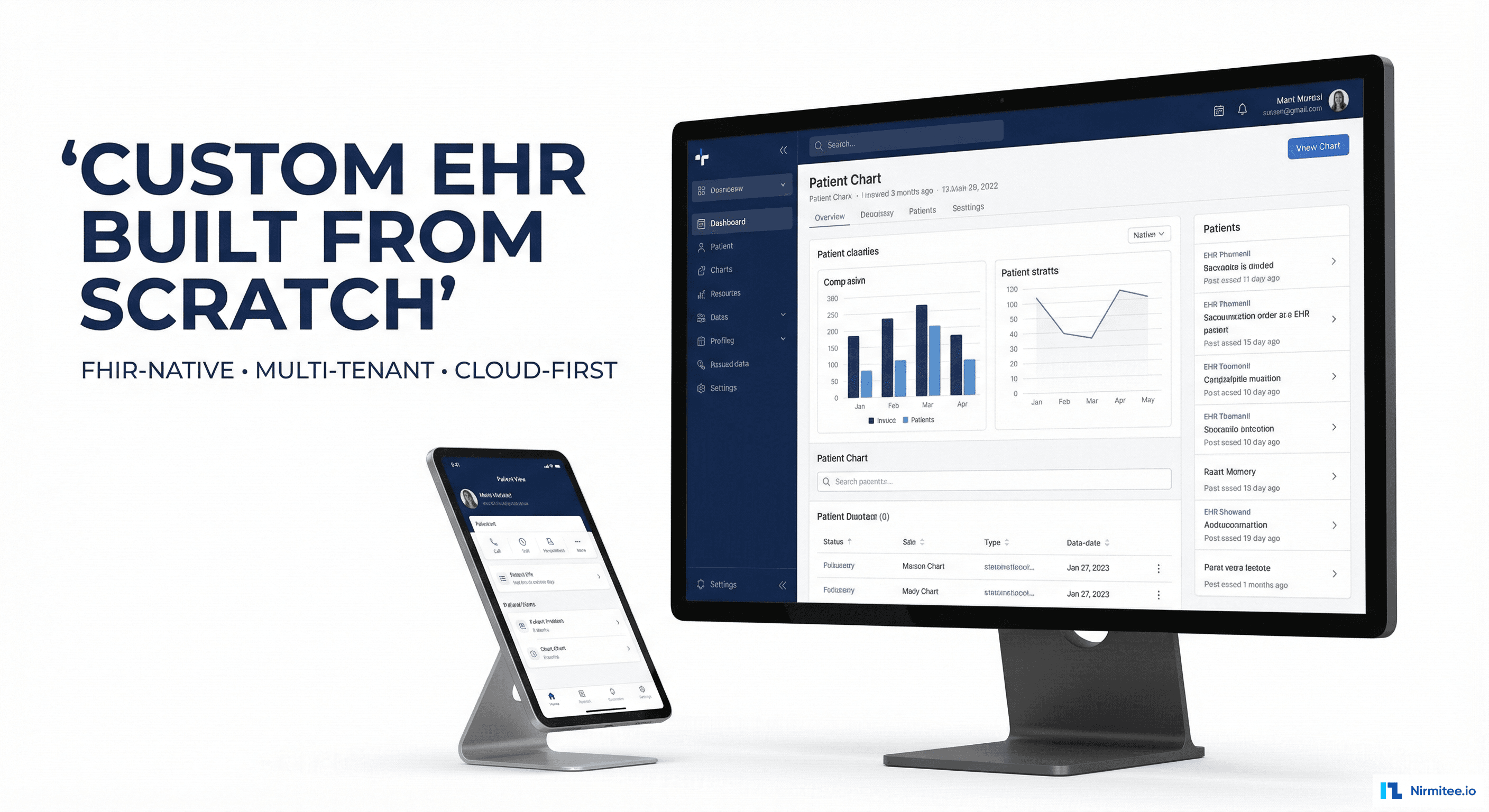
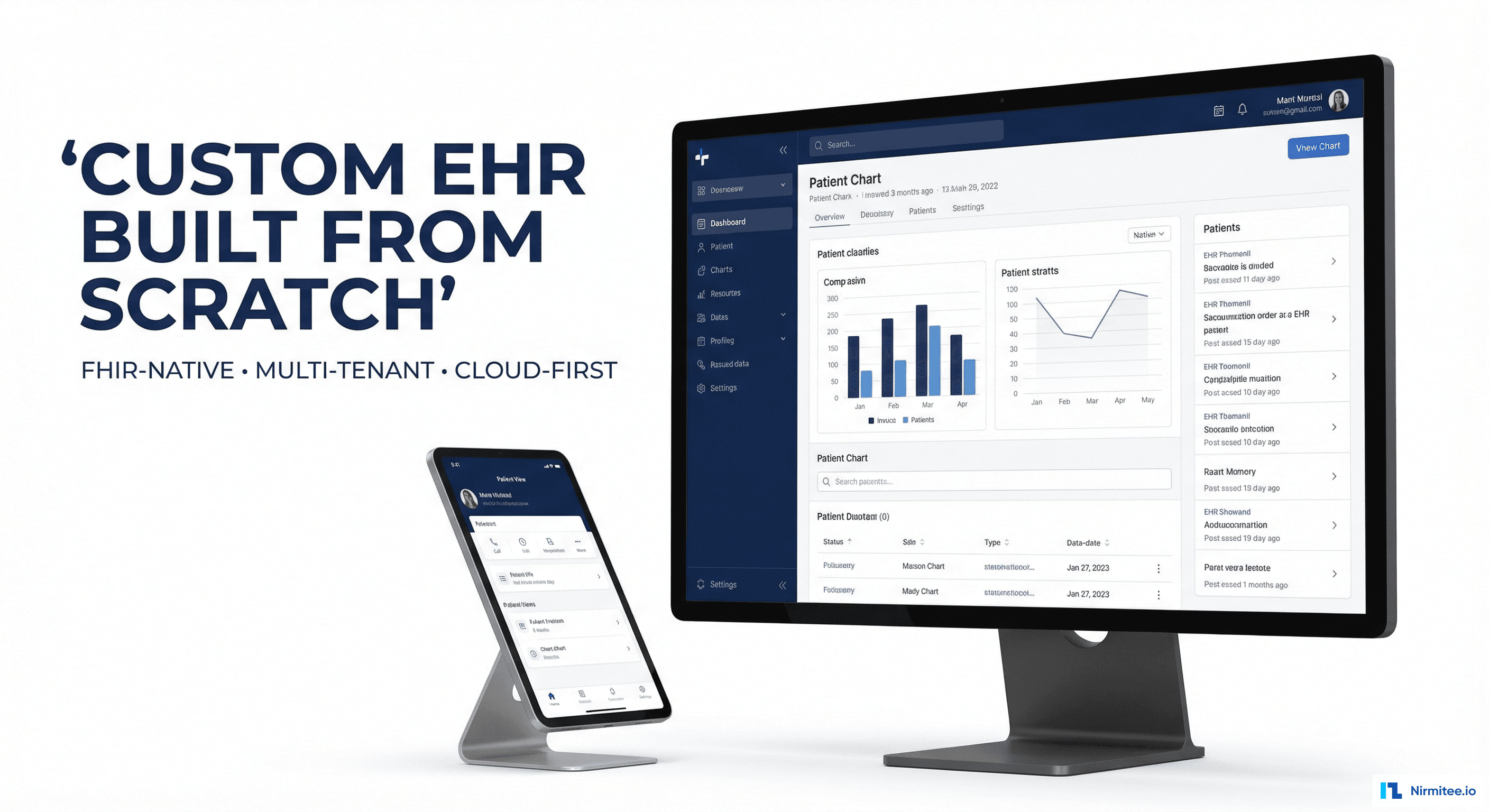
The patient chart is the clinical command center — a three-panel layout inspired by the best of Epic and Cerner, but built with modern web technologies:
- Left panel: patient demographics, photo, insurance, allergy banner (red for drug allergies, yellow for food/environment), advance directives, emergency contacts
- Center panel: tabbed content area — Encounters (visit history), Problems (active/resolved), Medications, Allergies, Immunizations, Documents, Referrals. Each tab loads instantly (no page refresh — SPA architecture)
- Right panel: quick-glance sidebar showing active medications, problem list, upcoming appointments, recent lab results with sparkline trends, and care team members
The chart loads in under 800ms — compared to 3-5 seconds typical of legacy EHRs. GraphQL queries fetch exactly the data each panel needs, nothing more.
Clinical Encounter Documentation
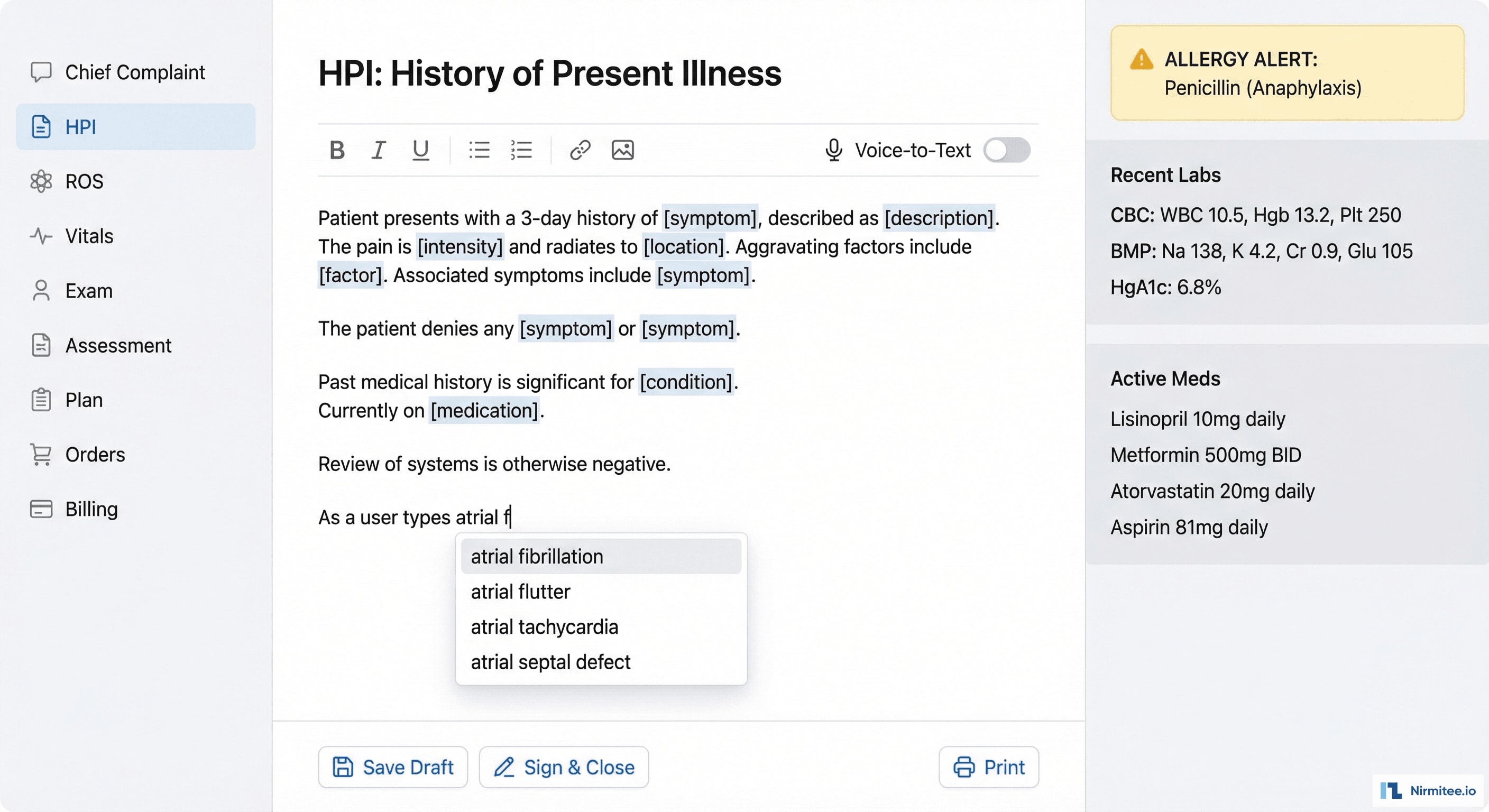
The encounter documentation system combines structured data capture with the flexibility of free-text narrative:
- SOAP note editor: rich text with medical term autocomplete (powered by SNOMED CT and RxNorm lookups), voice-to-text toggle, smart templates that pre-populate based on visit type and chief complaint
- Structured sections: Chief Complaint, HPI (with onset/duration/severity widgets), Review of Systems (clickable checkboxes by body system), Physical Exam (normal/abnormal toggles), Assessment (ICD-10 search with favorites), Plan (order entry, referrals, follow-up)
- Clinical decision support: real-time alerts as the provider documents — drug interactions, preventive care reminders, clinical guideline suggestions
- Auto-save: every keystroke saved. Never lose documentation to a browser crash or session timeout.
Architecture: Microservices + FHIR-Native
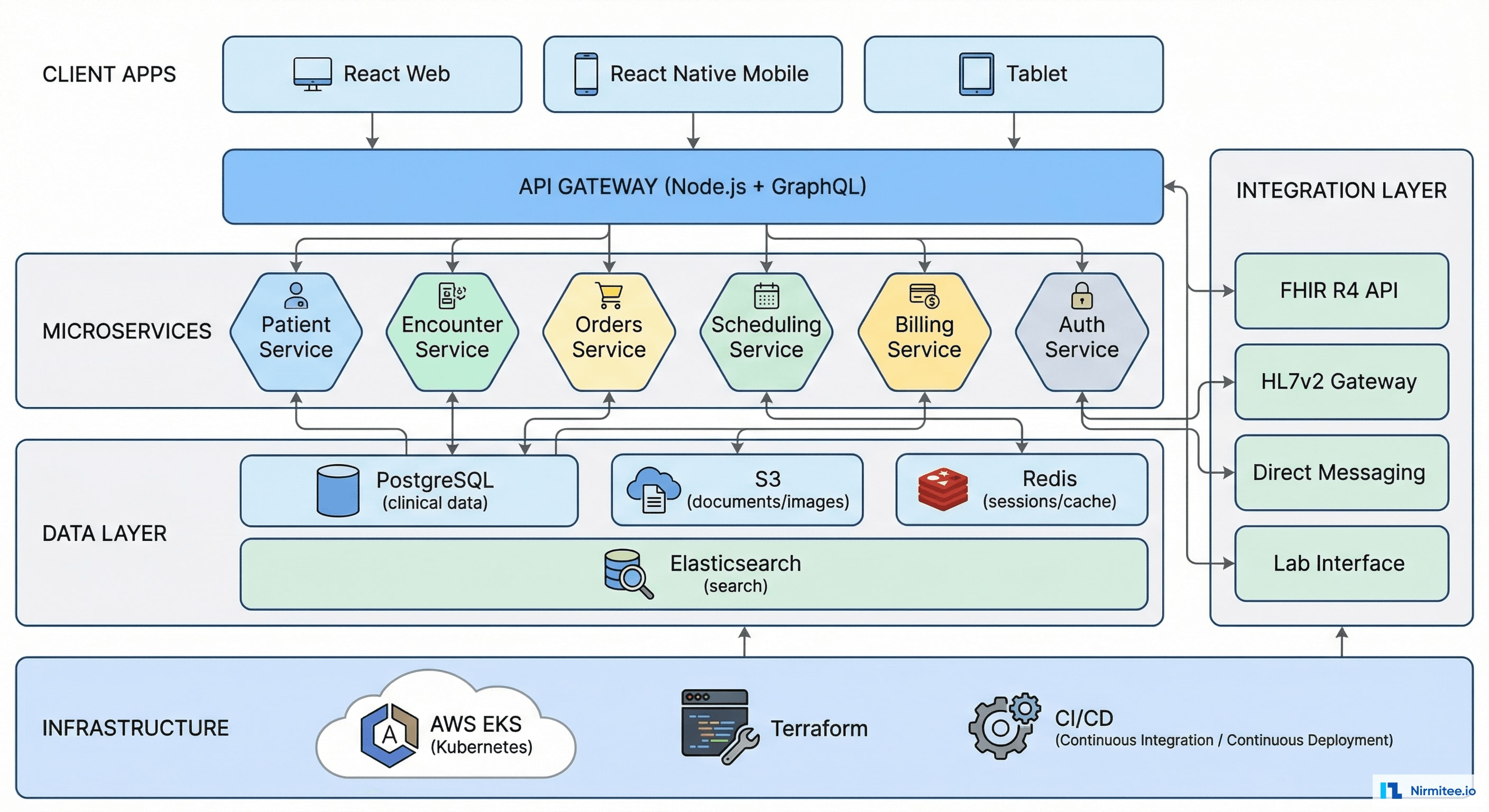
Why Microservices for an EHR?
Traditional EHRs are monoliths — one massive codebase that handles everything. When the scheduling module needs a fix, you risk breaking the charting module. We decomposed the EHR into independent services:
| Service | Responsibility | Data Store | API |
|---|---|---|---|
| Patient Service | Demographics, identity, merge/unmerge | PostgreSQL | GraphQL + FHIR |
| Encounter Service | Visit management, documentation, templates | PostgreSQL | GraphQL |
| Orders Service | CPOE, lab orders, imaging, referrals | PostgreSQL | GraphQL + FHIR |
| Scheduling Service | Appointments, availability, waitlist | PostgreSQL + Redis | GraphQL |
| Billing Service | Charge capture, coding, claim generation | PostgreSQL | GraphQL |
| Auth Service | Authentication, RBAC, audit logging | PostgreSQL + Redis | REST |
| FHIR Gateway | External FHIR R4 API for integrations | Reads from all services | FHIR R4 REST |
Each service is independently deployable, scalable, and testable. The Patient Service can be updated without touching Scheduling. Database migrations happen per-service, not globally.
Order Entry (CPOE)

The Computerized Physician Order Entry system handles all clinical orders:
- Universal search: type "metformin" and get medication results, or "CBC" for lab orders, or "chest x-ray" for imaging — all in one search bar with type-ahead
- Smart defaults: when ordering metformin, the system pre-fills common dosage (500mg), route (oral), frequency (BID), with one-click acceptance
- Drug interaction checking: real-time alerts against the patient's current medication list. Severity-graded: critical (blocks order), major (requires override reason), minor (informational)
- Order sets: pre-built bundles for common scenarios — "New Diabetic Workup" orders HbA1c + fasting glucose + lipid panel + kidney function in one click
- Duplicate order detection: alerts if the same lab was ordered in the last 7 days (configurable)
Scheduling
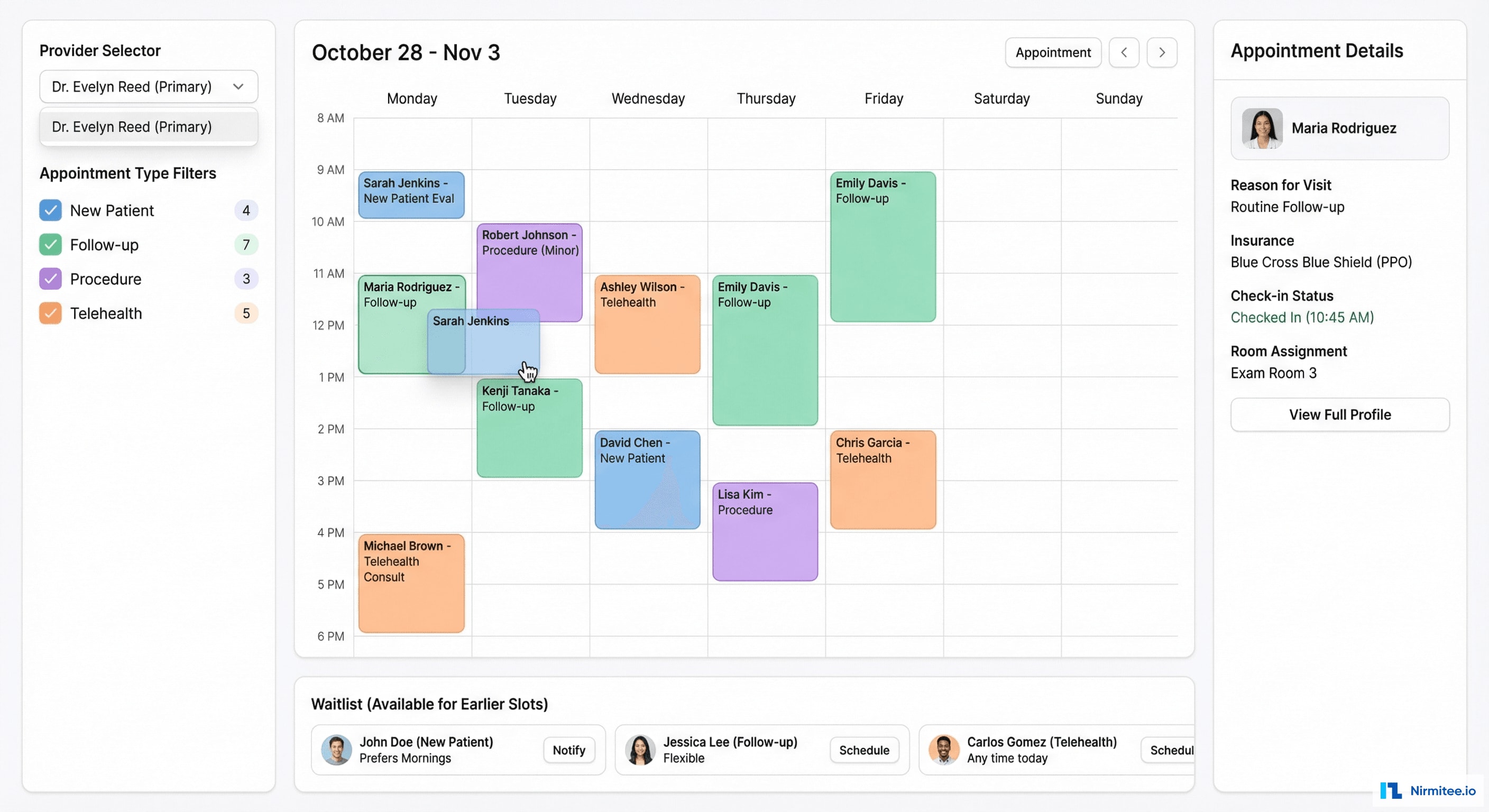
The scheduling module manages the practice's appointment workflow:
- Calendar view: day/week/month views with color-coded appointment types and provider columns
- Drag-and-drop rescheduling: move an appointment to a different time/provider without navigating away
- Waitlist management: patients who want an earlier appointment are queued and auto-notified when cancellations open slots
- Telehealth integration: appointment type "telehealth" auto-generates a video call link and includes it in the patient notification
- Check-in workflow: front desk can check patients in, assign exam rooms, and track wait times — all visible to the provider
Lab Results
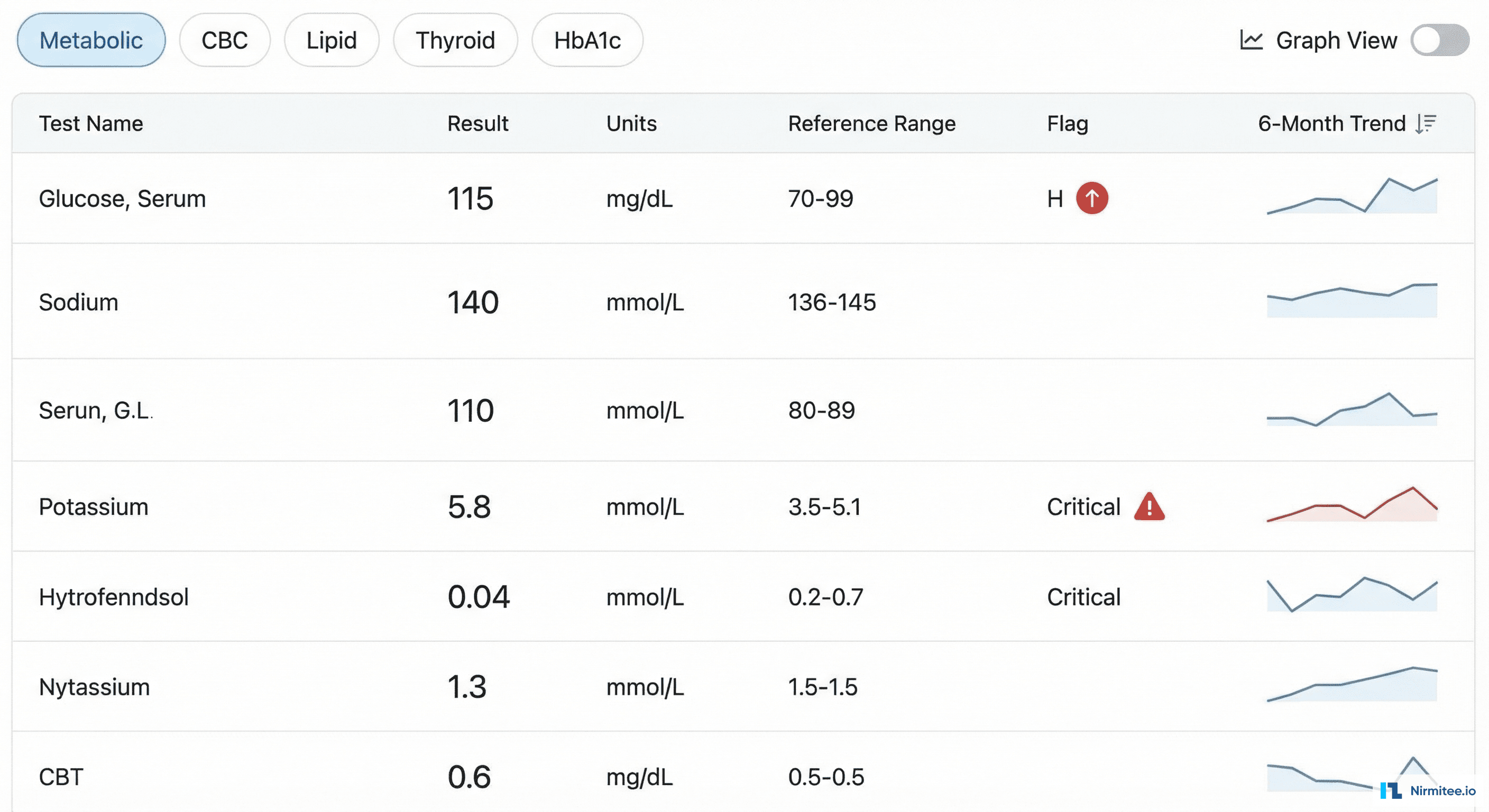
Lab results are presented with context, not just raw numbers:
- Sparkline trends: every result shows a mini chart of its 6-month history inline — instantly see if that creatinine is stable, rising, or falling
- Critical value highlighting: results outside the critical range are highlighted in red with an alert icon and auto-notification to the ordering provider
- Panel grouping: results organized by panel (metabolic, CBC, lipid, thyroid) with tabbed navigation
- Graph view: toggle any result to a full-screen trend chart for detailed longitudinal analysis
- Lab interface: inbound results via HL7 v2 ORU messages from reference labs, auto-matched to the patient and ordering provider
Billing & Claims
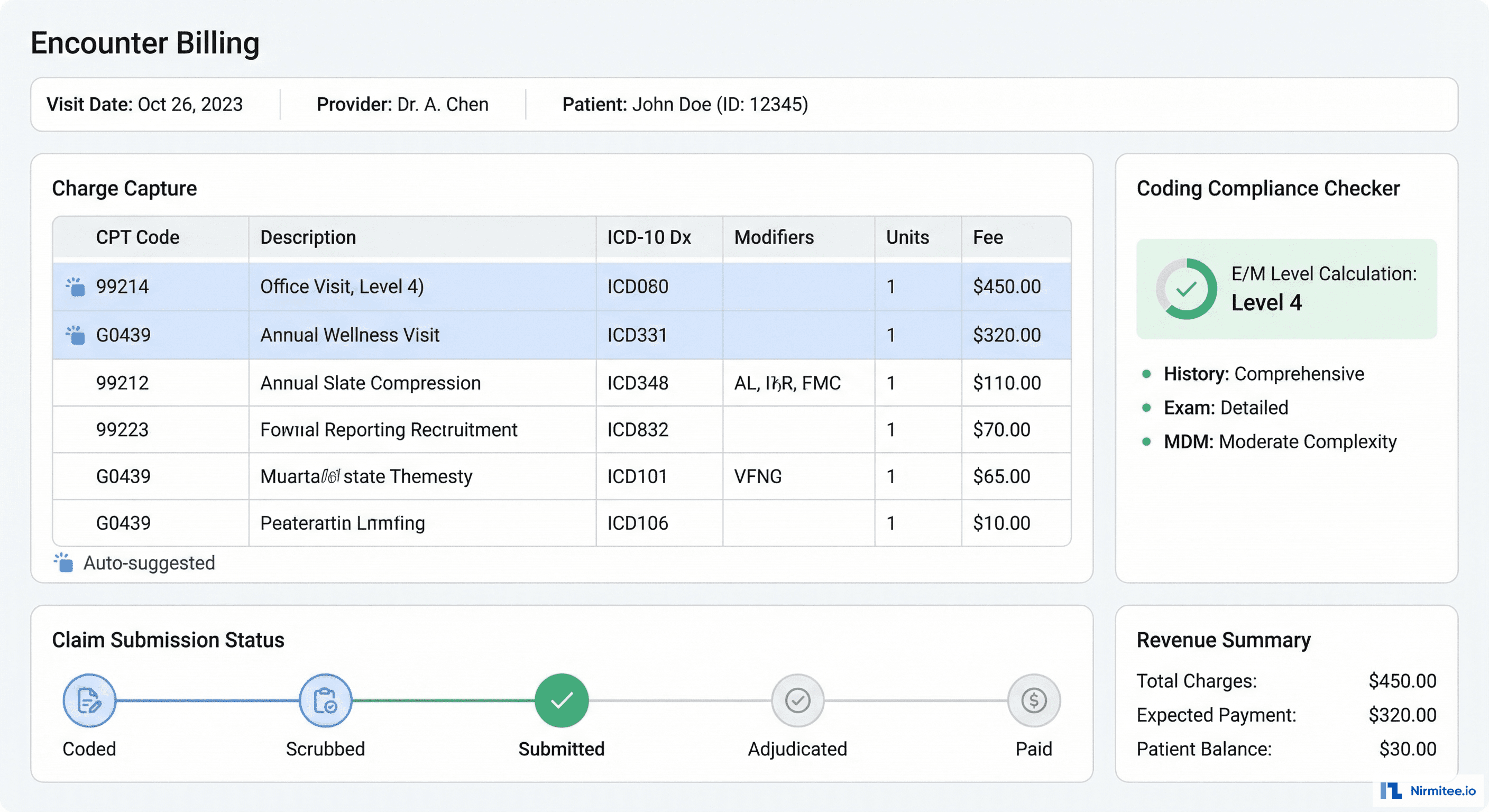
Integrated billing eliminates the "documentation in one system, billing in another" gap:
- Auto-suggested codes: based on the encounter documentation, the system suggests CPT and ICD-10 codes. E/M level auto-calculated from documentation complexity (MDM-based).
- Coding compliance: real-time validation against CCI edits, MUE limits, and LCD/NCD policies before claim submission
- Claim lifecycle: track every claim from coding through submission, adjudication, and payment with status timeline
- Clearinghouse integration: 837 claim submission and 835 remittance processing via WayStar API
Results
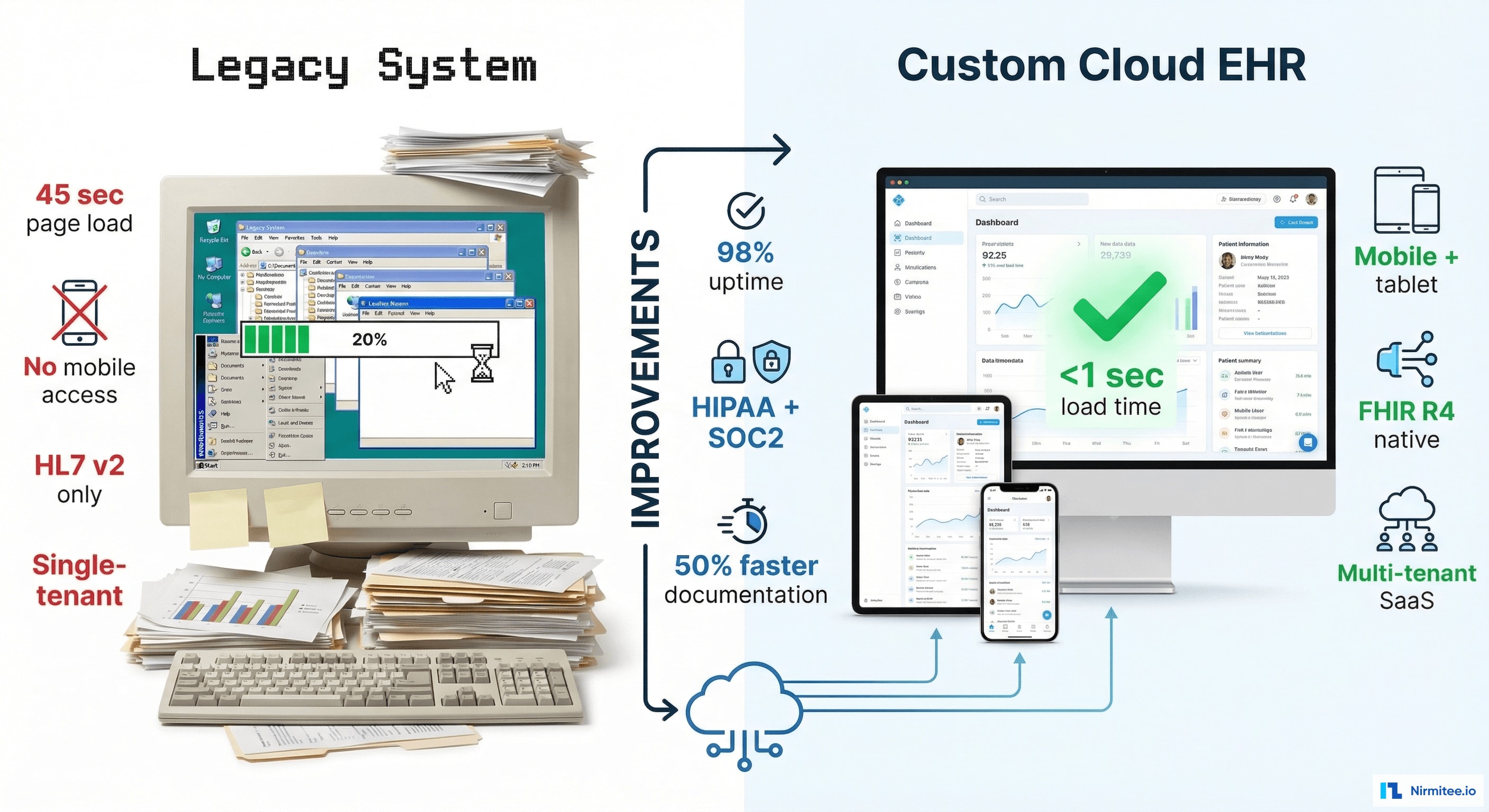
| Metric | Result |
|---|---|
| Build time | 8 months (architecture to production) |
| Team size | 6 engineers (3 backend, 2 frontend, 1 DevOps) |
| Clinics live | 3 locations, 45 providers, 12,000+ active patients |
| Page load time | <800ms (vs. 3-5 sec legacy EHRs) |
| Documentation time | 50% faster than previous EHR (smart templates + autocomplete) |
| Uptime | 99.95% (Kubernetes auto-healing) |
| FHIR API coverage | 23 resource types exposed via native FHIR R4 API |
| Coding accuracy | 94% auto-suggested code acceptance rate |
| Cost vs. Epic | ~70% less than comparable Epic Community Connect implementation |
Technology Stack
| Layer | Technology |
|---|---|
| Frontend | React + TypeScript + Tailwind CSS |
| Mobile | React Native (provider + patient apps) |
| API Layer | Node.js + GraphQL (Apollo Server) |
| FHIR Gateway | HAPI FHIR (Java) for external FHIR R4 API |
| Database | PostgreSQL (per-service schemas) |
| Cache | Redis (sessions, rate limiting, scheduling locks) |
| Search | Elasticsearch (patient search, medication lookup) |
| File Storage | AWS S3 (documents, images, scanned records) |
| Infrastructure | AWS EKS (Kubernetes), Terraform, GitHub Actions CI/CD |
| Monitoring | Datadog (APM, logs, infrastructure) |
Timeline
| Month | Milestone |
|---|---|
| Month 1-2 | Architecture, auth service, patient service, database schemas, CI/CD pipeline, FHIR gateway skeleton |
| Month 3-4 | Encounter documentation (SOAP editor), problem list, medication management, allergy tracking |
| Month 5-6 | CPOE, scheduling, lab results interface, clinical decision support alerts |
| Month 7 | Billing module, clearinghouse integration, patient portal, mobile apps |
| Month 8 | HIPAA security audit, penetration testing, pilot deployment at first clinic, staff training |
Lessons Learned
- GraphQL was the right choice for EHR. A patient chart needs different data in different views — the chart summary needs demographics + problems + meds, while the encounter view needs visit history + templates. GraphQL lets each view request exactly what it needs, eliminating over-fetching that makes legacy EHRs slow.
- FHIR-native storage pays dividends. Every external integration — lab interfaces, clearinghouses, patient apps, research queries — was trivial because the data was already in FHIR format. No transformation layer needed.
- Clinical decision support from day one. We built CDS into the encounter service from the start, not as an afterthought. Drug interaction checking, preventive care reminders, and coding suggestions are core features, not add-ons.
- Build the billing module early. We initially planned billing for Month 7-8. Clinicians started using the system in Month 6 and immediately needed billing. Moving billing earlier would have enabled a smoother clinical pilot.
Share
Related Case Studies
AI-Powered Personalized Oncology Treatment Platform: A Technical Case Study
Building a Patient-First Health Record Platform: Connecting 12 US EMRs Into One View