If you've built your ABDM integration — completed M1, M2, and M3 milestones in the sandbox — congratulations. The development is done. But here's what catches most teams off guard: building the integration is only half the battle.
The other half? Navigating the certification and approval pipeline that stands between your sandbox success and a live production deployment. And if you've tried to figure this out from ABDM's official documentation, you know the problem — it's scattered across multiple pages, PDFs, webinars, and forum posts with no single, clear path.
This guide fixes that. We'll walk you through every stage of the ABDM certification process — from the moment your M3 milestone is approved to the day you go live in production. No ambiguity, no assumptions, no missing steps.
Whether you're a CTO navigating the technical requirements, a founder planning timelines, or a compliance lead preparing documentation — this is the only guide you need.
Quick Recap: The Development Milestones (M1, M2, M3)
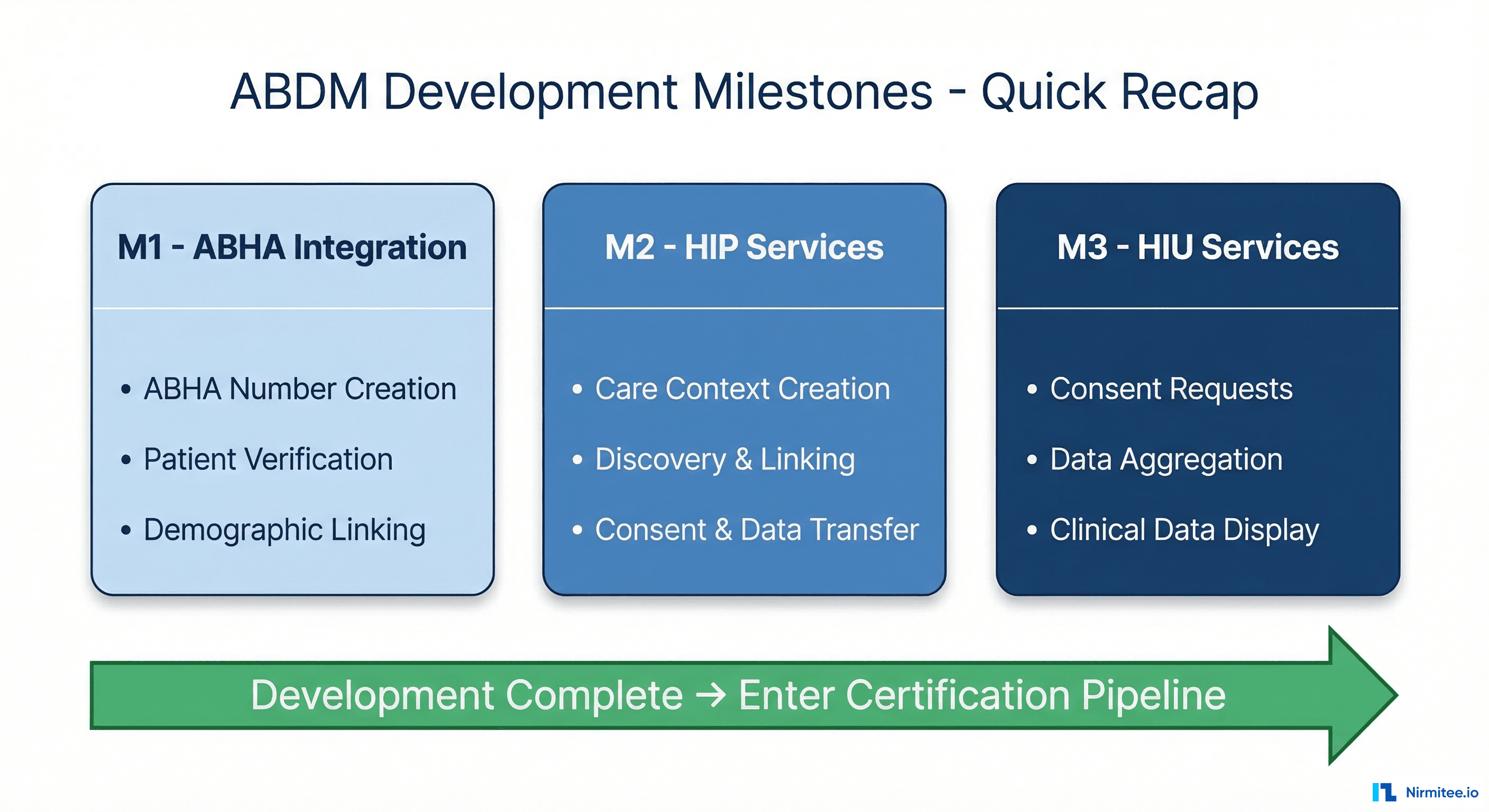
Before we dive into certification, let's establish where you are. ABDM integration follows three development milestones, each building on the previous one:
Milestone 1 (M1) — ABHA Integration: Your application can create ABHA numbers, capture and verify patient identities via OTP or QR code, and link patients to their ABHA profiles. This is the foundation — patient registration with ABDM.
Milestone 2 (M2) — HIP Services: Your system acts as a Health Information Provider. It creates care contexts after consultations, responds to discovery requests from Consent Managers, handles consent artifacts, and transfers encrypted FHIR-compliant health records to authorized requesters.
Milestone 3 (M3) — HIU Services: Your system flips roles and becomes a Health Information User. It can request consent from patients, aggregate health records from multiple facilities across the ABDM network, and present organized clinical data to healthcare providers.
For a deep technical walkthrough of each milestone, read our ABDM Integration Milestones M1 to M4 guide. For step-by-step sandbox setup, see our Step-by-Step ABDM Integration Guide.
Once all three milestones are approved in the sandbox environment, you enter the certification pipeline. This is where most teams get confused — and where this guide takes over.
The Certification Pipeline: What Happens After M3
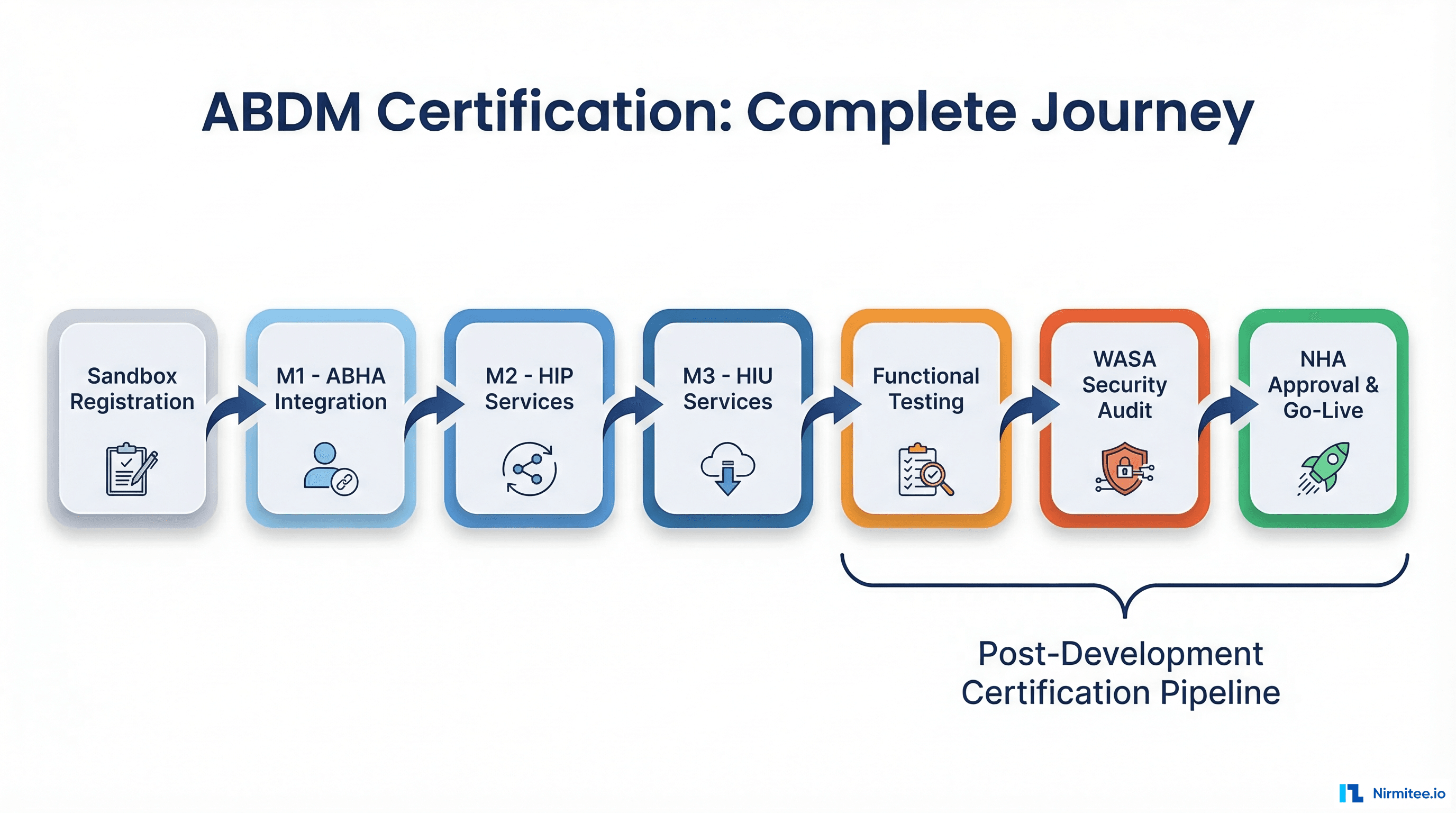
The ABDM sandbox exit process is a four-stage approval gate. Each stage must be completed sequentially — you cannot skip ahead or run them in parallel. Here's the high-level flow before we break each one down:
- Functional Testing — Third-party validation of your M1/M2/M3 implementation
- WASA (Web Application Security Audit) — Security certification by a CERT-IN empanelled agency
- NHA Document Submission & Committee Review — Bundle all reports and get final approval
- Production Access & Go-Live — Receive production credentials and deploy
Let's walk through each stage in detail.
Stage 1: Functional Testing — The First Gate
This is the first formal checkpoint after your sandbox development is complete. Many teams underestimate this stage, assuming it's a rubber stamp. It is not. The empanelled testing agencies are thorough, and applications regularly fail on their first attempt.
What Is Functional Testing?
Functional testing is a comprehensive, independent evaluation of your application against every ABDM workflow requirement. An NHA-authorized third-party agency tests every M1, M2, and M3 capability your application claims to support, along with non-functional aspects like performance and reliability.
The goal is to verify that your integration actually works as specified — not just in your own testing, but under the scrutiny of an independent evaluator following NHA's official test case matrices.
Who Conducts It?
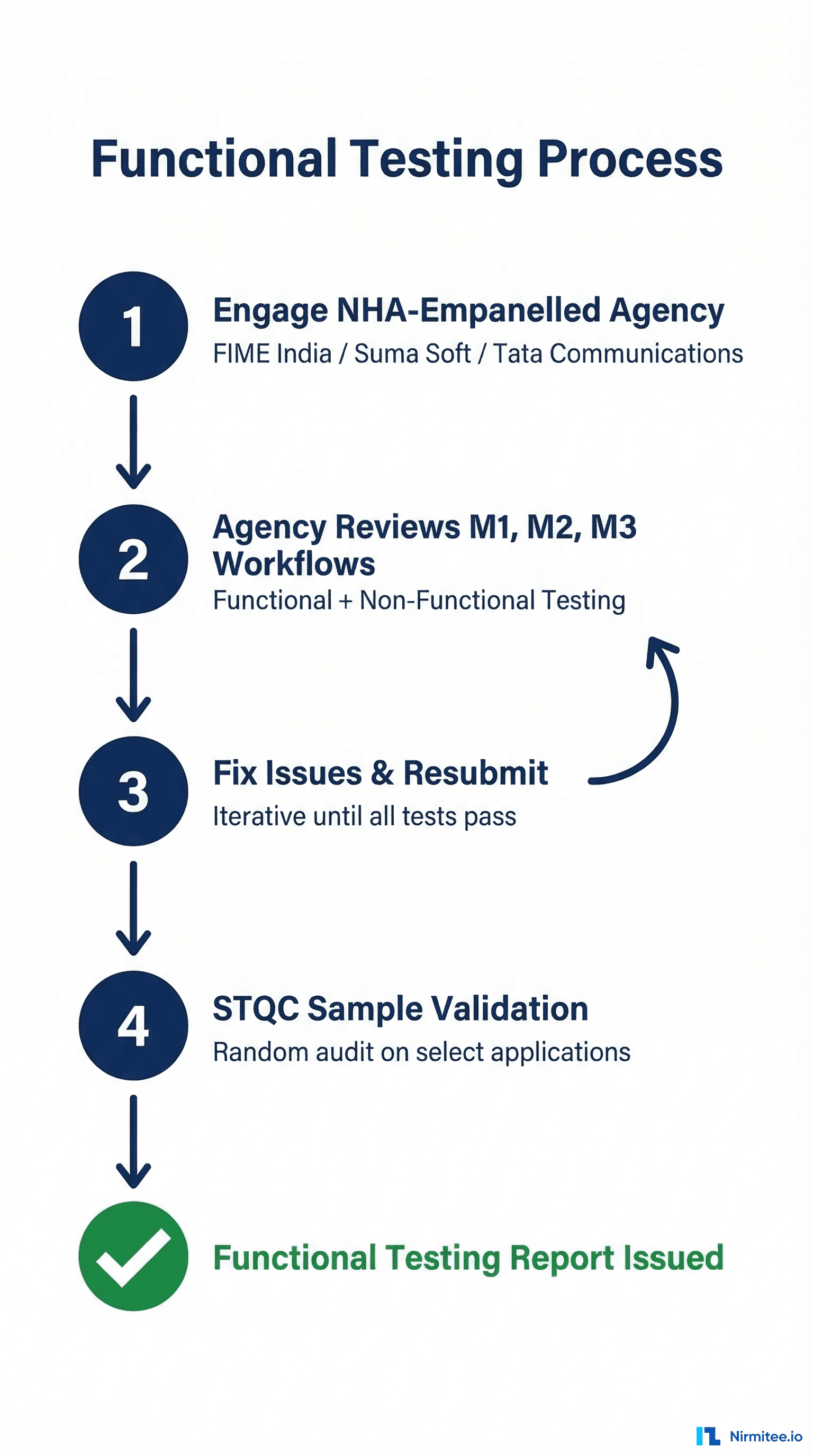
Since August 5, 2022, NHA has authorized exactly three empanelled agencies to conduct functional testing. You must use one of these — no exceptions:
- M/s FIME India Pvt. Ltd.
- M/s Suma Soft Pvt. Ltd.
- M/s Tata Communications
You cannot use any other testing organization, and you cannot self-certify. This applies to all new integrators and any existing integrators who were not certified before the August 2022 cutoff.
How the Process Works
- Engage an empanelled agency: Reach out to any of the three agencies above. This is a paid engagement — the integrator bears the cost.
- Agency reviews your M1/M2/M3 workflows: They test against NHA's official test case templates covering every functional requirement — ABHA creation, verification, discovery, consent handling, data transfer, and more.
- Non-functional testing: Performance, reliability, and edge cases are also evaluated.
- Fix and resubmit: If issues are found (and they often are), you fix them and resubmit for retesting. This is iterative until all test cases pass.
- STQC sample validation: The Standardisation Testing and Quality Certification (STQC) directorate may perform additional validation testing on a sample of applications. This is random — you may or may not be selected.
- Report issued: Once everything passes, the agency issues a Functional Testing Report documenting all tested integrations and their results.
What Gets Tested — Specific Areas
The testing is granular. Here's what the agencies evaluate across each milestone:
M1 Testing:
- ABHA number creation via Aadhaar and mobile
- ABHA capture via QR code scan (no OTP required)
- ABHA verification via mobile OTP and Aadhaar OTP
- Demographic field freezing after initial capture
- Linking token management via Gateway APIs
- Both new patient and existing patient linking workflows
M2 Testing:
- Care context creation for all supported record types (diagnostic reports, discharge summaries, OPD notes, prescriptions, immunization records)
- Discovery response to Consent Manager requests
- Patient-initiated linking of historical records
- Consent artifact acknowledgment and storage
- Encrypted FHIR-compliant data transfer
- SMS notification with deep links to ABHA app
M3 Testing:
- Consent request creation as HIU
- Consent request delivery to patient's ABHA app
- Health data reception from multiple HIPs
- Data parsing, structuring, and display to providers
- Consent duration parameter enforcement
How to Prepare
Don't wait until the testing agency shows up to find out you have gaps. Run through NHA's draft test case templates (available on the sandbox portal) yourself. Test every workflow end-to-end in the sandbox. The most common failure area is M2 — specifically the consent flow and data transfer. Test your consent flow end-to-end with the actual ABHA mobile app before engaging the agency.
Timeline
Functional testing typically takes 2 to 4 weeks, depending on your application's complexity and how many issues are found in the first pass. If you fail and need to fix and resubmit, add another 1-2 weeks per cycle.
Stage 2: WASA — Web Application Security Audit
Once your application passes functional testing, the next gate is WASA — the Web Application Security Audit. This is the security certification that many people confuse with "VASA" (it's WASA — Web Application Security Audit).
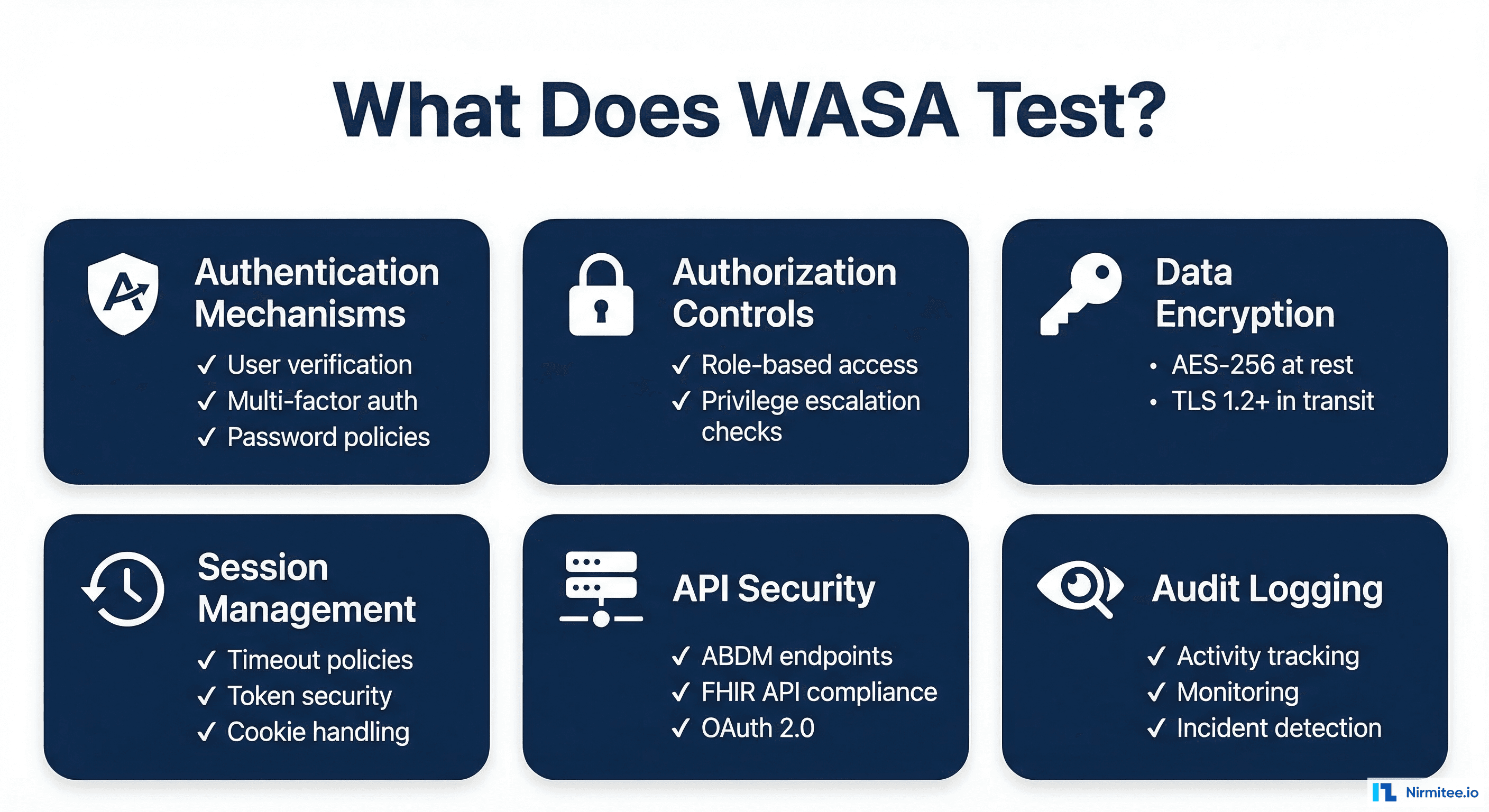
WASA is not a checkbox exercise. It's a rigorous, multi-phase security assessment that verifies your application meets the security standards required by ABDM's Health Data Management (HDM) Policy (originally published 2020, revised 2022). You're handling sensitive patient health data — NHA takes this seriously.
Who Can Conduct WASA?
WASA must be conducted by a CERT-IN (Indian Computer Emergency Response Team) empanelled agency. This is non-negotiable. Internal security teams, non-empanelled auditors, or generic penetration testing firms cannot issue a valid WASA report.
How to find a CERT-IN empanelled agency:
- Visit the official CERT-IN website at cert-in.org.in
- Navigate to the Cyber Security Assurance section
- Select "Empanelment by CERT-IN" from the dropdown
- Access the current list of certified security testing providers
While earlier ABDM guidelines also referenced STQC-accredited agencies as an alternative, current guidance strongly emphasizes CERT-IN empanelled agencies as the required standard for WASA. Always verify the latest requirements with NHA before engaging an auditor.
The 6-Step WASA Process
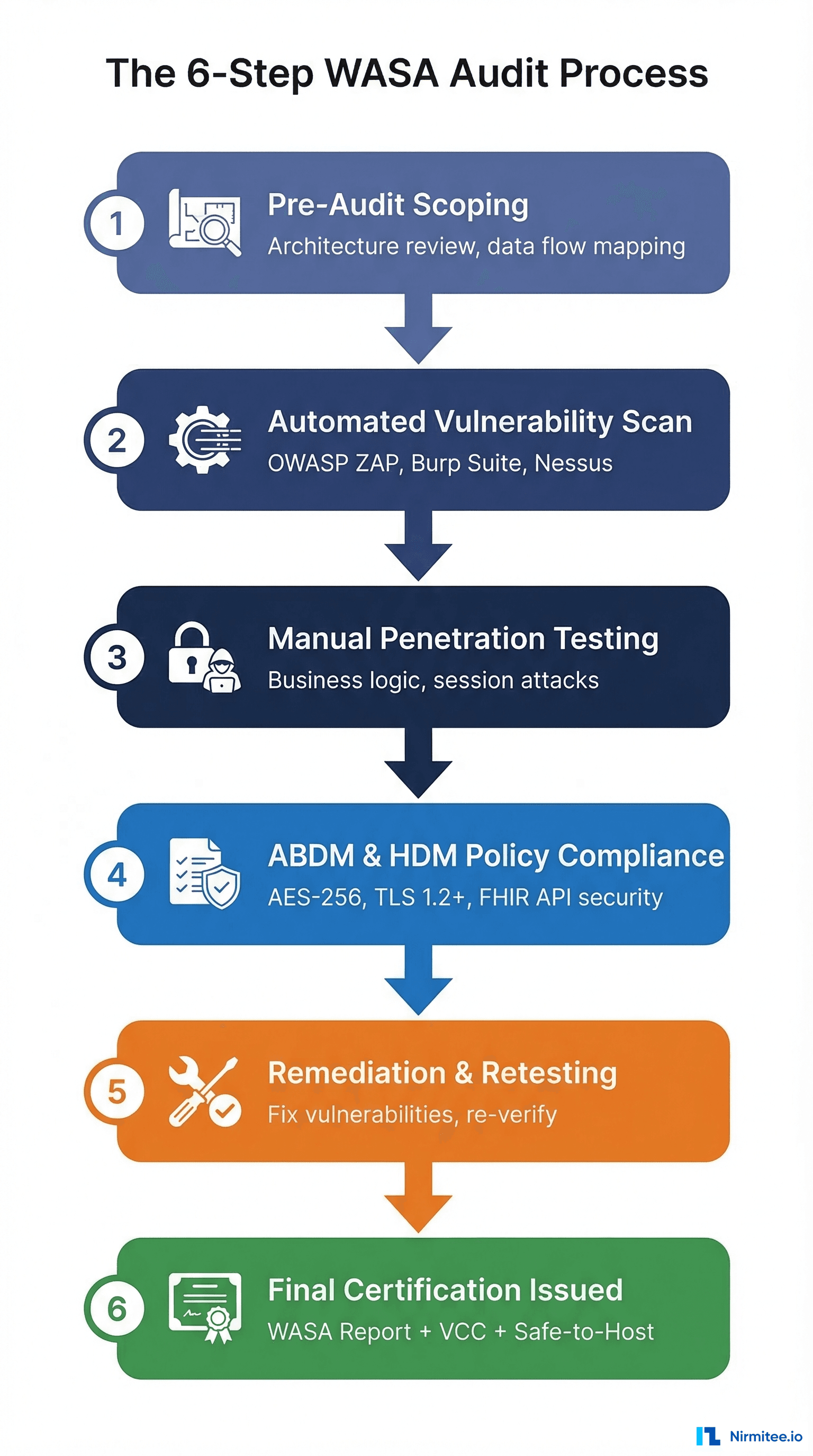
A WASA audit follows a structured, six-phase process:
Step 1: Pre-Audit Assessment & Scoping
The auditor reviews your system architecture, data flows, and ABDM integration points. They define the assessment boundaries and produce an Audit Scope Document (ASD). This document maps out exactly what will be tested — every API endpoint, every data storage mechanism, every authentication pathway.
Step 2: Automated Vulnerability Assessment
Using industry-standard tools like Burp Suite Pro, OWASP ZAP, and Nessus, the auditors scan your application for known vulnerabilities. This covers the OWASP Top 10, API weaknesses, misconfigured headers, exposed endpoints, and common web application flaws. The output is a Preliminary Vulnerability Report.
Step 3: Manual Penetration Testing
This is where automated tools can't reach. Security experts manually simulate real-world attacks to identify:
- Business logic flaws
- Session management vulnerabilities
- Access control bypasses
- Privilege escalation paths
- Authentication weaknesses
- Data exposure through edge cases
The output is a Comprehensive Vulnerability Report (CVR) with proof-of-concept for each finding.
Step 4: ABDM & HDM Policy Compliance Validation
This step is ABDM-specific. The auditor verifies your application meets the exact security requirements mandated by the Health Data Management Policy:
- Encryption at rest: AES-256 for stored health data
- Encryption in transit: TLS 1.2 or higher for all communications
- Access controls: Role-based access with least-privilege enforcement
- OAuth 2.0: Proper implementation for ABDM API authentication
- FHIR API security: Secure handling of FHIR resources
- Audit logging: Comprehensive activity logging and monitoring
- Privacy-by-design: Data minimization and purpose limitation
The output is a Compliance Checklist Report (CCR).
Step 5: Remediation & Retesting
If vulnerabilities are found (they almost always are), your development team fixes them. The auditor provides technical guidance on remediation. After fixes are implemented, the auditor retests to verify each vulnerability has been properly closed. This cycle may repeat until all critical and high-severity issues are resolved.
The output is a Closure Report confirming remediation.
Step 6: Final Security Certification
Once all issues are resolved and retesting passes, the CERT-IN empanelled agency issues three critical documents:
- Final WASA Report — Signed by the certified auditor, documenting the entire audit process and findings
- Vulnerability Closure Certificate (VCC) — Confirms all identified vulnerabilities have been remediated
- Safe-to-Host Certificate — The golden ticket. This is the mandatory document that proves your application meets ABDM's security standards for production deployment
The Safe-to-Host Certificate is what NHA requires to grant you production access. Without it, you cannot proceed.
How to Prepare for WASA
Smart teams don't wait for the WASA auditor to find problems. Before engaging a CERT-IN agency:
- Run your own OWASP Top 10 scan — fix the low-hanging fruit yourself
- Verify your encryption implementation — AES-256 at rest, TLS 1.2+ in transit
- Review all API endpoints for authentication and authorization
- Check session management — timeouts, token rotation, secure cookie flags
- Read the "NDHM Secure Application Development Reference Document" (available from NHA) before writing security code
- Ensure audit logging is comprehensive — every access, every modification, every failed attempt
Timeline
WASA typically takes 3 to 6 weeks, including the remediation and retesting cycle. If your application has significant security gaps, the remediation phase can extend this considerably. Applications that prepare well (pre-audit self-scanning) often complete in 3-4 weeks.
Stage 3: NHA Document Submission & Committee Review
You've passed functional testing. You've cleared WASA. Now you need to package everything and submit it to NHA's internal evaluation committee for final approval.
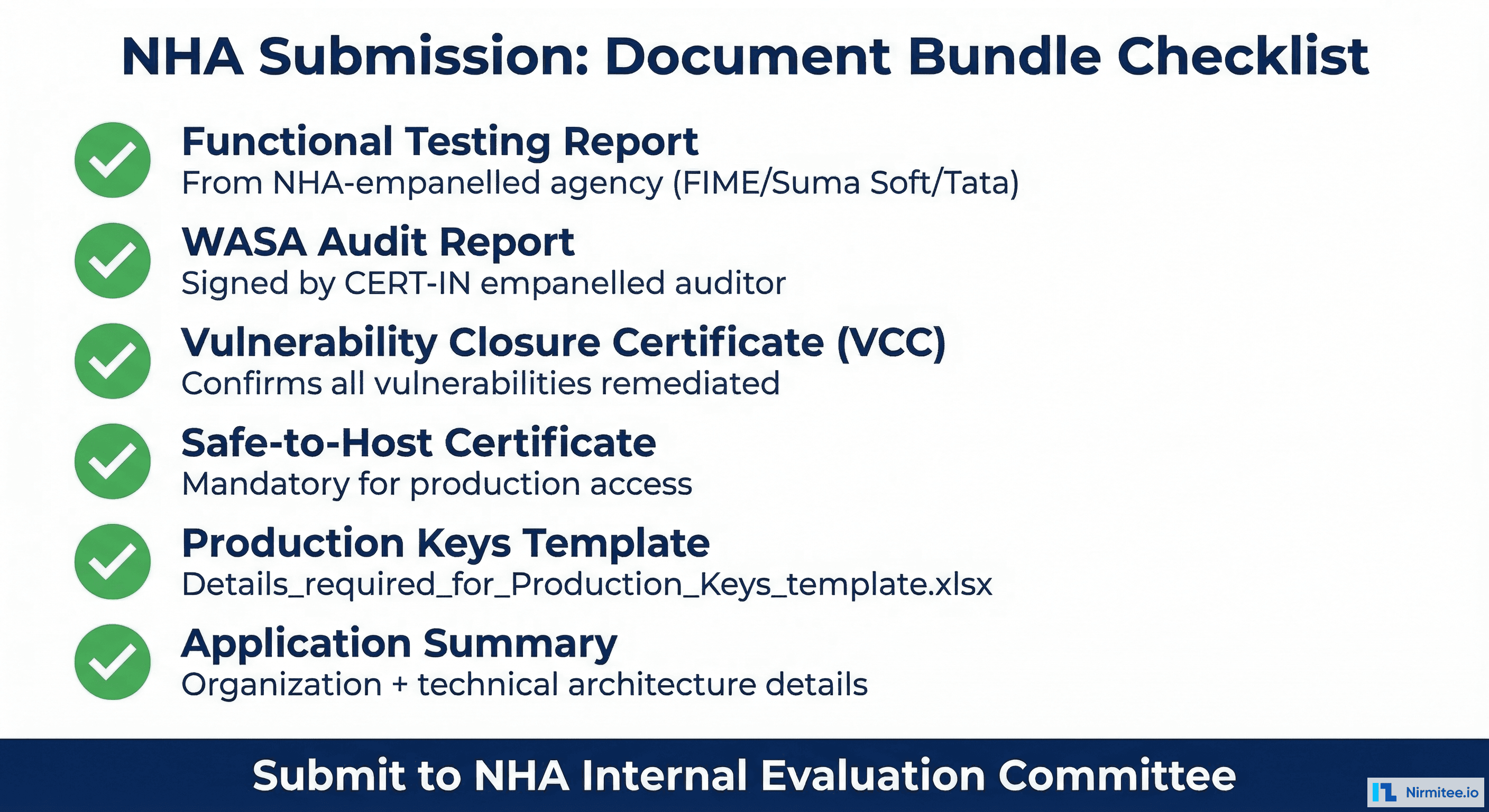
The Document Bundle
NHA requires a specific set of documents before they'll review your application for production access. Every document must be present — an incomplete submission delays the entire process:
- Functional Testing Report — From the NHA-empanelled agency (FIME India, Suma Soft, or Tata Communications). This proves your M1/M2/M3 implementation works correctly.
- WASA Audit Report — The final report signed by your CERT-IN empanelled auditor. Documents the complete security assessment.
- Vulnerability Closure Certificate (VCC) — Confirms all security vulnerabilities identified during WASA have been fixed and verified.
- Safe-to-Host Certificate — The security clearance from your CERT-IN agency. This is the single most critical document.
- Production Keys Template — A filled-out Excel template (
Details_required_for_Production_Keys_template.xlsx) with comprehensive organizational and technical details about your application and deployment. - Application Summary — Detailed overview of your application architecture, deployment infrastructure, and integration scope.
The NHA Review Process
An internal NHA evaluation committee reviews your complete submission. They're looking for:
- Complete documentation — no missing reports or certificates
- Consistency between functional testing results and WASA scope
- Adequate security posture for handling health data in production
- Proper organizational details and deployment readiness
This is not a rubber stamp, but it's also not adversarial. If your functional testing and WASA reports are clean, this stage is straightforward.
Timeline
NHA committee review typically takes 1 to 3 weeks. Incomplete submissions are the #1 cause of delays at this stage — make sure every document is present before submitting.
Stage 4: Production Access & Go-Live
The NHA committee has approved your application. Here's what happens next.
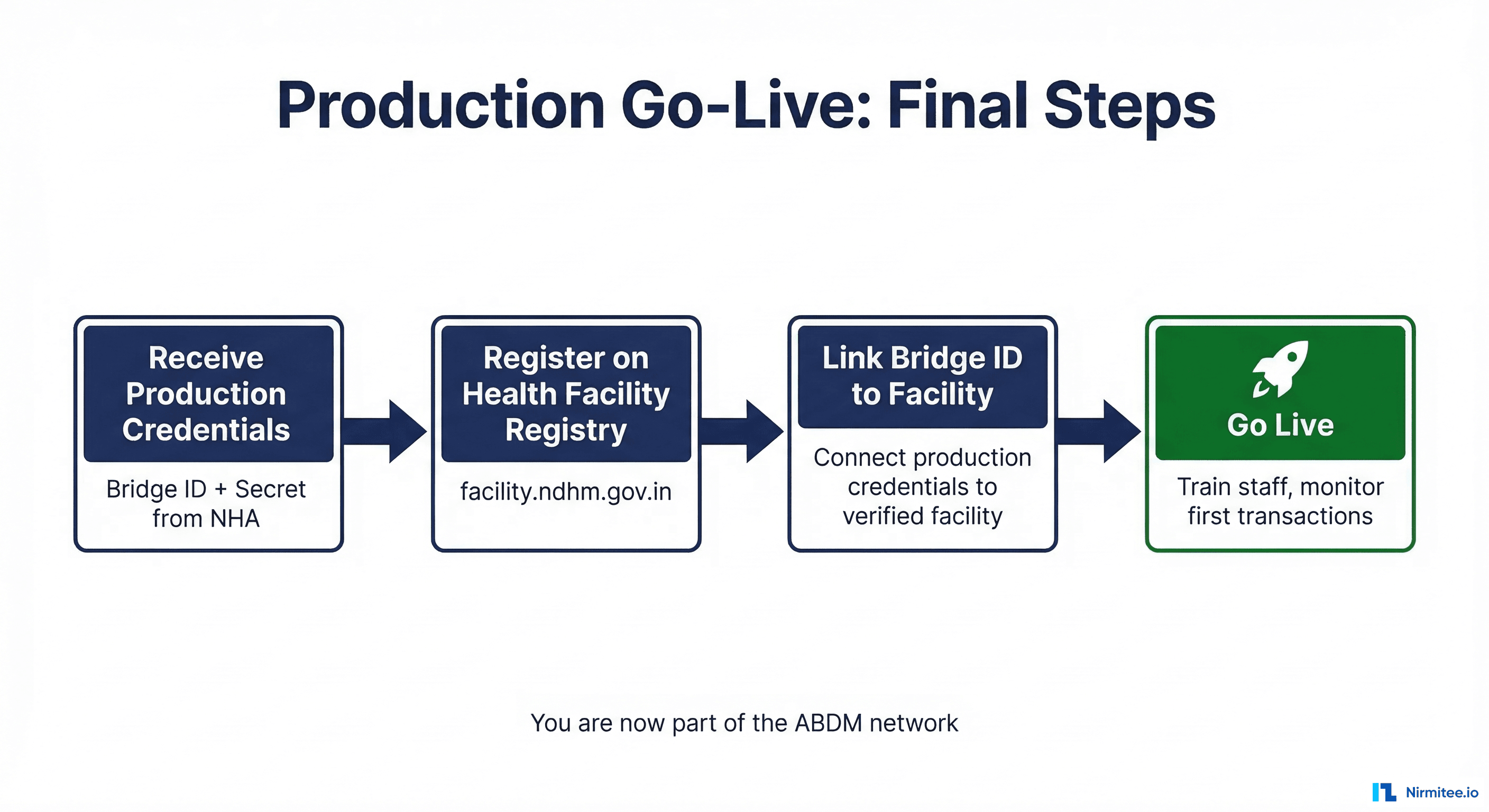
Receiving Production Credentials
NHA issues your production credentials — a production bridge ID and secret. These replace your sandbox credentials and give your application access to the live ABDM production environment with real patients, real health data, and real consent flows.
Health Facility Registry Registration
Before your application can go live, the partnering Health Information Provider (HIP) must be registered on the Health Facility Registry at facility.abdm.gov.in (previously facility.ndhm.gov.in). This is a separate registration from your sandbox enrollment:
- Complete the formal facility registration process on the HFR portal
- Obtain facility verification confirmation
- Link your production bridge ID to the verified facility profile
Pro tip: Start the HFR registration process early — don't wait until after NHA approval. The facility registration can run in parallel with your certification pipeline, so it's ready when your production credentials arrive.
Pre-Launch Preparation
- Staff training: Brief facility staff on the new ABDM-integrated workflows. They need to understand ABHA number capture, consent processes, and how health records flow through the system.
- Patient communication: Prepare patient education materials — posters, digital signage, assisted registration protocols for non-smartphone users.
- Monitoring: Set up monitoring for your first live transactions. Watch for API errors, consent flow failures, and data transfer issues.
- Support: Have your technical team on standby for the first few days of live operation.
You're Live
Once your production bridge ID is linked to a verified facility, your application is officially part of the ABDM network. Patients can discover your facility, link their ABHA numbers, grant consent, and have their health records flow securely through India's national health data exchange.
Timeline Summary: End-to-End View
Here's the complete timeline from sandbox registration to production go-live:
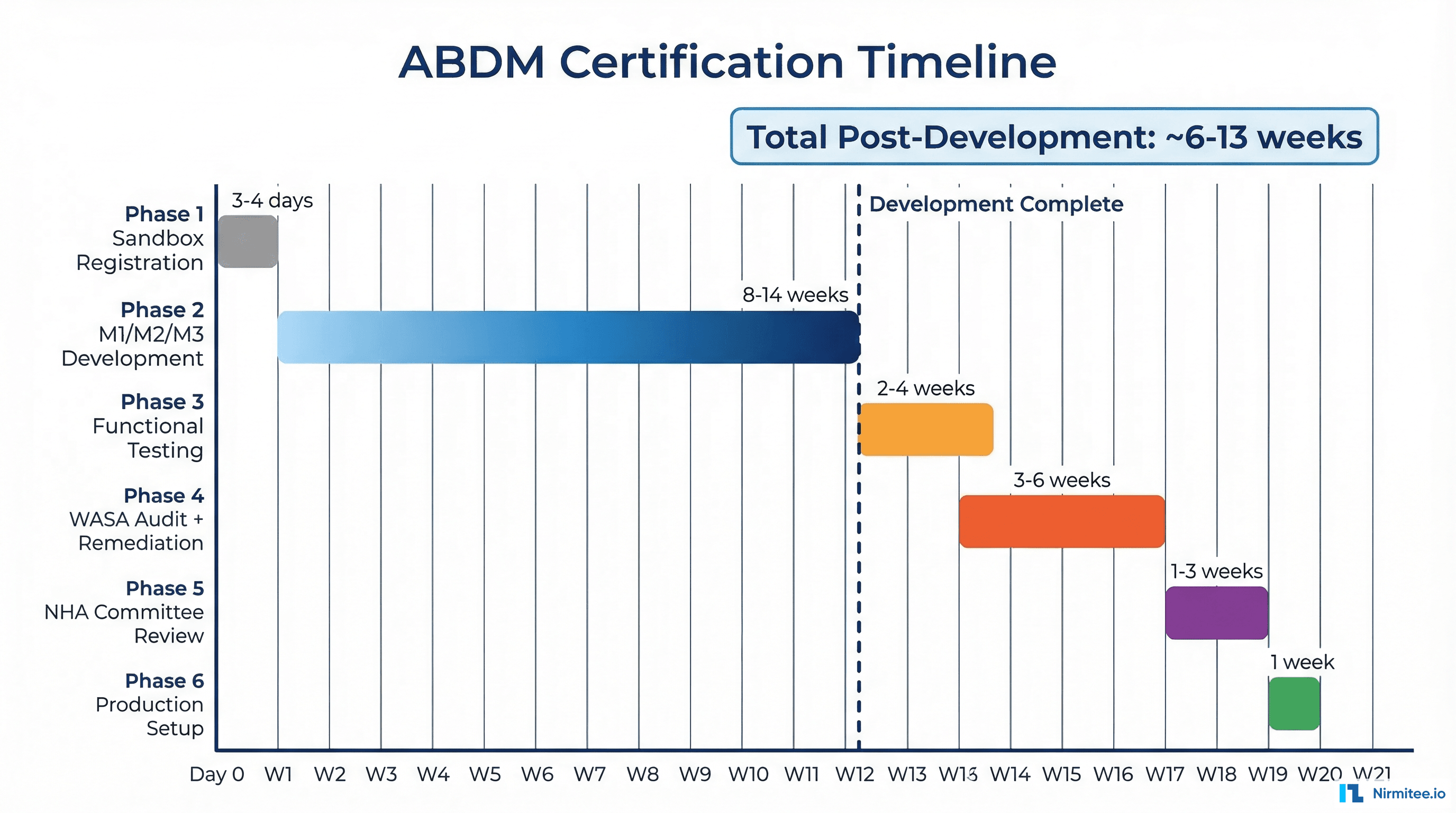
| Stage | Duration | Sequential? |
|---|---|---|
| Sandbox Registration | 3–4 days | Yes — must complete first |
| M1/M2/M3 Development | 8–14 weeks | Yes — sequential milestones |
| Functional Testing | 2–4 weeks | Yes — after all milestones approved |
| WASA Audit + Remediation | 3–6 weeks | Yes — after functional testing |
| NHA Committee Review | 1–3 weeks | Yes — after all reports submitted |
| Production Setup & Go-Live | ~1 week | HFR registration can start earlier |
Post-development certification pipeline (functional testing through go-live): approximately 6 to 13 weeks.
The biggest variables are the remediation cycles — both in functional testing (if workflows fail) and WASA (if security vulnerabilities are found). Teams that prepare well and self-test rigorously before engaging the agencies consistently land on the shorter end of these estimates.
Common Mistakes & Pro Tips
We've seen teams stumble on the same pitfalls repeatedly. Here's what to watch out for — and what the teams that sail through do differently.
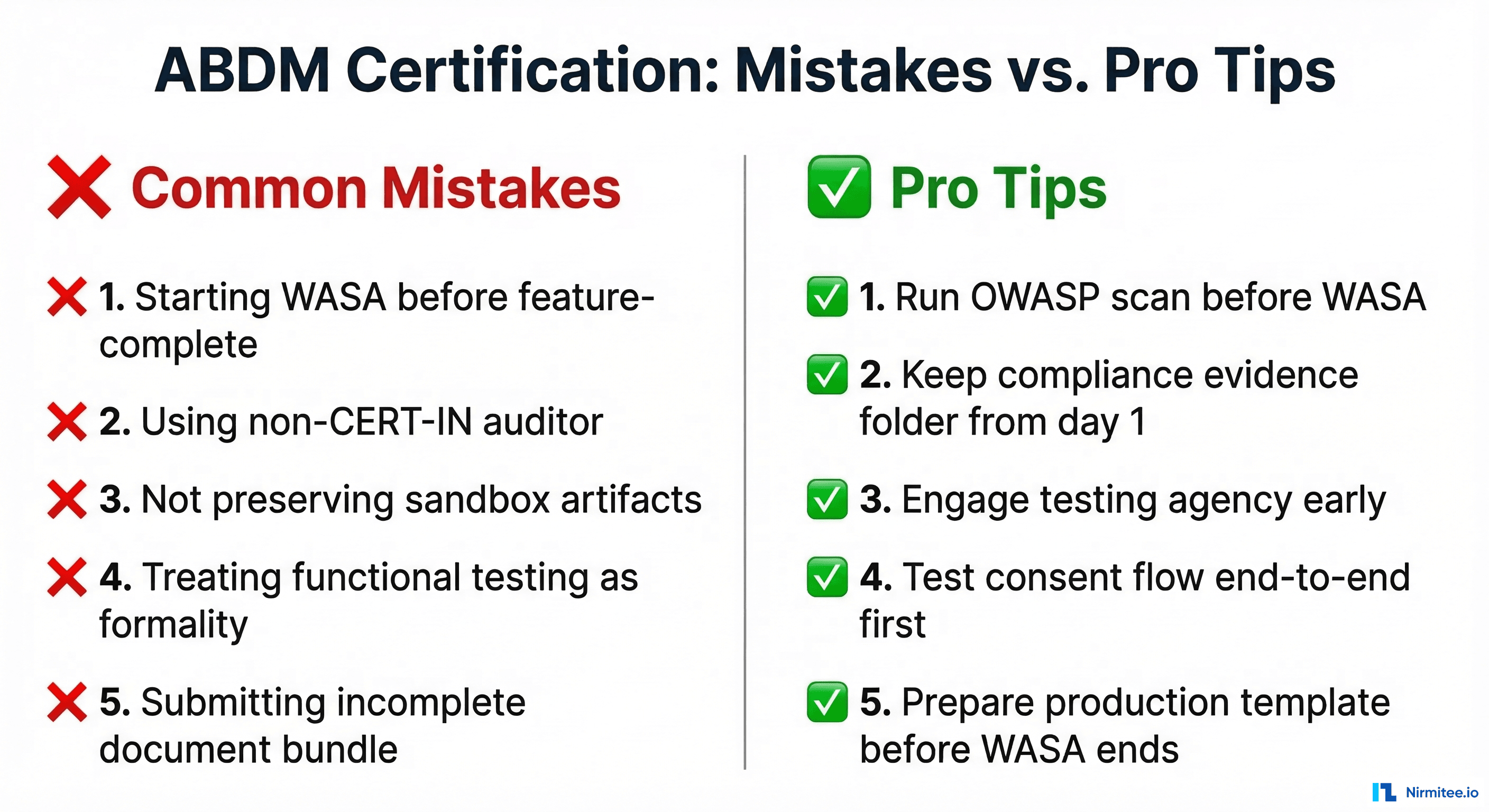
Mistakes to Avoid
1. Starting WASA before your application is feature-complete. If you trigger a security audit on an unfinished application and then add features afterward, those new features haven't been audited. You'll need to redo portions of the WASA at additional cost and time. Finish development first, then audit.
2. Using a non-CERT-IN empanelled auditor. Your security team, a generic pen-testing firm, or an auditor without CERT-IN empanelment cannot issue a valid WASA report or Safe-to-Host certificate. NHA will reject the submission, and you'll have to start the security audit over with a legitimate agency. Verify empanelment status on cert-in.org.in before engaging.
3. Not preserving sandbox test artifacts. Screenshots, API logs, test results, and milestone approval confirmations from your sandbox work — keep all of them. NHA may request evidence of sandbox testing during the committee review. Don't rely on memory or assume the sandbox portal retains everything.
4. Treating functional testing as a formality. The empanelled agencies follow NHA's test case matrices rigorously. They test edge cases, error handling, and non-happy-path scenarios. Applications that "work in demo mode" but haven't been stress-tested regularly fail. Prepare as if it's a production launch, not a checkbox.
5. Submitting an incomplete document bundle to NHA. Missing even one document — the VCC, the production keys template, the application summary — sends your submission to the back of the queue. Check the complete checklist before submitting. Every document, every field, every signature.
6. Not registering on Health Facility Registry early. HFR registration at facility.abdm.gov.in is a separate process that takes time. If you wait until after NHA approval to start it, your production credentials sit idle while you complete facility verification. Start HFR registration in parallel with your certification pipeline.
7. Hardcoding sandbox URLs or credentials. It sounds obvious, but we've seen production deployments that still pointed to sandbox endpoints. Use environment variables or configuration files, not hardcoded values. Have a checklist for sandbox-to-production environment migration.
8. Ignoring FHIR compliance in data formats. Both functional testing and WASA evaluate your FHIR resource formatting. Malformed FHIR bundles, missing required fields, or non-standard resource structures will fail you in both stages. Validate against the official FHIR profiles early and often.
Pro Tips from Teams That Got It Right
1. Run your own OWASP Top 10 scan before WASA. Free tools like OWASP ZAP can catch a significant portion of what the CERT-IN auditor will find. Fix these yourself before the paid audit starts. You'll save time on the remediation cycle and potentially cut weeks off your timeline.
2. Maintain a compliance evidence folder from day one. Create a shared folder at the start of your project. Every time you complete a milestone, pass a test, fix a bug, or make an architecture decision — drop the evidence in. Screenshots, API response logs, test reports, email confirmations. When NHA asks for documentation, you'll have everything ready instead of scrambling.
3. Engage the functional testing agency early. The three empanelled agencies have limited bandwidth. Their calendars fill up, especially around quarter-ends when multiple integrators are trying to certify simultaneously. Reach out and book your testing slot while you're still in the final stages of M3 development.
4. Read the NDHM Secure Application Development Reference Document. NHA publishes a reference document with detailed security requirements for ABDM-integrated applications. Read this before you write your first line of security code — not when you're preparing for WASA. It covers application architecture, data protection, authentication, network security, and infrastructure hardening requirements.
5. Test your consent flow end-to-end with the ABHA app before functional testing. The consent and data transfer flow (M2) is where the highest percentage of functional testing failures occur. Download the ABHA app, create a test ABHA number, and run the complete flow — discovery, consent request, consent grant, data transfer — from the patient's perspective. If it breaks here, it'll break during testing.
6. Have your Production Keys Template ready before WASA completes. The Details_required_for_Production_Keys_template.xlsx requires detailed organizational and technical information. Fill it out while WASA is in progress so that the moment your Safe-to-Host certificate arrives, you can submit the complete bundle to NHA immediately — no delay for paperwork.
Frequently Asked Questions
Is it VASA or WASA?
It's WASA — Web Application Security Audit. "VASA" is a common misheard version, but the official term used by NHA and CERT-IN is WASA. If you see either term in conversation, they're referring to the same thing.
Can I do WASA before functional testing?
Technically, you could engage a CERT-IN agency at any time. But practically, you should complete functional testing first. If functional testing reveals issues that require code changes, those changes will need to be re-audited in WASA. Doing them in sequence avoids wasted effort and cost.
Can I use any security auditor for WASA?
No. Only CERT-IN empanelled agencies can issue a valid WASA report and Safe-to-Host certificate that NHA will accept. Earlier guidelines also referenced STQC-accredited agencies, but current practice strongly favors CERT-IN empanelled agencies. Always confirm the latest accepted certifying bodies with NHA before engaging any firm.
What if I fail functional testing?
You fix the issues identified in the testing report and resubmit for retesting with the same empanelled agency. There's no limit on retesting, but each cycle adds time. This is why thorough self-testing before engaging the agency is critical.
What if WASA finds critical vulnerabilities?
You enter the remediation and retesting cycle (Step 5 of the WASA process). Your team fixes the vulnerabilities, the auditor re-verifies, and this repeats until all critical and high-severity issues are resolved. The auditor provides technical guidance on remediation approaches.
Do I need separate certification for HIP and HIU roles?
If your application implements both HIP (M2) and HIU (M3) capabilities, both are covered in a single functional testing and WASA cycle. You don't need to go through the process twice. However, both roles must be fully tested and included in the scope.
What about mobile applications — do they need a separate WASA?
If your mobile application is a separate codebase with its own backend APIs and ABDM integration, it requires its own WASA. If the mobile app is a frontend that communicates with the same backend that was already audited, the backend WASA may cover it — but discuss the scope with your CERT-IN agency upfront.
How long is the Safe-to-Host certificate valid?
Safe-to-Host certificates are typically valid for one year. After that, you'll need a re-audit to renew the certification. Major application changes or security incidents may also trigger a re-audit requirement.
Can I start the Health Facility Registry registration before NHA approval?
Yes, and you should. HFR registration at facility.abdm.gov.in is independent of the sandbox exit process. Starting it early means your facility is verified and ready when production credentials arrive, eliminating a potential delay in your go-live timeline.
Navigating ABDM certification can be complex — especially when you're doing it for the first time. If you need guidance at any stage, from milestone development to WASA preparation to production go-live, our team has been through this process multiple times. Talk to us →