Part of our complete guide to HL7 explained.
Ninety-five percent of US healthcare organizations still run HL7v2 for clinical data exchange. That is not a legacy problem waiting to be solved — it is the production reality for the next decade. Yet most healthcare AI tutorials assume FHIR-first architectures, adding a V2-to-FHIR translation layer that introduces latency, mapping complexity, and data loss before the agent even sees the clinical data.
There is a better path for many use cases: build agents that parse HL7v2 messages natively, extract clinical context directly from pipe-delimited segments, and act on the data without the overhead of format conversion. This guide shows you how, with production Python code for the three most common message types.
The Translation Tax: Why V2-to-FHIR Is Not Always the Answer
The standard advice in healthcare interoperability circles is straightforward: translate everything to FHIR, then build on FHIR. For many use cases — patient-facing APIs, multi-EHR aggregation, analytics lakehouses — this is correct. But for real-time clinical agents that need to process high-volume message streams with sub-second latency, the translation layer becomes a liability.
Here is what V2-to-FHIR translation actually costs:
- Latency: A well-optimized V2-to-FHIR mapper adds 50-200ms per message. For a sepsis screening agent processing critical lab results, that delay matters. Native v2 parsing completes in under 1ms.
- Mapping maintenance: The V2-to-FHIR ConceptMap is complex and version-dependent. Every EHR vendor sends a slightly different v2. You maintain the mapping layer AND the agent logic.
- Data loss: HL7v2 Z-segments carry site-specific custom data — local codes, proprietary fields, workflow flags. Standard FHIR mapping discards these. If your agent needs that data (and it often does), translation destroys it.
- Volume overhead: A 400-bed hospital generates 2,000-5,000 HL7v2 messages per hour. Translating all of them to FHIR just so your agent can read them back doubles the processing pipeline for no clinical benefit.
When to Stay Native v2 vs When to Translate
This is not an either/or decision. Use native v2 processing when:
- Your agent operates in a real-time alerting pipeline with a sub-100ms SLA
- You are integrating with a single hospital system (not aggregating across sites)
- Z-segment custom data is critical to your agent's decision-making
- Message volume exceeds 10,000 messages per hour
- No downstream systems need FHIR versions of the data
Translate to FHIR when:
- You need to aggregate data across multiple hospitals with different v2 dialects
- A patient-facing API is required (CMS mandates FHIR for patient access)
- Your data flows into an ML training pipeline that expects FHIR resources
- You are building on a cloud-native FHIR data store
Many production systems use both: native v2 for real-time agent processing, and asynchronous FHIR translation for analytics and downstream data pipelines.
HL7v2 Message Anatomy: What Your Agent Needs to Know
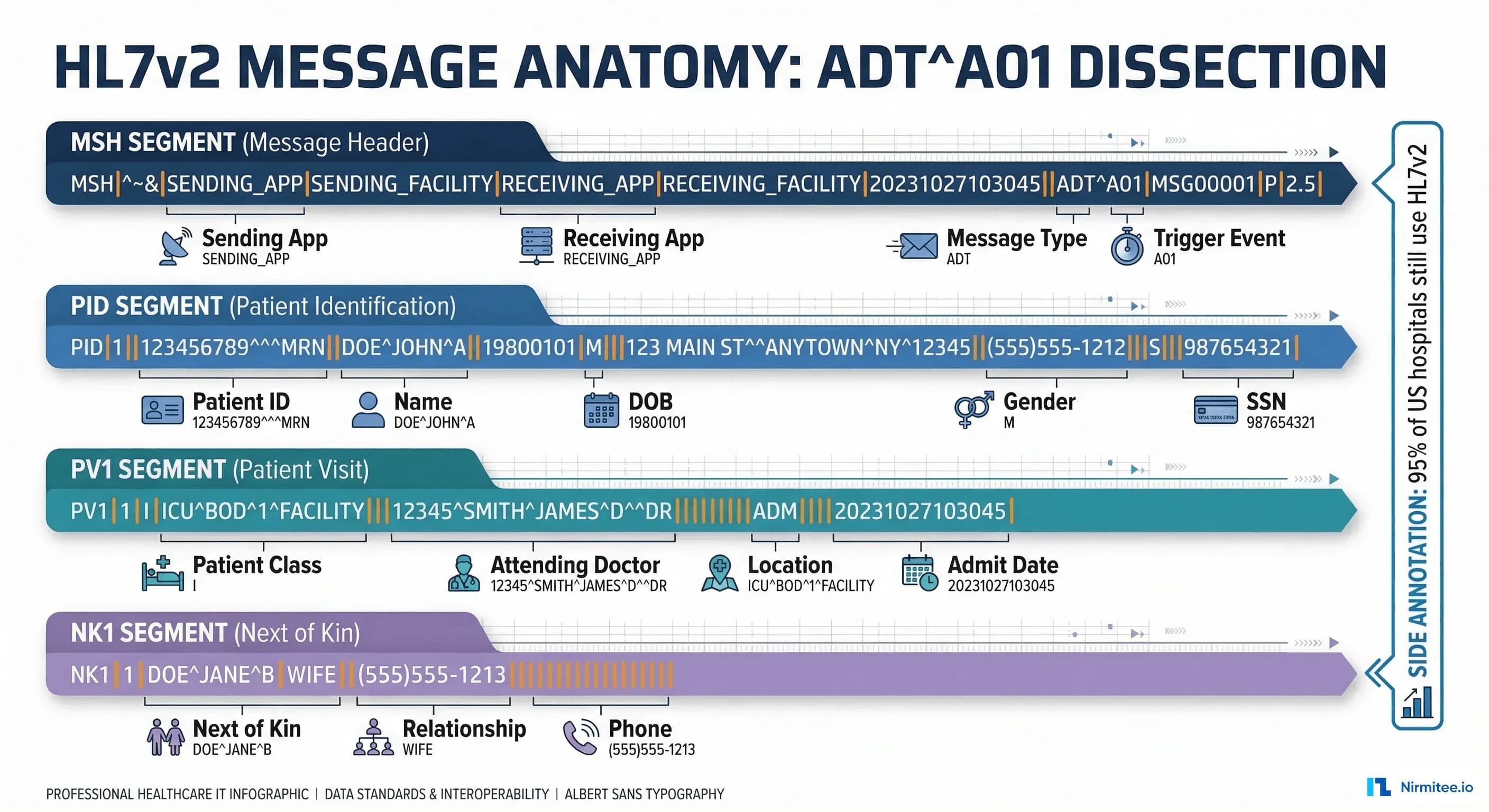
Before building a parser, you need to understand the v2 message structure. Every HL7v2 message consists of segments, fields, components, and sub-components separated by delimiters:
| Delimiter | Character | Purpose | Example |
|---|---|---|---|
| Segment separator | \r (CR) | Separates segments (MSH, PID, PV1) | MSH|...\rPID|... |
| Field separator | | | Separates fields within a segment | PID|1||12345^^^MRN |
| Component separator | ^ | Separates components within a field | Smith^John^M |
| Repetition separator | ~ | Separates repeating fields | 555-1234~555-5678 |
| Escape character | \ | Escape special characters | \F\ for literal | |
| Sub-component separator | & | Separates sub-components | Mercy&General&Hospital |
Building a Native HL7v2 Parser for AI Agents
Here is a production-grade Python parser that extracts the clinical context your agent needs from the three most common message types. This uses the hl7apy library for structural parsing and adds agent-specific context extraction on top.
# hl7v2_agent_parser.py - Native HL7v2 parser for AI agents
# pip install hl7apy

from hl7apy.parser import parse_message
from hl7apy.exceptions import HL7apyException
from dataclasses import dataclass, field
from typing import Optional
from datetime import datetime
import logging

logger = logging.getLogger(__name__)

@dataclass
class PatientContext:
    mrn: str = ""
    name: str = ""
    dob: str = ""
    gender: str = ""
    patient_class: str = ""   # I=Inpatient, O=Outpatient, E=Emergency
    attending_doctor: str = ""
    location: str = ""
    admit_date: str = ""

@dataclass
class LabResult:
    test_code: str = ""       # LOINC or local code
    test_name: str = ""
    value: str = ""
    units: str = ""
    reference_range: str = ""
    abnormal_flag: str = ""   # N, H, L, HH, LL
    status: str = ""          # F=Final, P=Preliminary
    observation_time: str = ""

@dataclass
class ClinicalEvent:
    message_type: str = ""
    trigger_event: str = ""
    timestamp: str = ""
    sending_app: str = ""
    patient: PatientContext = field(default_factory=PatientContext)
    lab_results: list = field(default_factory=list)
    order_code: str = ""
    order_name: str = ""
    z_segments: dict = field(default_factory=dict)

def parse_hl7v2_for_agent(raw_message: str) -> ClinicalEvent:
    event = ClinicalEvent()
    try:
        msg = parse_message(raw_message, find_groups=False)
    except HL7apyException as e:
        logger.error(f"Failed to parse HL7v2 message: {e}")
        return event

    # MSH - present in every message
    msh = msg.segment("MSH")
    event.message_type = str(msh.msh_9.msh_9_1.value)
    event.trigger_event = str(msh.msh_9.msh_9_2.value)
    event.timestamp = str(msh.msh_7.value)
    event.sending_app = str(msh.msh_3.value)

    # PID - Patient Identification
    try:
        pid = msg.segment("PID")
        event.patient.mrn = str(pid.pid_3.pid_3_1.value)
        name_last = pid.pid_5.pid_5_1.value
        name_first = pid.pid_5.pid_5_2.value
        event.patient.name = f"{name_first} {name_last}"
        event.patient.dob = str(pid.pid_7.value)
        event.patient.gender = str(pid.pid_8.value)
    except Exception:
        pass

    # PV1 - Patient Visit
    try:
        pv1 = msg.segment("PV1")
        event.patient.patient_class = str(pv1.pv1_2.value)
        event.patient.location = str(pv1.pv1_3.value)
        event.patient.attending_doctor = str(pv1.pv1_7.value)
        event.patient.admit_date = str(pv1.pv1_44.value)
    except Exception:
        pass

    # OBX segments - for ORU messages
    for segment in msg.children:
        seg_name = segment.name if hasattr(segment, 'name') else ''
        if seg_name == "OBX":
            lab = LabResult()
            try:
                lab.test_code = str(segment.obx_3.obx_3_1.value)
                lab.test_name = str(segment.obx_3.obx_3_2.value)
                lab.value = str(segment.obx_5.value)
                lab.units = str(segment.obx_6.value)
                lab.reference_range = str(segment.obx_7.value)
                lab.abnormal_flag = str(segment.obx_8.value)
                lab.status = str(segment.obx_11.value)
            except Exception:
                pass
            event.lab_results.append(lab)
        # Z-segments
        if seg_name.startswith("Z"):
            fields = []
            for child in segment.children:
                val = str(child.value) if hasattr(child, 'value') else ''
                fields.append(val)
            event.z_segments[seg_name] = fields
    return event
Processing ADT Messages: Admissions, Transfers, and Discharges
ADT (Admit, Discharge, Transfer) messages are the heartbeat of hospital operations. Your agent receives an ADT^A01 the moment a patient is admitted, an ADT^A02 when they transfer units, and an ADT^A03 at discharge. Each trigger event carries a different clinical context and different agent opportunities.
Here is how to process ADT messages and route them to agent-specific handlers:
# adt_agent_router.py - Route ADT events to agent handlers

class ADTAgentRouter:
    def __init__(self):
        self.handlers = {
            "A01": self.handle_admission,
            "A02": self.handle_transfer,
            "A03": self.handle_discharge,
            "A08": self.handle_update,
        }

    def process(self, event):
        handler = self.handlers.get(event.trigger_event)
        if handler:
            return handler(event)

    def handle_admission(self, event):
        # ADT^A01: Risk scoring + bed management + care team notify
        return {
            "action": "admission_workflow",
            "patient_mrn": event.patient.mrn,
            "tasks": [
                {"agent": "risk-scorer", "action": "calculate_admission_risk",
                 "data": {"mrn": event.patient.mrn}},
                {"agent": "bed-manager", "action": "confirm_bed_assignment",
                 "data": {"location": event.patient.location}},
                {"agent": "care-team", "action": "notify_attending",
                 "data": {"doctor": event.patient.attending_doctor}},
            ]
        }

    def handle_discharge(self, event):
        # ADT^A03: Discharge summary + follow-up + med reconciliation
        return {
            "action": "discharge_workflow",
            "patient_mrn": event.patient.mrn,
            "tasks": [
                {"agent": "discharge-planner", "action": "generate_summary"},
                {"agent": "scheduler", "action": "book_followup",
                 "data": {"days_out": 7}},
                {"agent": "medication-reconciler", "action": "reconcile_meds"},
            ]
        }
Processing ORU Messages: Lab Results That Drive Clinical Decisions
ORU^R01 messages carry observation results — lab values, radiology reports, vital signs. For AI agents, these are the richest data source. A single ORU message can contain dozens of OBX (Observation) segments, each with a test code, value, reference range, and abnormal flag.
The critical field for agent processing is OBX-8 (Abnormal Flags):
| Flag | Meaning | Agent Response |
|---|---|---|
| N | Normal | Log and continue |
| H | High | Flag for review |
| L | Low | Flag for review |
| HH | Critical High | Immediate alert + escalation |
| LL | Critical Low | Immediate alert + escalation |
| A | Abnormal | Clinical review queue |
Here is an agent that processes ORU messages for sepsis screening — one of the highest-value clinical AI applications:
# oru_sepsis_agent.py - Sepsis screening from native HL7v2 ORU

SEPSIS_MARKERS = {
    "6690-2": "WBC",          # White Blood Cell count
    "2160-0": "Creatinine",   # Kidney function
    "2532-0": "Lactate",      # Tissue perfusion
    "33959-8": "Procalcitonin", # Infection marker
}

CRITICAL_THRESHOLDS = {
    "WBC": {"high": 12.0, "critical": 18.0},
    "Lactate": {"high": 2.0, "critical": 4.0},
    "Creatinine": {"high": 1.5, "critical": 2.5},
    "Procalcitonin": {"high": 0.5, "critical": 2.0},
}

class SepsisScreeningAgent:
    def process_oru(self, event):
        findings = []
        risk_score = 0.0
        for lab in event.lab_results:
            marker = SEPSIS_MARKERS.get(lab.test_code)
            if not marker:
                continue
            try:
                value = float(lab.value)
            except (ValueError, TypeError):
                continue
            finding = {"marker": marker, "value": value,
                       "flag": lab.abnormal_flag}
            if lab.abnormal_flag in ("HH", "LL"):
                finding["severity"] = "critical"
                risk_score += 0.3
            elif lab.abnormal_flag in ("H", "L"):
                finding["severity"] = "elevated"
                risk_score += 0.15
            findings.append(finding)

        risk_score = min(risk_score, 1.0)
        if risk_score >= 0.6:
            action = "page_attending_stat"
        elif risk_score >= 0.3:
            action = "add_to_review_queue"
        else:
            action = "log_and_monitor"

        return {"agent": "sepsis-screener",
                "patient_mrn": event.patient.mrn,
                "risk_score": round(risk_score, 2),
                "action": action,
                "findings": findings,
                "z_segments": event.z_segments}
Handling Z-Segments: The Data FHIR Translation Loses
Z-segments are the most underappreciated feature of HL7v2 for AI applications. These are site-specific custom segments that carry data no standard segment covers:
- ZAI: AI inference results written back to the message stream — confidence scores, risk categories, recommended actions
- ZPH: Pharmacy-specific data — formulary status, therapeutic alternatives, cost tier
- ZCR: Clinical research flags — trial eligibility markers, research consent status
- ZSC: Social context — housing status, transportation barriers, language preferences
When you translate HL7v2 to FHIR, Z-segments either get dropped entirely or stuffed into opaque FHIR extensions that downstream systems ignore. An agent that parses v2 natively reads Z-segments as first-class data, preserving the full clinical picture.
This is particularly valuable when your agent writes results back to the message stream. You can create a ZAI segment with your agent's inference results, and the hospital's existing Mirth Connect infrastructure routes it to the right downstream systems without any FHIR involvement.
ORM Message Processing: Order Management for AI Agents
ORM^O01 messages carry new orders — lab orders, medication orders, radiology orders. For AI agents, these are opportunities for real-time clinical decision support: drug interaction checking, formulary validation, duplicate order detection, and cost optimization.
The key segments in an ORM message:
- ORC (Common Order): Order control code (NW=New, CA=Cancel, DC=Discontinue), order status, ordering provider
- OBR (Observation Request): What was ordered — test code, specimen type, clinical reason
- RXO (Pharmacy Order): For medication orders — drug code, dose, route, frequency
Your agent intercepts the ORM, runs clinical checks against the patient's existing data (pulled from prior ADT and ORU messages), and either approves the order or flags it for pharmacist/physician review. This happens in the message pipeline, before the order reaches the downstream system — true real-time decision support without FHIR overhead.
Production Architecture: MLLP Listener to Agent Pipeline
In production, HL7v2 messages arrive via MLLP (Minimal Lower Layer Protocol) — a TCP-based protocol that wraps each message in start/end block characters. Here is the architecture pattern for connecting an MLLP message stream to an AI agent pipeline:
- MLLP Listener: TCP socket on port 2575 (standard HL7 port). Receives messages, strips MLLP framing, sends ACK/NACK.
- Message Router: Reads MSH-9 (message type + trigger event) and routes to the appropriate Kafka topic. See our Kafka streaming guide for topic design patterns.
- Agent Consumer: Reads from Kafka, parses with the native v2 parser, executes agent logic, and writes results.
- Response Writer: Writes agent outputs back to the hospital system — either as new HL7v2 messages (with Z-segments) or via the EHR's API.
This pipeline processes messages in 3-15ms end-to-end, compared to 200-500ms when a V2-to-FHIR translation layer sits in the middle. For a time-critical clinical workflow, that difference can be clinically significant.
Testing Your V2 Agent: Generating Realistic Test Messages
Testing against real hospital HL7v2 messages requires test data that matches production patterns:
- HAPI Test Panel: The HAPI HL7v2 library includes message generators for all standard message types.
- Mirth Connect test channels: Set up a Mirth Connect channel that replays captured production messages (with PHI stripped) at configurable rates.
- Synthetic generators: Build a message generator that creates HL7v2 messages from synthetic patient data with realistic lab value distributions.
Always test with malformed messages — real hospital interfaces produce messages with missing segments, unexpected delimiters, and non-standard field values. Your parser must handle these gracefully.
Monitoring and Observability
Native v2 agents need dedicated monitoring. Use OpenTelemetry instrumentation to track:
- Parse success rate: Target 99.9%+
- Processing latency: p50, p95, p99 from message receipt to agent output. Target p95 under 15ms.
- Agent action rate: How many messages trigger actions vs pass-through? Sudden changes indicate drift or data quality issues.
- Z-segment coverage: Are you seeing Z-segments you have not mapped? New Z-segments may contain data your agent should use.
Feed these metrics into your alerting system with clinically aware thresholds.
At Nirmitee, we build healthcare AI agents that work with your existing infrastructure — not against it. Our integration teams have deep expertise in HL7v2 message processing, native v2 agent architectures, and hybrid pipelines that combine real-time v2 processing with asynchronous FHIR translation for analytics.
Whether you are adding AI capabilities to a legacy HL7v2 infrastructure or designing a greenfield agent pipeline that needs to ingest v2 from day one, our team can architect and build the solution.
Related reading
For more insights, explore our guides on what AI agents do in healthcare and FHIR in Modern Healthcare.
You may also find value in EHR Software Development Guide and Building a Healthtech App.