BridgeLink: The Open-Source Mirth Connect Fork (2026 Migration Guide)

Digital Growth Lead
Writes about healthcare technology, interoperability, and AI-driven transformation across modern care systems.
Part of our complete guide to Mirth Connect - Complete Guide for Healthcare Leaders.
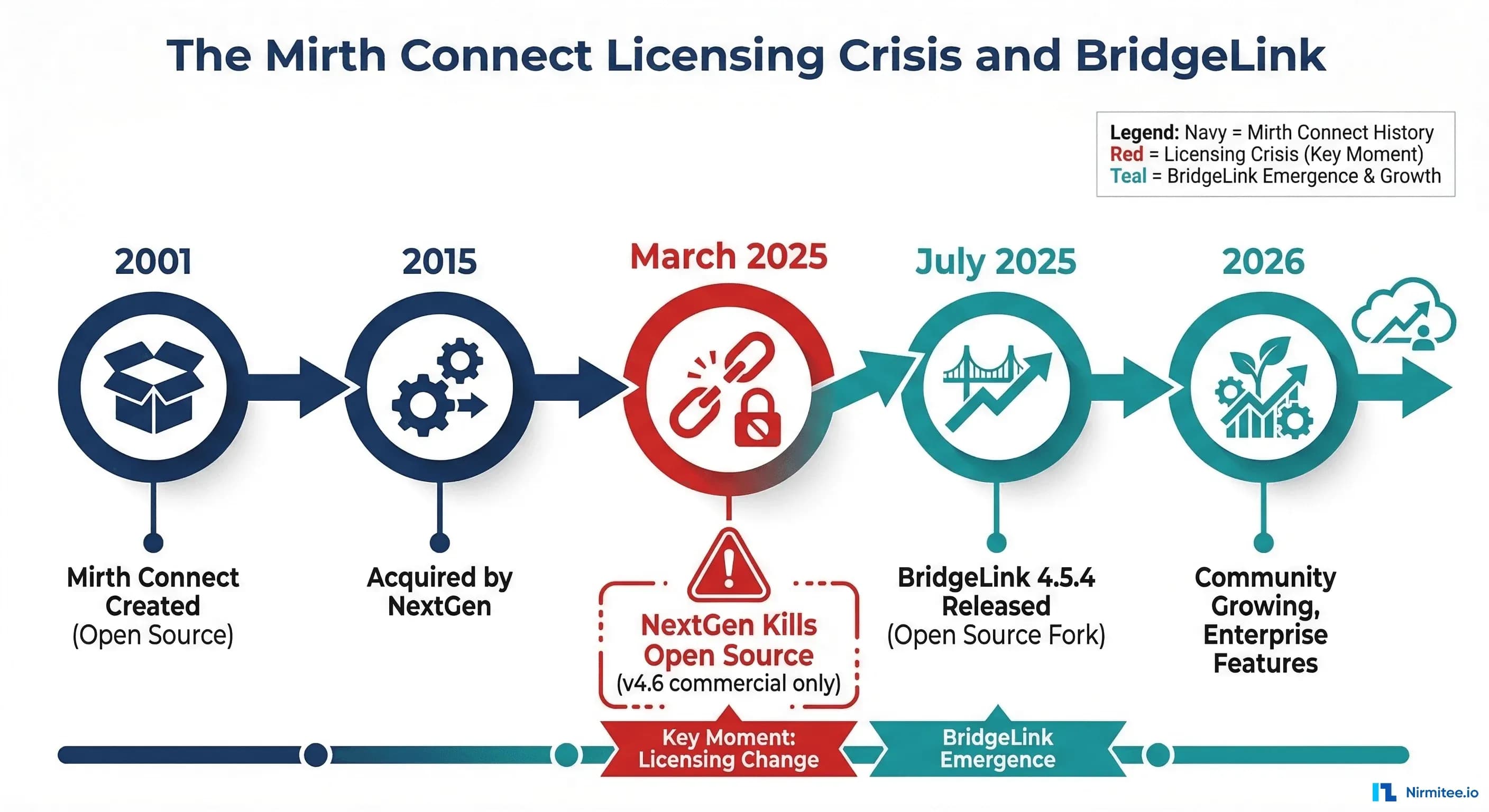
On March 19, 2025, NextGen Healthcare made an announcement that sent shockwaves through the healthcare integration community: Mirth Connect would no longer be open source. Starting with version 4.6, the platform that thousands of hospitals, health systems, and HIEs had relied on for nearly two decades shifted to a commercial-only licensing model. The source code for new releases would no longer be publicly available.
For the estimated 15,000+ organizations running Mirth Connect globally, this was not just a licensing update — it was an existential question. Teams that had built their entire integration infrastructure on the promise of open-source Mirth suddenly faced a choice: pay up, stay frozen on version 4.5.2, or find an alternative.
The community's response was swift. Within weeks, two major forks emerged. The most significant: BridgeLink, created by Innovar Healthcare. By July 2025, BridgeLink had released version 4.5.4 — complete with security patches, community enhancements, and a feature NextGen never shipped: the Dynamic Lookup Gateway.
This guide covers everything you need to evaluate BridgeLink, compare it against alternatives, and execute a migration from Mirth Connect — whether you are managing 10 channels or 1,000.
Understanding the Mirth Connect Licensing Change
Before diving into BridgeLink, it is worth understanding exactly what changed and why it matters for your organization.
What NextGen Changed
Mirth Connect was created in 2001 as an open-source healthcare integration engine under the Mozilla Public License. After being acquired by NextGen Healthcare in 2015, it operated under a dual-licensing model — a free open-source version and a commercial version with additional features and support. This model worked well for over a decade.
The March 2025 announcement ended that arrangement. The key changes:
- Version 4.6 and all future releases are available only under a commercial license
- Source code for new versions is no longer publicly available on GitHub
- Version 4.5.2 remains the last open-source release, still available under the Mozilla Public License
- New features like Mirth Command Center are exclusive to commercial licensees
- Mirth Connect for Research was introduced as a complimentary license for non-profit research institutions
Why This Matters
Staying on Mirth 4.5.2 indefinitely is not a viable long-term strategy. Without active maintenance, you face accumulating security vulnerabilities, no bug fixes for production issues, growing incompatibility with newer OS versions and Java releases, and compliance risks as unpatched software falls out of security standards. For organizations in regulated environments — which is essentially every healthcare organization in the US — running unpatched integration infrastructure is a compliance liability under HIPAA and ONC interoperability requirements.
BridgeLink: The Enterprise-Grade Open-Source Fork
BridgeLink is an open-source fork of Mirth Connect created and maintained by Innovar Healthcare, a Montgomery, Alabama-based company led by CEO Loyd Bittle. It is licensed under the Apache 2.0 license — a more permissive license than Mirth's original Mozilla Public License — and positions itself as "the only enterprise-grade open-source interface engine."
What BridgeLink 4.5.4 Adds Over Mirth 4.5.2
BridgeLink is not just a copy of Mirth's last open-source release. Version 4.5.4, released in July 2025, includes meaningful improvements:
- Dynamic Lookup Gateway (DLG): A centralized value mapping system that lets you create, manage, and deploy lookup tables independently of channel code. Interface developers can programmatically access lookups from channels, templates, and scripts — eliminating the scattered, hard-to-maintain value mapping that plagues most Mirth installations. The DLG now supports JSON data types and JSON index creation.
- Critical Security Patches: Upgrades to key dependencies, including Guava, Jetty, and commons-vfs2, that address CVEs left unpatched in Mirth 4.5.2. These are not theoretical vulnerabilities — they are actively exploited in the wild.
- Export Consistency: Improved reliability in channel export ordering, reducing errors during data migration and environment synchronization.
- Community Bug Fixes: Contributions from the open-source community addressing production issues that NextGen deprioritized in the commercial roadmap.
BridgeLink Editions
BridgeLink is available in three editions, all available on the AWS Marketplace:
- Developer Edition (Free): Core integration engine with full protocol support — HL7, FHIR, DICOM, X12, XML, JSON. Local database only, no SSL encryption.
- Standard Edition: Adds SSL message encryption, AWS Cognito authentication, RBAC with MFA enforcement, channel history with git-based version control, and AWS RDS external database support.
- Enterprise Edition: All Standard features plus auto-scaling, high availability clustering, and AI-powered automation, including OpenAI HL7 test message generation.
For organizations needing commercial support, Innovar offers premium support at $999/month, covering up to 10 issue-resolution cases and 2 developer support cases per month, with 24/7 phone and email coverage.
Planning your move off Mirth 4.5.2? Our integration team has built more than 350 interfaces on Mirth Connect. Start with a free written risk review: tell us your Mirth version, channel count and the systems you connect, and we will send back what is likely to break on Java 17 and OIE 4.6, and which path fits your setup: OIE, BridgeLink or licensed Mirth. If you want to go further, a two-week exit assessment ends in a fixed migration quote. Request a free Mirth risk review.
BridgeLink vs. OIE vs. NextGen Commercial
BridgeLink is not the only option. The Open Integration Engine (OIE), created by Saga Healthcare IT, is another community-driven fork. And of course, you can pay for NextGen's commercial Mirth Connect 4.6+. Here is how they compare:
BridgeLink vs. OIE: Head-to-Head
| Dimension | BridgeLink | Open Integration Engine |
|---|---|---|
| License | Apache 2.0 | Apache 2.0 |
| Base Version | 4.5.4 (actively developed) | 4.5.2 (community patches) |
| Unique Features | Dynamic Lookup Gateway, AI automation | Community-driven enhancements |
| Enterprise Support | Innovar commercial support available | Community-only |
| AWS Marketplace | Yes (3 editions) | No |
| Governance | Innovar-led with community input | Community-governed, vendor-neutral |
| Best For | Mid-to-large organizations (100+ beds) needing enterprise features and optional commercial support | Smaller organizations with strong internal engineering teams that prefer pure community governance |
The practical difference: BridgeLink has a company (Innovar) investing in the product roadmap, shipping releases with new features, and offering paid support. OIE is a true community project with no commercial backing. For production healthcare environments where uptime and support SLAs matter, BridgeLink is the safer bet. For organizations with deep internal expertise that want a vendor-neutral foundation, OIE is worth evaluating.
BridgeLink vs. NextGen Commercial
The trade-offs here are more nuanced:
What you gain with BridgeLink:
- No licensing fees for the core engine
- Full source code access — fork, modify, extend as needed
- No vendor lock-in on the platform itself
- Community-driven development that prioritizes real-world user needs
- Apache 2.0 license flexibility for derivative works
What you give up leaving NextGen:
- Official NextGen support organization and SLAs
- NextGen-certified integrations and connector library
- Mirth Command Center for centralized management
- NextGen's roadmap alignment with their broader EHR and PM suite
- Established a vendor relationship for compliance documentation
For most organizations already on Mirth 4.5.x open-source, the cost of NextGen's commercial license often exceeds the cost of migrating to BridgeLink plus optional Innovar support. The math is straightforward — but run the numbers for your specific environment.
Migration Step-by-Step: Mirth to BridgeLink
If you have decided BridgeLink is the right path, here is a detailed migration playbook. This process has been validated across multiple production migrations, including New York HIE environments like HEALTHeLINK's transition from Mirth Connect to BridgeLink.
Step 1: Inventory and Export (Day 1-3)
Before touching BridgeLink, document what you have:
- Export all channels as XML from your existing Mirth Administrator console
- Document all channel groups and their dependencies
- List all code templates, global scripts, and shared libraries
- Catalog custom connector plugins and extensions
- Record all configuration map entries and global map variables
- Export server settings including email, encryption keys, and database drivers
// In Mirth Administrator:
// Channels > Select All > Export All Channels
// Settings > Export server configuration
// Code Templates > Export all templates

// Verify export integrity
ls -la exported_channels/
find . -name "*.xml" | wc -l  // Should match your channel count
Step 2: Deploy BridgeLink (Day 3-5)
BridgeLink supports multiple deployment methods. Choose based on your infrastructure:
Docker (recommended for testing):
# Pull and run BridgeLink container
docker pull innovarhealthcare/bridgelink:4.5.4
docker run -d -p 8443:8443 -p 8080:8080 \
  --name bridgelink \
  -v bridgelink-data:/opt/bridgelink/appdata \
  innovarhealthcare/bridgelink:4.5.4
AWS Marketplace: Search for "BridgeLink" and select your edition (Developer, Standard, or Enterprise). The AMI comes pre-configured with the engine and required dependencies.
Bare Metal / VM: Download the installer from the BridgeLink Downloads page and follow the standard installation process. Requirements: Java 17+, PostgreSQL 12+ or MySQL 8+.
Step 3: Import Channels (Day 5-7)
BridgeLink uses the same channel format as Mirth Connect 4.5.x. Import is straightforward:
- Open the BridgeLink Administrator (same interface as Mirth Administrator)
- Import code templates and global scripts first — channels depend on these
- Import channel groups maintaining the same structure
- Import channels one group at a time, verifying each import
- Do not deploy channels yet — we will test first
Step 4: Database Migration (Day 7-10)
If you are using an external database (PostgreSQL or MySQL) for Mirth's configuration and message store:
- Update connection strings in BridgeLink's configuration to point to your database
- For a clean migration, use a fresh database and import channels via XML (recommended)
- For a stateful migration preserving message history, clone the database and point BridgeLink at the clone
- Verify database connectivity and run BridgeLink's built-in schema migration
# PostgreSQL: Clone existing Mirth database for BridgeLink
pg_dump -h localhost -U mirth_user mirth_db > mirth_backup.sql
createdb -h localhost -U mirth_user bridgelink_db
psql -h localhost -U mirth_user bridgelink_db < mirth_backup.sql

# Update BridgeLink mirth.properties
# database = postgres
# database.url = jdbc:postgresql://localhost:5432/bridgelink_db
Step 5: Test Each Channel (Day 10-14)
Deploy channels one at a time in your BridgeLink test environment:
- Start with your simplest channels — file-based or database-polling interfaces
- Test message processing with known-good sample messages
- Verify all JavaScript transforms execute correctly
- Confirm connector configurations (TCP ports, SFTP paths, database queries)
- Validate HL7 message parsing and generation
- Check FHIR endpoints if applicable
- Review channel statistics and error handling
Step 6: Parallel Run (Day 14-28)
Run both engines simultaneously for at least two weeks:
- Route a copy of production messages to BridgeLink channels
- Compare output between Mirth and BridgeLink for each channel
- Monitor error rates, processing times, and resource utilization
- Validate that all downstream systems receive identical data
- Document any discrepancies and resolve before cutover
Step 7: Cutover and Decommission (Day 28-35)
- Switch production traffic to BridgeLink channels
- Keep Mirth running but idle for 1 week as a rollback option
- Monitor BridgeLink closely for 48-72 hours post-cutover
- Decommission Mirth after successful validation period
- Update documentation, runbooks, and monitoring dashboards
The Coexistence Pattern: Running Both Engines
For larger organizations with hundreds of channels, a big-bang migration is unnecessarily risky. Instead, use the coexistence pattern — run Mirth and BridgeLink side by side and migrate channels incrementally.
How It Works
Phase 1 — Parallel Deployment (Weeks 1-2): Deploy BridgeLink alongside your existing Mirth instance. Both engines can connect to the same external systems (EHRs, labs, payers) but should use separate internal databases. Start by migrating your lowest-risk channels — typically file polling or database query channels that are easy to validate.
Phase 2 — Incremental Cutover (Weeks 3-8): Move channels to BridgeLink one group at a time. Prioritize by risk — start with channels that have low message volume and simple transforms, then move to high-volume HL7 feeds. For TCP listener channels, update the load balancer or DNS to route traffic to BridgeLink's ports instead of Mirth's.
Phase 3 — Decommission (Weeks 9-12): Once all channels are running on BridgeLink with a clean track record, decommission the Mirth instance. Archive the Mirth database for compliance retention requirements. Update all integration documentation to reference BridgeLink.
Key Architecture Considerations
- Port Management: BridgeLink uses the same default ports as Mirth (8443 for admin, 8080 for HTTP). If colocated on the same server, configure different ports for the BridgeLink instance.
- Shared External Connections: Both engines can connect to the same external endpoints. For TCP listener channels, only one engine can bind to a given port at a time — switch these last.
- Message Routing: Use a load balancer or reverse proxy to route inbound connections to the active engine for each channel.
AWS Deployment Architecture
BridgeLink's availability on the AWS Marketplace makes cloud deployment straightforward. Here is the recommended production architecture:
Production AWS Setup
- Compute: EC2 instances or ECS containers running BridgeLink. For the Enterprise Edition, use auto-scaling groups behind an ALB.
- Database: Amazon RDS PostgreSQL for channel configuration and message storage. Multi-AZ for production reliability.
- Load Balancing: Application Load Balancer for HTTPS/FHIR endpoints. Network Load Balancer for raw TCP/HL7 listener channels.
- Storage: S3 for message archival, log retention, and channel export backups.
- Monitoring: CloudWatch for application metrics, log aggregation, and alerting. Set alarms for channel error rates, queue depth, and processing latency.
- Security: VPC with private subnets for the engine and database. Security groups restricting HL7 listener ports to known source IPs. TLS termination at the ALB.
For HIPAA compliance, ensure encryption at rest (RDS, S3) and in transit (ALB TLS, VPC flow logs enabled), and configure CloudTrail for audit logging.
Migration Checklist and Timeline
Simple Environment (10-50 channels, 2-4 weeks)
- Single Mirth instance with standard connectors
- Minimal custom JavaScript transforms
- No complex channel dependencies
- Timeline: 2-4 weeks including testing
Medium Environment (50-200 channels, 4-8 weeks)
- Multiple channel groups with interdependencies
- Custom code templates and shared libraries
- External database connections
- Some custom connector plugins
- Timeline: 4-8 weeks with phased cutover
Complex Environment (200+ channels, 2-3 months)
- Multi-server Mirth deployments
- Complex message routing and channel chaining
- Heavy custom plugin usage
- Integration with multiple external systems (EHR, LIS, RIS, PMS, payer portals)
- Regulatory requirements for validation documentation
- Timeline: 2-3 months with coexistence pattern
Pre-Migration Checklist
| Task | Status | Notes |
|---|---|---|
| Complete channel inventory | ☐ | Count, groups, dependencies |
| Export all channels as XML | ☐ | Verify export integrity |
| Document code templates | ☐ | Global scripts, shared libraries |
| Catalog custom plugins | ☐ | Check BridgeLink compatibility |
| Database backup | ☐ | Full backup of Mirth DB |
| Deploy BridgeLink test instance | ☐ | Docker or AWS for initial testing |
| Import and test channels | ☐ | One group at a time |
| Parallel run (2+ weeks) | ☐ | Compare output between engines |
| Stakeholder sign-off | ☐ | IT, compliance, clinical ops |
| Cutover execution | ☐ | With the rollback plan ready |
| Decommission Mirth | ☐ | After a 1-week cool-down period |
Rollback Plan
Every migration needs a rollback strategy. For BridgeLink migration, rollback is straightforward because your original Mirth instance remains untouched during the parallel run:
- Keep Mirth running with channels in a stopped state during the parallel period
- Maintain your original Mirth database backup
- Document all port and routing changes made during the cutover
- If rollback is needed: stop BridgeLink channels, revert routing changes, restart Mirth channels
- Target rollback time: under 30 minutes for simple environments, under 2 hours for complex
How Nirmitee Can Help
At Nirmitee, we have hands-on experience migrating healthcare organizations from Mirth Connect to BridgeLink and other integration platforms. Our team has executed production migrations for hospital systems, health information exchanges, and digital health companies.
Whether you need a full migration engagement, architecture review, or just a second opinion on your migration plan, our integration specialists can help you navigate the transition with minimal disruption to your operations.
Frequently Asked Questions
Is BridgeLink a drop-in replacement for Mirth Connect?
For version 4.5.x, yes. BridgeLink is forked from the same codebase and uses identical channel formats, database schemas, and administration interfaces. Channels exported from Mirth 4.5.x import directly into BridgeLink without modification.
What about Mirth 3.x channels?
Mirth 3.x channels can be imported into BridgeLink, but you may need to address deprecated features and API changes introduced between versions 3.x and 4.5.x. Test thoroughly in a non-production environment first.
Does BridgeLink support FHIR?
Yes. BridgeLink includes the same FHIR connector capabilities as Mirth Connect 4.5.2, with community-driven enhancements. For organizations building FHIR-based integrations, BridgeLink is a capable foundation.
How does BridgeLink handle HIPAA compliance?
BridgeLink Standard and Enterprise editions include SSL encryption, RBAC, MFA enforcement, and audit logging — the same security controls required for HIPAA technical safeguards. Combined with proper AWS infrastructure (encryption at rest, VPC isolation, CloudTrail), BridgeLink meets the requirements for handling PHI.
Should I consider alternatives beyond BridgeLink?
If you are evaluating a complete integration platform change, commercial options like InterSystems Rhapsody, Infor Cloverleaf, iNTERFACEWARE Iguana, and Corepoint (now Lyniate) are worth evaluating. However, expect 6-12 months for a platform migration versus 2-4 weeks for BridgeLink — the channel formats are entirely different, requiring a complete rebuild of your integration logic.
Related guides
This article is part of our complete guide to Mirth Connect: a complete guide to Mirth Connect. Related deep-dives:
- Mirth Connect alternatives
- Mirth Connect vs Rhapsody vs Iguana
- the Mirth Connect licence change
Need production-grade Mirth Connect help? See our Mirth Connect integration services.
Moving off Mirth 4.5.2? Get a free written risk review.
Share your Mirth version, channel count and connected systems. We send back what is likely to break on Java 17 and OIE 4.6, and which path fits: OIE, BridgeLink or licensed Mirth. From a team that has built 350+ Mirth Connect interfaces.
Frequently Asked Questions
Is BridgeLink a drop-in replacement for Mirth Connect?
What about Mirth 3.x channels?
Does BridgeLink support FHIR?
How does BridgeLink handle HIPAA compliance?
Should I consider alternatives beyond BridgeLink?
How does Nirmitee.io approach healthcare software development?