Build an ABDM HIP from Scratch (M2): V3 Callbacks, Care Context Linking, Consent and Fidelius Data Push (2026)

Software Development Expert
Writes about software development, scalable architecture, and practical problem-solving across modern digital products. Focuses on turning complex technical ideas into clear, real-world solutions.
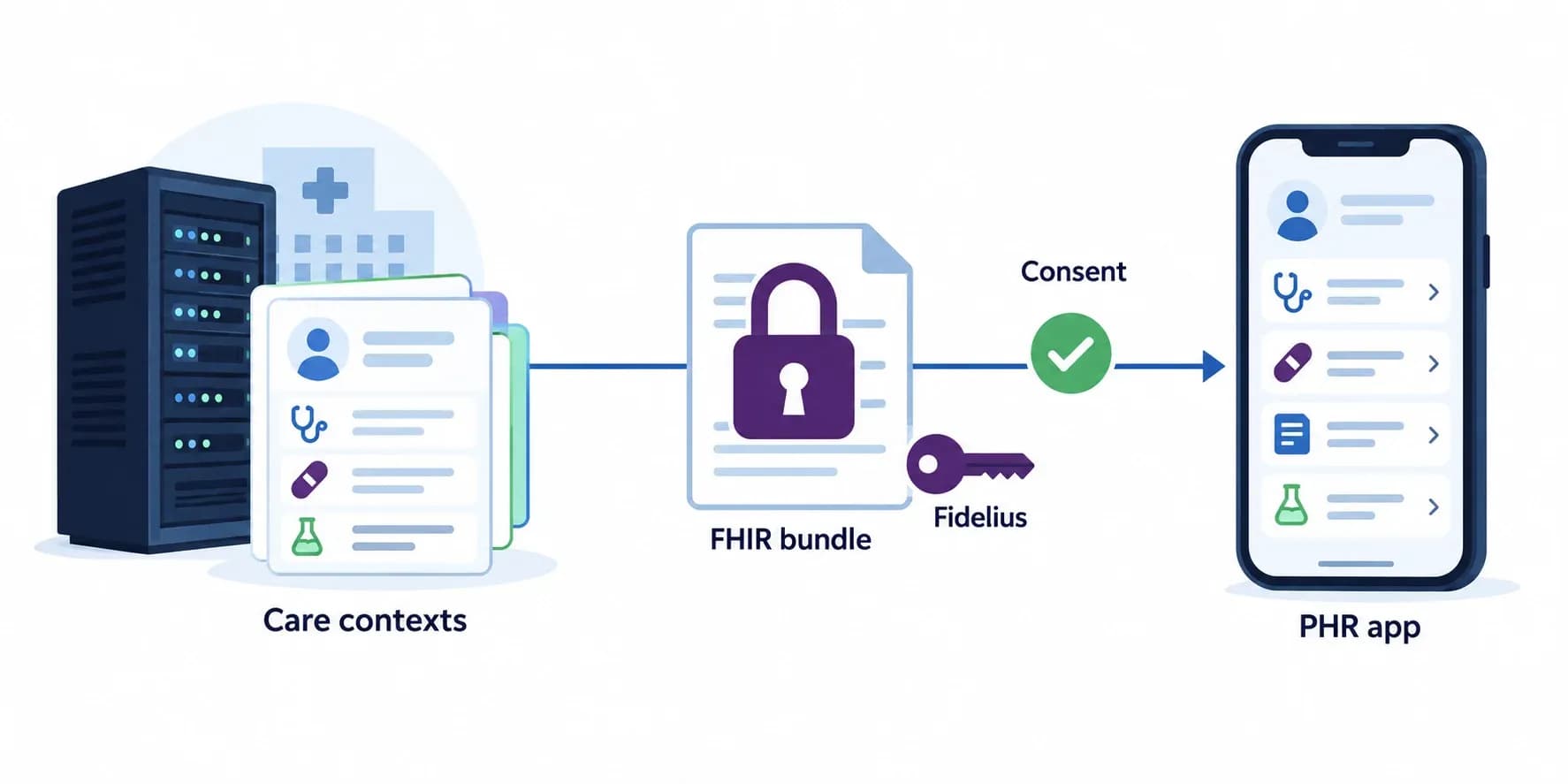
A HIP (Health Information Provider) in ABDM is any hospital, clinic, lab or pharmacy system that holds patient records and shares them through the ABDM network when the patient consents. Building one is Milestone 2 (M2): your software links each visit to the patient's ABHA as a care context, answers discovery, linking and consent callbacks from the ABDM gateway, and pushes FHIR records encrypted with Fidelius directly to whoever the patient authorised.
This is a stack-neutral reference architecture for building an ABDM HIP from scratch on the current V3 APIs: the flows, every gateway call and callback, the discovery matching algorithm, Fidelius on the producer side, the NRCeS FHIR rules that fail certification, a storage schema, and the production gotchas we have already paid for. Implement it in .NET, Java, Node, Go or Python. The consumer side, Milestone 3, is in our HIU reference architecture. Updated September 2026.
What is a HIP in ABDM, and how is it different from a HIU?
In ABDM, the HIP holds records and shares them; the HIU (Health Information User) requests records with consent and reads them. A hospital is usually both: HIP for the records it creates, HIU when its doctors need records from elsewhere.
| HIP (Milestone 2) | HIU (Milestone 3) | |
|---|---|---|
| Role | Provides records it holds | Uses records held by others |
| Main job | Link care contexts, answer discovery and consent, push encrypted FHIR | Request consent, fetch and decrypt records, purge on revoke |
| Header on gateway calls | X-HIP-ID | X-HIU-ID |
| Encryption role | Encrypts with the requester's public key | Supplies its key, decrypts |
| Typical owners | Hospitals, clinics, labs, pharmacies, diagnostic centres | Hospitals, doctors, PHR apps, insurers with consent |
Most hospital systems need Milestones 1 and 2 at minimum, because leaving the ABDM sandbox requires any two milestones. If you want this built or reviewed for your product, our ABDM integration services team takes HMIS and lab systems through M1, M2 and M3 and sandbox exit.
The ABDM M2 flow: four sub-flows that share one bridge
M2 looks like one flow but is four interlocking ones: HIP-initiated linking, patient-initiated discovery and linking, consent, and the data request with its encrypted push. All of them arrive at, or leave from, your bridge URL.
- A. HIP-initiated linking. After a visit, your system asks ABDM for a link token for the patient (it arrives on your callback) and links the visit as a care context. The patient sees it in their PHR app without doing anything.
- B. Patient-initiated discovery and linking. The patient searches for records at your hospital in a PHR app. ABDM sends you a discovery request; you match the patient and return care contexts; the patient confirms with an OTP you send.
- C. Consent. When the patient grants a consent that covers your care contexts, the consent manager notifies you. You store it and acknowledge.
- D. Data request and push. The requesting HIU asks for data with its public key and nonce. You acknowledge, build the FHIR bundles, encrypt them, push them directly to the HIU and tell ABDM the transfer is done.
Five concepts carry the whole design:
- Care context: your reference to one clinical encounter (for example
OPD/2026/09/10/001) with a display name the patient will read. You own the format; once linked it cannot be unlinked. - Link token: issued by ABDM for a patient after a demographic check, and reused for later visits. It goes in a header on each link call.
- Discovery match: how you decide that the person ABDM asks about is the patient in your records. It is the privacy seam of the whole HIP.
- Bridge URL: the public HTTPS base where ABDM sends every callback. One per client ID; updates take minutes to apply.
- HI types: the eight record categories (OPConsultation, Prescription, DiagnosticReport, DischargeSummary, ImmunizationRecord, WellnessRecord, HealthDocumentRecord, Invoice), each with its own FHIR profile.
The four operator screens a HIP needs
A working HIP has four operator-facing surfaces: registration with ABHA capture, care context linking, a discovery monitor and a bridge health page. Styling is yours; the logical structure below is what matters.
Screen A, Patient registration / ABHA capture
The form your front-desk operator fills when admitting a patient. Standard hospital registration fields (name, DOB, gender, mobile) plus one ABDM-specific field: ABHA address. Accept either the ABHA address (for example name@sbx in the sandbox) or the 14-digit ABHA number, and store both once verification returns them. Verification itself is Milestone 1 work; see our ABDM integration step-by-step guide.
After save, the operator can optionally fire ABHA card download, surfaced as a button that calls /profile/account/abha-card and renders the returned PDF inline. Store the captured ABHA address in your patient table against the UHID. This is the join key for every downstream M2 operation.
Screen B, Link care contexts (HIP-initiated)
The most common daily-use screen. Operator searches for a registered patient, sees a list of unlinked encounters at the facility, multi-selects which to link, and submits. Each row shows: encounter date, encounter type (OPD / IPD / Lab / Pharmacy / Vaccine), display label.
Two important UX rules:
- Pre-filter by HI type per row. A lab visit can only become a DiagnosticReport CC. A vaccination row can only become an ImmunizationRecord CC. Hide invalid combinations rather than throwing validation errors after submission.
- Show already-linked CCs greyed out. Re-linking an already linked care context is rejected by ABDM; disable the row instead of letting the operator click through.
On submit, your backend makes sure a link token is on file for the patient (requesting one with generate-token if not), links each selected care context with its own hip/v3/link/carecontext call, optionally sends the SMS notification, and records each attempt in your link tracking table.
Screen C, Discovery requests (read-only monitor)
Real-time list of inbound discovery and link requests from any HIU on the network. Shows: timestamp, requesting HIU, ABHA address, matching status (MATCHED / NO_MATCH / DUPLICATE), and action taken. This screen exists for the IT/compliance lead to verify no rogue HIU is fishing for patient data, not user-facing on the clinical floor.
Screen D, Bridge configuration, and health check
Settings page for the integration admin. Fields: HIP ID (read-only after onboarding), facility IDs (one row per registered facility), bridge URL (read-only, what ABDM has on file), registered callback URLs (read-only), default Fidelius key TTL.
Add a connectivity probe button that requests a gateway session token, checks that your bridge URL is reachable from the public internet, and asserts the HIP's TLS cert is valid. Should be runnable any time something looks broken.
Gateway APIs your HIP calls on V3
All HIP calls go to the ABDM gateway (https://dev.abdm.gov.in/api/hiecm in the sandbox, https://apis.abdm.gov.in/api/hiecm in production) and return 202; the real answer arrives on your callbacks. Every call carries these headers:
Authorization: Bearer {gateway session token}
REQUEST-ID:    {new UUID per call}
TIMESTAMP:     {ISO 8601 UTC, server clock in sync}
X-CM-ID:       sbx            (sandbox consent manager id)
X-HIP-ID:      {your HIP / facility id}
Content-Type:  application/json
1. Gateway session token
POST https://dev.abdm.gov.in/gateway/v0.5/sessions
{ "clientId": "YOUR_CLIENT_ID", "clientSecret": "YOUR_CLIENT_SECRET" }
Cache the token until shortly before expiresIn. A common setup error is calling a v3/sessions path for the token; the session endpoint is the v0.5 one.
2. Link token for a patient
POST /v3/token/generate-token
{
  "abhaNumber": 91000000000000,
  "abhaAddress": "patient@sbx",
  "name": "Name exactly as on Aadhaar",
  "gender": "M",
  "yearOfBirth": 1990
}
Returns 202. The token arrives on /hip/v3/links/link/token. The name must match the patient's Aadhaar name exactly, middle name included, or ABDM rejects the request. Store the token against the patient and reuse it.
3. Link a care context
POST /hip/v3/link/carecontext
X-LINK-TOKEN: {link token}
{
  "abhaNumber": 91000000000000,
  "abhaAddress": "patient@sbx",
  "patient": [{
    "referenceNumber": "OPD/2026/09/10/001",
    "display": "OPD visit, General Medicine, 10 Sep 2026",
    "hiType": "OPConsultation",
    "careContexts": [
      { "referenceNumber": "OPD/2026/09/10/001", "display": "OPD visit, General Medicine, 10 Sep 2026" }
    ]
  }]
}
patient is an array, and the link token is a header, not a body field. The API accepts several care contexts in one call, but in production we saw batched links lose records, so we link one care context per call.
4. Optional SMS notification
POST /hip/v3/link/patient/links/sms/notify2 tells a patient without a PHR app that records are available. The older /sms/notify path no longer works.
5. Push health data to the requester
POST {dataPushUrl from the data request}
{
  "pageNumber": 0,
  "pageCount": 1,
  "transactionId": "{from the request}",
  "entries": [{
    "content": "{base64 AES-GCM ciphertext of one FHIR bundle}",
    "media": "application/fhir+json",
    "checksum": "{checksum of the content}",
    "careContextReference": "OPD/2026/09/10/001"
  }],
  "keyMaterial": {
    "cryptoAlg": "ECDH",
    "curve": "Curve25519",
    "dhPublicKey": {
      "expiry": "{ISO 8601}",
      "parameters": "Curve25519/32byte random key",
      "keyValue": "{your X.509 encoded public key}"
    },
    "nonce": "{your 32-byte nonce, base64}"
  }
}
The data push URL points at the requesting HIU, not at ABDM. If your egress firewall only allows ABDM hosts, pushes will fail silently.
6. Notify the transfer
After pushing, post the outcome for each care context to /data-flow/v3/health-information/notify with sessionStatus TRANSFERRED (or FAILED) and a per-care-context status. Without it the consent manager cannot show the patient what was shared.
Callbacks your HIP must expose on V3
ABDM calls these paths under your bridge URL. Every one must answer HTTP 202 at once, with the work done in the background and the result sent to the matching on-* API. A handler that throws and returns 500 is one of the most common reasons NHA's M2 test cases fail.
| Callback (path under your bridge) | When it arrives | Your answer |
|---|---|---|
/hip/v3/links/link/token | Link token issued after generate-token | Store the token for the patient |
/user-initiated-linking/v3/patient/care-context/discover | Patient searches for records at your facility | Match, then .../care-context/on-discover |
/user-initiated-linking/v3/link/care-context/init | Patient taps Link | Send OTP, then .../link/care-context/on-init |
/user-initiated-linking/v3/link/care-context/confirm | Patient enters the OTP | Verify, then .../link/care-context/on-confirm |
/consent/v3/request/hip/notify | Consent granted, revoked or expired | Store or retire it, then consent/v3/request/hip/on-notify |
/hip/health-information/request | A HIU with a granted consent asks for data | ACK via data-flow/v3/health-information/hip/on-request, then push and notify |
/hip/patient/share | Patient scans your QR (Scan and Share) | Register or match, reply via patient-share/v3/on-share with a token number |
/hip/v3/links/patient/abha/deactivate | Patient deactivates their ABHA | Remove the ABHA linkage, keep clinical data |
In V3 the requestId in the body of each on-* reply must equal the request ID the callback came with; a mismatch is ignored without an error. For a symptom-first guide to callbacks that never arrive, see debugging ABDM callbacks and the bridge URL.
Discovery matching: the algorithm that makes or breaks adoption
A discovery request carries the patient's verified identifiers (ABHA number or address, mobile, name, gender, year of birth). Your matching rule decides the outcome: too strict and patients cannot link their records; too loose and one patient's care contexts are offered to another.
- Normalize the incoming name (case, honorifics, spaces) and mobile (last 10 digits).
- Require a strong identifier: mobile, ABHA number or ABHA address must match a patient you hold. If none does, answer with no match.
- Confirm with weak identifiers: name, gender and year of birth should agree. Allow a small spelling difference in the name only when the strong identifier matched.
- Never guess between two patients. If more than one record fits, return no match and flag it for the front desk to reconcile.
- Return only this facility's unlinked care contexts, grouped by HI type, through
on-discoverwith the transaction ID from the request. Where you can, match on your own patient ID to avoid duplicate discovery requests.
A lesson from production: if registration stores a landline in the mobile field, every discovery by mobile fails. Normalize both sides, and make the mobile field mandatory at registration.
Fidelius encryption on the producer side
ABDM does not rely on transport security alone: every record is encrypted end to end so that only the requester can read it. As the HIP, you encrypt with the requester's key.
- The data request gives you the HIU's public key (X.509 encoded, on Curve25519) and its 32-byte nonce.
- Generate a fresh HIP key pair and a 32-byte nonce for this transaction.
- Compute the shared secret with ECDH (your private key, the HIU's public key).
- XOR the two nonces. The first 20 bytes are the HKDF salt; the last 12 bytes are the AES-GCM IV.
- Derive a 32-byte AES key with HKDF-SHA256 from the shared secret and salt.
- Encrypt each FHIR bundle with AES-256-GCM, base64 the result, and send your X.509 encoded public key and nonce in
keyMaterial.
The trap that costs the most time: ABDM's Curve25519 is used in short Weierstrass form, not the Montgomery form that standard X25519 libraries implement, and public keys travel X.509 encoded. Libraries such as BouncyCastle can be configured for it; a plain X25519 call produces ciphertext the other side cannot open. Test a full round trip against the open-source Fidelius CLI before you ship. Our Fidelius encryption guide has a working implementation.
FHIR bundles per HI type: the NRCeS rules that fail certification
ABDM defines eight HI types (health information types): OPConsultation, Prescription, DiagnosticReport, DischargeSummary, ImmunizationRecord, WellnessRecord, HealthDocumentRecord and Invoice. Each has a distinct NRCeS FHIR profile with its own Composition.section slicing rules. Bundles that violate these are rejected by the NHA cert harness and silently fail to render in real PHR apps.
Universal scaffolding for every bundle
Every bundle includes:
Bundleresource withtype: document,timestamp,identifier,meta.profilepointing to the right NRCES bundle profileCompositionas the first entry, hastype,subject(Patient ref),author(Practitioner ref),custodian(Organization ref, your facility),section[]Patient, emit BOTH identifiers: 14-digit ABHA Number underhttps://healthid.abdm.gov.inAND the @cm-style ABHA Address underhttps://healthid.ndhm.gov.in. PHR apps render the patient banner fromPatient.identifier; emit only one and the banner shows incomplete data.Practitioner, name + MCI registration number under systemhttps://www.mciindia.orgOrganization(custodian), your facility ID under systemhttps://facility.abdm.gov.in
Per-HI-type rules (the ones that surprise everyone)
Two profile rules trip up every first-time implementer:
- PrescriptionRecord has a closed slice that allows MedicationRequest and Binary only. DocumentReference is rejected by validators. The auto-generated prescription PDF must go in as a
Binaryresource, not wrapped in DocumentReference. - ImmunizationRecord has the opposite rule: closed slice with Immunization, ImmunizationRecommendation, and DocumentReference. Binary is not allowed here. The vaccination certificate PDF must be a DocumentReference.
Most other HI types (OPConsultation, DischargeSummary, WellnessRecord, Invoice) accept DocumentReference for the auto-generated PDF. DiagnosticReportRecord has a closed slice of at most two entries: DiagnosticReport (0..1) plus DocumentReference (0..1).
Immunization-specific gotchas
- Never emit
<strong>status: "not-done"</strong>Immunization entries without a<strong>statusReason</strong>. Violates FHIR R4 constraintimm-1. Either skip scheduled-only shots at bundle build time or fully populatestatusReason. - Vaccine date scoping: when an HIU requests data covering the last 12 months and the patient has 30 historical vaccines, do NOT return all 30. Filter by the timestamp when this particular vaccine CC was linked (your link record's
linked_at) within a tight window, since each ImmunizationRecord CC represents one shot or one batch given on one date.
HIP storage schema: five tables beyond your EMR
The minimum HIP-side storage footprint is five tables beyond your existing EMR. SQL Server, PostgreSQL, MySQL, they all work. Schema below is portable SQL with light type aliases.
CREATE TABLE hip_patient_link (
  uhid              VARCHAR(64)  NOT NULL,
  abha_address      VARCHAR(255) NOT NULL,
  abha_number       VARCHAR(20),
  linked_at         DATETIME DEFAULT CURRENT_TIMESTAMP,
  source            VARCHAR(32),                       -- M1_REGISTER, M2_DISCOVER, M2_LINK
  PRIMARY KEY (uhid, abha_address)
);

CREATE TABLE care_context (
  id                       BIGINT PRIMARY KEY AUTO_INCREMENT,
  uhid                     VARCHAR(64) NOT NULL,
  care_context_reference   VARCHAR(128) UNIQUE NOT NULL,   -- your CC namespace, e.g. OP-2401
  display                  VARCHAR(255),
  hi_type                  VARCHAR(64),                    -- OPConsultation, ImmunizationRecord, ...
  source_table             VARCHAR(64),                    -- OPD_visit, vaccination_log, etc.
  source_id                BIGINT,
  visit_date               DATETIME,
  created_at               DATETIME DEFAULT CURRENT_TIMESTAMP
);

CREATE TABLE abdm_care_context (
  id                       BIGINT PRIMARY KEY AUTO_INCREMENT,
  care_context_reference   VARCHAR(128) NOT NULL,
  abha_address             VARCHAR(255) NOT NULL,
  link_ref_number          VARCHAR(64),
  link_token               VARCHAR(255),
  status                   VARCHAR(32),                    -- PENDING / CONFIRMED / FAILED
  initiated_at             DATETIME,
  linked_at                DATETIME,                       -- critical for visit-date scoping
  raw_payload              LONGTEXT,
  UNIQUE KEY uniq_cc_abha (care_context_reference, abha_address)
);

CREATE TABLE hip_keys (
  id              BIGINT PRIMARY KEY AUTO_INCREMENT,
  transaction_id  VARCHAR(64),
  private_key     VARBINARY(64),                          -- encrypted at rest
  public_key      VARBINARY(256),                         -- X.509 encoded
  nonce           VARBINARY(64),
  created_at      DATETIME DEFAULT CURRENT_TIMESTAMP,
  expires_at      DATETIME
);

CREATE TABLE abdm_inbox (                                  -- callback durability: persist, ACK, process
  id            BIGINT PRIMARY KEY AUTO_INCREMENT,
  endpoint      VARCHAR(64),
  request_id    VARCHAR(64),
  payload_json  LONGTEXT,
  received_at   DATETIME DEFAULT CURRENT_TIMESTAMP,
  processed_at  DATETIME,
  status        VARCHAR(32),                              -- RECEIVED / PROCESSED / FAILED
  error_message TEXT
);
<strong>linked_at</strong> in <strong>abdm_care_context</strong> is the load-bearing column. When an HIU requests data months later, the patient's date range may overlap many encounters. You must scope what you return to the visit(s) actually represented by the linked CC. A vaccination CC linked on a specific date should NOT pull in every shot the patient ever received at your facility, only the ones from that linking event. At push time, look up the linked_at for each CC in the data request, and filter your source records to within a tight window around that timestamp.
The inbox pattern is non-negotiable. ABDM expects every callback to be acknowledged with HTTP 202 within seconds, and building and encrypting FHIR bundles takes longer than that. Persist the callback body, ACK ABDM, then process via a worker.
Link lifecycle and idempotency
Each link attempt moves through a small set of states: token requested, token stored, link sent, linked or failed. ABDM occasionally delivers a callback twice, so every transition must be idempotent: processing the same callback again must change nothing. Key every inbox row on the request ID and ignore duplicates.
Fourteen HIP gotchas we have already paid for
- Gateway token path: the session token comes from
/gateway/v0.5/sessions; guessing a v3 path returns 403. - Link token name check: the name in
generate-tokenmust match Aadhaar exactly, including the middle name. - Link token is a header (
X-LINK-TOKEN), andpatientin the link body is an array. - One care context per link call. Batched links lost records in production.
- Linked is permanent: a care context cannot be unlinked, so check the reference and display name before sending.
- SMS path: use
/hip/v3/link/patient/links/sms/notify2; the old/sms/notifyno longer works. - Patient-initiated linking needs SMS in production: the OTP goes by SMS, so plan an approved SMS provider and template early.
- Discovery is asynchronous in V3: return 202, then answer through
on-discover. A synchronous body is ignored. - Request IDs must match: the
requestIdin anon-*body must equal the callback's request ID. - Bridge URL changes take 5 to 15 minutes to apply in our testing; keep the old endpoint alive during a move.
- Tunnels lose callbacks. ABDM does not resend a lost consent notification, so a callback lost in development means a dead consent. Probe the tunnel with a real-size request before test runs.
- Clock skew breaks auth: keep NTP running on every host that calls ABDM; a drifting VM clock produced intermittent 401s for us.
- Patient resource needs both identifiers: ABHA number and ABHA address, or PHR apps show an incomplete banner.
- The data push goes straight to the HIU. Allow outbound HTTPS to requester URLs, not just ABDM hosts.
More error codes and fixes are in our 25 common ABDM errors guide and the public ABDM V3 error catalog.
Async callbacks and operator screens: keeping staff informed
ABDM events arrive asynchronously; front-desk screens need an answer now. Three patterns bridge the gap: short polling of a status endpoint (simple and enough for low-traffic screens), server-sent events per transaction, or long polling. Whichever you pick, show every state change on the screen that started it, including failures, so a lost callback is visible instead of silent.
ABDM HIP onboarding checklist
- Register the facility in the Health Facility Registry (HFR) and get its ID.
- Get sandbox access and a client ID and secret on the ABDM sandbox.
- Register your public HTTPS bridge URL and confirm callbacks arrive.
- Build the four operator screens: registration with ABHA, care context linking, discovery monitor, bridge health.
- Implement linking (link token, one care context per call) and patient-initiated discovery with your matching rule.
- Implement Fidelius and pass a round-trip test before building the data push.
- Generate FHIR bundles for the HI types you hold, starting with OPConsultation, Prescription and DiagnosticReport, and validate them against NRCeS profiles. Our ABDM FHIR bundles guide and public bundle examples help here.
- Run a full M2 flow in the sandbox: link, consent from a test HIU, data request, decryption and display on the other side.
- Run NHA's M2 test cases, then functional testing, the security audit and the demo. See why M2 certification breaks dev teams and the ABDM certification process.
- Apply for production credentials once you have at least two milestones.
What we have learned shipping ABDM HIPs
We have built the HIP side for hospital software, including an HMIS that has cleared ABDM sandbox exit and runs in production. Three lessons decided most schedules:
- Discovery matching is the privacy seam. A strong identifier plus name, gender and year of birth, with duplicate detection, is the minimum that survives both NHA's tests and real registration data.
- Scope what you send to the visit that was linked. When a HIU asks for the last twelve months, return the encounters behind the consented care contexts, not the patient's whole history.
- Profile compliance is invisible until a PHR app shows an empty document. A prescription PDF wrapped in the wrong resource type validates in some tools and renders blank in apps. Validate against the NRCeS profiles, not only against base FHIR.
Building or fixing an ABDM HIP? Our ABDM integration team can review your M2 flows against NHA's test cases or build them with your team. Talk to our team to scope it.
Ready to scale?
Talk to our healthcare engineering team about building, integrating, and shipping faster.
Frequently Asked Questions
What is a HIP in ABDM?
What is the difference between HIP and HIU in ABDM?
What is ABDM M2?
What are HI types in ABDM?
Where is the ABDM M2 documentation?
What is a bridge URL or bridge ID in ABDM?
How does a patient share their profile with a HIP?
How long does it take to build an ABDM HIP?