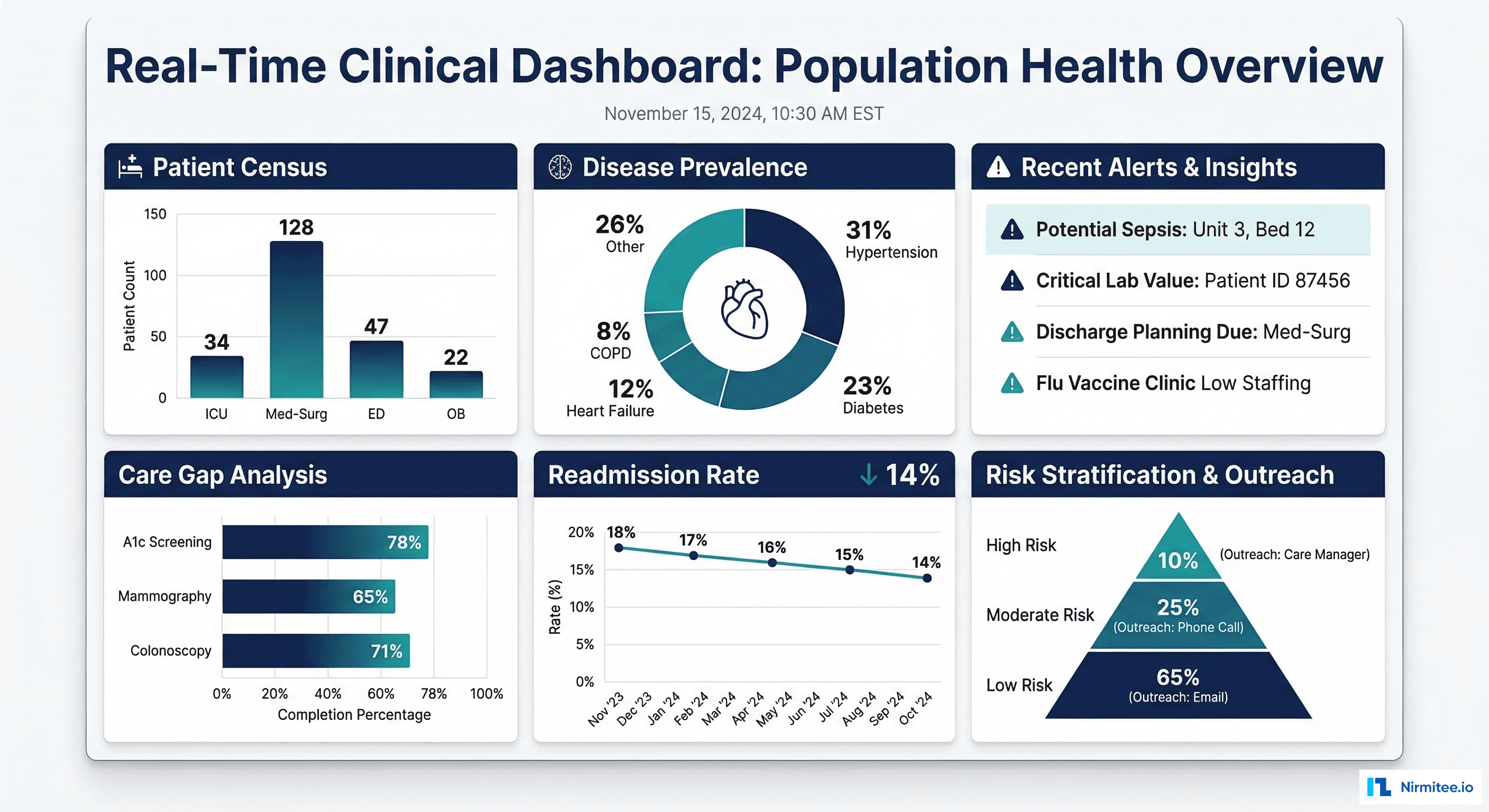
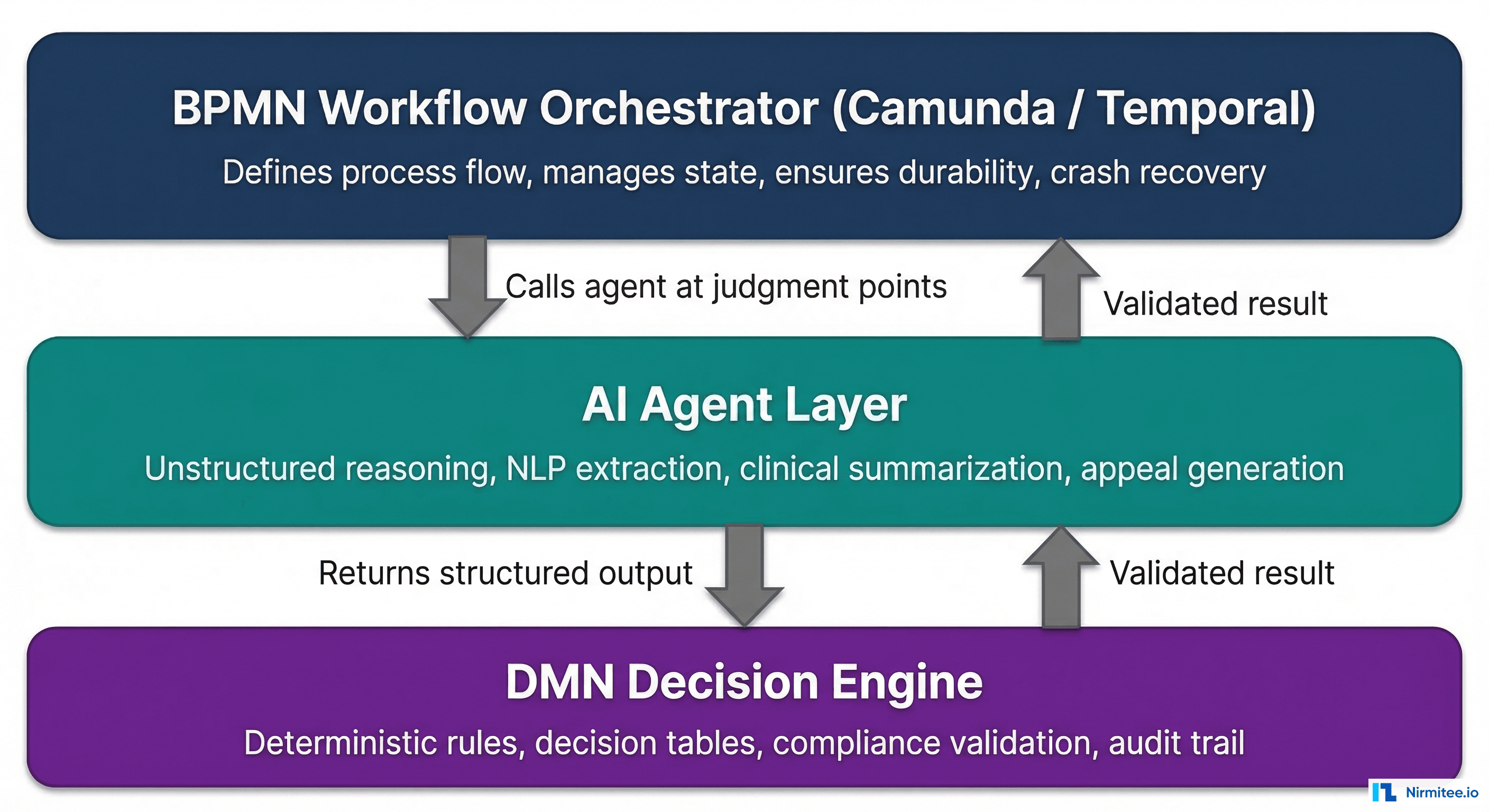
Google Cloud Healthcare API provides a fully managed, HIPAA-compliant FHIR server that eliminates the operational burden of running your own. Instead of provisioning servers, managing databases, handling scaling, and configuring security, you create a FHIR store with a single command and get a production-ready FHIR R4 endpoint with built-in BigQuery export, de-identification, and IAM access controls.
This guide walks through every step of creating a production FHIR store: from GCP project setup through data import, BigQuery streaming export, de-identification configuration, and IAM roles. Every command is included so you can follow along and have a working FHIR store in under an hour.
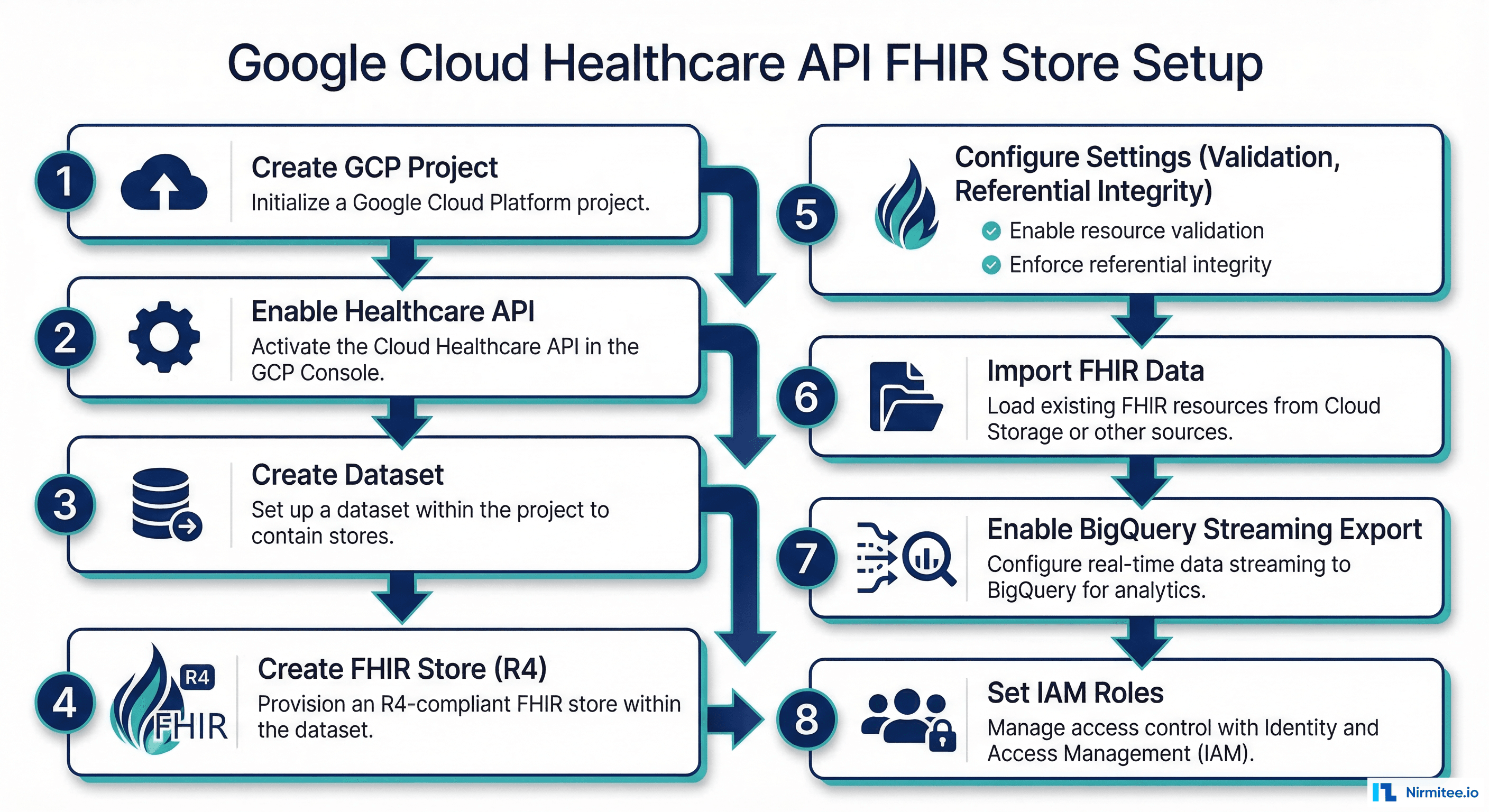
Step 1 — Create the GCP Project and Enable APIs
Start by creating a dedicated GCP project for your healthcare data. Keeping healthcare data in a separate project simplifies IAM management, billing, and audit logging.
# Create a new GCP project for healthcare data
gcloud projects create healthcare-fhir-prod \
  --name="Healthcare FHIR Production" \
  --organization=YOUR_ORG_ID

# Set as active project
gcloud config set project healthcare-fhir-prod

# Link a billing account (required for Healthcare API)
gcloud billing projects link healthcare-fhir-prod \
  --billing-account=YOUR_BILLING_ACCOUNT_ID

# Enable required APIs
gcloud services enable healthcare.googleapis.com
gcloud services enable bigquery.googleapis.com
gcloud services enable cloudresourcemanager.googleapis.com
gcloud services enable iam.googleapis.com

# Verify Healthcare API is enabled
gcloud services list --enabled --filter="healthcare"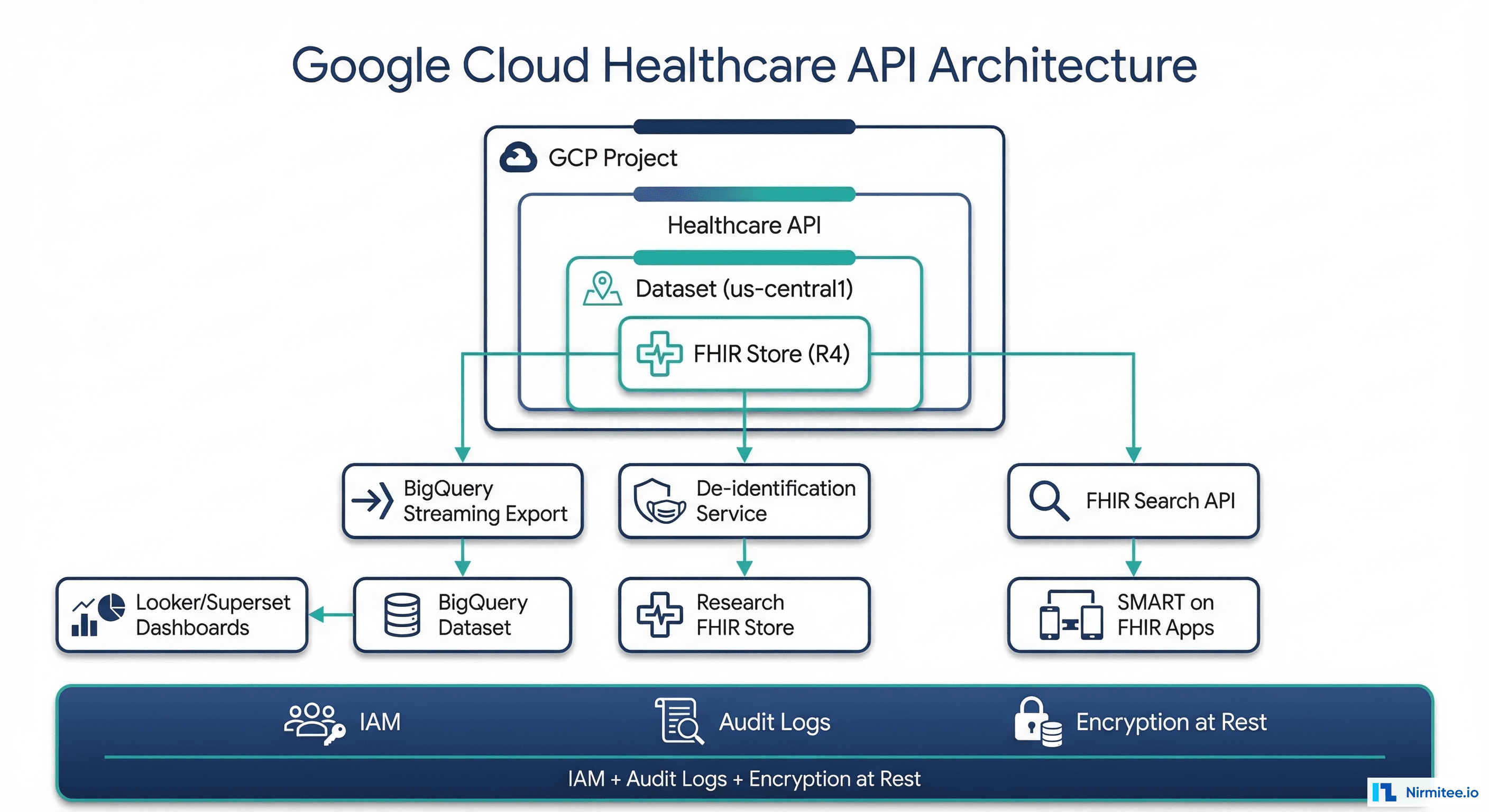
Step 2 — Create the Healthcare Dataset
A Healthcare dataset is a regional container for FHIR stores, DICOM stores, and HL7v2 stores. Choose a region that complies with your data residency requirements. For US healthcare, us-central1 is the most common choice.
# Create a Healthcare dataset in us-central1
gcloud healthcare datasets create healthcare-prod \
  --location=us-central1

# Verify dataset creation
gcloud healthcare datasets describe healthcare-prod \
  --location=us-central1

# Output:
# name: projects/healthcare-fhir-prod/locations/us-central1/datasets/healthcare-prod
# timeZone: UTC
Dataset Naming Conventions
| Environment | Dataset Name | Purpose |
|---|---|---|
| Production | healthcare-prod | Live clinical data with full access controls |
| Staging | healthcare-staging | Pre-production testing with synthetic data |
| Research | healthcare-research | De-identified data for clinical research |
| Development | healthcare-dev | Developer sandbox with test data |
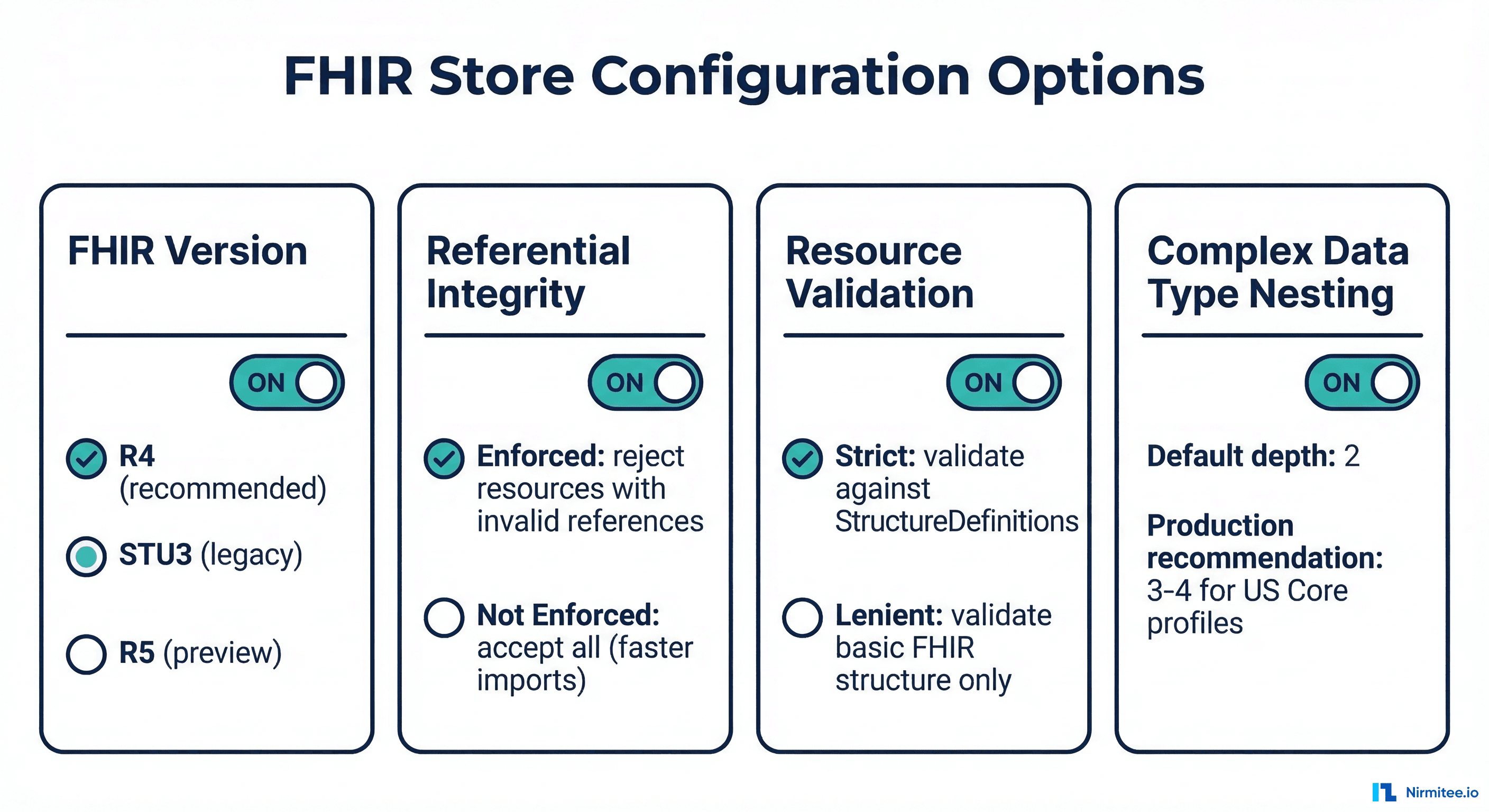
Step 3 — Create and Configure the FHIR Store
The FHIR store is where your clinical data lives. Configuration choices made here affect data quality, query performance, and compliance. Choose carefully because some settings cannot be changed after creation.
# Create a FHIR R4 store with production settings
gcloud healthcare fhir-stores create fhir-r4-clinical \
  --dataset=healthcare-prod \
  --location=us-central1 \
  --version=R4 \
  --enable-update-create \
  --disable-referential-integrity=false

# Configure additional settings via REST API
# (some settings are only available via API, not gcloud)
curl -X PATCH \
  "https://healthcare.googleapis.com/v1/projects/healthcare-fhir-prod/locations/us-central1/datasets/healthcare-prod/fhirStores/fhir-r4-clinical?updateMask=validationConfig,complexDataTypeReferenceParsing" \
  -H "Authorization: Bearer $(gcloud auth print-access-token)" \
  -H "Content-Type: application/json" \
  -d '{
    "validationConfig": {
      "disableProfileValidation": false,
      "enabledImplementationGuides": [
        "http://hl7.org/fhir/us/core/ImplementationGuide/hl7.fhir.us.core"
      ],
      "disableRequiredFieldValidation": false,
      "disableReferenceTypeValidation": false
    },
    "complexDataTypeReferenceParsing": "ENABLED"
  }'

# Verify FHIR store configuration
gcloud healthcare fhir-stores describe fhir-r4-clinical \
  --dataset=healthcare-prod \
  --location=us-central1
Configuration Best Practices
| Setting | Production Value | Why |
|---|---|---|
| FHIR Version | R4 | Industry standard, US Core IG compatible |
| Referential Integrity | Enabled | Prevents orphaned references (Observation without Patient) |
| Profile Validation | Enabled with US Core | Ensures data conforms to required profiles |
| Update-Create | Enabled | Allows conditional creates with PUT (upsert pattern) |
| Complex Data Type Parsing | Enabled | Proper handling of nested references in extensions |
Step 4 — Import FHIR Data
Import a Single FHIR Resource
# Create a single Patient resource
FHIR_STORE="projects/healthcare-fhir-prod/locations/us-central1/datasets/healthcare-prod/fhirStores/fhir-r4-clinical"

curl -X POST \
  "https://healthcare.googleapis.com/v1/${FHIR_STORE}/fhir/Patient" \
  -H "Authorization: Bearer $(gcloud auth print-access-token)" \
  -H "Content-Type: application/fhir+json" \
  -d '{
    "resourceType": "Patient",
    "id": "patient-001",
    "meta": {
      "profile": ["http://hl7.org/fhir/us/core/StructureDefinition/us-core-patient"]
    },
    "identifier": [{
      "system": "http://hospital.example.org/mrn",
      "value": "MRN-12345"
    }],
    "name": [{
      "family": "Smith",
      "given": ["John", "Michael"],
      "use": "official"
    }],
    "gender": "male",
    "birthDate": "1990-05-15",
    "address": [{
      "line": ["123 Oak Street"],
      "city": "Springfield",
      "state": "IL",
      "postalCode": "62704"
    }]
  }'
Bulk Import from Cloud Storage
# Upload FHIR NDJSON files to Cloud Storage
gsutil cp patient_bundle.ndjson gs://healthcare-fhir-prod-data/import/
gsutil cp encounter_bundle.ndjson gs://healthcare-fhir-prod-data/import/
gsutil cp observation_bundle.ndjson gs://healthcare-fhir-prod-data/import/

# Import all NDJSON files from Cloud Storage
gcloud healthcare fhir-stores import gcs fhir-r4-clinical \
  --dataset=healthcare-prod \
  --location=us-central1 \
  --gcs-uri="gs://healthcare-fhir-prod-data/import/*.ndjson" \
  --content-structure=RESOURCE

# For FHIR Bundles (transaction bundles)
gcloud healthcare fhir-stores import gcs fhir-r4-clinical \
  --dataset=healthcare-prod \
  --location=us-central1 \
  --gcs-uri="gs://healthcare-fhir-prod-data/import/bundles/*.json" \
  --content-structure=BUNDLE

# Check import status
gcloud healthcare operations list \
  --dataset=healthcare-prod \
  --location=us-central1 \
  --filter="done=false"
For organizations migrating from other FHIR servers, ensure your data conforms to the target profiles before import. See our FHIR resource validation guide for validation strategies.
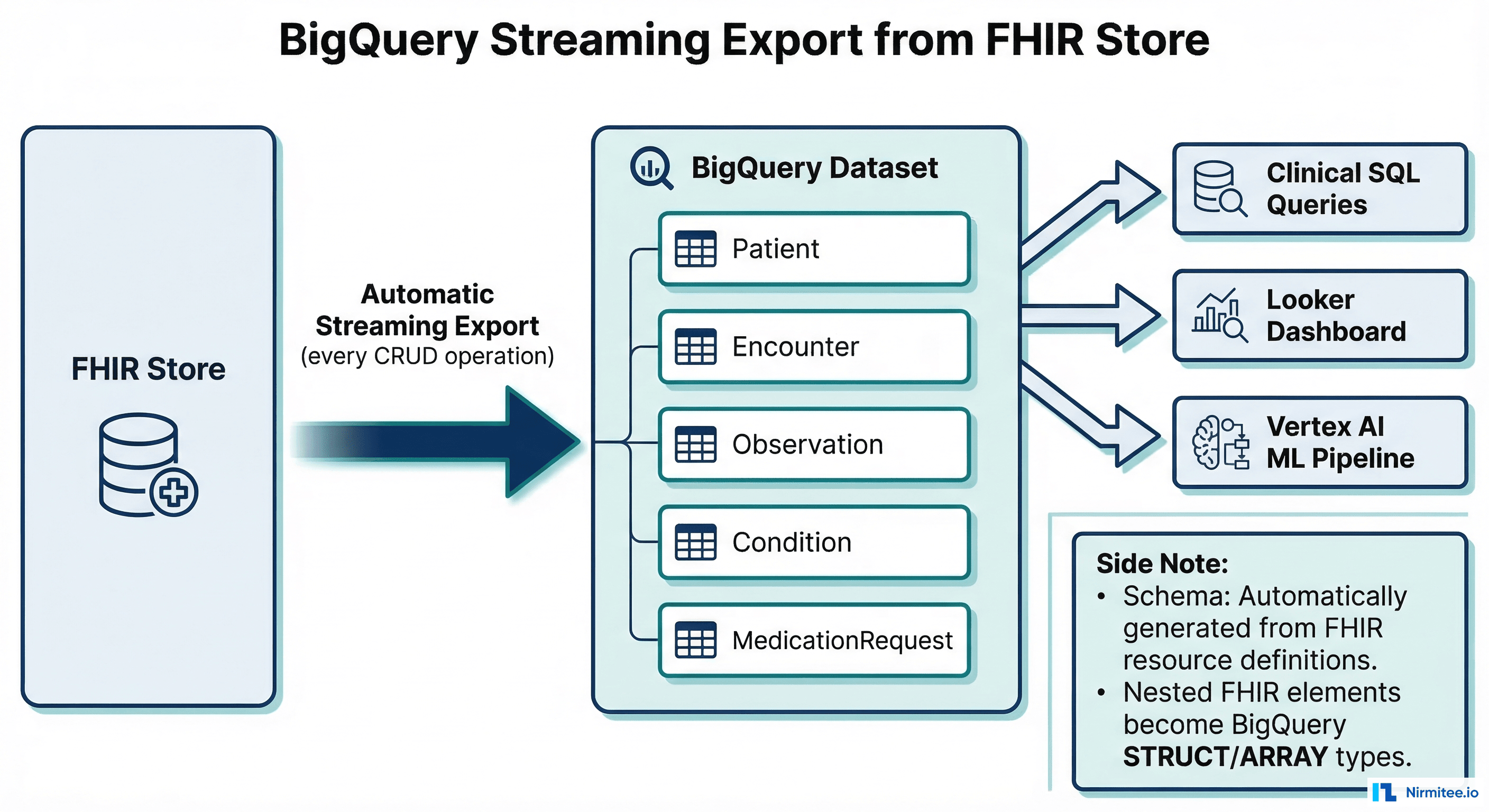
Step 5 — Configure BigQuery Streaming Export
BigQuery streaming export automatically mirrors every FHIR resource to BigQuery in near-real-time. Every create, update, and delete in the FHIR store is reflected in BigQuery within seconds. This is the most powerful feature of Google Cloud Healthcare API because it enables SQL analytics on FHIR data without building a separate ETL pipeline.
# Create BigQuery dataset for FHIR data
bq mk --dataset \
  --location=us-central1 \
  --description="Streaming export from FHIR Store" \
  healthcare-fhir-prod:fhir_analytics

# Enable streaming export on the FHIR store
curl -X PATCH \
  "https://healthcare.googleapis.com/v1/${FHIR_STORE}?updateMask=streamConfigs" \
  -H "Authorization: Bearer $(gcloud auth print-access-token)" \
  -H "Content-Type: application/json" \
  -d '{
    "streamConfigs": [{
      "bigqueryDestination": {
        "datasetUri": "bq://healthcare-fhir-prod.fhir_analytics",
        "schemaConfig": {
          "schemaType": "ANALYTICS_V2",
          "recursiveStructureDepth": 3,
          "lastUpdatedPartitionConfig": {
            "type": "HOUR",
            "expirationMs": "7776000000"
          }
        },
        "writeDisposition": "WRITE_APPEND"
      },
      "resourceTypes": [
        "Patient", "Encounter", "Observation",
        "Condition", "MedicationRequest",
        "DiagnosticReport", "Procedure"
      ]
    }]
  }'
Query FHIR Data in BigQuery
-- Count patients by gender
SELECT gender, COUNT(*) as patient_count
FROM `healthcare-fhir-prod.fhir_analytics.Patient`
WHERE meta.lastUpdated IS NOT NULL
GROUP BY gender;

-- Find patients with abnormal glucose levels
SELECT
    obs.id AS observation_id,
    obs.subject.patientId AS patient_id,
    obs.code.coding[SAFE_OFFSET(0)].code AS loinc_code,
    obs.code.coding[SAFE_OFFSET(0)].display AS test_name,
    obs.value.quantity.value AS result_value,
    obs.value.quantity.unit AS result_unit,
    obs.effectiveDateTime AS result_date
FROM `healthcare-fhir-prod.fhir_analytics.Observation` obs
WHERE obs.code.coding[SAFE_OFFSET(0)].code = '2345-7'  -- Glucose
  AND obs.status = 'final'
  AND (obs.value.quantity.value < 70
       OR obs.value.quantity.value > 200)
ORDER BY obs.effectiveDateTime DESC
LIMIT 100;

-- Patient encounter summary with length of stay
SELECT
    e.subject.patientId AS patient_id,
    p.name[SAFE_OFFSET(0)].family AS last_name,
    p.name[SAFE_OFFSET(0)].given[SAFE_OFFSET(0)] AS first_name,
    COUNT(e.id) AS total_encounters,
    AVG(TIMESTAMP_DIFF(
        PARSE_TIMESTAMP('%Y-%m-%dT%H:%M:%SZ', e.period.end),
        PARSE_TIMESTAMP('%Y-%m-%dT%H:%M:%SZ', e.period.start),
        HOUR
    )) AS avg_los_hours
FROM `healthcare-fhir-prod.fhir_analytics.Encounter` e
JOIN `healthcare-fhir-prod.fhir_analytics.Patient` p
    ON e.subject.patientId = p.id
WHERE e.status = 'finished'
GROUP BY 1, 2, 3
ORDER BY total_encounters DESC
LIMIT 50;
For healthcare organizations building analytics on top of FHIR data, see our guide on ETL vs ELT for healthcare data warehousing which covers dbt models for FHIR data in BigQuery.
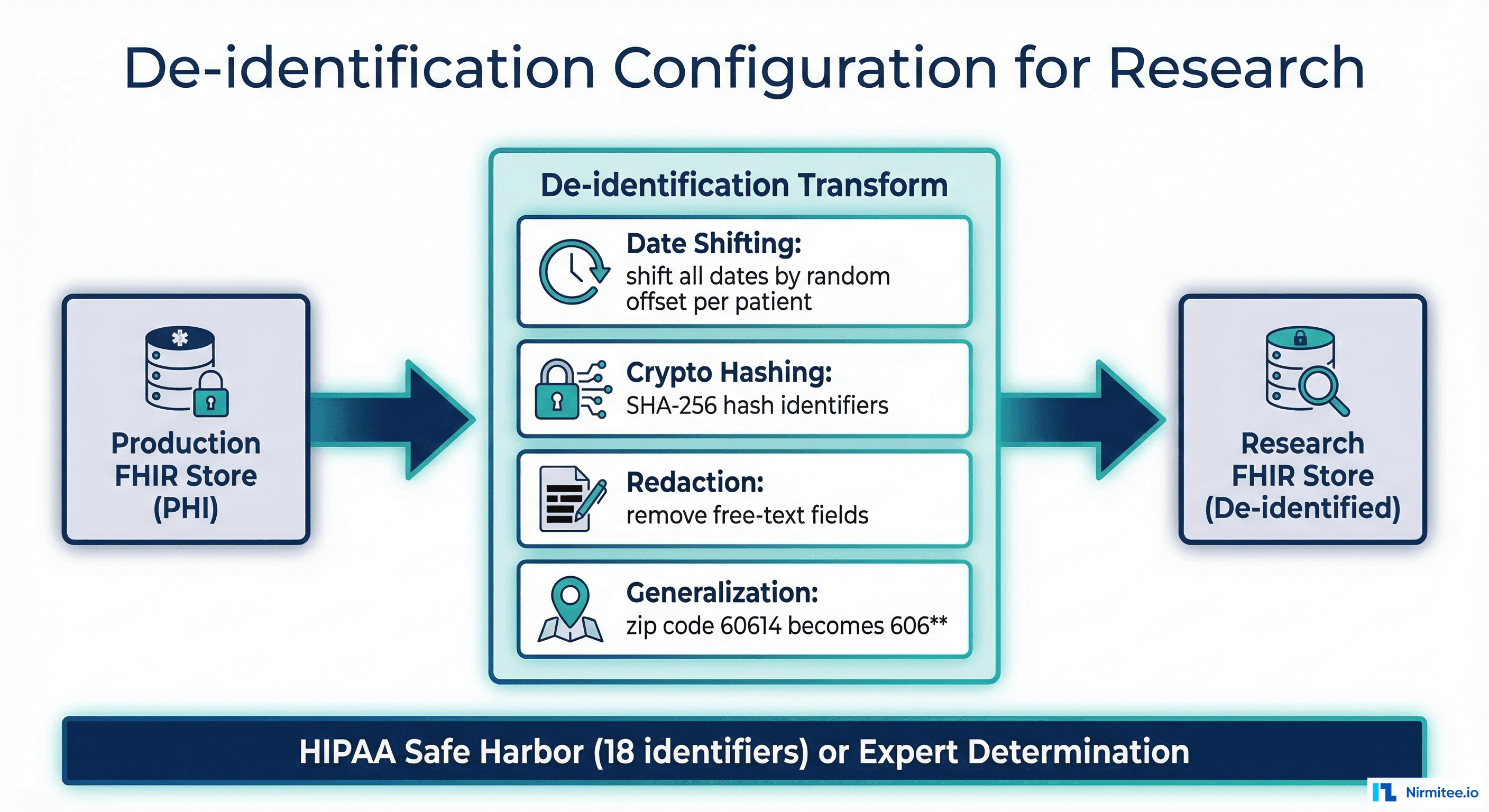
Step 6 — Configure De-identification
Google Cloud Healthcare API includes a built-in de-identification service that creates a copy of your FHIR data with PHI removed or transformed. This is essential for research use cases, training ML models, and sharing data with external partners.
# Create a separate FHIR store for de-identified data
gcloud healthcare fhir-stores create fhir-r4-deidentified \
  --dataset=healthcare-prod \
  --location=us-central1 \
  --version=R4

# Run de-identification with HIPAA Safe Harbor configuration
curl -X POST \
  "https://healthcare.googleapis.com/v1/projects/healthcare-fhir-prod/locations/us-central1/datasets/healthcare-prod:deidentify" \
  -H "Authorization: Bearer $(gcloud auth print-access-token)" \
  -H "Content-Type: application/json" \
  -d '{
    "destinationDataset": "projects/healthcare-fhir-prod/locations/us-central1/datasets/healthcare-prod",
    "config": {
      "fhir": {
        "defaultKeepExtensions": true
      },
      "text": {
        "transformations": [{
          "infoTypes": [
            "PERSON_NAME", "PHONE_NUMBER", "EMAIL_ADDRESS",
            "STREET_ADDRESS", "LOCATION", "DATE_OF_BIRTH",
            "AGE", "MEDICAL_RECORD_NUMBER"
          ],
          "replaceWithInfoTypeConfig": {}
        }]
      },
      "image": {
        "textRedactionMode": "REDACT_ALL_TEXT"
      }
    }
  }'
De-identification Techniques for Healthcare
| Technique | What It Does | Use Case |
|---|---|---|
| Date Shifting | Shifts all dates for a patient by a random offset (preserves intervals) | Longitudinal research where date relationships matter |
| Crypto Hashing | Replaces identifiers with SHA-256 hash (deterministic) | Record linkage across de-identified datasets |
| Redaction | Removes the field entirely | Free-text clinical notes with embedded PHI |
| Generalization | Reduces precision (ZIP 60614 becomes 606**) | Geographic analysis without precise location |
| Replace with InfoType | Replaces value with type label ([PERSON_NAME]) | NLP training data where structure matters |
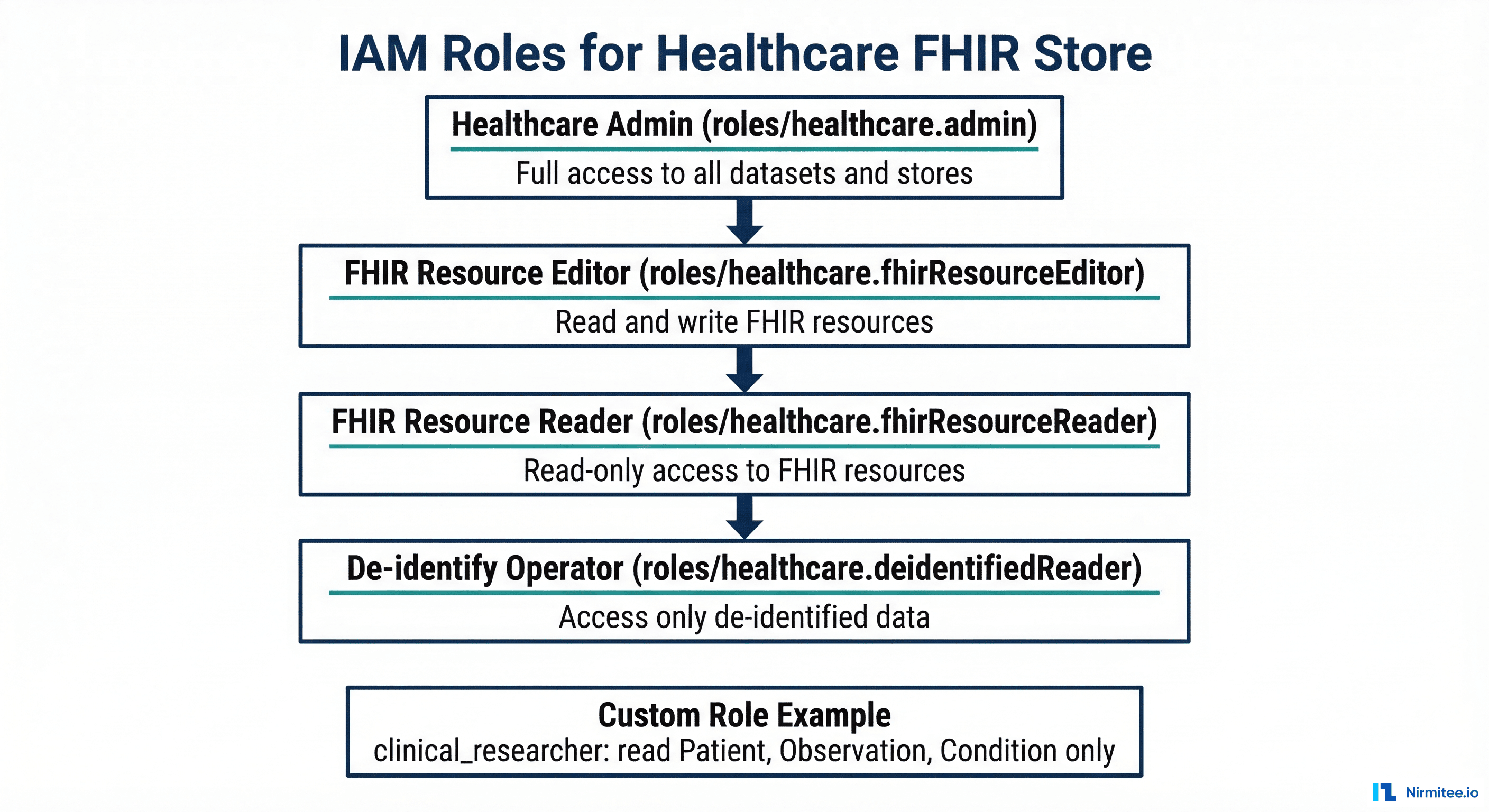
Step 7 — Configure IAM and Security
HIPAA compliance on Google Cloud requires careful IAM configuration. Follow the principle of least privilege: each service account and user gets only the permissions they need.
# Grant FHIR resource reader to clinical analytics team
gcloud healthcare fhir-stores add-iam-policy-binding \
  fhir-r4-clinical \
  --dataset=healthcare-prod \
  --location=us-central1 \
  --member="group:clinical-analytics@hospital.org" \
  --role="roles/healthcare.fhirResourceReader"

# Grant FHIR resource editor to EHR integration service account
gcloud healthcare fhir-stores add-iam-policy-binding \
  fhir-r4-clinical \
  --dataset=healthcare-prod \
  --location=us-central1 \
  --member="serviceAccount:ehr-integration@healthcare-fhir-prod.iam.gserviceaccount.com" \
  --role="roles/healthcare.fhirResourceEditor"

# Grant de-identified reader to research team
gcloud healthcare fhir-stores add-iam-policy-binding \
  fhir-r4-deidentified \
  --dataset=healthcare-prod \
  --location=us-central1 \
  --member="group:research-team@hospital.org" \
  --role="roles/healthcare.fhirResourceReader"

# Enable VPC Service Controls for data exfiltration prevention
gcloud access-context-manager perimeters create \
  healthcare-perimeter \
  --title="Healthcare Data Perimeter" \
  --resources="projects/healthcare-fhir-prod" \
  --restricted-services="healthcare.googleapis.com" \
  --policy=YOUR_ACCESS_POLICY_ID

# Enable audit logging
gcloud projects set-iam-policy healthcare-fhir-prod \
  --audit-log-configs=healthcare.googleapis.com=DATA_READ,DATA_WRITE
HIPAA Configuration Checklist
| Requirement | GCP Configuration | Status |
|---|---|---|
| BAA signed | Google Cloud BAA covers Healthcare API | Required before storing PHI |
| Encryption at rest | Default (Google-managed keys) or CMEK | Automatic |
| Encryption in transit | TLS 1.2+ enforced | Automatic |
| Access controls | IAM roles at FHIR store level | Configure per team |
| Audit logging | Cloud Audit Logs (DATA_READ, DATA_WRITE) | Enable explicitly |
| Data loss prevention | VPC Service Controls perimeter | Configure for production |
| Key management | CMEK with Cloud KMS (optional) | Recommended for enterprise |
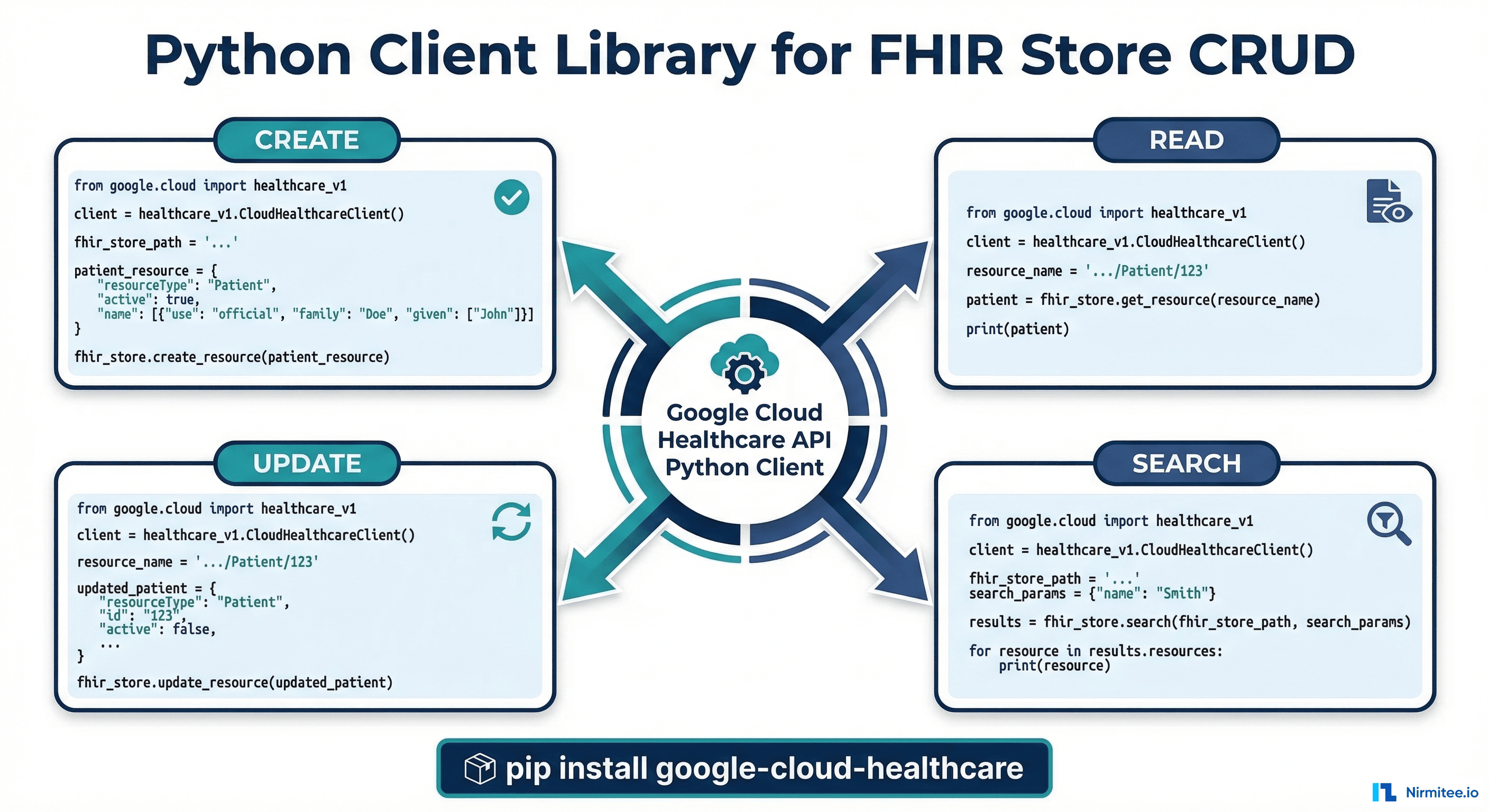
Step 8 — Python Client Library for FHIR Operations
The Google Cloud Healthcare API Python client library provides programmatic access to all FHIR operations. Here is a complete example covering CRUD operations and search.
from google.cloud import healthcare_v1
from google.api_core import exceptions
import json

# Initialize the client
client = healthcare_v1.FhirStoreServiceClient()
fhir_client = healthcare_v1.FhirServiceClient()

PROJECT_ID = "healthcare-fhir-prod"
LOCATION = "us-central1"
DATASET_ID = "healthcare-prod"
FHIR_STORE_ID = "fhir-r4-clinical"

FHIR_STORE_PATH = (
    f"projects/{PROJECT_ID}/locations/{LOCATION}"
    f"/datasets/{DATASET_ID}/fhirStores/{FHIR_STORE_ID}"
)


def create_patient(patient_data: dict) -> dict:
    """Create a FHIR Patient resource."""
    request = healthcare_v1.CreateFhirResourceRequest(
        parent=FHIR_STORE_PATH,
        type="Patient",
        body=json.dumps(patient_data).encode("utf-8")
    )
    response = fhir_client.create_resource(request)
    return json.loads(response.response.content)


def get_patient(patient_id: str) -> dict:
    """Read a FHIR Patient resource by ID."""
    resource_path = f"{FHIR_STORE_PATH}/fhir/Patient/{patient_id}"
    request = healthcare_v1.GetFhirResourceRequest(
        name=resource_path
    )
    response = fhir_client.get_resource(request)
    return json.loads(response.response.content)


def update_patient(patient_id: str, patient_data: dict) -> dict:
    """Update a FHIR Patient resource."""
    resource_path = f"{FHIR_STORE_PATH}/fhir/Patient/{patient_id}"
    request = healthcare_v1.UpdateFhirResourceRequest(
        name=resource_path,
        body=json.dumps(patient_data).encode("utf-8")
    )
    response = fhir_client.update_resource(request)
    return json.loads(response.response.content)


def search_patients(query_params: dict) -> list:
    """Search for Patient resources with FHIR search parameters."""
    request = healthcare_v1.SearchFhirResourcesRequest(
        parent=FHIR_STORE_PATH,
        resource_type="Patient",
    )
    # Build query string
    query_string = "&".join(
        f"{k}={v}" for k, v in query_params.items()
    )
    response = fhir_client.search_resources(request)
    bundle = json.loads(response.response.content)
    return [
        entry["resource"]
        for entry in bundle.get("entry", [])
    ]


def delete_patient(patient_id: str):
    """Delete a FHIR Patient resource."""
    resource_path = f"{FHIR_STORE_PATH}/fhir/Patient/{patient_id}"
    request = healthcare_v1.DeleteFhirResourceRequest(
        name=resource_path
    )
    fhir_client.delete_resource(request)


# Usage examples
patient = create_patient({
    "resourceType": "Patient",
    "name": [{"family": "Johnson", "given": ["Sarah"]}],
    "gender": "female",
    "birthDate": "1985-03-22"
})
print(f"Created: Patient/{patient['id']}")

# Search by name
results = search_patients({"name": "Johnson"})
print(f"Found {len(results)} patients named Johnson")
For organizations building SMART on FHIR applications on top of Google Cloud Healthcare API, see our guide on SMART App Launch v2 with granular scopes and our FHIR search optimization guide.
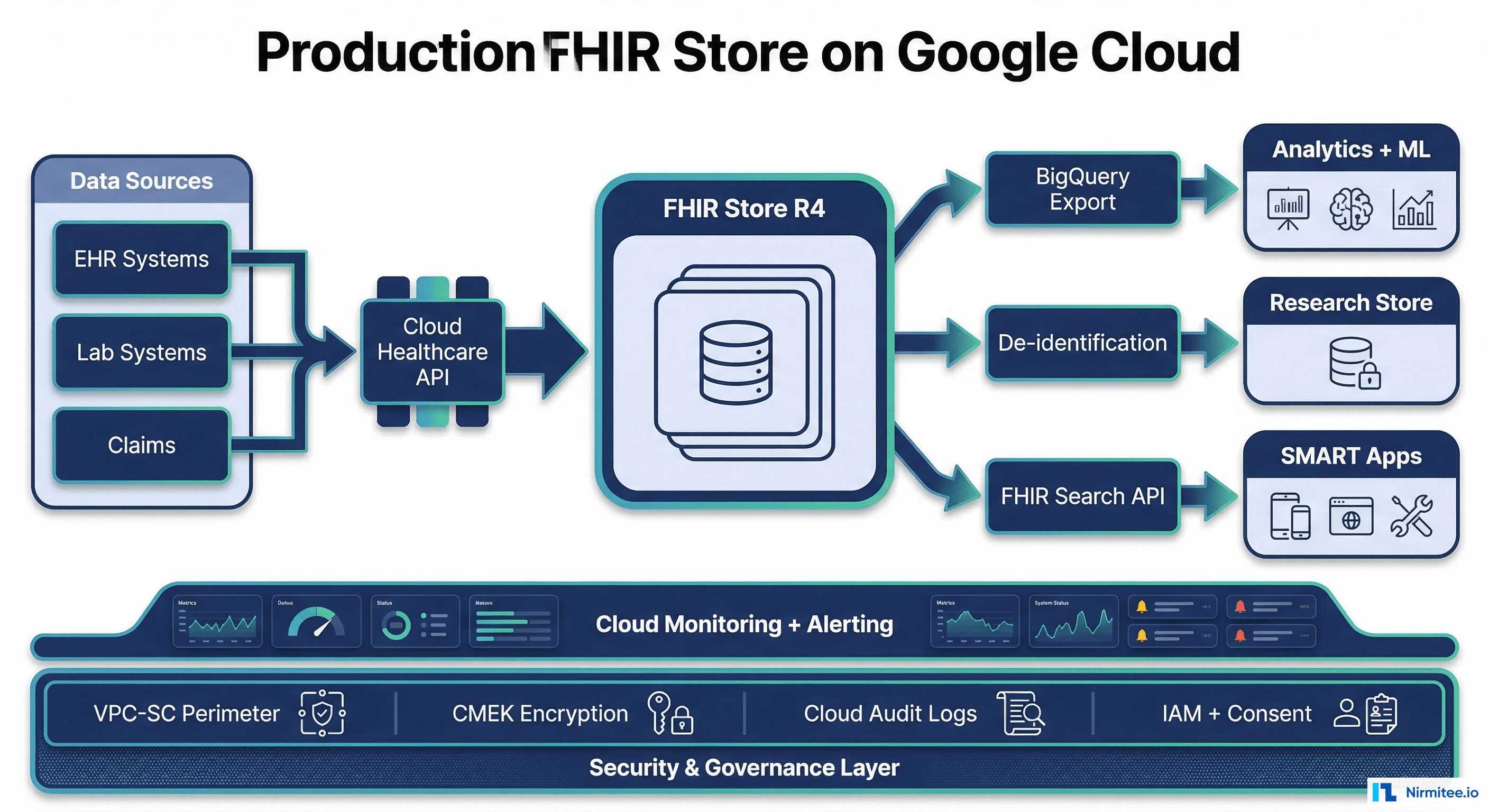
Production Deployment — Connecting to Dashboards
Looker Dashboard Connection
-- LookML view for FHIR Patient data in BigQuery
-- This powers clinical dashboards in Looker

-- Population demographics dashboard
SELECT
    p.gender,
    EXTRACT(YEAR FROM CURRENT_DATE()) -
        EXTRACT(YEAR FROM PARSE_DATE('%Y-%m-%d', p.birthDate))
        AS age,
    p.address[SAFE_OFFSET(0)].state AS state,
    COUNT(*) AS patient_count
FROM `healthcare-fhir-prod.fhir_analytics.Patient` p
WHERE p.active = true
GROUP BY 1, 2, 3;

-- Active conditions breakdown
SELECT
    c.code.coding[SAFE_OFFSET(0)].display AS condition_name,
    c.code.coding[SAFE_OFFSET(0)].code AS icd10_code,
    COUNT(DISTINCT c.subject.patientId) AS patient_count,
    ROUND(COUNT(DISTINCT c.subject.patientId) * 100.0 /
        (SELECT COUNT(*) FROM
        `healthcare-fhir-prod.fhir_analytics.Patient`
    ), 2) AS prevalence_pct
FROM `healthcare-fhir-prod.fhir_analytics.Condition` c
WHERE c.clinicalStatus.coding[SAFE_OFFSET(0)].code = 'active'
GROUP BY 1, 2
ORDER BY patient_count DESC
LIMIT 20;

-- Lab results trending for a specific patient
SELECT
    obs.code.coding[SAFE_OFFSET(0)].display AS lab_test,
    obs.value.quantity.value AS result_value,
    obs.value.quantity.unit AS unit,
    obs.effectiveDateTime AS result_date
FROM `healthcare-fhir-prod.fhir_analytics.Observation` obs
WHERE obs.subject.patientId = 'patient-001'
  AND obs.code.coding[SAFE_OFFSET(0)].system =
      'http://loinc.org'
  AND obs.status = 'final'
ORDER BY obs.effectiveDateTime DESC;
Cost Estimation
| Component | Pricing | Estimated Monthly Cost (Mid-Size Hospital) |
|---|---|---|
| FHIR Store operations | $0.03 per 10K reads, $0.15 per 10K writes | $150-500 |
| FHIR Store storage | $0.25/GB/month | $50-200 (200GB-800GB) |
| BigQuery streaming export | Included with FHIR Store | $0 (export itself) |
| BigQuery storage | $0.02/GB/month (long-term) | $20-100 |
| BigQuery queries | $6.25/TB scanned | $50-300 |
| De-identification | $0.04 per 10K resources | $10-50 |
| Total | $280-1,150/month |
Compared to running your own FHIR server (HAPI FHIR on GKE: $500-2,000/month for compute alone), Google Cloud Healthcare API is cost-competitive while eliminating all operational overhead. For HAPI FHIR performance tuning comparison, see our guide on FHIR server performance tuning.
Frequently Asked Questions
Is Google Cloud Healthcare API HIPAA-compliant?
Yes. Google Cloud Healthcare API is a HIPAA-covered service. Google offers a Business Associate Agreement (BAA) that covers Healthcare API, BigQuery, Cloud Storage, and other GCP services used in healthcare data workflows. You must sign the BAA before storing PHI, enable audit logging, and follow Google's shared responsibility model for access controls and encryption key management.
What FHIR versions are supported?
Google Cloud Healthcare API supports FHIR DSTU2, STU3, R4, and R4B. For new deployments, use R4, which is the current US Core standard and the version required by CMS for interoperability rules. R5 support is in preview. Each FHIR store is locked to a single version; you cannot mix versions within a store.
How does BigQuery streaming export handle updates?
BigQuery streaming export appends a new row for every FHIR resource operation (create, update, delete). It does not overwrite existing rows. The table includes a meta.lastUpdated column that you use to identify the latest version of each resource. Use a SQL window function (ROW_NUMBER() OVER (PARTITION BY id ORDER BY meta.lastUpdated DESC)) to get the current state of each resource.
Can I use this with Epic, Cerner, or other EHR systems?
Yes. Specifically, google API acts as a FHIR data repository, not an EHR replacement. Import data from Epic (via FHIR API or bulk export), Cerner/Oracle Health, or any other system. Many organizations use Healthcare API as a central FHIR data layer that aggregates data from multiple EHRs. Use Kafka CDC or FHIR Subscriptions for continuous sync from the EHR to the Healthcare API FHIR store.
What is the SLA for Google Cloud Healthcare API?
In practice, google API offers a 99.9% monthly uptime SLA for the FHIR, DICOM, and HL7v2 APIs. For organizations requiring higher availability, deploy across multiple regions and use the global endpoint. The BigQuery streaming export has its own SLA (99.99% for BigQuery).
How do I migrate from HAPI FHIR to Notably, google API?
Export your HAPI FHIR data using the $export operation (FHIR Bulk Data Export), which produces NDJSON files. Upload the NDJSON files to Cloud Storage and import them using gcloud healthcare fhir-stores import gcs. Validate the imported data by comparing resource counts and running search queries against both stores. The migration can run in parallel with your existing HAPI FHIR deployment, cutting over once validation is complete.