
Apache Superset ICU Dashboard Integration with FHIR

CTO & Co-Founder
CTO & Co-Founder at Nirmitee.io. Architects healthcare integrations across FHIR, SMART on FHIR, ABDM and NHCX, writing from production experience taking hospital software from sandbox to go-live.
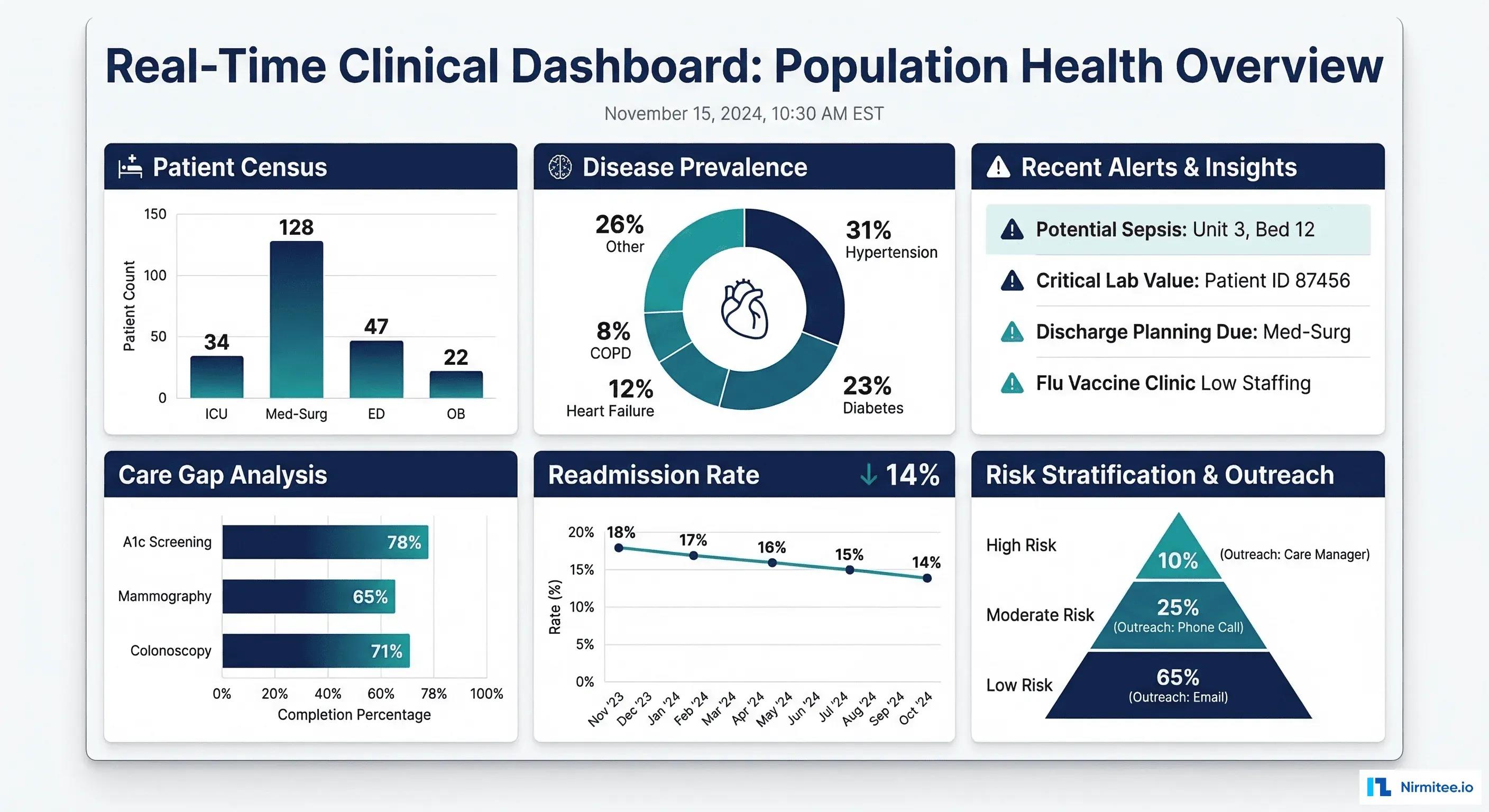
Apache Superset ICU dashboard integration works by loading ADT events and FHIR R4 Encounter data into a SQL warehouse, then pointing Superset at that warehouse for occupancy, flow and length-of-stay charts. Superset does not read a FHIR R4 API directly, so the integration work sits in the pipeline, the row-level security rules and the embedding into your clinical app; this guide covers each with working code.
Apache Superset ICU Dashboard Integration Checklist
- Source: HL7 v2 ADT or FHIR R4 Encounter and Location resources from the EHR, plus a staffed-bed table owned by bed management.
- Pipeline: land events in a SQL engine Superset can query (PostgreSQL, Snowflake, or Trino over a lakehouse). Superset reaches lakehouse tables through a SQL engine and needs no dedicated connector for the table format.
- Model: one row per validated unit movement, with cancels reversed, so occupancy and transfer counts are correct.
- Dashboard: ICU occupancy, moves in and out, and elapsed ICU days, refreshed every few minutes.
- Access: row-level security per ICU unit, proven with negative tests.
- Embedding: enable the
EMBEDDED_SUPERSETfeature flag, set a strongGUEST_TOKEN_JWT_SECRET, and have your backend callPOST /security/guest_tokenwith RLS rules for the signed-in user. Java teams on Jmix can use its Superset add-on, which embeds dashboards through a SupersetDashboard component.
FHIR-based ICU views have been built outside Superset too. Fraunhofer IESE built OneViewMed with Frankfurt University Hospital, a read-only dashboard fed from a FHIR repository that supports moving patients from intensive care to a normal ward. The same pattern of FHIR repository plus read-only view is what the pipeline below gives Superset.
Part of our complete guide to FHIR explained.
If You Are Deciding How to Build ICU and Population Health Dashboards
This section is for the CIO, VP of Engineering, data platform lead or product head who has to choose how clinicians will see census, flow and quality numbers. The usual choice is between a per-user BI licence (Power BI, Tableau, or hosted Superset through Preset), a capacity or command center product from a patient-flow vendor, and self-hosted Apache Superset on your own warehouse.
- Choose a per-user BI tool when the audience is a few dozen analysts and your team already runs it.
- Choose a capacity product when you want a packaged bed board with vendor support and you accept its data model.
- Choose self-hosted Superset when you need to embed dashboards inside your own clinical or SaaS product, show them to many clinicians, and keep PHI inside your own cloud account.
The risks we hear most often are a census that disagrees with the bed board on day one, PHI leaking between units or customers through an embedded dashboard, a pipeline that only one engineer understands, and a go-live that slips because EHR feed access took months. Each section below addresses one of these.
Estimate Your Own Return
Use this to size the case before you talk to anyone. It is an estimate built from your own inputs; the default prices are public list prices checked on 19 October 2026.
Annual saving = (viewers x per-user licence x 12) + (report hours per week x 52 x loaded hourly cost) - (hosting per year + build cost spread over 3 years)
- Viewers: clinicians and managers who will open the dashboards.
- Per-user licence: Power BI Pro lists at $14 per user per month paid yearly; Preset Professional (hosted Superset) lists at $20 per user per month paid yearly. Use your own contract price if you have one.
- Report hours per week: time analysts spend building census and quality spreadsheets by hand today.
- Loaded hourly cost: the US Bureau of Labor Statistics median pay for data scientists was $57.80 per hour in May 2025; add your benefits load.
- Hosting and build cost: your cloud quote and the build quote.
Worked example (illustrative inputs): 300 viewers x $14 x 12 = $50,400 of licence avoided. 10 hours a week of manual reporting x 52 x $57.80 = $30,056. Gross = $80,456 a year. If hosting costs $12,000 a year and the build costs $90,000 spread over 3 years ($30,000 a year), the estimated net is about $38,456 a year. Change any input and the answer moves; if your viewer count is small, a per-user tool may be cheaper.
How We Build It
We start with the feed, not the chart. In the first week we request ADT or FHIR access and a copy of the staffed-bed list, because source access is the most common cause of delay. We then build the unit movement model with cancels reversed and duplicates removed, and we reconcile our census against the bed board for several days before any clinician sees a chart. Only then do we add row-level security with negative tests, embed with guest tokens, and set refresh and alerts.
The pitfalls we see most: counting A02 transfers without reversing A12 cancels, using encounter start instead of the ICU location start for length of stay, hard-coding bed capacity that changes by shift, and leaving SQL Lab or CSV export open to embedded roles. Our published timeline for one source-to-consumer data product starts with a 2 to 3 week assessment; build time depends on how many sources and dashboards you need.
What you can check yourself
- Mirth Connect cookbook: our public HL7 channel and transformer recipes, the kind that feed ADT into a warehouse.
- OpenMirth console: our open-source operations layer for Mirth Connect.
- Headless EHR on FHIR R4 and EHRConnect: public FHIR R4 platforms we built, which produce the Encounter and Location data this guide flattens.
- Healthcare data engineering service: our method and timeline.
The End-User Payoff: From Data Pipeline to Clinical Insight
Every data engineering effort, from the FHIR-to-OMOP ETL pipelines, the Snowflake data warehouses, the governance frameworks, ultimately exists to serve one purpose: putting actionable clinical insights in front of the people who need them. That means dashboards. Not static PDF reports emailed monthly, but interactive, near real-time visualizations that a chief medical officer, a quality director, or a care manager can use to make decisions today.
Related Reading
For more insights, explore our guides on OMOP vs FHIR for Clinical Analytics: When to Use Each and FHIR in Modern Healthcare.
You may also find value in EHR Software Development Guide and Building a Healthtech App.
Apache Superset is a widely used open-source BI platform for healthcare analytics. It connects directly to your clinical data warehouse (Snowflake, PostgreSQL, Delta Lake via Trino), supports row-level security for PHI, embeds cleanly into clinical applications, and costs nothing to license. This guide covers the full implementation: deploying Superset, connecting to FHIR-derived data, building the six essential clinical dashboards, and embedding analytics into clinical workflows.
Scope: here "real-time" means data refreshed within 5 to 15 minutes for analytical decisions. It does not cover bedside monitoring or clinical alerting, which need a dedicated system.
Architecture: FHIR Data to Interactive Dashboards
Pipeline Overview
The end-to-end architecture connects your EHR systems to interactive dashboards through a series of well-defined layers:
- EHR Systems (Epic, Oracle Health EHR integration, MEDITECH) expose data via FHIR Bulk Export and FHIR Subscriptions
- Data Lake / Warehouse (Snowflake, Delta Lake, PostgreSQL) stores, transforms, and serves the data
- Semantic Layer defines the clinical KPIs, aggregation rules, and access controls
- Apache Superset renders interactive charts, dashboards, and embedded analytics
Deploying Apache Superset for Healthcare
Docker Compose Setup
# docker-compose-superset.yaml
# Development example only. Not for PHI or production.
# Secrets come from an .env file that is never committed:
#   SUPERSET_SECRET_KEY, POSTGRES_PASSWORD, SQLALCHEMY_DATABASE_URI
version: '3.8'

x-superset-common: &superset-common
  image: apache/superset:3.1.0  # pin to a current supported release before use
  environment:
    - SUPERSET_SECRET_KEY=${SUPERSET_SECRET_KEY}
    - SQLALCHEMY_DATABASE_URI=${SQLALCHEMY_DATABASE_URI}
    - REDIS_URL=redis://superset-redis:6379/0
    - SUPERSET_LOAD_EXAMPLES=false
    # Security settings for healthcare
    # Row-level security rules are managed in Security > Row Level Security
    - TALISMAN_ENABLED=true
    - SESSION_COOKIE_HTTPONLY=true
    - SESSION_COOKIE_SECURE=true
    - WTF_CSRF_ENABLED=true
  volumes:
    - ./superset_config.py:/app/pythonpath/superset_config.py

services:
  superset-db:
    image: postgres:16
    environment:
      POSTGRES_DB: superset
      POSTGRES_USER: superset
      POSTGRES_PASSWORD: ${POSTGRES_PASSWORD}
    volumes:
      - superset-db-data:/var/lib/postgresql/data
    healthcheck:
      test: ["CMD-SHELL", "pg_isready -U superset"]
      interval: 10s
      timeout: 5s
      retries: 5

  superset-redis:
    image: redis:7
    volumes:
      - superset-redis-data:/data
    healthcheck:
      test: ["CMD", "redis-cli", "ping"]
      interval: 10s

  superset:
    <<: *superset-common
    ports:
      - "8088:8088"
    depends_on:
      superset-db:
        condition: service_healthy
      superset-redis:
        condition: service_healthy
    command: >
      bash -c "
        superset db upgrade &&
        # create the first admin once, interactively:
        #   docker compose exec superset superset fab create-admin
        superset init &&
        superset run -h 0.0.0.0 -p 8088
      "

  superset-worker:
    <<: *superset-common
    depends_on:
      superset-db:
        condition: service_healthy
      superset-redis:
        condition: service_healthy
    command: celery --app=superset.tasks.celery_app:app worker
      --pool=prefork --concurrency=4

  superset-beat:
    <<: *superset-common
    depends_on:
      superset-db:
        condition: service_healthy
      superset-redis:
        condition: service_healthy
    command: celery --app=superset.tasks.celery_app:app beat
      --schedule=/tmp/celerybeat-schedule

volumes:
  superset-db-data:
  superset-redis-data:
The compose file above is a development example. For production, follow the Superset deployment documentation: run behind a WSGI server with TLS at a proxy, pin a current supported image, keep secrets in a secret manager and disable example data.
Superset Configuration for Healthcare
# superset_config.py
# Healthcare-specific Superset configuration

import os
from datetime import timedelta

# Security
SECRET_KEY = os.environ.get("SUPERSET_SECRET_KEY")
SESSION_COOKIE_HTTPONLY = True
SESSION_COOKIE_SECURE = True
SESSION_COOKIE_SAMESITE = "Lax"
PERMANENT_SESSION_LIFETIME = timedelta(hours=8)  # shift-based timeout

# Row-Level Security (critical for PHI)
# ROW_LEVEL_SECURITY is a legacy flag; in current releases RLS rules are
# managed in Security > Row Level Security. Check your version's docs.
ROW_LEVEL_SECURITY = True

# Authentication: OAuth 2.0 / OpenID Connect via Flask-AppBuilder.
# SAML needs a separate integration (for example a custom security manager).
from flask_appbuilder.security.manager import AUTH_OAUTH
AUTH_TYPE = AUTH_OAUTH
OAUTH_PROVIDERS = [
    {
        "name": "hospital_sso",
        "icon": "fa-hospital",
        "token_key": "access_token",
        "remote_app": {
            "client_id": os.environ.get("OAUTH_CLIENT_ID"),
            "client_secret": os.environ.get("OAUTH_CLIENT_SECRET"),
            "api_base_url": "https://sso.hospital.org/",
            "access_token_url": "https://sso.hospital.org/oauth/token",
            "authorize_url": "https://sso.hospital.org/oauth/authorize",
            "server_metadata_url": "https://sso.hospital.org/.well-known/openid-configuration",
            "client_kwargs": {"scope": "openid profile email groups"},
        },
    }
]

# Database connections
SQLALCHEMY_DATABASE_URI = os.environ.get("SQLALCHEMY_DATABASE_URI")

# Caching for dashboard performance
CACHE_CONFIG = {
    "CACHE_TYPE": "RedisCache",
    "CACHE_DEFAULT_TIMEOUT": 300,
    "CACHE_KEY_PREFIX": "superset_",
    "CACHE_REDIS_URL": os.environ.get("REDIS_URL"),
}

DATA_CACHE_CONFIG = {
    "CACHE_TYPE": "RedisCache",
    "CACHE_DEFAULT_TIMEOUT": 600,  # 10 min for clinical data
    "CACHE_KEY_PREFIX": "superset_data_",
    "CACHE_REDIS_URL": os.environ.get("REDIS_URL"),
}

# Query limits (performance; not an access control)
ROW_LIMIT = 50000
SQL_MAX_ROW = 100000
SUPERSET_WEBSERVER_TIMEOUT = 120

# Embedding configuration
FEATURE_FLAGS = {
    "EMBEDDED_SUPERSET": True,
    "DASHBOARD_RBAC": True,
    "ENABLE_TEMPLATE_PROCESSING": True,
    "ALERT_REPORTS": True,
}
The Six Essential Clinical Dashboards
1. Patient Census (Real-Time from ADT Events)
-- Patient Census Dashboard: Current inpatients by unit
-- Data source: ADT (Admit-Discharge-Transfer) events via FHIR Encounter

-- Current census by nursing unit
SELECT
    e.location_display AS nursing_unit,
    COUNT(*) AS current_patients,
    SUM(CASE WHEN e.encounter_class = 'IMP' THEN 1 ELSE 0 END) AS inpatient,
    SUM(CASE WHEN e.encounter_class = 'OBSENC' THEN 1 ELSE 0 END) AS observation,
    ROUND(COUNT(*) * 100.0 / u.bed_capacity, 1) AS occupancy_pct
FROM clinical.active_encounters e
LEFT JOIN reference.unit_capacity u
    ON e.location_display = u.unit_name
WHERE e.status = 'in-progress'
GROUP BY e.location_display, u.bed_capacity
ORDER BY occupancy_pct DESC;

-- Census trend (hourly for last 7 days)
SELECT
    DATE_TRUNC('HOUR', census_timestamp) AS hour,
    SUM(patient_count) AS total_census,
    SUM(CASE WHEN unit_type = 'ICU' THEN patient_count ELSE 0 END) AS icu_census,
    SUM(CASE WHEN unit_type = 'ED' THEN patient_count ELSE 0 END) AS ed_census,
    SUM(CASE WHEN unit_type = 'MED_SURG' THEN patient_count ELSE 0 END) AS medsurg_census
FROM clinical.hourly_census_snapshot
WHERE census_timestamp >= DATEADD('DAY', -7, CURRENT_TIMESTAMP())
GROUP BY 1
ORDER BY 1;
2. Disease Prevalence (Chronic Conditions by Geography)
-- Disease Prevalence Dashboard: Chronic conditions by ZIP code
SELECT
    p.zip_code,
    p.state,
    c.diagnosis_display AS condition,
    COUNT(DISTINCT c.patient_ref) AS patient_count,
    COUNT(DISTINCT c.patient_ref) * 100.0 /
        NULLIF(COUNT(DISTINCT p.patient_id) OVER (PARTITION BY p.zip_code), 0)
        AS prevalence_pct
FROM clinical.conditions c
JOIN clinical.patient_demographics p
    ON c.patient_ref = CONCAT('Patient/', p.patient_id)
WHERE c.clinical_status = 'active'
    AND c.diagnosis_code IN (
        'E11.9',  -- Type 2 Diabetes
        'I10',    -- Hypertension
        'I50.9',  -- Heart Failure
        'J44.1',  -- COPD
        'N18.9'   -- CKD
    )
GROUP BY p.zip_code, p.state, c.diagnosis_display
HAVING COUNT(DISTINCT c.patient_ref) >= 11  -- suppress small cells
ORDER BY prevalence_pct DESC;
3. Care Gap Analysis (Overdue Screenings)
-- Care Gap Dashboard: Patients overdue for preventive screenings
WITH screening_status AS (
    SELECT
        p.patient_id,
        p.date_of_birth,
        DATEDIFF('YEAR', p.date_of_birth, CURRENT_DATE()) AS age,
        p.gender,
        p.insurance_type,
        -- Breast cancer screening (mammogram): women 50-74, every 2 years
        MAX(CASE
            WHEN o.loinc_code IN ('24606-6', '24610-8')  -- Mammogram LOINC
            THEN o.effective_date
        END) AS last_mammogram,
        -- Colorectal screening: age 45-75
        MAX(CASE
            WHEN o.loinc_code IN ('29298-7', '57803-4')  -- Colonoscopy LOINC
            THEN o.effective_date
        END) AS last_colonoscopy,
        -- HbA1c for diabetics: every 6 months
        MAX(CASE
            WHEN o.loinc_code = '4548-4'  -- HbA1c
            THEN o.effective_date
        END) AS last_hba1c,
        -- Blood pressure check: annually
        MAX(CASE
            WHEN o.loinc_code = '85354-9'  -- BP panel
            THEN o.effective_date
        END) AS last_bp_check
    FROM clinical.patient_demographics p
    LEFT JOIN clinical.lab_results o
        ON CONCAT('Patient/', p.patient_id) = o.patient_ref
    GROUP BY p.patient_id, p.date_of_birth, p.gender, p.insurance_type
)
SELECT
    CASE
        WHEN age BETWEEN 18 AND 34 THEN '18-34'
        WHEN age BETWEEN 35 AND 49 THEN '35-49'
        WHEN age BETWEEN 50 AND 64 THEN '50-64'
        WHEN age >= 65 THEN '65+'
    END AS age_group,
    insurance_type,
    COUNT(*) AS total_patients,
    -- Mammogram gaps
    SUM(CASE
        WHEN gender = 'female' AND age BETWEEN 50 AND 74
            AND (last_mammogram IS NULL
                 OR last_mammogram < DATEADD('YEAR', -2, CURRENT_DATE()))
        THEN 1 ELSE 0
    END) AS mammogram_gap,
    -- Colonoscopy gaps
    SUM(CASE
        WHEN age BETWEEN 45 AND 75
            AND (last_colonoscopy IS NULL
                 OR last_colonoscopy < DATEADD('YEAR', -10, CURRENT_DATE()))
        THEN 1 ELSE 0
    END) AS colonoscopy_gap,
    -- HbA1c gaps (diabetic patients only)
    SUM(CASE
        WHEN patient_id IN (SELECT DISTINCT REPLACE(patient_ref, 'Patient/', '')
                            FROM clinical.conditions
                            WHERE diagnosis_code LIKE 'E11%')
            AND (last_hba1c IS NULL
                 OR last_hba1c < DATEADD('MONTH', -6, CURRENT_DATE()))
        THEN 1 ELSE 0
    END) AS hba1c_gap
FROM screening_status
GROUP BY 1, 2
ORDER BY 1, 2;
4. Quality Measures (HEDIS/CMS Star Ratings)
-- Quality Measures Dashboard: HEDIS performance tracking
SELECT
    m.measure_id,
    m.measure_name,
    m.measure_category,
    m.target_rate,
    COUNT(DISTINCT CASE WHEN m.numerator = TRUE THEN m.patient_id END)
        AS numerator_count,
    COUNT(DISTINCT m.patient_id) AS denominator_count,
    ROUND(
        COUNT(DISTINCT CASE WHEN m.numerator = TRUE THEN m.patient_id END)
        * 100.0 / NULLIF(COUNT(DISTINCT m.patient_id), 0), 1
    ) AS performance_rate,
    m.target_rate - ROUND(
        COUNT(DISTINCT CASE WHEN m.numerator = TRUE THEN m.patient_id END)
        * 100.0 / NULLIF(COUNT(DISTINCT m.patient_id), 0), 1
    ) AS gap_to_target,
    CASE
        WHEN ROUND(
            COUNT(DISTINCT CASE WHEN m.numerator = TRUE THEN m.patient_id END)
            * 100.0 / NULLIF(COUNT(DISTINCT m.patient_id), 0), 1
        ) >= m.target_rate THEN 'Meeting Target'
        WHEN ROUND(
            COUNT(DISTINCT CASE WHEN m.numerator = TRUE THEN m.patient_id END)
            * 100.0 / NULLIF(COUNT(DISTINCT m.patient_id), 0), 1
        ) >= m.target_rate - 5 THEN 'Near Target'
        ELSE 'Below Target'
    END AS status
FROM clinical.hedis_measures m
WHERE m.measurement_year = 2026
GROUP BY m.measure_id, m.measure_name, m.measure_category, m.target_rate
ORDER BY gap_to_target DESC;
5. 30-Day Readmission Rates
-- Readmission Dashboard: 30-day all-cause readmission by DRG
WITH index_admissions AS (
    SELECT
        e.patient_ref,
        e.encounter_id,
        e.drg_code,
        e.drg_description,
        e.discharge_date,
        e.facility_name
    FROM clinical.encounters e
    WHERE e.encounter_class = 'IMP'  -- inpatient
        AND e.status = 'finished'
        AND e.discharge_date BETWEEN
            DATEADD('MONTH', -6, CURRENT_DATE())
            AND DATEADD('DAY', -30, CURRENT_DATE())
),
readmissions AS (
    SELECT
        ia.encounter_id AS index_encounter,
        ia.drg_code,
        ia.drg_description,
        ia.facility_name,
        re.encounter_id AS readmit_encounter,
        DATEDIFF('DAY', ia.discharge_date, re.admit_date) AS days_to_readmit
    FROM index_admissions ia
    LEFT JOIN clinical.encounters re
        ON ia.patient_ref = re.patient_ref
        AND re.encounter_class = 'IMP'
        AND re.admit_date BETWEEN ia.discharge_date
            AND DATEADD('DAY', 30, ia.discharge_date)
        AND re.encounter_id != ia.encounter_id
)
SELECT
    drg_code,
    drg_description,
    facility_name,
    COUNT(DISTINCT index_encounter) AS total_discharges,
    COUNT(DISTINCT readmit_encounter) AS readmissions,
    ROUND(
        COUNT(DISTINCT readmit_encounter) * 100.0 /
        NULLIF(COUNT(DISTINCT index_encounter), 0), 1
    ) AS readmission_rate,
    AVG(days_to_readmit) AS avg_days_to_readmit
FROM readmissions
GROUP BY drg_code, drg_description, facility_name
HAVING COUNT(DISTINCT index_encounter) >= 20  -- statistical significance
ORDER BY readmission_rate DESC;
6. ED Utilization (Wait Times and LWBS)
-- ED Dashboard: Door-to-provider time and LWBS rates
SELECT
    DATE_TRUNC('HOUR', e.arrival_time) AS hour,
    COUNT(*) AS ed_volume,
    -- Door-to-provider time
    ROUND(AVG(
        DATEDIFF('MINUTE', e.arrival_time, e.provider_contact_time)
    ), 0) AS avg_door_to_provider_min,
    PERCENTILE_CONT(0.5) WITHIN GROUP (
        ORDER BY DATEDIFF('MINUTE', e.arrival_time, e.provider_contact_time)
    ) AS median_door_to_provider_min,
    -- LWBS (Left Without Being Seen) rate
    ROUND(
        SUM(CASE WHEN e.disposition = 'LWBS' THEN 1 ELSE 0 END)
        * 100.0 / COUNT(*), 1
    ) AS lwbs_rate,
    -- Admission rate from ED
    ROUND(
        SUM(CASE WHEN e.disposition = 'ADMITTED' THEN 1 ELSE 0 END)
        * 100.0 / COUNT(*), 1
    ) AS admission_rate,
    -- Average length of stay in ED
    ROUND(AVG(
        DATEDIFF('MINUTE', e.arrival_time, e.departure_time)
    ) / 60.0, 1) AS avg_ed_los_hours
FROM clinical.ed_encounters e
WHERE e.arrival_time >= DATEADD('DAY', -30, CURRENT_TIMESTAMP())
GROUP BY 1
ORDER BY 1;
Apache Superset ICU Dashboard Integration
An Apache Superset ICU dashboard is built from the same ADT feed as the patient census: admits, transfers and discharges for ICU beds, joined to a bed capacity table, refreshed every few minutes. Superset shows ICU occupancy, flow and length of stay well. It is not a bedside monitor, and it should not be used for vital-sign alarms or anything a clinician relies on to respond to a patient in real time.
Data the ICU Dashboard Needs
- ADT events: HL7 v2 A01 (admit), A02 (transfer) and A03 (discharge), plus the cancel events A11, A12 and A13 so that reversed moves do not inflate the count. In this example they are mapped to FHIR Encounter resources, where each Encounter.location entry carries its own period.
- Bed capacity: a reference table of staffed ICU beds per unit. Staffed beds change by shift, so keep it editable by bed management rather than hard-coded.
- Optional: transfer requests or step-down orders, if your EHR exposes them, to show pending moves.
Example ICU Queries
These queries assume the clinical.active_encounters table used in the census example above, with an icu_location_start column added: the start of the current ICU entry in Encounter.location.period, not the start of the whole encounter. Adjust names to your own model.
-- ICU occupancy and average elapsed ICU stay of current patients
SELECT
    e.location_display AS icu_unit,
    COUNT(*) AS patients,
    u.bed_capacity,
    ROUND(COUNT(*) * 100.0 / NULLIF(u.bed_capacity, 0), 1) AS occupancy_pct,
    ROUND(AVG(DATEDIFF('HOUR', e.icu_location_start, CURRENT_TIMESTAMP())) / 24.0, 1) AS avg_elapsed_icu_days
FROM clinical.active_encounters e
JOIN reference.unit_capacity u ON e.location_display = u.unit_name
WHERE e.status = 'in-progress' AND u.unit_type = 'ICU'
GROUP BY e.location_display, u.bed_capacity;

-- ICU movements in the last 24 hours, by direction
-- Assumes clinical.unit_movements: one row per validated move, built from
-- A01/A02/A03 with cancels (A11/A12/A13) reversed and duplicate messages removed
SELECT
    SUM(CASE WHEN to_unit_type = 'ICU' AND COALESCE(from_unit_type, '') <> 'ICU' THEN 1 ELSE 0 END) AS moves_into_icu,
    SUM(CASE WHEN from_unit_type = 'ICU' AND COALESCE(to_unit_type, '') <> 'ICU' THEN 1 ELSE 0 END) AS moves_out_of_icu
FROM clinical.unit_movements
WHERE moved_at >= DATEADD('HOUR', -24, CURRENT_TIMESTAMP());
Refresh, Access and Alerts
- Refresh: set the dashboard auto-refresh interval in Superset and keep chart cache timeouts at or below it. The data can only be as fresh as the pipeline that loads ADT events, which in the design above is 5 to 15 minutes.
- Access: use the row-level security rules in the next section so that each ICU team sees only its own unit, for example the
ICU_3Edepartment code. - Alerts: the ICU occupancy alert shown later uses Superset Alerts and Reports, which needs the
ALERT_REPORTSfeature flag and a Celery worker and beat scheduler. Use it for capacity planning, not for patient-level clinical alarms.
Building the pipeline that feeds these dashboards is the larger part of the work. Our healthcare data engineering team builds ADT and FHIR pipelines into analytics warehouses.
Row-Level Security in Superset
Restricting Data by User Department
Superset supports row-level security (RLS) to ensure that dashboard users see only the patients and data they are authorized to access. This is critical for HIPAA compliance when embedding dashboards across departments:
# Superset RLS configuration
# Applied via Admin -> Security -> Row Level Security

# Example RLS rules:

# Rule 1: Cardiologists see only cardiology patients
# Table: clinical.encounters
# Clause: department = 'Cardiology'
# Roles: Cardiology_Users

# Rule 2: Facility-scoped access
# Table: clinical.patient_demographics
# Clause: facility_id IN (SELECT facility_id FROM user_facility_access
#          WHERE user_email = '{{ current_username() }}')
# Roles: Facility_Scoped_Users

# Rule 3: Research role sees only consented patients
# Table: clinical.patient_demographics
# Clause: patient_id IN (SELECT patient_id FROM consent_records
#          WHERE research_consent = TRUE AND consent_status = 'active')
# Roles: Research_Users
Prove isolation with negative tests
Row-level security only protects patients if you prove it. Run these checks with synthetic data before any go-live, and again after every Superset upgrade:
| Test | Expected result |
|---|---|
| A Cardiology user queries encounters from another department | Zero rows |
| A guest token for facility A loads a facility B chart | No data or access denied |
A request sends RLS text such as ED' OR 1=1 -- | Rejected by the token service before it reaches Superset |
| CSV export by a restricted user | Only rows that user may see |
| Cached chart viewed by user A, then by user B | User B sees only their own rows |
| Embedded role opens SQL Lab | Not available |
The token helper in the next section ships with unit tests for the injection and failure cases; the table above is the end-to-end check on your own deployment.
Embedding Dashboards in Clinical Applications
Guest Token API for Secure Embedding
# embed_dashboard.py
# Generate guest tokens for embedding Superset dashboards
# in clinical applications (for example a care manager app)
import os
import requests

SUPERSET_URL = os.environ.get("SUPERSET_URL", "https://analytics.hospital.example")
SERVICE_USER = os.environ.get("SUPERSET_EMBED_USER", "")
SERVICE_PASSWORD = os.environ.get("SUPERSET_EMBED_PASSWORD", "")  # load from your secret store

# Server-side allow-lists. Map codes from your own user directory to numeric IDs.
# The RLS clause is built only from these values, never from request text.
ALLOWED_DEPARTMENTS = {"MEDSURG_4W": 12, "ICU_3E": 7, "ED": 3}
ALLOWED_FACILITIES = {"MAIN_CAMPUS": 1, "NORTH": 2}


class EmbedError(RuntimeError):
    pass


def build_rls(department_code: str, facility_code: str) -> list:
    """Build RLS clauses from allow-listed IDs only. Never accept clause text from the browser."""
    if department_code not in ALLOWED_DEPARTMENTS:
        raise EmbedError(f"unknown department: {department_code!r}")
    if facility_code not in ALLOWED_FACILITIES:
        raise EmbedError(f"unknown facility: {facility_code!r}")
    return [
        {"clause": f"department_id = {ALLOWED_DEPARTMENTS[department_code]:d}"},
        {"clause": f"facility_id = {ALLOWED_FACILITIES[facility_code]:d}"},
    ]


def get_guest_token(dashboard_id: str, user_email: str,
                    department_code: str, facility_code: str) -> str:
    """Generate a guest token for embedded dashboard access."""
    rls = build_rls(department_code, facility_code)

    # Step 1: service account login (credentials from your secret store)
    login = requests.post(
        f"{SUPERSET_URL}/api/v1/security/login",
        json={"username": SERVICE_USER, "password": SERVICE_PASSWORD, "provider": "db"},
        timeout=10,
    )
    if login.status_code != 200:
        raise EmbedError(f"Superset login failed: HTTP {login.status_code}")
    admin_token = login.json()["access_token"]

    # Step 2: guest token with server-built RLS.
    # Depending on your Superset version and CSRF settings, also send X-CSRFToken
    # from /api/v1/security/csrf_token/.
    guest = requests.post(
        f"{SUPERSET_URL}/api/v1/security/guest_token/",
        headers={"Authorization": f"Bearer {admin_token}"},
        json={
            "user": {"username": user_email,
                     "first_name": user_email.split("@")[0], "last_name": ""},
            "resources": [{"type": "dashboard", "id": dashboard_id}],
            "rls": rls,
        },
        timeout=10,
    )
    if guest.status_code != 200:
        raise EmbedError(f"Guest token request failed: HTTP {guest.status_code}")
    return guest.json()["token"]


if __name__ == "__main__":
    # Department and facility come from your user directory after sign-in,
    # not from query strings or form fields.
    token = get_guest_token(
        dashboard_id="census-dashboard-uuid",
        user_email="nurse.manager@hospital.example",
        department_code="MEDSURG_4W",
        facility_code="MAIN_CAMPUS",
    )

# Frontend embeds using @superset-ui/embedded-sdk:
# embedDashboard({
#   id: "census-dashboard-uuid",
#   supersetDomain: "https://analytics.hospital.org",
#   mountPoint: document.getElementById("dashboard-container"),
#   fetchGuestToken: () => fetch("/api/dashboard-token").then(r => r.text()),  // your backend calls get_guest_token
#   dashboardUiConfig: {
#     hideTitle: true,
#     filters: { expanded: false }
#   }
# });
Alerting on Clinical KPIs
# superset_alerts.py
# Configure automated alerts on clinical KPI thresholds
# Uses Superset's built-in Alert & Report feature

CLINICAL_ALERTS = [
    {
        "name": "ED LWBS Rate Above 5%",
        "description": "Alert when Left Without Being Seen rate exceeds 5%",
        "sql": """
            SELECT lwbs_rate FROM (
                SELECT
                    SUM(CASE WHEN disposition='LWBS' THEN 1 ELSE 0 END)
                    * 100.0 / COUNT(*) AS lwbs_rate
                FROM clinical.ed_encounters
                WHERE arrival_time >= DATEADD('HOUR', -4, CURRENT_TIMESTAMP())
            ) WHERE lwbs_rate > 5.0
        """,
        "validator_type": "not null",
        "recipients": ["ed.director@hospital.org"],
        "schedule": "*/15 * * * *",  # every 15 minutes
        "channel": "email"
    },
    {
        "name": "ICU Occupancy Above 90%",
        "description": "Alert when ICU occupancy exceeds 90%",
        "sql": """
            SELECT occupancy_pct FROM clinical.unit_census
            WHERE unit_type = 'ICU'
            AND occupancy_pct > 90
        """,
        "validator_type": "not null",
        "recipients": ["bed.management@hospital.org"],
        "schedule": "*/30 * * * *",  # every 30 minutes
        "channel": "slack"
    },
    {
        "name": "30-Day Readmission Spike",
        "description": "Alert when readmission rate exceeds 15% threshold",
        "sql": """
            SELECT readmission_rate FROM clinical.weekly_readmission_summary
            WHERE measurement_week = DATE_TRUNC('WEEK', CURRENT_DATE())
            AND readmission_rate > 15.0
        """,
        "validator_type": "not null",
        "recipients": ["quality.director@hospital.org"],
        "schedule": "0 8 * * MON",  # Monday at 8am
        "channel": "email"
    }
]
Looking to build a robust healthcare platform? Our Healthcare Software Product Development team turns complex requirements into production-ready systems. We also offer specialized Healthcare Interoperability Solutions services. Talk to our team to get started.
Frequently Asked Questions
How long does a first ICU dashboard take?
Our assessment takes 2 to 3 weeks and ends with a written plan and a quote. Build time after that depends on feed access and the number of dashboards, and the plan states it.
Do we need a data warehouse first?
You need a SQL engine Superset can query. If you already have PostgreSQL, Snowflake or a lakehouse with Trino, we build on it; if not, the assessment recommends one.
Will this lock us into Nirmitee?
No. Superset is Apache-licensed, the pipeline runs in your cloud account, and you own the code and the dashboards.
Does Superset connect directly to a FHIR R4 API for ICU dashboards?
No. Superset queries SQL databases, so a FHIR R4 API feeds a pipeline that flattens Encounter, Location and Observation resources into tables. Superset then reads those tables. Bulk Export suits nightly loads, and FHIR Subscriptions or HL7 v2 ADT feeds suit the minutes-level refresh an ICU board needs.
Can we embed Superset ICU dashboards in our own health software?
Yes. Turn on EMBEDDED_SUPERSET, issue guest tokens from your backend through POST /security/guest_token, and put the user's unit into the token's RLS rules so each ICU team sees only its patients.
Why Apache Superset instead of Tableau or Power BI?
For healthcare organizations, Superset offers three advantages: (1) no per-user licensing cost, which matters when you want to provide dashboards to hundreds of clinicians; (2) native embedding with guest tokens, to embed dashboards directly in clinical apps with row-level security; (3) self-hosted control, so PHI never leaves your infrastructure. Tableau and Power BI are excellent tools, but per-user licensing makes broad clinical deployment expensive; check current list prices with each vendor. Superset has no licence fee; you pay for hosting and the team that runs it.
How do we handle real-time data in Superset?
Superset is a visualization layer, not a streaming engine. For "real-time" dashboards, the work is in the data pipeline: use Snowflake Streams/Tasks or Spark Structured Streaming to keep your analytical tables current within 5-15 minutes. Superset queries these tables with a short cache TTL (60-300 seconds). For true sub-second updates (monitor boards), use a dedicated real-time dashboard tool and reserve Superset for analytical dashboards.
How do we ensure HIPAA compliance with embedded dashboards?
Three controls:
(1) Authentication: use SSO through OIDC (SAML needs a custom security manager), so users authenticate through your enterprise identity provider
(2) Row-level security: RLS rules ensure users see only patients in their department/facility/care team
(3) Audit logging: Superset keeps an action log of dashboard views and queries; export it to your SIEM and confirm it covers the events your compliance team needs, since it feeds into your data governance audit trail. Additionally, self-host Superset within your HIPAA-compliant infrastructure, and do not send PHI to any hosted analytics service that has not signed a BAA with you.
What data refresh rate is appropriate for clinical dashboards?
It depends on the dashboard's purpose. Patient census: every 5-15 minutes (driven by ADT events). Lab results: match how often your lab system sends results. Quality measures: daily or weekly (HEDIS calculations are batch). Readmission rates: weekly (metric inherently lagged by 30 days). ED utilization: every 15 minutes (operational decision-making). Match the data refresh to the decision cadence. Refreshing faster than the user checks the dashboard wastes compute resources.
Can we use Superset for patient-facing analytics?
Yes, with careful design. Use Superset's embedded SDK with guest tokens that apply strict RLS (each patient sees only their own data). The dashboard should show patient-friendly visualizations: lab result trends, medication history timeline, and upcoming screening reminders. Ensure the embedding application handles authentication and passes the patient context to the guest token generator. Treat it as a high-risk design: each patient token must carry a patient-specific RLS rule built on the server, SQL Lab and CSV export must be off for embedded roles, and isolation must be proven by negative tests before go-live.
Plan Your ICU Dashboard Build
ICU and population health dashboard assessment (2 to 3 weeks). You receive: an inventory of your ADT and FHIR feeds and their freshness; a check of your warehouse and access rules; a census reconciliation sample against your bed board; a row-level security and embedding design; and a written build plan with timeline and fixed quote. You get a fixed quote after a short scoping call.
See our healthcare data engineering services or book a scoping call.
Related guides
- ADT Event Processing: Building a Real-Time Patient Census from HL7 ADT Messages
- Streaming Healthcare Data with Kafka and FHIR: Real-Time Pipelines for ADT, Labs, and Clinical Alerts
- FHIR Bulk Data Export with Mirth Connect: Building a Population Health Data Pipeline
- OMOP vs FHIR for Clinical Analytics: When to Use Which (and How to Bridge Both)
Ready to scale?
Talk to our healthcare engineering team about building, integrating, and shipping faster.
Frequently Asked Questions
What is a real-time clinical dashboard?
Why use Apache Superset for healthcare analytics?
How do you build population health dashboards from FHIR data?
How is PHI protected in clinical BI dashboards?
How do you deploy Apache Superset for a hospital?
How does Nirmitee.io approach healthcare software development?
Can Apache Superset show a live ICU dashboard?
What data feeds an ICU dashboard in Superset?
How often can a Superset dashboard refresh?
Should Superset alerts be used for ICU clinical alarms?


