Why Epic and Oracle Health Mobile Integration Matters in 2026
More than 89% of U.S. hospitals run on either Epic or Oracle Health (formerly Cerner) as their primary EHR. According to ONC data from 2025, these two platforms collectively manage clinical records for over 300 million Americans. For healthtech companies building mobile applications, integrating with these EHRs is not optional. It is the difference between a product that clinicians actually use and one that sits unused.
The challenge is real: Epic and Oracle Health each have their own certification processes, API flavors, and marketplace requirements. A mobile app that works with one does not automatically work with the other. This guide walks through every layer of the integration, from SMART on FHIR authentication to App Orchard submission, with code examples and hard-earned lessons from production deployments.
Understanding SMART on FHIR App Launch for Mobile
Both Epic and Oracle Health support the SMART on FHIR App Launch Framework. This is the industry-standard protocol for launching third-party applications within an EHR context. On mobile, the flow differs from browser-based launches in important ways.
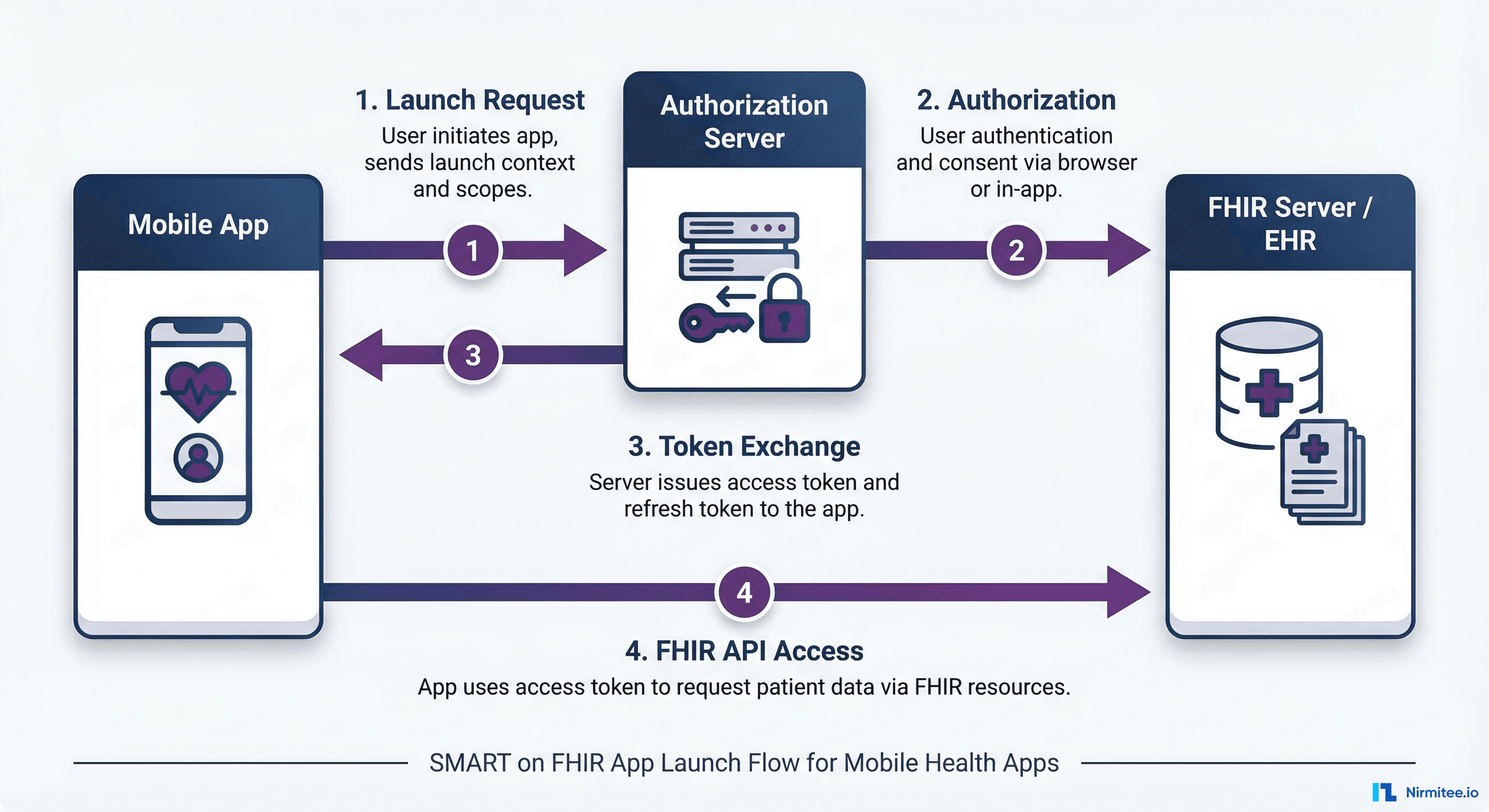
The Mobile App Launch Sequence
The mobile SMART on FHIR flow uses the Authorization Code Grant with PKCE (Proof Key for Code Exchange). Unlike confidential web apps, mobile apps cannot safely store client secrets. PKCE solves this by generating a one-time code verifier and challenge for each authorization request.
Here is the step-by-step flow:
- Launch context received — The EHR passes a launch token and the FHIR server URL to your mobile app via a deep link or custom URL scheme.
- Discovery — Your app fetches the server's
.well-known/smart-configurationendpoint to get authorization and token URLs. - Authorization request — Your app opens a system browser (not a WebView) with the authorization URL, including the PKCE code challenge, requested scopes, and redirect URI.
- User authentication — The clinician or patient authenticates through the EHR's login page.
- Token exchange — Your app receives the authorization code at the redirect URI and exchanges it for an access token, using the PKCE code verifier.
- FHIR API access — Your app uses the access token to call FHIR R4 endpoints for patient data.
Code Example: SMART on FHIR Discovery on iOS
import Foundation

struct SMARTConfiguration: Codable {
    let authorization_endpoint: String
    let token_endpoint: String
    let capabilities: [String]
    let scopes_supported: [String]?
}

func discoverSMARTEndpoints(fhirBaseURL: String) async throws -> SMARTConfiguration {
    let url = URL(string: "\(fhirBaseURL)/.well-known/smart-configuration")!
    let (data, response) = try await URLSession.shared.data(from: url)

    guard let httpResponse = response as? HTTPURLResponse,
          httpResponse.statusCode == 200 else {
        throw SMARTError.discoveryFailed
    }

    return try JSONDecoder().decode(SMARTConfiguration.self, from: data)
}

// Usage
let config = try await discoverSMARTEndpoints(
    fhirBaseURL: "https://fhir.epic.com/interconnect-fhir-oauth/api/FHIR/R4"
)
print("Auth endpoint: \(config.authorization_endpoint)")
Code Example: PKCE Flow on Android (Kotlin)
import java.security.MessageDigest
import java.security.SecureRandom
import android.util.Base64

class PKCEHelper {
    private val codeVerifier: String
    val codeChallenge: String

    init {
        val bytes = ByteArray(32)
        SecureRandom().nextBytes(bytes)
        codeVerifier = Base64.encodeToString(bytes, Base64.URL_SAFE or Base64.NO_PADDING or Base64.NO_WRAP)
        val digest = MessageDigest.getInstance("SHA-256").digest(codeVerifier.toByteArray())
        codeChallenge = Base64.encodeToString(digest, Base64.URL_SAFE or Base64.NO_PADDING or Base64.NO_WRAP)
    }

    fun buildAuthURL(authEndpoint: String, clientId: String, redirectUri: String, scopes: String): String {
        return "$authEndpoint?" +
            "response_type=code&" +
            "client_id=$clientId&" +
            "redirect_uri=$redirectUri&" +
            "scope=$scopes&" +
            "code_challenge=$codeChallenge&" +
            "code_challenge_method=S256&" +
            "aud=https://fhir.epic.com/interconnect-fhir-oauth/api/FHIR/R4"
    }
}
Epic Integration: App Orchard and MyChart
Epic's ecosystem has two distinct integration paths depending on whether you are building for patients or providers.
Patient-Facing Apps via MyChart
Patient apps integrate through MyChart, Epic's patient portal. When a patient authorizes your app through MyChart, they grant access to their clinical data using FHIR R4 APIs. The key scopes available for patient apps include:
patient/Patient.read— Demographicspatient/Observation.read— Lab results and vitalspatient/MedicationRequest.read— Active medicationspatient/AllergyIntolerance.read— Allergy recordspatient/Condition.read— Problem listpatient/DocumentReference.read— Clinical documentspatient/Immunization.read— Vaccination records
Important limitation: MyChart does not support write operations for third-party apps in most configurations. You can read data but cannot create orders, update problems, or write notes back. Epic restricts write access to apps that go through a deeper integration review.
Provider-Facing Apps via Hyperspace
Provider apps launch within Epic Hyperspace (the clinician-facing client). These apps receive richer context including the current patient, encounter, and the logged-in practitioner's identity. Provider scopes include:
launch— Required for EHR launch contextuser/Patient.read— Read any patient the provider can accessuser/Encounter.read— Current and historical encountersuser/DiagnosticReport.read— Lab and imaging reportsuser/Procedure.read— Surgical and procedural history
App Orchard Submission Process
Every third-party app that connects to Epic must go through App Orchard (now called App Market). The process involves:
- Registration — Create a developer account and register your application. You specify whether it is a patient or provider app, list the FHIR resources you need, and describe your use case.
- Sandbox testing — Epic provides a sandbox environment with synthetic patient data. You must demonstrate your app works correctly against this sandbox.
- Security review — Epic reviews your app's authentication implementation, data handling, and HIPAA compliance practices.
- Clinical review — For apps that influence clinical decisions, Epic's clinical team reviews the app's safety and appropriateness.
- Production approval — After passing all reviews, your app receives a production client ID. Individual health systems can then enable your app for their users.
Typical timeline: 3-6 months from submission to production approval. Cost varies, but expect $15,000-$25,000 in annual marketplace fees plus development costs.
Oracle Health (Cerner) Integration: CODE Program
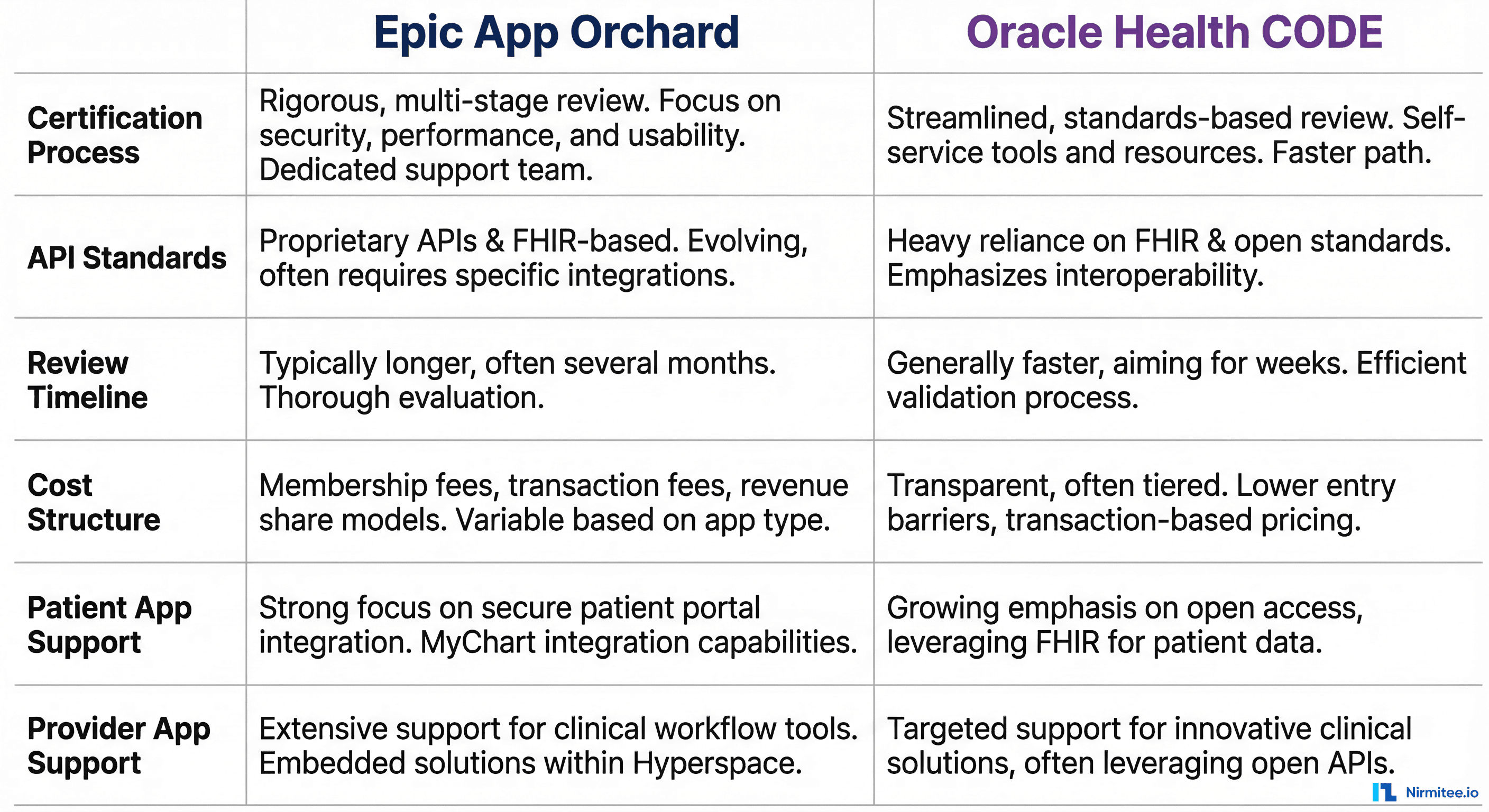
Oracle Health's developer program, CODE, provides a parallel path for third-party integrations. Since Oracle's acquisition, the platform has been transitioning toward Oracle Cloud Infrastructure, but the FHIR APIs remain stable.
Key Differences from Epic
| Aspect | Epic App Orchard | Oracle Health CODE |
|---|---|---|
| FHIR Version | R4 (full support) | R4 (full support) |
| Auth Standard | SMART on FHIR + PKCE | SMART on FHIR + PKCE |
| Patient Access | Via MyChart | Via HealtheLife / Patient Portal |
| Write Support | Limited for third-party | More open for certified apps |
| Review Timeline | 3-6 months | 2-4 months |
| Annual Fee | $15K-$25K | $10K-$20K |
| Sandbox Quality | Extensive synthetic data | Good, but fewer edge cases |
| Custom Resources | Epic-specific extensions | Millennium-specific extensions |
Oracle Health FHIR Scopes
Oracle Health supports the standard SMART scopes but also offers system-level access for backend services more readily than Epic. This makes Oracle Health a stronger choice for apps that need to run automated data pipelines or population health queries.
{
  "scope": "system/Patient.read system/Observation.read system/MedicationRequest.read",
  "grant_type": "client_credentials",
  "client_assertion_type": "urn:ietf:params:oauth:client-assertion-type:jwt-bearer",
  "client_assertion": "eyJhbGciOiJSUzM4NCIs..."
}
Building a Cross-EHR Mobile App Architecture
The practical challenge is building one mobile app that works with both Epic and Oracle Health. Here is the architecture pattern we use at Nirmitee for production deployments.
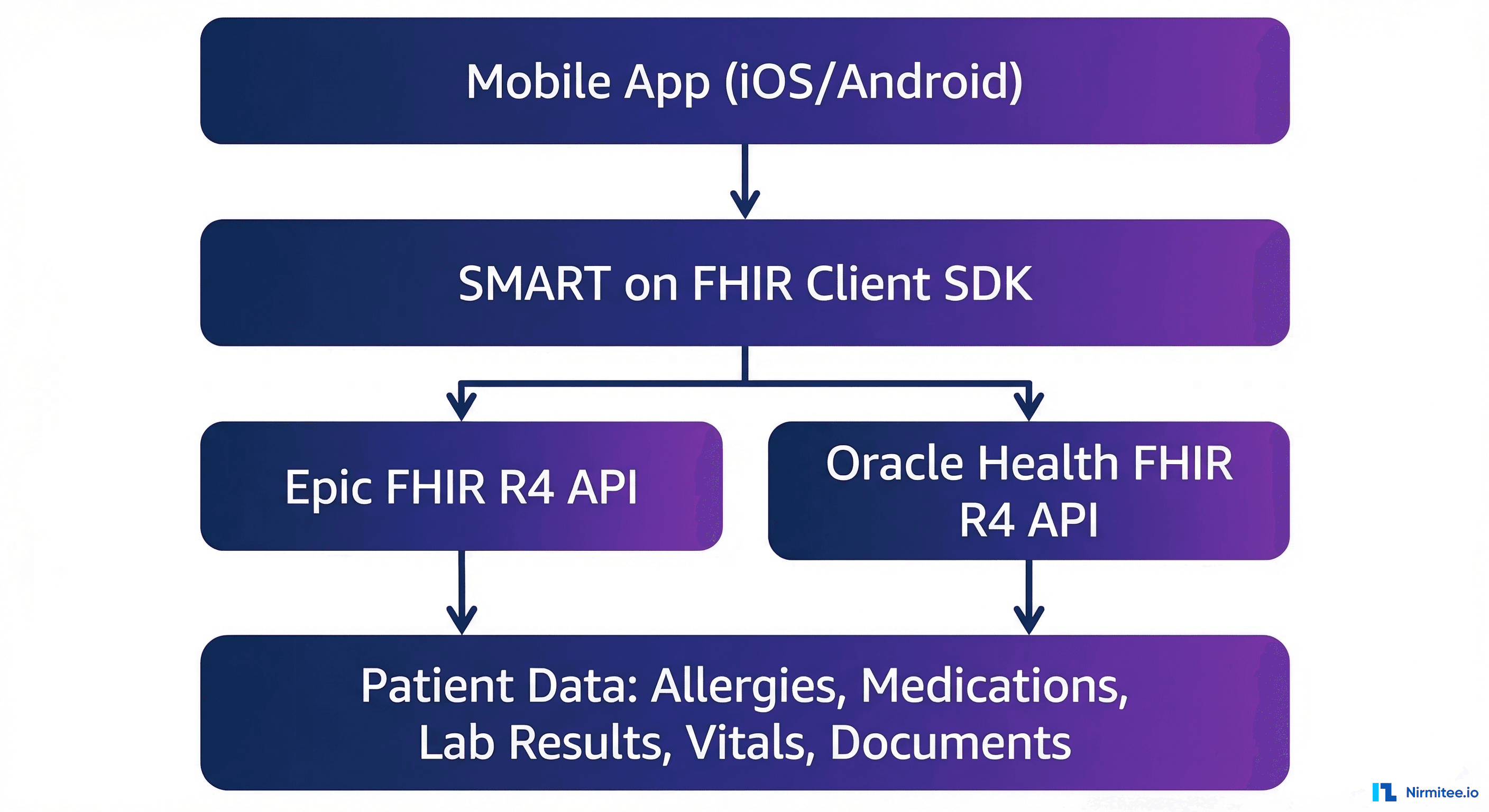
Abstraction Layer Pattern
The key is an EHR abstraction layer that normalizes differences between Epic and Oracle Health APIs. Your mobile app never calls EHR APIs directly. Instead, it communicates with your backend, which handles the EHR-specific logic.
// EHR Abstraction Interface
interface EHRClient {
  getPatient(patientId: string): Promise<FHIRPatient>;
  getObservations(patientId: string, category: string): Promise<FHIRBundle>;
  getMedications(patientId: string): Promise<FHIRBundle>;
  getAllergies(patientId: string): Promise<FHIRBundle>;
  refreshToken(refreshToken: string): Promise<TokenResponse>;
}

// Epic Implementation
class EpicClient implements EHRClient {
  private baseUrl: string;

  async getObservations(patientId: string, category: string): Promise<FHIRBundle> {
    const url = `${this.baseUrl}/Observation?patient=${patientId}&category=${category}`;
    return this.fetchWithAuth(url);
  }
}

// Oracle Health Implementation
class OracleHealthClient implements EHRClient {
  private baseUrl: string;

  async getObservations(patientId: string, category: string): Promise<FHIRBundle> {
    const dateRange = `ge${this.getDefaultStartDate()}`;
    const url = `${this.baseUrl}/Observation?patient=${patientId}&category=${category}&date=${dateRange}`;
    return this.fetchWithAuth(url);
  }
}
Handling EHR-Specific Quirks
Despite both supporting FHIR R4, there are real differences that trip up developers:
- Date formats — Epic returns dates in
YYYY-MM-DDformat while Oracle Health sometimes includes timezone offsets like2026-03-17T10:00:00-05:00. - Search parameters — Epic supports
_revincludeon more resources than Oracle Health. Oracle Health requires explicit date ranges on Observation searches. - Pagination — Epic uses
Bundle.linkwith anextrelation. Oracle Health uses the same mechanism but with different page sizes (default 20 vs Epic's default 10). - Extensions — Both add proprietary extensions. Epic uses
http://open.epic.com/FHIR/StructureDefinition/namespace while Oracle Health useshttps://fhir-ehr.cerner.com/r4/StructureDefinition/. - Token expiry — Epic access tokens typically expire in 5 minutes. Oracle Health grants longer-lived tokens (up to 10 minutes) but refresh token behavior differs.
Patient Apps vs. Provider Apps: What to Build
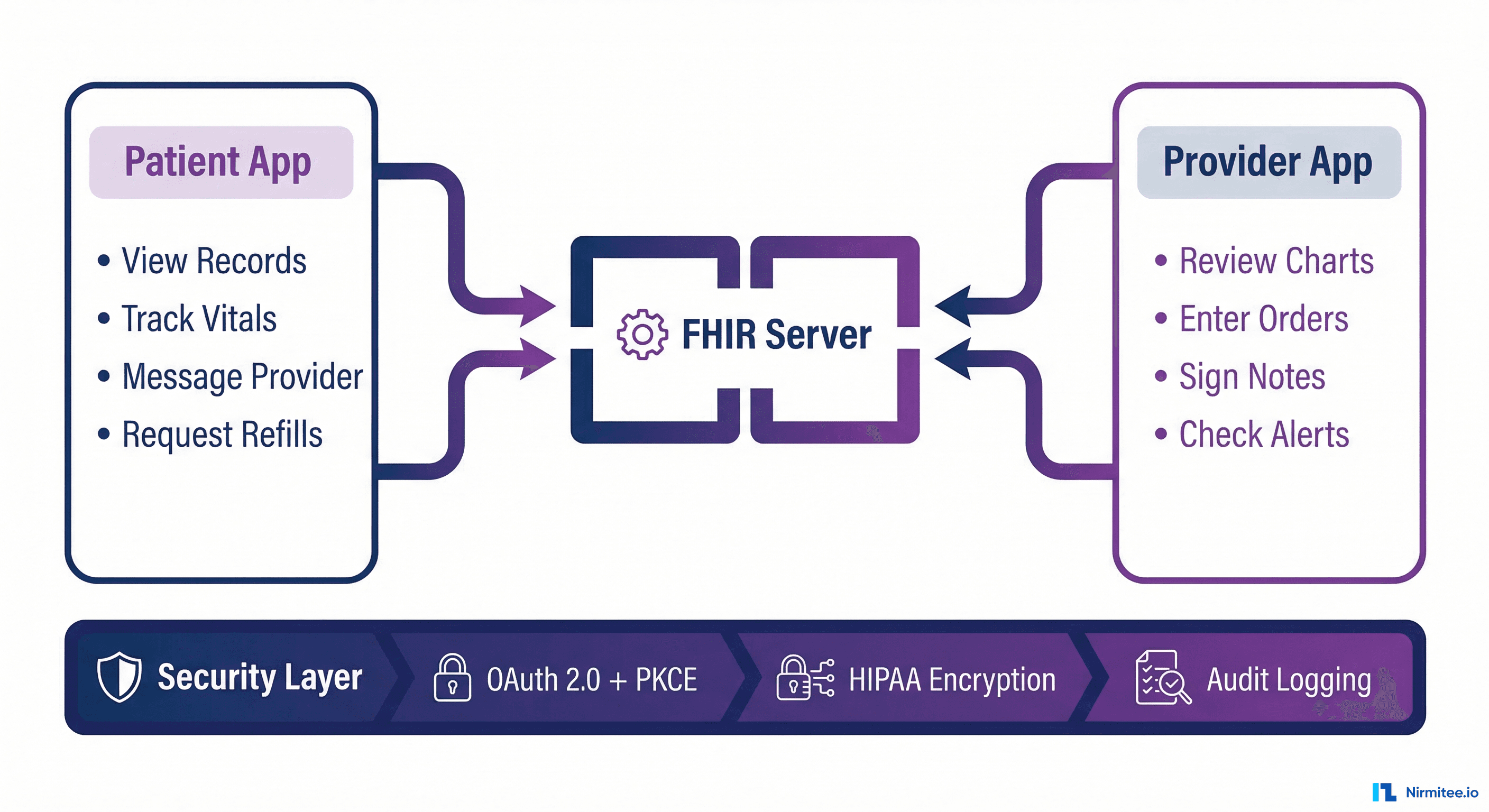
Patient App Considerations
Patient-facing mobile apps have the broadest addressable market but the most constraints:
- Read-only access in most configurations. You can display lab results, medications, and visit history but cannot write back.
- Patient must authorize each connection. Unlike provider apps that launch in-context, patient apps require the user to log into their patient portal.
- Data freshness varies. Some health systems update patient-facing data in near-real-time; others batch updates every 24 hours.
- Limited encounter context. Patient apps do not know which encounter is current — they see the patient's entire longitudinal record.
Successful patient apps focus on areas where read-only access is sufficient: health dashboards, medication tracking, lab result visualization, and care plan monitoring.
Provider App Considerations
Provider apps have richer capabilities but a narrower deployment model:
- Launch context gives you the current patient, encounter, and practitioner automatically. No need for the user to search.
- Write access is possible through deeper integration tiers. You can create clinical documents, update problem lists, or submit orders.
- Embedded in workflow. Provider apps that integrate into Hyperspace or PowerChart feel native to clinicians rather than being a separate tool.
- Higher compliance bar. Apps that influence clinical decisions face additional safety reviews and may require FDA 510(k) clearance.
API Rate Limits and Performance Optimization
Both Epic and Oracle Health enforce API rate limits that mobile developers must account for. Ignoring these limits will result in HTTP 429 responses and potentially having your app suspended.
| Metric | Epic | Oracle Health |
|---|---|---|
| Requests per minute | 120 per patient session | 100 per patient session |
| Concurrent connections | 10 per app | 15 per app |
| Bundle page size limit | 100 resources | 50 resources |
| Bulk data export | Supported (SMART Backend) | Supported (limited) |
Performance Strategies
- Cache aggressively — Patient demographics and allergy lists change infrequently. Cache for the session duration and invalidate on user refresh.
- Use
_includeand_revinclude— Fetch related resources in a single request instead of making separate calls for each. - Implement pagination correctly — Always follow the
Bundle.link[next]URL rather than constructing offset-based queries. - Background sync — For patient apps, sync data when the app is backgrounded using iOS Background App Refresh or Android WorkManager.
Timeline and Cost: What to Expect
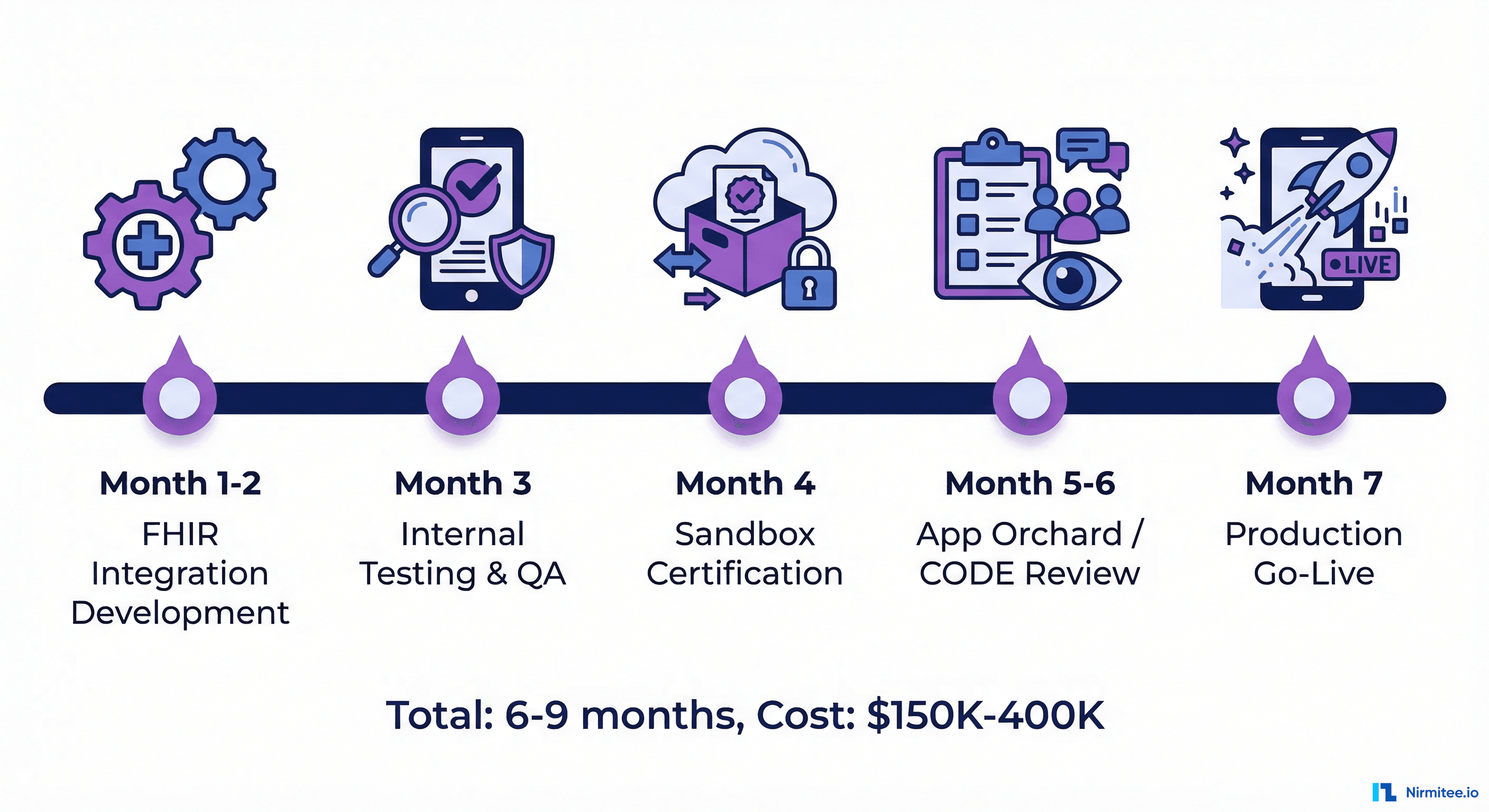
Development Phases
- Phase 1: FHIR Integration (8-12 weeks) — Build the abstraction layer, implement SMART on FHIR auth, connect to sandbox environments. Cost: $60K-$120K.
- Phase 2: Testing and Compliance (4-6 weeks) — Run Inferno test suites, conduct HIPAA security assessment, prepare documentation. Cost: $25K-$50K.
- Phase 3: Certification (8-16 weeks) — Submit to App Orchard and/or CODE, respond to review feedback, iterate on requirements. Cost: $15K-$30K in fees plus developer time.
- Phase 4: Site Deployment (4-8 weeks per site) — Each health system must enable your app individually. Their IT team configures your app, tests it, and rolls it out to users. Cost: $5K-$15K per site in support effort.
Total Cost Ranges
- Single EHR (Epic or Oracle Health): $150K-$250K for initial development and certification
- Both EHRs: $250K-$400K (shared abstraction layer reduces incremental cost)
- Ongoing annual costs: $50K-$100K for marketplace fees, API monitoring, certification renewals, and maintenance
Security and HIPAA Compliance for Mobile
Mobile EHR integrations carry specific security requirements beyond standard web applications.
Required Security Measures
- Certificate pinning — Pin your FHIR server's TLS certificate to prevent man-in-the-middle attacks. Both Epic and Oracle Health require this for production apps.
- Secure token storage — Use iOS Keychain or Android Keystore for access and refresh tokens. Never store tokens in SharedPreferences, UserDefaults, or local databases.
- Jailbreak/root detection — Detect compromised devices and restrict functionality. Both marketplaces check for this during review.
- Data at rest encryption — Any cached FHIR data must be encrypted on device. Use iOS Data Protection API or Android's EncryptedFile.
- Audit logging — Log every FHIR API call with timestamp, resource type, and patient context. This is required for HIPAA compliance and EHR audit support.
- Session timeout — Implement automatic session expiry. The recommended maximum is 15 minutes of inactivity for patient apps and 8 hours for provider apps.
Common Pitfalls and How to Avoid Them
After building multiple Epic and Oracle Health mobile integrations at Nirmitee, here are the issues that catch development teams off guard:
- Using WebView for authentication — Both Epic and Oracle Health reject apps that use embedded WebViews for OAuth. You must use the system browser (ASWebAuthenticationSession on iOS, Chrome Custom Tabs on Android). This is a SMART on FHIR requirement.
- Assuming consistent data quality — FHIR resources from different health systems vary wildly. One system might populate
Patient.telecomwith three phone numbers; another might leave it empty. Build defensive parsers. - Ignoring offline scenarios — Mobile apps lose connectivity. Cache critical data locally and queue write operations for retry when connectivity returns.
- Skipping the SMART on FHIR test suite — Run the ONC Inferno tests against your implementation before submitting for review. Both marketplaces will run similar tests.
- Hard-coding FHIR server URLs — Each health system has a unique FHIR base URL. Your app must discover endpoints dynamically through the SMART configuration endpoint.
Working with Nirmitee on EHR Mobile Integration
At Nirmitee, we have delivered production mobile integrations with both Epic and Oracle Health for healthtech companies ranging from Series A startups to enterprise platforms. Our team has direct experience with SMART on FHIR app development, App Orchard certification, and scalable healthcare architecture.
Whether you are building a patient engagement app that connects to MyChart or a clinical decision support tool embedded in Hyperspace, we can accelerate your path from sandbox to production. Contact our team to discuss your EHR integration requirements.