
Getting Through Epic Showroom: The App Approval Process Nobody Documents

CTO & Co-Founder
CTO & Co-Founder at Nirmitee.io. Architects healthcare integrations across FHIR, SMART on FHIR, ABDM and NHCX, writing from production experience taking hospital software from sandbox to go-live.
Part of our complete guide to Epic FHIR integration.
Showroom is only one part of reaching Epic customers. Our guide on how to integrate with Epic covers the routes, approvals and timeline around it.
All Epic modules in one place: see our Epic modules list for what each module does and where apps integrate.
If you're building a healthtech product that needs to work with Epic, you've probably heard of the Showroom. What you probably haven't heard is exactly how to get through it. Epic's documentation is deliberately sparse, the process changes without announcement, and the vendors who have made it through aren't exactly publishing their playbooks. This guide fixes that.
Epic now commands 42.3% of the acute care EHR market in the United States, up from 39.1% just a year prior. In 2024 alone, Epic added 176 multispecialty hospitals and 29,399 beds — its largest annual net gain ever (Healthcare IT News). If you're building for US healthcare, Epic integration isn't optional — it's existential. And Showroom is the gateway. Epic is rarely the only EHR on a startup's roadmap, though, and our EHR API comparison covering Epic, Oracle Health, athenahealth and eClinicalWorks maps auth, write-back and bulk access for each. If ambulatory eClinicalWorks practices are next on that roadmap, start with our eClinicalWorks FHIR integration guide.
Meanwhile, FHIR adoption is accelerating at a pace few predicted. The HL7 FHIR compliance market hit $2.3 billion in 2025 and is projected to reach $8.6 billion by 2036 (Morningstar). Seventy-eight percent of countries surveyed now have regulations mandating electronic health data exchange, and 73% of those specifically require or recommend FHIR (Firely). The window for getting your app into Epic's ecosystem is wide open — if you can navigate the approval process.
Epic Showroom explained: the four product tiers
Epic Showroom is Epic's public marketplace for products that connect to Epic, services that help Epic customers, and Health Grid Networks. Products in Showroom sit in one of four tiers. The tiers describe different product categories and connection criteria; only Toolbox is defined by following Epic's recommended integration practices.
| Showroom tier | What Epic says it means | How a product gets there |
|---|---|---|
| Cornerstone Partners | Technologies that are integral to Epic software | Not set out in Epic's public FAQ |
| Toolbox | Products in specific categories that follow Epic's recommended practices for integration (a Blueprint) | Epic says it plans to regularly evaluate new products and categories eligible for Toolbox |
| Toolbox Under Construction | Products in Toolbox categories whose recommended practices are still being developed | Not set out in Epic's public FAQ |
| Connection Hub | Products with a live connection to at least one Epic site | Requested by the vendor after agreeing to the terms of service and attesting to one live connection with an Epic customer |
Two points from Epic's own FAQ matter most for a startup. Connection Hub is an optional, paid marketing service that makes an app publicly discoverable, and a listing is not required for customers to download your app. Epic also does not sell your product for you: you sell to the health system, agree pricing and terms with them, and invoice them directly. (Source: Vendor Services FAQ, read 17 October 2026.)
How the four Epic developer sites fit together
Epic splits its developer offer across four sites, and most confusion about Showroom comes from mixing them up.
- open.epic (open.epic.com): free public specifications for Epic's standards-based APIs and interfaces, a self-service FHIR sandbox, and client registration.
- Epic on FHIR (fhir.epic.com): the free FHIR section of open.epic, where you register an app, get a client ID and test in the sandbox.
- Vendor Services (vendorservices.epic.com): a paid support program. Epic's FAQ gives pricing from $1,900 per year for vendors, with a three-month trial and a refund of the annual fee, less any used support services or other outstanding amounts, if you cancel inside that window.
- Showroom (showroom.epic.com): the marketplace where buyers discover products, services and Health Grid Networks.
Our guide on how to integrate with Epic covers the build side of each site, from sandbox to a live customer.
App Orchard is now Showroom: what changed
Epic App Orchard, Epic's earlier developer program and app gallery, is no longer an active site. Industry coverage reports it was renamed App Market before Epic introduced Showroom (Fierce Healthcare, August 2023). Today, paid developer support sits in Vendor Services and public discovery sits in Showroom. On 17 October 2026, both apporchard.epic.com and appmarket.epic.com redirected to vendorservices.epic.com.
| Question | Under App Orchard | Today |
|---|---|---|
| Where do developers enrol for Epic support? | App Orchard developer program | Vendor Services (optional, from $1,900 a year per Epic's FAQ) |
| Where do buyers find apps that work with Epic? | App Orchard gallery | Showroom, in four tiers (Cornerstone Partners, Toolbox, Toolbox Under Construction, Connection Hub) |
| Where are the API specs and sandbox? | Developer program sites | open.epic and Epic on FHIR, free |
| Do you need a listing to go live? | Often assumed | No. Epic says a listing is not required for customers to download your app |
What did not change is the step that decides go-live: each health system that runs Epic still has to approve and switch on your app. A Showroom listing helps a buyer find you; it does not replace a sponsoring customer. If an older guide directs you to App Orchard, check Epic's current sites before planning your next step.
Showroom vs. Connection Hub: Understanding Epic's Ecosystem
Before diving into the approval process, you need to understand the landscape. Epic retired the old App Orchard in late 2022 and replaced it with two distinct programs that serve different purposes.
Connection Hub
Connection Hub launched in December 2022 as an online directory where any vendor with a live Epic connection can list their product. Think of it as Epic's verified integration registry. The barrier to entry is relatively low: you need at least one live connection with an Epic customer and a $500 annual fee per product (Epic's Connection Hub listing request guide, read 17 October 2026). Connection Hub lives inside Showroom as the "Products" section, accessible primarily to Epic's customer base — the IT teams and clinical informaticists evaluating integration options.
Showroom
Showroom is the broader platform that launched in 2024 as an overhaul of Epic's former App Market. It's not just a product listing — it's a full vendor showcase that includes products, services, consulting partnerships, and implementation support. Showroom is where health system buyers (not just IT teams) go to evaluate third-party solutions. It's the public-facing storefront, while Connection Hub is the technical catalog inside it.
Which Do You Need?
If you're building a SMART on FHIR app or any software that integrates with Epic's APIs, you'll engage with both. Connection Hub is where your technical integration gets listed. Showroom is where health systems discover and evaluate your product. Most startups should target Connection Hub first — it's the foundation — then build out their Showroom presence once they have live customers.
The Step-by-Step Review Process
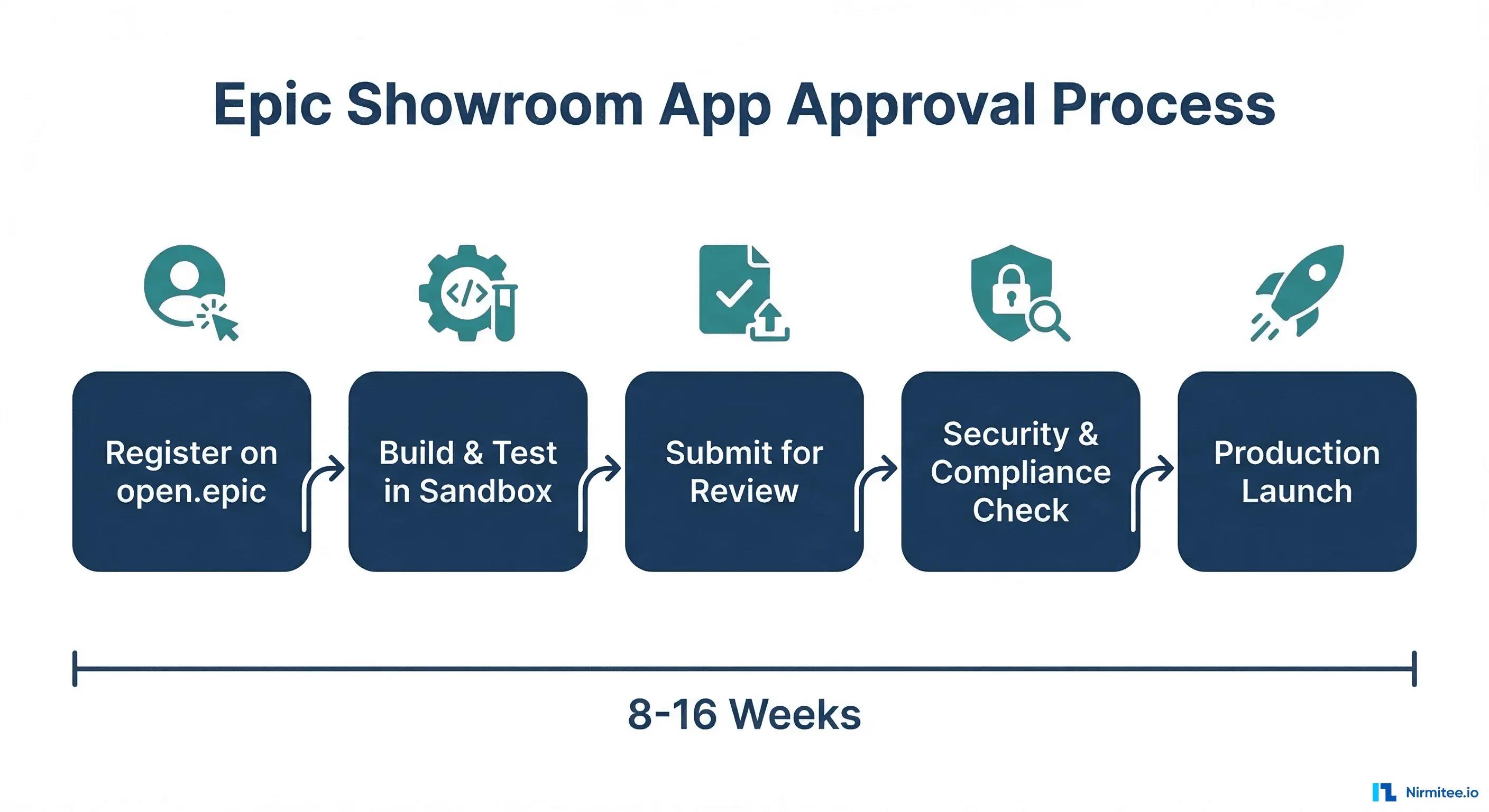
Here's the process that nobody documents end-to-end. Expect 8 to 16 weeks from first registration to production access, depending on your app's complexity and how prepared you are.
Phase 1: Registration and Setup (Weeks 1-2)
Start at open.epic.com. Create a developer account and register your application. During registration, you'll specify your app's integration type (SMART on FHIR, backend service, or bulk data), the FHIR resources you need access to, and your OAuth 2.0 configuration. Epic will issue you a non-production client ID — this is your sandbox credential.
Critical detail: spend time on your scope selection here. Requesting overly broad scopes (like patient/*.read when you only need patient/Observation.read) is a common early mistake that creates problems during review. Request only what your app actually needs.
Phase 2: Sandbox Development and Testing (Weeks 3-6)
Epic provides a testing sandbox populated with synthetic patient data. This is where you build and validate your integration. The sandbox simulates a real Epic EHR environment, including authentication flows, FHIR resource queries, and clinical data structures.
Key sandbox activities include:
- Implementing the SMART App Launch Framework (EHR launch and/or standalone launch)
- Testing OAuth 2.0 authorization with PKCE (Proof Key for Code Exchange)
- Querying FHIR R4 resources against sandbox test patients
- Handling token refresh flows and session management
- Testing error scenarios — what happens when a resource doesn't exist, when a token expires mid-request, when the server returns a 429
Pro tip: Epic's sandbox is intentionally limited. Don't expect every edge case to be testable there. Document the gaps and address them with your first champion site (more on this later).
Phase 3: Vendor Services Enrollment (Week 5-7)
While sandbox testing is ongoing, enroll in Epic Vendor Services. This is optional but strongly recommended. For a fee, Vendor Services gives you access to individualized integration support, expanded documentation, pairing with the right integration technology, and — critically — a smoother path through the review process.
Vendor Services staff can tell you before you submit whether your implementation has issues. Think of it as a pre-review review. Startups that skip Vendor Services often discover problems during formal review, which adds weeks to the timeline.
Phase 4: Security Review and Attestation (Weeks 7-10)
This is where most apps stall. Epic requires a comprehensive security attestation covering your application's data handling, authentication implementation, and compliance posture. We'll cover the specific requirements in the security section below.
Phase 5: Epic Technical Review (Weeks 10-13)
Once your attestation is complete, Epic's team reviews your integration. They're evaluating SMART on FHIR compliance, appropriate scope usage, error handling, and whether your app behaves correctly with real-world data patterns. If issues are found, you'll receive feedback and need to resubmit — each cycle adds 1-3 weeks.
Phase 6: Champion Site Validation and Go-Live (Weeks 13-16)
You need at least one Epic customer — a hospital or health system — willing to be your champion site. This organization validates your app in their actual Epic environment, confirms it works with their configuration, and provides feedback to Epic. Having a champion site lined up before you start the review process is the single biggest accelerator. Without one, you'll be waiting.
After champion site validation, Epic issues your production client ID and you can request a Connection Hub listing.
Common Rejection Reasons (and How to Avoid Them)
Based on patterns across dozens of Epic integration projects, here are the issues that most frequently derail Showroom approval:
1. Incomplete SMART on FHIR Implementation
The most common failure. Apps that handle the happy path but break on edge cases: expired tokens, revoked access, malformed FHIR bundles, or SMART App Launch v2 granular scope changes. Epic tests these scenarios. Your app needs to handle every one gracefully, not just log an error and crash.
2. Missing or Incomplete Security Attestation
Epic's attestation isn't a checkbox exercise. They ask detailed questions about how you handle PHI at rest and in transit, your incident response procedures, your audit logging implementation, and your data retention policies. Vague answers get flagged. Specific, technical answers with evidence (screenshots, architecture diagrams, audit log samples) pass.
3. Overly Broad FHIR Scopes
Requesting patient/*.read when you only need vital signs and medications is a red flag. Epic expects data minimization — your app should request the narrowest scopes possible. If you need Observation and MedicationRequest, request exactly those, not everything.
4. Poor Error Handling
What does your app do when Epic returns a 500? A 429 (rate limit)? A 401 with an expired token? An OperationOutcome with a warning? Apps that don't implement proper rate limiting and retry logic or that surface raw FHIR errors to end users will be rejected.
5. No Champion Site
You can pass every technical check and still not get listed if no Epic customer is willing to vouch for your app in production. Start building health system relationships early — ideally before you start the approval process. This is a business requirement, not a technical one, and it catches many startups off guard.
Security Requirements: The Complete Checklist
Epic's security requirements are extensive but not unreasonable if you've built for healthcare before. Here's what you need:
Authentication and Authorization
- OAuth 2.0 with PKCE — PKCE is mandatory for public clients and strongly recommended for confidential clients. If you're building a single-page app or mobile app, PKCE is non-negotiable.
- SMART on FHIR App Launch — Support for EHR launch (launched from within Epic) and/or standalone launch (launched independently). Your app must correctly handle the launch context, including patient context and encounter context.
- Token management — Proper handling of access tokens, refresh tokens, token expiration, and token revocation. Never store tokens in localStorage. Use secure, httpOnly cookies or server-side session management.
- Scope enforcement — Your app must respect the scopes granted by the authorization server. If a scope is denied, your app should degrade gracefully, not crash.
Data Protection
- TLS 1.2 or higher — All data in transit must be encrypted. TLS 1.0 and 1.1 are not acceptable.
- Encryption at rest — Any PHI stored by your application must be encrypted using AES-256 or equivalent.
- Audit logging — Every access to PHI must be logged with timestamp, user identity, resource accessed, and action performed. Logs must be retained per your HIPAA compliance requirements.
- Data minimization — Store only the minimum PHI necessary for your app's function. If you can accomplish your goal with de-identified data, do so.
Compliance Documentation
- HIPAA Business Associate Agreement (BAA) — You'll need a BAA with each health system customer, and potentially with Epic, depending on data flows.
- Security attestation — Epic's annual attestation form covering your security controls, incident response, business continuity, and data handling practices.
- Penetration test results — Recent third-party penetration testing results or SOC 2 Type II report demonstrating your security posture.
SMART on FHIR Certification: What Epic Actually Tests
Epic's SMART on FHIR testing is based on the ONC Inferno Framework, which implements the SMART App Launch IG (Implementation Guide) test suite. Here's what gets tested:
- Discovery — Your app must correctly read the server's
/.well-known/smart-configurationand FHIR/metadata(CapabilityStatement) to discover supported features. - Authorization — Complete OAuth 2.0 flow with correct redirect handling, state parameter validation, and PKCE challenge/verifier.
- Token exchange — Correct handling of the authorization code exchange, including
id_tokenvalidation if OpenID Connect is used. - FHIR resource access — Querying patient data using the access token, with correct Accept headers, proper pagination handling, and search parameter usage.
- Token refresh — Using the refresh token to obtain new access tokens without re-prompting the user.
- Scopes — Verifying your app requests and uses only the scopes it needs, and handles scope downgrading gracefully (when the server grants fewer scopes than requested).
A concrete recommendation: run the Inferno test suite against your app before submitting to Epic. If you can pass Inferno's Standalone Patient App and EHR Practitioner App test groups, you're in strong shape for Epic's review. We've written about the practical details of connecting apps to EHRs via FHIR and.
Pricing and Fees
Epic's integration ecosystem has several cost components that startups need to budget for:
- open.epic.com — Free. Developer registration, sandbox access, and non-production client IDs cost nothing.
- Vendor Services: annual fee from $1,900 a year per Epic's Vendor Services FAQ (read 17 October 2026), for guided integration support, expanded documentation, and pre-review assistance.
- Connection Hub listing: $500 per product per year, non-refundable, for a listing visible to Epic customers (Epic's Connection Hub listing request guide, read 17 October 2026). It is optional and not required for customers to download your app.
- Other Showroom tiers: Epic's FAQ lists Cornerstone Partners, Toolbox and Toolbox Under Construction alongside Connection Hub. Toolbox is a designation for products that follow Epic's recommended integration practices, not a paid listing upgrade.
- Per-site costs — Each health system has its own implementation fees and timelines. Budget $10,000-$50,000+ per site for implementation support, depending on complexity.
The total cost for a startup's first Epic integration, from registration through first live customer, typically ranges from $25,000 to $75,000 when you factor in development time, security compliance, and site-specific implementation. We've covered the full first-90-days EHR integration timeline in a separate guide.
How to Accelerate Your Approval
Based on hard-won experience across multiple Epic integrations, here are the six moves that compress the timeline:
1. Register on open.epic.com Before You Write a Line of Code
Registration and client ID provisioning take 1-2 weeks. Don't wait until your app is "ready." Register early, get your sandbox credentials, and start testing against Epic's FHIR endpoints while you're still building.
2. Enroll in Vendor Services Immediately
The Vendor Services annual fee (from $1,900 a year per Epic's FAQ, read 17 October 2026) is the best investment you'll make. Vendor Services staff can pre-screen your integration approach, flag issues before formal review, and connect you with the right Epic technical contacts. Startups that skip this step routinely add 4-6 weeks to their timeline.
3. Run Inferno Before Submitting
The ONC Inferno test suite tests exactly what Epic tests. Run it locally (it's open source and Docker-based), fix every failure, and include your Inferno test results in your submission. This signals to Epic's reviewers that you've done your homework.
4. Prepare Security Documentation in Parallel
Don't wait until your integration is built to start on security attestation. Begin your SOC 2 engagement, draft your incident response plan, set up audit logging, and document your PHI handling practices while development is ongoing. Security documentation and code development should be parallel workstreams, not sequential.
5. Secure a Champion Site Early
This is the biggest bottleneck for startups without existing health system relationships. Start conversations with potential champion sites 2-3 months before you plan to submit. Health systems have their own procurement and IT governance cycles — getting a verbal "yes" and getting a signed agreement are very different timelines.
6. Document Everything
Epic's reviewers want to see that you've thought through edge cases, error scenarios, and data handling. Create a technical integration document that covers your architecture, FHIR resource usage, scope justification, error handling strategy, and security controls. A well-documented submission clears review significantly faster than a bare-minimum one.
The Bottom Line
Getting through Epic Showroom is a process, not a project. It requires sustained effort across engineering, security, compliance, and business development. But for healthtech startups targeting the US market, there's no shortcut around it — Epic's 42.3% market share means your product's addressable market depends on this integration.
The good news: Epic has made the process more accessible than it was in the App Orchard days. The combination of open.epic.com, Connection Hub's $500 entry point, and the SMART on FHIR standard means a well-prepared startup can go from zero to listed in 8-16 weeks. The teams that struggle are the ones that treat it as an afterthought rather than a first-class engineering workstream.
Struggling with healthcare data exchange? Our Healthcare Interoperability Solutions practice helps organizations connect clinical systems at scale. We also offer specialized healthcare product engineering services. Talk to our team to get started.
Frequently Asked Questions
How long does Epic Showroom approval take?
Plan for 8-16 weeks from registration to production access. Well-prepared teams with existing health system relationships can hit the lower end; first-time integrators without a champion site often exceed 16 weeks.
Do I need to pay to list on Epic Showroom?
A Connection Hub listing costs $500 per product per year (Epic's Connection Hub listing request guide, read 17 October 2026). Developer sandbox access through open.epic.com is free. Vendor Services adds another annual fee but significantly accelerates the process.
What's the difference between Showroom and Connection Hub?
Showroom is the full vendor showcase platform visible to health system buyers. Connection Hub is the technical integration directory within Showroom, focused on IT teams evaluating integration capabilities. You need Connection Hub for your listing; Showroom is the broader ecosystem it lives in.
Is SMART on FHIR required for Epic integration?
For patient-facing and clinician-facing apps that access clinical data, yes. SMART on FHIR (using the SMART App Launch Framework and OAuth 2.0) is Epic's standard integration pattern for third-party applications. Backend service integrations may use different patterns.
Can I test my integration without a health system customer?
Yes, using Epic's sandbox at open.epic.com. However, you'll need a champion site (a real Epic customer) before you can get production access and a Connection Hub listing.
Ready to scale?
Talk to our healthcare engineering team about building, integrating, and shipping faster.
Frequently Asked Questions
What is Epic Showroom and how is it different from Connection Hub?
How long does the Epic app approval process take?
What is a champion site in Epic's approval process?
What are common mistakes when registering an app with Epic?
Why does Epic integration matter for healthtech startups?
How does Nirmitee.io approach healthcare software development?
Is Epic App Orchard still available?
What are the Epic Showroom tiers?
Do I need a Showroom listing for a hospital to use my app?
