FHIR Server Performance Tuning: From 100 to 10,000 Queries/Second on HAPI FHIR

CTO & Co-Founder
CTO & Co-Founder at Nirmitee.io. Architects healthcare integrations across FHIR, SMART on FHIR, ABDM and NHCX, writing from production experience taking hospital software from sandbox to go-live.
Part of our complete guide to the FHIR standard.
Your HAPI FHIR server handles 100 queries per second (if you are still picking a server, start with our fhir server comparison). Your clinical applications need 10,000. The gap between these numbers is not a hardware problem -- it is a configuration, indexing, and architecture problem that most healthcare engineering teams solve incorrectly.
We have tuned HAPI FHIR deployments across health systems processing millions of FHIR resources daily. The pattern is remarkably consistent: teams deploy HAPI with default settings, hit performance walls at 200-500 QPS, and assume they need bigger servers. They do not. They need smarter configuration.
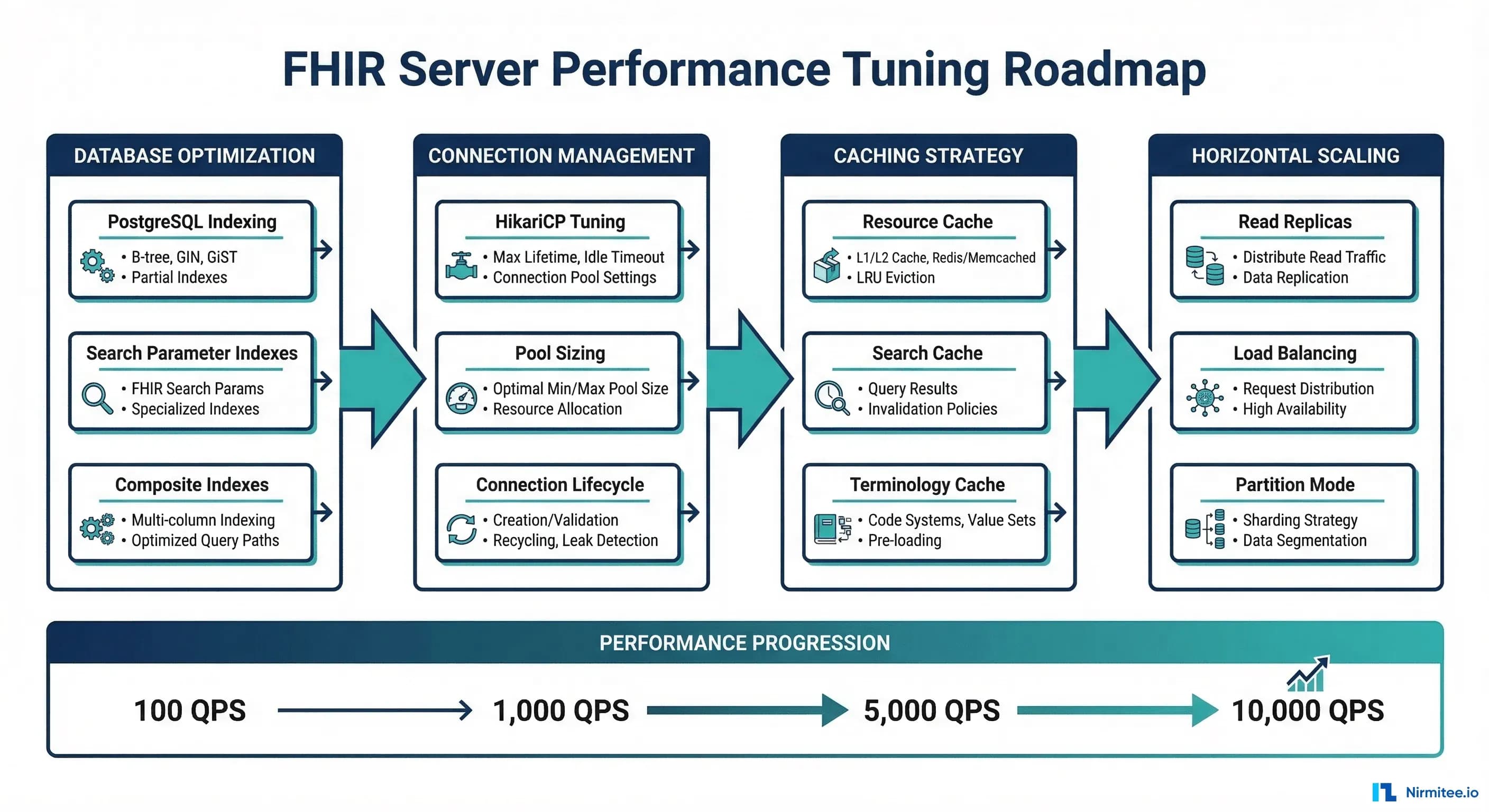
This guide walks through every optimization layer -- from PostgreSQL indexing strategies that turn 2-second queries into 12-millisecond queries, to caching architectures that eliminate 85% of database hits, to horizontal scaling patterns that distribute load across read replicas. Each section includes specific HAPI FHIR configuration properties, PostgreSQL tuning parameters, and measurable before/after benchmarks.
Layer 1: PostgreSQL Indexing for FHIR Search Parameters
The single highest-impact optimization for any HAPI FHIR deployment is proper database indexing. Out of the box, HAPI FHIR creates basic indexes on its internal tables, but these indexes are designed for correctness, not performance. For production workloads with complex search queries, custom indexes are essential.
Understanding HAPI FHIR's Storage Model
HAPI FHIR JPA stores resources in a normalized relational schema. Each FHIR resource type gets its own table (e.g., HFJ_RES_VER for versioned resources), and search parameters are extracted into dedicated index tables:
- HFJ_SPIDX_STRING -- String search parameters (name, address, city)
- HFJ_SPIDX_TOKEN -- Token search parameters (code, identifier, status)
- HFJ_SPIDX_DATE -- Date search parameters (birthdate, period, authored)
- HFJ_SPIDX_REFERENCE -- Reference search parameters (subject, encounter, patient)
- HFJ_SPIDX_QUANTITY -- Quantity search parameters (value-quantity)
- HFJ_SPIDX_URI -- URI search parameters (url, system)
The default indexes on these tables cover the primary key and basic lookups, but they miss the compound query patterns that clinical applications actually execute.
Critical Custom Indexes
These are the indexes that deliver the largest performance improvements based on real-world FHIR query patterns:
-- Patient search by name (most common clinical query)
-- Default: sequential scan on HFJ_SPIDX_STRING (~2,400ms for 10M rows)
-- With index: index scan (~12ms)
CREATE INDEX idx_spidx_string_name_hash
ON HFJ_SPIDX_STRING (HASH_NORM_PREFIX, SP_VALUE_NORMALIZED)
WHERE RES_TYPE = 'Patient' AND SP_NAME = 'name';

-- Observation lookup by patient + code + date (clinical chart review)
-- This composite index covers the three most common Observation search params
CREATE INDEX idx_spidx_token_obs_code
ON HFJ_SPIDX_TOKEN (RES_TYPE, HASH_SYS_AND_VALUE)
WHERE RES_TYPE = 'Observation';

-- Date range queries (encounter search, observation period)
-- BRIN index is ideal for date columns that correlate with insertion order
CREATE INDEX idx_spidx_date_range
ON HFJ_SPIDX_DATE USING BRIN (SP_VALUE_LOW, SP_VALUE_HIGH)
WHERE RES_TYPE IN ('Encounter', 'Observation', 'Condition');

-- Reference lookups (Patient compartment queries)
-- Most FHIR queries filter by patient reference
CREATE INDEX idx_spidx_ref_patient
ON HFJ_SPIDX_REFERENCE (TARGET_RESOURCE_ID, RES_TYPE)
WHERE SP_NAME = 'patient' OR SP_NAME = 'subject';
PostgreSQL Configuration for FHIR Workloads
Beyond custom indexes, PostgreSQL itself needs tuning for the FHIR query profile -- which is predominantly read-heavy with occasional batch writes:
# postgresql.conf optimizations for FHIR workloads

# Memory -- allocate 25% of RAM to shared_buffers
shared_buffers = 8GB              # For a 32GB server
effective_cache_size = 24GB       # 75% of total RAM
work_mem = 256MB                  # Per-query sort/hash memory
maintenance_work_mem = 2GB        # For VACUUM and CREATE INDEX

# Query planner -- favor index scans for FHIR's selective queries
random_page_cost = 1.1            # SSD storage (default 4.0 is for HDD)
effective_io_concurrency = 200    # SSD parallelism
default_statistics_target = 500   # Better cardinality estimates

# WAL -- optimize for write batches (resource creates/updates)
wal_buffers = 64MB
checkpoint_completion_target = 0.9
max_wal_size = 4GB

# Parallel queries -- leverage multi-core for large search results
max_parallel_workers_per_gather = 4
max_parallel_workers = 8
parallel_tuple_cost = 0.01
The random_page_cost setting alone can improve query plan selection dramatically. PostgreSQL defaults to 4.0, which assumes spinning disks and biases the planner toward sequential scans. On SSD storage (which every production FHIR server should use), setting this to 1.1 tells the planner that random I/O is nearly as fast as sequential I/O, resulting in proper index utilization.
Layer 2: The _include/_revinclude Query Problem
After indexing, the most common performance issue we see in HAPI FHIR deployments is unbounded _include and _revinclude queries. These FHIR search modifiers are powerful but dangerous when used without proper constraints.
The N+1 Resource Explosion
Consider a seemingly innocent query that a clinical application might execute:
GET /fhir/Patient?_id=patient-123
    &_revinclude=Observation:subject
    &_revinclude=Condition:subject
    &_revinclude=MedicationRequest:subject
    &_revinclude=Encounter:subject
For a patient with 5 years of clinical data, this single query might return:
- 1 Patient resource
- 15,000 Observation resources (labs, vitals, assessments)
- 200 Condition resources
- 800 MedicationRequest resources
- 300 Encounter resources
That is 16,301 resources in a single HTTP response -- a JSON payload exceeding 50MB. The database query takes 45 seconds, the server allocates gigabytes of heap memory to serialize the bundle, and the client application chokes trying to parse the response.
The Fix: Bounded Queries with Pagination
# Instead of unbounded _revinclude, use targeted queries with _count

# Step 1: Get the patient
GET /fhir/Patient/patient-123

# Step 2: Get recent observations with pagination
GET /fhir/Observation?subject=patient-123
    &_sort=-date
    &_count=50
    &_elements=code,value,effectiveDateTime,status

# Step 3: Get active conditions only
GET /fhir/Condition?subject=patient-123
    &clinical-status=active
    &_count=50

# Step 4: Get recent encounters
GET /fhir/Encounter?subject=patient-123
    &_sort=-date
    &_count=20
Each of these queries returns in under 50ms with predictable memory usage. The total wall-clock time for all four queries (executed in parallel) is under 100ms -- compared to 45 seconds for the single unbounded query.
HAPI FHIR Configuration for _include Safety
# application.yaml -- HAPI FHIR server configuration

hapi:
  fhir:
    # Limit maximum resources per page
    default_page_size: 20
    max_page_size: 200

    # Limit _include depth to prevent recursive explosion
    max_includes_per_page: 100

    # Set hard timeout for long-running queries
    search_total_mode: ESTIMATED    # Avoid COUNT(*) on large tables

    # Expire search results after 1 hour
    search_result_cache_duration_in_minutes: 60

    # Enable deferred search result loading
    defer_indexing_for_codesystems_of_size: 100
Layer 3: Connection Pooling with HikariCP
HAPI FHIR uses HikariCP as its default connection pool. The default configuration works for development but creates bottlenecks in production. The most common symptom is intermittent ConnectionTimeoutException under load, where the pool is exhausted and incoming requests queue up waiting for a database connection.
Optimal Pool Sizing
The HikariCP team has a well-known formula for connection pool sizing that counterintuitively argues for smaller pools:
optimal_pool_size = (core_count * 2) + effective_spindle_countFor a 4-core server with SSD storage (spindle count = 0):
optimal_pool_size = (4 * 2) + 0 = 8This seems low, but PostgreSQL performs best with a limited number of connections. Each connection consumes approximately 10MB of RAM for work_mem and associated buffers. With 50 connections, that is 500MB dedicated to connection overhead alone -- memory that would be better used for shared_buffers and OS page cache.
Production HikariCP Configuration
# application.yaml -- HikariCP settings for HAPI FHIR

spring:
  datasource:
    hikari:
      # Pool sizing
      maximum-pool-size: 20         # 4 cores * 2 + headroom
      minimum-idle: 5               # Keep 5 warm connections

      # Timeouts
      connection-timeout: 30000     # 30s to acquire connection
      idle-timeout: 600000          # 10min idle before eviction
      max-lifetime: 1800000         # 30min max connection age

      # Leak detection
      leak-detection-threshold: 60000  # Log if connection held > 60s

      # Validation
      validation-timeout: 5000
      connection-test-query: SELECT 1

      # Metrics
      register-mbeans: true          # Expose JMX metrics
      pool-name: HapiFhirPool       # Named pool for monitoring
Monitoring Pool Health
The three metrics that matter for connection pool health:
| Metric | Healthy Range | Alert Threshold | What It Means |
|---|---|---|---|
| Pool Wait Time (p95) | < 20ms | > 100ms | Time threads wait for a connection |
| Active Connections | < 80% of max | > 90% of max | Connections currently in use |
| Connection Creation Rate | < 1/min | > 10/min | New connections being created (churn) |
If your pool wait time p95 exceeds 100ms, the solution is usually not to increase the pool size. Instead, investigate slow queries that are holding connections longer than necessary. A query that takes 5 seconds holds a connection for 5 seconds -- fixing the query is 100x more effective than adding more connections.
Layer 4: Caching Strategy
Caching is where FHIR server performance tuning delivers its most dramatic improvements. A properly configured cache eliminates 85% of database queries for typical clinical workloads, where the same patient data is accessed repeatedly by multiple applications within a short time window.
Three-Tier Cache Architecture
L1: In-Process Resource Cache (Caffeine)
HAPI FHIR supports an in-process cache for frequently accessed resources. This is the fastest layer -- sub-millisecond response times with no network overhead:
# application.yaml -- L1 in-process caching

hapi:
  fhir:
    # Resource cache
    resource_cache_enabled: true
    resource_cache_max_entries: 10000
    resource_cache_expire_after_write_seconds: 300    # 5 min TTL

    # Terminology cache (CodeSystem, ValueSet lookups)
    terminology_cache_enabled: true
    terminology_cache_max_entries: 5000
The terminology cache is particularly impactful. ValueSet expansion and CodeSystem lookup are expensive operations that most applications repeat frequently (e.g., validating observation codes against LOINC). Caching these eliminates repeated database queries for static reference data.
L2: Distributed Search Cache (Redis)
For multi-node deployments, a distributed cache ensures that search results computed on one node are available to all nodes:
# Redis configuration for FHIR search caching

# docker-compose.yml
services:
  redis:
    image: redis:7-alpine
    command: >
      redis-server
      --maxmemory 2gb
      --maxmemory-policy allkeys-lru
      --save ""
      --appendonly no
    ports:
      - "6379:6379"

# Spring Boot Redis cache configuration
spring:
  cache:
    type: redis
    redis:
      time-to-live: 900000       # 15 minute TTL
      cache-null-values: false
  redis:
    host: redis
    port: 6379
    timeout: 3000
L3: Database Query Optimization
Even with L1 and L2 caching, database queries for cache misses must be fast. This is where the PostgreSQL indexing from Layer 1 pays off. The combination of proper indexes and query plan optimization ensures that cache misses are served in 15-25ms rather than 200-500ms.
Cache Invalidation Strategy
Cache invalidation in healthcare is particularly sensitive. Stale data in a clinical context can have patient safety implications. The recommended approach:
- Resource cache: Short TTL (5 minutes) with write-through invalidation. When a resource is updated, immediately evict it from cache.
- Search cache: Medium TTL (15 minutes) with eventual consistency. Search results can tolerate slight staleness for most use cases.
- Terminology cache: Long TTL (24 hours) or until JVM restart. CodeSystem and ValueSet data changes infrequently (quarterly at most for LOINC/SNOMED updates).
- CapabilityStatement cache: Cache indefinitely until server restart. This resource describes the server's capabilities and only changes on deployment.
Layer 5: HAPI FHIR Server Configuration Tuning
Beyond the database and cache layers, HAPI FHIR itself has configuration properties that significantly affect performance. These are often overlooked because they require understanding HAPI's internal architecture.
Inline Resource Storage
By default, HAPI FHIR stores the full JSON/XML representation of each resource in the HFJ_RES_VER table alongside the extracted search index entries. This means every resource read requires joining the resource version table. Enabling inline resource storage keeps the resource body in the same row as the current version, eliminating a JOIN:
hapi:
  fhir:
    # Store resource body inline with current version
    inline_resource_storage_enabled: true

    # Use JSONB column for PostgreSQL (enables native JSON queries)
    resource_encoding: JSONB
This optimization reduces resource read latency by 20-30% for single resource fetches (GET /fhir/Patient/123).
Partition Mode
For multi-tenant FHIR servers or servers with distinct data domains, HAPI FHIR's partition mode can dramatically improve query performance by physically separating data:
hapi:
  fhir:
    partitioning:
      enabled: true
      partition_mode: PATIENT       # Partition by patient
      # Or use REQUEST_TENANT for multi-tenant deployments
      # partition_mode: REQUEST_TENANT

      # Cross-partition reference resolution
      cross_partition_reference_enabled: true

      # Default partition for shared resources (CodeSystem, ValueSet)
      default_partition_id: 0
Patient-based partitioning ensures that all resources for a given patient are co-located on the same database partition. When a clinical application queries for a patient's data, all the relevant indexes and data pages are in the same partition -- eliminating cross-partition scatter reads.
Search Result Caching
hapi:
  fhir:
    # Search result caching
    search_result_caching_enabled: true
    search_cache_duration_in_minutes: 60

    # Deferred search count (avoid COUNT(*) on initial search)
    search_total_mode: ESTIMATED

    # Prefetch size (number of results to load ahead)
    search_prefetch_thresholds:
      - 50     # Load 50 results immediately
      - 200    # Load up to 200 on first page request
      - -1     # Load remaining on subsequent page requests

    # Maximum search result cache entries
    search_cache_max_results: 50000
The search_total_mode: ESTIMATED setting is one of the highest-impact single-line changes you can make. By default, HAPI FHIR executes a COUNT(*) query to determine the total number of matching resources. On tables with millions of rows, this COUNT can take 5-10 seconds -- longer than the actual search. Setting it to ESTIMATED uses PostgreSQL's table statistics for an approximate count, returning instantly.
Layer 6: Horizontal Scaling with Read Replicas
When single-server optimization reaches its limits (typically around 3,000-5,000 QPS on well-tuned hardware), horizontal scaling with read replicas is the path to 10,000+ QPS.
Architecture Pattern
FHIR workloads are overwhelmingly read-heavy. In a typical clinical deployment, 90-95% of operations are reads (search, read, vread) and only 5-10% are writes (create, update). This makes read replicas extremely effective:
- Primary database: Handles all write operations (resource create, update, delete)
- Read replicas (2-4): Handle all search and read operations
- Load balancer: Routes requests based on HTTP method (GET to replicas, POST/PUT/DELETE to primary)
PostgreSQL Streaming Replication Setup
# Primary server: postgresql.conf
wal_level = replica
max_wal_senders = 10
wal_keep_size = 1GB
synchronous_commit = on           # For clinical data integrity
synchronous_standby_names = 'replica1'  # At least one sync replica

# Replica server: recovery.conf (PostgreSQL 12+: standby.signal)
primary_conninfo = 'host=primary-db port=5432 user=replicator password=xxx'
hot_standby = on
hot_standby_feedback = on         # Prevent query cancellation on replica
Spring Boot Multi-DataSource Configuration
# application.yaml -- Route reads to replicas

spring:
  datasource:
    primary:
      url: jdbc:postgresql://primary-db:5432/hapi
      username: hapi
      password: ${DB_PASSWORD}
      hikari:
        maximum-pool-size: 10      # Fewer connections for writes

    replica:
      url: jdbc:postgresql://replica-lb:5432/hapi
      username: hapi_readonly
      password: ${DB_READONLY_PASSWORD}
      hikari:
        maximum-pool-size: 30      # More connections for reads
        read-only: true
Load Balancer Configuration (HAProxy)
# haproxy.cfg -- Route FHIR operations by HTTP method

frontend fhir_frontend
    bind *:443 ssl crt /etc/ssl/fhir.pem

    # Route writes to primary HAPI nodes
    acl is_write method POST PUT DELETE PATCH
    use_backend hapi_write if is_write

    # Route reads to read-optimized HAPI nodes
    default_backend hapi_read

backend hapi_write
    balance roundrobin
    option httpchk GET /fhir/metadata
    server hapi-w1 10.0.1.10:8080 check
    server hapi-w2 10.0.1.11:8080 check backup

backend hapi_read
    balance leastconn
    option httpchk GET /fhir/metadata
    server hapi-r1 10.0.2.10:8080 check
    server hapi-r2 10.0.2.11:8080 check
    server hapi-r3 10.0.2.12:8080 check
Layer 7: Load Testing and Benchmarking
You cannot improve what you do not measure. Before and after each optimization, run structured load tests to quantify the impact. The three tools we recommend for FHIR-specific load testing:
k6 Load Testing Script for FHIR
// k6-fhir-load-test.js
import http from 'k6/http';
import { check, sleep } from 'k6';
import { Rate, Trend } from 'k6/metrics';

const errorRate = new Rate('errors');
const searchLatency = new Trend('fhir_search_latency');
const readLatency = new Trend('fhir_read_latency');

export const options = {
  stages: [
    { duration: '2m',  target: 50  },   // Ramp to 50 VUs
    { duration: '5m',  target: 200 },   // Ramp to 200 VUs
    { duration: '10m', target: 500 },   // Sustained 500 VUs
    { duration: '5m',  target: 1000 },  // Peak at 1000 VUs
    { duration: '2m',  target: 0   },   // Ramp down
  ],
  thresholds: {
    'fhir_search_latency': ['p95<200', 'p99<500'],
    'fhir_read_latency': ['p95<50', 'p99<100'],
    'errors': ['rate<0.01'],
  },
};

const BASE_URL = __ENV.FHIR_URL || 'http://localhost:8080/fhir';
const PATIENT_IDS = ['patient-001', 'patient-002', 'patient-003'];

export default function () {
  const patientId = PATIENT_IDS[Math.floor(Math.random() * PATIENT_IDS.length)];

  // Scenario 1: Patient read (30% of traffic)
  if (Math.random() < 0.3) {
    const start = Date.now();
    const res = http.get(BASE_URL + '/Patient/' + patientId);
    readLatency.add(Date.now() - start);
    check(res, { 'patient read 200': (r) => r.status === 200 });
    errorRate.add(res.status !== 200);
  }

  // Scenario 2: Observation search (40% of traffic)
  else if (Math.random() < 0.7) {
    const start = Date.now();
    const res = http.get(BASE_URL + '/Observation?subject=' + patientId
      + '&_sort=-date&_count=50');
    searchLatency.add(Date.now() - start);
    check(res, { 'obs search 200': (r) => r.status === 200 });
    errorRate.add(res.status !== 200);
  }

  // Scenario 3: Patient search by name (30% of traffic)
  else {
    const start = Date.now();
    const res = http.get(BASE_URL + '/Patient?name=Smith&_count=20');
    searchLatency.add(Date.now() - start);
    check(res, { 'patient search 200': (r) => r.status === 200 });
    errorRate.add(res.status !== 200);
  }

  sleep(0.1);
}
Gatling Simulation for Sustained Load
For long-running stability tests (30-60 minutes), Gatling provides better memory efficiency and more detailed reporting than k6:
// FhirLoadSimulation.scala
import io.gatling.core.Predef._
import io.gatling.http.Predef._
import scala.concurrent.duration._

class FhirLoadSimulation extends Simulation {
  val httpProtocol = http
    .baseUrl("http://localhost:8080/fhir")
    .acceptHeader("application/fhir+json")
    .contentTypeHeader("application/fhir+json")

  val patientSearch = scenario("Patient Search")
    .exec(http("Search by name")
      .get("/Patient?name=Smith&_count=20")
      .check(status.is(200))
      .check(jsonPath("$.total").saveAs("total")))

  val observationSearch = scenario("Observation Search")
    .exec(http("Search by patient")
      .get("/Observation?subject=patient-001&_sort=-date&_count=50")
      .check(status.is(200)))

  setUp(
    patientSearch.inject(
      rampUsersPerSec(10).to(500).during(5.minutes),
      constantUsersPerSec(500).during(20.minutes)
    ),
    observationSearch.inject(
      rampUsersPerSec(10).to(300).during(5.minutes),
      constantUsersPerSec(300).during(20.minutes)
    )
  ).protocols(httpProtocol)
   .assertions(
     global.responseTime.percentile3.lt(500),
     global.successfulRequests.percent.gt(99)
   )
}
Benchmarking Methodology
Follow this structured approach for each optimization round:
- Baseline: Run the k6 test against the unoptimized server. Record p50, p95, p99 latencies and maximum throughput (QPS at <1% error rate).
- Apply one change: Make a single optimization (e.g., add a custom index, change a pool size, enable a cache).
- Re-test: Run the identical k6 test. Compare metrics.
- Document: Record the change, the before/after metrics, and any side effects.
- Repeat: Apply the next optimization layer.
This one-change-at-a-time approach ensures you understand exactly which optimization produced which improvement. Applying multiple changes simultaneously makes it impossible to attribute gains and can mask regressions.
Putting It All Together: The Performance Tuning Checklist
Here is the complete optimization checklist in priority order, with expected impact at each stage:
| Stage | Optimization | Expected QPS Improvement | Effort |
|---|---|---|---|
| 1 | Custom PostgreSQL indexes for FHIR search params | 100 → 800 QPS | 4 hours |
| 2 | PostgreSQL tuning (shared_buffers, random_page_cost) | 800 → 1,500 QPS | 2 hours |
| 3 | Bound _include/_revinclude queries at application level | 1,500 → 2,000 QPS | 8 hours |
| 4 | HikariCP connection pool optimization | 2,000 → 2,500 QPS | 1 hour |
| 5 | Enable resource + terminology caching | 2,500 → 5,000 QPS | 2 hours |
| 6 | search_total_mode: ESTIMATED | 5,000 → 6,000 QPS | 5 minutes |
| 7 | Inline resource storage + JSONB encoding | 6,000 → 7,000 QPS | 1 hour |
| 8 | Read replicas (3x) with HAProxy routing | 7,000 → 10,000+ QPS | 1-2 days |
The total effort to go from 100 to 10,000 QPS is approximately 3-4 days of focused engineering work. The cost is minimal -- mostly configuration changes and a few custom indexes. The alternative, vertical scaling with larger servers, would cost 10-20x more in infrastructure and still hit a ceiling around 3,000-5,000 QPS.
FAQ
How do I know if my FHIR server has a performance problem?
The clearest indicators are: p95 response time exceeding 500ms for search queries, p99 exceeding 2 seconds for any operation, or throughput plateauing below your expected clinical user load. A health system with 500 concurrent clinicians typically needs 2,000-5,000 QPS to maintain responsive clinical applications. If your CapabilityStatement endpoint takes more than 50ms, your server is under-optimized.
Should I use HAPI FHIR's built-in Elasticsearch integration for search?
Only if you have specific requirements for full-text clinical narrative search or complex aggregation queries. For standard FHIR search parameters (token, string, date, reference), properly indexed PostgreSQL outperforms Elasticsearch because it avoids the synchronization overhead between the relational store and the search index. Elasticsearch adds operational complexity (cluster management, index mapping maintenance) that is only justified for advanced search scenarios.
What is the impact of enabling resource validation on performance?
Full FHIR profile validation on every write operation adds 50-200ms per resource create/update, depending on profile complexity. For production write-heavy workloads, validate at the API gateway layer and disable per-resource validation in HAPI FHIR. For read-heavy workloads (the common case), write validation has minimal impact on overall throughput since writes are a small percentage of total operations.
How do I handle the trade-off between search_total_mode ACCURATE and ESTIMATED?
Use ESTIMATED as the default and expose an optional _total=accurate parameter for specific API consumers that genuinely need exact counts (e.g., reporting dashboards). Most clinical applications do not display total result counts -- they display paginated lists. For the rare case where an exact count is needed, the client can explicitly request it, accepting the performance cost.
What PostgreSQL version should I use for HAPI FHIR?
PostgreSQL 15 or 16. Version 15 introduced significant improvements to BRIN index performance and sort operations that directly benefit FHIR date-range queries. Version 16 added parallel query improvements for complex joins. Avoid PostgreSQL 13 or earlier -- the query planner improvements in 14+ are substantial for the FHIR query profile.
From architecture to production, our healthcare product engineering services team builds healthcare platforms that perform at scale. We also offer specialized Healthcare Interoperability Solutions services. Talk to our team to get started.
Ready to scale?
Talk to our healthcare engineering team about building, integrating, and shipping faster.
Frequently Asked Questions
Why is my HAPI FHIR server slow even on good hardware?
How does PostgreSQL indexing improve FHIR search performance?
Why are FHIR _include and _revinclude queries a performance problem?
How should you configure the HikariCP connection pool for HAPI FHIR?
How much does caching improve FHIR server performance?
How does Nirmitee.io approach healthcare software development?