Channel management via API sounds simple. The docs make it look like five curl commands. Here is what actually happens when you try to automate Mirth Connect channel deployment — and the working pattern we built after eight hours of silent failures.
The Promise
Mirth Connect exposes a REST API on the same port as the Administrator GUI (default: 8443). The Swagger documentation lists clean endpoints:
POST /api/channels— create a channelPUT /api/channels/{channelId}— update a channelPOST /api/channels/_deploy— deploy channelsGET /api/channels/{channelId}— export a channel
On paper, you could build a CI/CD pipeline in an afternoon: version your channel XML in Git, push changes, have a deployment script call these endpoints, and you are done. Infrastructure as Code for integration engines.
That is the promise. Here is the reality.
We spent the better part of a day building a Mirth Connect 4.5.2 automation pipeline. Every endpoint returned success status codes. Channels appeared in the dashboard. Deploy calls completed without errors. And nothing worked. The channels were invalid, the deploys were phantom operations, and the logs showed nothing because logging was off by default.
This post documents every gotcha we hit, in the order we hit them, with the exact error messages, API responses, and workarounds. If you are building CI/CD for Mirth Connect, this will save you a full day.
Before You Start: Authentication and Required Headers
Every Mirth REST API call requires two things that the docs gloss over.
The X-Requested-With Header
This header is mandatory on every single API call. Without it, Mirth returns 403 Forbidden with no explanation. The value can be anything — XMLHttpRequest, curl, your app name — but it must be present.
# This fails silently with 403:
curl -k https://localhost:8443/api/channels

# This works:
curl -k -H "X-Requested-With: curl" https://localhost:8443/api/channels
This is a CSRF protection mechanism. Mirth checks for the header's existence, not its value. Every curl command in this post includes it.
Authentication: Two Methods, Both Work Differently
Method 1: Basic Auth (simpler, works everywhere)
curl -k -u admin:admin \
  -H "X-Requested-With: curl" \
  https://localhost:8443/api/channels
Method 2: Session Cookie (from the login endpoint)
# Login and capture the session cookie
curl -k -c cookies.txt \
  -H "X-Requested-With: curl" \
  -X POST https://localhost:8443/api/users/_login \
  -d "username=admin&password=admin"

# Use the session cookie on subsequent calls
curl -k -b cookies.txt \
  -H "X-Requested-With: curl" \
  https://localhost:8443/api/channels
Basic auth is simpler for scripts. Session cookies are what the Administrator GUI uses internally. For CI/CD, stick with basic auth — one less piece of state to manage.
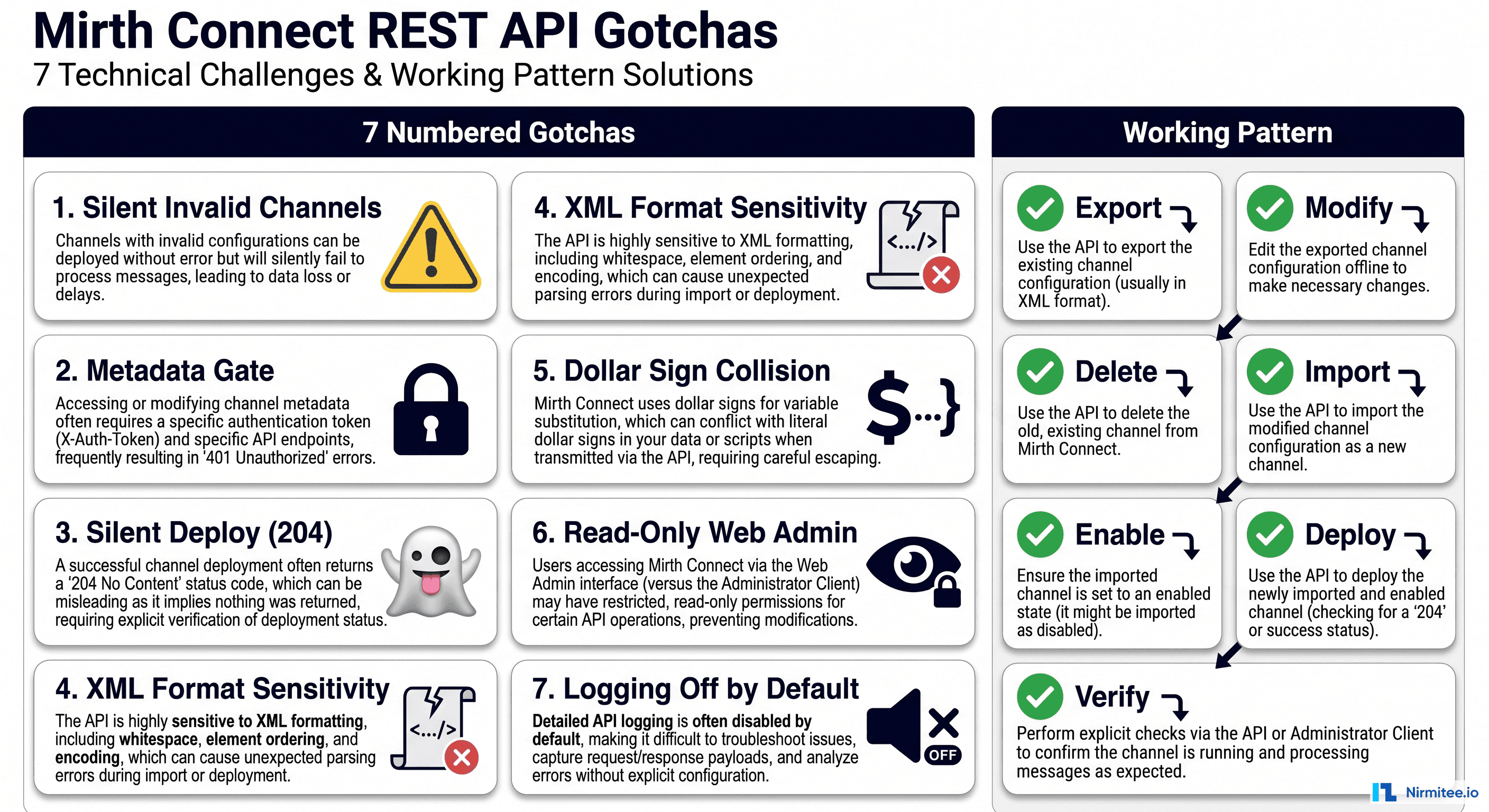
Gotcha #1: Channel Creation Silently Produces Invalid Channels
This is the big one. The one that wastes the most time because everything looks like it worked.
What You Expect
You craft a channel XML payload (or use JSON), POST it to /api/channels, get a success response, and your channel is ready to deploy.
What Actually Happens
curl -k -u admin:admin \
  -H "X-Requested-With: curl" \
  -H "Content-Type: application/xml" \
  -X POST https://localhost:8443/api/channels \
  -d @my-channel.xml
Response:
{"boolean":true}Looks great. The API accepted the channel and returned true. You check the channel list and the channel appears. It has a name, an ID, a description. It exists.
Except when you open it in the Mirth Administrator (the desktop Java app), you see this:
This channel is invalid. Verify all required extensions are loaded correctly.The channel is there, but it is broken. Mirth accepted the XML, stored it, returned success, and created something that cannot be deployed, cannot process messages, and cannot even be edited in the GUI.
Why This Happens
Mirth's channel XML format is extremely specific. The class attributes on properties elements, the version attributes, the exact nesting of data type properties — all of it must match precisely what Mirth's internal serializer produces. The API does not validate the XML against the expected schema. It performs basic XML parsing, stores whatever you sent, and returns true.
The channel XML that Mirth itself exports contains elements like:
<properties class="com.mirth.connect.connectors.tcp.TcpReceiverProperties" version="4.5.2">If your XML has the wrong class name, a missing version attribute, or elements in the wrong order, the channel is created but flagged as invalid internally. The API gives you zero indication that anything went wrong.
The Fix
Do not author channel XML from scratch. The only reliable source of valid channel XML is Mirth itself. Create your base channel in the Mirth Administrator GUI, then export it via the API:
curl -k -u admin:admin \
  -H "X-Requested-With: curl" \
  -H "Accept: application/xml" \
  https://localhost:8443/api/channels/b5bda28f-7c29-4773-8bea-2eb5f17aa710 \
  -o base-channel.xml
This exported XML is the gold standard. It contains every property, every default, every version tag exactly as Mirth expects it. Use this as your template.
Gotcha #2: The Channel Metadata Gate (The Hidden Deploy Blocker)
You have a valid channel. You call the deploy endpoint. It succeeds. The channel does not start.
The Symptom
# Deploy the channel
curl -k -u admin:admin \
  -H "X-Requested-With: curl" \
  -H "Content-Type: application/json" \
  -X POST "https://localhost:8443/api/channels/_deploy" \
  -d '{"channelIds":["b5bda28f-7c29-4773-8bea-2eb5f17aa710"],"returnErrors":true}'
Response: 204 No Content
You check the dashboard. The channel exists but shows as "Undeployed." You call deploy again. Another 204. Still undeployed.
The Root Cause
Mirth maintains a server-level channel metadata registry that is separate from the channel definitions themselves. This metadata controls which channels are "enabled" — and only enabled channels can be deployed. Creating a channel via the API does not automatically enable it in this registry.
The Fix
After creating or importing a channel, you must explicitly enable it in the server metadata:
# Step 1: Get current channel metadata
curl -k -u admin:admin \
  -H "X-Requested-With: curl" \
  -H "Accept: application/xml" \
  https://localhost:8443/api/server/channelMetadata \
  -o metadata.xml
The metadata XML looks like this:
<map>
  <entry>
    <string>b5bda28f-7c29-4773-8bea-2eb5f17aa710</string>
    <channelMetadata>
      <enabled>false</enabled>
      <lastModified>
        <time>1716700000000</time>
        <timezone>America/New_York</timezone>
      </lastModified>
      <pruningSettings>
        <archiveEnabled>true</archiveEnabled>
      </pruningSettings>
    </channelMetadata>
  </entry>
</map>
Notice <enabled>false</enabled>. This is the gate. You need to set it to true:
# Step 2: Update metadata with enabled=true
curl -k -u admin:admin \
  -H "X-Requested-With: curl" \
  -H "Content-Type: application/xml" \
  -X PUT https://localhost:8443/api/server/channelMetadata \
  -d '<map>
  <entry>
    <string>b5bda28f-7c29-4773-8bea-2eb5f17aa710</string>
    <channelMetadata>
      <enabled>true</enabled>
      <lastModified>
        <time>1716700000000</time>
        <timezone>America/New_York</timezone>
      </lastModified>
      <pruningSettings>
        <archiveEnabled>true</archiveEnabled>
      </pruningSettings>
    </channelMetadata>
  </entry>
</map>'
Only after this step will the deploy endpoint actually do anything.
Gotcha #3: Silent Deploy Success (204 Means Nothing)
This compounds Gotcha #2 and makes debugging a nightmare.
The Problem
The deploy endpoint — both the bulk POST /api/channels/_deploy and the single-channel POST /api/channels/{channelId}/_deploy — returns 204 No Content in all of the following cases:
- The channel was successfully deployed and started
- The channel was disabled in metadata (nothing happened)
- The channel ID does not exist (nothing happened)
- The channel is invalid (nothing happened)
204 No Content is the HTTP equivalent of a shrug. There is no response body to inspect. There is no error. There is no indication of what happened.
How to Verify Deployment Actually Worked
After calling deploy, check the channel status explicitly:
# Check channel status after deploy
curl -k -u admin:admin \
  -H "X-Requested-With: curl" \
  -H "Accept: application/json" \
  https://localhost:8443/api/channels/statuses
The response includes the deployment state for each channel:
{
  "list": {
    "dashboardStatus": [
      {
        "channelId": "b5bda28f-7c29-4773-8bea-2eb5f17aa710",
        "name": "HL7v2 ADT to FHIR Patient",
        "state": "STARTED",
        "deployedRevisionDelta": 0,
        "statistics": { ... }
      }
    ]
  }
}
If the channel is not in this list, it was never deployed. If state is not STARTED, something went wrong. Build this verification step into your CI/CD pipeline — without it, you are deploying into a void.
The Single-Channel Deploy Endpoint
One small mercy: there is a per-channel deploy endpoint that is easier to work with than the bulk deploy:
# Deploy a single channel
curl -k -u admin:admin \
  -H "X-Requested-With: curl" \
  -X POST "https://localhost:8443/api/channels/b5bda28f-7c29-4773-8bea-2eb5f17aa710/_deploy"
Same 204 response, same silent behavior, but at least you are targeting one channel and can immediately verify its status.
Gotcha #4: XML Format Sensitivity (Python ElementTree Breaks Mirth Channels)
Once you have a valid channel XML exported from Mirth, you naturally want to modify it programmatically — change the port, update the transformer code, swap out a destination URL. This is where standard XML tools fail you.
The Trap
You write a Python script using xml.etree.ElementTree:
import xml.etree.ElementTree as ET

tree = ET.parse('channel.xml')
root = tree.getroot()

# Change the port
port_elem = root.find('.//listenerConnectorProperties/port')
port_elem.text = '6662'

tree.write('modified-channel.xml', xml_declaration=True, encoding='UTF-8')
You POST the modified XML. Mirth returns {"boolean":true}. The channel shows up. And it is invalid.
Why This Happens
Python's ElementTree (and most XML libraries) normalize the XML when writing it back:
- Self-closing tags change:
<elements />becomes<elements/>or vice versa - Namespace handling shifts: attributes may be reordered
- Whitespace changes: indentation and line endings are modified
- Attribute ordering:
classandversionattributes may swap positions
Mirth's XML deserializer is sensitive to some of these differences. A channel XML that is semantically identical but syntactically reformatted by an XML library will be accepted by the API and stored as an invalid channel.
Here is the exact difference that breaks things. Mirth exports:
<pluginProperties/>
<listenerConnectorProperties version="4.5.2">
After round-tripping through Python ET:
<pluginProperties />
<listenerConnectorProperties version="4.5.2">
That space before the /> should not matter in any sane XML parser. But Mirth uses XStream with specific class-mapping expectations, and the deserialized object graph must match exactly.
The Fix: Use String Replacement
Crude, effective, and the only approach that reliably preserves the XML format:
# Change the port from 6661 to 6662
sed 's|<port>6661</port>|<port>6662</port>|g' base-channel.xml > modified-channel.xml

# Change the channel name
sed 's|<name>HL7v2 ADT to FHIR Patient</name>|<name>HL7v2 ADT to FHIR Patient - Staging</name>|g' \
  modified-channel.xml > final-channel.xml
Or in a bash script:
CHANNEL_XML=$(cat base-channel.xml)
CHANNEL_XML="${CHANNEL_XML//<port>6661<\/port>/<port>6662<\/port>}"
CHANNEL_XML="${CHANNEL_XML//<name>HL7v2 ADT to FHIR Patient<\/name>/<name>HL7v2 ADT to FHIR Patient - Staging<\/name>}"
echo "$CHANNEL_XML" > modified-channel.xml
Yes, this is string manipulation on XML. Yes, it feels wrong. It is the only thing that works consistently.
If you absolutely must use a proper XML library, the workaround is to never write the full XML back out. Instead, read the original file as a string, use regex or string replacement for your specific changes, and write the string back. Keep the XML library for reading and validation only.
Gotcha #5: Dollar Signs in URLs (FHIR + Mirth Variable Syntax Collision)
If your Mirth channel calls FHIR APIs, you will hit this within the first hour.
The Problem
FHIR uses $ in operation URLs:
https://tx.fhir.org/r4/CodeSystem/$lookup?system=http://hl7.org/fhir/sid/icd-10-cm&code=I21.0Mirth uses $ for variable interpolation in connector fields:
${channelMap.get('myVariable')}When you put a FHIR $lookup URL in the HTTP Sender's Host field, Mirth tries to resolve $lookup as a variable reference. It finds nothing, replaces it with empty string or null, and your HTTP call goes to a completely different (and invalid) endpoint.
The error you see in the logs (if logging is even enabled — see Gotcha #7):
ERROR - HTTP request failed: 404 Not FoundOr worse, no error at all — just a 400 from the FHIR server that you cannot see because the response is swallowed.
The Fix
Build the URL in a JavaScript transformer step and put it in a channel map variable:
// In the source transformer (JavaScript step), build the full URL
var fhirBase = 'https://tx.fhir.org/r4';
var operation = 'CodeSystem/' + String.fromCharCode(36) + 'lookup';  // $ = char 36
var system = encodeURIComponent('http://hl7.org/fhir/sid/icd-10-cm');
var code = msg['DG1']['DG1.3']['DG1.3.1'].toString();

var fullUrl = fhirBase + '/' + operation + '?system=' + system + '&code=' + code;
channelMap.put('fhirLookupUrl', fullUrl);
Then in the HTTP Sender destination, use the variable in the Host field:
${fhirLookupUrl}Now Mirth resolves the variable, which contains the literal $lookup string, and the HTTP call goes to the correct FHIR endpoint. The key is that the dollar sign in the resolved value is not processed again for variable substitution.
Alternatively, for simpler cases, you can escape the dollar sign with a backslash in some Mirth contexts, but this behavior is inconsistent across versions. The JavaScript approach is bulletproof.
Gotcha #6: The Web Admin is Read-Only
The Expectation
Mirth Connect 4.x ships with a web-based administrator at https://localhost:8443/webadmin. Surely this modern web interface can manage channels, right?
The Reality
The web admin (/webadmin) has exactly three features:
- Login — enter your credentials
- Dashboard — view channel status, message counts, and statistics
- Logout — end your session
That is it. No channel creation. No channel editing. No transformer editing. No deploying. No undeploying. It is a monitoring dashboard, not an administration interface.
For actual channel management, you need either:
- Mirth Administrator — the desktop Java application (requires Java runtime, launches via JNLP or direct JAR)
- The REST API — what this entire blog post is about
This matters for CI/CD because you cannot tell your ops team "just fix it in the web admin." Any channel change requires either the desktop app or API access.
Gotcha #7: Logging Is Off by Default
The Problem
You deploy a channel, send a test message, and nothing happens. No output. No error. No log entry. You check the Mirth server logs:
docker exec mirth-connect cat /opt/connect/appdata/logs/mirth.logThe log file exists but contains only startup messages. Your channel processing, transformer errors, HTTP call failures — none of it is logged.
Why This Happens
Mirth's default log configuration (log4j2.properties) sets the root log level to ERROR. Only fatal errors appear. Transformer exceptions, HTTP response codes, message routing decisions — all of it happens at INFO or DEBUG level and is silently discarded.
The Fix
Edit the log4j2.properties file inside the container (or mount it via Docker volume):
# Find the log config
docker exec mirth-connect find /opt/connect -name "log4j2.properties"
# Usually at: /opt/connect/conf/log4j2.properties

# Change the root log level
docker exec mirth-connect sed -i \
  's/logger.root.level = ERROR/logger.root.level = INFO/' \
  /opt/connect/conf/log4j2.properties
For a Docker setup, mount a custom config:
# docker-compose.yml
services:
  mirth-connect:
    image: nextgenhealthcare/connect:4.5.2
    volumes:
      - ./custom-log4j2.properties:/opt/connect/conf/log4j2.properties
Your custom-log4j2.properties should include:
logger.root.level = INFOAfter this change, restart Mirth (or the container). Now you will actually see what is happening when channels process messages:
INFO  - Channel "HL7v2 ADT to FHIR Patient" (b5bda28f) deployed successfully
INFO  - Received message on channel b5bda28f, source connector 0
INFO  - Transformer executed successfully, 6 FHIR resources generated
Without this fix, you are debugging blind. Enable it on day one.
The Working Pattern: API-Based Channel Deployment That Actually Works
After hitting all seven gotchas, here is the step-by-step process that reliably deploys Mirth channels via the API. This is the pattern we use in production.
Step 1: Create the Base Channel in Mirth Administrator
Use the desktop Java app to create your channel. Configure the source connector, destination connectors, transformer steps, and filters. Validate and save. This is the only step that requires the GUI — you do it once per channel type.
Step 2: Export the Channel via API
MIRTH_URL="https://localhost:8443"
CHANNEL_ID="b5bda28f-7c29-4773-8bea-2eb5f17aa710"
AUTH="admin:admin"

curl -k -u "$AUTH" \
  -H "X-Requested-With: curl" \
  -H "Accept: application/xml" \
  "$MIRTH_URL/api/channels/$CHANNEL_ID" \
  -o base-channel.xml
Commit this XML to your Git repository. This is your source of truth.
Step 3: Modify the XML (String Replacement Only)
# Create environment-specific channel
cp base-channel.xml staging-channel.xml

# Generate a new unique channel ID
NEW_ID=$(uuidgen | tr '[:upper:]' '[:lower:]')

# Replace channel ID, name, and port
sed -i '' "s|<id>$CHANNEL_ID</id>|<id>$NEW_ID</id>|g" staging-channel.xml
sed -i '' "s|<name>HL7v2 ADT to FHIR Patient</name>|<name>HL7v2 ADT to FHIR Patient - Staging</name>|g" staging-channel.xml
sed -i '' "s|<port>6661</port>|<port>7661</port>|g" staging-channel.xml
Step 4: Delete the Old Channel (If Updating)
# Undeploy first (safe to call even if not deployed)
curl -k -u "$AUTH" \
  -H "X-Requested-With: curl" \
  -X POST "$MIRTH_URL/api/channels/$CHANNEL_ID/_undeploy"

# Delete the channel
curl -k -u "$AUTH" \
  -H "X-Requested-With: curl" \
  -X DELETE "$MIRTH_URL/api/channels/$CHANNEL_ID"
Why delete instead of update with PUT? Because PUT /api/channels/{channelId} returns false on validation failures with no error details. The delete-and-recreate pattern gives you a clean slate and avoids versioning conflicts.
Step 5: Import the Modified Channel
curl -k -u "$AUTH" \
  -H "X-Requested-With: curl" \
  -H "Content-Type: application/xml" \
  -X POST "$MIRTH_URL/api/channels" \
  -d @staging-channel.xml
Expected response: {"boolean":true}
Step 6: Enable the Channel in Server Metadata
curl -k -u "$AUTH" \
  -H "X-Requested-With: curl" \
  -H "Content-Type: application/xml" \
  -X PUT "$MIRTH_URL/api/server/channelMetadata" \
  -d "<map>
  <entry>
    <string>$NEW_ID</string>
    <channelMetadata>
      <enabled>true</enabled>
      <lastModified>
        <time>$(date +%s)000</time>
        <timezone>UTC</timezone>
      </lastModified>
      <pruningSettings>
        <archiveEnabled>true</archiveEnabled>
      </pruningSettings>
    </channelMetadata>
  </entry>
</map>"
Step 7: Deploy and Verify
# Deploy
curl -k -u "$AUTH" \
  -H "X-Requested-With: curl" \
  -X POST "$MIRTH_URL/api/channels/$NEW_ID/_deploy"

# Wait for deployment to complete
sleep 3

# Verify
STATUS=$(curl -sk -u "$AUTH" \
  -H "X-Requested-With: curl" \
  -H "Accept: application/json" \
  "$MIRTH_URL/api/channels/statuses" | \
  python3 -c "
import sys, json
data = json.load(sys.stdin)
statuses = data.get('list', {}).get('dashboardStatus', [])
if not isinstance(statuses, list):
    statuses = [statuses]
for s in statuses:
    if s.get('channelId') == '$NEW_ID':
        print(s.get('state', 'NOT_FOUND'))
        sys.exit(0)
print('NOT_DEPLOYED')
")

echo "Channel status: $STATUS"
if [ "$STATUS" != "STARTED" ]; then
  echo "ERROR: Channel failed to deploy. Status: $STATUS"
  exit 1
fi
The Full Automation Script
Here is a complete bash script you can drop into a CI/CD pipeline. It handles the entire lifecycle: export, modify, import, enable, deploy, and verify.
#!/usr/bin/env bash
set -euo pipefail

# =============================================================================
# mirth-deploy.sh -- Deploy a Mirth Connect channel via REST API
#
# Usage:
#   ./mirth-deploy.sh <channel-xml> [--env staging|production]
#
# Prerequisites:
#   - curl, python3, uuidgen
#   - MIRTH_URL, MIRTH_USER, MIRTH_PASS environment variables
# =============================================================================

CHANNEL_XML="${1:?Usage: $0 <channel-xml> [--env staging|production]}"
ENVIRONMENT="${3:-staging}"

MIRTH_URL="${MIRTH_URL:-https://localhost:8443}"
MIRTH_USER="${MIRTH_USER:-admin}"
MIRTH_PASS="${MIRTH_PASS:-admin}"
AUTH="$MIRTH_USER:$MIRTH_PASS"

CURL_OPTS="-sk -u $AUTH -H X-Requested-With:mirth-deploy"

echo "=== Mirth Channel Deployment ==="
echo "Target: $MIRTH_URL"
echo "Channel: $CHANNEL_XML"
echo "Environment: $ENVIRONMENT"
echo ""

# --- Step 1: Parse channel ID and name from the XML ---
CHANNEL_ID=$(grep -oP '(?<=<id>)[^<]+' "$CHANNEL_XML" | head -1)
CHANNEL_NAME=$(grep -oP '(?<=<name>)[^<]+' "$CHANNEL_XML" | head -1)
echo "[1/7] Channel: $CHANNEL_NAME ($CHANNEL_ID)"

# --- Step 2: Check if channel already exists ---
EXISTING=$(curl $CURL_OPTS \
  -H "Accept: application/json" \
  -o /dev/null -w "%{http_code}" \
  "$MIRTH_URL/api/channels/$CHANNEL_ID" 2>/dev/null || true)

if [ "$EXISTING" = "200" ]; then
  echo "[2/7] Channel exists -- undeploying and deleting..."

  # Undeploy (ignore errors)
  curl $CURL_OPTS -X POST \
    "$MIRTH_URL/api/channels/$CHANNEL_ID/_undeploy" 2>/dev/null || true
  sleep 1

  # Delete
  curl $CURL_OPTS -X DELETE \
    "$MIRTH_URL/api/channels/$CHANNEL_ID" 2>/dev/null
  echo "  Deleted existing channel."
else
  echo "[2/7] Channel does not exist -- fresh install."
fi

# --- Step 3: Import the channel ---
echo "[3/7] Importing channel XML..."
IMPORT_RESULT=$(curl $CURL_OPTS \
  -H "Content-Type: application/xml" \
  -X POST "$MIRTH_URL/api/channels" \
  -d @"$CHANNEL_XML" 2>/dev/null)

if echo "$IMPORT_RESULT" | grep -q '"boolean":true\|true'; then
  echo "  Import accepted."
else
  echo "  ERROR: Import failed. Response: $IMPORT_RESULT"
  exit 1
fi

# --- Step 4: Enable in channel metadata ---
echo "[4/7] Enabling channel in server metadata..."
TIMESTAMP=$(date +%s)000
METADATA_XML="<map>
  <entry>
    <string>$CHANNEL_ID</string>
    <channelMetadata>
      <enabled>true</enabled>
      <lastModified>
        <time>$TIMESTAMP</time>
        <timezone>UTC</timezone>
      </lastModified>
      <pruningSettings>
        <archiveEnabled>true</archiveEnabled>
      </pruningSettings>
    </channelMetadata>
  </entry>
</map>"

curl $CURL_OPTS \
  -H "Content-Type: application/xml" \
  -X PUT "$MIRTH_URL/api/server/channelMetadata" \
  -d "$METADATA_XML" 2>/dev/null
echo "  Metadata updated."

# --- Step 5: Deploy ---
echo "[5/7] Deploying channel..."
curl $CURL_OPTS \
  -X POST "$MIRTH_URL/api/channels/$CHANNEL_ID/_deploy" 2>/dev/null
echo "  Deploy command sent."

# --- Step 6: Wait and verify ---
echo "[6/7] Verifying deployment (waiting 5s)..."
sleep 5

STATUS=$(curl $CURL_OPTS \
  -H "Accept: application/json" \
  "$MIRTH_URL/api/channels/statuses" 2>/dev/null | \
  python3 -c "
import sys, json
data = json.load(sys.stdin)
statuses = data.get('list', {}).get('dashboardStatus', [])
if not isinstance(statuses, list):
    statuses = [statuses]
for s in statuses:
    if s.get('channelId') == '$CHANNEL_ID':
        print(s.get('state', 'UNKNOWN'))
        sys.exit(0)
print('NOT_DEPLOYED')
" 2>/dev/null)

echo "  Channel state: $STATUS"

# --- Step 7: Report ---
echo ""
echo "[7/7] Deployment result:"
if [ "$STATUS" = "STARTED" ]; then
  echo "  SUCCESS -- Channel '$CHANNEL_NAME' is deployed and running."
  exit 0
elif [ "$STATUS" = "STOPPED" ]; then
  echo "  WARNING -- Channel deployed but stopped."
  exit 0
elif [ "$STATUS" = "NOT_DEPLOYED" ]; then
  echo "  FAILURE -- Channel was not deployed."
  echo "  Troubleshooting:"
  echo "    1. Check if channel is valid (open in Mirth Administrator)"
  echo "    2. Verify metadata has enabled=true"
  echo "    3. Check server logs"
  exit 1
else
  echo "  FAILURE -- Unexpected state: $STATUS"
  exit 1
fi
Save this as mirth-deploy.sh, make it executable, and call it from your CI/CD pipeline:
chmod +x mirth-deploy.sh
MIRTH_URL=https://mirth.internal:8443 \
MIRTH_USER=deploy \
MIRTH_PASS='s3cure-p@ss' \
./mirth-deploy.sh channels/adt-to-fhir.xml --env production
Bonus: Environment-Specific Channel Modification
For multi-environment deployments (dev, staging, production), create a simple modifier script that uses sed to swap environment-specific values:
#!/usr/bin/env bash
# modify-channel.sh -- Create environment-specific channel XML
# Usage: ./modify-channel.sh <base-channel.xml> <env-config.env> > output.xml

BASE_XML="$1"
ENV_FILE="$2"

# Load environment config
source "$ENV_FILE"

# Start with the base channel (preserving exact XML format)
CHANNEL=$(cat "$BASE_XML")

# Replace values using exact string matching
CHANNEL="${CHANNEL//<port>${BASE_PORT}<\/port>/<port>${TARGET_PORT}<\/port>}"
CHANNEL="${CHANNEL//<name>${BASE_NAME}<\/name>/<name>${TARGET_NAME}<\/name>}"

# If destination URL needs changing
if [ -n "${TARGET_DEST_URL:-}" ]; then
  CHANNEL="${CHANNEL//$BASE_DEST_URL/$TARGET_DEST_URL}"
fi

echo "$CHANNEL"
With an environment config file:
# staging.env
BASE_PORT=6661
TARGET_PORT=7661
BASE_NAME="HL7v2 ADT to FHIR Patient"
TARGET_NAME="HL7v2 ADT to FHIR Patient - Staging"
BASE_DEST_URL="https://fhir.production.internal"
TARGET_DEST_URL="https://fhir.staging.internal"
Quick Reference: Every Endpoint You Need
| Operation | Method | Endpoint | Notes |
|---|---|---|---|
| Login | POST | /api/users/_login | Returns session cookie |
| List channels | GET | /api/channels | Add Accept: application/xml |
| Get channel | GET | /api/channels/{id} | Use XML format for re-import |
| Create channel | POST | /api/channels | Returns {"boolean":true} even on invalid XML |
| Update channel | PUT | /api/channels/{id} | Returns false on failure, no details |
| Delete channel | DELETE | /api/channels/{id} | Undeploy first |
| Get metadata | GET | /api/server/channelMetadata | Check enabled status |
| Set metadata | PUT | /api/server/channelMetadata | Must set enabled=true |
| Deploy (bulk) | POST | /api/channels/_deploy | JSON body with channel IDs |
| Deploy (single) | POST | /api/channels/{id}/_deploy | Simpler, same 204 response |
| Undeploy | POST | /api/channels/{id}/_undeploy | Safe to call if not deployed |
| Channel statuses | GET | /api/channels/statuses | The only way to verify deployment |
All endpoints require -k (skip TLS verify for self-signed cert), -H "X-Requested-With: curl", and authentication.
Need help automating your Mirth Connect deployment pipeline or building HL7 integration channels? Explore our Healthcare Interoperability Solutions for production-grade integration engine management, and our Healthcare Software Product Development services for CI/CD automation in healthcare environments. Talk to our team to get started.
The Bottom Line
Mirth Connect's REST API is functional but adversarial. It accepts bad input without complaint, confirms operations that did not happen, and hides the information you need to debug behind a disabled logging configuration. The documentation covers the happy path and stops.
The pattern that works: create in the GUI, export via API, modify with string replacement, deploy via the 7-step process, and always verify with the statuses endpoint. Anything that skips a step in this sequence will eventually produce a deployment that looks successful and is not.
We built three production channels this way — HL7v2 to FHIR R4 Bundle, a smart ADT router, and an HL7v2 to openEHR transformer — all deployed and updated exclusively through CI/CD after the initial GUI creation. The automation works. It just does not work the way the docs suggest.
This post is part of our Mirth Connect integration series. We build healthcare integration pipelines — HL7v2, FHIR, openEHR — and write about the parts the documentation leaves out. See our other posts on HL7v2 to FHIR transformation in Mirth, smart message routing, and openEHR integration.