Mirth Connect Telehealth Integration for Virtual Care Workflows

Digital Growth Lead
Writes about healthcare technology, interoperability, and AI-driven transformation across modern care systems.
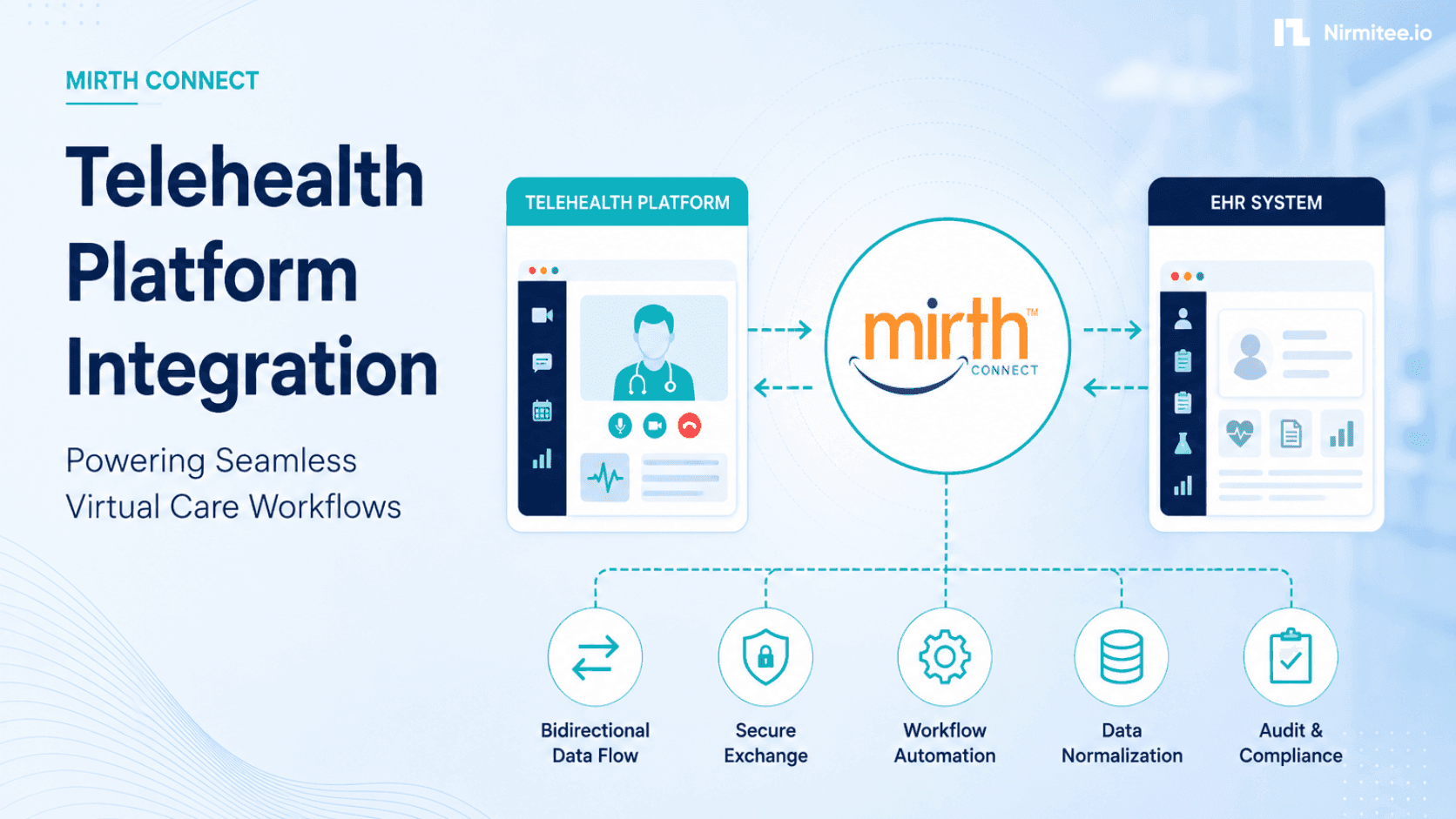
A telehealth platform that cannot talk to the EHR is a data island. The video call happens, notes get written, maybe a prescription is sent, and then someone re-keys it all into the patient's record by hand. That is how virtual care becomes a parallel system instead of part of the chart. The fix is integration, and because telehealth vendors use modern web formats while EHRs use HL7 and FHIR, you need something in the middle to translate between them. This guide covers Mirth Connect telehealth integration end to end: keeping the telehealth platform and the EHR in sync, in both directions.
Related reading: Mirth Connect Support Contract & SLA Guide 2026.
We have built telehealth and virtual-care products, including a production teletherapy platform and EHR integrations for 30+ healthtech startups, so the bidirectional pattern below is one we have shipped, not just sketched.
Telehealth EHR integration is bidirectional
Telehealth EHR integration moves data in both directions: booking, intake, and visit notes flow into the EHR as HL7 SIU, ADT, and MDM messages; patient demographics, problem lists, medications, and recent results flow back to the platform so the clinician has context before the call. A one-way integration — sending visits into the EHR but not pulling context back — leaves the virtual encounter disconnected from the patient record.
The thing to internalize first about telehealth EHR integration is that data has to move both ways. Into the EHR, you send what the virtual visit generates: an appointment when a patient books, registration details from intake, and after the visit, the clinical note, any orders, and charges. Back to the telehealth platform, you pull what the clinician needs to deliver good care, the patient's demographics, problem list, medications, allergies, and recent results, so the provider is not flying blind on a video call.
Telehealth vendors typically expose their side as JSON over REST or webhooks. The EHR side speaks HL7 v2 messages, ADT for registration, SIU for scheduling, ORU for results, MDM for documents, and increasingly FHIR R4 resources. Bridging those two languages is the core of the job. If the EHR formats are unfamiliar, our guide to HL7 and the FHIR R4 specification are useful references.
Why Mirth Connect sits in the middle
Telehealth platforms speak JSON over REST or webhooks; EHRs speak HL7 v2 and FHIR. Mirth Connect is the translation engine in the middle — converting incoming booking webhooks to HL7 SIU messages, patient intake JSON to ADT, and EHR FHIR responses to app-ready JSON — so neither system has to implement the other's protocol.
You could write bespoke code to translate between your telehealth vendor and the EHR, and many teams do, until the second EHR or the third message type turns that code into a maintenance burden. Mirth Connect gives you a translation and routing layer built for exactly this.
- Format translation. A common real-world pattern is receiving patient registration as JSON from the telehealth platform via a webhook and transforming it into an HL7 ADT message the EHR accepts. Mirth does this kind of conversion as a channel, not a custom service.
- Scheduling sync. SIU messages keep appointment data aligned between the telehealth platform, the EHR, and any other scheduling tool, so a booked virtual visit shows up everywhere it should.
- Clinical context on demand. Mirth can pull demographics, problems, and results from the EHR and deliver them to the telehealth app in the shape it expects.
- Reliability. Logging, retries, and replay mean a momentary outage on either side does not drop a booking or a note.
If the engine is new to you, start with our complete guide to Mirth Connect and the architecture and deployment guide, and the same engine connects to any EHR behind the platform, as our Cerner integration guide shows.
What flows each way
Telehealth platform → EHR: appointment booking (SIU^S12), patient registration (ADT^A04), intake form data (custom OBX or FHIR Observation), post-visit notes (MDM^T02 or FHIR DocumentReference), orders placed during the visit (ORM^O01), and charges (DFT^P03). EHR → telehealth platform: patient demographics (ADT or FHIR Patient), active medications (FHIR MedicationRequest), problem list (FHIR Condition), recent lab results (ORU or FHIR Observation).
Laid out side by side, the two directions have distinct triggers and needs. Into the EHR, the trigger is a booking or intake event, the data is an appointment and patient, it arrives as webhook JSON, and Mirth translates it into SIU and ADT messages, with patient matching as the critical step. Back to the platform, the trigger is an order, result, or record update, the data is results and demographics in HL7 or FHIR, and Mirth maps it into app-ready JSON so the clinician has fresh context. One engine owns both directions, which is what keeps the virtual visit tied to the record. The real-time registration mechanics are covered in our ADT event processing guide.
The architecture
The reference architecture: telehealth platform webhook → Mirth HTTP Listener → Transformer (JSON to HL7 v2 or FHIR) → EHR destination (MLLP to Bridges or FHIR REST). Return path: Mirth polls or subscribes to EHR FHIR endpoints → Transformer (FHIR resources to platform JSON) → HTTP POST to telehealth platform API. Mirth is the only component that knows both protocols.
The shape is a small set of bidirectional Mirth channels between the telehealth platform and the EHR. On the inbound side, a source connector receives a webhook from the platform, a filter validates it, a transformer converts the JSON to the right HL7 or FHIR structure and matches the patient, and a destination connector posts it to the EHR. On the outbound side, a channel pulls or receives clinical data from the EHR, reshapes it to the platform's API, and delivers it. The video and audio of the visit itself stay with the telehealth platform, which is built for real-time media; Mirth handles the data, which is what needs to reach the record.
Patient matching is the linchpin. A booking from the telehealth platform has to resolve to the correct patient in the EHR, or you create duplicates and orphaned records. Our HL7 v2 to FHIR R4 mapping guide covers the field-level mapping, and consistent channel design patterns keep the inbound and outbound channels organized as the platform grows.
Post-visit data: closing the loop
Post-visit closure is what separates a complete telehealth integration from a partial one. The visit note must return to the EHR as an MDM^T02 document or FHIR DocumentReference within minutes of the visit ending — not batched overnight. Orders placed during the call flow as ORM^O01. Charges flow as DFT^P03. Without this loop, the virtual encounter exists only in the telehealth platform and is absent from the legal medical record.
The part teams forget is what happens after the call ends. A complete telehealth integration sends the visit note back to the EHR as an MDM document or a FHIR DocumentReference, so the encounter is part of the legal record, not stranded in the telehealth app. Orders placed during the visit flow as ORM messages, and charges flow as DFT so the visit gets billed. Closing this loop is what makes a virtual visit indistinguishable from an in-person one as far as the record is concerned, and it is usually the difference between a telehealth product that clinicians tolerate and one they trust. Building this on a solid foundation matters; our guide to a HIPAA-compliant telehealth platform architecture covers the broader system around these flows.
Reliability and the failure modes that matter
The three failure modes that matter most in telehealth integration: (1) scheduling sync lag — a booking confirmed in the platform does not appear in the EHR before the clinician opens the chart; (2) demographic mismatch — the patient in the telehealth platform does not match a patient in the EHR, causing a failed ADT; (3) post-visit document loss — the visit note fails to post to the EHR and the failure is not surfaced. All three require monitoring and dead-letter queues in Mirth, not just happy-path testing.
A few specific failures hurt telehealth integrations, and each is addressable in the engine. Duplicate patients arise when a booking does not match an existing record, so invest in matching logic before anything else. Lost bookings or notes are unacceptable, so every channel needs a dead-letter and replay path, which our guide to message replay and dead letter queues details. Timing gaps, where a clinician opens a visit before the EHR context has arrived, are eased by pulling context ahead of the scheduled time rather than at the moment the call starts. Plan for these, and the platform feels seamless to both patient and provider.
A scheduling sync example, end-to-end
Scheduling is usually the first flow teams build, because it is where the two systems most obviously need to agree. Picture a patient booking a virtual visit in the telehealth app. The platform fires a webhook with the appointment and patient details as JSON. A Mirth channel receives it, validates the payload, and resolves the patient against the EHR, creating the record if this is a new patient or matching an existing one. It then builds an SIU scheduling message and, if needed, an ADT registration message, and posts them to the EHR, so the visit appears on the clinician's schedule alongside in-person appointments.
The reverse direction matters just as much. When the EHR is the source of truth for a clinician's calendar, changes there, a cancellation, a reschedule, a room or provider change, need to flow back to the telehealth platform so the patient sees accurate information. Running both directions through the same engine, with a clear rule for which system wins in a conflict, is what keeps the two calendars from drifting apart. Without that discipline, you get the classic failure where a patient shows up for a visit the clinician's schedule no longer shows.
In the Mirth channel itself, the inbound transformer is where the webhook JSON becomes an HL7 message. A simplified skeleton of that transformer looks like this (all data synthetic):
// Source transformer on the inbound webhook channel
// Telehealth booking JSON -> HL7 SIU^S12
var appt = JSON.parse(connectorMessage.getRawData());

tmp['MSH']['MSH.9']['MSH.9.1'] = 'SIU';
tmp['MSH']['MSH.9']['MSH.9.2'] = 'S12';

tmp['SCH']['SCH.1']['SCH.1.1']   = appt.appointmentId;
tmp['SCH']['SCH.11']['SCH.11.4'] = appt.startTime;        // 20260702143000

tmp['PID']['PID.3']['PID.3.1'] = appt.patient.mrn || '';  // empty -> matching step
tmp['PID']['PID.5']['PID.5.1'] = appt.patient.lastName;
tmp['PID']['PID.5']['PID.5.2'] = appt.patient.firstName;
tmp['PID']['PID.7']['PID.7.1'] = appt.patient.dob;        // YYYYMMDD

tmp['PV1']['PV1.2']['PV1.2.1'] = 'O';                     // outpatient / virtual

// No MRN yet? Route through the patient-matching destination first
if (!appt.patient.mrn) {
    channelMap.put('needsMatch', true);
}
The real transformer carries more segments, validation, and site-specific rules, but the shape is the point: parse the platform's JSON, populate the HL7 template, and let routing decide whether patient matching runs first.
How to set up Mirth Connect telehealth integration: 7 steps
The 7-step setup: (1) map data flows in both directions, (2) get EHR interface credentials and test environment access, (3) build inbound channels (webhook/REST listener → HL7 v2 transformer → EHR MLLP destination), (4) build outbound channels (FHIR poll or subscription → JSON transformer → platform REST destination), (5) test with synthetic patients, (6) run parallel with manual reconciliation, (7) cut over and monitor post-visit document delivery rate daily for the first two weeks.
Every Mirth Connect telehealth integration we have shipped follows the same sequence, whatever the platform or EHR on either side:
- Map the workflows and data elements. List every event that must cross the boundary: booking, reschedule, cancellation, intake, note, order, charge, and the clinical context the platform needs back. Assign each one its HL7 message type or FHIR resource before any channel is built.
- Stand up Mirth and secure the endpoints. An HTTPS listener with authentication for the platform's webhooks, and a secured connection, VPN or TLS MLLP or FHIR over OAuth 2.0, to the EHR.
- Build the inbound channel. Webhook JSON in, a validation filter, a transformer to SIU or ADT, and a destination that posts to the EHR.
- Implement patient matching before anything else ships. Decide the match keys, the confidence threshold, and what happens on no-match. Matching errors are the hardest failures to unwind later.
- Build the outbound channel. Pull or receive demographics, problems, medications, and results from the EHR, reshape them to the platform's API, and deliver them ahead of the visit time.
- Wire in reliability. Queues, retries, a dead-letter path, replay, and alerting on every channel, so an outage on either side never drops a booking or a note.
- Parallel-run, instrument, and cut over. Run each channel alongside the manual step it replaces, track messages posted and replayed, and retire the manual step only when staff trusts the numbers.
Mirth Connect vs. custom middleware vs. vendor-native integration
Teams usually weigh three options for connecting a telehealth platform to the EHR. The differences show up after go-live, not before:
| Consideration | Mirth Connect | Custom middleware | Vendor-native integration |
|---|---|---|---|
| Format translation (JSON, HL7 v2, FHIR) | Built-in transformers | Hand-written per format | Limited to what the vendor supports |
| Adding a second EHR | New channel, same engine | New code path to build and maintain | New contract, if offered at all |
| Reliability (retries, replay, dead-letter) | Built-in | You build and own it | Opaque, vendor-controlled |
| Debugging a failed message | Message-level logs and replay | Whatever you instrumented | Support ticket |
| Ongoing cost | Engine ops and channel maintenance | Full code ownership | Recurring per-connection fees |
| Best fit | Multi-EHR, evolving workflows | One simple flow, strong in-house team | Single EHR, standard workflows only |
A realistic rollout
A standard telehealth-EHR integration runs 8–12 weeks: 1 week data mapping, 2 weeks channel build, 2 weeks testing with the EHR team, 2 weeks parallel run, 1 week cutover. The most common delay is getting test credentials from the health system's interface team. Start that request on day one.
Sequencing keeps the telehealth integration low-risk. Begin with one-way scheduling, pushing bookings into the EHR, and confirm patient matching is solid before anything else, since matching errors are the most damaging and the hardest to unwind later. Add the return path for schedule changes once the inbound side is trusted. Then layer in clinical context to the platform, demographics, and recent results first, followed by problems and medications. Finally, close the post-visit loop with notes, orders, and charges back to the EHR. Each phase is independently useful, so the platform is never waiting on a single big launch.
Run each new channel in parallel with whatever manual step it replaces until staff trusts it, and instrument everything: track bookings posted, context delivered, and any messages that fail and get replayed. Because telehealth volume can spike, for example, around a new service line or a seasonal surge, design the channels to queue and retry rather than buckle under load, the same discipline that keeps any busy Mirth deployment healthy.
What it costs and how long it takes
Two variables drive both budget and timeline: how many flows cross the boundary, and how the EHR is accessed. A scheduling-only first phase, one inbound channel plus patient matching, is measured in weeks, not months, and each later phase (clinical context, post-visit loop) adds incrementally rather than multiplying scope. EHR access is the wildcard: a FHIR endpoint you can call directly moves faster than an interface engine queue managed by a health system's IT team, where coordination time often exceeds build time. For calibration, one healthtech went from zero FHIR capability to a working Epic integration in 5 weeks. Ask any vendor quoting a telehealth integration to break the estimate down by flow, that is the honest way to scope this work.
Security and compliance
Telehealth integration handles Protected Health Information, so a Business Associate Agreement is required. The data layer uses OAuth 2.0 and SMART on FHIR scopes where FHIR is involved, and secured connections for HL7 v2; the platform remains responsible for securing the video session itself. We sign BAAs with US health systems and digital health customers, and we build on HIPAA-compliant, SOC 2 Type II, and ISO 27001 certified infrastructure with FHIR R4 native architecture.
This content describes engineering patterns. It does not include actual Protected Health Information. All data examples are synthetic.
How Nirmitee.io approaches telehealth work
Healthcare is the only industry we serve, and virtual care is an area we have shipped in. We built SayHey, a mental health teletherapy platform that runs in production, and AffEx Health with a consultation flow and patient dashboard, so the bidirectional sync between a virtual-care app and clinical systems is familiar territory. Our architecture is FHIR R4 native, which makes the clinical-context direction straightforward, and we treat the post-visit loop, notes, orders, and charges back to the EHR, as part of the job rather than an afterthought. For the platform side specifically, our work on mental health telemedicine platforms goes deeper.
Connect the telehealth platform and the EHR in both directions, get patient matching right, and close the post-visit loop so virtual care lives in the record. If you want a second set of eyes on a Mirth Connect telehealth integration, or want it built, share your use case at nirmitee.io, and we will tell you what we have shipped for similar products.
Ready to scale?
Talk to our healthcare engineering team about building, integrating, and shipping faster.
Frequently Asked Questions
How does a telehealth platform integrate with an EHR?
Why is telehealth EHR integration bidirectional?
Does Mirth Connect handle the telehealth video call?
What happens to the visit note after a telehealth appointment?
Is a BAA required for telehealth EHR integration?