Mirth Connect eClinicalWorks Integration: HL7 Interfaces for Ambulatory Practices

Digital Growth Lead
Writes about healthcare technology, interoperability, and AI-driven transformation across modern care systems.
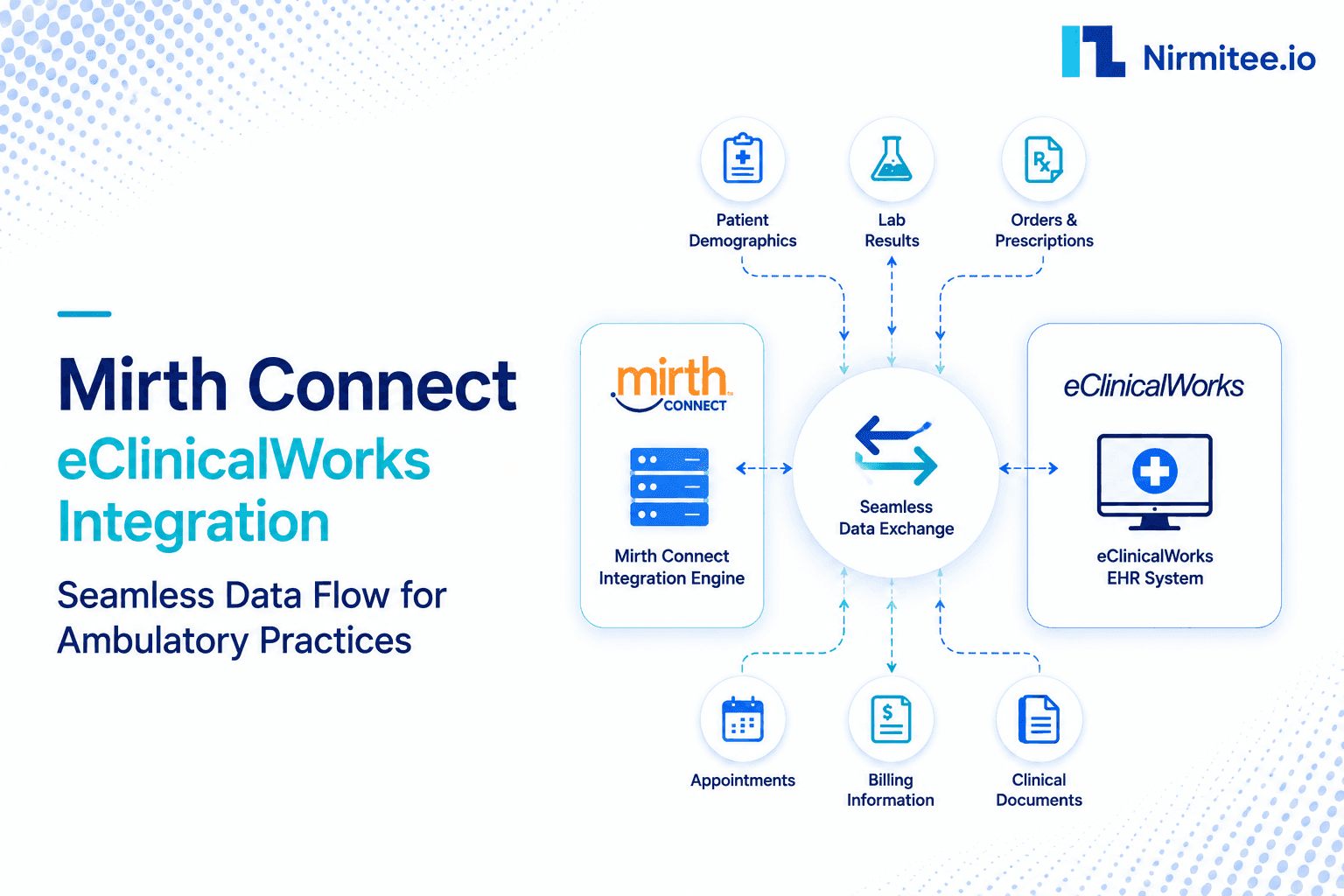
eClinicalWorks is one of the largest ambulatory EMRs in the United States, which means a huge number of clinics, labs, billing services, and digital health products eventually need to exchange data with it. The reality of that integration is rarely pure FHIR or pure HL7. Ambulatory practices run on a hybrid: modern FHIR APIs for apps and patient access, and tried-and-true HL7 v2 interfaces for the lab and billing traffic that keeps the lights on. This guide is about using Mirth Connect to run both cleanly so an eClinicalWorks practice gets the connectivity it needs without a pile of brittle point-to-point links.
We have built EHR integrations for healthtech startups, several of them in ambulatory settings, so the hybrid pattern below is what we actually deploy, not an idealized diagram.
What eClinicalWorks exposes
eClinicalWorks has two integration surfaces: certified FHIR R4 APIs for apps, and HL7 v2 interfaces for lab, billing and clinical event feeds. This guide covers the HL7 v2 interfaces, which is where Mirth Connect does its work.
The FHIR side is split across two portals: provider-facing and backend apps register on eClinicalWorks Connect, and patient-facing apps on the healow developer portal. App registration, scopes, sandbox limits, practice activation and the published rate limit are covered in our eClinicalWorks API integration guide. On the HL7 side, eClinicalWorks sets up lab interfaces under a statement of work, and documents its broader approach on its interoperability page. When an app needs those HL7 v2 messages as FHIR, Mirth can map them into FHIR R4 bundles.
Why ambulatory practices reach for Mirth Connect
Ambulatory practices run a hybrid of FHIR APIs and HL7 v2 interfaces: labs over HL7 ORM/ORU, billing over HL7 DFT, patient apps over FHIR, scheduling via a mix of both. Mirth Connect consolidates all of these into one engine with logging, retries, LOINC mapping, and a single audit trail, replacing the brittle point-to-point connections that break whenever eCW is upgraded.
Small and mid-size clinics do not have a large integration team, so the last thing they need is a separate one-off connection for every lab, billing service, and app. An interface engine consolidates all of it into one manageable place.
Mirth Connect earns its keep in an eCW practice for a few specific reasons:
- It runs the hybrid. One engine can receive HL7 v2 lab results, call the eCW or healow FHIR APIs, and present consistent output, so you are not maintaining two unrelated integration styles.
- It consolidates lab and billing feeds. Orders out, results in, and charges flowing to your billing service all live as channels in one place, with logging and retries built in.
- It absorbs the messy parts. Code normalization, reshaping, and routing happen in the transformer, not scattered across a clinic's various vendor connections.
- It scales down. Mirth is as comfortable running a handful of channels for a single clinic as it is running hundreds for a hospital, which suits the ambulatory world.
If Mirth is new to you, our complete guide to Mirth Connect and the architecture and deployment guide cover the basics, and the same pattern applies across vendors, as our Cerner integration guide shows.
FHIR and HL7 v2, side by side
eCW's certified FHIR R4 API exposes US Core resources such as Patient, Encounter, Observation, Condition, MedicationRequest, AllergyIntolerance and DocumentReference, and is best for app-facing data access. It has no FHIR Appointment resource: scheduling runs through healow's separate scheduling API, which is FHIR DSTU2 and needs a signed contract for production. eCW HL7 v2 covers lab order output (ORM/OML), result inbound (ORU), charge export (DFT), and ADT feeds, and is best for real-time operational events. The hybrid pattern runs both in Mirth: FHIR for what the app reads, HL7 v2 for what happens in real time.
The two paths suit different jobs. The FHIR R4 API, through the eCW and healow portals, is best for apps and patient access, exposing US Core resources over REST with SMART on FHIR authorization. HL7 v2 interfaces, over MLLP, are best for the lab and billing traffic that needs operational stability. There is one important caveat on the FHIR side: supporting US Core is not the same as delivering every USCDI element you expect, with complete search behavior and consistent coding. We dig into that gap in why FHIR-compliant does not mean interoperable, and it is worth verifying coverage for your exact use case before you design around it.
The architecture for a clinic
The shape is a small set of Mirth channels between eClinicalWorks and everything a clinic connects to. A source connector receives an HL7 v2 message or the result of an FHIR call. A filter keeps only what is relevant. A transformer normalizes eCW's codes to LOINC, SNOMED, and ICD and reshapes the data. A destination connector sends it onward, to a lab system, a billing service, a patient app, or an analytics store.
That normalization step is where quality is won or lost, because a result coded in eCW's local terms means nothing to an outside lab or registry. Our HL7 v2 to FHIR R4 mapping guide covers building those tables, and even a small clinic benefits from consistent channel design patterns, so the integration stays understandable as it grows.
Lab integration: the ambulatory bread and butter
Lab integration is the highest-value eClinicalWorks integration. Orders flow out of eCW as HL7 v2 ORM or OML messages over MLLP to the reference lab. Results return as HL7 v2 ORU messages that Mirth receives, maps LOINC codes on, and posts back to eCW as inbound results that land in the correct patient chart. Without LOINC mapping in Mirth, results arrive with local lab codes that eCW cannot display properly.
For most ambulatory practices, the first and most valuable integration is labs. The flow is symmetric: an order goes out from eCW as an HL7 v2 ORM or OML message to a reference lab, and the result comes back as an ORU message that needs to land in the right patient's chart. Mirth sits in the middle of both directions, validating the order, routing it to the correct lab, and then taking the inbound result, mapping its codes, and posting it back so the clinician sees it without manual entry.
A nice optimization here is the hybrid pattern: as ORU results arrive over HL7 v2, a channel can precompute a clean results summary and store it for fast display, while FHIR is reserved for deeper drill-down when a clinician needs the full record. That gives the practice speed and operational stability at once. The broader lab pattern, including mapping HL7 ORM and ORU to FHIR DiagnosticReport, is covered in our lab integration guide.
Patient access through healow
healow is eClinicalWorks' patient portal and mobile app, exposed to third-party developers via the healow FHIR R4 API with OAuth 2.0 and SMART on FHIR. Patient-facing apps that need to read eCW patient records use this path, not the provider-facing eCW API. Confirm which portal your use case targets before registering as a developer, because the credentials and scopes are different.
The patient-facing side of eClinicalWorks runs through healow, and its FHIR developer portal is how patient apps get authorized access to data. If your product lets patients view results or pull their records into a personal health app, this is the path you build against (the healow patient APIs are read-only; booking appointments uses the separate healow scheduling API under contract), using SMART on FHIR scopes so patients grant only the access they intend. Mirth can sit behind your app to cache and reshape what healow returns, so your patient experience is fast and not bottlenecked by live API calls on every screen. Treating patient access as a first-class path, rather than an afterthought bolted onto a provider integration, is what makes these features feel polished.
Where the eClinicalWorks integrations get tricky
Three things that slow eClinicalWorks integrations: (1) US Core compliance is not the same as complete data delivery, so verify every resource and field in the live API, not just the spec; (2) eCW versions vary significantly between practices, so a channel that works on one practice's eCW version may fail on another's; (3) nothing reaches production until each practice activates your app, and HL7 lab interfaces need a statement of work with eClinicalWorks. Put both steps in the plan on day one.
A few realities deserve attention upfront. FHIR coverage gaps are real: a resource may be supported in name but missing a field you need or behaving inconsistently in search, so always confirm against the actual API rather than the marketing claim. Code normalization is more variable in ambulatory settings because practices customize their setups, so your mapping tables carry real weight. And every channel needs a recovery path for the messages that fail, especially lab results, where a dropped ORU is a clinical safety issue, not just a technical one; our guide to message replay and dead letter queues covers handling those safely. Plan for these, and the integration stays stable.
Billing and revenue feeds
After labs, billing is the integration most ambulatory practices care about, because cash flow depends on it. eClinicalWorks generates charge and financial detail that needs to reach a billing service or clearinghouse, often as HL7 v2 DFT messages, and eligibility and claim status need to flow back so the front desk and billing team are not working blind. Mirth Connect handles this as a set of channels: it picks up charge messages as encounters close, reshapes them to whatever the billing partner expects, and routes them reliably, with a record of every message in case something needs to be resent.
The reason to run billing through the same engine as clinical and lab data is correlation and reliability. When a charge can be tied back to the encounter and the result that justified it, denials are easier to work with, and audits are less painful. And because the engine logs and can replay messages, a transient outage at the billing partner does not silently drop revenue, the messages queue and are resent. For a clinic, that reliability is the difference between an integration that quietly works and one that generates a stream of billing exceptions someone has to chase by hand.
A realistic rollout for a clinic
Ambulatory practices do not have the luxury of a long integration project, so the sequence matters. Start with a single high-value interface, usually a lab connection, and prove it end to end: orders out, results back, codes mapped, results landing in the right chart. Run it in parallel with whatever manual process it replaces until the staff trusts it. Then add billing feeds, then patient access through healow, one capability at a time, so the practice always has a working system and never a big-bang switchover.
Keep the footprint small and well monitored. A clinic rarely needs hundreds of channels, but the handful it has should be named consistently, logged, and alerted so that a failed lab result or a stalled billing feed surfaces immediately rather than days later. This phased, monitored approach is what lets a small practice get hospital-grade integration without a hospital-sized team, and it keeps each new connection low-risk because the ones before it are already stable. Done this way, an eClinicalWorks integration grows with the practice instead of becoming a fragile dependency nobody wants to touch.
Security and compliance
Both paths handle Protected Health Information, so a Business Associate Agreement is required. The FHIR path uses OAuth 2.0 and SMART on FHIR scopes; HL7 v2 interfaces rely on network-level trust arranged with the practice or its hosting. We sign BAAs with US health systems and digital health customers, and we build to HIPAA requirements on a FHIR R4 native architecture and are ISO 27001:2022 certified. The FHIR resource reference is at hl7.org/fhir/R4.
This content describes engineering patterns. It does not include actual Protected Health Information. All data examples are synthetic.
How Nirmitee approaches the eClinicalWorks work
Healthcare is the only industry we serve, and ambulatory integration is a regular part of it. Our architecture is FHIR R4 native, so the eCW and healow FHIR paths are familiar, and we treat HL7 v2 lab and billing feeds with equal care because that is where a clinic's daily reliability lives. The pattern we see work is consistent: one engine, the hybrid done deliberately, and lab integration treated as the safety-critical flow it is.
If you are connecting an eClinicalWorks practice to labs, billing, or a patient app and want a second set of eyes on the design, or want it built, share your use case at nirmitee.io, and we will tell you what we have shipped for similar ambulatory work.
Ready to scale?
Talk to our healthcare engineering team about building, integrating, and shipping faster.
Frequently Asked Questions
Does eClinicalWorks have a FHIR API?
Why use Mirth Connect for an eClinicalWorks integration?
What is the most common eClinicalWorks integration?
Is supporting US Core enough for my eClinicalWorks integration?
Is a BAA required to integrate with eClinicalWorks?