openEHR + SMART on FHIR: Running SMART Apps Against an openEHR Backend

CTO & Co-Founder
CTO & Co-Founder at Nirmitee.io. Architects healthcare integrations across FHIR, SMART on FHIR, ABDM and NHCX, writing from production experience taking hospital software from sandbox to go-live.
SMART on FHIR has become the dominant app launch framework in health IT. Over 500 apps run on SMART, and every major EHR vendor supports the SMART App Launch Framework. But SMART on FHIR assumes your backend speaks FHIR natively. What if your clinical data repository is openEHR?
This is not a theoretical question. Organizations running openEHR CDRs (EHRbase, Better Platform, Nedap) increasingly need to support SMART app launches to participate in the broader health IT ecosystem. Patients expect apps like Apple Health to connect. Regulators mandate SMART-based patient access. Clinical apps built on SMART need to work regardless of the backend storage model.
This guide covers how to run SMART on FHIR applications against an openEHR backend, including the emerging SMART on openEHR specification, the practical architecture, scope mapping, and a working implementation approach.
How SMART Launch Works Against an openEHR CDR
The Standard SMART App Launch Flow
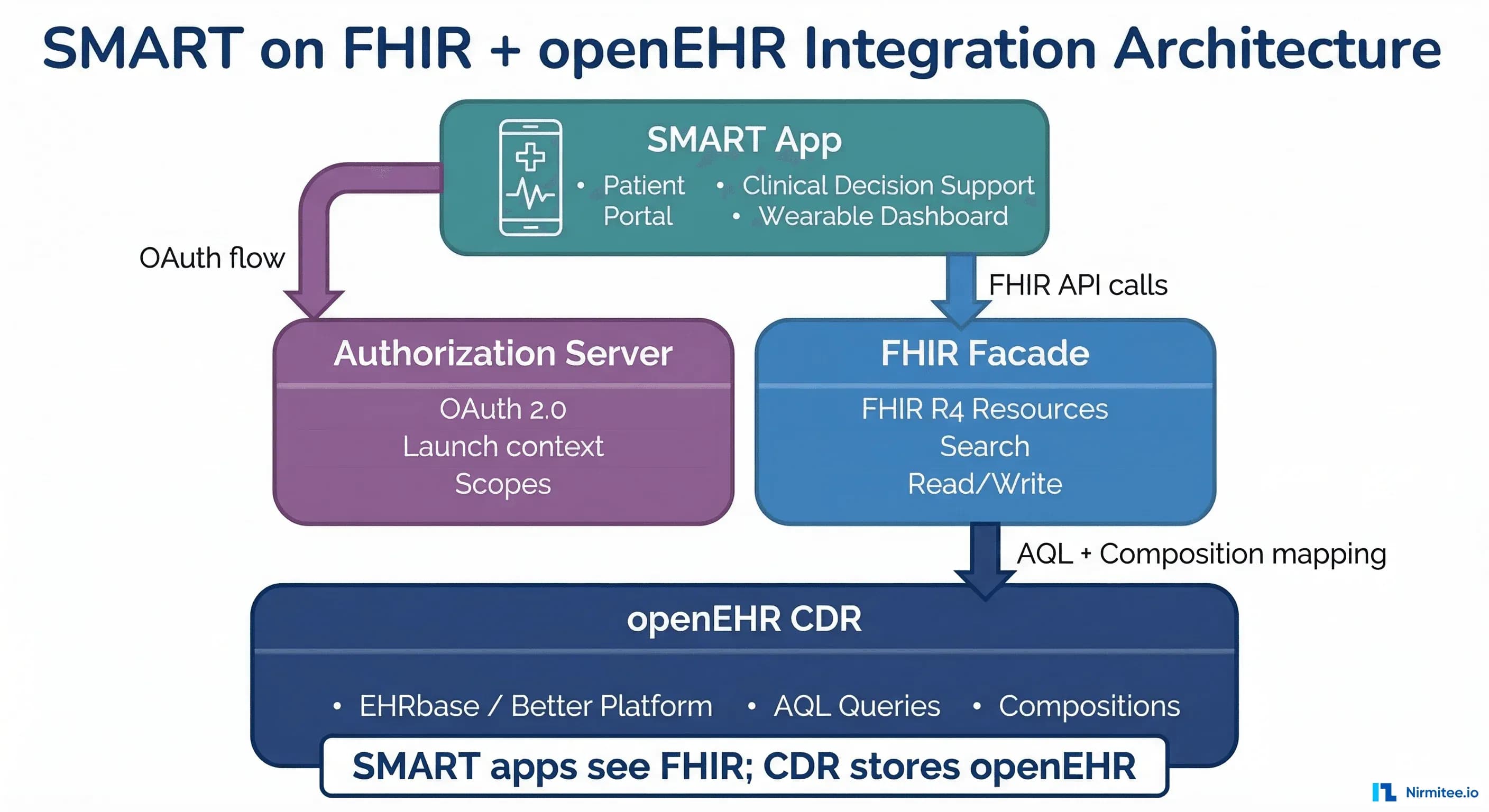
The SMART App Launch Framework defines an OAuth 2.0-based authorization flow. When running against an openEHR backend, the flow is identical from the app's perspective — the openEHR details are hidden behind a FHIR facade:
- Discovery — The app fetches
/.well-known/smart-configurationfrom the FHIR server. This returns the authorization and token endpoints, supported scopes, and capabilities. - Authorization — The app redirects the user to the authorization endpoint with requested scopes (e.g.,
patient/Observation.read). The user authenticates and selects a patient context. - Token exchange — The app exchanges the authorization code for an access token. The token includes the patient ID and granted scopes.
- FHIR API calls — The app makes FHIR API calls using the access token. The FHIR facade translates these into openEHR queries and returns FHIR resources.
The critical point: SMART apps do not know or care that the backend is openEHR. They see a standard FHIR API. The translation happens server-side.
The SMART Configuration Endpoint
Your FHIR facade must serve the SMART configuration document:
// GET /.well-known/smart-configuration
{
  "authorization_endpoint": "https://auth.example.com/authorize",
  "token_endpoint": "https://auth.example.com/token",
  "token_endpoint_auth_methods_supported": ["client_secret_basic", "client_secret_post"],
  "registration_endpoint": "https://auth.example.com/register",
  "scopes_supported": [
    "openid", "fhirUser", "launch", "launch/patient",
    "patient/Patient.read", "patient/Observation.read",
    "patient/Condition.read", "patient/MedicationRequest.read",
    "patient/AllergyIntolerance.read", "patient/Procedure.read"
  ],
  "response_types_supported": ["code"],
  "capabilities": [
    "launch-standalone", "launch-ehr",
    "client-public", "client-confidential-symmetric",
    "context-standalone-patient", "context-ehr-patient",
    "sso-openid-connect", "permission-patient"
  ]
}
Mapping SMART Scopes to openEHR Data Paths
The Scope Translation Challenge
SMART scopes are defined in terms of FHIR resources: patient/Observation.read, patient/Condition.read, etc. Your authorization server needs to translate these into openEHR data access permissions. This is where the mapping gets interesting.
A single FHIR resource type often maps to multiple openEHR archetypes:
| SMART Scope | FHIR Resource | openEHR Archetype(s) |
|---|---|---|
patient/Patient.read | Patient | EHR subject + ADMIN_ENTRY.demographic |
patient/Observation.read | Observation | OBSERVATION.blood_pressure, .body_temperature, .pulse, .laboratory_test_result, .body_weight, .height_length |
patient/Condition.read | Condition | EVALUATION.problem_diagnosis |
patient/MedicationRequest.read | MedicationRequest | INSTRUCTION.medication_order |
patient/AllergyIntolerance.read | AllergyIntolerance | EVALUATION.adverse_reaction_risk |
patient/Procedure.read | Procedure | ACTION.procedure |
patient/DiagnosticReport.read | DiagnosticReport | OBSERVATION.laboratory_test_result + CLUSTER.laboratory_test_analyte |
Implementing Scope Enforcement
The scope-to-archetype mapping must be enforced at two levels:
- FHIR facade level — Only serve FHIR resources that the token's scopes authorize. If the token has
patient/Observation.readbut notpatient/Condition.read, the facade must reject requests to/Condition.
- AQL query level — When building AQL queries to fetch data from the CDR, only query archetypes that correspond to the granted scopes. A token with
patient/Observation.readshould only trigger AQL queries for OBSERVATION archetypes.
# Scope enforcement in the FHIR facade
SCOPE_TO_ARCHETYPES = {
    "patient/Observation.read": [
        "openEHR-EHR-OBSERVATION.blood_pressure",
        "openEHR-EHR-OBSERVATION.body_temperature",
        "openEHR-EHR-OBSERVATION.pulse",
        "openEHR-EHR-OBSERVATION.laboratory_test_result",
        "openEHR-EHR-OBSERVATION.body_weight",
        "openEHR-EHR-OBSERVATION.height_length",
    ],
    "patient/Condition.read": [
        "openEHR-EHR-EVALUATION.problem_diagnosis",
    ],
    "patient/AllergyIntolerance.read": [
        "openEHR-EHR-EVALUATION.adverse_reaction_risk",
    ],
    "patient/MedicationRequest.read": [
        "openEHR-EHR-INSTRUCTION.medication_order",
    ],
}

def get_allowed_archetypes(token_scopes: list[str]) -> list[str]:
    """Return list of archetypes accessible for given SMART scopes."""
    archetypes = []
    for scope in token_scopes:
        archetypes.extend(SCOPE_TO_ARCHETYPES.get(scope, []))
    return list(set(archetypes))

def build_scoped_aql(ehr_id: str, archetypes: list[str]) -> str:
    """Build AQL query restricted to allowed archetypes."""
    archetype_predicates = " OR ".join(
        f"c/archetype_details/archetype_id/value = '{a}'" for a in archetypes
    )
    return f"""
        SELECT c
        FROM EHR e CONTAINS COMPOSITION c
        WHERE e/ehr_id/value = '{ehr_id}'
        AND ({archetype_predicates})
    """
The FHIR-to-openEHR Translation Layer
Architecture of the Translation Layer
The translation layer is the core component that makes SMART apps work against openEHR. It performs bidirectional mapping between FHIR resources and openEHR compositions. Here is the architecture:
- Request parser — Parses incoming FHIR requests (GET /Patient/123, GET /Observation?patient=123&code=8480-6) into a structured query object.
- AQL builder — Translates the FHIR query into one or more AQL queries against the CDR. FHIR search parameters map to AQL WHERE clauses.
- CDR executor — Runs the AQL queries against EHRbase or Better Platform and collects the result sets.
- Resource mapper — Transforms openEHR compositions/data points into FHIR resources. This is the most complex component.
Resource Mapping Examples
Here is how a blood pressure observation maps between the two models:
# openEHR blood pressure composition (flat JSON)
openehr_data = {
    "encounter/blood_pressure/any_event/systolic|magnitude": 120,
    "encounter/blood_pressure/any_event/systolic|unit": "mm[Hg]",
    "encounter/blood_pressure/any_event/diastolic|magnitude": 80,
    "encounter/blood_pressure/any_event/diastolic|unit": "mm[Hg]",
    "encounter/blood_pressure/any_event/time": "2024-06-15T10:30:00Z"
}

# Mapped to FHIR Observation resource
fhir_observation = {
    "resourceType": "Observation",
    "id": "bp-2024-06-15",
    "status": "final",
    "category": [{
        "coding": [{"system": "http://terminology.hl7.org/CodeSystem/observation-category",
                     "code": "vital-signs"}]
    }],
    "code": {
        "coding": [{"system": "http://loinc.org", "code": "85354-9",
                     "display": "Blood pressure panel"}]
    },
    "effectiveDateTime": "2024-06-15T10:30:00Z",
    "component": [
        {
            "code": {"coding": [{"system": "http://loinc.org", "code": "8480-6",
                                  "display": "Systolic blood pressure"}]},
            "valueQuantity": {"value": 120, "unit": "mmHg",
                              "system": "http://unitsofmeasure.org", "code": "mm[Hg]"}
        },
        {
            "code": {"coding": [{"system": "http://loinc.org", "code": "8462-4",
                                  "display": "Diastolic blood pressure"}]},
            "valueQuantity": {"value": 80, "unit": "mmHg",
                              "system": "http://unitsofmeasure.org", "code": "mm[Hg]"}
        }
    ]
}
EHRbase SMART Support
EHRbase FHIR Bridge
EHRbase FHIR Bridge is the official component for exposing openEHR data via FHIR. It provides:
- FHIR R4 endpoints — Read and search for common FHIR resources (Patient, Observation, Condition, Procedure, DiagnosticReport).
- Bidirectional mapping — POST a FHIR resource, and it creates an openEHR composition. GET a FHIR resource and it queries the CDR via AQL.
- Template-driven — Mappings are configured per template. You define which archetype paths correspond to which FHIR resource fields.
To add SMART support on top of FHIR Bridge, you need an authorization server. The common approach:
# Docker Compose: EHRbase + FHIR Bridge + Keycloak (SMART auth)
services:
  ehrbase:
    image: ehrbase/ehrbase:latest
    environment:
      - DB_URL=jdbc:postgresql://db:5432/ehrbase
      - SECURITY_AUTHTYPE=OAUTH
      - SPRING_SECURITY_OAUTH2_RESOURCESERVER_JWT_ISSUER_URI=http://keycloak:8080/realms/smart

  fhir-bridge:
    image: ehrbase/fhir-bridge:latest
    environment:
      - EHRBASE_URL=http://ehrbase:8080/ehrbase
      - FHIR_BRIDGE_SECURITY_TYPE=oauth2
      - SPRING_SECURITY_OAUTH2_RESOURCESERVER_JWT_ISSUER_URI=http://keycloak:8080/realms/smart
    ports:
      - "8888:8888"  # FHIR endpoint

  keycloak:
    image: quay.io/keycloak/keycloak:latest
    command: start-dev --import-realm
    environment:
      - KEYCLOAK_ADMIN=admin
      - KEYCLOAK_ADMIN_PASSWORD=admin
    volumes:
      - ./keycloak/smart-realm.json:/opt/keycloak/data/import/smart-realm.json
    ports:
      - "8080:8080"  # Auth endpoints
Better Platform SMART Support
Better Platform includes built-in FHIR support and can be configured to act as a SMART-capable FHIR server. The Better FHIR API is tightly integrated with the CDR and supports SMART App Launch out of the box when the authorization module is enabled. Configuration is through the Better admin portal rather than code-level setup.
SMART on FHIR vs. SMART on openEHR
The Emerging SMART on openEHR Specification
The openEHR community is developing a specification for "SMART on openEHR" that extends the SMART App Launch Framework to work natively with openEHR endpoints. Key differences from the standard SMART on FHIR approach:
- Native openEHR scopes — Instead of mapping FHIR scopes to archetypes, define scopes directly in terms of openEHR archetypes and template paths:
patient/openEHR-EHR-OBSERVATION.blood_pressure.read. - AQL as the query language — Apps that understand openEHR can query the CDR directly via AQL instead of going through a FHIR translation layer. This avoids the lossy mapping between models.
- Composition-level access control — Authorization can be defined at the composition level, not just the resource level. This enables finer-grained access control aligned with clinical workflows.
When to Use Which Approach
Use FHIR facade + standard SMART when:
- You need to support existing SMART apps (the vast majority of the ecosystem).
- Regulatory requirements mandate FHIR-based patient access (ONC, CMS regulations).
- Your apps are built by third parties who only know FHIR.
Use native SMART on openEHR when:
- You are building apps in-house that need full openEHR query capabilities.
- The FHIR resource model loses clinical detail that your app needs (e.g., openEHR archetypes have richer structure than FHIR resources).
- You need composition-level access control beyond what FHIR scopes provide.
Practical Implementation Guide
Step 1: Deploy the Authorization Server
You need an OAuth 2.0 authorization server that supports the SMART App Launch Framework. Options:
- Keycloak with SMART extensions — Most common open-source choice. Requires custom configuration for SMART launch parameters and patient context selection.
- Custom implementation — Build the OAuth endpoints directly into your application server. Our EHR platform uses this approach with RS256 JWT signing and built-in patient context management.
- Commercial identity providers — Auth0, Okta, or Azure AD with SMART-specific configuration.
Step 2: Build the FHIR Facade
The minimum viable FHIR facade for SMART app support needs these endpoints:
GET /metadata— FHIR CapabilityStatement (required for SMART discovery).GET /.well-known/smart-configuration— SMART configuration document.GET /Patient/{id}— Patient demographics.GET /Patient/{id}/$everything— All data for a patient (optional but common).GET /Observation?patient={id}— Observations with search parameters.GET /Condition?patient={id}— Active conditions/diagnoses.
Step 3: Implement Resource Mappers
Each FHIR resource type needs a mapper that translates between openEHR and FHIR. The mapper has two methods:
# Resource mapper interface
class FhirMapper:
    def to_fhir(self, composition: dict, ehr_id: str) -> dict:
        """Convert openEHR composition to FHIR resource."""
        raise NotImplementedError

    def to_openehr(self, fhir_resource: dict) -> dict:
        """Convert FHIR resource to openEHR flat composition."""
        raise NotImplementedError

class BloodPressureMapper(FhirMapper):
    ARCHETYPE = "openEHR-EHR-OBSERVATION.blood_pressure"
    FHIR_CODE = {"system": "http://loinc.org", "code": "85354-9"}

    def to_fhir(self, composition: dict, ehr_id: str) -> dict:
        return {
            "resourceType": "Observation",
            "id": self._generate_id(composition),
            "status": "final",
            "category": [{"coding": [{"system": "http://terminology.hl7.org/CodeSystem/observation-category",
                                       "code": "vital-signs"}]}],
            "code": {"coding": [self.FHIR_CODE]},
            "subject": {"reference": f"Patient/{ehr_id}"},
            "effectiveDateTime": composition.get("time"),
            "component": [
                self._systolic_component(composition),
                self._diastolic_component(composition)
            ]
        }
Step 4: Testing with Inferno
The Inferno test suite is the standard tool for validating SMART on FHIR compliance. Run the Standalone Patient App test suite against your FHIR facade to verify:
- SMART discovery endpoints return the correct configuration.
- OAuth authorization flow completes successfully.
- Token exchange returns valid access tokens with patient context.
- FHIR resource endpoints return valid R4 resources.
- Scope enforcement correctly restricts data access.
Our own EHR platform passes 47 of 51 Inferno tests against an openEHR backend, with the only failures being TLS-related tests expected in a development HTTP environment.
Building interoperable healthcare systems is complex. Our Healthcare Interoperability Solutions team has deep experience shipping production integrations. We also offer specialized Healthcare Software Product Development services. Talk to our team to get started.
Conclusion
Running SMART apps against an openEHR backend is a solved problem architecturally. The FHIR facade pattern with an OAuth 2.0 authorization server gives you compatibility with the entire SMART app ecosystem while keeping your clinical data in the richly modeled openEHR format.
The key decisions are: how much of the FHIR facade to build (start with read-only Patient and Observation, expand from there), which authorization server to use (Keycloak for open source, custom for tight integration), and whether to invest in native SMART on openEHR scopes for your internal apps.
If you are building a SMART-compatible layer on top of your openEHR CDR, talk to our team. We have implemented this pattern end-to-end and can help you avoid the mapping pitfalls.
Ready to scale?
Talk to our healthcare engineering team about building, integrating, and shipping faster.
Frequently Asked Questions
Does the FHIR facade lose clinical detail from openEHR?
Can I use existing SMART apps without modification?
What about write operations (creating data via SMART apps)?
How does patient identity mapping work?
How does Nirmitee.io approach healthcare software development?
What healthcare standards does Nirmitee.io support?