"Can we get the radiology reports to show up in our portal?"
It sounds like a small request. A radiology machine produces a report, your application has a screen, you connect the two. In practice this is one of the most misunderstood integrations in healthcare, and the teams that treat it as a quick job are usually the ones still debugging it three months later.
Related reading: DICOM, DICOMweb & FHIR ImagingStudy Integration Guide.
This guide walks through how radiology integration actually works, end to end, in plain language and diagrams. No code. Just the moving parts, what each one does, where it goes wrong, and what you need to know before you start.
Images and reports come from two different places
The first and most important thing to understand is this: the imaging machine and the report are not the same source.
A modality, the CT scanner, X-ray unit or ultrasound machine, produces images. It sends them as DICOM objects: the pixel data plus a set of tags describing the patient and the study. What it does not contain is the radiologist's findings. There is no impression, no narrative, no "the chest is clear." That report is written later, by a radiologist, in a separate reporting system, and it travels on its own path.
So when a client says "get the report from the machine," the honest answer is usually that the machine never had the report to begin with. The images come from the modality; the report comes from the RIS or reporting system. Getting both into a portal means handling two flows, not one.
How a radiology machine actually sends data
A radiology device is, on the network, simpler than it looks. It is a node that pushes data out using a protocol called DICOM. When a scan is finished, the machine opens a connection to a destination you have configured, its address and a name called an AE Title, and sends the images with a command called C-STORE.
The key word is "pushes." You do not pull images from the machine. You stand up something that listens, and you tell the machine to send to it. That listener is the front door of your integration.
The full picture: the moving parts
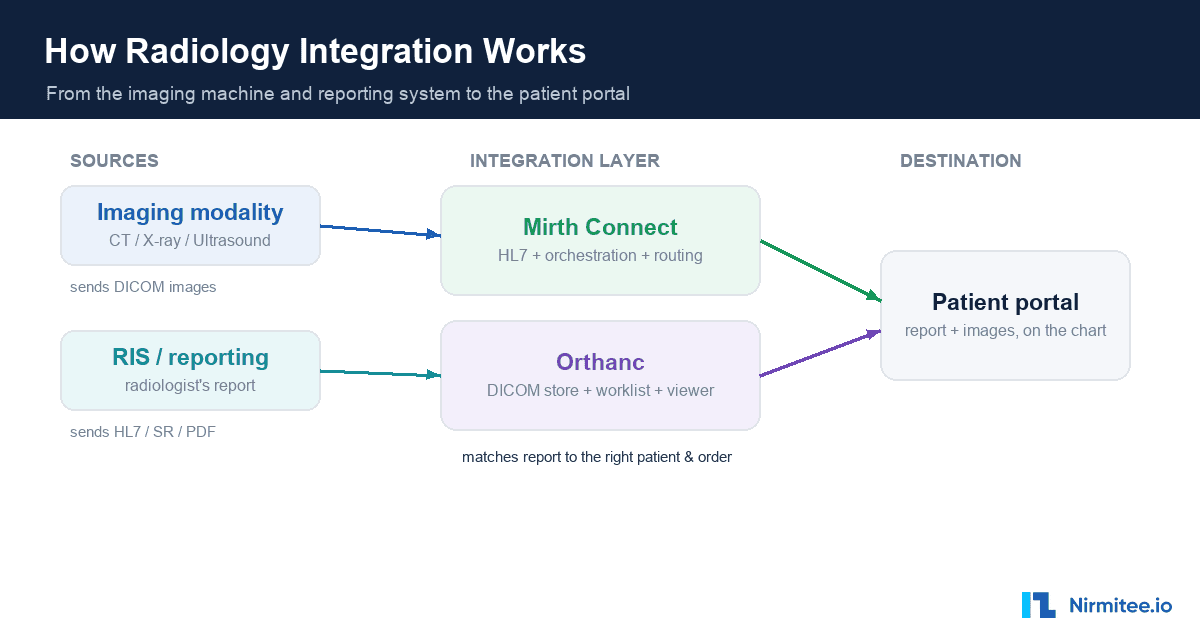
Here is how the whole thing fits together. On the left, the two sources. In the middle, the integration layer. On the right, the portal where it all lands.
The integration layer is usually two tools working together, an integration engine and a DICOM server, and we will come back to why you need both. Their job is to receive the images and the report, match them to the right patient and order, store them, and expose them to the portal through an API.
An integration engine like Mirth Connect is the natural choice for the messaging and orchestration. It handles the HL7 report feed, routes the DICOM images, runs the transformation logic, and gives you retries and monitoring out of the box.
The three ways a radiology report arrives
Because the report is separate from the images, the next question is: in what form does it arrive? There are three common answers, and each is a different integration path.
- HL7 ORU message. The most common path. The report text rides inside an HL7 result message, broken across one or more segments and tied to an order. You parse it and reassemble the text. The catch: report formats vary by system, and a stray line break in the narrative can break the message if it is not handled carefully.
- DICOM Structured Report. Here the report is itself a DICOM object, a structured tree of text nodes. To get readable text you walk the tree; you cannot just read one field.
- DICOM-encapsulated PDF. A finished PDF report wrapped inside a DICOM object. It is human-readable, but it is a document, not data, so you cannot pull out discrete fields without extra work.
The single most useful question to ask at the start of any radiology project is which of these three your client's system actually produces. The answer changes the whole build.
The hardest part: matching the report to the right patient
This is where radiology integrations quietly go wrong. The order lives in one system, the images in another, the report in a third. Something has to tie them together, and that something is almost always the accession number, a single identifier that should travel with the order, onto the study, and into the report.
When this works, a report lands cleanly on the right study for the right patient. When it does not, because a digit was transposed, or a technologist left the field blank, or two facilities used the same patient ID, you get an orphaned study or, far worse, a report attached to the wrong person.
Two things make this reliable. First, a Modality Worklist: instead of a technologist typing patient details at the machine, the worklist pushes the correct identifiers onto the study before the scan even happens. Second, a firm rule that you never silently drop a study that fails to match, it goes to a review queue where a human reconciles it. In radiology, an unseen study or a misattributed report is a patient-safety event, not a minor bug.
Why you pair Mirth with a DICOM server
A common assumption is that the integration engine does everything. It does not, and knowing this up front saves you a painful surprise.
Mirth is excellent at receiving images, handling the HL7 report feed, running your matching logic, and giving you reliability features like retries and an error queue. Running that engine reliably in production is its own discipline, covered in our guide to Mirth Connect high availability. What it does not do is serve a Modality Worklist or act as a full image archive with query, retrieve and a viewer. For those you pair it with a dedicated DICOM server such as Orthanc. The engine moves the messages and the logic; the DICOM server stores and serves the images. Designing for both from day one is the difference between a clean build and a stalled one.
How you test it without owning the machine
Radiology machines cost a fortune, and you will not have one on your desk. You do not need one. Because a modality is just a network node that speaks DICOM, software can stand in for it perfectly. The trick is to move outward one step at a time.
You start on a single laptop, with one tool sending sample images and another receiving them, proving your stack works. Then you swap in real-shaped sample studies, ideally a few anonymised studies exported from the client's actual machine, which is the single most valuable test asset you can get. You run a connectivity test, the DICOM equivalent of a ping, to confirm the two ends can talk before sending anything heavy. Then you point it at your real integration engine, then at the real device on the client's network, and only at the very end do you run the full path into the portal. By the time you touch the live machine, everything else already works, so any problem is isolated to that one new variable.
The real-world challenges that catch teams out
Most of the difficulty in radiology integration is not the happy path; it is the long list of things that behave differently in production. The ones that catch teams most often:
- The network, not the code. A blocked firewall port often looks like a timeout rather than an error. Devices need fixed addresses. And you usually cannot touch the machine yourself, a biomedical engineer or the vendor configures it, which is a scheduling and access problem as much as a technical one.
- Exact-match identifiers. The names devices use to recognise each other are case-sensitive and must match exactly. One wrong character and the connection is refused.
- Format mismatches. Images can be compressed in formats the receiver was never told to accept, in which case the study appears to send but never arrives.
- Silent failures. The most expensive radiology bugs do not crash. A message is accepted, everything looks green, and yet the report never reaches the patient's chart. The discipline of monitoring whether data actually landed, not just whether it was sent, is what separates a reliable integration from a fragile one.
None of these are exotic. They are the standard texture of connecting real clinical systems, which is exactly why experience matters more than any single tool. Strong healthcare interoperability is less about the protocol and more about handling everything that happens around it. For the wider map of the standards in play, see our guide to interoperability standards in healthcare.
What you need before you start
If you are scoping a radiology integration, the answers to a short list of questions tell you almost everything about the build ahead:
- Which system produces the signed report, and in what form, HL7, DICOM Structured Report or PDF?
- Does the client want the report text, the images, or both? Report-only is a much smaller build.
- What is the imaging machine, and can you get its DICOM conformance statement?
- Is a Modality Worklist in use, or do technologists type patient details by hand?
- Can you get a few anonymised sample studies and a sample report to build against?
- Can you get onto the network with the device to run a connectivity test?
Answer those, and "get the reports into our portal" turns from a vague request into a scoped, predictable project.
Connecting radiology systems, or any clinical systems, into a single reliable flow is exactly what we do. Explore our healthcare interoperability solutions to see how we connect EHRs, imaging and reporting systems without the data getting lost in between, backed by our healthcare product engineering for the reliability and monitoring that production demands. Talk to our team to get started.
Conclusion
Radiology integration looks like a single line between a machine and a screen. In reality it is two data flows, a careful match on a single identifier, two tools working together, and a long tail of real-world conditions that only appear in production. Treated as the plumbing it actually is, governed, matched and monitored, it becomes reliable. Treated as a quick connection, it becomes the integration nobody wants to own. The teams that win are the ones who respect the difference before they start.