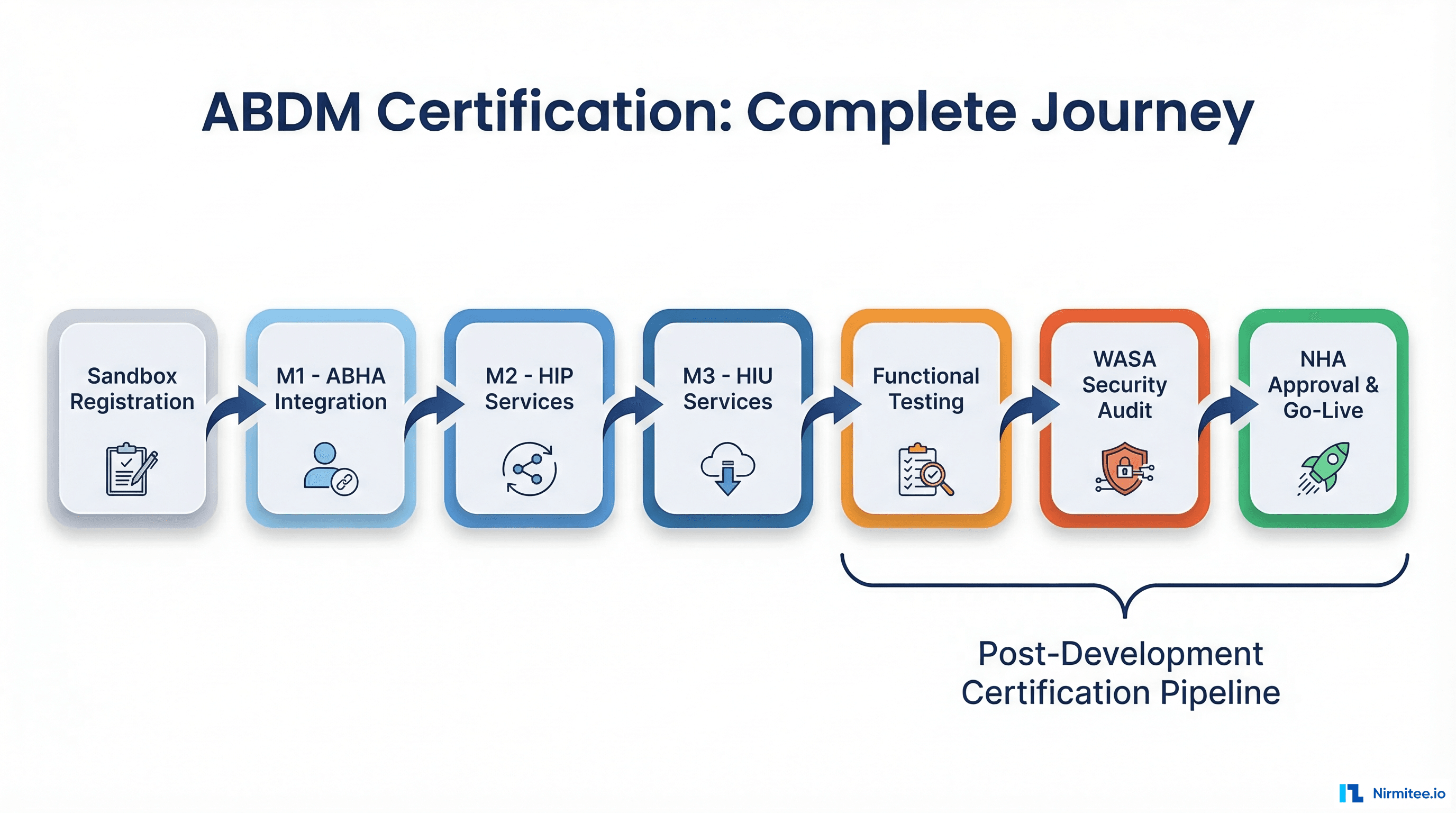
This guide will give an idea of ABDM integration using the three core modules of ABDM - M1, M2, and M3 in simple terms. By the end, you'll have a clear understanding of how to register healthcare professionals, facilities, and securely share health records.
India's healthcare system is going digital with the Ayushman Bharat Digital Mission (ABDM). It's revolutionising the healthcare landscape by making things easier for hospitals, doctors, and patients by connecting everyone on one platform.
What is ABDM?
Ayushman Bharat Digital Mission (ABDM) is a government initiative aimed at digitising India's healthcare system. Its primary goal is to create a digital healthcare ecosystem that makes medical services more accessible and efficient.
Through ABDM, a digital database of doctors and hospitals is created, and it ensures that health records are shared securely with the patient's consent.
By standardizing healthcare processes across the country, ABDM helps improve the quality of care and simplify the healthcare journey for both providers and patients.
Step 1: How to Register Healthcare Professionals (M1)
What is M1?
The M1 module is designed to register healthcare professionals like doctors, nurses, and other medical staff in a national database known as the Healthcare Professionals Registry (HPR). This module ensures that only qualified and verified professionals are part of the system.
Steps to Register
- Learn How It Works
Go through the M1 API documentation to fully understand the registration process. - Secure Access
Use a secure login method called OAuth 2.0 to connect to the system. You'll receive login details such as the Client ID and Secret when you sign up on ABDM's sandbox platform. - Submit Professional Details
Provide essential information such as name, qualifications, and license number. This can be done through the provided platform or API. - Get HPR ID
After successfully registering, each professional receives a unique HPR ID, which serves as their digital identity. - Test It Out
Utilize the sandbox (a testing platform) to ensure that the registration process runs smoothly.
The M1 module is a key step in ensuring that healthcare providers are registered efficiently and their credentials are easily accessible in a secure, national system.
Step 2: How to Register Healthcare Facilities (M2)
What is M2?
The M2 module focuses on registering healthcare facilities such as hospitals, clinics, labs, and other healthcare providers in the Health Facility Registry (HFR). This ensures that all facilities are properly listed and can be accessed through a standardized system.
Steps to Register
- Learn How It Works
Familiarize yourself with the M2 API documentation to understand the process thoroughly. - Secure Access
Use the OAuth 2.0 login method, similar to M1, for secure authentication. - Submit Facility Details
Provide important information about the facility, such as its name, type (hospital, clinic, or lab), location, contact details, and services offered. - Get HFR ID
Once registered, the healthcare facility will receive a unique HFR ID. - Test It Out
Make sure to test the process in the sandbox environment before proceeding to the live version.
Registering healthcare facilities ensures that they are mapped correctly and are part of the nationwide digital ecosystem. With accurate and complete details, the M2 module makes facility management much easier.
Step 3: How to Link and Share Health Data (M3)
What is M3?
The M3 module plays a vital role in managing health records and sharing them securely across the healthcare system. It allows patients to give consent for their records to be shared, enabling healthcare providers to offer better and more informed care.
Steps to Use M3
- Learn How It Works
Review the M3 API documentation to understand how to manage patient consent and share health data. - Secure Access
Just like in M1 and M2, use OAuth 2.0 for secure login. - Request Consent
Seek permission from patients to access their health records by using the consent/request option. You can check the status of this consent through the /consent/status feature. - Link Health Records
Once consent is granted, link patient health records, such as prescriptions or lab reports, to their Ayushman Bharat Health Account (ABHA) ID - Retrieve Records
After obtaining consent, you can retrieve the patient's health records using the system. - Test It Out
Like the previous modules, you can test the M3 process in the sandbox to ensure everything functions smoothly.
This module significantly improves patient care by allowing healthcare providers to access health records securely and only with the patient's permission.
Final Steps After Integration
After successfully registering professionals and facilities and linking health data, it's important to perform the following tasks:
-
Thorough Testing
Use the sandbox environment to ensure all the modules (M1, M2, and M3) are functioning as expected before moving to the production stage.
-
Apply for Production Access
Once testing is successful, submit a request for production access to start using the system in a live environment.
-
Ensure Compliance
Regularly review ABDM's guidelines to make sure your system complies with their security and privacy standards.
-
Monitor System Performance
Keep an eye on the system to ensure smooth operations and address any performance issues promptly.
By following these final steps, you can ensure a seamless transition to using the ABDM platform in real-world scenarios while maintaining compliance and system integrity.
Node.js SDK for Ayushman Bharat Digital Mission (ABDM) API. This SDK provides a simple and type-safe way to interact with ABDM's healthcare APIs.
Features
- TypeScript Support: Full TypeScript support with type definitions
- Comprehensive API Coverage: Covers all major ABDM APIs
- Promise-based: All API calls return Promises
- Configurable: Customize HTTP client and other options
- Well-tested: Comprehensive test suite
- Production-ready: Used in production by Nirmitee
Why Integrate with ABDM?
Integrating with ABDM provides significant advantages for healthcare providers. Better patient care is one of the main benefits, as it enables doctors and facilities to access vital health records quickly. Additionally, the entire healthcare process becomes streamlined, with professionals and facilities registered under a unified system.
Secure data sharing allows patients to control who can access their records, improving trust and transparency. By becoming part of this nationwide digital healthcare network, healthcare providers gain access to a system that extends their reach and enhances their services.
By integrating the M1, M2, and M3 modules, you'll not only contribute to India's digital health mission but also significantly improve the efficiency and quality of your healthcare services. The future of healthcare is digital, and now is the time to embrace it.
Struggling to develop your healthtech product? Nirmitee.io is your trusted development partner for ABDM integration services. We empower healthtech founders to navigate the challenges of product development with confidence, ensuring compliance with regulatory standards and scalability for future growth. Let us bring your vision to life!