ABDM Certification Process 2026: Sandbox Registration, Functional Testing, WASA and Go-Live

Software Development Expert
Writes about software development, scalable architecture, and practical problem-solving across modern digital products. Focuses on turning complex technical ideas into clear, real-world solutions.
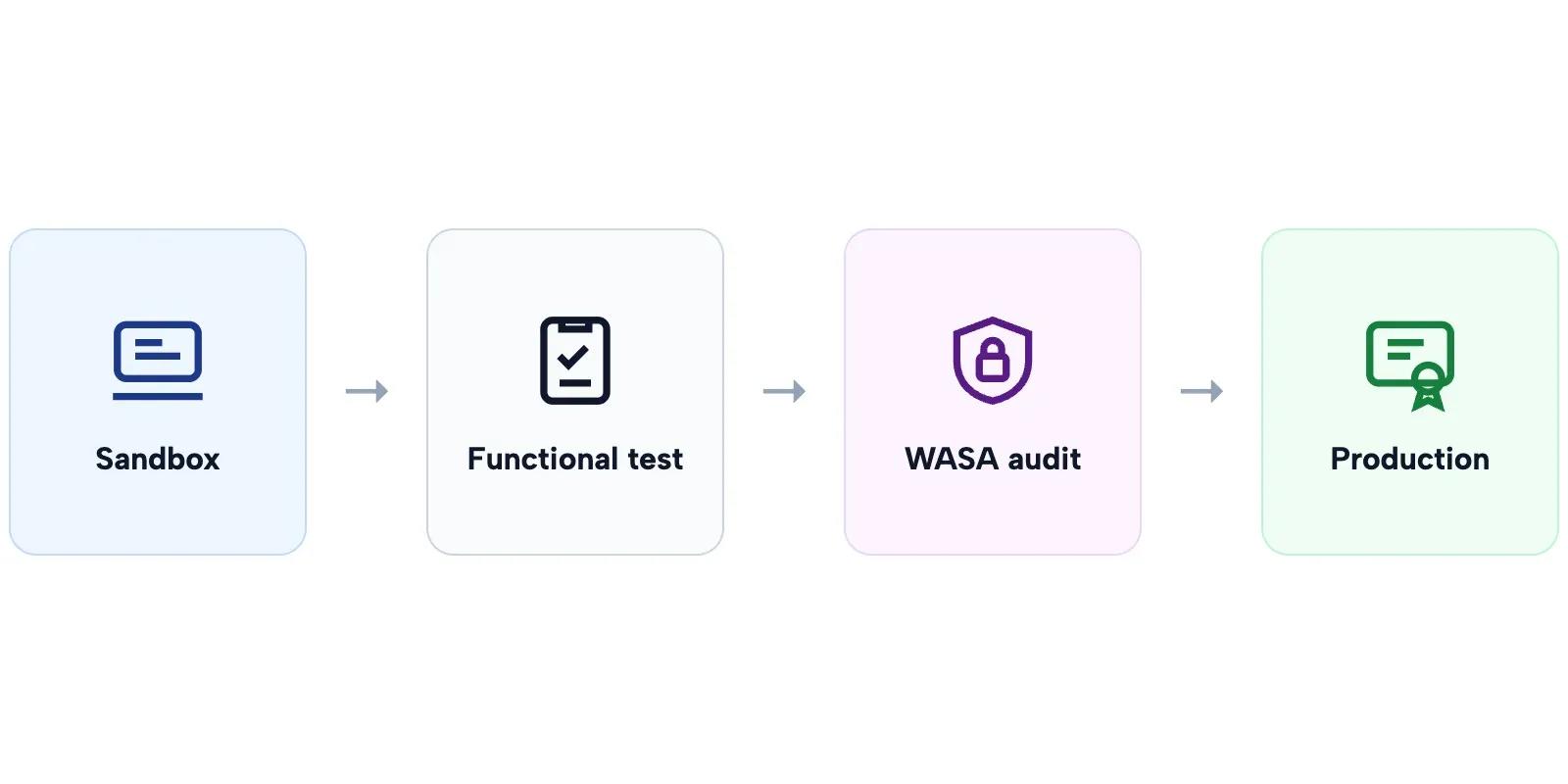
The ABDM certification process is the sandbox exit path that turns a working ABDM integration into a production one: complete at least two milestones (M1, M2 or M3) in the sandbox, pass functional testing by an NHA-empanelled agency, clear a WASA security audit by a CERT-In empanelled auditor and receive a Safe-to-Host certificate, submit the reports for NHA committee review, then receive production credentials and map each facility in the Health Facility Registry.
This guide walks through every stage of the ABDM ecosystem sandbox exit process in order, from ABDM sandbox registration to the day you go live, with the documents each stage needs, the mistakes that send teams back a step, and what we learned taking hospital software through it. If you have not built the milestones yet, start with our ABDM integration step-by-step guide. If you want the certification handled for you, our ABDM integration services team manages the whole exit. Updated September 2026.
ABDM sandbox registration: where certification starts
Every ABDM certification starts with ABDM sandbox registration on the ABDM sandbox portal (sandbox.abdm.gov.in), run by the National Health Authority (NHA). You register your organisation and application, and after approval receive a sandbox client ID and secret with the roles your integration needs (for example HIP and HIU). Approval is not instant: sandbox signup, missing credentials and IP whitelisting are among the most common questions on the ABDM sandbox forum, so apply as soon as the project is confirmed.
- Who registers: the entity that owns the software and will receive production credentials, usually the software vendor, not each hospital.
- What you need: organisation details, the application you are integrating, a technical contact and the roles you need.
- What you get: sandbox credentials and access to the ABDM sandbox documentation for M1, M2 and M3, NHA's test cases, and a single point of contact (SPOC) from NHA later in the process.
For the sandbox account itself (login, client credentials, gateway token and bridge URL), follow our ABDM sandbox login and setup guide. This guide picks up from there with the certification steps.
The ABDM ecosystem sandbox exit process as a flowchart
The exit process has four stages after your milestones work, and one rule before it: NHA Integration Support stated on the ABDM sandbox forum that "the exit process criteria currently require any 2 milestones to be completed to exit sandbox and get the credentials for production environment." M1 alone cannot exit.
The four stages of ABDM certification at a glance
| Stage | Who runs it | What you get |
|---|---|---|
| 1. Functional testing | An NHA-empanelled testing agency | Functional testing report |
| 2. WASA security audit | A CERT-In empanelled auditor | WASA report, vulnerability closure certificate, Safe-to-Host certificate |
| 3. NHA document submission and committee review | NHA's evaluation committee | Approval for production access |
| 4. Production access and go-live | You, with NHA and each facility | Production credentials, HFR mapping, listing as an integrated application |
Quick Recap: The Development Milestones (M1, M2, M3)
Before we dive into certification, let's establish where you are. ABDM integration (see our step-by-step ABDM integration guide) follows three development milestones, each building on the previous one:
Milestone 1 (M1), ABHA Integration: Your application can create ABHA numbers, capture and verify patient identities via OTP or QR code, and link patients to their ABHA profiles. This is the foundation, patient registration with ABDM.
Milestone 2 (M2), HIP Services: Your system acts as a Health Information Provider. It creates care contexts after consultations, responds to discovery requests from Consent Managers, handles consent artifacts, and transfers encrypted FHIR-compliant health records to authorized requesters.
Milestone 3 (M3), HIU Services: Your system flips roles and becomes a Health Information User. It can request consent from patients, aggregate health records from multiple facilities across the ABDM network, and present organized clinical data to healthcare providers.
For a deep technical walkthrough of each milestone, read our ABDM Integration Milestones M1 to M4 guide.
Once at least two milestones work in the sandbox (NHA requires any two to exit; M1 alone is not enough), you enter the certification pipeline. See why an M1-only certificate is not possible. This is where most teams get confused, and where this guide takes over.
The Certification Pipeline: What Happens After M3
The ABDM sandbox exit process is a four-stage approval gate. Each stage must be completed sequentially, you cannot skip ahead or run them in parallel. Here's the high-level flow before we break each one down:
- Functional Testing, Third-party validation of your M1/M2/M3 implementation
- WASA (Web Application Security Audit), Security certification by a CERT-IN empanelled agency
- NHA Document Submission & Committee Review, Bundle all reports and get final approval
- Production Access & Go-Live, Receive production credentials and deploy
Let's walk through each stage in detail.
If you run an empanelled hospital, our guide on ABDM compliance for AB-PMJAY hospitals and the 2026 deadline covers what non-compliance actually costs.
Watch: Why an ABDM Go-Live Takes Months When the API Work Takes Weeks (5:40). Six gates sit between a signed deal and a live hospital on ABDM.
Stage 1: Functional Testing: The First Gate
This is the first formal checkpoint after your sandbox development is complete. Many teams underestimate this stage, assuming it's a rubber stamp. It is not. The empanelled testing agencies are thorough, and applications regularly fail on their first attempt.
What Is Functional Testing?
Functional testing is a comprehensive, independent evaluation of your application against every ABDM workflow requirement. An NHA-authorized third-party agency tests every M1, M2, and M3 capability your application claims to support, along with non-functional aspects like performance and reliability.
The goal is to verify that your integration actually works as specified, not just in your own testing, but under the scrutiny of an independent evaluator following NHA's official test case matrices.
Who Conducts It?
As of NHA's August 2022 empanelment, three agencies were authorized to conduct functional testing. Confirm the current list with your NHA SPOC before you engage one:
- M/s FIME India Pvt. Ltd.
- M/s Suma Soft Pvt. Ltd.
- M/s Tata Communications
You cannot use any other testing organization, and you cannot self-certify. This applies to all new integrators and any existing integrators who were not certified before the August 2022 cutoff.
How the Process Works
- Engage an empanelled agency: Reach out to any of the three agencies above. This is a paid engagement, the integrator bears the cost.
- Agency reviews your M1/M2/M3 workflows: They test against NHA's official test case templates covering every functional requirement, ABHA creation, verification, discovery, consent handling, data transfer, and more.
- Non-functional testing: Performance, reliability, and edge cases are also evaluated.
- Fix and resubmit: If issues are found (and they often are), you fix them and resubmit for retesting. This is iterative until all test cases pass.
- STQC sample validation: The Standardisation Testing and Quality Certification (STQC) directorate may perform additional validation testing on a sample of applications. This is random, you may or may not be selected.
- Report issued: Once everything passes, the agency issues a Functional Testing Report documenting all tested integrations and their results.
What Gets Tested: Specific Areas
The testing is granular. Here's what the agencies evaluate across each milestone:
M1 Testing:
- ABHA number creation via Aadhaar and mobile
- ABHA capture via QR code scan (no OTP required)
- ABHA verification via mobile OTP and Aadhaar OTP
- Demographic field freezing after initial capture
- Linking token management via Gateway APIs
- Both new patient and existing patient linking workflows
M2 Testing:
- Care context creation for all supported record types (diagnostic reports, discharge summaries, OPD notes, prescriptions, immunization records)
- Discovery response to Consent Manager requests
- Patient-initiated linking of historical records
- Consent artifact acknowledgment and storage
- Encrypted FHIR-compliant data transfer
- SMS notification with deep links to ABHA app
M3 Testing:
- Consent request creation as HIU
- Consent request delivery to patient's ABHA app
- Health data reception from multiple HIPs
- Data parsing, structuring, and display to providers
- Consent duration parameter enforcement
How to Prepare
Don't wait until the testing agency shows up to find out you have gaps. Run through NHA's draft test case templates (available on the sandbox portal) yourself. Test every workflow end-to-end in the sandbox. The most common failure area is M2, specifically the consent flow and data transfer. Test your consent flow end-to-end with the actual ABHA mobile app before engaging the agency.
How long functional testing takes
Functional testing time depends on the agency's calendar and on how many cycles of fixes you need. In our certifications, several rounds of internal demos with the NHA SPOC came before the formal test, and every failed test case added a fix-and-retest cycle. Book the agency early and run NHA's test cases yourself first.
Stage 2: WASA: Web Application Security Audit
Once your application passes functional testing, the next gate is WASA, the Web Application Security Audit. This is the security certification that many people confuse with "VASA" (it's WASA, Web Application Security Audit).
WASA is not a checkbox exercise. It's a rigorous, multi-phase security assessment that verifies your application meets the security standards required by ABDM's Health Data Management (HDM) Policy (originally published 2020, revised 2022). You're handling sensitive patient health data, NHA takes this seriously.
Who Can Conduct WASA?
WASA must be conducted by a CERT-IN (Indian Computer Emergency Response Team) empanelled agency. This is non-negotiable. Internal security teams, non-empanelled auditors, or generic penetration testing firms cannot issue a valid WASA report.
How to find a CERT-IN empanelled agency:
- Visit the official CERT-IN website at cert-in.org.in
- Navigate to the Cyber Security Assurance section
- Select "Empanelment by CERT-IN" from the dropdown
- Access the current list of certified security testing providers
While earlier ABDM guidelines also referenced STQC-accredited agencies as an alternative, current guidance strongly emphasizes CERT-IN empanelled agencies as the required standard for WASA. Always verify the latest requirements with NHA before engaging an auditor.
The 6-Step WASA Process
A WASA audit follows a structured, six-phase process:
Step 1: Pre-Audit Assessment & Scoping
The auditor reviews your system architecture, data flows, and ABDM integration points. They define the assessment boundaries and produce an Audit Scope Document (ASD). This document maps out exactly what will be tested, every API endpoint, every data storage mechanism, every authentication pathway.
Step 2: Automated Vulnerability Assessment
Using industry-standard tools like Burp Suite Pro, OWASP ZAP, and Nessus, the auditors scan your application for known vulnerabilities. This covers the OWASP Top 10, API weaknesses, misconfigured headers, exposed endpoints, and common web application flaws. The output is a Preliminary Vulnerability Report.
Step 3: Manual Penetration Testing
This is where automated tools can't reach. Security experts manually simulate real-world attacks to identify:
- Business logic flaws
- Session management vulnerabilities
- Access control bypasses
- Privilege escalation paths
- Authentication weaknesses
- Data exposure through edge cases
The output is a Comprehensive Vulnerability Report (CVR) with proof-of-concept for each finding.
Step 4: ABDM & HDM Policy Compliance Validation
This step is ABDM-specific. The auditor verifies your application meets the exact security requirements mandated by the Health Data Management Policy:
- Encryption at rest: AES-256 for stored health data
- Encryption in transit: TLS 1.2 or higher for all communications
- Access controls: Role-based access with least-privilege enforcement
- OAuth 2.0: Proper implementation for ABDM API authentication
- FHIR API security: Secure handling of FHIR resources
- Audit logging: Comprehensive activity logging and monitoring
- Privacy-by-design: Data minimization and purpose limitation
The output is a Compliance Checklist Report (CCR).
Step 5: Remediation & Retesting
If vulnerabilities are found (they almost always are), your development team fixes them. The auditor provides technical guidance on remediation. After fixes are implemented, the auditor retests to verify each vulnerability has been properly closed. This cycle may repeat until all critical and high-severity issues are resolved.
The output is a Closure Report confirming remediation.
Step 6: Final Security Certification
Once all issues are resolved and retesting passes, the CERT-IN empanelled agency issues three critical documents:
- Final WASA Report, Signed by the certified auditor, documenting the entire audit process and findings
- Vulnerability Closure Certificate (VCC), Confirms all identified vulnerabilities have been remediated
- Safe-to-Host Certificate, The golden ticket. This is the mandatory document that proves your application meets ABDM's security standards for production deployment
The Safe-to-Host Certificate is what NHA requires to grant you production access. Without it, you cannot proceed.
How to Prepare for WASA
Smart teams don't wait for the WASA auditor to find problems. Before engaging a CERT-IN agency:
- Run your own OWASP Top 10 scan, fix the low-hanging fruit yourself
- Verify your encryption implementation, AES-256 at rest, TLS 1.2+ in transit
- Review all API endpoints for authentication and authorization
- Check session management, timeouts, token rotation, secure cookie flags
- Read the "NDHM Secure Application Development Reference Document" (available from NHA) before writing security code
- Ensure audit logging is comprehensive, every access, every modification, every failed attempt
How long WASA takes
The audit itself is quick compared with remediation. The length of the WASA stage is set by how many findings the auditor raises and how fast you close them. Teams that run their own OWASP Top 10 scan and fix the obvious issues before the paid audit shorten this stage the most.
The Safe to Host rules NHA sets for WASA
NHA's developer documentation sets out who audits, what gets audited and when an audit must be repeated. These are the rules as written on the ABDM Developer Portal page on WASA and the Safe to Host certificate (checked 26 October 2026):
| Question | NHA's answer |
|---|---|
| Who does the audit | An auditor from the CERT-In empanelled list |
| Which URL is audited | The staging URL. The certificate then covers the same application in production |
| Scope of a first audit | The whole application, if it has never been audited |
| Adding a module later | Only the new module is audited, not the part already certified |
| Website, Android and iOS | Separate audits for each. One audit of a shared ABHA base URL does not cover the apps |
| After a code change | A new audit if the change is major or touches the backend. Minor changes can be ignored |
| Already hold a Safe to Host certificate | No new WASA, unless the certificate has expired |
Two of these rules are easy to miss. Teams that ship a website and two mobile apps budget for one audit and need three. And teams that change the backend after the audit, even to fix a functional test failure, find at the exit gate that the certificate no longer covers what they run.
Is VAPT the same as WASA for ABDM?
VAPT (vulnerability assessment and penetration testing) is the general name for the kind of testing a WASA audit includes. For ABDM, what counts is the result: a Safe to Host certificate from a CERT-In empanelled auditor, on the staging URL of the application you will run in production. A VAPT report from your own team or from a firm that is not on the CERT-In list does not meet the requirement, however thorough it is.
Questions to ask a WASA auditor before you sign
- Is your firm on the current CERT-In empanelled list? Check the list on cert-in.org.in yourself.
- Will you audit our staging URL and issue a Safe to Host certificate that names our application?
- Does the quote cover each platform we ship (website, Android, iOS) as a separate audit?
- How many retest rounds are included after we fix the findings?
- If part of our application was audited before, will you scope only the new module?
- How long does the certificate stay valid, and what will you need from us to renew it?
Stage 3: NHA Document Submission & Committee Review
You've passed functional testing. You've cleared WASA. Now you need to package everything and submit it to NHA's internal evaluation committee for final approval.
The Document Bundle
NHA requires a specific set of documents before they'll review your application for production access. Every document must be present, an incomplete submission delays the entire process:
- Functional Testing Report, From the NHA-empanelled agency (FIME India, Suma Soft, or Tata Communications). This proves your M1/M2/M3 implementation works correctly.
- WASA Audit Report, The final report signed by your CERT-IN empanelled auditor. Documents the complete security assessment.
- Vulnerability Closure Certificate (VCC), Confirms all security vulnerabilities identified during WASA have been fixed and verified.
- Safe-to-Host Certificate, The security clearance from your CERT-IN agency. This is the single most critical document.
- Production Keys Template, A filled-out Excel template (
Details_required_for_Production_Keys_template.xlsx) with comprehensive organizational and technical details about your application and deployment. - Application Summary, Detailed overview of your application architecture, deployment infrastructure, and integration scope.
Is there an ABDM certificate to download?
There is no single ABDM certificate that you download from a portal. Your evidence of certification is the set of documents above (the functional testing report, the WASA report and closure certificate, and the Safe-to-Host certificate), NHA's approval with production credentials, and your listing as an integrated application on the ABDM website. Keep them together; customers and hospitals ask for them.
The NHA Review Process
An internal NHA evaluation committee reviews your complete submission. They're looking for:
- Complete documentation, no missing reports or certificates
- Consistency between functional testing results and WASA scope
- Adequate security posture for handling health data in production
- Proper organizational details and deployment readiness
This is not a rubber stamp, but it's also not adversarial. If your functional testing and WASA reports are clean, this stage is straightforward.
How long NHA review takes
Incomplete submissions are the main cause of delay at this stage. In our certifications the committee demo was followed by a validation demo, and production keys arrived within days of the final committee approval.
Stage 4: Production Access & Go-Live
The NHA committee has approved your application. Here's what happens next.
Receiving Production Credentials
NHA issues your production credentials, a production bridge ID and secret. These replace your sandbox credentials and give your application access to the live ABDM production environment with real patients, real health data, and real consent flows.
Health Facility Registry Registration
Before your application can go live, the partnering Health Information Provider (HIP) must be registered on the Health Facility Registry at facility.abdm.gov.in (previously facility.ndhm.gov.in). This is a separate registration from your sandbox enrollment:
- Complete the formal facility registration process on the HFR portal
- Obtain facility verification confirmation
- Link your production bridge ID to the verified facility profile
Pro tip: Start the HFR registration process early, don't wait until after NHA approval. The facility registration can run in parallel with your certification pipeline, so it's ready when your production credentials arrive.
Pre-Launch Preparation
- Staff training: Brief facility staff on the new ABDM-integrated workflows. They need to understand ABHA number capture, consent processes, and how health records flow through the system.
- Patient communication: Prepare patient education materials, posters, digital signage, assisted registration protocols for non-smartphone users.
- Monitoring: Set up monitoring for your first live transactions. Watch for API errors, consent flow failures, and data transfer issues.
- Support: Have your technical team on standby for the first few days of live operation.
You're Live
Once your production bridge ID is linked to a verified facility, your application is officially part of the ABDM network. Patients can discover your facility, link their ABHA numbers, grant consent, and have their health records flow securely through India's national health data exchange.
What the full sequence looked like in our certifications
Durations vary with the testing queue and your fix cycles, so rather than quote weeks, here is the order of events we went through, which matches NHA's published process and adds detail:
- NHA assigns a SPOC after your milestones work in the sandbox.
- Three to four internal demo rounds with the SPOC.
- Functional testing by the empanelled agency.
- WASA security audit and remediation, ending with the Safe-to-Host certificate.
- A validation demo in which the reports are checked again.
- A final committee demo in front of five to six reviewers.
- Production keys within days of approval.
- An integration check in the production environment.
- Listing as an integrated application on the ABDM website, about three weeks later.
The biggest variables are the remediation cycles in functional testing and WASA. Teams that self-test against NHA's test cases and run their own security scans first spend the least time in both.
Common Mistakes & Pro Tips
We've seen teams stumble on the same pitfalls repeatedly. Here's what to watch out for, and what the teams that sail through do differently.
Mistakes to Avoid
1. Starting WASA before your application is feature-complete. If you trigger a security audit on an unfinished application and then add features afterward, those new features haven't been audited. You'll need to redo portions of the WASA at additional cost and time. Finish development first, then audit.
2. Using a non-CERT-IN empanelled auditor. Your security team, a generic pen-testing firm, or an auditor without CERT-IN empanelment cannot issue a valid WASA report or Safe-to-Host certificate. NHA will reject the submission, and you'll have to start the security audit over with a legitimate agency. Verify empanelment status on cert-in.org.in before engaging.
3. Not preserving sandbox test artifacts. Screenshots, API logs, test results, and milestone approval confirmations from your sandbox work, keep all of them. NHA may request evidence of sandbox testing during the committee review. Don't rely on memory or assume the sandbox portal retains everything.
4. Treating functional testing as a formality. The empanelled agencies follow NHA's test case matrices rigorously. They test edge cases, error handling, and non-happy-path scenarios. Applications that "work in demo mode" but haven't been stress-tested regularly fail. Prepare as if it's a production launch, not a checkbox.
5. Submitting an incomplete document bundle to NHA. Missing even one document, the VCC, the production keys template, the application summary, sends your submission to the back of the queue. Check the complete checklist before submitting. Every document, every field, every signature.
6. Not registering on Health Facility Registry early. HFR registration at facility.abdm.gov.in is a separate process that takes time. If you wait until after NHA approval to start it, your production credentials sit idle while you complete facility verification. Start HFR registration in parallel with your certification pipeline.
7. Hardcoding sandbox URLs or credentials. It sounds obvious, but we've seen production deployments that still pointed to sandbox endpoints. Use environment variables or configuration files, not hardcoded values. Have a checklist for sandbox-to-production environment migration.
8. Ignoring FHIR compliance in data formats. Both functional testing and WASA evaluate your FHIR resource formatting. Malformed FHIR bundles, missing required fields, or non-standard resource structures will fail you in both stages. Validate against the official FHIR profiles early and often.
Pro Tips from Teams That Got It Right
1. Run your own OWASP Top 10 scan before WASA. Free tools like OWASP ZAP can catch a significant portion of what the CERT-IN auditor will find. Fix these yourself before the paid audit starts. You'll save time on the remediation cycle and potentially cut weeks off your timeline.
2. Maintain a compliance evidence folder from day one. Create a shared folder at the start of your project. Every time you complete a milestone, pass a test, fix a bug, or make an architecture decision, drop the evidence in. Screenshots, API response logs, test reports, email confirmations. When NHA asks for documentation, you'll have everything ready instead of scrambling.
3. Engage the functional testing agency early. The three empanelled agencies have limited bandwidth. Their calendars fill up, especially around quarter-ends when multiple integrators are trying to certify simultaneously. Reach out and book your testing slot while you're still in the final stages of M3 development.
4. Read the NDHM Secure Application Development Reference Document. NHA publishes a reference document with detailed security requirements for ABDM-integrated applications. Read this before you write your first line of security code, not when you're preparing for WASA. It covers application architecture, data protection, authentication, network security, and infrastructure hardening requirements.
5. Test your consent flow end-to-end with the ABHA app before functional testing. The consent and data transfer flow (M2) is where the highest percentage of functional testing failures occur. Download the ABHA app, create a test ABHA number, and run the complete flow, discovery, consent request, consent grant, data transfer, from the patient's perspective. If it breaks here, it'll break during testing.
6. Have your Production Keys Template ready before WASA completes.
The Details_required_for_Production_Keys_template.xlsx requires detailed organizational and technical information. Fill it out while WASA is in progress so that the moment your Safe-to-Host certificate arrives, you can submit the complete bundle to NHA immediately, no delay for paperwork.
Navigating ABDM certification can be complex, especially when you're doing it for the first time. If you need guidance at any stage, from milestone development to WASA preparation to production go-live, our team has been through this process multiple times. Talk to our team
Ready to scale?
Talk to our healthcare engineering team about building, integrating, and shipping faster.
Frequently Asked Questions
What is the ABDM certification process?
What is the ABDM ecosystem sandbox exit process?
How do I register on the ABDM sandbox?
What is WASA certification for ABDM?
Can I download an ABDM certificate?
Can I get ABDM certification with only M1?
Who conducts ABDM functional testing?
What is HFR registration in ABDM certification?
Do Android and iOS apps need a separate WASA audit for ABDM?
Is VAPT the same as WASA for ABDM?