Nirmitee.io

Epic Integration Services

Epic Integration Services

Connect your healthcare product to Epic with an implementation plan built around the clinical workflow, the right interfaces and each customer’s activation requirements. Planning the build in house? Start with how to integrate with Epic.

Scope my Epic integrationWatch our Epic sandbox demos

For digital health teams, healthcare software companies and health systems.

From product requirement to customer rollout
  1. 01
    Your product

    Define who uses it and what changes in their workflow.

  2. 02
    The integration contract

    Agree on data, permissions, interfaces and ownership.

  3. 03
    Customer activation

    Validate the connection with the target health system.

  4. 04
    A supported workflow

    Monitor failures, manage changes and prepare the next site.

Illustrative implementation plan · no patient data

Evidence you can check
  • ISO 27001:2022 certified
  • HIPAA-enabled: we sign BAAs
  • SMART on FHIR app run against the Epic and Oracle Health developer sandboxes in one session

The problem

Sound Familiar?

What digital health teams tell us before their first or next Epic customer.

The sandbox worked, the customer did not

Everything passed in Epic's sandbox, then the first health system asked for a security review, app activation and its own validation before anything went live.

Every customer is a new project

The second and third health systems each run their own Epic build, so the same integration needs setup, testing and sign-off again.

Writes nobody can prove

The product says it saved a note or a reading in Epic, but nobody checked that it landed on the right patient in the right place.

FHIR is not the whole story

Results, orders or admissions still arrive over HL7 v2 from the customer's interface engine, and population data needs Bulk FHIR on a schedule.

Use cases

What It Looks Like When It Works

Four use cases from going live with Epic customers, each shown as the screen your team works in.

From Your First Epic Customer to Your Tenth

Today

Each new health system is tracked in email threads and spreadsheets, and nobody knows which one is waiting on whom.

With the integration

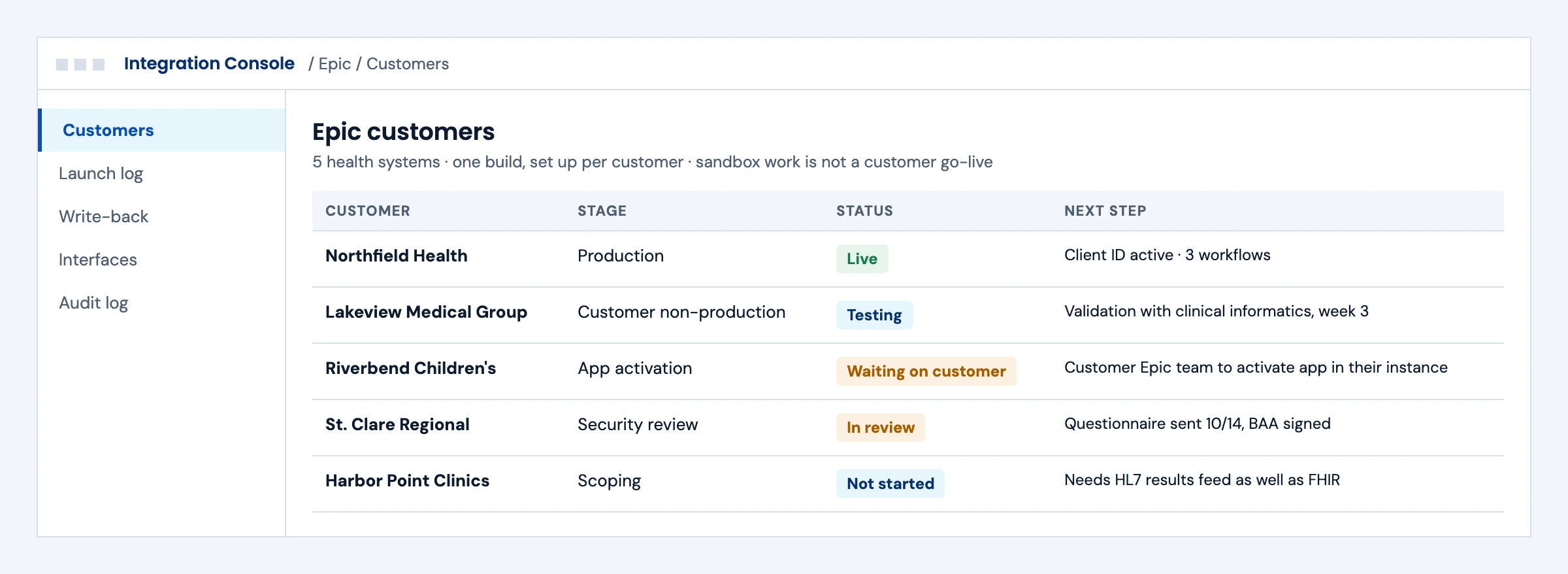
Every customer has a stage, a status and a named next step, from scoping to security review to app activation to production, on one build.

What we build
  • One integration build, configured per customer
  • A rollout checklist per customer: security review, BAA, app activation, validation
  • Sandbox milestones kept separate from customer go-live
Epic customer rollout tracker showing five health systems at different stages with the next step for each
Illustrative screen with fictional customers and patients: epic customer rollout tracker showing five health systems at different stages with the next step for each. Tap to open full size.

SMART Launch Inside the Clinician's Workflow

Today

Clinicians sign in again to a separate app and search for the patient by hand.

With the integration

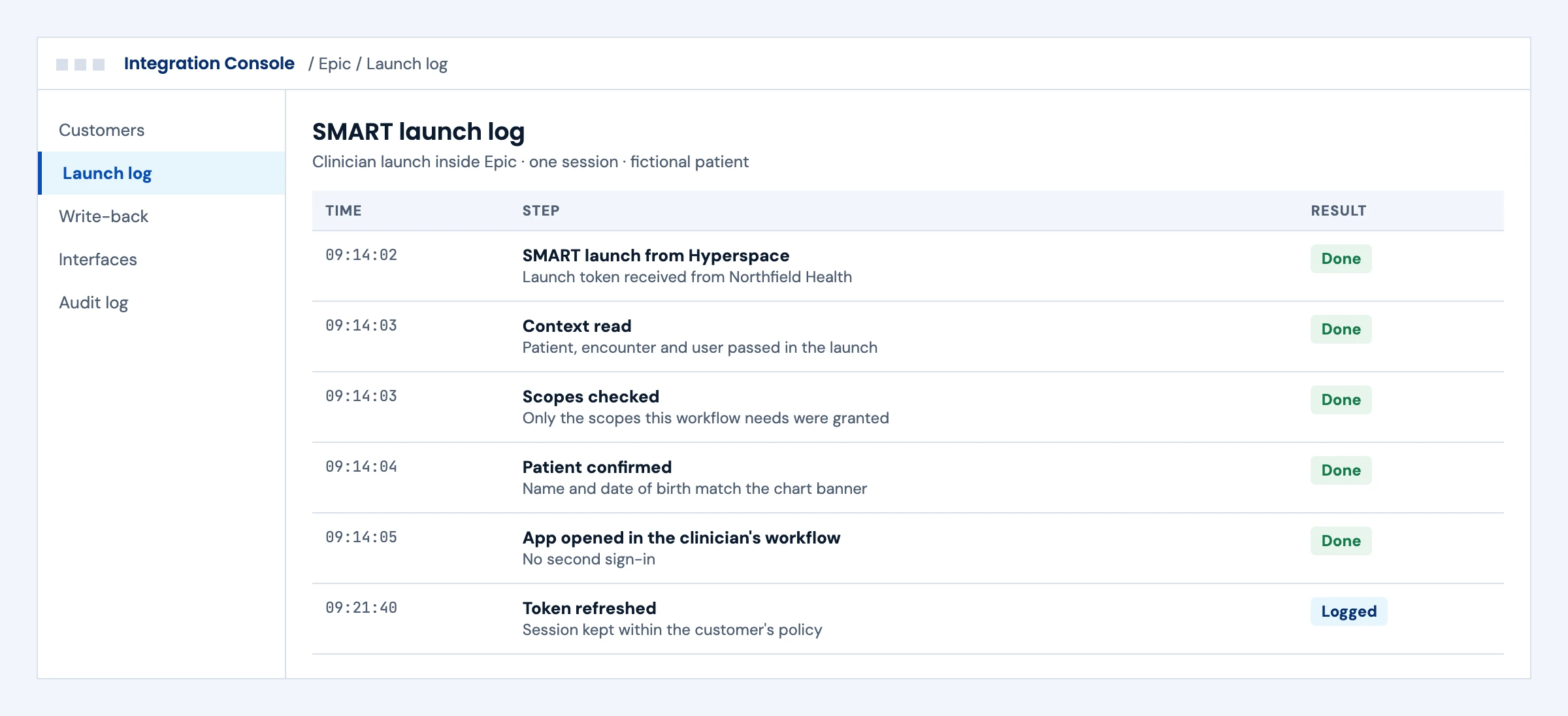
The app opens from inside Epic with the patient, encounter and user already passed in, only the scopes the workflow needs, and no second sign-in.

What we build
  • SMART on FHIR launch from inside Epic
  • Least-scope requests per workflow
  • Patient checks against the chart before any data is shown
SMART launch log showing the launch from Epic, the context passed in, scopes checked and the app opened
Illustrative screen with fictional customers and patients: sMART launch log showing the launch from Epic, the context passed in, scopes checked and the app opened. Tap to open full size.

Write-back You Can Prove

Today

The product reports success as soon as it sends data, and errors surface weeks later in a clinician's complaint.

With the integration

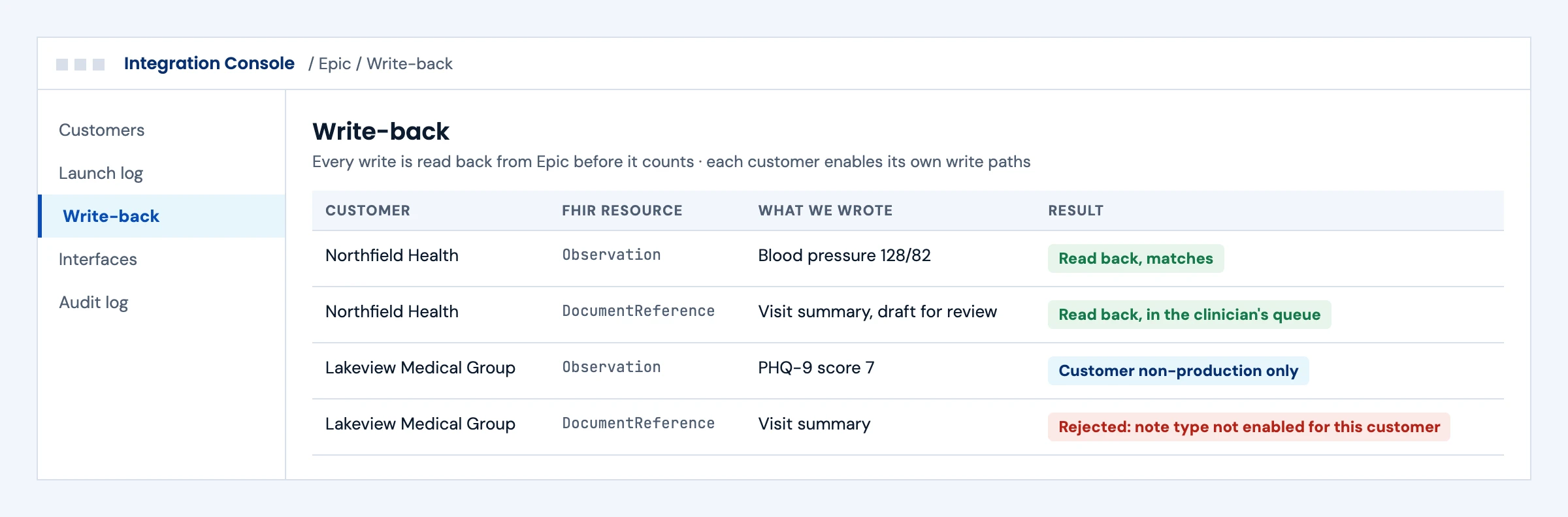
Every write is read back from Epic before it counts, and writes a customer has not enabled are rejected with a clear reason.

What we build
  • FHIR writes per customer, only on enabled paths
  • Read-back after every write
  • Rejections routed with the reason, never retried blindly
Epic write-back log with each FHIR write read back and one write rejected because the note type is not enabled
Illustrative screen with fictional customers and patients: epic write-back log with each FHIR write read back and one write rejected because the note type is not enabled. Tap to open full size.

HL7 v2 and Bulk FHIR Next to Your FHIR APIs

Today

Results and admissions arrive through a separate interface nobody on the product team watches.

With the integration

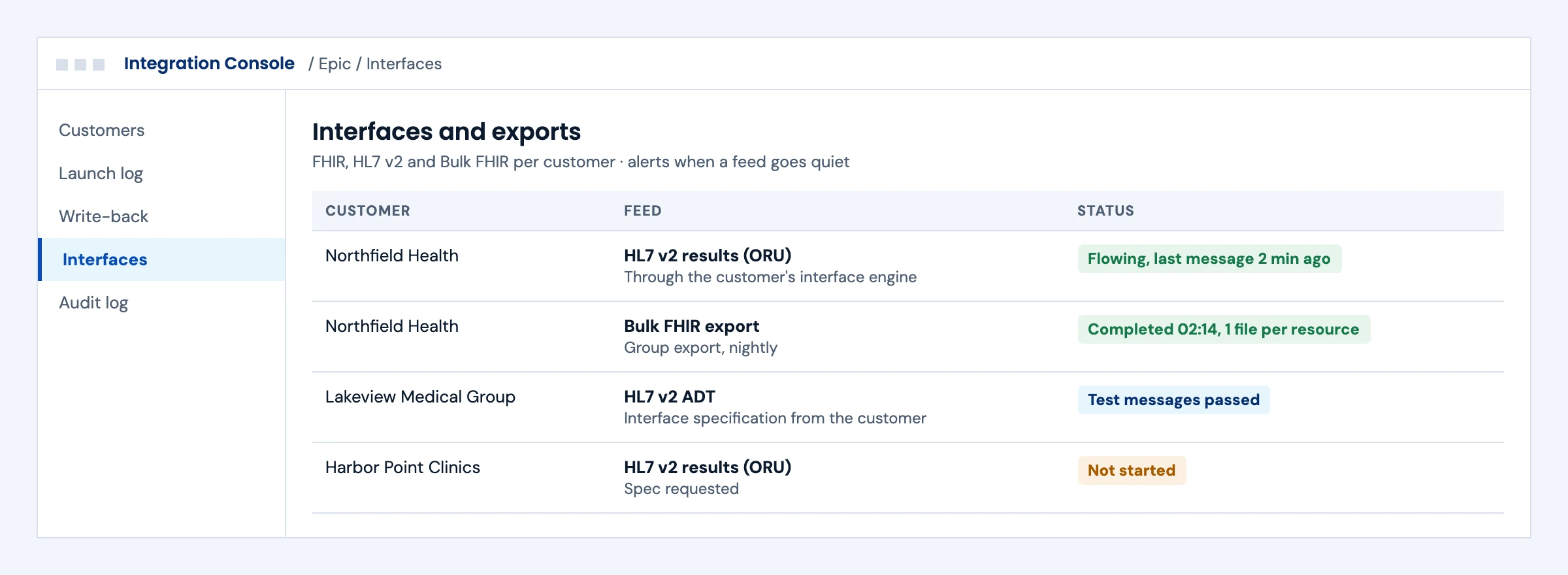
FHIR, HL7 v2 and Bulk FHIR exports for each customer show in one place, with an alert when a feed goes quiet.

What we build
  • HL7 v2 interfaces through each customer's engine, from their specification
  • Bulk FHIR Group export on the customer's schedule
  • Monitoring per feed and per customer
Interfaces and exports per Epic customer: HL7 v2 results and ADT feeds and a nightly Bulk FHIR export
Illustrative screen with fictional customers and patients: interfaces and exports per Epic customer: HL7 v2 results and ADT feeds and a nightly Bulk FHIR export. Tap to open full size.

First call

Questions We Will Ask You on the First Call

The answers decide the integration path, the order of work and what each customer will ask for.

Which workflow must work first, and for whom?

A clinician-facing app, a patient app and a back-office sync each need a different Epic route.

Do you have a signed or likely first Epic customer?

Customer production access goes through that health system, so their timeline sets yours.

What data do you need to read, and what must you write?

Reads are broad; writes depend on what each customer enables.

Does it launch inside Epic or run in the background?

SMART launch and system-to-system access are set up differently.

Do you also need HL7 v2 or Bulk FHIR?

Results, orders and admissions often still come over HL7 v2; population data comes from Bulk FHIR.

What will the customer's security review ask?

Plan the questionnaire, BAA and data flow answers before the first customer asks.

How many Epic customers in the next year?

Ten customers need a build that is configured per customer, not rebuilt.

Who on your side owns customer onboarding?

Each go-live needs an owner for validation and support after launch.

Your starting point

Where You Start Decides the First Deliverable

01

First Epic customer

Turn an enterprise requirement into a feasible scope.

What we define together

Workflow map, interface recommendation and customer dependency list.

02

Existing connection, new workflows

Add the right data without destabilizing your live product.

What we define together

Gap analysis, change plan and regression-test scope.

03

More health systems

Make onboarding repeatable without assuming every site is identical.

What we define together

Configuration model, activation checklist and support ownership.

Watch our Epic sandbox workflows

Epic sign-in, chart reads and verified write-back.

Our 8:37 walkthrough explains six integration routes, then demonstrates SMART on FHIR sign-in, chart reads and a body-weight Observation written to Epic and read back from the chart.

Recorded against Epic’s public sandbox using synthetic test patients. Customer authorization, supported operations and production validation must be confirmed separately for each health system.

Watch the full walkthrough on YouTube →

From a reviewed draft to a verified preliminary note.

For clinical documentation products: review one draft version, file a preliminary note to an Epic encounter, read it back and reconcile a lost reply before retrying.

Epic reads and note filing run against the public sandbox. The consultation and draft use synthetic data and a fixed template; no AI model runs. The lost reply is an injected interruption after Epic accepts the note. App approval does not sign or finalize the note.

Watch the note write-back walkthrough on YouTube →
Discuss your Epic workflow →

From example to acceptance

Take the demonstrated workflow to a customer acceptance plan

Our videos demonstrate specific workflows with synthetic patients in Epic’s public sandbox. Use that evidence to write a customer-specific plan for access, supported operations and clinical review.

  1. Define the action

    Choose the person, patient context, resource and operation the product needs. For a documentation workflow, distinguish saving a preliminary note from signing or finalizing it.

  2. Confirm customer activation

    Identify the health system’s workflow and integration owners. Confirm the endpoint, app configuration, permitted scopes and operations in the customer’s non-production environment.

  3. Record acceptance evidence

    Keep the configuration, test scenarios, read-back results and unresolved issues with the release decision. A successful sandbox request is one piece of that evidence.

Failures to test before go-live

Launch context is absent
The app shows a recoverable state and does not guess the patient or encounter.
Access is denied or expires
Explain the next step and handle cancellation or reauthorization without exposing another patient’s information.
A write succeeds but its reply is lost
Reconcile the resource that was accepted before retrying. Read back the saved result and compare it with the reviewed version.
A resource or field is unavailable
Show what is missing and test the agreed alternative. Customer-specific capability checks precede production activation.

Find your Epic workflow

Epic Module Integration: Cupid, Radiant, Beaker, Willow and OpTime

Start with the application your customer uses, then identify the data, events and approved interfaces your product needs.

01

Cupid · Cardiology

Cardiovascular workflows and procedural documentation.

Scope orders, results, imaging context and external cardiology systems.

02

Radiant · Radiology

Imaging exam scheduling, performance and results.

Scope orders, reports and the boundary with PACS or imaging systems.

03

Beaker · Laboratory

Clinical laboratory and pathology workflows.

Scope lab orders, specimen context, results and correction handling.

04

Willow · Pharmacy

Medication workflows, including inpatient pharmacy and inventory.

Identify the Willow application, medication data and external pharmacy workflow.

05

OpTime · Operating room

Surgical and procedural workflows.

Define the scheduling, procedural or supply-usage interface in scope.

06

Kaleidoscope · Ophthalmology

Eye-care documentation, diagnostic testing and imaging workflows.

Identify the required clinical data and available device or imaging interfaces.

These are the Epic workflow areas we build into. Available interfaces depend on each customer’s configuration, permissions and supported Epic capabilities, and we confirm them site by site.

Epic specialty applications ↗Epic orders and results interfaces ↗Epic procedural and medication inventory interfaces ↗

Choose the right connection

Epic Integration Services for FHIR APIs, HL7 Interfaces and SMART Apps

The answer changes the integration approach. Explore the workflow closest to yours.

A clinician uses your product in context.

Start with the care-team action—not a request for every available resource. A SMART launch may be the right fit when your experience needs patient or user context.

Investigate
Launch context, user roles and required resource operations.
Validate
Missing context, denied access, session expiry and clinical usability.
Coordinate
Customer configuration and the workflow owner’s acceptance criteria.
Scope decision

A defined in-chart workflow with a documented launch and authorization contract.

Ways to connect

Ways to Integrate a Product With Epic

Most products combine two or three of these. The workflow decides which ones, and each customer confirms what it enables.

01

FHIR R4 APIs

Read and, where the customer enables it, write clinical data such as patients, encounters, observations, conditions, medications and documents through Epic's published FHIR APIs.

Resource and operation map per customer

02

SMART on FHIR app launch

Open your app inside the clinician's workflow or let patients connect from your app, with OAuth 2.0 authorization and launch context.

Launch, scope and session design

03

CDS Hooks

Return decision support cards when a clinician opens a chart or is about to sign draft orders, where the customer supports the hook, for products that guide care or check coverage requirements.

Hook contract and card behavior

04

HL7 v2 interfaces

Admissions, orders, results and scheduling events through the health system's interface team and Epic's interface tooling.

Interface specification and test messages

05

Bulk FHIR export

Population-level data for analytics and quality programs, with Group export run on the customer's schedule.

Export plan and reconciliation

Workflows we integrate

Epic Integration Use Cases: Billing, MyChart, Prior Authorization and More

The same Epic connection serves very different products. These are the workflows we scope most often.

01

Revenue cycle and billing

Eligibility, charges, claims status and remittance alongside X12 transactions, so billing products see the same encounter the clinician documented.

Encounter, Coverage and X12 mapping

02

MyChart and patient apps

Patient-facing apps that connect to a person's Epic record with their consent, for scheduling, results, remote monitoring and education.

Patient authorization and reconnection flows

03

Referrals and prior authorization

Referral data and the Da Vinci coverage, documentation and prior authorization flows behind the CMS-0057-F payer rules.

CRD, DTR and PAS integration plan

04

Devices and remote monitoring

Readings from connected devices filed as observations, with clinician review and the alert rules the care team agrees.

Device-to-observation mapping and review rules

05

Lab and imaging results

Orders and results with corrections, critical values and the boundary with the lab or imaging system.

Order and result interface plan

06

Scheduling and access

Open slots, booking and changes that respect the health system's templates and visit types.

Scheduling rules and conflict handling

Epic mobile app and MyChart integration →Prior authorization automation →X12 EDI healthcare integration →Medical device integration →

Delivery, with ownership

A Sandbox Milestone Is Not a Customer Go-Live

We make engineering work and customer dependencies visible from the beginning.

01

Define the clinical outcome

Agree on the people, data and action your integration supports.

Workflow map · interface recommendation · exclusions

02

Build the integration contract

Implement authorization, mapping, errors and the product-side behavior.

Resource mapping · test scenarios · environment configuration

03

Validate with the customer

Confirm the configured workflow, permissions and acceptance evidence in the target environment.

Customer checklist · issue log · release decision

04

Activate and operate

Coordinate rollout and make support ownership explicit before expanding to another site.

Runbook · monitoring · escalation · repeatable onboarding

Architecture decision

Direct Epic Connection or Middleware: The Right Fit for Your Product

There is no default winner. Choose against your workflow, existing estate and operating model.

Direct integration

More Ownership of the Contract.

Useful when you need precise control over supported operations and product-specific behavior.

  • Your team owns mapping, credentials and integration operations.
  • Customer-specific setup and review still apply.
  • Budget for API changes, monitoring and additional sites.
Middleware-assisted

Reuse Where It Fits the Workflow.

Useful when an existing platform’s connectors cover your requirements and commercial model.

  • Validate coverage, failure behavior and write limitations.
  • Include platform charges and exit considerations.
  • Do not assume a connector removes customer activation work.

Engagement options

Three Ways to Start: Feasibility, Scoped Build or Team Support

01

Discovery & feasibility

For unclear interfaces or customer requirements. Define scope before committing to a build.

02

Scoped implementation

For an agreed workflow. Align milestones, acceptance criteria and customer dependencies.

03

Integration team support

For an active roadmap. Add engineering capacity with clear ownership and a prioritized backlog.

Understand the cost drivers →

Epic integration FAQ

Epic Integration Services: Buyer Questions

What Do Epic Integration Services Include?

Discovery of the workflow and the customer's Epic environment, the choice of FHIR APIs, SMART launch, CDS Hooks or HL7 v2, the build and tests against Epic's sandbox, validation with the customer's team, go-live and monitoring. You receive the integration code, the interface specification and a runbook for the next health system.

What Are the Ways to Integrate With Epic?

The main ways are Epic's FHIR R4 APIs, SMART on FHIR app launch, CDS Hooks for decision support where the customer supports it, HL7 v2 interfaces through the health system's interface team and Bulk FHIR export for population data. A Showroom listing is a separate, optional Epic marketing program, not a connection method. Most products combine two or three, chosen by the workflow, not by the technology.

How Long Does an Epic Integration Take?

We estimate the engineering and customer activation timeline after confirming the scope, supported operations, access and validation requirements. The first go-live follows the health system's calendar for access, security review and configuration. Later customers may reuse the code and runbook, and each site still needs its own validation.

How Much Does an Epic Integration Cost?

Cost follows the workflows and data in scope, read versus write operations, the number of customers to activate, any HL7 v2 interfaces and the support you need after launch. Epic, middleware and hosting charges are separate. Our Epic integration cost page explains each driver, and we fix the scope after a short discovery.

Do We Need a Partnership With Epic to Integrate?

No partnership is needed to build with Epic's published APIs. Production access comes from each health system that uses your product, under its own agreement with you. Epic's vendor programs and Showroom listing are optional and have their own requirements.

Can You Integrate With MyChart?

Yes, through patient-facing SMART on FHIR authorization, where a person connects your app to their Epic record with consent. We design the connection, reconnection and missing-data paths so the patient understands what is shared and what happens if access ends.

Can Our Product Write Data Back Into Epic?

Only where Epic supports the operation and the customer enables it for your app. We confirm each write against the customer's environment and agree clinical review rules with their team before we build it.

Do You Support Epic HL7 v2 Interfaces?

Yes. Many health systems still exchange admissions, orders, results and scheduling as HL7 v2. We work from the customer's interface specification and test messages and build the listener, mapping and acknowledgements on your side.

Updated October 2026

Before you commit

Epic Integration Questions to Answer Before You Commit

Do you provide Epic approval or certification?

No approval is implied. We provide integration engineering and validation support. Epic programs, listings and customer authorization have their own requirements and decisions.

Can we write information back to the chart?

Only where the required operation is supported and authorized. Confirm the resource, workflow, customer configuration and clinical validation requirements before designing write-back.

Will One Integration Work for Every Epic Customer?

Reusable code helps, but each health system has its own endpoints, configuration, permissions and activation work. Design for repeatable onboarding rather than a universal endpoint.

What happens after launch?

Agree on monitoring, incident ownership, credential changes, API updates and additional-customer support. Operational scope belongs in the proposal, not in an assumption.

Plan with the right evidence

Confirm the Workflow, Then Confirm Epic Access

Epic’s requirements and supported interfaces can change. Use the official documentation alongside your target customer’s implementation requirements.

Epic interoperability catalog ↗Epic developer documentation ↗Get the Epic Integration Checklist →

Does sandbox success guarantee production access?

No. Production use requires the relevant app setup and customer-specific activation, permissions and validation.

What should we prepare for a scoping conversation?

Bring your intended workflow, required data and operations, target health systems, current integration status and any launch constraints. Do not share patient data.

Epic is a trademark of Epic Systems Corporation.

Talk through your requirements

Let’s map the next useful step.

Tell us what your product needs to do and where you are in the integration journey. We’ll follow up to clarify the scope, dependencies and appropriate next step.

  • Your workflow and target customer
  • The data and operations you need
  • What is already built—and what is blocked
hello@nirmitee.io →

Project details only. Please do not include patient data or credentials. Privacy policy

Request received

Thank You for Sharing the Context.

Our team will review your requirements and follow up on scope and next steps.