Assetly for hospitals

Hospital Asset Management Software Built for Complete Visibility and Control

Track, manage and optimize biomedical, surgical, IT and non-medical assets across their full lifecycle.

  • QR · BAROpen an equipment record from a QR label or barcode
  • RFIDReconcile a department with an RFID inventory scan
  • BLE · GPSOngoing zone or outdoor location, after a site fit review
  • ₹ · $Review maintenance, contracts and cost against the same asset

LIVELive at KEM Hospital · 2 more hospital implementations in progress

One equipment record Identity → Service history → Cost review. Hospital asset management software. Explore the product in a guided demo.

Live at KEM HospitalBuilt for real hospital asset operations. Assetly is live at KEM Hospital. 2 more hospital implementations are in progress.
On-premise deploymentNirmitee is ISO compliant
QR · Barcode · RFIDBLE and GPS after a fit review
Accreditation evidenceNABH · Joint Commission · SFDA · DHA · MHRA

Find your answer in 30 seconds

What brings you here?

1

Your role

2

Your biggest problem right now

Pick a problem to see a short video, the part of this page that answers it, and a demo request ready to send.

See how your team would use it

Assetly for Every Hospital Team

Select your role to see how Assetly supports your daily work.

Biomedical Heads

Keep every device serviceable, documented and accounted for.

See preventive maintenance, calibration and breakdown history against one equipment record. Review what is due, what is overdue and what is still waiting on a vendor.

  • Preventive maintenance schedules with the evidence each task needs to close
  • Breakdown tickets linked to the service history of the same device
  • Calibration records and AMC/CMC contract coverage on the equipment record
  • Downtime and response time reviewed by device, department and vendor

Book a walkthrough

See your role’s workflow on your own equipment list.

We reply by email with demo times. Need to discuss requirements first? Contact the team.

Hospital Equipment Tracking System Built for Real Hospital Challenges

Twelve problems hospital teams raise most often, and what the asset record changes about each one.

Watch
Why Hospitals Lose Medical Equipment (and What It Really Costs)
Your Equipment Register Is Wrong (and It Is Costing You)
01Locating equipment quickly

TodayStaff walk the floor looking for a pump or monitor that was moved and not recorded.

With AssetlyScan or search the register to see the last recorded location, department and custody for that asset.

03Breakdown and service requests

TodayFaults are reported by phone and the service history is rebuilt from memory.

With AssetlyRaise a ticket against the asset so the fault, response and parts join that device's permanent history.

05AMC/CMC and vendor management

TodayContract coverage is unclear at the moment a device fails.

With AssetlySee contract coverage, vendor and service terms alongside the equipment before authorising a paid repair.

07Physical asset audits

TodayAnnual verification is a manual count that rarely reconciles with the register.

With AssetlyScan a defined scope, compare observations with the expected list and give each discrepancy an owner.

09Asset lifecycle and disposal

TodayRetired equipment stays on the register long after it leaves the floor.

With AssetlyTrack condemnation and disposal as recorded steps, so the register reflects what the hospital actually holds.

11Maintenance cost and ROI

TodayRepair spend is visible in finance but not against the device that consumed it.

With AssetlyCompare maintenance cost, parts and contract coverage per asset against its recorded value and use.

02Preventive maintenance

TodayPM schedules live in spreadsheets, so due and overdue work is noticed late.

With AssetlyReview due, overdue and completed PM against each equipment record, with the evidence that closes a task.

04Calibration management

TodayCalibration certificates sit in folders and are hard to produce on request.

With AssetlyHold calibration status and records against the device, so the next due date and last certificate are retrievable.

06NABH and compliance readiness

TodayQuality reviews trigger a document hunt across departments.

With AssetlyRetrieve equipment identity, maintenance and calibration records from one register. Hospital procedures still own the policy.

08Asset transfers between departments

TodayEquipment moves between wards and the register is updated later, or not at all.

With AssetlyRecord the move, the destination and the expected return, and follow the handoff until the asset is back.

10Equipment utilization

TodayPurchase requests are argued without evidence of how existing devices are used.

With AssetlyReview recorded utilization by category. Agree the data source before drawing a conclusion.

12Replacement and CapEx planning

TodayReplacement cases rest on opinion rather than service history.

With AssetlyBring repeated faults, cost and age into one review so biomedical and finance decide from the same record.

Healthcare Asset Management Software: Everything Connected in One Platform

Eight modules reading from the same asset record, so a service visit, a contract and a cost all describe the same device.

01Asset register

One record per asset with identifiers, category, department, ownership and purchase detail. The source the rest of the platform reads from.

03Preventive maintenance

Schedule recurring tasks by device or category. Review what is due, overdue and completed, with the evidence each task requires.

05AMC/CMC contracts

Keep vendor, coverage and renewal terms beside the asset so cover is clear before a repair is authorised.

07Dashboards

Review availability, due work, open exceptions and spend by facility and department. Confirm the views your team needs in the demo.

02Work orders

Raise, assign and close service requests against the asset. The ticket, attending team and parts stay with that device's history.

04Calibration

Hold calibration status, due dates and certificates against the equipment. Retrieve the record when a review asks for it.

06Service history

A continuous record of faults, visits, parts and costs. The history behind a repair, replacement or vendor conversation.

08Reports

Export the register, maintenance, calibration and audit records in the formats your quality and finance reviews expect.

Real Assetly screens

See the product behind the process.

Equipment records, department inventory, audit exceptions and mobile tasks. Bring one of your workflows to the demo.

Assetly asset register listing equipment with type, department, location, value and last maintenance date (demo data)
Start with a register your team can review
Assetly dashboard with asset counts, maintenance compliance and alerts that need attention (demo data)
Turn an inventory check into a follow-up list
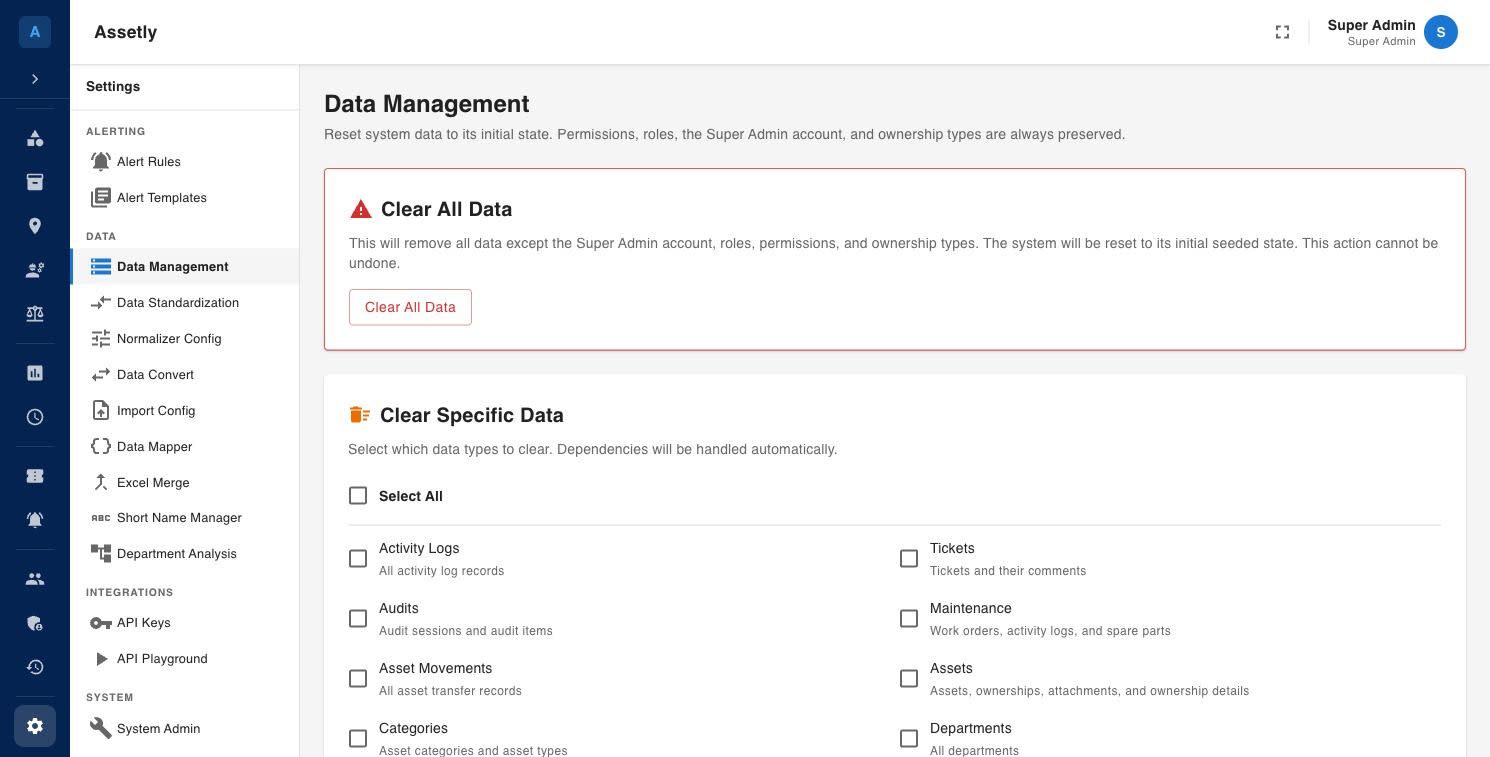
Assetly data management settings for clearing test data such as activity logs, audits and asset movements before go-live
Prepare the data before expanding the rollout
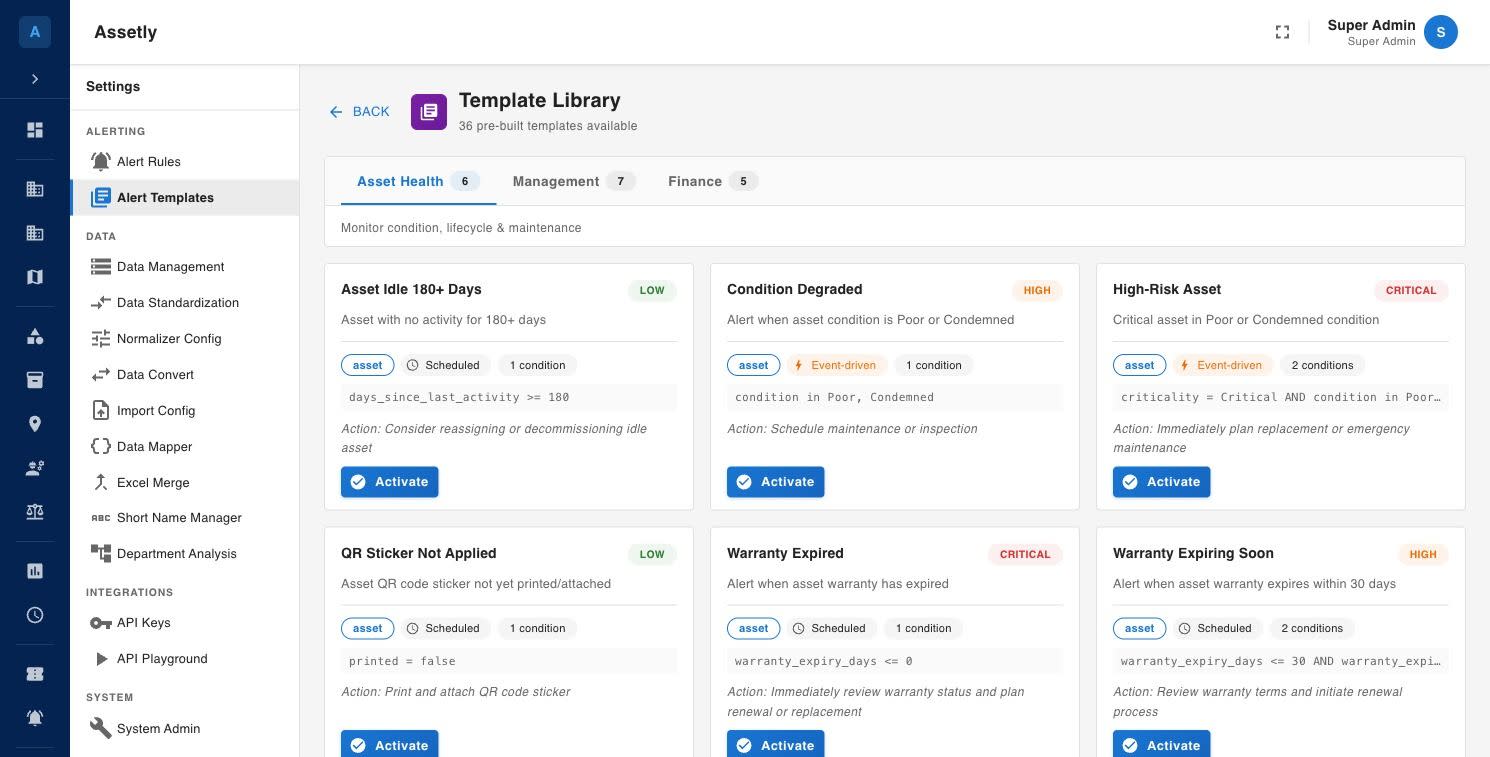
Assetly alert template library with rules such as asset idle for 180 days, condition degraded and QR sticker not applied
Give discrepancies a review process
See mobile equipment and floor views
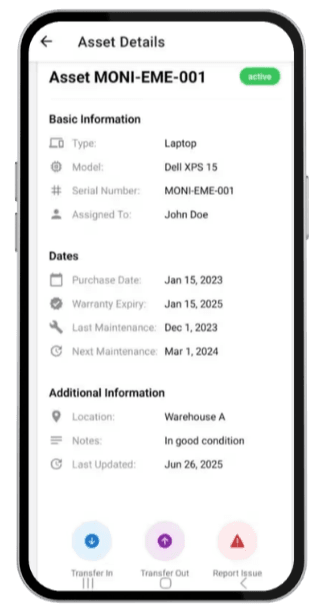
Assetly mobile app asset details screen with serial number, warranty and maintenance dates, and Transfer and Report issue buttons
Mobile equipment tasks
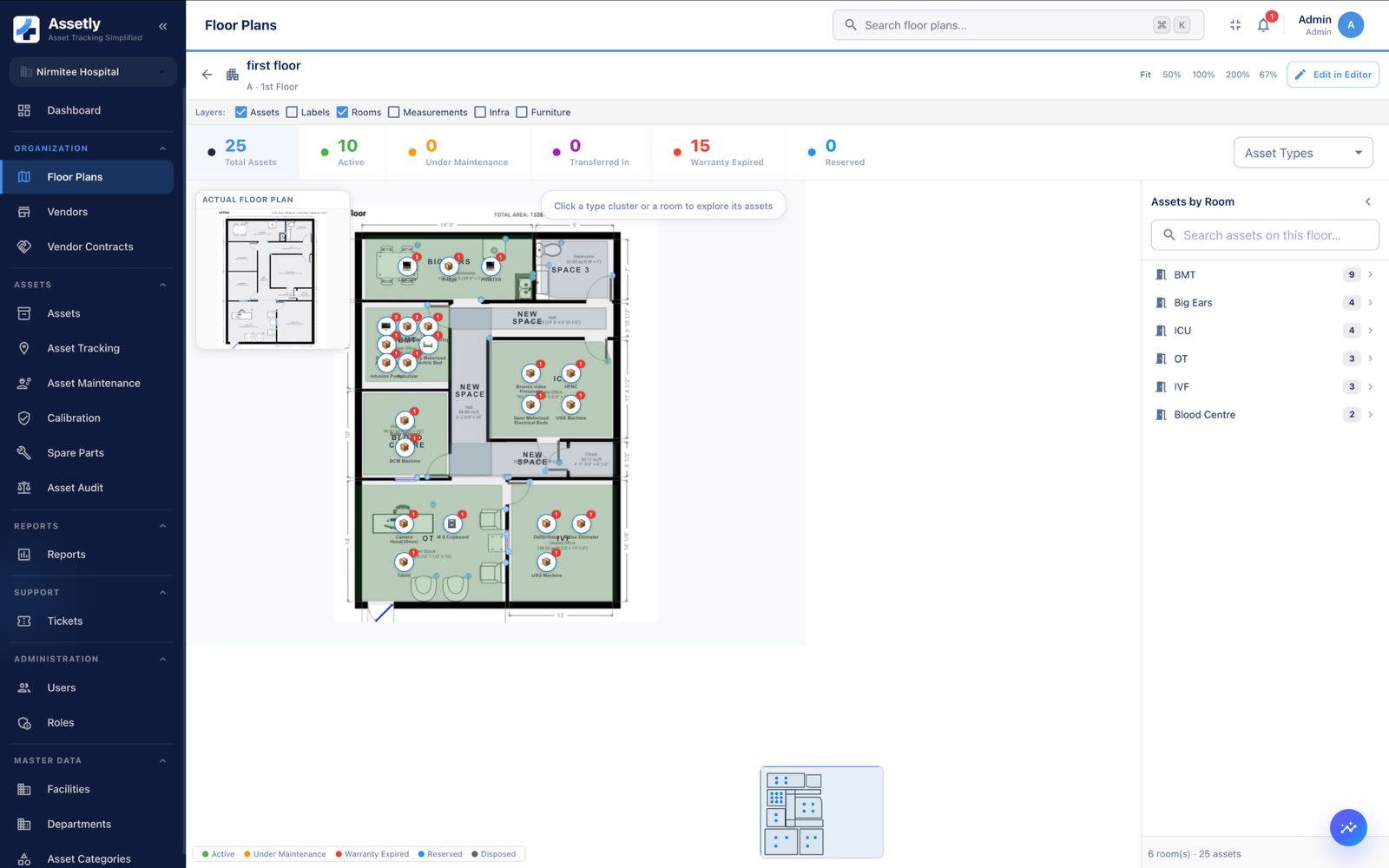
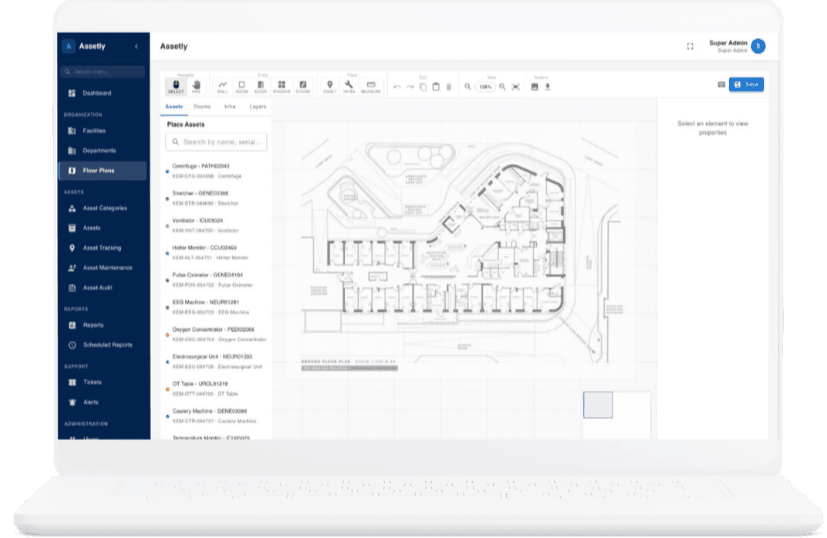
Assetly floor plan with equipment placed in rooms (demo data)
Floor and zone context. Continuous location requires validated RTLS hardware.
Clinician with a clipboard and healthcare icons (illustration, not a product screen)
Hospital equipment context
Assetly floor plan screen on a laptop, with a list of hospital equipment to place on the ground floor plan
Floor plan with placed equipment

Watch: hospital asset tracking in 12 short explainers

Why equipment goes missing, how QR, RFID and RTLS differ, and how to stay audit ready. Pick a topic, then a video. Product screens in the videos use an invented test hospital.

The problem · 7:22

Why Hospitals Lose Medical Equipment (and What It Really Costs)

Where missing hospital equipment really goes, the four costs nobody adds up, why spreadsheets and ward rounds go stale, and a first step to take this month.

See the full playlist on YouTube

Follow an equipment record through its lifecycle · One equipment record, several decisions

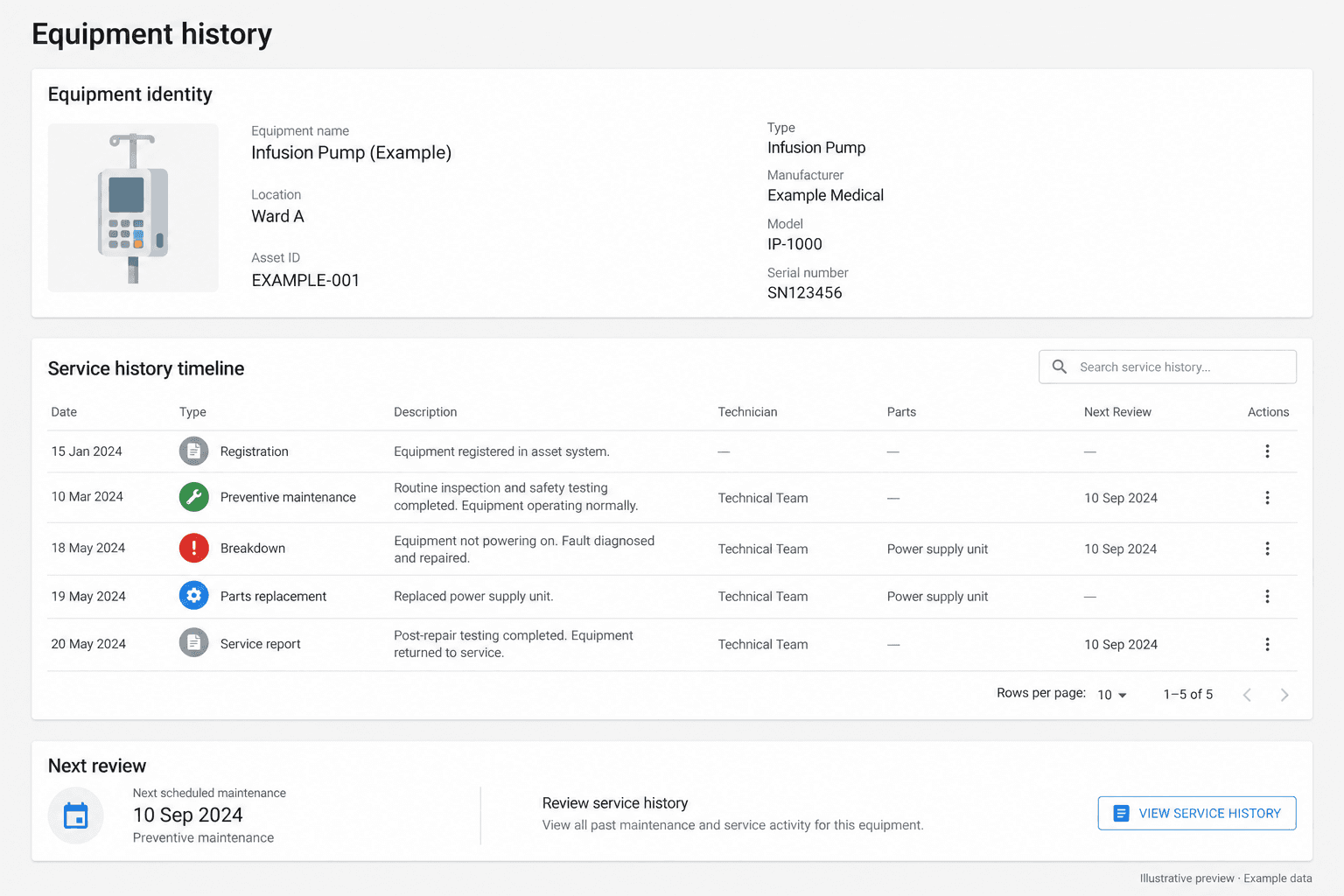
Follow an infusion pump from registration to replacement review.

An illustrative walkthrough, not a customer outcome. Ask us to demonstrate the records and reports your team needs.

  1. Identify and assign

    Review the serial number, department, warranty and service contract. Confirm the register entry before applying or scanning its QR label.

  2. Maintain and investigate

    Review preventive maintenance, calibration and breakdown history. Check the service report, attending team, replaced parts and recorded costs.

  3. Decide with the history

    Biomedical and finance teams review repeated faults, service costs and contract coverage together. Agree the evidence needed for repair, replacement or disposal.

Choose a job.
See the workflow.

Explore eight use cases. Choose the work you want to improve, see the product view and book a demo for your team.

Equipment historyProduct view
AssetsExample workspace
Illustrative Assetly equipment history with example data
Illustrative workflow preview. Example data; not an app screenshot.

Find the history behind the next repair decision.

Book an equipment history demo

Example infusion pump · Biomedical team

Illustrative example · Step 1 of 3

Review the equipment identity, responsible department and installation history.

Product screens use a demo hospital and some views are illustrations, not connected to a live hospital. Review the selected release and reader setup in a product demo.

Identification and tracking

QR, Barcode, RFID, BLE, GPS

A readable label, a bulk inventory scan and a continuous location system solve different problems. Review the method against your equipment and your staff workflow.

Watch
Hospital Asset Tracking Explained: QR vs RFID vs RTLS
What Hospital Asset Tracking Really Costs: QR vs RFID vs Bluetooth

QR codes

In use

A printed code that opens one asset record when scanned on a phone.

Where it is used: Day-to-day lookups, ward checks and raising a ticket at the device.

Setting it up: Agree label placement, durability against cleaning, printer and reprint responsibilities.

Barcodes

In use

A linear label read by a phone camera or handheld scanner.

Where it is used: Sites standardising on existing scanners or an established label stock.

Setting it up: Confirm symbology, scanner compatibility and the label format your printers support.

RFID

In use

A tag read without line of sight, so a group of assets can be scanned at once.

Where it is used: Bulk inventory checks and reconciling a department against the register.

Setting it up: Validate tags on metal equipment, read range, missed reads and unexpected tags before rollout.

BLE

A battery tag broadcasting to gateways for zone or room-level visibility.

Where it is used: Considered where ongoing location, not a point-in-time scan, is the requirement.

Setting it up: Requires a fit review: gateway coverage, tag life, interference and device compatibility.

GPS

A tracker reporting position outside the building over a mobile network.

Where it is used: Considered for equipment travelling in ambulances or between sites.

Setting it up: Requires a fit review: tracker, connectivity, update behaviour, power and integration.

Not sure which method fits?

Bring your equipment mix and the question you need answered: where it is now, or when it was last checked. We review QR, RFID, BLE or GPS against your site before any hardware is bought.

Book a fit review

No GPS or BLE deployment is claimed here. Both require a fit review covering device compatibility, interference testing, infrastructure and coverage.

Labels, handheld RFID or RTLS: what each one can and cannot doThree approaches compared

QR stickers and barcode labels

Useful for opening an equipment record or checking one item at a time. Phone QR audits were a buyer preference in our hospital discovery. Agree label placement, durability, cleaning requirements, printer compatibility and reprinting responsibilities.

Requires a readable label and a deliberate scan

Handheld RFID inventory

Useful for scanning a selected equipment group and reconciling observations with the register. Validate tags and readers on metal equipment, scan range, missed reads and unexpected tags before rollout.

A scan is an observation, not continuous location

RTLS and fixed-reader coverage

Consider this when the requirement is ongoing zone or room-level visibility. Scope the infrastructure, tag technology, network, coverage and acceptance tests separately. Assetly support and integration must be confirmed for the selected installation.

Requires a separately validated hardware deployment

GS1 describes barcode and RFID applications for healthcare asset tracking. That reference does not establish Assetly GS1 certification or compatibility with every reader. Read the GS1 healthcare reference.

Discuss your tracking requirement

Asset intelligence

Make Better Decisions About Every Asset

Asset intelligence connects the equipment record (purchase invoices, vendors, contracts and recorded use) to the question your team needs to answer.

Watch
Hospital Equipment Utilization and ROI: Which Devices Earn Their Keep?
Biomedical

What needs attention?

See maintenance, calibration and breakdown history together. Know which equipment needs a closer review.

From scattered service records to a complete equipment history.
Operations

Where is the discrepancy?

Find missing or unmatched items during inventory checks. Follow equipment moves and linen handoffs before deciding whether replacements are needed.

From an unmatched scan to an owned follow-up.
Finance

What is driving the cost?

Review purchase cost, invoice details, repairs, parts and contract coverage alongside the equipment record. Build the evidence for repair or replacement.

From a cost total to the history behind it.
Vendors and procurement

Who supplies and services it?

Keep vendor details, service contracts and spare-part sourcing together. Review vendor payments and performance with the team responsible.

Know the supplier, coverage and cost behind the equipment.
Equipment use

Which equipment is underused?

Review recorded usage and utilization for expensive equipment. Identify what needs investigation before buying more.

Use equipment data to question the next purchase.
Financial returns

What return is equipment generating?

Review billing-linked revenue, maintenance costs and ROI by equipment category. Connect that view with purchase invoice details and service history.

Compare revenue and costs before making capital decisions.
How should we measure utilization?

Is the equipment being used?

Agree the data source before drawing a conclusion. Procedure counts, billing data and operating time measure different things. Monthly procedure uploads and capital-commitment comparisons require product and implementation confirmation.

Assetly on mobile

Designed for Teams
at Every Level

At the desk · Web

Leadership and biomedical teams work from the web dashboard: the register, due work, open exceptions and reports across departments.

  • Web: register, dashboards, reports and administration
On the ward · Mobile

Floor staff work from the mobile app, where the asset is. Scan a tag to open its record, raise or close a ticket, and update a preventive maintenance task without returning to a desk.

  • Mobile: scanning, tickets, PM tasks and department checks
  • Dispatch, receiving and exception review on the floor
Explore the workflows
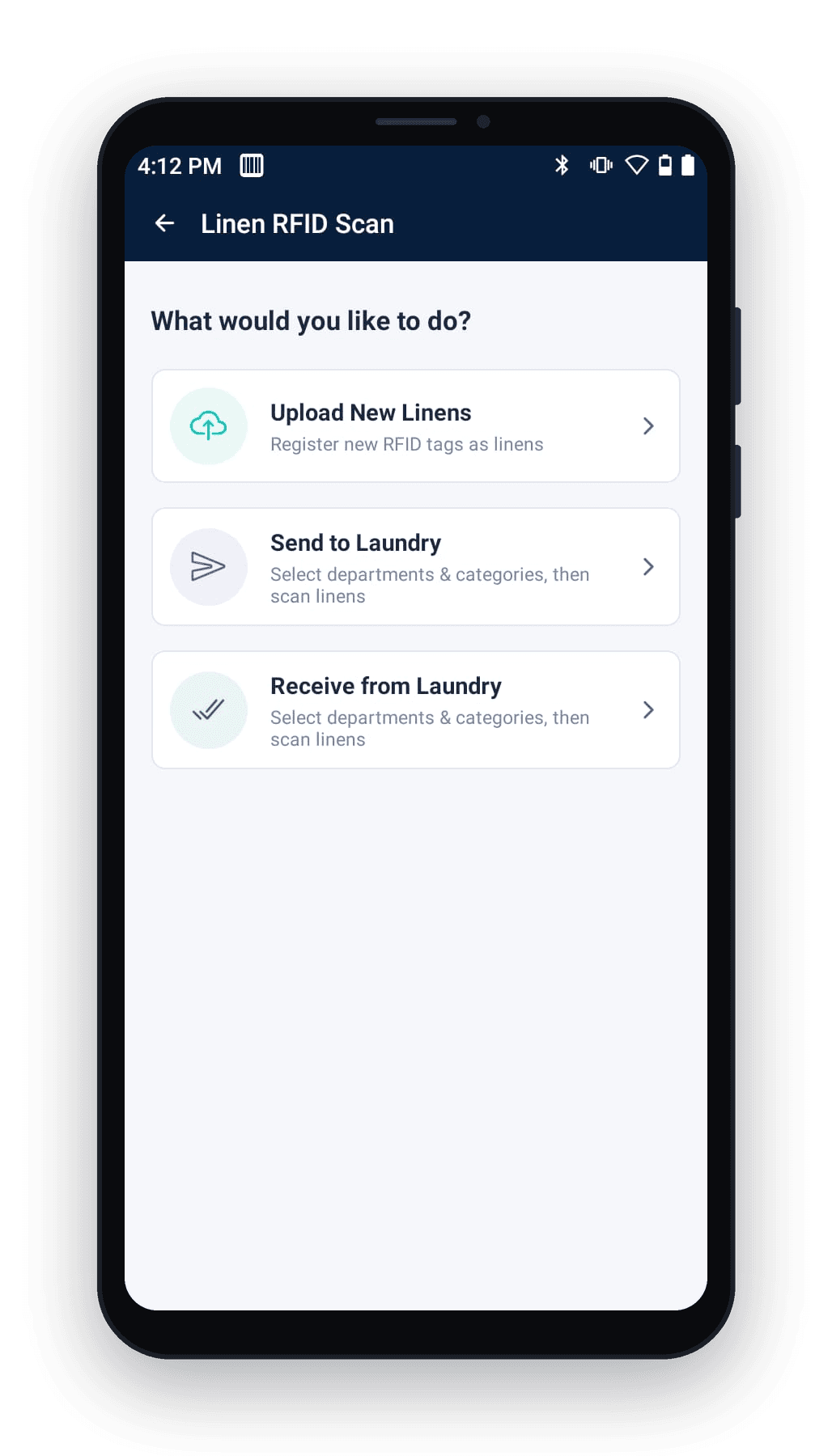
Assetly mobile app Linen RFID Scan menu with Upload New Linens, Send to Laundry and Receive from LaundryAssetly mobile app Send to Laundry screen with department and category filters and a list of scanned linen RFID tags
Assetly mobile app: the linen RFID scan menu and the Send to Laundry screen.

One Platform Across Your Hospital Network

Assets are recorded against a four-level structure, so a group view and a ward search both resolve to the same record.

L1Hospital group

The parent view. Review the register, open work and exceptions across every facility in the group.

L3Building

Blocks, wings and floors within a facility, so location is recorded at the level your team actually searches.

L2Facility

A hospital or unit with its own register, teams and access. Facility-wise permissions keep each site's data in its own hands.

L4Department

The owning team for each asset. Custody, transfers and accountability are recorded here.

Central dashboards

Review the register, open work and exceptions across the group, then narrow to a single facility without changing systems.

Facility-wise access

Scope user access to the facilities and departments each team owns. Agree roles and permissions with your IT team during scoping.

Inter-facility transfers

Move equipment between sites as a recorded handoff, with the destination and expected return visible to both teams.

Network-wide reporting and the multi-facility view are confirmed against your structure during scoping. Bring your facility and department list to the demo.

Quality and accreditation evidence

Prepare equipment records for the review your hospital faces.

Help quality and biomedical teams retrieve the equipment identity, maintenance history and calibration records they need. Agree record ownership, required documents and report formats in the pilot.

Watch
Medical Equipment Audit Readiness: Maintenance and Calibration Records
Hospital Maintenance Reports and Sign-Off: Your Forms, the Right Signature

India: NABH equipment evidence

NABH medical-equipment requirements cover inventory and logs, maintenance, inspection and calibration, trained personnel, and replacement or disposal guidance. Review which records Assetly supports and which remain in your hospital procedures.

Read the NABH standards
Medical Equipment Audit Readiness: Maintenance and Calibration Records

Software records support evidence retrieval. They do not establish accreditation, regulatory compliance or maintenance quality. Hosting, access controls, data handling, integrations and local support require an IT and delivery review for your market.

How hospitals start

Start with one workflow.
Prove its value before expanding.

Choose a department or equipment group. Review the product with the people who will use it. Agree acceptance criteria, responsibilities, cost and timeline.

Watch
Moving Your Hospital Equipment Register Off Excel or SAP in 30 Days
Getting Hospital IT and Security Approval for Asset Tracking Software

Bring the task

Tell us where the team loses time: equipment records, laundry handoffs, inventory checks or maintenance follow-up.

Review the fit

Demonstrate the selected workflow. Settle data imports, forms, devices, hosting, access and regional requirements.

Measure the change

Compare against a baseline. Review exceptions and record quality before deciding on a wider rollout.

Scope an equipment pilot
From Asset Data to Hospital-Wide AdoptionFive steps, in order. Each one has an owner and an exit condition agreed before the next begins.
  1. Asset data onboarding

    Review your existing register, agree field mappings and duplicate handling, then validate the import on a pilot scope before migrating further.

  2. Tagging

    Select the identification method per asset group, agree label placement and durability, and assign responsibility for the initial tagging run and reprints.

  3. Training

    Walk each team through the workflow they own: biomedical service, department checks, audits and reporting. Confirm forms and approval steps as they are taught.

  4. Go-live

    Start with the agreed department or asset group. Compare against the baseline you set and review exceptions and record quality before widening scope.

  5. Ongoing support

    Agree the support channels, response expectations and review cadence in the proposal, along with who owns data corrections after go-live.

  6. How long does rollout take?

    It depends on asset data quality, facility count and tagging method. A single-department pilot is much faster than a network rollout. We agree dates in scoping, and confirm which system owns each record before any HIS or ERP interface is built.

    Scope your rollout
Choose how Assetly fits your hospital’s IT environment.For your IT and security team. On-premise deployment is available. Discuss hosting, deployment requirements and responsibilities with our team before choosing your setup.

Review your deployment

Discuss an on-premise setup. Agree server requirements, installation, updates, backups and the responsibilities of each team.

Review access and data handling

Bring your requirements for user access, audit records, data retention, backup and recovery. Review the controls and evidence for your proposed deployment.

Connect with existing systems

Discuss your equipment register, imports, exports and required integrations. Confirm compatibility and implementation scope with your IT team.

Nirmitee is ISO compliant. On-premise deployment is available. Discuss security documentation, applicable SOC reports, access controls and your hospital’s requirements with our team.

Discuss hosting and security
Buyers procure a working process, with delivery behind it.See published procurement requirements. What procurement teams ask for: published requirements show why software selection needs to cover the register, field work and the handoff to support.

Implementation and support

The same tender requires tagging, reader integration, training and a support escalation process. These need named delivery responsibilities.

Review the installation and support scope

These are examples of buyer requirements. They do not imply that the issuing organization is an Assetly customer or that Assetly meets every tender condition.

A demo around your team’s work

See your use case.
Talk through the fit.

Meet the Assetly team for a focused product walkthrough.

  1. See the workflow that matters to your team.
  2. Discuss your records, devices and existing systems.
  3. Agree what a useful pilot would need to prove.

No equipment register or patient information is needed to book.

Prefer to pick a time yourself?

Choose a demo time

The booking calendar opens in a new tab.

Need to discuss requirements first? Contact the team.

Request a demoNo equipment register or patient information is needed to book.

We reply by email with demo times. Need to discuss requirements first? Contact the team.

Frequently Asked Questions

Does an RFID scan give continuous real-time location?

A handheld RFID scan records an observation at a point in time. Continuous real-time location requires a separately validated RTLS installation, with suitable tags, readers and coverage. Confirm the device scope and location expectations before choosing a pilot.

Can we start with our existing equipment register?

Start by reviewing its identifiers, department names and ownership. Agree field mappings, duplicate handling and an exception process before importing. A pilot should test the selected records and workflow before a wider migration.

How does Assetly support maintenance and calibration records?

Assetly includes equipment, service and calibration workflows. Use the demonstration to review the records your team needs, who updates them and how they are retrieved. Recordkeeping supports a review; it does not certify maintenance quality or accreditation.

Can Assetly replace our CMMS or connect to our ERP?

Review the systems you already use and decide which one owns each record. Integration, field mapping and export requirements need a scoped evaluation. An existing connector or API does not establish compatibility with your installation.

Can staff print or replace their own QR labels?

Agree local label printing and reprinting during scoping, including the printer, label stock and software workflow. Initial bulk tagging and ongoing label operations need separate responsibilities and costs.

Are tags, readers, installation and support included?

Agree these separately in the proposal. Reader compatibility, tag placement, site coverage, installation responsibilities, training and support response expectations depend on the facility and the selected workflow.

Is Assetly suitable beyond hospitals?

Laboratories and other institutions also procure asset registers, identification and inventory reconciliation. We can review your requirements for fit. Issue and return, GIS, financial integration, hosting and certification requirements need confirmation before any commitment.

What should we measure in a pilot?

Agree a baseline and review criteria with your team. Useful measures include unresolved register discrepancies, time spent on a defined inventory check and the ability to retrieve required maintenance records. Savings, rollout dates and location accuracy need evidence from the agreed scope.

How is Assetly priced, and how does it fit our procurement process?

Pricing depends on the facilities, asset volume, modules and deployment you select, so it is prepared against your scope rather than published as a list price. Implementation is a one-time cost and recurring charges are quoted separately. Tags, readers, printers and on-site work are itemised so your procurement team can review each line. Ask for a written scope and commercial proposal before committing.

How long does a rollout take?

The timeline depends on asset data quality, the number of facilities, the tagging method and how quickly your team can review imports and attend training. A single-department pilot is materially faster than a network-wide rollout. We agree the sequence, responsibilities and target dates during scoping rather than quoting a standard duration here.

How is our data secured, and where is it hosted?

On-premise deployment is available, and Nirmitee is ISO compliant. Hosting location, user access and roles, audit records, data retention, backup and recovery are agreed with your IT and security team for the deployment you choose. Bring your security questionnaire to the review so the controls and documentation can be mapped to your requirements before any commitment.

What is hospital asset tracking software?

Hospital asset tracking software keeps one record per piece of equipment and updates its last-seen location from QR, barcode, RFID or BLE observations. Assetly adds maintenance, calibration and contract history to the same record.

What is healthcare asset management software?

Healthcare asset management software, also called medical asset management software, manages the full life of equipment: register, location, preventive maintenance, calibration, service contracts, utilization and replacement review.

Is Assetly a hospital equipment tracking system or a CMMS?

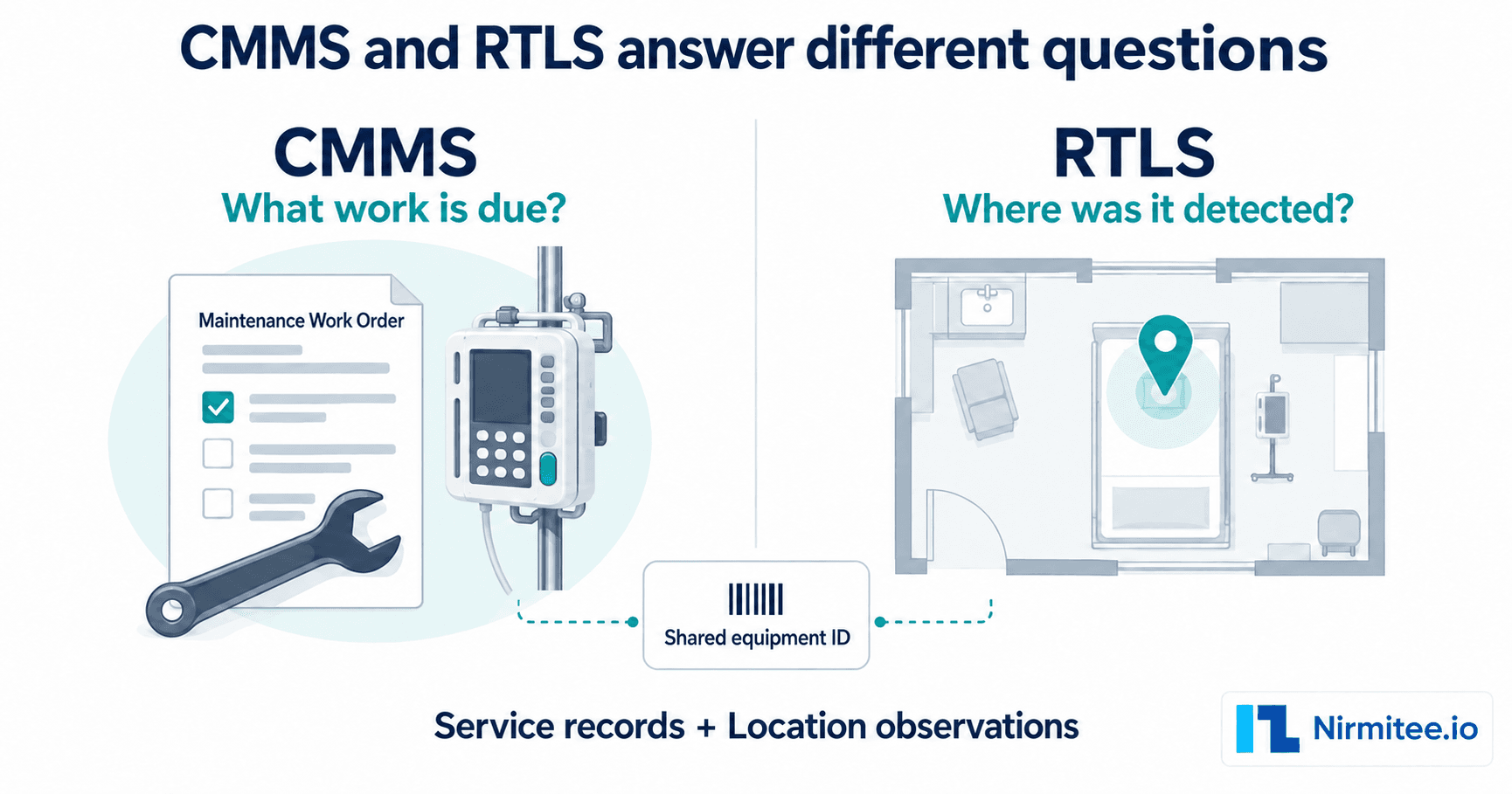
Both parts of the job for medical equipment: it works as a hospital equipment tracking system and as hospital CMMS software for service and calibration work. Building systems such as HVAC usually stay in a facilities CMMS.

Does Assetly work as medical equipment tracking software in India and the US?

Yes. The same equipment record supports NABH evidence in India and Joint Commission equipment management reviews in the US. Confirm the reports your accreditor needs during the demo.

Does Assetly include calibration management and AMC management?

Assetly includes calibration and vendor contract workflows, so due dates, certificates and AMC or CMC coverage sit on the equipment record. Review the fields and approval steps your team needs in the demo.

Ready to Improve Hospital Asset Visibility?

See Assetly in action with your hospital workflows.

Schedule a Demo
Request a demoNo equipment register or patient information is needed to book.

We reply by email with demo times. Need to discuss requirements first? Contact the team.