
healow SMART on FHIR walkthrough
DemonstratedOur recorded walkthrough of the healow flow.
Where it stops: The patient-access flow shown. It does not cover scheduling, writes or practice activation.
Watch the walkthrough ↗For health tech products
We build eClinicalWorks integrations for health tech products: provider SMART apps, backend and bulk data feeds, patient and scheduling apps through healow, HL7 v2 interfaces and contracted write-back. We also run the access path with you, from app registration and agreements to activation in each practice. For API-level detail, read our eClinicalWorks API integration guide.
Plan my eClinicalWorks integrationFor digital health products, practice networks and healthcare software teams selling into eClinicalWorks practices. Updated October 2026.
Evidence, by status
Certified reads, contracted writes and practice activation need different evidence. Check that each one covers your feature.
Our recorded walkthrough of the healow flow.
Where it stops: The patient-access flow shown. It does not cover scheduling, writes or practice activation.
Watch the walkthrough ↗The sandbox supports EHR-launch apps, so we would prove yours there first.
Where it stops: No public recording of a provider launch.
Backend and bulk apps need an activated practice and its patient groups.
Where it stops: The sandbox cannot show this, so a practice has to agree.
Needs an interop contract and a healow pricing agreement.
Where it stops: Prices are not published. We have shown no production write.
How it runs
Each practice has its own base URL, its own version and its own call budget. These flows follow that through.
App Activation Code, version check and a per-practice budget, in order.
Choose EHR launch, standalone or backend per app.
The practice needs this code to turn your app on.
Bulk apps also need the practice's patient groups.
If it fails: No activation means no data. The runbook names the person at the practice who does it.
USCDI v3 reads need a recent 12.0.2 or 12.0.3 patch.
If it fails: An old patch answers that the scope is not supported, so the feature stays off there.
It counts FHIR, /authorize and /token, per practice base URL.
If it fails: Over the limit, a 429 blocks requests from your app for the rest of that minute. We plan for the block reaching every practice, and throttle first.
eClinicalWorks Connect and healow portal as read September 25, 2026, rechecked October 28, 2026. Connect returned an error on October 31, 2026, so confirm the current limits.
The feature looks like one flow. It crosses two agreements.
Your app identifies the practice and its URL.
Read and search on certified APIs, at no cost today, with at least 30 days' notice of fees.
Available only under a healow pricing agreement.
If it fails: Without the agreement, the app sends a request to staff. It cannot book.
Booked, requested or failed, each with a next step.
eClinicalWorks and healow terms as read 25 Sep and October 28, 2026.
Failure modes
These come from how the platform works: one budget, many versions and separate contracts.
Decision makers
Two agreements, many practices, and what stays yours.
Finding out about the contract late, and a practice's old patch. Name both in week one.
BAA first. Fields, storage and retention get listed per workflow, and logs carry IDs, not chart content.
Once paid, you own the custom code, version matrix, runbooks and all of your data. We keep our reusable tools and open-source parts. Connect, healow and any interop contract stay with your company.
A technical lead, engineers and a rollout owner on your side for practices. Meet the lead before you sign.
Custom source code, API and agreement list, version matrix, activation runbook, test evidence and a handover.
ISO 27001:2022 certified, and we sign BAAs. Ask for the certificate and scope.
Work and sources you can inspect
Start with the product your customer uses and the action your feature needs. Review the healow walkthrough, then separate patient access from provider, scheduling and interface work.
Recorded healow walkthrough
See our healow SMART on FHIR walkthrough. Confirm the app type and operations you need separately from the patient-access flow shown.
Watch the healow walkthroughImplementation guide
Review eClinicalWorks Connect, healow and HL7 integration paths in our API guide.
Read the eClinicalWorks guide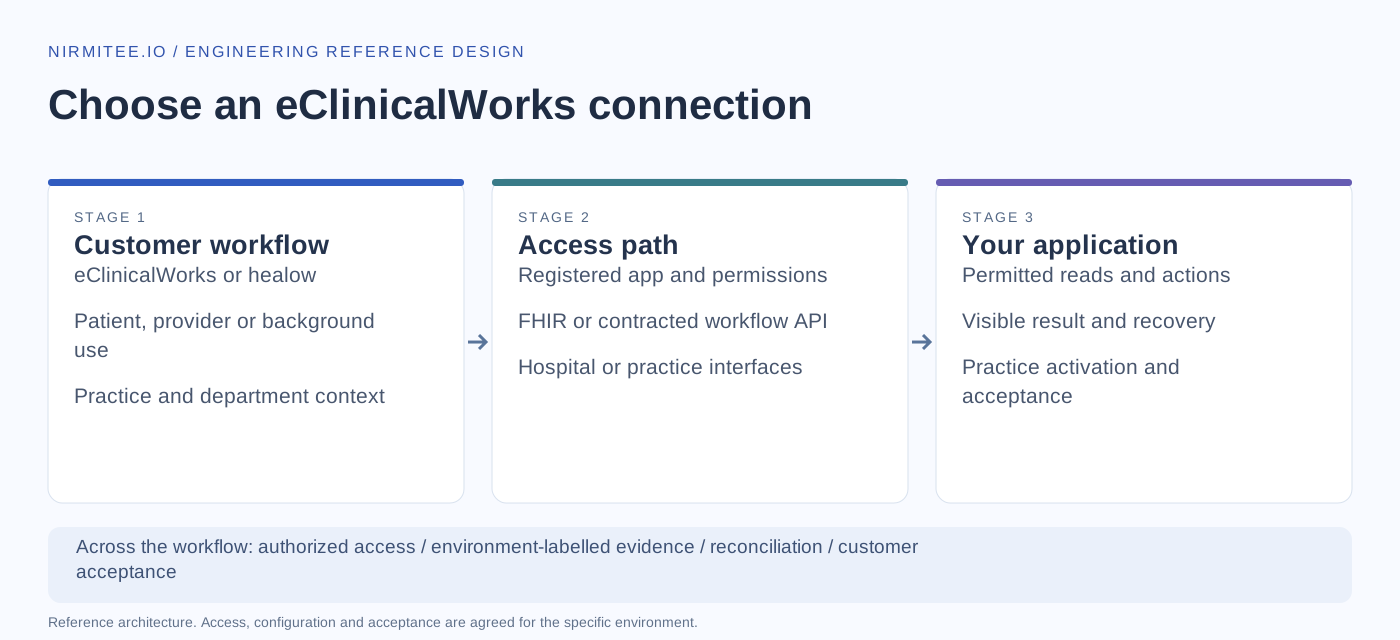
The walkthrough applies to the demonstrated flow. Scheduling, write-back, background access and customer activation must be confirmed for the relevant product, app and agreement.
Discuss this workflowThe problem
What health tech teams tell us when they start building on eClinicalWorks.
Provider and backend apps register on eClinicalWorks Connect, patient and booking apps on healow, and nobody is sure which app type the product needs.
The product needs to write to the chart, but the write APIs are contracted, not in the public CapabilityStatement, and the price is not published.
Going over 250 calls a minute at one practice blocks the whole app for the rest of that minute, across every practice.
USCDI v3 reads and many writes need a 12.0.2 or 12.0.3 patch, so a feature works in one practice and fails in the next.
Use cases
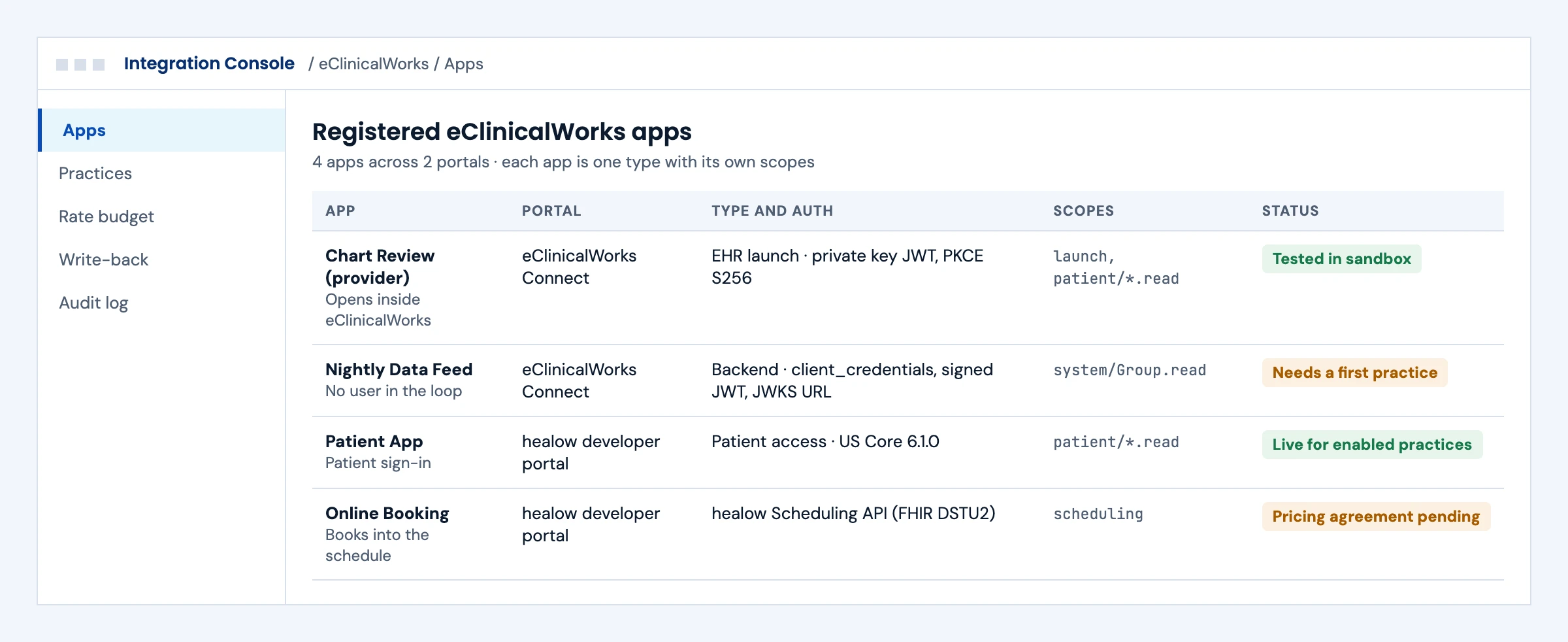
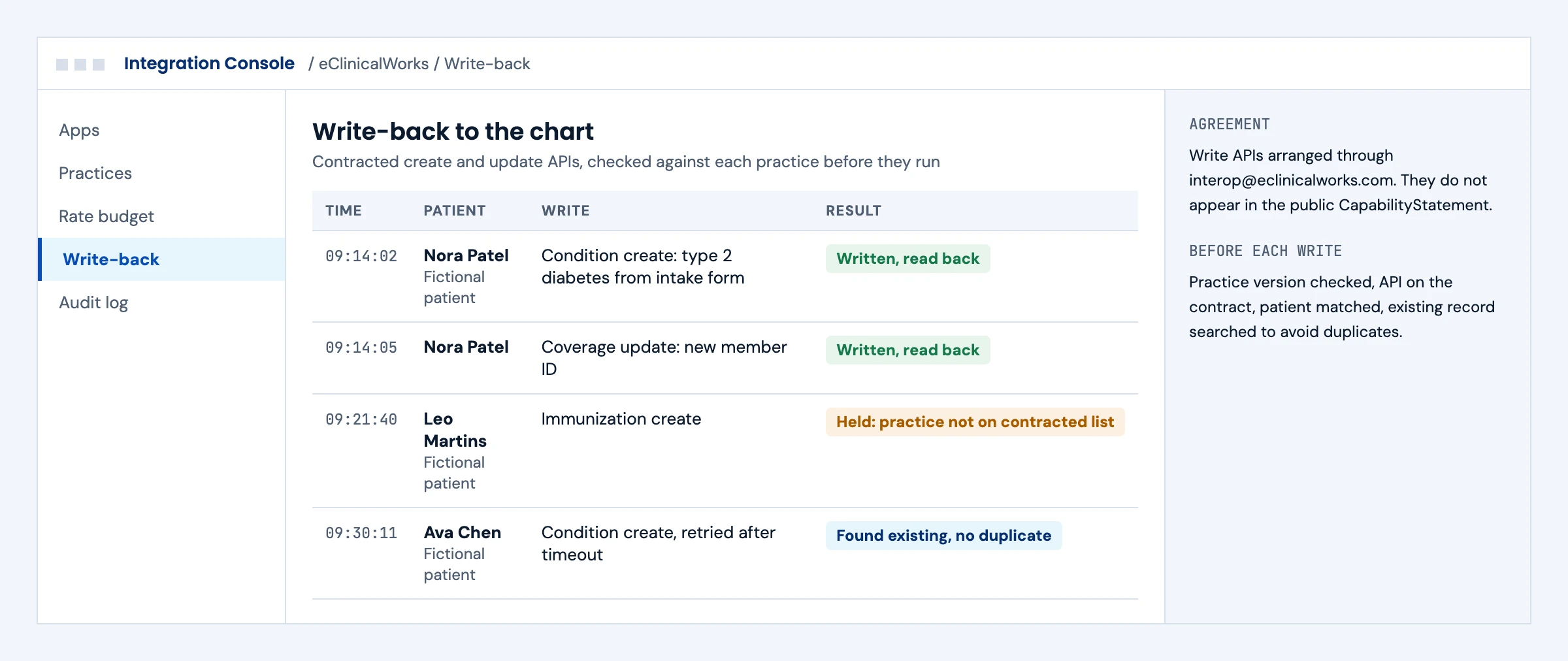
Four use cases, each shown as the console your team works in. The practices and patients are fictional; the eClinicalWorks rules behind each screen are real.
Teams register one app and later find it cannot both open inside the chart and run a nightly feed.
Each workflow has its own registered app: provider launch and backend feeds on eClinicalWorks Connect, patient access and booking on healow, each with the right scopes and status.
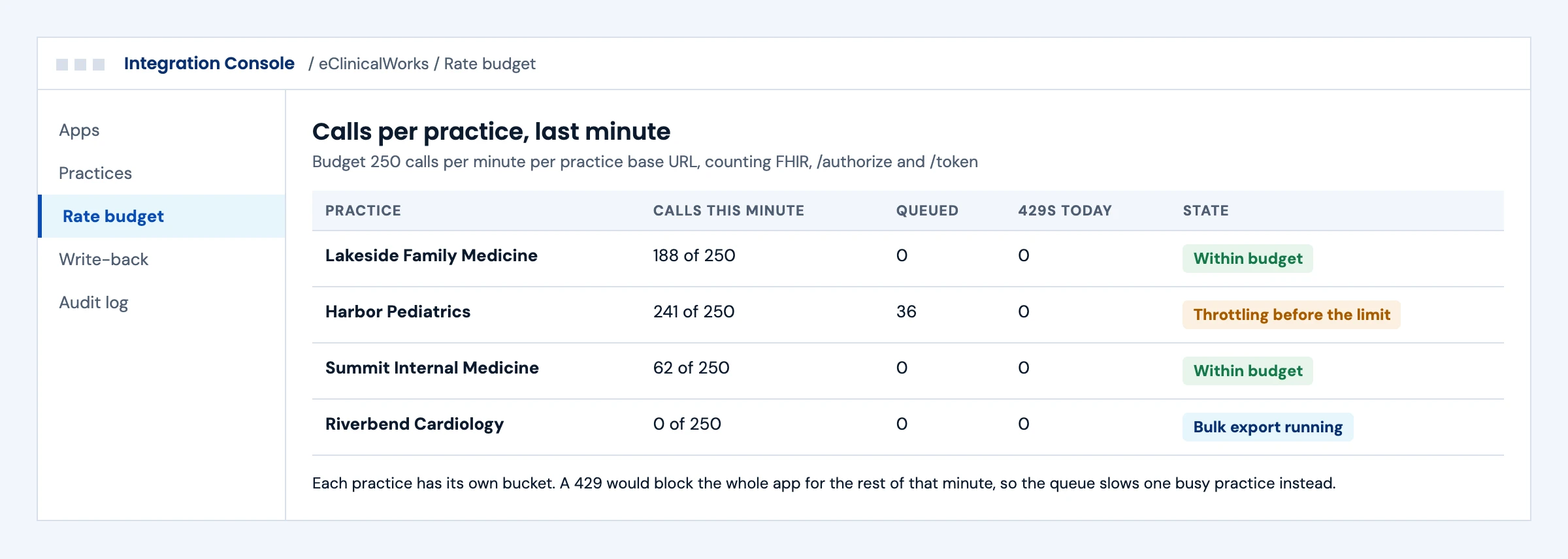
A large practice runs a backfill and every practice sees errors for the next minute.
Calls are counted per practice base URL against the 250 per minute budget, a queue slows the busy practice first, and bulk export handles large loads.
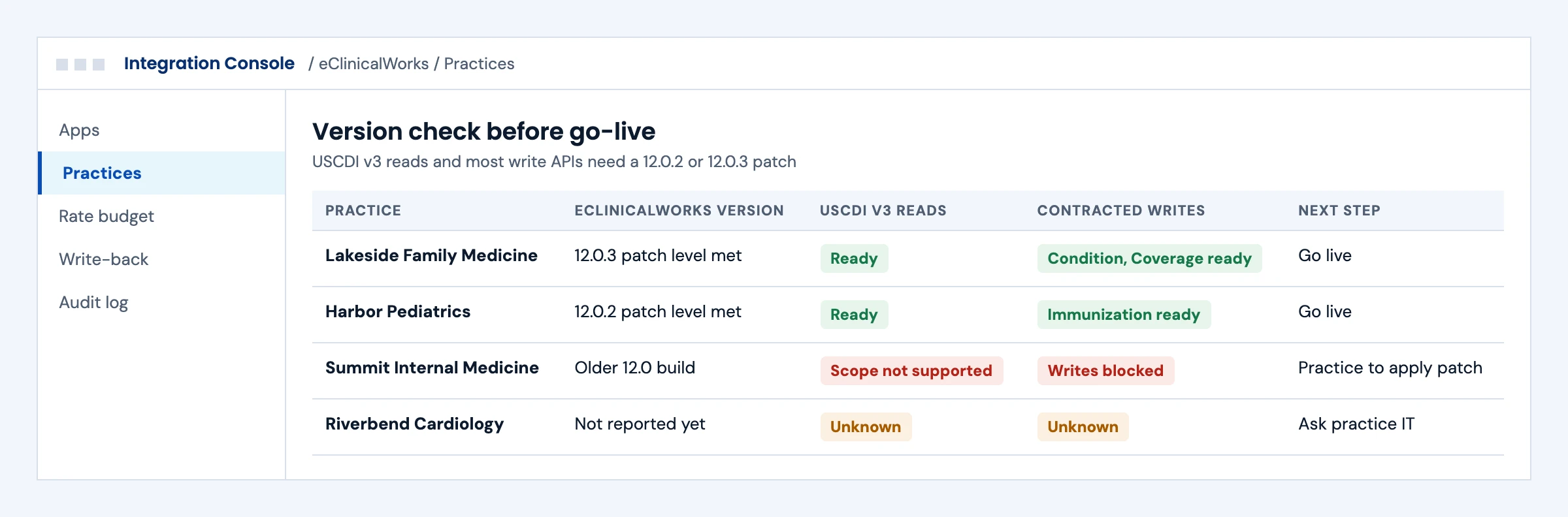
A feature is switched on and fails in a practice running an older build.
Each practice's version is checked against the patch each API needs, so USCDI v3 reads and contracted writes only go live where they will work.
Data from the product is retyped into the chart, or a retry creates a second record.
Contracted creates and updates run only for APIs on your agreement, each write is read back, and a retry after a timeout first looks for the existing record, where the API allows that search, before it creates anything.
First call
The answers decide the app types, the agreements and the order of work.
That decides eClinicalWorks Connect, healow or both, and which app types to register.
Reads run on the certified FHIR APIs; writes need a contract through eClinicalWorks, so we start it in week one.
Booking runs on the healow Scheduling API with a pricing agreement and each practice's consent, or through HL7 SIU.
USCDI v3 reads and many writes need a recent patch, so the version list shapes the rollout.
Large first loads go through bulk export to stay inside the 250 calls per minute budget.
Some workflows are faster over an existing interface through Mirth Connect.
Your organization does; we prepare the requests and the API list with you.
Backend and bulk apps need an activated practice to test, so we line one up early.
What we build
eClinicalWorks splits developer access across two portals: provider and backend apps register on eClinicalWorks Connect, and patient, scheduling and remote monitoring apps on the healow developer portal. Most products need pieces from both.
Documentation, decision support and review tools that a clinician opens inside eClinicalWorks. The EHR launch loads your app in an iframe with patient and encounter context; a standalone launch signs the user in from your own app. We handle secret or private key JWT clients, PKCE with S256 and refresh tokens. For cards in the workflow, eClinicalWorks supports CDS Hooks for encounter-start and order-select.
Analytics, population health and data platform feeds that use client_credentials with a signed JWT and a JWKS URL registered on the portal. eClinicalWorks returns invalid_client when that URL is unreachable or not allowlisted, and expects system/Group.read in bulk token requests only. Bulk export follows Bulk Data STU 1.0.1 against patient groups the practice saves from its EMR Registry, with _since for incremental loads.
eClinicalWorks FHIR has no Appointment, Schedule or Slot resource, and Encounter searches cannot filter by status, so a day list built from Encounter misses patients who are booked but not checked in. We build the complete list from an HL7 SIU feed (S12 new, S13 rescheduled, S15 cancelled) through Mirth Connect into a live appointment table, and use the healow Scheduling API where a product books visits.
Patient access apps read US Core 6.1.0 data through healow, need no contract, and go live for every practice with Patient APIs enabled once registration succeeds. Online booking runs on the healow Scheduling API (FHIR DSTU2), which needs a pricing agreement with healow and each practice's consent, and its terms bar caching the data or running the app for another company. Remote monitoring devices post readings through the healow RPM Device API.
ADT, SIU, ORM, ORU, DFT and MDM messages over an interface the practice sets up with eClinicalWorks. eClinicalWorks says lab interfaces need a statement of work and may carry costs, and publishes no HL7 v2 specification, so we work from the practice's interface documents. We build and run the Mirth Connect channels, mapping, acknowledgements, alerting and replay.
eClinicalWorks lists 29 create, update and delete FHIR APIs, among them Patient, Coverage, Condition, Immunization, MedicationRequest, vital signs, referrals and clinical notes. They are contracted through interop@eclinicalworks.com, many need a specific 12.0.2 or 12.0.3 patch, and none appear in the public CapabilityStatement. We build against the resource specifications and error code guide.
Two kinds of access
Read and search APIs for USCDI v1 (US Core 3.1.1) and USCDI v3 (US Core 6.1.0) on a per-practice base URL. USCDI v3 reads need a recent 12.0.2 or 12.0.3 patch; otherwise eClinicalWorks answers that the scope is not supported.
Write-back, healow appointment booking and one Encounter read labeled as a paid API sit outside the certified set. Each needs its own agreement, and prices are not published.
From registration to production
Contracts and practice activation decide the calendar more than code does, so we start them on day one.
We set up your organization on eClinicalWorks Connect and, where needed, healow, then register each app with its scopes, URLs and JWKS URL. EHR-launch apps are tested in the eClinicalWorks sandbox.
Registered apps, a first launch and a scope list.If the product writes back or books appointments, we prepare the request to eClinicalWorks or healow with you, listing the exact APIs.
A written API list for each agreement.We build the integration and check each practice's eClinicalWorks version against the patch each API needs, including USCDI v3 reads and every write.
Tested workflows and a version matrix per practice.We publish the app, share its App Activation Code and walk each practice through activation. Bulk apps also need the practice's patient groups.
A repeatable activation runbook and support handover.Evidence
The engineering behind our eClinicalWorks delivery, with public code, a recorded walkthrough and test results you can inspect.
A patient app connecting to an eClinicalWorks record through healow over SMART on FHIR: PKCE sign-in, per-category consent, then conditions, allergies, medications, vitals, immunizations and labs read in one pass. Recorded in healow's sandbox practice with its published synthetic test patient. Read only; provider and backend apps are not shown.
Watch the 6-minute walkthrough ↗One app run against the Epic and Oracle Health developer sandboxes in a single session, with the launch, PKCE and token handling an eClinicalWorks SMART app needs.
Our team has built 350+ interfaces on Mirth Connect, the engine we use for the HL7 v2 side of an eClinicalWorks integration.
Passed all 47 ONC (g)(10) SMART App Launch Standalone Patient App tests (October 27, 2026), so we know the server side of the launch.
Headless EHR on GitHub ↗Before you commit
Your organization does. Apps are registered to your organization on eClinicalWorks Connect and healow, and any contract is between you and eClinicalWorks, so the integration and its access stay yours. We handle the registration work, build the integration and run activation with each practice.
Not for the certified FHIR APIs today: eClinicalWorks says they are available at no cost at this time, including bulk. Write APIs, healow scheduling and the Encounter read labeled as paid need an agreement, and those prices are not published.
Yes, for the resources eClinicalWorks lists, under a contract arranged through interop@eclinicalworks.com, and many writes need a recent 12.0.2 or 12.0.3 patch. We confirm each write, how clinicians see it and how duplicates are handled before it goes into scope.
Not through the eClinicalWorks FHIR server, which has no Appointment, Schedule or Slot resource. Booking runs on the healow Scheduling API, which needs a pricing agreement with healow and consent from each practice. HL7 SIU messages are the other route.
Not from eClinicalWorks FHIR alone. It has no Appointment resource, and an Encounter is the visit itself, so booked patients who have not arrived often do not appear. First compare Encounter?practitioner=&date= with the practice's schedule screen and page with the page parameter. For the complete list, the practice turns on an HL7 SIU feed and we keep a live appointment table from it. The healow Scheduling API finds and books open slots, but has no call that lists a provider's booked appointments.
Yes. When your product handles billing, charges can leave eClinicalWorks as HL7 DFT messages, and eligibility, claims and payments run as X12 270/271, 837 and 835 through the practice's clearinghouse. We build these flows in Mirth Connect and test them against the clearinghouse's acknowledgements before go-live.
For provider and backend apps, you share the App Activation Code, the practice adds it under Product Activation, you approve the practice on the portal and the practice clicks Activate. Patient apps on healow skip this step.
Going over 250 calls a minute on any practice blocks your whole app for the rest of that minute. We cache tokens, queue requests per practice and use bulk export for large loads, so one busy practice cannot stop the others.
Partly. EHR-launch apps run in the eClinicalWorks sandbox and patient apps in the healow sandbox. Backend and bulk apps need a practice that has activated them, so we line up a first practice early.
Often, yes. eClinicalWorks was designated a QHIN in January 2025 and exchanges records through PRISMANet. That helps retrieve records for treatment, but it does not put your product in the clinician's workflow, book appointments or write back to the chart.
The number of workflows, read versus write scope, healow scheduling or HL7 v2, how quickly agreements are signed and how many practices you activate. Any eClinicalWorks or healow charges are separate from our engineering fees.
Define the next step
Tell us about your product and the practices you sell to. We will come back with the app types, agreements and activation steps your workflow needs.
Please don’t include patient data, credentials or sensitive records.
eClinicalWorks and healow are trademarks of eClinicalWorks, LLC. Other product names are trademarks of their respective owners.
From our YouTube channel
Explore the workflows and decisions behind this service. Demonstrations and recorded discussions have the scope described in each video.
Watch the healow SMART on FHIR walkthrough.