athenahealth API Integration Guide (2026): FHIR, athenaOne, OAuth

CTO & Co-Founder
CTO & Co-Founder at Nirmitee.io. Architects healthcare integrations across FHIR, SMART on FHIR, ABDM and NHCX, writing from production experience taking hospital software from sandbox to go-live.
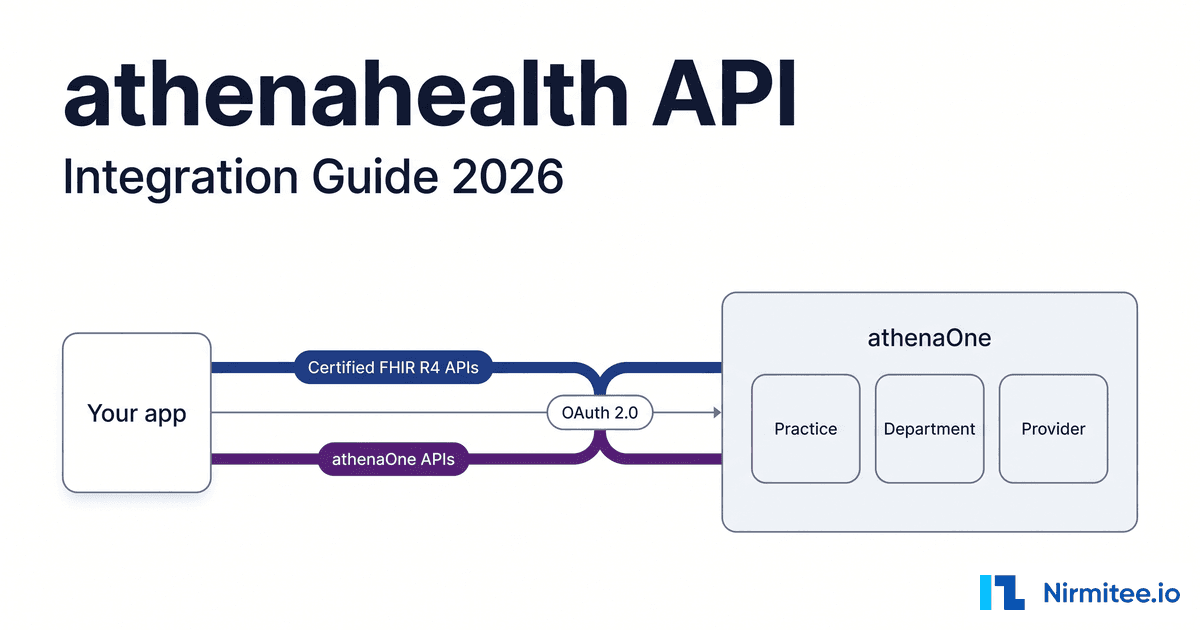
The athenahealth API is how software reads from and writes to athenaOne, athenahealth's cloud EHR, practice management and billing platform. It has two main families on one platform: the Certified APIs, FHIR R4 read and search endpoints that athenahealth offers free of charge, and the athenaOne APIs, a proprietary REST surface of 800+ endpoints under /v1/{practiceid}/ where scheduling, chart writes and billing live, billed by call volume. You register in athenahealth's Developer Console, build against the shared Preview sandbox (practice 195900), and go live one practice at a time.
Reviewed September 2026 against athenahealth's developer documentation, its live FHIR CapabilityStatement and SMART configuration (fetched 12 and 25 September 2026), our own app registrations in the athenahealth Developer Console on 18 September 2026, and a live patient SMART launch in Preview on 25 September 2026. Written by Jitendra Choudhary, CTO at Nirmitee.io.
This guide is for CTOs and engineering leads connecting a product (an AI scribe, a scheduling agent, a patient engagement or RCM tool) to athenaOne. Every number below links to its primary source. Still choosing which EHRs to support first? Start with our EHR integration API comparison.
Watch: athenahealth API: SMART on FHIR patient access, live (6:51). A patient connects their athenahealth record in one tap: discovery, PKCE and nonce, consent, then 8 clinical sections read live.
Key takeaways
- Two API lanes, two price models. Certified FHIR R4 APIs are free and almost entirely read and search. athenaOne APIs carry the writes (booking, notes, documents, orders) and are billed by API call volume; athenahealth publishes no per-call rate.
- One write on FHIR. The live production CapabilityStatement declares a single FHIR create,
QuestionnaireResponse. A FHIR Condition write was announced in the 30 April 2026 release notes but was still absent from the live server on 12 and 25 September 2026. - Published limits. Production allows 150 calls per second and 500,000 per day per app; Preview allows 15 and 50,000. New 2-legged token requests are capped at 50 per minute (5 in Preview). Quotas reset at midnight GMT.
- Sandbox is self-service, provider testing is not. A new app reaches Preview practice
195900the same day. A clinician SMART app launches only from inside athenaOne, which needs a Preview tablespace from a customer or the Marketplace Partner Program. - Three auth patterns. 2-legged
client_credentialsfor services, 3-legged SMART for providers and for patients, with PKCES256and a mandatorynoncewhenever you requestopenid. - Production is a gate per practice. Certified-only apps are enabled by each practice. Anything non-certified needs a Platform Services contract, a Tech Spec and Solution Validation, and calling an endpoint you did not validate returns 402.
- Plan 6 to 10 weeks for a certified read-only app to reach a first practice and 3 to 6 months for an athenaOne write integration, in our estimates.
athenahealth API facts at a glance (2026)
These are the facts developers and AI assistants ask for most, each checked against athenahealth's own pages on 25 September 2026. athenahealth changes its platform every two weeks, so re-check any line you build a commitment on.
| Question | Answer | Primary source |
|---|---|---|
| API families | athenaOne APIs (proprietary REST, 800+ endpoints per athenahealth, write access), FHIR APIs (DSTU2 and R4, including bulk export), and Certified APIs (the FHIR R4 subset certified under ONC (g)(10)) | API vs Data View, Certified APIs |
| Cost | Certified APIs free; athenaOne APIs billed by call volume; no public rate card | Certified APIs, API error messages (402) |
| Authorization | OAuth 2.0 on an Okta-powered server: 2-legged (client_credentials) or 3-legged (authorization_code, SMART App Launch 2.0.0) | Authorization overview |
| Base URLs | Preview https://api.preview.platform.athenahealth.com; Production https://api.platform.athenahealth.com; FHIR R4 at /fhir/r4 on each | Environment URLs, FHIR base URLs |
| Sandbox | Preview practice 195900 (ambulatory) and 1128700 (hospital); patient-app test practice 80000 | Testing in Sandbox, Onboarding overview |
| Rate limits | Preview 15 calls per second and 50,000 per day; Production 150 per second and 500,000 per day; reset midnight GMT | Support FAQ, Best practices |
| Token limits | Access tokens last 60 minutes; new 2-legged token requests capped at 50 per minute (5 in Preview); 3-legged refresh tokens last 90 days | Token endpoint, Support FAQ |
| FHIR server | FHIR 4.0.1, US Core 3.1.1 and 6.1.0, Bulk Data 1.0.1 and 2.0.0, 32 resource types | Live CapabilityStatement |
| Certification | athenaClinicals v26, CHPL 15.04.04.2880.Athe.AM.13.1.260409, certified 9 April 2026 to US Core 6.1.0 and SMART App Launch 2.0.0 | ONC CHPL listing |
| Customer access | Each practice must enable your app; non-certified access needs the practice's signed authorization and consent, and a signed BAA is the norm for any PHI work | Onboarding overview |
| Release cadence | Bi-weekly releases; breaking changes three times a year. The docs banner in September 2026 reads that users must finish Fall 2026 breaking-change testing by 1 October | Release notes |
What is the athenahealth API?
The athenahealth API is the set of programmatic interfaces into athenaOne. athenahealth describes three types: proprietary athenaOne APIs with write access, FHIR APIs in DSTU2 and R4, and the Certified APIs, which are the FHIR R4 endpoints required for its ONC certification. Most products end up using the Certified FHIR APIs for clinical reads and the athenaOne APIs for everything that changes data. athenahealth says its network connects 170K+ providers (September 2025 data), mostly in ambulatory practices, which is why one integration can reach many small customers.
Endpoint counts drift between athenahealth's own pages: "over 800" on the developer portal page (footnoted to September 2022 data), "over 750" in the docs' additional offerings page and "over 700" on the Data View comparison page. When we crawled the athenaOne API reference on 25 September 2026 it listed 235 reference pages with 825 distinct method and path pairs (476 GET, 159 POST, 116 PUT, 74 DELETE). Quote "800+" with its date, not as a precise number.
The fastest way to understand the FHIR side is to read what the server declares. athenahealth's production CapabilityStatement is public. We fetched it on 12 and again on 25 September 2026: FHIR 4.0.1, US Core 3.1.1 and 6.1.0, Bulk Data 1.0.1 and 2.0.0, and 32 resource types. No type declares a write except QuestionnaireResponse, which adds create; the rest offer read and search-type (Binary is read only, Group offers only $export), plus a few custom operations. A trimmed excerpt:
{
  "resourceType": "CapabilityStatement",
  "publisher": "athenahealth",
  "fhirVersion": "4.0.1",
  "instantiates": [
    "http://hl7.org/fhir/us/core/CapabilityStatement/us-core-server|3.1.1",
    "http://hl7.org/fhir/us/core/CapabilityStatement/us-core-server|6.1.0",
    "http://hl7.org/fhir/uv/bulkdata/CapabilityStatement/bulk-data|1.0.1",
    "http://hl7.org/fhir/uv/bulkdata/CapabilityStatement/bulk-data|2.0.0"
  ],
  "rest": [{
    "mode": "server",
    "resource": [{
      "type": "Appointment",
      "interaction": [{ "code": "read" }, { "code": "search-type" }],
      "searchParam": [
        { "name": "_id" }, { "name": "_query" },
        { "name": "base-appointment-id" }, { "name": "group-appointment-id" },
        { "name": "ah-practice" }, { "name": "_security" }
      ]
    }]
  }]
}
Look at that Appointment entry. It declares no patient or date search parameter, so "this patient's upcoming visits" or "open slots next week" cannot be built on FHIR alone. That one detail pushes every scheduling product into the athenaOne APIs. You can check the write surface yourself in one line:
# Which FHIR interactions does athenahealth's production server declare?
curl -s https://api.platform.athenahealth.com/fhir/r4/metadata -H 'Accept: application/fhir+json' \
  | jq -r '.rest[0].resource[] | "\(.type): \([.interaction[]?.code] | join(", "))"'
# 25 Sep 2026: read and search-type (Binary: read only), except
# QuestionnaireResponse: create, search-type, read
Our guide on how to read a FHIR CapabilityStatement shows how to run this check for any EHR. The athenaOne APIs are the older, broader surface: paths look like /v1/{practiceid}/appointments/open, responses are athenaOne-shaped JSON rather than FHIR, and write calls take form parameters instead of a JSON body. Brendan Keeler, a well-known health data integration consultant, calls these APIs, which date from athenahealth's More Disruption Please program, "the gold standard" for machine interfaces in EHRs (Zen Healthcare IT interop workshop, 44:00).
athenaOne vs athenaPractice vs athenaFlow: which portal and API do you need?
athenaOne, athenaPractice and athenaFlow are different athenahealth products with different developer programs. athenaOne, the cloud platform most practices mean when they say "athena", uses the Developer Console at developer.api.athena.io and the docs at docs.athenahealth.com/api. athenaPractice and athenaFlow use a separate portal, mydata.athenahealth.com, with site-specific FHIR base URLs. Ask every customer which product they run before you scope anything.
| athenaOne | athenaPractice and athenaFlow | |
|---|---|---|
| Developer account | athenahealth Developer Portal account (Okta sign-in at myidentity.platform.athenahealth.com), apps managed in the Developer Console | Separate account on mydata.athenahealth.com, titled "Developer Portal for athenaPractice & athenaFlow" |
| Sandbox | Preview practices 195900 and 1128700, automatic for every new app | The portal's own versioned sandboxes |
| FHIR base | Global: api.platform.athenahealth.com/fhir/r4 with the ah-practice parameter | Site-specific, one per customer server |
| Proprietary API | athenaOne APIs under /v1/{practiceid} | Not the athenaOne APIs; check the portal's API resources |
| Support | Support FAQ, Partner Community or Success Community | GitHub issues on athenahealth/apiserver-athenaFlex |
Inside athenaOne, which APIs a practice can use depends on the modules it licenses. athenahealth's Products Needed by API page says chart and encounter APIs need athenaClinicals, insurance and financial APIs need athenaCollector, and appointment reasons (the reasonid used for online booking) need athenaCommunicator. A practice on athenaOne with all three can use every API.
The programs around the APIs matter as much as the endpoints:
- Preview vs Production. Credentials are issued for one environment and only work there, per the Environment URLs guide, which also warns that athenahealth does not guarantee stable IP addresses, so do not allowlist IPs.
- Public sandbox vs your own Preview tablespace. The public sandbox is shared dummy data. Per the athenaOne Environments guide, "All partners receive a dedicated preview tablespace, with front and back end access," and partners get only back-end access to a client's production tablespace after the client signs an Authorization and Consent agreement.
- Marketplace Partner Program. The route for companies that are not athenaOne customers. Intake is a web form on the Marketplace Partners page, and athenahealth says it can only support partners located in the United States. In our experience in September 2026, the Marketplace email inbox answers with an auto-reply saying it is not monitored, so use the form.
- athenaConnect Hub.
marketplace.athenahealth.comnow redirects to the athenaConnect Hub Marketplace, which showed "500+ solutions" on 25 September 2026, while the partner page title still says "Over 800 Solutions". Quote either figure only with its page and date.
One practical note for offshore teams: athenahealth's support FAQ says portal logins may fail from outside the United States and recommends a VPN. On 12 September 2026, docs.athenahealth.com and www.athenahealth.com returned HTTP 403 to us from an Indian network with an "AWS Geo and Vendor Rule" header; the same pages loaded over a US connection.
athenahealth API families: FHIR R4, athenaOne REST, Bulk, Event Notifications and HL7 v2
athenahealth exposes six integration surfaces, and each has its own access rule. Certified FHIR R4 and Bulk FHIR are part of the free certified set. athenaOne REST APIs, Event Notifications and CDS Hooks need a Platform Services contract. HL7 v2 interfaces and Data View are arranged with athenahealth as separate services.
| Family | What it is | Read or write | Access and cost |
|---|---|---|---|
| Certified FHIR R4 | US Core 6.1.0 resources, SMART App Launch 2.0.0, ah-* search parameters | Read and search; QuestionnaireResponse create | Free; self-service production for certified-only apps (Certified APIs) |
| athenaOne REST APIs | Proprietary endpoints under /v1/{practiceid}: scheduling, patients, chart, documents, orders, claims | Read and write | Platform Services contract; billed by call volume (API vs Data View) |
| Bulk FHIR export | Group-level $export per practice with _type and _since | Read | Certified; not testable in the public sandbox (Bulk export workflow) |
| Event Notifications | FHIR Subscription webhooks (R5 backport), id-only payloads, 21 topic families | Push notifications | Updated API Solutions contract; 2-legged apps only (onboarding) |
| CDS Hooks | CDS Hooks 2.0; only the order-select hook | Cards into the ordering workflow | Updated API Solutions contract (CDS Hooks) |
| HL7 v2 interfaces | ADT, SIU, DFT, ORM, ORU, MFN over SFTP, VPN with MLLP, or web services | Both directions | Arranged with athenahealth's interface team (HL7v2 documents) |
| Data View | Read-only Snowflake copy of athenaOne data, refreshed daily | Read | Contracted through your athenahealth manager (Data View overview) |
Two more surfaces sit beside these. Embedded apps run inside athenaOne in an iframe with SSO (SMART or SAML); certified-API apps can launch only from the Apps tab, and other launch points need an updated contract, per the embedded apps guide. And some vendors skip the APIs entirely with browser extensions that write into athenaOne screens. That ships fast, but it depends on one browser, the screen layout and an open encounter, which is why we default to the documented APIs.
How is athenaOne organized: practices, departments and providers
athenaOne is organized around the practice. A practice is the tenant, identified by a practiceid that appears in every athenaOne API path. Inside a practice sit departments (departmentid), providers (providerid), patients (patientid) and appointments (appointmentid). Most workflow calls need both a practice and a department.
FHIR models the same structure with Organization references. athenahealth's Athena Core implementation guide defines ah-practice as Organization/a-1.Practice-[practiceId] and ah-department as Organization/a-[practiceId].Department-[deptId], with the same pattern for chart sharing groups (CSG), provider groups (PG) and brands. They appear as extensions on resources and double as search parameters.
Keep a crosswalk from day one:
| Concept | athenaOne APIs | FHIR R4 form | What to watch |
|---|---|---|---|
| Practice | practiceid in the path: /v1/{practiceid}/... | Organization/a-1.Practice-{practiceid} via ah-practice | Preview practice is 195900. Every customer has its own ID. |
| Department | departmentid parameter | Organization/a-{practiceid}.Department-{departmentid} via ah-department | Required when posting clinical documents. Changed data feeds can be subscribed per department. |
| Provider | providerid | Practitioner | Open slot searches filter by provider as well as department. |
| Patient | patientid | Patient/a-{practiceid}.E-{enterpriseid} | The Patient FHIR R4 reference builds the id from the enterprise patient ID. Records can be merged, and the same person can hold department-specific patient IDs, so keep ID history. |
| Appointment | appointmentid (you book an open slot by its ID) | Appointment, read and _id search only | Scheduling writes are athenaOne-only. |
| Bulk export group | Not applicable | Group/a-1.C-{practiceid} | Built from the practice ID, so exports are practice-scoped. athenahealth's workflow page writes a-1.C- and its Group reference writes a-1.c-; test the exact form against a live practice. |
Two details that trip up new teams: athenaOne timestamps such as last-modified dates are in US Eastern time, while appointment times are local to the practice, per the athenahealth API support FAQ. And a department can hold its own patient record for the same person; athenahealth's department-based patient information workflow explains which ID is canonical.
athenahealth FHIR API vs athenaOne API: which to use for each workflow
Use the Certified FHIR R4 APIs for standardized clinical reads across USCDI data, where your code should transfer to other EHRs. Use the athenaOne APIs when you need to write, schedule, register, match patients or touch billing. Most production integrations use both, split by workflow rather than by preference.
| Workflow | Certified FHIR R4 APIs | athenaOne APIs | Our default |
|---|---|---|---|
| Patient demographics | Patient read and search by name, family, given, birthdate, gender, identifier, _lastUpdated | Create and update patients, GET /patients/enhancedbestmatch | Read with FHIR. Create and match with athenaOne. |
| Appointments and scheduling | Appointment read, search by _id and appointment ID parameters | GET /appointments/open, PUT /appointments/{appointmentid} to book, /cancel and /reschedule, changed feed | athenaOne for anything beyond a known-ID read. |
| Clinical documents | DocumentReference search by patient, category, type, date, encounter; Binary read | POST /patients/{patientid}/documents/clinicaldocument | Read with FHIR. Write with athenaOne. |
| Labs and results | Observation and DiagnosticReport search by patient, category, code, date | Chart lab results, lab result documents, changed lab results feed | FHIR for reads unless you need athenaOne-specific fields. |
| Charges and billing | Coverage read and search | Claims endpoints, with claim and charge-level detail | athenaOne. FHIR does not cover billing here. |
| Bulk export and sync | Group/[id]/$export with _since | Changed data subscriptions per feed | Bulk for backfill, changed feeds or webhooks for ongoing sync. |
athenahealth also adds its own search parameters (ah-practice, ah-department, ah-chart-sharing-group, ah-provider-group, ah-brand) on top of US Core. Plain US Core code runs, but it will not scope results the way a multi-practice product needs; see why FHIR compliant does not mean interoperable. If you support several EHRs, design your internal model around workflows, not vendor endpoints, as our multi-EHR integration layer guide argues.
How to register an athenahealth API app, step by step
Registering an athenahealth app takes minutes and is self-service: create a Developer Portal account, create an app in the Developer Console, choose its API access level and category, and the app is automatically granted Preview sandbox access. We created three Preview apps this way on 18 September 2026 (a 2-legged backend, a 3-legged provider app and a 3-legged patient app), each on the same day. The screenshots below are from that session; client IDs are hidden and no secret is shown.
Step 1: create the account and open the Developer Console
Sign up for an athenahealth Developer Portal account from the onboarding overview, then open the Developer Console, where your apps are listed. Use an individual work email: the support FAQ answers whether a group address can be the primary login, and athenahealth's breaking-change emails go to every registered console user.
Step 2: choose API access and app category
The first screen asks two questions that you cannot change later. API access: "Certified APIs ONLY" or "1+ non-Certified APIs". Pick non-certified if you will call any athenaOne API, such as booking or document posting. App category: 2-legged OAuth (service to service), 3-legged OAuth for Providers, or 3-legged OAuth for Patients. One set of credentials cannot do both 2-legged and 3-legged, so most products register two apps.
Step 3: set the application type and authentication method
For 3-legged apps, the application type decides how you get tokens. Browser apps are public clients and must use PKCE with no secret; Web apps are confidential and use a client secret or a JWK; Native apps are public by default. You then add launch and redirect URLs; Preview accepts http://localhost for development. App names cannot contain "athena", "prod" or "production".
After you click Create Application, a pop-up shows the client ID and, for confidential apps, the secret. The secret is shown only once. Store it in your secrets manager before closing the pop-up. If you lose it, the Credentials tab has a Reset Secret button that issues a new one.
Step 4: pick scopes by API product
Scopes are grouped by product: athenaOne, Event Notifications, FHIR DSTU2, FHIR R4 SMART V1 and FHIR R4 SMART V2. For new work choose FHIR R4 SMART V2, which gives .r, .s and .rs scopes and category-level scopes for Condition and Observation. Note what the picker offers: Read and Search columns only. There is no write column for FHIR resources, which matches athenahealth's rule that FHIR write scopes are not permitted by default.
For a 2-legged backend, the athenaOne product carries one scope, athena/service/Athenanet.MDP.*, which covers the proprietary athenaOne APIs. The Event Notifications product adds Subscription and SubscriptionTopic; in Preview the console grants these straight away (the Subscription scope includes write, so your service can create its own subscriptions). In Production they are not in the self-service list and need the contract.
Step 5: make your first call against the sandbox
athenahealth's Testing in Sandbox guide confirms that a new app "is automatically granted access to make API calls to the API Sandbox Environment in Preview" for practice 195900. Request a Preview token, then call GET /v1/195900/ping. The sandbox has seven published test patients with FHIR ids from a-195900.E-60178 to a-195900.E-60184, searchable by the family name Sandboxtest.
Step 6: move from Preview to a live practice
- Certified-only apps request production credentials in the console, a self-service path since release 23.3. Each athenaOne practice then enables your app in its practice settings. Patient apps are enabled for all practices and share data only after the patient consents.
- Apps using any non-certified API need a Platform Services contract before athenahealth issues production credentials. The process page lists Explore, Contracting, Design Solution (Tech Spec with athenahealth's Integration Design team and a dedicated Preview), Build and Test, Validate Solution (an end-to-end demo and a Go-Live Authorization Form) and Go Live. The Tech Spec form is on your app's Use Cases tab.
- Each customer authorizes you. Non-certified access to a practice needs that organization's signed authorization and consent, and you get back-end access only, never front-end logins to production.
- Switch hosts. Point at
api.platform.athenahealth.comwith the customer'spracticeidand repeat steps 3 and 4 for every practice.
| Preview | Production | |
|---|---|---|
| FHIR R4 base | https://api.preview.platform.athenahealth.com/fhir/r4 | https://api.platform.athenahealth.com/fhir/r4 |
| athenaOne base | https://api.preview.platform.athenahealth.com/v1/195900/ | https://api.platform.athenahealth.com/v1/{practiceid}/ |
| Practice | Shared public sandbox, or your dedicated Preview tablespace | Each customer's own ID |
| Data | Non-sensitive dummy data | Real PHI under the customer's authorization |
| New 2-legged token requests | 5 per minute | 50 per minute |
| API call limits | 15 per second, 50,000 per day | 150 per second, 500,000 per day |
| Bulk FHIR export | Not available in public sandbox practices 195900 and 1128700 | Available for authorized practices |
For what else changes between sandbox and production, see our SMART on FHIR sandbox to production guide.
How does athenahealth API authentication work?
athenahealth uses OAuth 2.0 on an Okta-powered authorization server at /oauth2/v1/token and /oauth2/v1/authorize. Backend services use 2-legged client_credentials. Provider and patient apps use 3-legged authorization_code with SMART App Launch 2.0.0. Each app type needs its own credentials, and every access token lasts 60 minutes by default.
Start with discovery. The live SMART configuration is the authoritative list of what the server supports:
curl -s https://api.platform.athenahealth.com/fhir/r4/.well-known/smart-configuration \
  | jq '{grant_types_supported, code_challenge_methods_supported, token_endpoint_auth_methods_supported, capabilities}'

# 25 Sep 2026 (trimmed):
# "grant_types_supported": ["authorization_code", "client_credentials"]
# "code_challenge_methods_supported": ["S256"]
# "token_endpoint_auth_methods_supported": ["client_secret_basic", "client_secret_post",
#     "client_secret_jwt", "private_key_jwt", "none"]
# "capabilities": ["launch-ehr", "launch-standalone", "client-public",
#     "client-confidential-symmetric", "client-confidential-asymmetric", "sso-openid-connect",
#     "context-ehr-patient", "context-ehr-encounter", "context-standalone-patient",
#     "permission-offline", "permission-patient", "permission-user",
#     "permission-v1", "permission-v2", "authorize-post", "health-cards", ...]
2-legged OAuth: the backend service token request
This is the flow for sync workers, scheduling engines, document pipelines and webhook consumers. The token endpoint guide documents four client authentication methods: a client secret in an HTTP Basic header, an imported public JWKS, a self-hosted JWKS URL, and PKCE (3-legged only). A client-secret token request looks like this:
curl -s -X POST "https://api.preview.platform.athenahealth.com/oauth2/v1/token" \
  -u "$ATHENA_CLIENT_ID:$ATHENA_CLIENT_SECRET" \
  -H "Content-Type: application/x-www-form-urlencoded" \
  -d "grant_type=client_credentials" \
  -d "scope=athena/service/Athenanet.MDP.*"

# then
curl -s "https://api.preview.platform.athenahealth.com/v1/195900/ping" \
  -H "Authorization: Bearer $ACCESS_TOKEN"
If your security team rejects shared secrets, sign a JWT client assertion instead (private_key_jwt, the method in the HL7 SMART Backend Services specification). athenahealth requires iss and sub to equal the client ID, aud to be the token URL, and exp less than an hour ahead.
# client_assertion = RS256-signed JWT with a kid header:
#   {"iss": CLIENT_ID, "sub": CLIENT_ID, "aud": TOKEN_URL, "exp": now+300, "jti": uuid}
curl -s -X POST "https://api.preview.platform.athenahealth.com/oauth2/v1/token" \
  -H "Content-Type: application/x-www-form-urlencoded" \
  -d "grant_type=client_credentials" \
  -d "scope=athena/service/Athenanet.MDP.* system/Patient.rs system/Appointment.rs" \
  -d "client_assertion_type=urn:ietf:params:oauth:client-assertion-type:jwt-bearer" \
  -d "client_assertion=$SIGNED_JWT"
Three rules decide whether this survives load. Cache tokens: the best practices guide asks for one key server that fetches and shares tokens, because new 2-legged token requests are capped at 50 per minute in production and 5 in Preview (3-legged token requests have no preset cap). Parse expires_in as a number: the 25.7 release changed it from a string to a number and made the 3-legged sub an opaque user ID. And never send a token over unencrypted email: athenahealth says it will shut off the key for an hour and audit usage.
3-legged OAuth: SMART on FHIR with PKCE and nonce
Provider apps start from athenaOne: a clinician opens your app from the chart, athenaOne calls your launch URL with launch and iss, and you redirect to the authorize endpoint. Patient apps start standalone with launch/patient. Both use PKCE (S256 is the only method advertised), and athenahealth's authorize endpoint guide says nonce is "Required if requesting the openid scope." Leave it out and login fails.
# 1. PKCE verifier and challenge, plus state and nonce
VERIFIER=$(openssl rand -base64 64 | tr -d '=+/\n' | cut -c1-64)
CHALLENGE=$(printf '%s' "$VERIFIER" | openssl dgst -sha256 -binary | openssl base64 | tr '+/' '-_' | tr -d '=')
STATE=$(openssl rand -hex 16); NONCE=$(openssl rand -hex 16)

# 2. Send the user's browser here (provider EHR launch shown; for a patient app
#    drop "launch" and use scope "launch/patient openid fhirUser offline_access patient/Patient.rs")
AUTH="https://api.preview.platform.athenahealth.com/oauth2/v1/authorize"
echo "$AUTH?response_type=code&client_id=$CLIENT_ID\
&redirect_uri=$(jq -rn --arg u "$REDIRECT_URI" '$u|@uri')\
&launch=$LAUNCH\
&scope=$(jq -rn '"launch openid fhirUser offline_access user/Patient.rs user/Condition.rs"|@uri')\
&aud=$(jq -rn '"https://api.preview.platform.athenahealth.com/fhir/r4"|@uri')\
&state=$STATE&nonce=$NONCE\
&code_challenge=$CHALLENGE&code_challenge_method=S256"

# 3. Exchange the code (a public Browser app sends no secret)
curl -s -X POST "https://api.preview.platform.athenahealth.com/oauth2/v1/token" \
  -H "Content-Type: application/x-www-form-urlencoded" \
  -d "grant_type=authorization_code" \
  -d "code=$CODE" \
  -d "redirect_uri=$REDIRECT_URI" \
  -d "client_id=$CLIENT_ID" \
  -d "code_verifier=$VERIFIER"
# Check the id_token nonce equals $NONCE before trusting the login.
The provider testing gate surprises most teams. Per the onboarding overview, testing a provider app's launch inside athenaOne needs an athenaOne customer to grant your app access to its Preview environment; third-party vendors get a Preview tablespace through a BAA with a willing client or through the Marketplace Partner Program. When we tried a standalone login for our provider app with a developer account on 18 September 2026, athenahealth's login refused it with a message that the app is for clinicians. Patient apps are different: athenahealth publishes a Preview test login for practice 80000, patient 14545, on the same page. For the protocol itself, see SMART on FHIR OAuth2 authorization for clinical apps.
What a live patient login looks like (25 September 2026)
We ran our registered patient app through a full standalone SMART launch against athenahealth's Preview environment on 25 September 2026, using the test login athenahealth publishes. The app discovered the endpoints from the SMART configuration, sent the authorize request below (client ID masked), and the patient signed in on athenahealth's own login page, which names the registered app.
athenahealth then showed its consent screen, where every permission has its own checkbox and the patient can untick any of them. It expanded our Condition and Observation scopes into categories (problem list, encounter diagnoses, vitals, labs, social history): we requested 12 scopes and were granted 21.
The token response named the patient, a-80000.E-14545, and also carried athenahealth-specific ah_practice and ah_brand fields, so the app opened that record with no picker. The nonce in the ID token matched the one we sent. Eight parallel FHIR searches (conditions, allergies, medication orders, labs, vitals, diagnostic reports, documents, encounters) all returned data. What surprised us:
- Request only scopes ticked on the registration. Asking for
patient/Procedure.rsandpatient/Immunization.rs, which were not ticked, failed the whole login with "Policy evaluation failed", after the patient had already signed in. - Category scopes appear unasked. Plain Condition and Observation scopes were expanded into category scopes: 12 requested, 21 granted. Parse the granted
scopestring rather than assuming it echoes your request. - Returning patients skip consent. A patient who approved the app before goes straight back to your redirect unless you send
prompt=consent. MedicationRequest?patient=alone returned 403. Addingintent=orderwith the same token returned 200.- Units are raw. Body weight came back in grams (87543.33 g), not kilograms; normalise before you chart or compare.
- The Preview quota header is real. Our session's
X-RateLimit-Limitread 50000, matching the documented 50,000 calls per day.
SMART v2 scope syntax on athenahealth
athenahealth moved to SMART App Launch 2.0.0 on 23 July 2025 and says v1 scopes "will not be retired at this time". Use v2 for new apps. The prefix must match the app type: system/ only on 2-legged apps, user/ and patient/ only on 3-legged apps.
| Scope | Meaning | App type |
|---|---|---|
athena/service/Athenanet.MDP.* | athenaOne proprietary APIs | 2-legged |
system/Patient.rs | Read and search Patient for authorized practices (v1 equivalent system/Patient.read) | 2-legged |
system/Subscription.write, system/SubscriptionTopic.read | Event Notifications | 2-legged, contract in production |
user/Observation.rs | What the signed-in clinician can see | 3-legged provider |
patient/Condition.rs?category=http://terminology.hl7.org/CodeSystem/condition-category|problem-list-item | Granular category scope introduced with HTI-1 | 3-legged patient |
launch or launch/patient, openid fhirUser offline_access | EHR launch or standalone patient launch; identity; refresh token (90 days) | 3-legged |
By default athenahealth permits no wildcard scopes (such as patient/*.read) and no FHIR write scopes, per the authorization overview. Request only the scopes you use: every scope is something a customer's security review has to approve.
athenahealth API rate limits, quotas and pagination
athenahealth publishes its limits: 150 calls per second and 500,000 calls per day per app in Production, and 15 per second and 50,000 per day in Preview, resetting at midnight GMT. Going over returns a "Developer Over Rate" error, and athenahealth does not raise Preview limits. Production raises go through a support case.
| Limit | Preview | Production | Source |
|---|---|---|---|
| API calls per second (QPS) | 15 | 150 | Support FAQ |
| API calls per day (QPD) | 50,000 | 500,000 | Support FAQ |
| New 2-legged token requests | 5 per minute | 50 per minute | Support FAQ |
| Access token lifetime | 60 minutes | 60 minutes | Token endpoint |
| Bulk export jobs | 2 per practice, 5 per client | 5 per practice, 10 per client, 2 per client per practice | Bulk export workflow |
| Uptime objective | 99.7% or higher, measured per app in the Developer Console | API availability | |
Watch the headers. On OAuth calls, X-RateLimit-Limit is requests per minute and X-RateLimit-Remaining resets at the top of each minute; on API calls, the limit is per day and resets at midnight GMT. Keep X-Request-Id for support cases. athenahealth's retry guide says to retry only 502, 503, 504 and network errors, with exponential backoff, jitter and a circuit breaker, and not to retry a 429 blindly, because a daily quota does not clear until reset.
Pagination differs by family. athenaOne list endpoints use limit and offset; many default to 1,000 and allow up to 10,000, but the 26.7 and 26.11 releases cut inbox tasks and patient cases to a maximum of 1,000. FHIR searches page with athenahealth's cursor parameter and the Bundle's next link. The best practices guide also names the calls that burn quota fastest (GET /patients, GET /appointments/booked, /booked/multipledepartment, GET /claims), asks you to parameterize them and run heavy pulls off-hours, and states that athenahealth "will not accept integrations that necessitate the import of bulk data from one system to another" through the REST APIs. Use Bulk FHIR or Data View for that.
Common athenahealth API workflows with example requests
Three workflows cover most product integrations: finding the right patient, booking into a real open slot, and writing a document back to the chart. The requests below follow athenahealth's endpoint references and target the Preview practice. A FHIR read by ID looks like this, using one of athenahealth's published sandbox patients:
# FHIR Patient read (2-legged token with system/Patient.rs, or a 3-legged token)
curl -s "https://api.preview.platform.athenahealth.com/fhir/r4/Patient/a-195900.E-60178" \
  -H "Authorization: Bearer $ACCESS_TOKEN" \
  -H "Accept: application/fhir+json"
Search for a patient
For read-only lookups, FHIR search is the portable option. Scope it to the practice with ah-practice:
curl -s -G "https://api.preview.platform.athenahealth.com/fhir/r4/Patient" \
  -H "Authorization: Bearer $ACCESS_TOKEN" \
  -H "Accept: application/fhir+json" \
  --data-urlencode "ah-practice=Organization/a-1.Practice-195900" \
  --data-urlencode "family=$LAST_NAME" \
  --data-urlencode "birthdate=$BIRTHDATE"
When a person arrives from outside athenaOne (a caller, an intake form, a referral) and you must decide whether they already exist, use the Enhanced Best Match workflow. First name, last name and date of birth are required. athenahealth documents a score of 26 or higher as an automatch and 23 or higher as a strong match, and does not return matches below 16; its best practices ask for at least one more input, such as email, phone, zip or SSN:
curl -s -G "https://api.preview.platform.athenahealth.com/v1/195900/patients/enhancedbestmatch" \
  -H "Authorization: Bearer $ACCESS_TOKEN" \
  --data-urlencode "firstname=$FIRST_NAME" \
  --data-urlencode "lastname=$LAST_NAME" \
  --data-urlencode "dob=$DOB_MM_DD_YYYY" \
  --data-urlencode "zip=$ZIP"
Never auto-create a patient on a weak match. Duplicate charts are costly for the practice to merge and break your sync keys. See patient matching beyond demographics for thresholds and review queues.
Find open appointment slots and book one
Scheduling is athenaOne-only. The Appointment Slot reference documents GET /appointments/open. departmentid is required, and you must pass a reasonid or an appointmenttypeid or no slots come back. Prefer reasonid (from GET /patientappointmentreasons), which follows the practice's web scheduling setup; appointmenttypeid ignores that setup, and the docs say to consult athenahealth before using it. A reasonid other than -1 also requires providerid. Dates are mm/dd/yyyy, and the range defaults to seven days from today. Each open slot has an appointmentid; booking is a PUT on that ID with a required patientid, documented in the Appointment reference, which reserves appointmenttypeid on booking for kiosk and practice-staff apps.
# 1. Open slots for a department and provider
curl -s -G "https://api.preview.platform.athenahealth.com/v1/195900/appointments/open" \
  -H "Authorization: Bearer $ACCESS_TOKEN" \
  --data-urlencode "departmentid=$DEPARTMENT_ID" \
  --data-urlencode "providerid=$PROVIDER_ID" \
  --data-urlencode "reasonid=$REASON_ID" \
  --data-urlencode "startdate=$START_MM_DD_YYYY" \
  --data-urlencode "enddate=$END_MM_DD_YYYY"

# 2. Book the chosen slot for the matched patient
curl -s -X PUT "https://api.preview.platform.athenahealth.com/v1/195900/appointments/$APPOINTMENT_ID" \
  -H "Authorization: Bearer $ACCESS_TOKEN" \
  -H "Content-Type: application/x-www-form-urlencoded" \
  -d "patientid=$PATIENT_ID" \
  -d "reasonid=$REASON_ID" \
  -d "departmentid=$DEPARTMENT_ID"
Three things decide whether this works at a real practice. Slots exist only where the practice has built provider schedule templates, so an empty response usually means configuration, not a bug. Appointment types and reasons are practice-specific IDs to discover per customer, never hard-code, and avoid reasonid=-1 in production because it can return slots that no reason can book. And a slot can be taken between search and booking, so handle the failure and re-offer. Cancel with PUT /appointments/{appointmentid}/cancel and move a visit with PUT /appointments/{appointmentid}/reschedule, passing the new slot as newappointmentid; PUT /appointments/booked/{appointmentid} changes a booked visit's department, provider or appointment type. For FHIR Slot and Appointment at other vendors, see our FHIR scheduling API guide.
Post a clinical document to the chart
Document pipelines write back through POST /patients/{patientid}/documents/clinicaldocument. Per the Clinical Document reference, departmentid and documentsubclass are required, the file goes in attachmentcontents as Base64 (ideally under 20 MB; encrypted PDFs are not supported), and the document lands in the clinical inbox for review unless you set autoclose. athenahealth reserves this class for care not provided by the practice, such as outside consult notes, emergency or urgent care notes, operative notes and admission or discharge summaries, so an AI scribe writing notes for the practice's own visits should follow athenahealth's Adding Notes to an Encounter workflow instead. It writes Assessment, HPI, Review of Systems and Physical Exam notes to an open encounter, and the structured sections need a GET first so the PUT does not overwrite the provider's documentation. The document upload call looks like this:
curl -s -X POST "https://api.preview.platform.athenahealth.com/v1/195900/patients/$PATIENT_ID/documents/clinicaldocument" \
  -H "Authorization: Bearer $ACCESS_TOKEN" \
  -H "Content-Type: application/x-www-form-urlencoded" \
  --data-urlencode "departmentid=$DEPARTMENT_ID" \
  --data-urlencode "documentsubclass=$DOCUMENT_SUBCLASS" \
  --data-urlencode "attachmenttype=$ATTACHMENT_TYPE" \
  --data-urlencode "attachmentcontents=$(base64 -i visit-note.pdf)"
Posted documents land in a clinician's workflow and the legal record, so agree the subclass and department for each document type with the practice before go-live. If you already run Mirth Connect for HL7 v2 feeds, our walkthrough of Mirth Connect and athenahealth clinical and billing workflows shows how to drive these calls from an interface engine.
What can you write back to athenaOne through the API?
Almost every write to athenaOne goes through the athenaOne REST APIs, not FHIR. The live production CapabilityStatement declares one FHIR create, QuestionnaireResponse. Appointments, patients, problems, encounter notes, documents, orders, vitals and claims are all writable through athenaOne endpoints, which are non-certified, contract-gated and billed by call volume.
| Data | Certified FHIR R4 (live server, 25 Sep 2026) | athenaOne REST APIs | Gotcha |
|---|---|---|---|
| Appointments | Read, _id search | PUT /appointments/{appointmentid} with patientid and reasonid; cancel, reschedule, check-in | appointmenttypeid is reserved for kiosk and staff apps |
| Patients | Read, search | POST /patients, PUT /patients/{patientid} | Run Enhanced Best Match first; most patient fields are capped at 20 characters |
| Problems and diagnoses | Read, search. Condition write announced, not live | POST/PUT /chart/{patientid}/problems, encounter diagnoses | See the release-note conflict below |
| Encounter notes | DocumentReference read | PUT assessment, HPI, ROS, physical exam on /chart/encounter/{encounterid}/... | Encounter must be open; always GET before PUT |
| Outside documents | DocumentReference, Binary read | POST .../documents/clinicaldocument | Lands in the clinical inbox unless autoclose; non-PDF attachments go to review |
| Orders, vitals | ServiceRequest, Observation read | POST /chart/encounter/{encounterid}/orders/..., /chart/encounter/{encounterid}/vitals | You alert the provider on out-of-range vitals |
| Encounters | Read, search | POST /appointments/{appointmentid}/encounter | New in release 26.09.03; returns the existing encounter rather than duplicating |
| Questionnaires | POST QuestionnaireResponse | Health History Forms | Patient-entered data is reconciled by a clinician |
| Claims | Coverage read | POST /claims, POST /appointments/{appointmentid}/claim | Heavy claim reads should be limited to 3 to 6 months |
The Condition write conflict. athenahealth's 26.04.30 release note announces "New Condition Write FHIR Endpoint which Supports Problems and Encounter Diagnosis", generally available 30 April 2026. When we read the live production CapabilityStatement on 12 September and again on 25 September 2026, Condition still declared only read and search-type, and the FHIR Condition reference showed no create either. Our read: the endpoint may exist behind scopes that are not self-service, but do not plan a problem-list write on FHIR until the CapabilityStatement declares it and your customer's app is granted Condition.c or Condition.write. Use POST /chart/{patientid}/problems today.
Three rules from athenahealth's best practices apply to every write: only practice users update the chart, so patient-entered data must go through reconciliation (post Health History Forms or C-CDAs); documents normally land in the clinical inbox for provider review; and the encounter notes workflow warns that ignoring the order of calls "could result in a loss of user documentation." Our FHIR DocumentReference and clinical notes guide compares note write-back across Epic, Oracle Health and athenahealth.
How do you detect changes in athenaOne and keep data in sync?
athenahealth gives you three mechanisms. Changed data subscriptions let you subscribe to a feed and poll for changed records. Event Notifications, built on FHIR Subscriptions, push id-only webhook notifications and need an updated API Solutions contract. Group-level Bulk FHIR export with _since pulls incremental batches. Most products pair a bulk backfill with one of the first two.
| Changed data subscriptions | FHIR Subscriptions | Bulk FHIR Group export | |
|---|---|---|---|
| Model | Subscribe once, then poll /{feed}/changed | Push: rest-hook webhook, id-only payload | Async batch job, NDJSON files |
| Auth | 2-legged token | 2-legged apps only, HMAC-signed delivery | Token with system scopes |
| Scope | One practice per subscription, optionally per department | One topic per subscription (such as Patient.update or Appointment.schedule) across many practices | Whole practice: Group/a-1.c-{practiceid} |
| Access | athenaOne API (non-certified, billed by call volume) | Not certified; needs an updated API Solutions contract | Part of the certified FHIR surface |
| Best for | Operational sync of appointments and patients | Near real-time triggers | Initial load, analytics, monthly deltas |
Changed data subscriptions
athenahealth's Changed Data Subscriptions guide describes the pattern: subscribe a feed, then read its changes. For appointments:
# Subscribe once: all events by default, or one eventname per call; departmentids limits departments
curl -s -X POST "https://api.preview.platform.athenahealth.com/v1/195900/appointments/changed/subscription" \
  -H "Authorization: Bearer $ACCESS_TOKEN"

# Poll on a schedule
curl -s -G "https://api.preview.platform.athenahealth.com/v1/195900/appointments/changed" \
  -H "Authorization: Bearer $ACCESS_TOKEN" \
  --data-urlencode "departmentid=$DEPARTMENT_ID"
Other feeds follow the same shape, such as /patients/changed. Reading a feed removes those records from your queue. leaveunprocessed is a testing flag that leaves them in place, and showprocessedstartdatetime/showprocessedenddatetime (Eastern time) re-read changes you already retrieved, for a short window after an error. The guide also sets hard operational rules: unretrieved messages are deleted after 24 hours (athenahealth may cut that to one hour), subscriptions with no /changed call for seven days are removed, and subscription changes take about ten minutes to apply in production. Poll at least hourly and no more than once a minute, wait for each response before polling the same department again, and make the worker idempotent by upserting on appointmentid or patientid. Since release 21.7 you can subscribe feed types to individual departments, useful when a customer uses you in only part of the practice. Watch the release notes for breaking changes to feeds: the upcoming 26.11 release cuts the maximum limit on the patient case changed feed to 1,000, and athenahealth asks API users to finish Fall release testing by October 1.
Event Notifications (FHIR Subscriptions)
athenahealth's Subscription reference says the API follows the Subscriptions R5 Backport IG, supports only rest-hook channels and id-only payloads, requires an ah-practice filter and takes one topic per subscription. Per the onboarding guide, only 2-legged apps can use it, and because it is not part of the certified surface its scopes do not appear in the self-service list for production apps. The best practices set the delivery rules: return 2xx within a hard two-second timeout, verify the X-Hub-Signature header and tolerate duplicates, because delivery is at least once. Failures retry for up to an hour, then sit in a dead letter queue replayable for seven days, and a webhook that fails for more than three days without a single success loses its subscription. Every id-only notification becomes a follow-up read against a FHIR or athenaOne endpoint, so budget for that volume; athenahealth's sample webhook shows the pattern. For the surrounding architecture, see event-driven pipelines with FHIR Subscriptions.
Bulk FHIR export
The Group profile in the Athena Core IG states that only the Group-level export is supported, with the ID formatted as a-1.c-[practiceId]; there is no system-level or Patient-level kick-off. athenahealth added _since support for Bulk export in release 24.08.12, but its FHIR Bulk Export Workflow recommends Bulk export for initial loads and monthly syncs, not daily synchronization or real-time needs, and points daily sync at Data View. It is not available in the public sandbox, so you need a customer's Preview practice or your own private one. The request follows the HL7 Bulk Data export async pattern:
curl -s -i "https://api.preview.platform.athenahealth.com/fhir/r4/Group/a-1.c-$PRACTICE_ID/\$export?_type=Patient,Encounter,Observation&_since=2026-08-01T00:00:00Z" \
  -H "Authorization: Bearer $ACCESS_TOKEN" \
  -H "Accept: application/fhir+json" \
  -H "Prefer: respond-async"
# 202 Accepted + polling URL in the Location header: poll it until 200 returns the manifest
The manifest lists NDJSON file URLs per resource type plus a transactionTime, which you store as the next _since. athenahealth's file URLs are pre-signed and expire 60 minutes after you fetch the manifest (poll again for fresh ones), exports stay downloadable for up to 30 days, and production allows two concurrent jobs per client per practice. Our Bulk FHIR export guide for Epic, Oracle Health and athenahealth compares Group semantics and polling across vendors.
athenahealth API errors and how to fix them
Most athenahealth errors are access problems, not code problems: a missing scope, a practice your key is not authorized for, an endpoint you have not paid for or validated, or a quota. athenahealth's API error messages page lists the codes; the table maps the common ones to fixes. Rows marked "we saw" come from our own requests.
| Status and message | What it means | Fix |
|---|---|---|
401 Access Token Missing (we saw, 25 Sep 2026) | No bearer token on an athenaOne call | Send Authorization: Bearer; check your key server |
400 Client ID Required (we saw, 25 Sep 2026) | Token request without client authentication | Send HTTP Basic credentials or a client assertion |
402 Payment Required | "Only Certified APIs are available at no extra cost in Production" | Contract Platform Services for non-certified APIs |
| 402 on a newly added endpoint | The endpoint was not part of your Solution Validation | Re-validate the updated solution before calling it in Production |
402 Incorrect permissions | Invalid credentials, or you have no access to that client | Check environment and the customer's authorization |
403 You do not have access to this context | Your key is not authorized for that practiceid | Preview: request access per the support page. Production: finish onboarding for that practice |
403 One or more required access scopes are missing | Token lacks a scope | Add the scope to the app, then request a new token |
403 Developer Over Rate | Over QPS or daily quota | Throttle, cache, batch; Production raises via a support case |
403 Changed messages require setup (subscription) | You polled /changed before subscribing | POST the subscription and wait about 10 minutes |
429 Your call-volume quota has been exceeded or called too often | Quota or per-endpoint throttle | Back off; do not retry blindly until the quota resets |
429 Too many active exports | Bulk export concurrency limit | Queue jobs per practice |
409 That appointment time was already booked | Slot taken between search and booking | Re-query open slots and re-offer |
| 400 reason ID "doesn't map to an actual appointment type" | Wrong reasonid for that department and provider | Load reasons per department and provider from /patientappointmentreasons |
400 In general, dates must be mm/dd/yyyy. | athenaOne date format | Format dates as mm/dd/yyyy on athenaOne calls |
400 Only open or in review encounters can be modified. | Writing to a closed encounter | Write while the encounter is open, after check-in |
400 Unable to attach uploaded document. | Usually an encrypted PDF or DOS line feeds | Send an unencrypted PDF under 20 MB |
| 406 on bulk export | Unsupported Accept header | Send Accept: application/fhir+json and Prefer: respond-async |
503 A concurrent request for changed messages was made. | Two /changed calls for the same feed at once | Wait for each response before polling again |
Login fails when openid is requested | Missing nonce, which the authorize endpoint requires with openid | Send a one-time nonce and verify it in the ID token |
Policy evaluation failed after the patient signs in (we saw, 25 Sep 2026) | The authorize request asked for a scope that is not ticked on the app registration | Request exactly the registered scopes; change the registration first if you need more |
403 on MedicationRequest?patient= (we saw, 25 Sep 2026) | The search needs an intent parameter | Add intent=order; the same token then returned 200 |
| Consent screen never appears for a returning patient (we saw, 25 Sep 2026) | athenahealth reuses the earlier consent | Send prompt=consent when you need the patient to review permissions again |
| Provider app login refused as "for clinicians" (we saw, 18 Sep 2026) | 3-legged provider apps authenticate through an EHR launch from athenaOne, not a standalone developer login | Test inside a Preview tablespace from a customer or the partner program |
| 403 page on docs.athenahealth.com (we saw, 12 Sep 2026) | Geo rule on athenahealth's sites for some non-US networks ("AWS Geo and Vendor Rule") | Use a US connection, as athenahealth's FAQ suggests for portal logins |
| Changed-data subscription silently gone | Removed after 7 days without a /changed call | Poll at least daily, ideally every few minutes, and alert on empty feeds |
| Webhook subscription deleted | More than 3 days of continuous delivery failure | Monitor 2xx rates on your webhook and recreate the subscription |
Going to production: Tech Spec, Solution Validation and practice enablement
Production on athenahealth means one authorized practice at a time. A certified-only app needs production credentials and each practice's enablement. Anything using athenaOne APIs, Event Notifications or CDS Hooks needs a Platform Services contract, a Tech Spec reviewed by athenahealth's Integration Design team, and Solution Validation before athenahealth issues production credentials.
Solution Validation is an end-to-end demo of your workflow in a Preview tablespace, followed by a Go-Live Authorization Form. Every endpoint you call is part of that review, so plan your endpoint list before the demo: adding one later means re-validation, and the unvalidated call returns 402. After go-live, athenahealth deletes the temporary Preview it set up for validation. Patient apps follow an expedited path that skips several steps.
Treat each practice as a runbook: its practiceid, departments in scope, bookable providers and appointment reasons, document subclasses, the admin who signs and enables, a named contact for breaking-change testing, and the security evidence each customer's HIPAA review will ask for (data flows, access controls, encryption, audit logging, incident response). athenahealth releases every two weeks and ships breaking changes three times a year, with testing windows of 15 December to 1 February, 15 April to 1 June and 15 August to 1 October. On 25 September 2026 its docs carried a banner that Fall 2026 breaking-change testing must be complete by 1 October. The Developer Console's Analytics tab shows call volume, errors and uptime per app, and since release 26.06.11 an API Manager tab lists every API enabled for a production app.
A Marketplace listing is optional and separate from production access. Certified-only apps can go live without it. The listing matters when you want athenaOne practices to discover you, and the Marketplace Partner Program is also how a company without an athenaOne customer gets a Preview tablespace. athenahealth's partner page says each partner "is onboarded to ensure their solutions fully integrate", and the public athenaConnect Hub catalog exposes a HITRUST-certified flag per product.
How much does the athenahealth API cost?
athenahealth's Certified FHIR APIs are free; its proprietary athenaOne APIs are billed by API call volume under a Platform Services contract, and athenahealth publishes no per-call rate. The only Marketplace price athenahealth publishes is optional event sponsorship at $2,000 to $100,000. Any listing fee or revenue-share figure you see online is not from athenahealth.
| Item | What athenahealth publishes | Source |
|---|---|---|
| Certified APIs (FHIR R4, SMART, Bulk) | "free of charge to the healthcare developer community"; ONC cost disclosure lists "Types of Costs: None" for (g)(7), (g)(9) and (g)(10) | Certified APIs, ONC cost disclosure (April 2025) |
| athenaOne APIs | "Usage is billed by API call volume"; production returns 402 Payment Required without paid access. No rate card | API vs Data View, error messages |
| Event Notifications, CDS Hooks, enhanced embedded apps | Need an updated API Solutions contract. No prices | Event Notifications |
| Data View | Contracted through your athenahealth success manager. No prices | Data View contracting |
| Marketplace | Only event sponsorships, $2,000 to $100,000, "not required to develop and deploy Production-ready apps"; pricing "may vary" for non-certified apps. No listing fee or revenue share published | Additional offerings |
Where the conflicting numbers come from: some vendor guides say athenahealth charges "zero fees, no revenue share", others say "15 to 30% revenue share". Neither cites athenahealth, and we found neither figure on any athenahealth page on 25 September 2026. The "zero fees" line matches athenahealth's position in 2013, when its business development lead told a conference it was "charging zero integration fee" and "doing zero rev share" with Marketplace partners (TIBCO Mashery talk, October 2013, 9:47). That is history, not a current price list. On revenue shares in general, Brendan Keeler argues that revenue shares for EHR access are no longer allowed under 21st Century Cures Act guidance (Zen Healthcare IT workshop, July 2026, 27:00); treat that as an expert view, not athenahealth policy, and ask athenahealth for your own terms in writing.
How long does an athenahealth integration take, and what does it cost to build?
Typically, a certified read-only app reaches a first live practice in 6 to 10 weeks, and an integration that writes through athenaOne APIs takes 3 to 6 months, most of it contracting, the Tech Spec and Solution Validation rather than code. A first production integration costs roughly $45,000 to $120,000 to build, before athenahealth's call-volume fees, which it does not publish.
| Phase (typical ranges from our delivery planning) | Calendar time | Build cost | What moves it |
|---|---|---|---|
| Workflow map, API lane choice, app registration | 1 to 2 weeks | $4,000 to $8,000 | Number of workflows and user types |
| Build against the public sandbox (FHIR reads, athenaOne calls, token cache, sync worker) | 4 to 8 weeks | $20,000 to $50,000 | Write-back depth, SMART UI, sync design |
| Contracting and Tech Spec (non-certified only) | 2 to 8 weeks, mostly waiting | $2,000 to $5,000 | athenahealth's response time; runs in parallel with the build |
| Private Preview testing and Solution Validation | 2 to 6 weeks | $8,000 to $20,000 | Endpoint count, customer test data, fixes after the demo |
| Security evidence (policies, pen test, customer questionnaire) | parallel | $5,000 to $20,000 | What you already have; excludes a first SOC 2 audit |
| First practice enablement, go-live and hypercare | 2 to 4 weeks | $6,000 to $17,000 | Practice configuration and data quality |
| Total, first production integration | 6 weeks (certified read-only) to 6 months (athenaOne writes) | $45,000 to $120,000 |
Outside that total: athenahealth's call-volume charges for athenaOne APIs, each additional practice (mostly configuration discovery and support), and breaking-change testing three times a year. Competitor guides quote $10,000 to $200,000 and "6 to 12 weeks" without showing their workings; treat every figure, including ours, as a planning range.
How athenahealth integration differs from Epic
athenahealth is one multi-tenant cloud platform addressed by practiceid, with published call limits, free certified APIs and paid, write-capable athenaOne APIs. Epic gives each health system its own production base URL, activates apps site by site, and bills the health system for API access. If you know one, the other still needs its own plan; our guide to integrating with Epic covers that side in the same format.
| Question | athenahealth (athenaOne) | Epic |
|---|---|---|
| Where production lives | One shared platform URL; the practice is a parameter | One base URL per health system |
| Developer entry | Developer Console at developer.api.athena.io; Preview sandbox automatic | fhir.epic.com; free self-service sandbox |
| Who pays | Certified APIs free; athenaOne APIs billed to the developer by call volume, rates unpublished | Developers pay nothing for public APIs; the health system pays an annual USCDI API subscription of $4,500 to $47,000 per production instance (Epic disclosure, 9 September 2026) |
| Gate to production | Practice enables certified apps; non-certified needs Platform Services contract, Tech Spec and Solution Validation | Each health system approves and activates the app |
| FHIR writes | QuestionnaireResponse create only on the live server; writes go through athenaOne APIs | 13 resource types declare write in the sandbox metadata, with narrow rules |
| Change notifications | Event Notifications: FHIR Subscription webhooks, under contract; plus polled changed-data feeds | Mostly HL7 v2 interface feeds |
| Published call limits | Yes: 150 per second and 500,000 per day per app in Production | See our Epic guide |
| Backend auth | Client secret, imported JWKS or JWKS URL | JWK Set URL required for backend apps from the May 2026 Epic version |
Brendan Keeler makes the same contrast in his 2026 workshop: athenahealth invested in machine interfaces and now offers FHIR Subscriptions, "which nobody else has", while Epic leads on in-workflow UI integration (44:00 onward). Teams supporting both usually put a shared data model in the middle and write one adapter per vendor, the pattern behind most EHR integration architectures and our multi-EHR integration layer guide.
athenahealth field notes (September 2026)
What athenahealth's Developer Console, Preview environment and public endpoints showed when we registered and ran apps in September 2026:
- App registration is same-day. On 18 September 2026 we created a 2-legged backend app, a 3-legged provider app and a 3-legged patient app in Preview. Scopes were granted immediately in Preview, including Event Notifications scopes on the 2-legged app.
- The FHIR scope picker has no write column. FHIR R4 SMART V2 offers Read and Search per resource, plus category scopes for Condition and Observation.
- Provider apps cannot log in standalone. A standalone login with a developer account was refused as an app for clinicians; the provider app needs an EHR launch from an athenaOne Preview tablespace.
- The FHIR write surface did not change in two weeks. The production CapabilityStatement on 12 and 25 September 2026 listed 32 resource types, read and search only except QuestionnaireResponse create, despite the April Condition write release note.
- A patient SMART launch works end to end in Preview. On 25 September 2026 our patient app completed discovery, PKCE with nonce, athenahealth's login and consent, and eight FHIR searches for test patient
a-80000.E-14545. athenahealth added category scopes (12 requested, 21 granted),MedicationRequestneededintent, and weights arrived in grams. - Unauthenticated probes.
GET /v1/195900/pingwithout a token returned 401 "Access Token Missing"; a token request without a client returned 400 "Client ID Required". - Geography matters. athenahealth's docs and website returned 403 from an Indian network on 12 September 2026 and loaded over a US connection.
Our open-source SMART work shows the same mechanics: headless-ehr-fhir, a Go FHIR R4 server with a built-in SMART server, passes the ONC (g)(10) SMART App Launch STU2 standalone patient suite 47 of 47 in Inferno. The hard parts of SMART (discovery, PKCE, signed client assertions, scope handling) are the same ones you implement against athenahealth, and you can read the code before you hire anyone.
Where teams get stuck with athenahealth integrations
The code is rarely the slow part. Teams lose time on access, configuration and assumptions the public sandbox never tests.
1. Designing on FHIR, then finding the writes elsewhere
The CapabilityStatement shows read and search for almost everything. Teams that plan scheduling or note write-back on FHIR Appointment or DocumentReference writes must rebuild on athenaOne APIs and may need to change onboarding lanes. Cost: a redesign sprint plus an unplanned commercial conversation.
2. Practice-level enablement
Nothing works in production until that specific practice signs its Authorization and Consent and, for Certified-only apps, enables the app. Your go-live date sits on a practice admin's calendar. Cost: idle engineers and slipped pilots. Start the paperwork during the sales cycle.
3. Department scoping
Clinical documents need a departmentid, open slots are searched per department, and subscriptions can be department-scoped. A product that stores only practiceid posts to the wrong department or misses changes. Cost: data fixes inside a customer's chart, the most expensive kind of bug.
4. Throttling
Per-request token fetching hits the 50 and 5 per minute token caps fast, and id-only webhooks and polling add read volume against the daily call quota. athenahealth also says it will not accept integrations that pull bulk data through the athenaOne APIs; use Bulk export or Data View for that. Cost: "Developer Over Rate" errors and 429s that look like outages. Centralize token caching, back off with jitter, and batch reads.
5. Sandbox data gaps
Practice 195900 is a shared sandbox with dummy data. Its departments, providers, appointment types and templates are not your customer's. Cost: code that passes every preview test and returns empty slot lists in production. Build per-practice configuration discovery and test against the customer's real setup early.
6. Mapping IDs
patientid, the FHIR Patient id (a-{practiceid}.E-{enterpriseid}) and your internal ID are three different keys, and merges add history: the changed-patients feed offers showpreviouspatientids for that reason. Cost: duplicate or orphaned records that surface months later. Keep a crosswalk keyed by practice and record previous IDs.
athenahealth API integration checklist
Run through this before you promise a customer a go-live date.
- Confirm the customer runs athenaOne, not athenaPractice or athenaFlow, and which modules it licenses.
- Map every workflow to Certified FHIR APIs or athenaOne APIs using the decision and write-back tables.
- Pick your lane: certified-only, or a Platform Services contract (customer route, or the Marketplace Partner Program if you are not a customer). Start contracting in parallel with the build.
- Register separate 2-legged and 3-legged apps; store secrets in a secrets manager on day one.
- Build one token cache that respects 50 and 5 new tokens per minute and parses
expires_inas a number. - Send PKCE and a nonce on every 3-legged login; request SMART v2 scopes only for resources you use.
- Check the live CapabilityStatement and SMART configuration in CI and alert on changes.
- Model
practiceid,departmentid,providerid,patientidandappointmentidwith a FHIR id crosswalk. - Run Enhanced Best Match before creating any patient, with manual review for weak matches.
- Discover reasons, departments and providers per practice; handle empty slot lists and 409 booking conflicts.
- Choose a sync design: bulk backfill plus changed-data polling or Event Notifications, all idempotent.
- List every endpoint for Solution Validation; adding one later means re-validation.
- Name an owner for the three breaking-change testing windows each year.
- Monitor call volume, errors and quota headers per practice from the first production call.
Planning an athenaOne integration? Our athenahealth integration services team scopes which of your workflows fit the free Certified APIs, which need athenaOne APIs and a contract, and what each practice has to enable. For the wider picture see our healthcare interoperability solutions, and our custom healthcare software development team builds the product around the integration. Talk to our team for a fixed-scope architecture review before you commit to a timeline.
Ready to scale?
Talk to our healthcare engineering team about building, integrating, and shipping faster.
Frequently Asked Questions
Is the athenahealth API free?
How much does athenahealth API access cost?
Does athenahealth have a sandbox, and what is the sandbox practice ID?
What are the athenahealth API rate limits?
Does athenahealth support SMART on FHIR?
Does athenahealth have webhooks?
What is the difference between athenaOne and athenaPractice APIs?
What is the difference between the athenahealth FHIR API and the athenaOne API?
Can you write data back to athenahealth through the API?
How long does an athenahealth integration take?
Do I need to join the athenahealth Marketplace to integrate?
Does athenahealth support Bulk FHIR export?
Is athenahealth connected to TEFCA and Carequality?
Why can't I open the athenahealth developer docs from outside the US?
What is the difference between practiceid and departmentid in athenahealth?