

Your clinical app is ready. The FHIR R4 endpoints are mapped. The Epic integration is scoped. Then your team hits the authorization layer and discovers that "just use OAuth2" is not a complete answer in healthcare.
SMART on FHIR is. It is the authorization framework that makes OAuth2 work in clinical contexts — patient records, provider workflows, EHR launch sequences, and PHI-scoped access. If you are building a digital health app that connects to Epic, Cerner, or any FHIR R4-compliant system, SMART on FHIR is not optional. It is the mechanism that makes the connection legal, auditable, and clinically safe.
This article explains how SMART on FHIR works in 2026, what the authorization flow looks like in practice, how Epic integration maps to it, and what your team needs to get right before writing a single line of token-exchange code.
What Is SMART on FHIR, Actually?
SMART on FHIR stands for Substitutable Medical Applications, Reusable Technologies on Fast Healthcare Interoperability Resources. The name is dense. The concept is precise.
It layers healthcare-specific authorization semantics on top of OAuth2 and OpenID Connect. Standard OAuth2 was designed for general-purpose API access. SMART on FHIR extends it with clinical context: patient identity, encounter context, provider identity, and fine-grained scopes that map directly to FHIR resource types.
The current production standard is SMART on FHIR v2, which aligns with FHIR R4 and introduced granular scopes, asymmetric client authentication, and tighter security requirements than v1. If you are starting a new integration in 2026, you build against v2.
The Core Authorization Flows
SMART on FHIR defines two primary launch contexts. Which one applies depends on where your app lives and who initiates the session.
EHR Launch
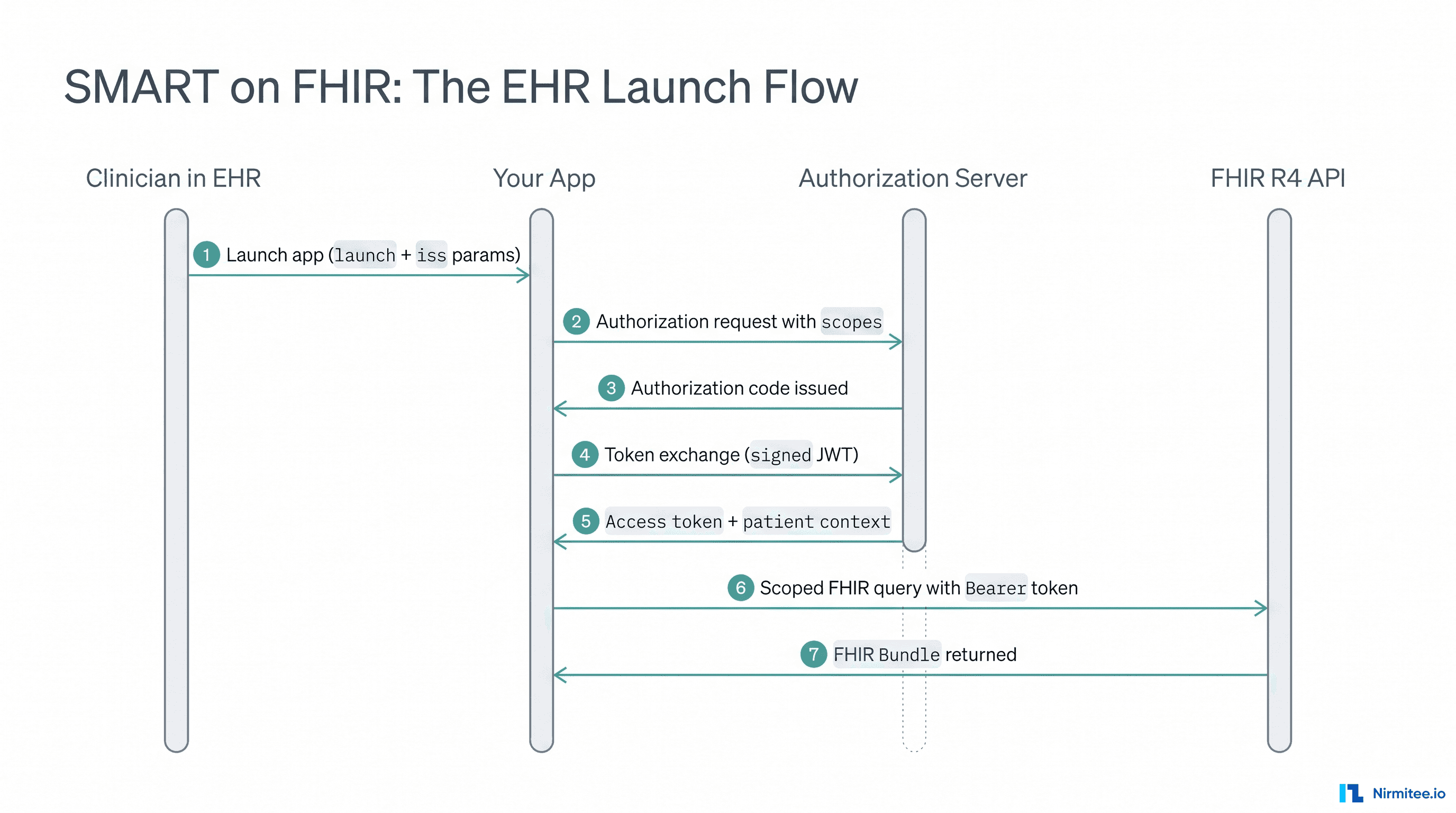
The EHR launches your app. A clinician is working inside Epic, clicks a button, and your application opens in context — already knowing the patient ID, the encounter, and the practitioner. The EHR passes a launch parameter alongside the iss (FHIR server base URL) to your app's launch endpoint.
Your app then requests an authorization code from the EHR's authorization server, including the launch scope alongside whatever clinical scopes it needs. The authorization server validates the request, confirms the user's session, and issues an authorization code. Your app exchanges that code for an access token and — critically — a context object containing the patient, encounter, and user identifiers.
This is the flow that powers most Epic Showroom (formerly App Orchard) integrations. The clinician never re-authenticates. Patient context is injected automatically.
Standalone Launch
Your app initiates the session independently — a patient-facing mobile app, a population health dashboard, a telehealth portal. There is no EHR session to inherit context from.
The app redirects the user to the EHR's authorization endpoint with the required scopes. The user authenticates, consents to data access, and the authorization server issues a code. The app exchanges that code for an access token. Patient context may be returned in the token response, or the app may need to prompt the user to select a patient.
Standalone launch is common in patient-facing apps and any scenario where your app is the entry point rather than a component inside a larger clinical workflow.
SMART on FHIR Scopes: How Access Control Actually Works
This is where SMART on FHIR diverges most sharply from standard OAuth2. Scopes are not arbitrary strings. They follow a defined syntax that maps directly to FHIR resource types and operations.
The v2 scope format is:
[context]/[resourceType].[permission]Where context is patient, user, or system, and permission is read, write, create, delete, or * for full access.
Examples:
patient/Observation.read— read Observation resources in the current patient contextuser/MedicationRequest.write— write MedicationRequest resources as the authenticated usersystem/Patient.read— system-level read access to Patient resources, used in backend serviceslaunch/patient— request that the EHR inject patient context at launch
Your app requests only the scopes it needs. The authorization server enforces them. If your clinical decision support module needs to read lab results, it requests patient/Observation.read — not patient/*.read unless the clinical function genuinely requires access to every resource type.
This is not just good practice. It is a HIPAA minimum-necessary requirement. Over-scoped PHI access creates audit exposure and expands your breach surface.
Epic Integration and SMART on FHIR in Practice
Epic is the most common FHIR R4 integration target for digital health teams in 2026. Its SMART on FHIR implementation follows the v2 specification closely, but there are Epic-specific behaviors your team needs to account for.
App Registration with Epic on FHIR
Before your app can authenticate against any Epic instance, it must be registered through Epic's developer program at fhir.epic.com — with marketplace distribution handled through Epic Showroom, which replaced the retired App Orchard. Epic requires you to declare your redirect URIs, the scopes your app will request, and whether you are using a confidential or public client.
Confidential clients — server-side apps — authenticate using a signed JWT with an RSA private key, which is asymmetric client authentication as required by SMART v2. Public clients — mobile apps, SPAs — use PKCE (Proof Key for Code Exchange) instead of a client secret.
Getting this registration wrong is the most common reason Epic integrations stall. Mismatched redirect URIs, incorrect scope declarations, or using a symmetric client secret where Epic expects asymmetric authentication will produce opaque authorization errors that take significant time to debug.
The Token Exchange
After the authorization code is issued, your app sends a POST request to Epic's token endpoint. For a confidential client, this includes a client_assertion — a signed JWT containing your client ID, the token endpoint URL as the audience, and an expiry. Epic validates the signature against the public key you registered:
POST /oauth2/token HTTP/1.1
Content-Type: application/x-www-form-urlencoded

grant_type=authorization_code
&code=eyJhbGciOi...
&redirect_uri=https://yourapp.example.com/callback
&client_assertion_type=urn:ietf:params:oauth:client-assertion-type:jwt-bearer
&client_assertion=eyJhbGciOiJSUzM4NCJ9...
The response includes:
access_token— a short-lived bearer token, typically 5–10 minutes for Epicpatient— the FHIR Patient resource ID in contextencounter— the FHIR Encounter resource ID, if availableid_token— an OpenID Connect token identifying the authenticated userrefresh_token— present only if theoffline_accessscope was granted
Your app uses the access token in the Authorization: Bearer header on all subsequent FHIR R4 API calls.
Scoped FHIR Queries Against Epic
With a valid access token scoped to patient/Observation.read, your app can query Epic's FHIR R4 endpoint:
GET /api/FHIR/R4/Observation?patient=<id>&category=laboratory
Authorization: Bearer <access_token>
Epic returns a FHIR Bundle containing Observation resources. The access token enforces that your app can only access the patient whose ID was injected at launch — not any other patient record in the system.
That is the security model working correctly. The token is scoped. The query is scoped. The audit log records both.
Backend Services: The System-Level Flow
Not every FHIR integration involves a human in the loop. Agentic workflows for claims processing, automated lab result routing, and population health queries run without a user session. (Claims themselves travel over a different standard entirely — see X12 vs HL7)
SMART on FHIR v2 defines a Backend Services authorization flow for exactly this. Your server authenticates directly with the EHR's authorization server using a signed JWT — no user redirect, no authorization code. The server receives an access token scoped to the system-level permissions you registered.
This is the flow that powers automated clinical decision support pipelines, nightly data pulls for chronic care management, and agentic claims processing — workflows where a human authorization step would break the automation entirely.
Backend Services requires careful scope management. system/*.read is a broad grant. In production, scope it to the specific resource types your automation actually touches.
Keycloak as an Identity Broker in SMART Architectures
If your app supports multiple EHR systems — Epic and Cerner, for example — managing separate authorization flows for each gets complex fast. A common pattern is to use an identity broker like Keycloak between your app and each EHR's authorization server.
Your app authenticates against Keycloak. Keycloak federates the identity to the appropriate EHR's SMART on FHIR authorization server. The token returned to your app is normalized, regardless of which EHR is behind it.
This pattern is particularly useful for multi-tenant telehealth platforms and hospital networks where your app needs to integrate with multiple Epic instances or a mix of Epic and Cerner. It centralizes your access control logic and reduces the surface area for misconfiguration.
Nirmitee.io uses Keycloak for identity management in FHIR R4-native architectures — it ships as part of the default stack, not as a custom add-on you negotiate separately.
What Goes Wrong: Common SMART on FHIR Failures
Most SMART on FHIR integration failures fall into a small set of categories.
Scope mismatch at registration. Your app requests patient/DiagnosticReport.read at runtime but only registered patient/Observation.read in your Epic on FHIR registration. The authorization server rejects the scope silently or returns a token that fails on the FHIR query. Register every scope your app will ever request — including edge cases.
Token expiry handling. Epic access tokens expire in minutes. Apps that do not implement refresh token rotation or re-authentication flows will fail mid-session in clinical contexts — exactly when a clinician is trying to access a record. Build token refresh into your HTTP client layer from the start, not as an afterthought.
Asymmetric key rotation. Your RSA key pair has a lifecycle. Rotate your private key without updating the public key in your Epic registration and every token exchange fails immediately. Build key rotation into your deployment process with a documented rollover window.
Missing iss validation. Your launch endpoint must validate the iss parameter against a known list of authorized FHIR server URLs. Skipping this check opens your app to authorization code injection attacks. SMART v2 makes this mandatory — not optional hardening.
PHI in logs. Access tokens contain claims that may reference patient IDs. Logging raw token responses creates a PHI exposure. Sanitize token responses before any logging operation.
SMART on FHIR and HIPAA: The Connection Is Direct
SMART on FHIR is not a HIPAA compliance framework. But it is the mechanism that makes HIPAA-compliant EHR access possible in a clinical app.
The minimum-necessary standard in HIPAA maps directly to SMART scopes. The access control requirements map to token-based authorization. The audit logging requirements map to recording every token issuance and FHIR query against a patient record.
If your app accesses PHI through a FHIR R4 API and does not implement SMART on FHIR correctly, you do not have a compliant access control model. That is not a legal opinion — it is an architectural fact.
For a deeper look at how compliance infrastructure fits into clinical app architecture, the Healthcare AI Implementation Playbook covers the broader compliance and integration stack in detail.
Building SMART on FHIR Into Your Stack From Day One
The teams that struggle most with SMART on FHIR treat it as a late-stage EHR integration task. Authorization architecture decisions made at the start of a project — client type, scope strategy, token storage, identity brokering — are expensive to change after your first Epic sandbox connection is working.
The teams that move fastest start with a FHIR R4-native architecture where SMART on FHIR is part of the default stack, not bolted on after the core product is built.
At Nirmitee.io, SMART on FHIR authorization ships as part of every FHIR R4 engagement. The Keycloak identity layer, asymmetric client authentication, scope management, and PHI-safe audit logging are built in by default. Your team does not spend the first three sprints solving authorization infrastructure — you start with it already in place and build the clinical functionality that differentiates your product.
If you are evaluating Epic integration or building a FHIR R4-native clinical app, the Healthcare CTO's AI Glossary is a useful reference for the terminology your team will encounter across the integration stack.
Scoping the authorization layer for a clinical app? Explore our AI-driven interoperability solutions for SMART on FHIR and multi-EHR architectures, or see how our agentic AI services for healthcare use Backend Services flows for automated clinical workflows. Talk to our team to get the authorization architecture right before you write token-exchange code.


