SMART App Launch v2.2: Granular Scopes, Token Introspection, and What Changed from v1

CTO & Co-Founder
CTO & Co-Founder at Nirmitee.io. Architects healthcare integrations across FHIR, SMART on FHIR, ABDM and NHCX, writing from production experience taking hospital software from sandbox to go-live.
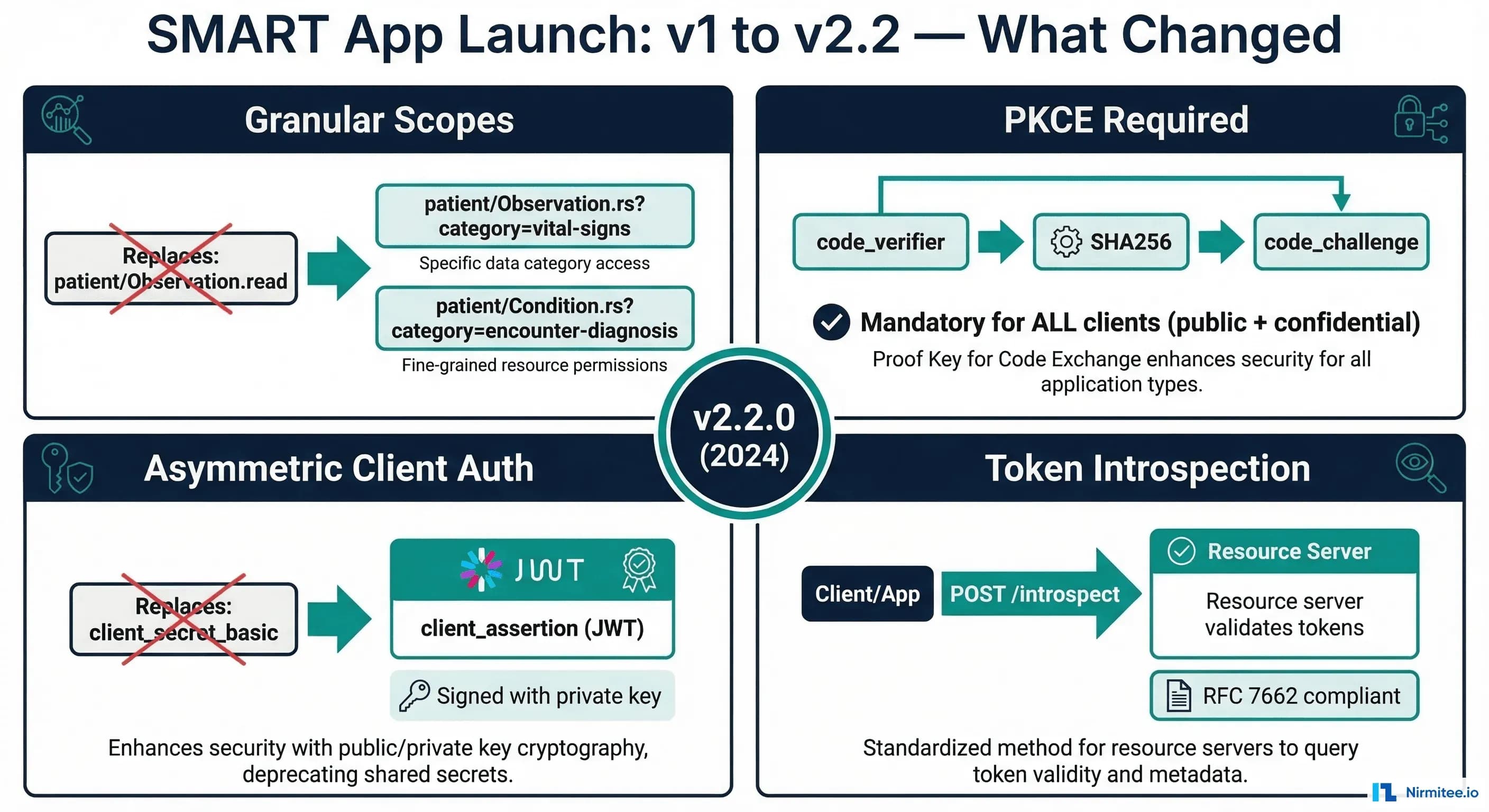
SMART App Launch has been the standard for authorizing third-party applications against FHIR servers since 2014. Version 2.0, released in 2023, was a substantial rewrite that introduced granular scopes, mandatory PKCE, asymmetric client authentication, and token introspection. Version 2.2, finalized in 2024, refined these capabilities with clearer implementation guidance, additional scope patterns, and tighter security requirements.
If you are maintaining a FHIR server, building a SMART-enabled clinical application, or preparing for ONC certification, understanding the v1-to-v2 changes is not optional. The ONC g(10) certification criteria now require SMART App Launch v2 support, and the Inferno test suite has been updated to validate v2-specific behaviors. Applications that only support v1 scopes will fail certification testing.
This guide covers every significant change between v1 and v2.2, with implementation details for authorization servers and client applications. We include code examples for PKCE implementation, granular scope enforcement, asymmetric client authentication with JWTs, and token introspection -- plus the specific Inferno test failures you will encounter if these features are incomplete.
Granular Scopes: From Resource-Level to Field-Level Access Control
The most impactful change in v2 is the introduction of granular scopes. In v1, scopes operated at the resource level: patient/Observation.read granted access to all Observations for the patient in context. There was no way to limit access to specific categories, types, or subsets of resources.
v2 Scope Syntax
The v2 scope format introduces CRUDS permissions and optional query parameter filters:
# v2 Scope Format:
# {context}/{resourceType}.{permissions}[?{queryParams}]

# CRUDS Permission Characters:
# c = create
# r = read (single resource by ID)
# s = search (search for resources)
# u = update
# d = delete

# Examples:

# Read + Search vital signs only (not lab results, not assessments)
patient/Observation.rs?category=vital-signs

# Read + Search active conditions only
patient/Condition.rs?category=encounter-diagnosis

# Read + Search active medications only
patient/MedicationRequest.rs?status=active

# Create + Read + Search (for a clinical note app)
patient/DocumentReference.crs

# Full CRUDS access (administrative app)
user/Patient.cruds
Scope Negotiation
A critical v2 behavior: the authorization server may downscope the granted scopes. If a client requests patient/Observation.rs (all observations), the server may grant patient/Observation.rs?category=vital-signs (only vital signs) based on the user's consent choices or organizational policy. The client must check the scope claim in the token response to determine what was actually granted:
# Token response with downscoped scope
{
  "access_token": "eyJ...",
  "token_type": "Bearer",
  "expires_in": 3600,
  "scope": "patient/Observation.rs?category=vital-signs patient/Patient.rs",
  "patient": "Patient/123",
  "refresh_token": "dGhpcyBpcyBhIHJlZnJlc2ggdG9rZW4..."
}

# The client MUST parse the returned scope and adjust its behavior.
# If it requested patient/Observation.rs but got
# patient/Observation.rs?category=vital-signs,
# it should only query for vital signs.
Implementing Granular Scope Enforcement
On the server side, granular scopes require the FHIR server to filter query results based on the scope's query parameters. Here is how the enforcement works:
# Server-side scope enforcement pseudocode

def enforce_scope(request, token_scopes):
    resource_type = request.resource_type  # e.g., "Observation"

    # Find matching scope for this resource type
    matching_scope = find_scope(token_scopes, resource_type)

    if not matching_scope:
        return 403  # No scope grants access to this resource type

    # Check permission (r, s, c, u, d)
    if request.is_search and 's' not in matching_scope.permissions:
        return 403
    if request.is_read and 'r' not in matching_scope.permissions:
        return 403

    # Apply query parameter filters from scope
    if matching_scope.query_params:
        for param, value in matching_scope.query_params.items():
            # Add scope filter to the search query
            request.add_filter(param, value)

    # For read operations, validate the resource matches scope filters
    if request.is_read:
        resource = fetch_resource(request.resource_id)
        if not resource_matches_scope_filters(resource, matching_scope):
            return 403

    return execute_request(request)
PKCE: Now Mandatory for All Clients
In v1, PKCE (Proof Key for Code Exchange, RFC 7636) was optional and primarily recommended for public clients (mobile apps, single-page applications). In v2, PKCE is mandatory for all client types, including confidential clients that also authenticate with client secrets or assertions.
Why PKCE for Confidential Clients?
This is the most common question from teams migrating from v1. The answer: defense in depth. PKCE protects against authorization code interception attacks that can occur even when client authentication is in place. In healthcare environments, where applications may run in shared clinical workstation environments, the attack surface for code interception is real.
Implementation
// PKCE implementation for SMART App Launch v2

import crypto from 'crypto';

// Step 1: Generate code_verifier (43-128 characters, URL-safe)
function generateCodeVerifier() {
  return crypto.randomBytes(32)
    .toString('base64url');  // 43 characters
}

// Step 2: Compute code_challenge (S256 method only in v2)
function generateCodeChallenge(verifier) {
  return crypto.createHash('sha256')
    .update(verifier)
    .digest('base64url');
}

// Step 3: Include in authorization request
const codeVerifier = generateCodeVerifier();
const codeChallenge = generateCodeChallenge(codeVerifier);

const authUrl = new URL(smartConfig.authorization_endpoint);
authUrl.searchParams.set('response_type', 'code');
authUrl.searchParams.set('client_id', CLIENT_ID);
authUrl.searchParams.set('redirect_uri', REDIRECT_URI);
authUrl.searchParams.set('scope', 'launch/patient patient/Observation.rs openid fhirUser');
authUrl.searchParams.set('state', generateRandomState());
authUrl.searchParams.set('aud', FHIR_SERVER_URL);
authUrl.searchParams.set('code_challenge', codeChallenge);
authUrl.searchParams.set('code_challenge_method', 'S256');

// Step 4: Include code_verifier in token exchange
const tokenResponse = await fetch(smartConfig.token_endpoint, {
  method: 'POST',
  headers: { 'Content-Type': 'application/x-www-form-urlencoded' },
  body: new URLSearchParams({
    grant_type: 'authorization_code',
    code: authorizationCode,
    redirect_uri: REDIRECT_URI,
    client_id: CLIENT_ID,
    code_verifier: codeVerifier,
  }),
});
Server-Side PKCE Validation
# Authorization server PKCE validation

def validate_token_request(request):
    stored_challenge = get_stored_code_challenge(request.code)
    stored_method = get_stored_challenge_method(request.code)

    if not stored_challenge:
        # PKCE was not used in authorization request
        # In v2, this is an error -- PKCE is required
        return error("invalid_request", "PKCE code_challenge required")

    code_verifier = request.code_verifier
    if not code_verifier:
        return error("invalid_request", "code_verifier required")

    # Only S256 is supported in SMART v2 (plain is not allowed)
    if stored_method != "S256":
        return error("invalid_request", "Only S256 code_challenge_method supported")

    # Validate: BASE64URL(SHA256(code_verifier)) == stored_challenge
    computed = base64url_encode(sha256(code_verifier))
    if computed != stored_challenge:
        return error("invalid_grant", "PKCE validation failed")

    return proceed_with_token_issuance()
Asymmetric Client Authentication
SMART v2 introduces support for asymmetric client authentication using JSON Web Tokens (JWTs), following the private_key_jwt method from OpenID Connect. This replaces or supplements the traditional client_secret_basic and client_secret_post methods.
Why Asymmetric Auth?
- No shared secrets: The authorization server only stores the client's public key (or JWKS URL), not a secret. Compromising the server does not expose client credentials.
- Stronger authentication: RSA-2048 or ES256 signatures are cryptographically stronger than shared secrets.
- Required for backend services: The SMART Backend Services profile (system-to-system) requires asymmetric auth. Using it for user-facing apps creates consistency.
Client Assertion JWT
// Creating a client_assertion JWT for token requests

import jwt from 'jsonwebtoken';
import fs from 'fs';

const privateKey = fs.readFileSync('client-private-key.pem');

function createClientAssertion(tokenEndpoint, clientId) {
  const now = Math.floor(Date.now() / 1000);

  const payload = {
    iss: clientId,                    // Client ID
    sub: clientId,                    // Same as iss
    aud: tokenEndpoint,               // Token endpoint URL
    exp: now + 300,                   // 5 minute expiry
    iat: now,
    jti: crypto.randomUUID(),         // Unique token ID
  };

  return jwt.sign(payload, privateKey, {
    algorithm: 'RS384',               // RS256, RS384, or ES384
    keyid: 'my-key-id',              // Must match JWKS kid
  });
}

// Use in token request
const tokenResponse = await fetch(tokenEndpoint, {
  method: 'POST',
  headers: { 'Content-Type': 'application/x-www-form-urlencoded' },
  body: new URLSearchParams({
    grant_type: 'authorization_code',
    code: authorizationCode,
    redirect_uri: REDIRECT_URI,
    client_assertion_type: 'urn:ietf:params:oauth:client-assertion-type:jwt-bearer',
    client_assertion: createClientAssertion(tokenEndpoint, CLIENT_ID),
    code_verifier: codeVerifier,
  }),
});
Token Introspection
SMART v2 standardizes a token introspection endpoint (RFC 7662) that resource servers can use to validate access tokens. This is particularly important in distributed architectures where the FHIR resource server and the authorization server are separate systems.
Introspection Request/Response
# Token introspection request (resource server to auth server)
POST /introspect HTTP/1.1
Host: auth.hospital.internal
Content-Type: application/x-www-form-urlencoded
Authorization: Basic cmVzb3VyY2Utc2VydmVyOnNlY3JldA==

token=eyJhbGciOiJSUzI1NiIsInR5cCI6IkpXVCJ9...

# Response for a valid token
{
  "active": true,
  "scope": "patient/Observation.rs?category=vital-signs patient/Patient.rs openid",
  "client_id": "my-clinical-app",
  "token_type": "Bearer",
  "exp": 1710100000,
  "iat": 1710096400,
  "sub": "practitioner-456",
  "iss": "https://auth.hospital.internal",
  "patient": "Patient/123",
  "fhirUser": "Practitioner/456"
}

# Response for an expired/revoked token
{
  "active": false
}
Migration Guide: v1 to v2
Scope Mapping
| v1 Scope | v2 Equivalent | Notes |
|---|---|---|
patient/Observation.read | patient/Observation.rs | .read to .rs (read + search) |
patient/Observation.write | patient/Observation.cud | .write to .cud (create + update + delete) |
patient/Observation.* | patient/Observation.cruds | .* to .cruds (all operations) |
user/Patient.read | user/Patient.rs | Same context prefix, new permissions |
launch/patient | launch/patient | Unchanged |
openid fhirUser | openid fhirUser | Unchanged |
Backwards Compatibility Strategy
Most authorization servers need to support both v1 and v2 clients during a transition period. The recommended approach:
# Scope normalization: accept both v1 and v2 formats

def normalize_scope(scope_string):
    scopes = scope_string.split()
    normalized = []

    for scope in scopes:
        # v1 format: patient/Resource.read or patient/Resource.write
        v1_match = re.match(
            r'(patient|user|system)/([\w]+)\.(read|write|\*)',
            scope
        )
        if v1_match:
            context, resource, permission = v1_match.groups()
            v2_permission = {
                'read': 'rs',
                'write': 'cud',
                '*': 'cruds'
            }[permission]
            normalized.append(f"{context}/{resource}.{v2_permission}")
        else:
            # Already v2 format or non-FHIR scope (openid, launch/*)
            normalized.append(scope)

    return ' '.join(normalized)
Testing with Inferno SMART Test Kit
The Inferno SMART App Launch test kit has been updated to validate v2-specific behaviors. Here are the test categories and the most common failures:
Running the Inferno SMART v2 Tests
# Start Inferno locally with Docker
docker pull infernoframework/inferno-smart-app-launch
docker run -d -p 4567:4567 infernoframework/inferno-smart-app-launch

# Navigate to http://localhost:4567
# Select "SMART App Launch STU2.2" test suite
# Configure with your FHIR server URL and client credentials
Common Inferno Failures and Fixes
| Test | Failure | Fix |
|---|---|---|
| Discovery | code_challenge_methods_supported missing from .well-known/smart-configuration | Add "code_challenge_methods_supported": ["S256"] to SMART config |
| PKCE | Token endpoint accepts request without code_verifier | Reject token requests missing code_verifier when code_challenge was present |
| Scopes | Token response contains v1 scopes instead of v2 | Update scope serialization to use v2 CRUDS format |
| Introspection | Introspection endpoint returns 404 | Implement /introspect endpoint per RFC 7662 |
| Granular Scopes | Search returns resources outside granted scope filter | Enforce query parameter filters from granular scopes on search results |
SMART Configuration Discovery Updates
The .well-known/smart-configuration endpoint must include new v2-specific fields:
{
  "issuer": "https://auth.hospital.internal",
  "authorization_endpoint": "https://auth.hospital.internal/authorize",
  "token_endpoint": "https://auth.hospital.internal/token",
  "introspection_endpoint": "https://auth.hospital.internal/introspect",
  "jwks_uri": "https://auth.hospital.internal/.well-known/jwks.json",

  "scopes_supported": [
    "openid", "fhirUser", "launch/patient", "launch/encounter",
    "patient/Patient.rs", "patient/Observation.rs",
    "patient/Condition.rs", "patient/MedicationRequest.rs"
  ],

  "response_types_supported": ["code"],
  "grant_types_supported": ["authorization_code", "refresh_token", "client_credentials"],

  "code_challenge_methods_supported": ["S256"],

  "token_endpoint_auth_methods_supported": [
    "client_secret_basic",
    "client_secret_post",
    "private_key_jwt"
  ],
  "token_endpoint_auth_signing_alg_values_supported": ["RS256", "RS384", "ES384"],

  "capabilities": [
    "launch-ehr", "launch-standalone",
    "client-public", "client-confidential-symmetric", "client-confidential-asymmetric",
    "sso-openid-connect", "context-passthrough-banner", "context-passthrough-style",
    "context-ehr-patient", "context-ehr-encounter",
    "context-standalone-patient",
    "permission-offline", "permission-patient", "permission-user",
    "authorize-post"
  ]
}
FAQ
Do I need to support both v1 and v2 scopes simultaneously?
Yes, for a transition period. Many existing SMART apps in production still use v1 scopes. The recommended approach is to normalize v1 scopes to v2 internally (as shown in the backwards compatibility section) and grant v2 scopes in the token response. This allows v1 clients to continue working while new clients adopt v2 natively. Plan for a 6-12 month transition period before deprecating v1 scope support.
Is PKCE enough to replace client secrets for confidential clients?
No. PKCE and client authentication serve different security purposes. PKCE prevents authorization code interception. Client authentication (secret or assertion) proves the client's identity. In v2, confidential clients must use both: PKCE for code exchange protection and client authentication (preferably asymmetric) for identity verification. Public clients use PKCE only, since they cannot securely store credentials.
How do granular scopes affect existing app registrations?
Existing app registrations with v1 scopes should continue to work if your authorization server normalizes v1 to v2 internally. However, you should plan to update app registrations to use v2 scopes as part of your migration. This is also an opportunity to apply least-privilege: apps that were granted patient/Observation.read (all observations) might only need patient/Observation.rs?category=vital-signs (vital signs only).
What is the timeline for ONC requiring SMART v2?
The ONC HTI-1 final rule requires support for SMART App Launch v2 as part of the g(10) certification criteria. Health IT developers certified under the ONC Health IT Certification Program must support v2 by the compliance deadlines specified in the rule. If you are preparing for certification or recertification, implement v2 now -- the Inferno test suite already validates v2 behaviors.
Does token introspection replace JWT validation?
It depends on your architecture. If your authorization server issues JWTs as access tokens, the resource server can validate them locally by checking the signature against the authorization server's JWKS. Token introspection is an alternative that works with both JWT and opaque tokens, and provides the advantage of real-time revocation checking (a locally validated JWT cannot know if it has been revoked). For healthcare systems where token revocation is a compliance requirement, introspection is recommended.
Struggling with healthcare data exchange? Our Healthcare Interoperability Solutions practice helps organizations connect clinical systems at scale. Talk to our team to get started.
Ready to scale?
Talk to our healthcare engineering team about building, integrating, and shipping faster.
Frequently Asked Questions
What is SMART App Launch v2.2?
What are granular scopes in SMART on FHIR v2?
Why is PKCE mandatory for confidential clients in SMART v2?
How do v1 scopes map to v2 scopes in SMART App Launch?
How do you pass ONC certification testing for SMART App Launch v2?
How does Nirmitee.io approach healthcare software development?