
SMART on FHIR development services · United States
SMART on FHIR App Development
Build an EHR-connected product with the launch, authorization and data handling designed around its users. We develop clinician and patient apps, adapt existing products for multiple EHRs, and plan background access separately. Scope includes the app, recovery paths, customer testing and the steps needed for rollout.
Plan your SMART appCompare EHR supportFor healthcare product teams and the customers who use their integrations.
Epic · Oracle Health · athenahealth · MEDITECH · SMART App Launch · FHIR
Updated October 2026
- 01Launch and context
Decide who starts the app and which patient, encounter or user context the workflow requires.
- 02Authorization
Discover endpoints, request the agreed scopes and verify the access actually granted.
- 03FHIR data
Check resource support, search parameters, pagination and any permitted write-back.
- 04Customer rollout
Validate the workflow at the target site and record approval, monitoring and support owners.
Illustrative implementation plan · no patient data
Your starting point
SMART on FHIR development services, in short
SMART on FHIR app development connects a healthcare application to an EHR through a standardized launch and authorization framework, then uses FHIR APIs for the permitted data. Nirmitee scopes the users and workflow, builds discovery and authorization, implements the application experience and tests the failure paths. We separate the shared app code from each vendor's endpoint, scopes and resource behavior. For example, a clinician summary may need patient and encounter context, while a patient companion starts outside the EHR and requests access to the patient's record. Each connection is validated for the customer environment before rollout. A functioning public sandbox is one development checkpoint; customer access, security review and workflow acceptance still need their own evidence.
Who it is for
Product teams building a SMART app or adapting an existing app for another EHR.
Decide who starts the app and which patient, encounter or user context the workflow requires.
What we build
Launch flows, authorized data access, user workflows and recovery paths.
Discover endpoints, request the agreed scopes and verify the access actually granted.
What comes next
Customer acceptance tests, access checks and the approvals needed for rollout.
Check resource support, search parameters, pagination and any permitted write-back.
EHR coverage
SMART across Epic, Oracle Health, athenahealth and MEDITECH
A common standard gives the app a shared starting point. Registration, permitted scopes, resources and customer provisioning still differ. These facts come from current vendor documentation checked October 11, 2026; we validate the intended workflow against the target environment before finalizing scope.
| EHR | Documented capability | What to confirm for your app |
|---|---|---|
| Epic | Epic documents app registration with production and non-production client IDs, plus a SMART sandbox launcher. | Confirm the customer's endpoint, enabled APIs and launch configuration before rollout. |
| Oracle Health | Millennium documentation describes SMART apps and customer environment provisioning. | Confirm the tenant, launch context and customer provisioning for the intended workflow. |
| athenahealth | athenahealth documents patient and provider SMART launch, resource-specific read scopes and SMART v2 CRUDS syntax. | Wildcard and write scopes are not permitted by default. Confirm practice access and the resource-specific scopes your app needs. |
| MEDITECH | Greenfield documents US Core FHIR R4 view-only patient access after patient authorization. | Confirm clinician launch, writes and production access separately with MEDITECH and the customer. |
Vendor documentation is linked in the primary sources below. An available developer environment does not establish clinician access, write permissions or approval at every customer site.
Find your workflow
SMART on FHIR application development and integration services
Choose the workstreams your product needs. These are proposed implementation scopes; the supported operations and customer dependencies are confirmed during discovery.
Clinician apps inside the EHR
Decision support, care coordination and specialty workflows launched from the chart. We define the patient and encounter context the feature needs, prevent stale-patient actions and make missing context visible to the user.
EHR launch · patient context · encounter context · session isolation
Patient-facing standalone apps
Companion and engagement applications where patients begin in your product and authorize a connection to their EHR. The scope covers organization selection, consent outcomes, permitted reads and a clear path to reconnect.
Standalone launch · authorization code · PKCE · patient scopes
Multi-EHR app adaptation
Keep common workflow and authorization code together while recording vendor differences in configuration and adapters. Test each target EHR's discovery, scope syntax, resource searches and returned context independently.
Per-vendor configuration · capability checks · environment-labelled tests
SMART on FHIR integration for an existing product
Add an EHR connection to an existing app after reviewing its sign-in, user mapping, session lifetime and storage. We identify where EHR authorization ends and the application's own access rules begin.
User mapping · token storage · logout · access revocation
Permitted FHIR reads and write-back
Retrieve the required records with pagination and profile checks. For writes, confirm the resource, operation and payload rules and test how the result is retrieved or reconciled. An available read API does not imply a write API.
Patient · Observation · Condition · DocumentReference · supported operations
Backend services assessment
Scope unattended data access separately from an interactive SMART app. Confirm system permissions, client authentication, key management and the customer's data-access policy before choosing a background job or export design.
SMART Backend Services · system scopes · signed JWT · key rotation
Choose the right connection
EHR launch, standalone launch or backend services?
The launch type follows the user's starting point and the access the feature requires. One product may use more than one flow, but each needs a separate authorization and acceptance plan.
A clinician starts in the EHR and needs the chart's context.
The launch type follows the user's starting point and the access the feature requires. One product may use more than one flow, but each needs a separate authorization and acceptance plan.
- Implementation contract
- Receive iss and launch, discover SMART endpoints, send aud and the required scopes, and use PKCE for the declared SMART version.
- Acceptance checks
- Check granted scopes and returned context. Reject stale patient state and explain missing encounter context.
Check granted scopes and returned context. Reject stale patient state and explain missing encounter context.
| Approach | Use it when | Implementation contract | Acceptance checks |
|---|---|---|---|
| EHR launch | A clinician starts in the EHR and needs the chart's context. | Receive iss and launch, discover SMART endpoints, send aud and the required scopes, and use PKCE for the declared SMART version. | Check granted scopes and returned context. Reject stale patient state and explain missing encounter context. |
| Standalone patient launch | The patient begins in your app and connects an EHR record. | Choose the issuer, request patient context, complete authorization and keep the app session separate from token storage. | Test cancelled consent, incomplete scopes, unavailable data, expiration and reconnection. |
| Standalone clinician launch | A provider works in your application outside the EHR. | Confirm the vendor supports the intended provider flow, then define user identity and how patients are selected. | Validate provider permissions and patient selection; do not assume an EHR launch handle or encounter context. |
| Backend services | A service runs without an interactive user launch. | Confirm system-level access and the supported client authentication method. Design keys and tenant credentials separately. | Test permission boundaries, key rotation, job failures and the allowed resource or export operations. |
The implementation follows the declared SMART version and the target server's supported behavior. SMART App Launch 2.2 requires apps to support PKCE; the published HL7 specification is linked below.
Decisions before development
Implementation decisions that need an explicit answer
The assessment records the decision, its owner and the evidence needed to close it. This keeps a working launch from being mistaken for a complete integration.
Scopes describe access, not feature completeness
Request only the resources and operations the workflow needs. Check the scopes actually granted and handle a partial grant. Test the operation too: a scope alone does not establish that a resource, search parameter or write is supported.
Patient and encounter context can be missing
Specify which context is mandatory for each feature. Clear previous patient data on a new launch and prevent a stale response from populating another patient's screen. Missing encounter context needs a defined fallback or a blocked action.
Public and confidential clients differ
A browser application cannot protect a client secret. Decide whether the app is a public client or uses a trusted server component, then design PKCE, session storage and any client authentication for that deployment model.
FHIR responses need workflow checks
Follow supported pagination and distinguish an empty search, unavailable resource, denied operation and request failure. Preserve provenance and data freshness where the feature needs them; do not turn a partial response into a complete-record claim.
Refresh and storage are separate choices
Confirm whether refresh is supported and appropriate for the approved app type. Define retention, reconnection, logout and revocation behavior. Token lifetime and rate limits are checked per environment rather than assumed from another vendor.
Approval has named owners
Record the customer technical owner, vendor provisioning route, security reviewer and clinical workflow owner. A completed registration, sandbox test or marketplace listing does not substitute for those owners' acceptance.
What we define together
What your team receives at handover
Agree the deliverables before implementation. The handover should let your engineers reproduce the tested workflow and identify what still depends on the customer or vendor.
Workflow and scope specification
User journeys, launch types, required context, resources and operations, plus the outcome for denied access or missing data.
Vendor configuration register
Issuer and environment inventory, redirect and launch URLs, client type, requested scopes and source-linked capability decisions. Secrets stay in the agreed secret store.
Application source and setup
The agreed app code, configuration examples without credentials, dependency versions and local setup instructions in your repository.
Automated acceptance checks
Unit and browser checks for launch recovery, scope handling, context isolation and data retrieval, with results labelled by environment and test type.
Security and data-flow review material
Architecture, token and session handling, data retention decisions and hosting dependencies for the customer's review. This material supports review; it does not certify the product.
Rollout and support runbook
Customer configuration steps, smoke checks, alerts, support ownership, escalation and rollback. Unresolved access and approval steps stay visible.
Delivery, with ownership
Five steps from sandbox to customer go-live
Engineering work and customer review have different owners. Build-time ranges remain a placeholder until the scope is approved; this sequence identifies the evidence needed at each handoff.
Define the workflow
Agree the user, target EHRs, required resources and read or write operations. Record unavailable capabilities before committing to scope.
Output: agreed workflow and capability gaps
Register and connect
Set up the agreed sandbox client, redirect URLs and scopes. Inspect discovery metadata and confirm the launch context.
Output: connected development environment
Build and recover
Implement authorization and the user workflow. Handle denied access, expired sessions, missing data and pagination with explicit user outcomes.
Output: working app and recovery tests
Test with the customer
Run unit and browser checks, then validate the permitted workflow in the customer's test environment. Record failures and retest fixes.
Output: recorded customer acceptance results
Approve and roll out
Obtain the relevant customer, vendor and security approvals. Confirm monitoring, support ownership and rollback before go-live.
Output: approved rollout and support plan
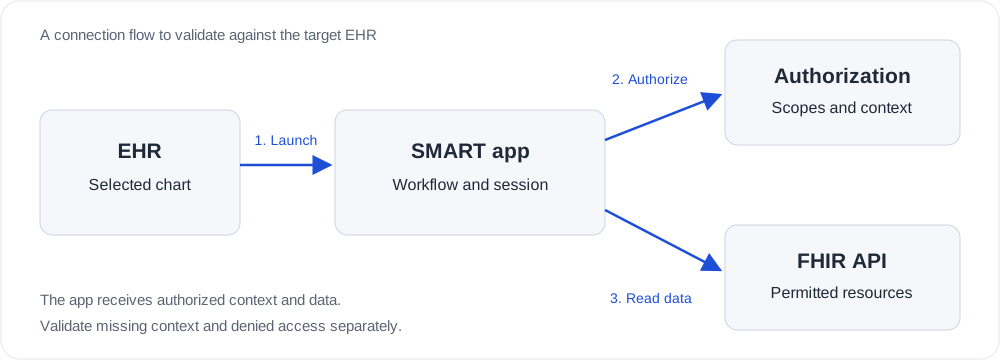
The estimate structure
What changes SMART on FHIR app cost and timeline
Build cost and time ranges are awaiting Jitendra's approved figures. A useful estimate names its assumptions and customer dependencies. These are the factors to scope before comparing proposals.
User journeys and launch types
An app with one launch flow has a different scope from a product supporting clinician launch, patient standalone access and unattended jobs. List the required journeys and their acceptance criteria.
Number of EHRs and customer sites
Each vendor needs capability and behavior checks. Each customer can add provisioning, review and rollout work. A shared codebase reduces duplication but does not remove those site checks.
Reads, searches and writes
The resource list, filters, pagination and freshness requirements define data work. Write-back adds payload validation, reconciliation and workflow review when the vendor and customer permit it.
Application experience
A focused viewer differs from a workflow with user roles, editing, audit history and exception handling. Existing designs and product code help identify the work that can be reused.
Access and approval dependencies
Sandbox credentials, customer test access, security questionnaires and change calendars can affect elapsed delivery time. Track those dependencies separately from implementation effort.
Support and operation
Hosting, monitoring, alert routing, credential rotation and multi-tenant support need owners and an agreed operating model. Vendor fees and customer charges require their own confirmation.
Engagement options
Three ways to move the integration forward
Choose the starting point that matches your access, existing product and delivery needs.
Discovery and feasibility
For an uncertain route or missing access. Define the workflow, test the difficult assumptions and produce a scope with named dependencies.
Scoped implementation
For a validated operation contract. Agree the connector, application changes, acceptance evidence and customer rollout milestones.
Engineering and operational support
For an existing connection. Prioritize new workflows, diagnose recovery gaps and define monitoring and support ownership.
Evidence you can check
Proof you can run and acceptance checks to request
Ask for a reproducible workflow, the environment it ran against and the limits of the result. The prepared companion example is a narrow development sample; it does not establish a named vendor integration or production approval.
A sample workflow to review
The companion example is prepared locally for discovery, authorization and patient-context reads. The guide explains how to run it and where its coverage ends.
What your acceptance run should show
A successful launch and permitted reads, plus visible recovery for denial, missing context and failed requests. Save the run's environment and scope with its results.
Public GitHub link
Placeholder: Jitendra will supply the approved public sample-app repository.
Named case study
Placeholder: Jitendra will supply a case study approved for public use.
Before you commit
SMART on FHIR development questions
What do SMART on FHIR integration services include?
SMART on FHIR integration services cover the connection between your application and an authorized EHR workflow. The scope includes launch discovery, OAuth authorization, resource access, patient context, partial-data handling and recovery. We confirm the target server and customer permissions before committing reads, writes or background access.
What does SMART on FHIR development include?
We scope the workflow, launch and authorization, FHIR data handling, failure recovery, testing and customer rollout. The supported resources and operations depend on the target EHR and the customer's permissions.
Can one SMART app work across multiple EHRs?
A shared launch and data layer can be adapted across EHRs. Each vendor and customer environment still needs its own registration, capability checks and acceptance tests. A sandbox run does not establish access at every customer.
How much does a SMART on FHIR app cost?
Placeholder: Jitendra will supply approved build cost ranges. A scoped estimate depends on the workflow, EHRs, access, read and write requirements, testing and support. Vendor and customer charges need separate confirmation.
How long does SMART on FHIR app development take?
Placeholder: Jitendra will supply approved build time ranges. Customer access, vendor review and security approval are separate dependencies and must be included in the delivery plan.
Does a sandbox test mean the app is ready for production?
A sandbox test demonstrates only the workflow and environment tested. Production requires customer access, vendor requirements, security and workflow review, and acceptance testing in the intended environment.
Can the app write data back to the EHR?
Write-back must be scoped resource by resource against the vendor's documentation and the customer's enabled permissions. We confirm payload rules and validate the result before treating a write workflow as supported.
What is the difference between FHIR and SMART on FHIR?
FHIR defines the resources and API interactions used to exchange health data. SMART adds an authorization and launch framework. A FHIR endpoint alone does not establish which users may access it or whether a vendor supports your intended launch, resource or write operation.
Do you support EHR launch and standalone launch?
We scope both. EHR launch begins in the EHR and supplies an issuer and launch handle. Standalone launch begins in your app and requests any needed context through authorization. Each flow needs its own recovery paths for denied access, missing context and expired sessions.
How do you handle patient switching and missing encounter context?
We define which context the feature requires, clear previous patient state before a new launch and prevent actions when the required context is missing. Acceptance tests exercise chart switching, unavailable encounter data and stale responses. A launch handle is not proof that every context field will be returned.
Can you add SMART authorization to an existing app?
We can assess the current identity, session and data model and plan a SMART connection around it. The assessment checks where tokens are held, how EHR users map to application users, and what happens when access is revoked or the selected patient changes.
What should we have ready before the first scoping call?
Bring the target workflow, intended users, EHRs and customer sites, the resources and operations needed, and the access you already have. Existing screen designs and a named customer technical owner help us identify dependencies. Keep patient data, credentials and token values out of the enquiry.
How do I choose a SMART on FHIR app development company?
Ask the company to explain the required launch flow, target EHR behavior and customer activation steps. Request source-linked capability decisions, environment-labelled test results, a recovery demonstration and a clear handover. A proposal should separate implementation from vendor charges, customer approval and ongoing support.
Can your SMART on FHIR developers work with our existing engineering team?
We can scope a shared delivery model around your product and repository. Agree who owns the app, authorization, EHR configuration, acceptance tests and operational support. The first assessment identifies the access and capability questions that must be resolved before implementation milestones are committed.
What does your team hand over?
The agreed deliverables include application source, environment configuration guidance, a launch and scope specification, automated tests and their environment-labelled results, and a rollout and support runbook. Customer approval and vendor provisioning are tracked as separate dependencies.
Next useful step
Plan your SMART app around the first customer workflow
Share the users, target EHRs, required data and access available today. We can use those details to define a scope with clear implementation and approval dependencies.
Plan with the right evidence
Confirm the workflow and the available access.
Review the current vendor documentation alongside your customer's requirements. The delivery plan records the operations tested, environment and outstanding approvals.
Epic developer documentation (checked October 11, 2026) ↗Oracle Health developer documentation (checked October 11, 2026) ↗athenahealth developer documentation (checked October 11, 2026) ↗MEDITECH developer documentation (checked October 11, 2026) ↗HL7 SMART App Launch 2.2: launch and authorization ↗SMART Backend Services authorization ↗Epic, Oracle Health, athenahealth and MEDITECH are trademarks of their respective owners.
Implementation guides for your engineering team
Read the SMART on FHIR implementation guide →SMART authentication troubleshooting →Healthcare API security planning →Plan the rest of your integration
Read the SMART on FHIR implementation guide →Epic integration services →Oracle Health integration services →athenahealth integration services →MEDITECH integration services →FHIR integration services →EHR and EMR integration services →Talk through your requirements
What should your SMART app do?
Describe the first workflow and the target EHRs. Tell us what is already built and which access or approval step is holding you up.
- Your workflow and target customer
- The data and operations you need
- What is already built and what is blocked