
SMART on FHIR: From Sandbox to Production — What the Docs Don't Tell You

Founder & CEO
15+ years building healthcare technology. Led 100+ EHR integrations, FHIR implementations, and clinical AI deployments.
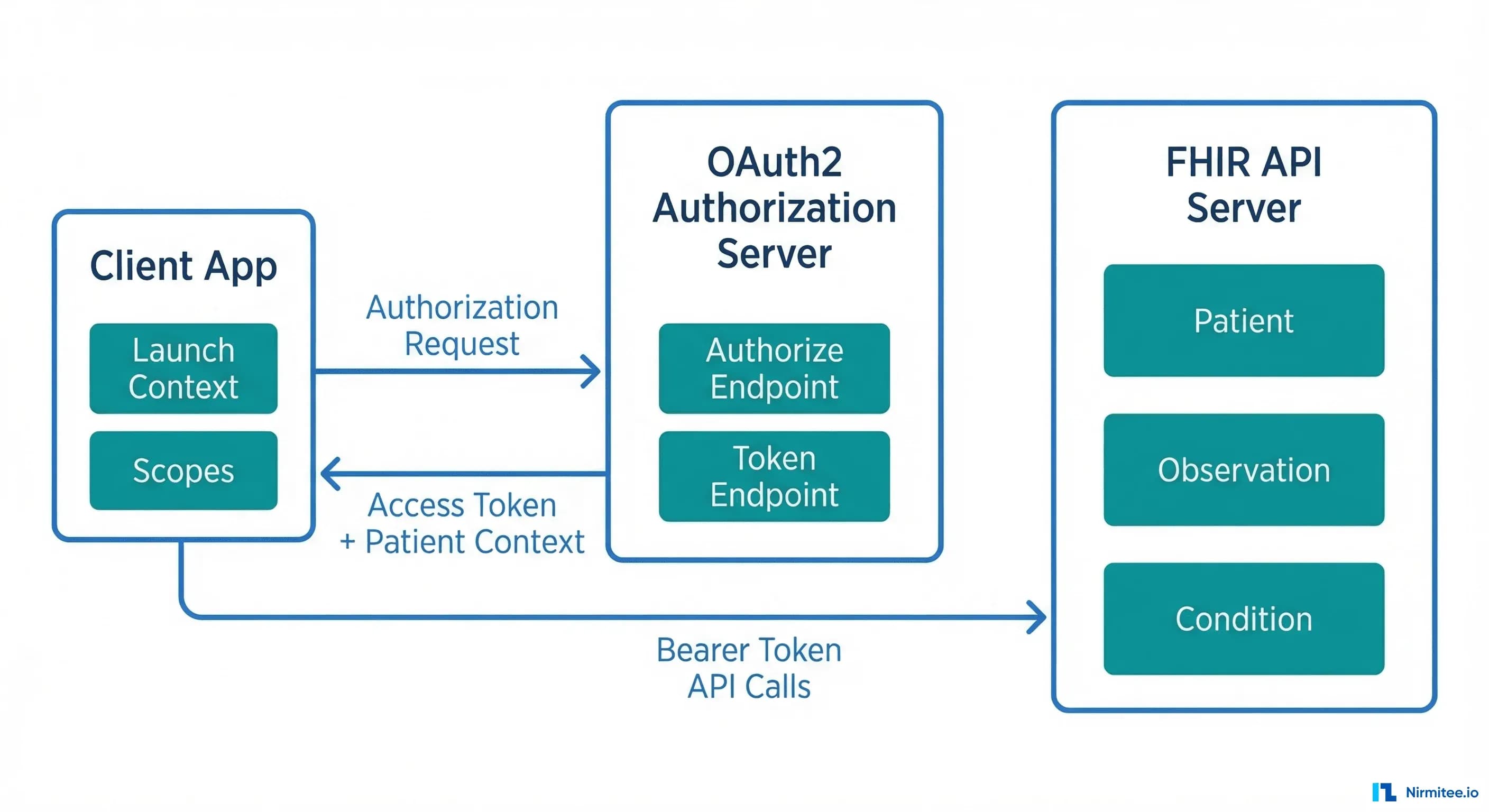
We spent three months building a SMART on FHIR standalone application from scratch. By the end, we passed 47 out of 51 Inferno test suite validations — with the only four failures being TLS-related tests that are expected to fail in an HTTP development environment. Along the way, we discovered that the official documentation, while comprehensive in theory, leaves enormous gaps when you move from a sandbox environment to anything resembling production. This guide covers every gotcha, workaround, and hard-won lesson from that journey.
Related case study: we took this exact path with a a SMART on FHIR app that auto-fills nursing notes.
SMART (Substitutable Medical Applications, Reusable Technologies) on FHIR is the healthcare industry's answer to a decades-old problem: how do you build third-party applications that can securely access clinical data across different EHR systems? The 21st Century Cures Act and subsequent ONC Final Rule (2020) mandated that certified EHR systems support standardized APIs for patient access — and SMART on FHIR became the mechanism to deliver on that mandate. As of 2025, every ONC-certified EHR must expose FHIR R4 endpoints with SMART authorization. The market opportunity is massive. The implementation? That is where things get interesting.
The SMART on FHIR Promise vs Reality
On paper, SMART on FHIR solves the healthcare interoperability problem beautifully. It provides standardized OAuth2-based authorization, launch context that tells your app which patient and encounter are in scope, and a well-defined set of FHIR resources you can query. In theory, you build one app and it works with Epic, Cerner, Allscripts, and every other certified EHR.
The reality is more nuanced. SMART on FHIR gets several things right:
- Standardized authorization — OAuth2 with healthcare-specific extensions (launch context, scopes) means you are not building custom integrations for each EHR.
- Patient-facing access — The standalone launch flow lets patients authorize your app directly, without going through an EHR session.
- Scope-based access control — Granular permissions via FHIR scopes (
patient/Patient.read,patient/Observation.read) let you request exactly the data you need. - Discovery via
.well-known— Your app can dynamically discover authorization endpoints, token URLs, and supported capabilities.
But here is what breaks in practice:
- EHR-specific behaviors — Each EHR implements the spec slightly differently. Epic returns
patientin the token response; some EHRs return it in the ID token. Cerner uses different scope formats than Epic for bulk data. - Sandbox vs production data fidelity — Sandbox data is clean, complete, and well-formed. Production data has missing fields, inconsistent coding systems, and edge cases the spec does not cover.
- Token lifecycle management — Refresh token behavior varies wildly. Some EHRs issue single-use refresh tokens; others allow reuse. Token expiry ranges from 5 minutes (Epic) to 60 minutes.
- Version fragmentation — While the mandate is FHIR R4, you will encounter R2 (DSTU2) endpoints in production, especially with older EHR installations.
Setting Up Your Development Environment
Before writing a single line of application code, you need a functioning development environment. Here are the three paths we evaluated, and which one we recommend.
SMART Health IT Sandbox
The SMART Health IT Launcher is the fastest way to get started. It provides a hosted FHIR server with sample patient data, a configurable launch simulator, and pre-registered test clients. You can test both standalone and EHR launch flows without any infrastructure setup.
Limitation: The sandbox uses permissive validation. Resources that pass here may fail against a production EHR's stricter parser.
Epic Open Sandbox
Epic's App Orchard sandbox is closer to production behavior. You register your app, get client credentials, and test against Epic's FHIR R4 implementation. This is where you will discover Epic-specific behaviors like their 5-minute access token expiry and patient context in the token response body.
Recommendation: If you are targeting Epic hospitals (which represent roughly 35% of US acute care EHR market share according to KLAS Research), start here early. The behavior differences between Epic's sandbox and the generic SMART launcher will save you weeks of debugging later.
Local HAPI FHIR Server
For full control, run a local HAPI FHIR server with your own authorization layer. This is what we did for our implementation — we built a Go-based FHIR server with an embedded SMART authorization server using RS256 JWT signing. This approach gives you complete control over the authorization flow, token behavior, and data seeding.
# Docker Compose for local HAPI FHIR + PostgreSQL
version: '3.8'
services:
  hapi-fhir:
    image: hapiproject/hapi:latest
    ports:
      - "8080:8080"
    environment:
      - spring.datasource.url=jdbc:postgresql://db:5432/hapi
      - spring.datasource.username=admin
      - spring.datasource.password=admin
      - hapi.fhir.subscription.resthook_enabled=true
      - hapi.fhir.fhir_version=R4
    depends_on:
      - db
  db:
    image: postgres:15
    environment:
      POSTGRES_DB: hapi
      POSTGRES_USER: admin
      POSTGRES_PASSWORD: admin
    volumes:
      - hapi-data:/var/lib/postgresql/data
volumes:
  hapi-data:
The Authorization Flow: OAuth2 Nuances in Healthcare
SMART on FHIR authorization is OAuth2 — but with healthcare-specific extensions that trip up even experienced OAuth developers. The core difference is launch context: your app needs to know which patient, encounter, or practitioner is in scope, and that context is communicated through the authorization flow itself.
Standalone Launch vs EHR Launch
There are two primary launch flows, and they serve fundamentally different use cases:
Standalone Launch is initiated by the patient or user directly opening your app. Your app discovers the FHIR server's authorization endpoints via the .well-known/smart-configuration endpoint and drives the entire OAuth2 flow:
# Step 1: Discover authorization endpoints
GET https://fhir.example.com/fhir/.well-known/smart-configuration

# Response:
{
  "authorization_endpoint": "https://fhir.example.com/auth/authorize",
  "token_endpoint": "https://fhir.example.com/auth/token",
  "capabilities": [
    "launch-standalone",
    "client-public",
    "client-confidential-symmetric",
    "context-standalone-patient",
    "permission-v2",
    "sso-openid-connect"
  ]
}

# Step 2: Redirect user to authorization endpoint
GET https://fhir.example.com/auth/authorize?
  response_type=code&
  client_id=my-smart-app&
  redirect_uri=https://myapp.com/callback&
  scope=launch/patient openid fhirUser patient/Patient.read patient/Observation.read&
  state=abc123&
  aud=https://fhir.example.com/fhir&
  code_challenge=E9Melhoa2OwvFrEMTJguCHaoeK1t8URWbuGJSstw-cM&
  code_challenge_method=S256

# Step 3: Exchange authorization code for token
POST https://fhir.example.com/auth/token
Content-Type: application/x-www-form-urlencoded

grant_type=authorization_code&
code=AUTH_CODE_HERE&
redirect_uri=https://myapp.com/callback&
client_id=my-smart-app&
code_verifier=dBjftJeZ4CVP-mB92K27uhbUJU1p1r_wW1gFWFOEjXk

# Token Response:
{
  "access_token": "eyJhbGciOiJSUzI1NiIs...",
  "token_type": "Bearer",
  "expires_in": 3600,
  "scope": "launch/patient openid fhirUser patient/Patient.read patient/Observation.read",
  "patient": "patient-john-smith",
  "id_token": "eyJhbGciOiJSUzI1NiIs..."
}
EHR Launch is initiated from within the EHR's user interface. The EHR sends a launch parameter to your app's launch URL, and your app exchanges that opaque launch token for context during the authorization flow:
# EHR opens your app with a launch parameter:
GET https://myapp.com/launch?
  iss=https://fhir.example.com/fhir&
  launch=xyz789

# Your app redirects to authorize with the launch parameter:
GET https://fhir.example.com/auth/authorize?
  response_type=code&
  client_id=my-smart-app&
  redirect_uri=https://myapp.com/callback&
  scope=launch openid fhirUser patient/Patient.read&
  state=abc123&
  aud=https://fhir.example.com/fhir&
  launch=xyz789
Key difference: In EHR launch, you request the launch scope (not launch/patient), and the EHR provides the patient context. In standalone launch, you request launch/patient and the authorization server may prompt the user to select a patient.
PKCE: Why You Need It Now
PKCE (Proof Key for Code Exchange, RFC 7636) is no longer optional in SMART on FHIR. The SMART App Launch v2.1 specification requires PKCE support, and the Inferno test suite validates it. For public clients (SPAs, mobile apps), PKCE is mandatory. For confidential clients, it is strongly recommended and tested.
import hashlib
import base64
import secrets

# Generate code verifier (43-128 characters, unreserved URI characters)
code_verifier = secrets.token_urlsafe(32)
# Example: "dBjftJeZ4CVP-mB92K27uhbUJU1p1r_wW1gFWFOEjXk"

# Generate code challenge (S256 method)
code_challenge = base64.urlsafe_b64encode(
    hashlib.sha256(code_verifier.encode('ascii')).digest()
).decode('ascii').rstrip('=')
# Example: "E9Melhoa2OwvFrEMTJguCHaoeK1t8URWbuGJSstw-cM"

# Include in authorization request:
# code_challenge={code_challenge}&code_challenge_method=S256

# Include verifier in token exchange:
# code_verifier={code_verifier}
Gotcha we hit: Some EHR authorization servers silently ignore PKCE parameters if the client is registered as confidential. Your token exchange will still work, but Inferno will flag this as a failure because the server should validate the code verifier. If you are building the authorization server, always validate PKCE when parameters are present, regardless of client type.
Scope Negotiation Gotchas
SMART on FHIR scopes follow the pattern context/ResourceType.permission. The most common formats:
# SMART v1 scopes (still widely used):
patient/Patient.read        # Read patient demographics
patient/Observation.read    # Read observations (vitals, labs)
patient/*.read              # Read all patient-accessible resources
user/Patient.read           # Read any patient (user-level access)
openid                      # OpenID Connect identity
fhirUser                    # Include FHIR user reference in ID token
launch/patient              # Request patient context (standalone)
launch                      # Accept EHR launch context
offline_access              # Request refresh token

# SMART v2 scopes (granular, recommended):
patient/Patient.rs          # Read and search Patient
patient/Observation.rs      # Read and search Observation
patient/Condition.crs       # Create, read, search Condition
Here is where scope negotiation gets tricky in production:
- Scope downgrading — You request
patient/*.readbut the EHR returns onlypatient/Patient.read patient/Observation.read. Your app must check thescopefield in the token response and handle reduced permissions gracefully. - Unsupported scopes — Not all EHRs support all FHIR resource types. Request
patient/MedicationRequest.readon an EHR that only supportspatient/MedicationOrder.read(DSTU2 naming), and you will get a silent scope removal. - Wildcard behavior —
patient/*.readis convenient for development but many production EHRs require you to enumerate specific resource types. Epic, for example, supports wildcard scopes but recommends specific scopes for App Orchard review.
Our recommendation: Always request specific scopes in production. Use patient/*.read only during early development. Parse the granted scopes from the token response and adjust your API calls accordingly.
Sandbox vs Production: The 5 Things That Will Break
This is the section we wish someone had written before we started. These are not edge cases — they are systematic differences between sandbox and production FHIR environments that will break your application if you are not prepared.
1. Data Completeness Differences
Sandbox FHIR servers serve synthetic data that is beautifully complete. Every Patient resource has name, birthDate, gender, address, telecom, and identifiers. Every Observation has a clean LOINC code, a numeric value, and a reference range.
Production data is messier. You will encounter Patient resources with no address. Observations with a valueCodeableConcept instead of valueQuantity. Conditions without onset dates. AllergyIntolerance resources where the substance is in a free-text note instead of a coded code element.
Defense: Build your FHIR resource parsers with every field optional. Use pattern matching, not strict type assertions. Test with Synthea-generated data that includes realistic data gaps.
2. Rate Limiting
Sandbox environments have no rate limiting. You can fire hundreds of requests per second during development, and everything works. Production EHRs enforce strict rate limits — and the limits vary by EHR vendor, by endpoint, and sometimes by the specific health system's configuration.
Typical production rate limits we encountered:
- Epic: 10 requests per second per patient context, with throttling (HTTP 429) rather than hard rejection
- Cerner: Varies by resource type; bulk endpoints have separate limits
- Most EHRs: Return
Retry-Afterheaders with 429 responses
Defense: Implement exponential backoff with jitter from day one. Batch your FHIR reads using _include and _revinclude parameters to reduce request count. Cache aggressively — clinical data does not change every second.
3. FHIR Version Inconsistencies
The ONC mandate specifies FHIR R4 (v4.0.1), but you will encounter version inconsistencies in practice. Some health systems run older EHR versions that expose DSTU2 or STU3 endpoints alongside R4. Resource names changed between versions (MedicationOrder in DSTU2 became MedicationRequest in R4). Search parameters have different names. Bundle structures differ subtly.
Defense: Check the server's CapabilityStatement (or Conformance in DSTU2) to determine the FHIR version before making resource requests. Consider using a FHIR client library that abstracts version differences — fhirclient.js handles this reasonably well.
4. Required vs Optional Fields
The FHIR specification defines minimum cardinality for each element, but EHR implementations add their own constraints through profiles. A field that is optional in base FHIR might be required by a specific EHR's profile. Conversely, a field your app depends on might not be populated in production even though the sandbox always includes it.
Common surprises:
- US Core profiles require
Patient.identifierwith an MRN system, but some EHRs do not expose MRNs to third-party apps Observation.categoryis required by US Core but inconsistently populated across EHRsEncounter.classuses different code systems across vendors
Defense: Validate your resource handling against the US Core Implementation Guide profiles, not just base FHIR. Run the Inferno validator against sample production data early.
5. Token Expiry and Refresh Behavior
Sandbox tokens often last for hours. Production tokens expire in minutes. This difference will break your app if you are not handling token refresh correctly.
What we learned:
- Epic access tokens expire in 5 minutes (300 seconds)
- Some EHRs issue single-use refresh tokens — each refresh returns a new refresh token, and the old one is immediately invalidated
- Refresh token expiry ranges from 24 hours to 90 days depending on the EHR and the app's registration
- The
offline_accessscope is required to receive a refresh token, but not all EHRs support it for all client types
# Token refresh request
POST https://fhir.example.com/auth/token
Content-Type: application/x-www-form-urlencoded

grant_type=refresh_token&
refresh_token=CURRENT_REFRESH_TOKEN&
client_id=my-smart-app&
client_secret=MY_SECRET  # Only for confidential clients

# Response includes a NEW refresh token (single-use pattern):
{
  "access_token": "eyJhbGciOiJSUzI1NiIs...",
  "token_type": "Bearer",
  "expires_in": 300,
  "scope": "patient/Patient.read patient/Observation.read offline_access",
  "refresh_token": "NEW_REFRESH_TOKEN_REPLACES_OLD"
}
Defense: Implement proactive token refresh — refresh when the token has less than 60 seconds of remaining validity, not when it has already expired. Store refresh tokens securely and handle the single-use pattern by always persisting the latest refresh token from each response.
Surviving the Inferno Test Suite
The ONC Inferno Test Suite is the gold standard for validating SMART on FHIR implementations. It is the same tool used during ONC Health IT certification testing. If your app (or your FHIR server) can pass Inferno, you are in solid shape for production deployment.
We ran Inferno against our custom Go-based FHIR server with an embedded SMART authorization server. Our final score: 47 out of 51 tests passing. Here is the breakdown:
What Passed
- OpenID Connect — All tests passed. ID token validation,
fhirUserclaim, JWKS endpoint discovery, RS256 signature verification. - Token Refresh — All tests passed. Refresh token exchange, scope preservation, new token issuance.
- Resource Access — All tests passed. Patient read, Observation search, Condition search, all US Core required resource types.
- Patient Standalone Launch — All tests passed. Authorization code flow with PKCE, scope negotiation, patient context.
- SMART Configuration — All tests passed.
.well-known/smart-configurationendpoint, capability declarations, supported grant types.
What Failed (and Why It Is OK)
The 4 failing tests were all TLS-related:
- TLS 1.2+ enforcement — Our development server runs on HTTP (no TLS). In production, TLS termination happens at the load balancer or reverse proxy (nginx, Cloudflare, AWS ALB), not at the application layer.
- Certificate validation — Same root cause. No certificates in HTTP dev mode.
These failures are expected and acceptable during development. In a production deployment with proper TLS configuration, these tests pass automatically. The Inferno documentation explicitly notes that TLS tests may fail in development environments.
Tips for Maximizing Your Pass Rate
- Run Inferno locally in Docker — The hosted version at inferno.healthit.gov works, but running locally gives you faster iteration cycles and the ability to inspect network traffic.
docker compose pull docker compose up -d # Inferno available at http://localhost:4567 - Use
host.docker.internal— If your FHIR server runs on localhost, Inferno (running in Docker) cannot reachlocalhost. Usehost.docker.internalas the FHIR server URL in Inferno's configuration. On macOS and Windows with Docker Desktop, this resolves to the host machine. On Linux, add--add-host=host.docker.internal:host-gatewayto your Docker run command. - Seed your test data — Inferno expects specific resource types to exist. At minimum, you need a Patient resource and associated Observations, Conditions, and other US Core required resources. We pre-loaded a comprehensive patient record with vitals, lab results, conditions, medications, and allergies.
- Watch the 5-minute timeout — Inferno has a 5-minute timeout for OAuth flows. When it redirects you to your authorization server, complete the login and authorization within that window. If you are testing manually, have your test credentials ready.
- Validate your JWKS endpoint — The
/auth/jwksendpoint must return a valid JWK Set with the key used to sign your ID tokens. Inferno fetches this endpoint and uses it to verify the ID token signature. Make sure thekid(key ID) in your JWT header matches a key in the JWK Set. - Support both
code_challenge_methodvalues — While S256 is the recommended and most common method, Inferno may test plain PKCE as well. Support both if possible.
Epic-Specific Gotchas
Epic dominates the US EHR market. If your SMART on FHIR app will be deployed in hospitals, you will almost certainly integrate with Epic. Here are the gotchas that are not in the official documentation.
Caching Delays
When you register or update your app in Epic's App Orchard (now the Epic on FHIR developer portal), changes to your app's configuration — redirect URIs, scopes, and display name — can take up to 24 hours to propagate. This is because Epic caches app registrations aggressively. During development, this means you might update your redirect URI and then spend hours debugging why authorization fails, only to discover the old redirect URI is still cached.
Workaround: Get your redirect URIs and scope list finalized before you start testing. Avoid iterating on app registration during active development sprints.
Complete Resource Updates
Epic's FHIR API requires complete resource updates (PUT), not partial patches. If you read a Patient resource, modify one field, and PUT it back, you must include every element from the original resource. Omitting a field is interpreted as deleting it. This is technically FHIR-spec-compliant behavior, but other EHRs are more lenient with partial updates via PATCH.
# WRONG: Partial update (will delete fields not included)
PUT /fhir/Patient/123
{
  "resourceType": "Patient",
  "id": "123",
  "name": [{"family": "Smith", "given": ["John"]}],
  "birthDate": "1990-01-15"
  // Missing: gender, address, telecom — these get DELETED
}

# CORRECT: Read first, modify, PUT complete resource
GET /fhir/Patient/123  → save full resource
# Modify the field you need
PUT /fhir/Patient/123
{
  "resourceType": "Patient",
  "id": "123",
  "meta": {"versionId": "2"},
  "name": [{"family": "Smith", "given": ["John"]}],
  "birthDate": "1990-01-15",
  "gender": "male",
  "address": [...],  // preserved from GET
  "telecom": [...]   // preserved from GET
}
App Orchard Review Process
Epic's app review process is thorough and can take 4-8 weeks. They review your app for security practices, data handling, privacy policy, and FHIR API usage patterns. Key requirements:
- Your app must have a published privacy policy and terms of service
- All data in transit must use TLS 1.2+
- You must demonstrate proper token handling (no tokens in URLs, no tokens in local storage for web apps)
- Your app must handle scope downgrading gracefully
- You need to specify exactly which FHIR resources and operations your app uses
Pro tip: Start the App Orchard review process early, even if your app is not fully complete. The review happens in parallel with development, and reviewer feedback often reveals requirements you missed.
Certification Process and Costs
If you are building a SMART on FHIR application that will be marketed to healthcare organizations, you will likely need ONC Health IT certification. Here is what that process looks like and what it costs.
ONC Health IT Certification
ONC certification is required for EHR systems that want to participate in CMS programs (Medicare, Medicaid). For third-party SMART apps, certification is not always required, but it significantly increases trust with healthcare organizations and may be required by some health systems before they allow your app to connect.
The certification process involves testing by an ONC-Authorized Testing Lab (ONC-ATL) and certification by an ONC-Authorized Certification Body (ONC-ACB). The two main testing labs are:
- Drummond Group — One of the most established ONC-ATLs. Testing fees range from $10,000 to $25,000 depending on the scope of certification criteria.
- SLI Compliance (now Leidos) — Similar fee range, with some differences in testing methodology and timeline.
Cost Breakdown
Based on our research and conversations with certified health IT vendors, here is a realistic cost breakdown for a SMART on FHIR application seeking ONC certification:
| Cost Category | Estimated Range | Notes |
|---|---|---|
| ONC-ATL Testing Fees | $10,000 - $25,000 | Depends on number of certification criteria |
| ONC-ACB Certification Fees | $5,000 - $15,000 | Annual maintenance fees apply |
| Pre-certification Preparation | $5,000 - $15,000 | Gap analysis, documentation, test prep |
| EHR Marketplace Listing | Varies | Epic App Orchard, Cerner Code — some free, some paid |
| Annual Compliance Maintenance | $2,000 - $5,000/year | Recertification, API version updates |
| Total First-Year Cost | $20,000 - $50,000 | Excluding development costs |
Timeline
Expect 3-6 months from initial application to certification, assuming your application is functionally complete. The process includes:
- Pre-testing (2-4 weeks) — Gap analysis against certification criteria, documentation preparation, Inferno pre-testing
- ONC-ATL Testing (4-8 weeks) — Formal testing against certification criteria, deficiency resolution, retesting
- ONC-ACB Review (2-4 weeks) — Final review and certification issuance
- EHR Marketplace Submission (4-8 weeks) — App Orchard or Cerner Code review, if applicable
Is Certification Worth It?
For most SMART on FHIR applications targeting the US healthcare market, the answer is yes — with caveats. Certification is a strong trust signal for health system IT departments. It demonstrates that your app has been tested against federal standards and handles clinical data responsibly. However, if you are building an internal tool or a research application, the cost and timeline may not be justified.
The 21st Century Cures Act is clear in its direction: standardized, open APIs for healthcare data access. ONC certification aligns your product with that regulatory direction and future-proofs your market positioning.
Conclusion
Building a SMART on FHIR application is genuinely feasible — the standards work, the tooling is maturing, and the regulatory tailwinds are strong. But the gap between sandbox success and production readiness is wider than most documentation suggests. The five production-breaking differences we outlined (data completeness, rate limiting, FHIR version inconsistencies, required field variations, and token lifecycle differences) will bite you if you are not prepared.
Our recommendation: Start with the Inferno test suite as your north star. If you can pass 90%+ of Inferno's validations, you are well-positioned for production. Address TLS in your deployment architecture (not your application code). Seed realistic test data early. And if you are targeting Epic, start the App Orchard conversation months before you need production access.
At Nirmitee, we build healthcare applications that pass real-world interoperability tests — not just sandbox demos. If you are building a SMART on FHIR application and need help navigating the sandbox-to-production gap, reach out to our team. We have been through the trenches and can help you get there faster.
Struggling with healthcare data exchange? Our Healthcare Interoperability Solutions practice helps organizations connect clinical systems at scale. We also offer specialized product engineering for healthcare teams. Talk to our team to get started.
Frequently Asked QuestionsHow long does it take to build a SMART on FHIR app from scratch?
For a team with OAuth2 experience, expect 2-3 months to reach Inferno test suite compliance. Add 1-2 months for production hardening (rate limiting, error handling, token management) and 3-6 months for ONC certification if required.
Do I need ONC certification for my SMART on FHIR app?
Not always. ONC certification is required for EHR systems participating in CMS programs. For third-party apps, it is a strong trust signal but not always mandatory. However, some health systems require it before allowing connections to their production FHIR endpoints.
Can I use SMART on FHIR with non-Epic EHRs?
Yes. SMART on FHIR is an open standard supported by Epic, Cerner (Oracle Health), Allscripts, MEDITECH, athenahealth, and other ONC-certified EHRs. The implementation details vary, but the core OAuth2 + FHIR pattern is consistent across vendors.
What programming languages work best for SMART on FHIR?
Any language with good OAuth2 and HTTP client libraries works. Popular choices include JavaScript/TypeScript (with fhirclient.js), Python (with fhirclient), Java (with HAPI FHIR), and Go. We built our implementation in Go using the Echo framework with a custom SMART authorization server.
How do I handle FHIR version differences between EHRs?
Query the server's CapabilityStatement first to determine the FHIR version. Use a FHIR client library that supports multiple versions, or build an abstraction layer that maps between version-specific resource names and search parameters. Focus on FHIR R4 as the baseline — it is the ONC-mandated version.
Ready to scale?
Talk to our healthcare engineering team about building, integrating, and shipping faster.
Frequently Asked Questions
What is SMART on FHIR?
What breaks when moving a SMART on FHIR app from sandbox to production?
What is the difference between SMART standalone launch and EHR launch?
Is PKCE required for SMART on FHIR apps?
Which sandbox should I use to develop a SMART on FHIR application?
How does Nirmitee.io approach healthcare software development?