Nirmitee.io
Skip to platform details
Interoply BETABY NIRMITEE

Healthcare integration platform

Connect systems.
Control the work.

One platform and an integration team to connect your EHRs, payers and clearinghouses. We help scope, build and run your workflows, with tested releases, PHI controls and evidence of what reached the destination.

Guided beta evaluation. Bring your EHR and one workflow.

Your healthcare operationsPlatform overview
EHRs & FHIRPayers & X12Forms & HL7
InteroplyINTEGRATION + WORKFLOW ENGINE
ConnectAutomateVerify
CONTROL PLANE
Test gates · Versioned releases · Audit trail
Chart writes Human review Recovery
See how the control plane works
healthcare connectors
99
connector operations
702
example workflows
237
standards, natively
6
Inside the product

Healthcare workflows.
The whole picture.

Build the flow, connect your systems, handle exceptions and trace every change. Explore real screens from Interoply.

Inside Interoply / 01

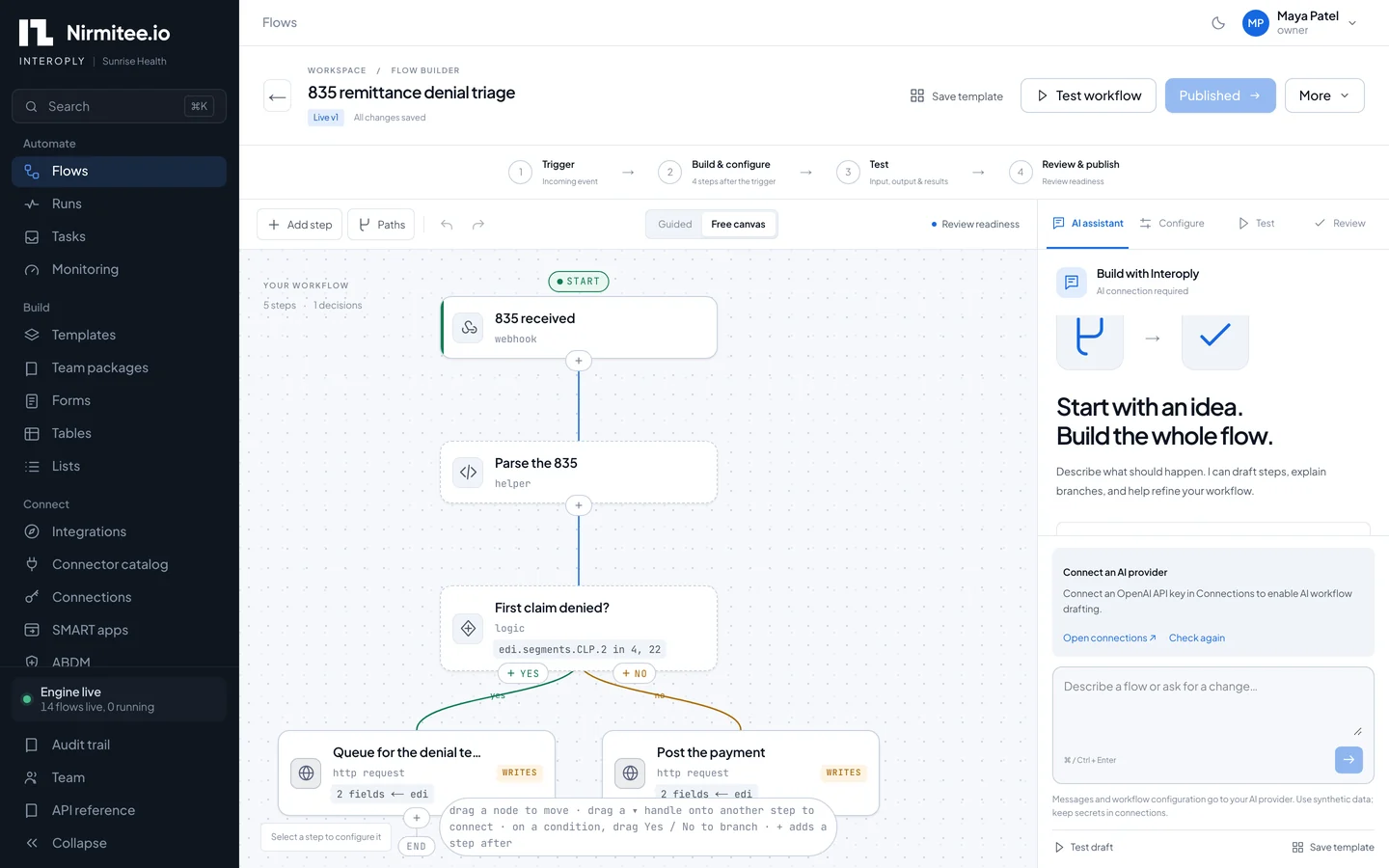
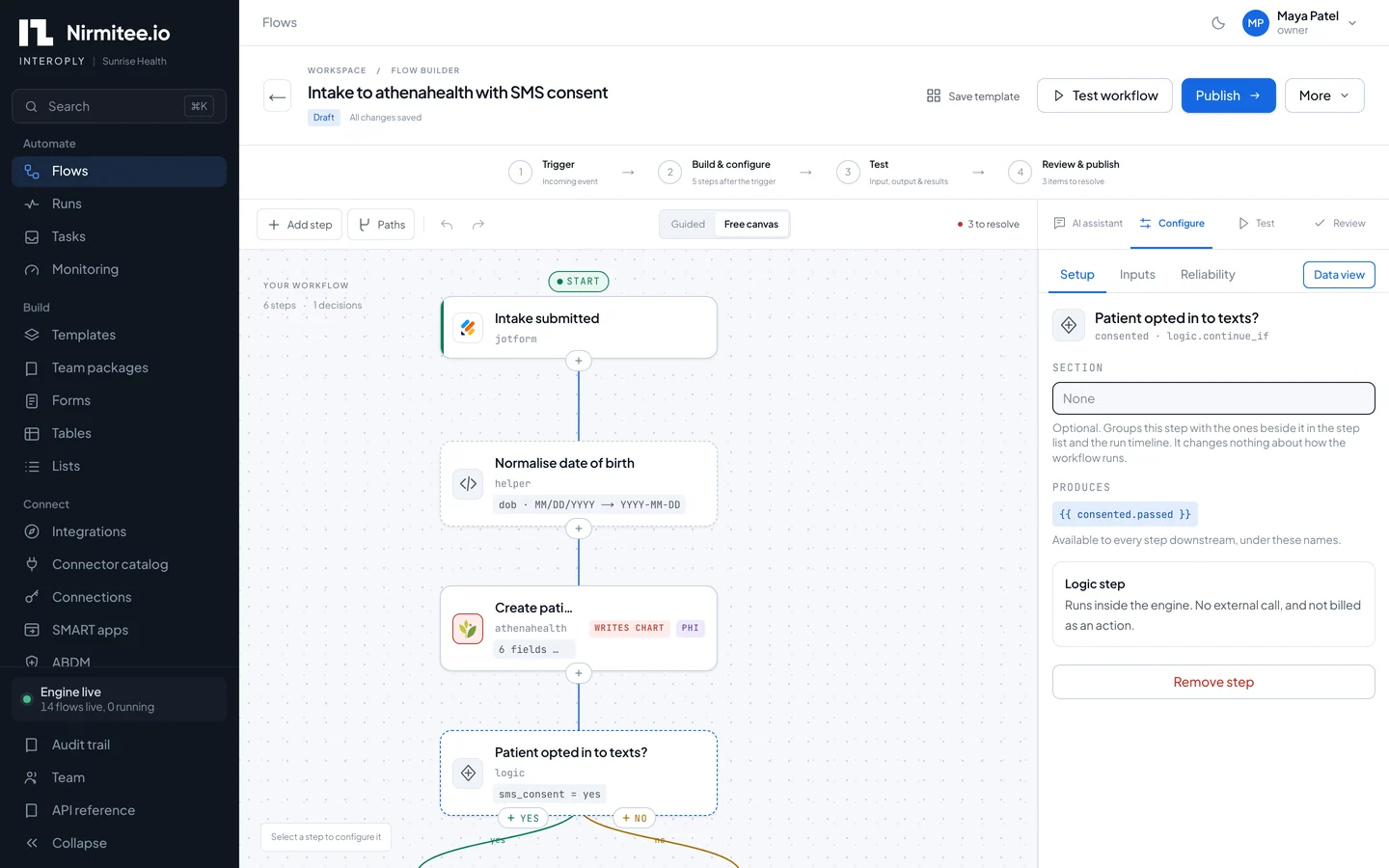
Turn a manual handoff into a working flow.

See the intake-to-athenahealth workflow on a visual canvas. Follow the patient check, chart write and consent branch in one place.

  • Map fields visually
  • Branch on real conditions
  • Review before publishing
See it in a live demo
Interoply workflow builder showing a JotForm intake flow that creates the patient in athenahealth and checks SMS consent View full screen
The intake to athenahealth workflow on the visual canvas, with the chart write and PHI step flagged.
Start with your integration

Different systems.
One place to run the work.

Find your use case, check the connector operations and see how the workflow behaves when a system or a person needs more time.

01

EHR and EMR integration

Epic · Oracle Health · athenahealth · eClinicalWorks

Connect patient intake and chart workflows to the systems your teams use. Map fields, resolve possible patient matches and route exceptions for review.

Ask us to show you

Walk through a chart write, its matching rules and the vendor access needed to go live.

Explore EHR integration services
02

HL7 and FHIR integration

HL7 v2 / MLLP · FHIR R4 · SMART on FHIR

Receive HL7 messages, call FHIR resources and validate mapped data against configured contracts. Quarantine failed checks before delivery.

Ask us to show you

Run a valid message and an invalid message, then inspect the quarantine evidence.

Explore FHIR implementation
03

Payer, clearinghouse and X12 EDI

Eligibility · Claim status · Claims · Remittance

Build workflows around 270/271, 276/277, 278, 835 and 837P transactions. Parse remittance and route denial exceptions to a work queue.

Ask us to show you

Follow an 835 denial from response codes to the person responsible for its next action.

Explore revenue cycle integration
04

Health information exchange

Redox · Health Gorilla · Metriport · CMS Blue Button

Keep the exchange connections you already use. Add routing, workflow state and human review around the records and responses they provide.

Ask us to show you

Trace a network response into the next business step, with access and consent requirements in scope.

Explore HIE implementation
05

Labs, pharmacy, imaging and devices

Labcorp · Quest · DoseSpot · DICOMweb · Dexcom

Use the relevant connector operations to bring clinical systems into a workflow. Review the exact data, direction and permissions for your use case.

Ask us to show you

Check the required operation and sample payload against your destination and acceptance criteria.

Check the clinical connector catalog
06

Intake, referrals and patient operations

Forms · Scheduling · Fax · Messaging · CRM

Start work from a form, webhook or schedule. Combine automated steps with tasks for missing information, approvals and exceptions.

Ask us to show you

Show the routine path and the exception path, including what happens while a person decides.

See healthcare workflow examples

Have a custom API, legacy interface or system outside the catalog? Our team will scope the connector, mapping, access and testing it needs.

Discuss your integration needs
The platform

A healthcare integration platform with workflow automation built in

Interoply is a healthcare integration platform with a workflow engine built in: it moves data between clinical, payer and business systems and completes the work that spans them. An integration engine's depth in HL7, FHIR and X12, with the no-code workflow layer that engines never had.

Connect

EHRs, payers, clearinghouses, labs, pharmacy, fax and messaging through 99 connectors and 702 operations, each testable in a sandbox before vendor credentials arrive.

Automate

Flows that branch, loop, join, call reusable sub-flows and wait days for a payer, a callback or a person, with per-connection rate limits for every payer.

Prove

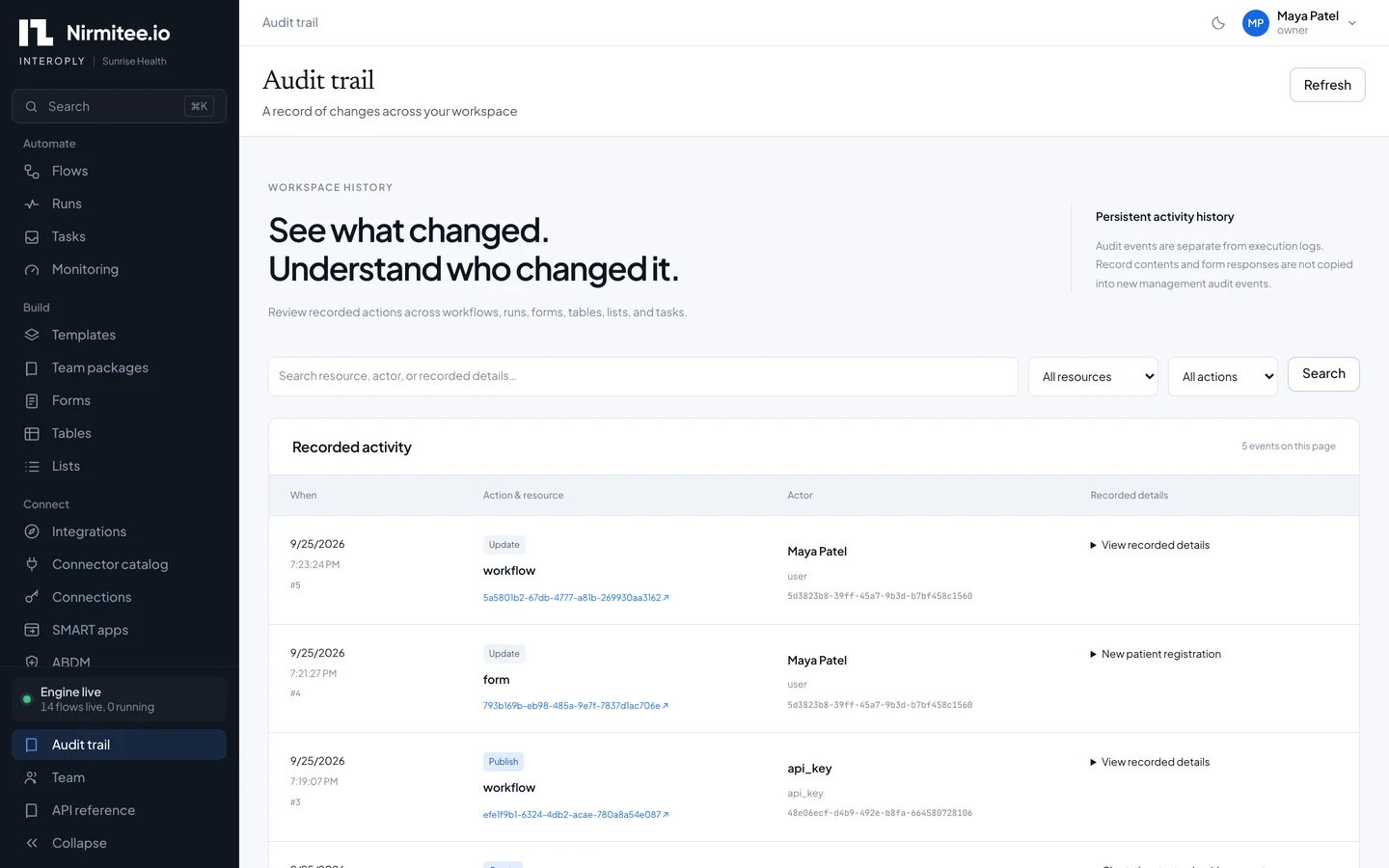
Every step logged with PHI redacted, every inbound event stored before processing, every change audited, and any failed run resumed from the step that broke.

From connection to production

A control plane for every
healthcare integration.

Production brings changing mappings, bad messages, uncertain writes and failed runs. Interoply gives your team the controls and evidence to manage each one.

FOLLOW THE EXECUTIONIllustrative workflow paths
  1. 01Receive source
  2. 02Prepare the write
  3. 03Write destination
  4. 04Read back + compare

Prove the destination matches.

For a configured synchronization workflow, a successful response is followed by a connector GET and a comparison of the fields your policy defines.

  1. 01Build a draft
  2. 02Test the exact version
  3. 03Activate staging
  4. 04Test production
  5. 05Activate release
01

Release with evidence

Keep untested changes out of production.

Pin the workflow version, request definitions and account bindings. Test the exact release in staging and production before activation.

  • Separate staging and production
  • Immutable release versions
  • Passing-test activation gates
02

Catch bad data before delivery

Give invalid messages a visible place to land.

Apply versioned FHIR and HL7 contracts to mapped data. Configured rules check required fields, types, cardinality and allowed values; failures stop delivery and create quarantine evidence.

  • Versioned validation contracts
  • Audited quarantine investigation
  • Correct, test and replay
03

Verify the destination

Check what arrived, beyond an HTTP response.

Read the destination record back through its connector and compare the fields your policy defines. Retain mismatch evidence and confirm synchronization only after a match.

  • Source-of-truth policies
  • Connector GET read-back
  • Versioned checkpoints
04

Recover without blind rewrites

Investigate a failed run before repeating a write.

Track synchronization intent and unresolved reservations. An authorized recovery can read back, reconcile and confirm the original reservation without another destination write.

  • Stable idempotency keys
  • Read-back-only recovery
  • Environment-scoped evidence
05

Make operations accountable

Know who owns the next action.

Give each integration an owner and delivery target. Investigate overdue runs, link an incident to its run, and record an owner and resolution in the workspace.

  • Searchable retained run history
  • Backlog and delivery visibility
  • Run-linked incident records
06

Reuse what your team has tested

Carry the implementation forward, then test its new context.

Package workflows, mappings, setup instructions, synthetic samples and regression suites as immutable versions. Install a chosen version, bind its accounts and generate fresh test evidence.

  • Shared implementation packages
  • Mapping regression gates
  • Installation provenance

Bring the integration your team finds hardest to operate.

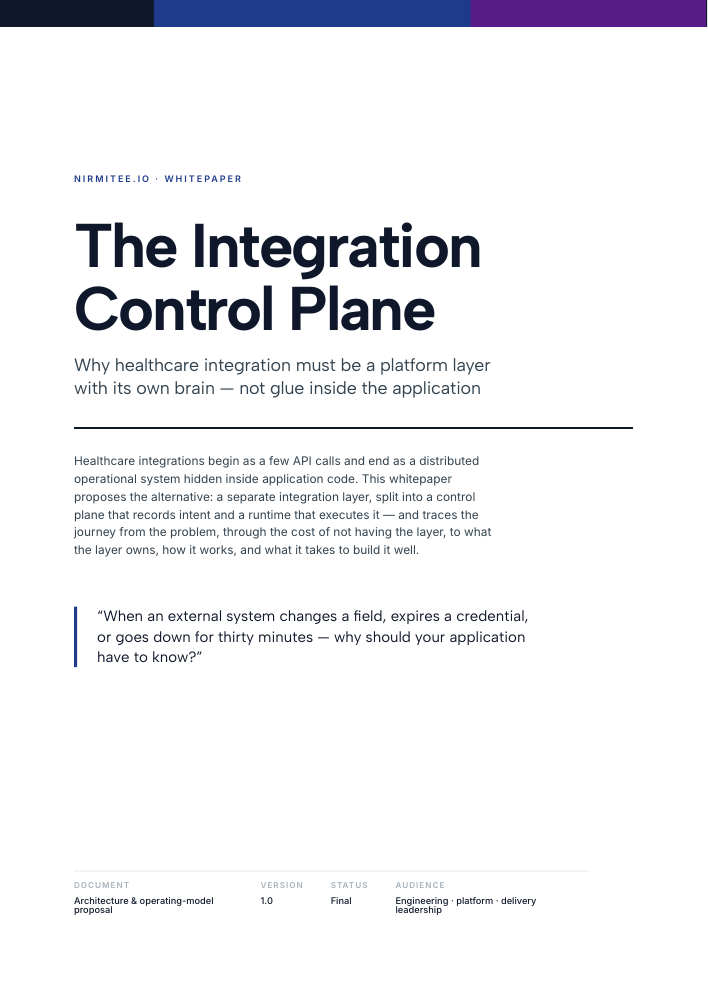
Explore the integration control-plane white paper
Walk through the control plane
Platform capabilities

The tools to build it.
The controls to run it.

Healthcare workflow automation for the people designing the flow, the engineers connecting systems and the teams responsible for delivery.

01

Visual workflow builder

Build branches, parallel paths, joins and loops. Map fields without code, and draft a workflow in plain English for your team to review and test.

02

Long-running orchestration

Wait for a callback, a person or a condition. Poll claim status across days and resume failed work with the execution context retained.

03

Schedules and catch-up

Run recurring work, catch up missed schedules and backfill a past window. Bound concurrent runs and request rates per connection.

04

Human approval and task inbox

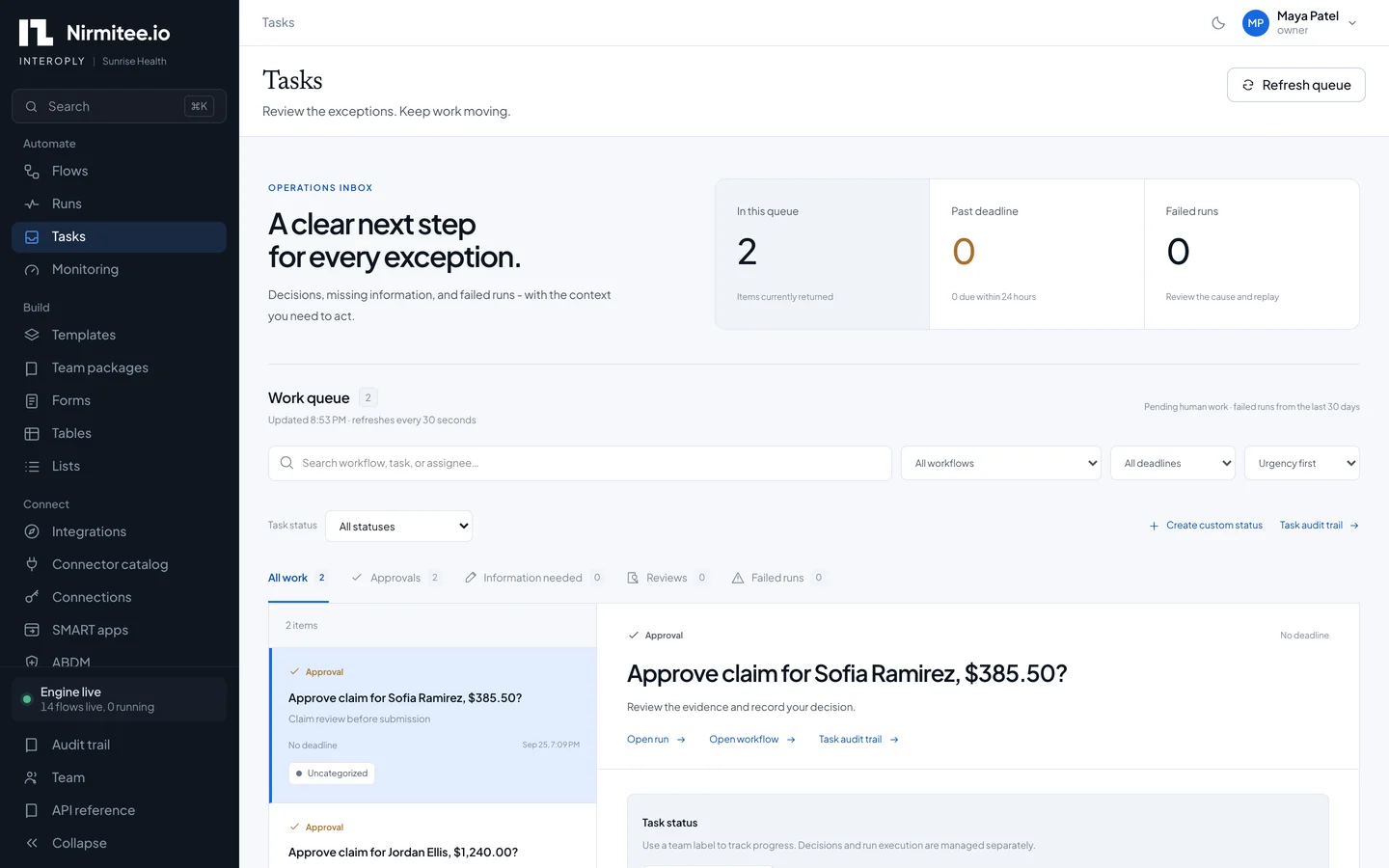
Assign, reassign and escalate exceptions. Ask a person to approve, supply missing information or correct a patient match.

05

Forms, tables and lookup lists

Collect intake through hosted forms, retain workflow state across days and reuse lookup values across operational flows.

06

Healthcare-native connectivity

Use FHIR R4, SMART on FHIR, HL7 v2 over MLLP, X12 EDI, SFTP, AS2 and DICOMweb alongside the connector catalog.

07

Sandbox and connection checks

Exercise connector operations with fixtures before vendor credentials arrive. Test configured connections and disable an account when needed.

08

PHI and access controls

Tokenise tagged fields before logging, encrypt execution history and configure retention. Control access with roles, tenant isolation and TOTP MFA.

09

API and private-network workers

Use the platform API and deploy outbound-only workers in the network that can reach your EHR. Worker zones keep execution in the right network.

Beyond the connector catalog

Build your own
custom integrations.

Target your first integration in weeks.

Bring a scoped workflow, API documentation and access to the systems. We agree on a delivery target after discovery; vendor onboarding and security approvals shape the schedule.

Your API becomes a workflow step

Use the HTTP connector.
Keep the platform controls.

Configure the method, URL, query, headers and body in the request builder. Use stored connections or tokens from an earlier step, then extract response fields for the next step.

  • GET, POST, PUT, PATCH and DELETE
  • Dynamic fields and chained API requests
  • Mappings, human tasks and tested releases
From your endpoint to a controlled release
  1. 01
    Define the requestEndpoint, authentication and payload
  2. 02
    Map the responseNamed outputs for the next step
  3. 03
    Test the workflowSuccess, exceptions and retry behavior
  4. 04
    Release with evidencePinned version and account bindings
Healthcare networks, accounted for

Your EHR is behind a VPN.
Your integration can still reach it.

Place a worker inside the network that can reach the endpoint. Network zones route work to the right worker, whether the system sits behind a hospital VPN or accepts only an allowlisted IP.

Interoply coordinationWorkflow configuration
Queue and execution evidence
←Worker-initiated
outbound connection
Approved network access
YOUR PRIVATE NETWORK / VPN
Zone workerPlaced in your network
EHR / lab / SFTPReachable from this zone
Worker placement diagram. The coordination path requires outbound access; HL7 MLLP listeners receive messages on the approved local network.
VPNs and IP allowlists

Place the worker on an approved route or egress address. Our team scopes routing, firewall and allowlisting requirements with you.

Mutual TLS and private certificates

Configure client certificates and private CA roots for supported connections while retaining certificate verification.

One zone per network

Keep network placement explicit. If no worker serves the required zone, the run waits instead of executing elsewhere.

Bring your API specification and network constraints. We’ll map the connector, worker placement and first workflow together.

Scope my custom integration
Proven workflows

Workflows you can run this week

Two workflows run end to end against real systems today, and the templates below them start you from a working flow rather than a blank canvas.

Live

New patient intake to athenahealth, then a text to the patient

A patient completes the intake form, Interoply checks for an existing chart, creates the patient in athenahealth only when no match exists, and texts a confirmation. Matching and write controls are tested as part of the workflow.

Trigger
Intake form submitted
JotForm webhook, stored first
Check
Duplicate patient search
Name, date of birth, phone
Write
Create patient in athenahealth
Idempotent chart write
Notify
SMS confirmation
Twilio, PHI kept out of logs
Possible match: a front-desk task asks a person to confirm or merge before anything is written.

Integrating a product with athenahealth? Our athenahealth integration team runs the Marketplace access process.

Live

835 denial triage into billing work queues

Interoply parses each 835 remittance, including full-size files stored out of line, reads the CARC and RARC codes on every denied or adjusted line, and routes each one to the queue that fixes it.

Trigger
835 arrives
SFTP drop or clearinghouse
Parse
Read claims and service lines
CAS group, CARC and RARC
Route
Match denial rules
Eligibility, coding, authorization
Queue
Work item with context
Tables keep state across days
Unmatched codes land in the Tasks inbox with the remittance detail attached, so nothing is dropped.

The same engine handles eligibility, claim status and the rest of the X12 EDI transaction set.

Templates ready to adapt

Eligibility before the visit

A nightly 270/271 sweep for tomorrow's schedule; coverage problems go to the Tasks inbox.

Referral intake with review

Fax or form in, NPI verified, triage branch, human approval, referral packet faxed back.

Claim status polling

276/277 every few hours until the claim is paid or denied, then the next action starts.

Lab results over SFTP

A nightly lab drop parsed, validated and routed to the right chart and team.

Claim submission

Build and send 837P claims through Stedi or Change Healthcare and track the lifecycle.

Prior authorization

Da Vinci PAS and X12 278 templates. See prior authorization automation below.

Prior authorization is its own programme: see our prior authorization automation software, built on the same Da Vinci servers we publish as open-source healthcare tools.

See one running on your EHRA live demo on your EHR's sandbox, with one of your workflows.
How it works

How healthcare workflow automation works in Interoply

You go from a described workflow to a tested production release in four steps, and the same run log follows it the whole way.

How data and work move through Interoply
  1. 1

    Start from a template or a sentence

    Pick one of 237 example workflows, or describe the work in plain English and the assistant drafts the flow for you to review.

  2. 2

    Connect your systems

    Every operation runs in sandbox mode from fixtures first. Swap in real credentials when the vendor grants access.

  3. 3

    Test, then promote

    Test the exact version in staging. It moves to production only after that test passes, pinned to the tested version.

  4. 4

    Watch every run

    See each step's request and response with PHI tokenised, handle exceptions in the Tasks inbox, and resume from the failed step.

Trigger
Webhook, form, HL7 over MLLP, SFTP drop or schedule
Stored before processing
Steps
Map, validate, branch, loop, call connectors
Contract checks quarantine bad messages
Waits
For a duration, a callback or a condition
Poll a claim for weeks
Destinations
EHR, clearinghouse, messaging, tables
Chart writes read back and verified
Exceptions branch to the Tasks inbox: approve, supply missing information or correct a match, with escalation before the deadline.
Anatomy of an Interoply workflow
Connector library

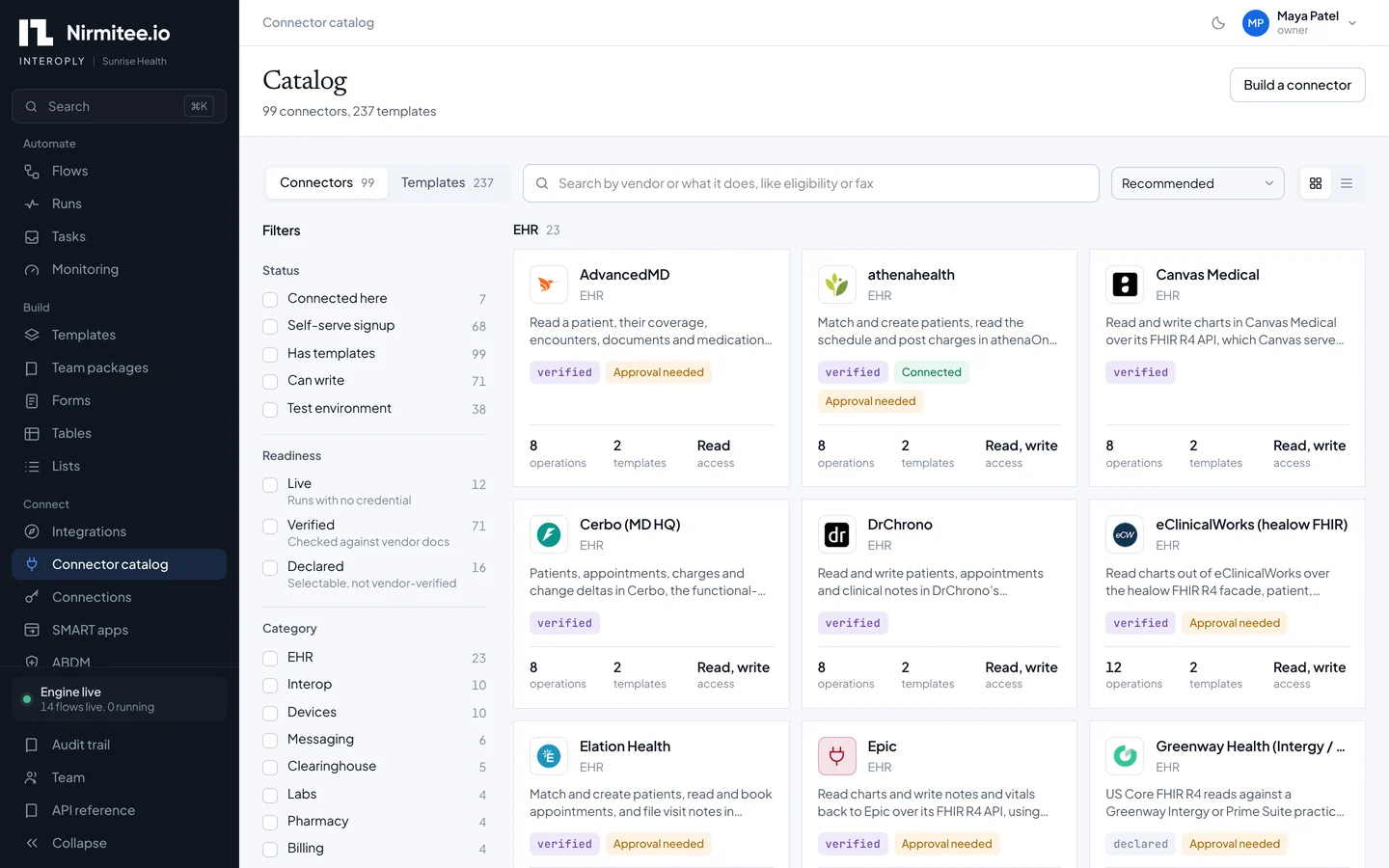
EHR, payer and clearinghouse integrations: 99 connectors

99 connectors across EHRs, payers, clearinghouses, labs, pharmacy, devices and the business tools around them, from EHR integration with Epic, Oracle Health, athenahealth and eClinicalWorks to an HL7 v2 interface engine over MLLP and X12 EDI. Each operation ships with a sandbox fixture, so a whole workflow runs before vendor credentials arrive; sandbox mode is refused in production.

Standards, natively

  • FHIR R4Read and write any resource on any FHIR R4 server
  • SMART on FHIRRegister, check and launch SMART apps
  • HL7 v2Lossless parsing and an inbound MLLP listener
  • X12270/271, 276/277, 278, 835 and 837P
  • SFTP and AS2File drops, polling and signed EDI transport
  • DICOMwebQuery and retrieve from PACS over DICOMweb

Building on a specific standard with our engineers? See our FHIR integration services and HL7 integration services.

99 connectors

EHR and practice management

23
  • AdvancedMD integration
    AdvancedMD
  • athenahealth integration
    athenahealth
  • Canvas Medical integration
    Canvas Medical
  • Cerbo integration
    Cerbo
  • DrChrono integration
    DrChrono
  • eClinicalWorks integration
    eClinicalWorks
  • Elation Health integration
    Elation Health
  • Epic integration
    Epic
  • Greenway Health integration
    Greenway Health
  • Healthie integration
    Healthie
  • IntakeQ integration
    IntakeQ
  • MEDITECH Expanse integration
    MEDITECH Expanse
  • Medplum integration
    Medplum
  • ModMed integration
    ModMed
  • Netsmart integration
    Netsmart
  • NextGen Healthcare integration
    NextGen Healthcare
  • Open Dental integration
    Open Dental
  • Oracle Health integration
    Oracle Health
  • PointClickCare integration
    PointClickCare
  • SMART on FHIR apps integration
    SMART on FHIR apps
  • Tebra integration
    Tebra
  • Veradigm integration
    Veradigm
  • WellSky integration
    WellSky

Payers, clearinghouses and eligibility

8
  • Change Healthcare integration
    Change Healthcare
  • Claim.MD integration
    Claim.MD
  • OA
    Office Ally
  • Stedi integration
    Stedi
  • Waystar integration
    Waystar
  • Availity integration
    Availity
  • Da Vinci PAS integration
    Da Vinci PAS
  • pVerify integration
    pVerify

Interoperability networks, registries and imaging

15
  • Any FHIR R4 server integration
    Any FHIR R4 server
  • Carequality and eHealth Exchange integration
    Carequality and eHealth Exchange
  • CMS Blue Button 2.0 integration
    CMS Blue Button 2.0
  • CMS-0057 payer APIs integration
    CMS-0057 payer APIs
  • Health Gorilla integration
    Health Gorilla
  • Metriport integration
    Metriport
  • NLM Clinical Tables integration
    NLM Clinical Tables
  • NPI Registry integration
    NPI Registry
  • Redox integration
    Redox
  • VSAC value sets integration
    VSAC value sets
  • CDC Open Data integration
    CDC Open Data
  • Immunization registries integration
    Immunization registries
  • MedlinePlus Connect integration
    MedlinePlus Connect
  • ClinicalTrials.gov integration
    ClinicalTrials.gov
  • DICOMweb PACS integration
    DICOMweb PACS

Labs and pharmacy

8
  • Ash Wellness integration
    Ash Wellness
  • Labcorp integration
    Labcorp
  • LOINC integration
    LOINC
  • QD
    Quest Diagnostics
  • DoseSpot integration
    DoseSpot
  • openFDA integration
    openFDA
  • RxNorm integration
    RxNorm
  • Surescripts integration
    Surescripts

Devices and remote monitoring

10
  • Dexcom integration
    Dexcom
  • Fitbit integration
    Fitbit
  • Garmin Health integration
    Garmin Health
  • Google Health integration
    Google Health
  • Junction integration
    Junction
  • Oura integration
    Oura
  • Polar integration
    Polar
  • Terra integration
    Terra
  • WHOOP integration
    WHOOP
  • Withings integration
    Withings

Patient messaging, fax and telehealth

10
  • Gmail integration
    Gmail
  • Paubox integration
    Paubox
  • SendGrid integration
    SendGrid
  • Slack integration
    Slack
  • Spruce Health integration
    Spruce Health
  • Twilio integration
    Twilio
  • Documo integration
    Documo
  • Phaxio integration
    Phaxio
  • WestFax integration
    WestFax
  • Zoom integration
    Zoom

Forms, scheduling and signatures

8
  • Cognito Forms integration
    Cognito Forms
  • JotForm integration
    JotForm
  • Typeform integration
    Typeform
  • Acuity Scheduling integration
    Acuity Scheduling
  • Calendly integration
    Calendly
  • Google Calendar integration
    Google Calendar
  • NexHealth integration
    NexHealth
  • DocuSign integration
    DocuSign

Billing, CRM, files and AI

15
  • Candid Health integration
    Candid Health
  • QuickBooks Online integration
    QuickBooks Online
  • Square integration
    Square
  • Stripe integration
    Stripe
  • HighLevel integration
    HighLevel
  • HubSpot integration
    HubSpot
  • Salesforce integration
    Salesforce
  • Airtable integration
    Airtable
  • Google Sheets integration
    Google Sheets
  • Amazon S3 integration
    Amazon S3
  • Dropbox integration
    Dropbox
  • Google Drive integration
    Google Drive
  • Microsoft 365 integration
    Microsoft 365
  • Anthropic Claude integration
    Anthropic Claude
  • OpenAI integration
    OpenAI

India digital health

2
  • A
    ABDM
  • N
    NHCX

Product names and logos are trademarks of their owners and identify the systems each connector reaches.

People and automation

Humans in the loop, not in the way

Automation handles the routine path; people decide the exceptions, in one place, before the deadline.

  • Tasks inboxApprove, supply missing information or correct a match. Tasks are assigned, reassigned and escalated before they breach their deadline.
  • Hosted formsIntake and referral forms for people outside your workspace. Validated on the server; a submission starts a run.
  • TablesWorkflow state that lasts across days, for denials, referrals and anything else a person returns to.
  • Built for operations and engineeringOperations teams build and change flows on a visual canvas. Engineers get the API, versioned releases and test gates.
Safety by design

HIPAA-enabled workflows.
Security controls you can inspect.

Interoply treats PHI as a data class: tagged fields are tokenised before a run record is written, and identifiers expire on their own schedule while the audit of what ran stays.

We sign a Business Associate Agreement (BAA) with every customer before PHI flows.

Audit trail and role-based access are part of the product, not an enterprise add-on.

Review the data flow with your security team: what crosses each system boundary, which fields are tagged as PHI, how long execution data is retained and who can access it. HIPAA readiness combines these configured controls with your organization’s policies and operating procedures. Read the HHS Security Rule overview.

Safety layers every run passes through
  • PHI-redacted run logs for every step
  • Payloads encrypted in execution history
  • Configurable retention with automatic purge
  • Contract checks quarantine bad HL7 and FHIR
  • Destination reconciliation: write, read back, compare
  • Workers inside your network, no inbound ports
Evaluate with evidence

Give your healthcare team
something concrete to trust.

Interoply is in beta. Start with a scoped workflow and validate connector coverage, security requirements and operational ownership together before a production rollout.

Inspect the product

Bring your security and integration questions.

  1. 01
    Follow a synthetic record

    See the mapping, PHI handling, run evidence and destination check.

  2. 02
    Review access and deployment

    Walk through roles, MFA, retention and the worker’s network placement.

  3. 03
    Agree on readiness

    Confirm the BAA, vendor access, test criteria and the owner of each exception.

Book a technical walkthrough
Deployment

Managed, your cloud or on-premises. Your choice.

Choose who operates the platform. The product, the controls and the release process are the same either way.

Managed by Nirmitee

We run Interoply for you: upgrades, monitoring, incident handling and vendor access. You build and run workflows from day one.

Advantage
Platform operations sit with our team.
Plan for
Agree on access, support responsibilities and the data flows for your deployment.

In your own cloud

Deploy Interoply into your cloud account under your own infrastructure and security controls.

Advantage
Use your cloud boundary and network policies.
Plan for
Assign infrastructure, upgrades, backups and monitoring responsibilities with your team.

On your on-premises servers

Run Interoply inside your infrastructure, close to the hospital systems and network boundaries you manage.

Advantage
Place the platform within your own network.
Plan for
Server capacity, availability, recovery and a defined process for applying updates.

In both models, outbound-only workers can sit inside a hospital VPN or on an allowlisted address, with a zone per network. Staging and production environments, releases pinned to a tested version, a monitoring dashboard with success rate and latency, and incidents with an owner and resolution come as standard.

Who it is for

Who Interoply is for

Digital health companies

Integrate with many EHRs and payers from one platform instead of one custom build per customer.

Provider groups and MSOs

Automate front-office and revenue-cycle work across locations and systems.

RCM and billing companies

Run eligibility, claim status and denial work at volume with rate limits per payer.

Health systems

Add a workflow layer beside the interface engine for the new work it was never built for.

Need engineers rather than a platform? Our healthcare interoperability services team builds and runs integrations end to end.

Platform + integration expertise

Bring your integration needs.
Work through them with one team.

From the first vendor access request to the workflow running in production, Nirmitee helps connect the platform to the systems, standards and operational constraints around your business.

  1. 01
    Map your systems and requirements

    Review the source, destination, data access, patient matching and exception paths before choosing the implementation.

  2. 02
    Connect, configure and validate

    Work through vendor access, account setup, mappings and workflow testing. Identify what the existing connectors cover and what needs engineering.

  3. 03
    Deploy with operational ownership

    Choose managed, cloud or on-premises deployment. Establish release gates, run visibility and the people responsible for exceptions.

Compared September 2026

Interoply vs Mirth Connect, Redox, Keragon and Zapier

Each tool solves a different part of the problem. This is how they line up on the questions healthcare teams ask first.

Interoply compared with Mirth Connect 4.6 and later, Redox, Keragon and Zapier
QuestionInteroplyMirth Connect 4.6+RedoxKeragonZapier
What it isIntegration platform with a workflow engineHL7 interface engineManaged interoperability networkNo-code healthcare automationGeneral automation
HL7 v2, FHIR and X12All three, nativeHL7 v2, FHIR and X12 data typesFHIR and HL7 through the networkApp connectors; no HL7 v2 or X12 listedNot supported
Human tasks, forms, waits of daysBuilt inCustom codeNot offeredYesPartial
Test without vendor credentialsSandbox for every operationBuild your ownSandbox tierTrialTrial
Runs in your cloud or networkYes, managed, your cloud or on-premisesYes, self-managedManaged onlyManaged onlyManaged only
Audit trail and RBACIncludedYesYesEnterprise plan onlyNot for PHI
BAASigned with every customerPer licence agreementYesYes, paid plansCannot sign a BAA
Licence modelCommercial platformCommercial licence from 4.6 (19 March 2025)Commercial platformCommercial SaaSCommercial SaaS

Competitor facts from each vendor's public pages, checked 25 September 2026. Mirth Connect moved to a single commercial licence with version 4.6; 4.5.2 is the last open-source release.

Moving off an open-source engine? Read Mirth Connect alternatives after the licensing change, or keep Mirth with our Mirth Connect integration services.

Weighing a network? Compare Redox alternatives and direct EHR integration.

Mapping your manual work first? Start with our healthcare workflow automation guide.

Where the platform adds value

A strong fit when…

  • Your workflow crosses several systems and includes decisions a person must make.
  • You need repeatable testing, release controls and evidence of what reached the destination.
  • You want one team to help scope, connect and operate the integration.
How go-live works

What we handle with you

  • Vendor access and onboarding. We set up the EHR, payer and clearinghouse accounts, scopes and partner onboarding each production connection needs.
  • Workflow configuration and testing. We configure mappings, identity rules, destination behavior and exception ownership, and test each workflow against sandbox fixtures before it goes live.
  • Right-sized from day one. Start with one workflow on a managed tenant and add systems as you grow, with the same platform underneath.

Coming next

  • SSO and SCIM
  • Canonical healthcare objects across EHRs
  • Prior authorization agent
  • ADT discharge outreach and ORM/ORU lab routing templates
  • ERA payment posting
For your technical evaluation

Take the architecture
to your team.

Use the white paper to evaluate the design, the handbook to work through implementation, and the scoping guide to prepare your requirements.

Architecture white paper / 59 pages

The Healthcare Integration Control Plane

What should govern an integration, what should execute it, and how do you prove the business step completed? Explore control-plane, runtime and connector boundaries, with failure modes and operating trade-offs.

  • 24 sections and 14 architecture diagrams
  • Five integration patterns, from APIs to human handoffs
  • Recovery, reconciliation and production ownership
Explore the white paper
Implementation handbook

The Healthcare Integration Bible

28 chapters covering implementation decisions, caveats, acceptance scenarios and the team that owns production.

Explore the integration handbook
Project scoping

Healthcare Integration Scoping Guide

Map dependencies, failure points and ownership before committing to a timeline. Bring that scope into your Interoply demo.

Explore the scoping guide
FAQ

Frequently asked questions

What is a healthcare integration platform?

A healthcare integration platform connects clinical, payer and business systems and moves data between them in the standards they speak: FHIR, HL7 v2 and X12. Interoply adds a workflow engine on top, so the work that spans those systems, such as intake, eligibility checks and denial follow-up, runs automatically instead of by hand.

What is healthcare workflow automation software?

Healthcare workflow automation software runs multi-step operational work across systems without manual copying. In Interoply that means new patient intake written to the chart, nightly eligibility sweeps, referral intake with human review, claim status polling and 835 denial triage, each with a full run log and a task inbox for the exceptions a person must decide.

How is Interoply different from an integration engine like Mirth Connect or Rhapsody?

Interoply has the engine depth teams expect, with HL7 v2 over MLLP, FHIR R4 and X12, and adds what engines leave to custom code: human tasks, hosted forms, workflows that wait days for a payer or a person, sandbox testing for every connector operation, and releases promoted from staging to production only after a passing test.

How does Interoply support HIPAA-enabled workflow automation?

Interoply is built for PHI. Tagged fields are tokenised before a run record is written, run logs are PHI-redacted, payloads are encrypted in execution history, retention purges run automatically, tenants are isolated twice, every change is audited, and access uses role-based permissions with TOTP multi-factor authentication. We sign a Business Associate Agreement (BAA) with every customer before PHI flows.

Is Zapier HIPAA compliant, and what should healthcare teams use instead?

Zapier states that it does not support PHI and cannot sign a BAA, so it is not an option for patient data. Healthcare teams that like its speed choose a platform built for PHI: Interoply gives the same visual, no-code building with tokenised PHI, audit trails, role-based access and a signed BAA.

Which EHRs does Interoply connect to?

Interoply has connectors for Epic, Oracle Health, athenahealth, eClinicalWorks, NextGen, Veradigm, ModMed, Elation, AdvancedMD, DrChrono, Canvas Medical, Healthie, Medplum, Open Dental and more, plus any FHIR R4 server and SMART on FHIR app launch. Our team runs the vendor access process for programmes such as Epic and athenahealth.

Does Interoply support HL7 v2, FHIR and X12?

Yes. Interoply reads and writes any FHIR R4 resource, launches SMART on FHIR apps, parses HL7 v2 losslessly and receives it over MLLP, and builds and parses X12 270/271 eligibility, 276/277 claim status, 278 prior authorization, 835 remittance and 837P claims. AS2, SFTP, mutual TLS and DICOMweb cover the transports around them.

Can we run Interoply in our own cloud or on-premises servers?

Yes. Interoply runs as a managed service operated by Nirmitee or inside your own cloud account or on your on-premises servers. Workers can also sit inside a hospital network with outbound-only connections, so Interoply reaches EHRs behind the firewall without opening inbound ports, and each network gets its own zone.

How long does it take to implement Interoply?

Workflows run in sandbox mode on day one, because every connector operation ships with a fixture and needs no vendor account. You test the exact version in staging, then promote it to production once vendor credentials are in place. Gated EHR programmes take weeks to grant access, and our team runs that process for you.

Do we need developers to build workflows?

No. Operations teams build and change flows on a visual canvas, map fields without code, or describe the workflow in plain English and let the assistant draft it for review and testing. Engineers get a full API, versioned releases, mapping regression tests and test gates when they want them.

What happens when a payer or EHR is down?

Inbound events are stored before processing, steps have retry controls, and missed schedules catch up. Failed runs can resume from the failed step. For configured synchronization flows, unresolved write reservations block a repeat write while an operator checks destination evidence. Recovery and retry behavior are tested against the destination connector and its supported idempotency rules.

Is Interoply a healthcare iPaaS?

Interoply is delivered like an iPaaS, as a managed platform with connectors and a visual builder, but it is healthcare-native: PHI tokenisation, clinical and claims standards, contract checks that quarantine bad HL7 and FHIR messages, and a human task inbox. General iPaaS tools leave those parts for you to build.

What does an integration control plane do in Interoply?

An integration control plane governs how integrations are configured, tested, released and operated. In Interoply, it ties exact workflow versions to account bindings and passing tests, validates data against configured contracts, tracks delivery evidence and supports destination reconciliation. Operators can investigate quarantined messages and recover supported uncertain writes through read-back checks without issuing another write.

Can Interoply work alongside Redox or Health Gorilla?

Yes. Interoply has connectors for Redox, Health Gorilla, Metriport and CMS Blue Button, so teams that already exchange data through a network keep it and use Interoply for the workflow around the data: routing, human review, payer transactions and writing results back to the systems their staff use.

Your systems. Your workflow.

See what Interoply
can take off your team’s plate.

A 30-minute live demo focused on the workflow that costs your team the most hours. Bring your EHR, your destination system and the handoff you want to automate.

Book a 30-minute demoPrefer to share your requirements first?