ModMed API Documentation: EMA REST and FHIR Endpoints

CTO & Co-Founder
CTO & Co-Founder at Nirmitee.io. Architects healthcare integrations across FHIR, SMART on FHIR, ABDM and NHCX, writing from production experience taking hospital software from sandbox to go-live.
Key facts
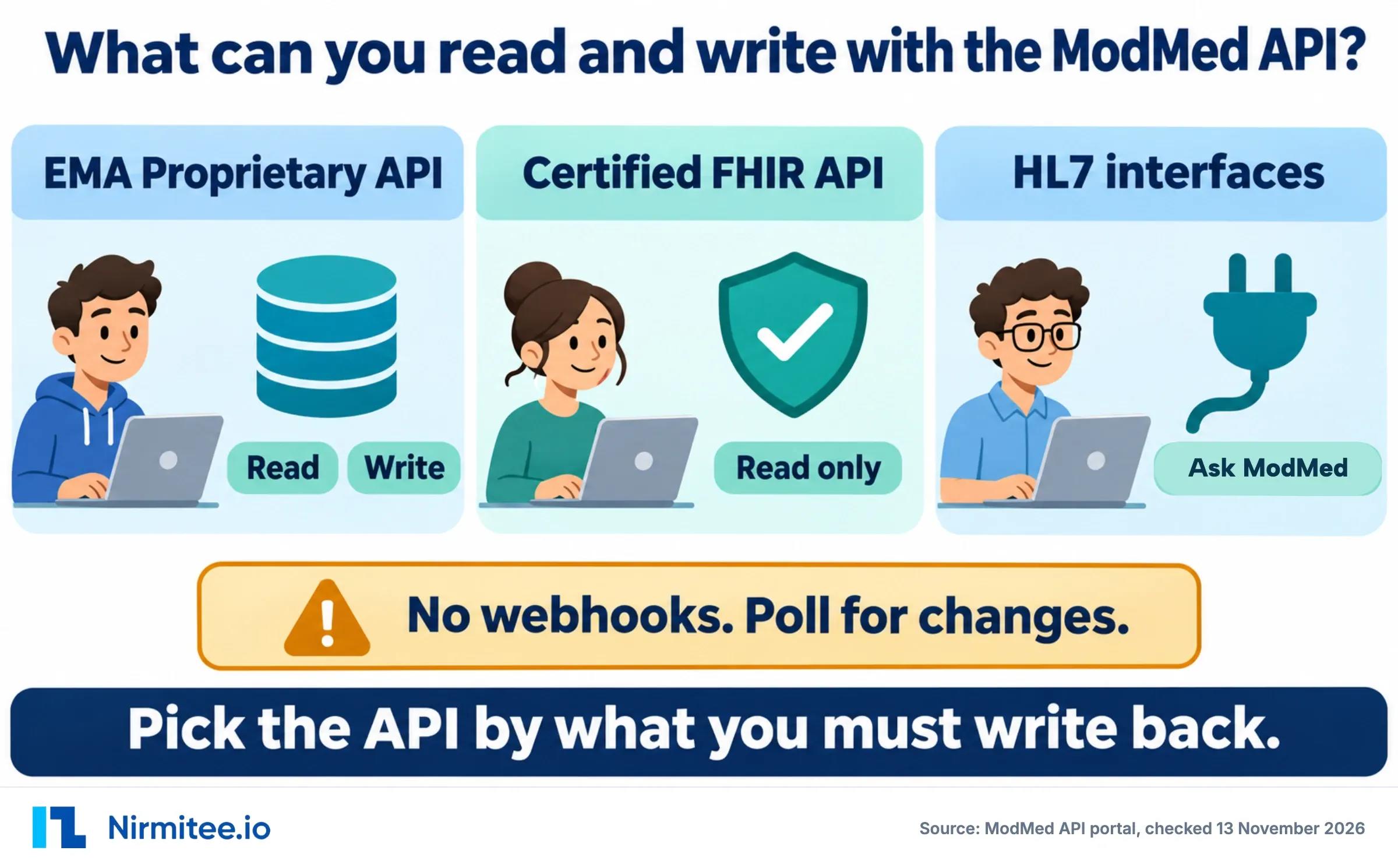
The ModMed API has two APIs with different limits: the EMA Proprietary API reads and writes EMA and ModMed PM data with no deletes, and the Certified FHIR API reads EMA and gGastro data with bulk export. Sandboxes and resource grants each take up to two weeks, no fees are published, and there are no webhooks.
- The EMA Proprietary API has 43 read and search operations and 20 write operations (13 create, 7 update). It has no delete. Source: OpenAPI definitions on the ModMed API portal, spec 3.4.3_FINAL.
- The Certified FHIR API covers EMA and gGastro, serves 31 resource types, and is read, search and bulk export only. Source: ModMed API portal, getting-started page.
- ONC's CHPL lists both products on US Core 6.1.0, USCDI v3, SMART App Launch 2.0.0 and Bulk Data 1.0.0. Source: CHPL listings 11032 (EMA v7) and 11054 (gGastro v6).
- Sandboxes for the proprietary API "can take up to two weeks to provision", and resource provisioning can take up to two more weeks. Source: ModMed API portal.
- The Certified FHIR API "does not have a public sandbox". Authorization and API calls run against the production environment. Source: ModMed API portal, authentication page.
- No webhooks or FHIR Subscription appear anywhere in the 174 portal pages. Change detection is polling. Source: our full read of the portal, November 13, 2026.
What can you build with the ModMed API?
With the ModMed API you can build patient intake, online booking, insurance capture, referral intake, AI scribe text, prior authorization evidence, charge capture, an analytics warehouse, and appointment reminders. The first five and charge capture write through the EMA Proprietary API. The rest read, either from the proprietary API or the certified FHIR API. Each one has a limit you should design around from day one.
Every use case below runs only on capabilities ModMed documents. Business value is the typical goal for that use case, not a measured result. Build times are typical build estimates for an experienced team once access is granted. ModMed's own access waits are listed separately.
1. Digital intake and registration
| Who it is for | Intake and patient-form vendors |
|---|---|
| Business value (typical) | Less front-desk typing and fewer duplicate charts. |
| Integration domain | Registration |
| API and access | EMA REST, read + write |
| How it works | Search Patient, then create or update it. ModMed asks you to match on at least first name, last name, date of birth and gender first. Reported history goes in as Condition, MedicationStatement and AllergyIntolerance creates on the clipboard. |
| How easy it is | Medium. Patient matching and the clipboard review state both need design work. |
| How well it works | Works today: Patient create and update work directly. Limited: Clipboard items wait until staff reconcile each one. |
| Timeline | Build: 2 to 3 weeks (Typical build estimate for an experienced team once access is granted; separate from ModMed's access waits). Access: ModMed states up to two weeks for a sandbox and up to two weeks for the resource grant. |
2. Online booking
| Who it is for | Booking widgets, call centers, patient apps |
|---|---|
| Business value (typical) | Patients book without a phone call, so staff phone time goes down. |
| Integration domain | Scheduling |
| API and access | EMA REST, read + write |
| How it works | Read appointment types from ValueSet, search Slot with the required appointment type, then create the Appointment with type, location, provider, patient, date, time and duration. |
| How easy it is | Medium. Slot windows and slot conflicts need careful handling. |
| How well it works | Works today: Search, book and reschedule work. Limited: Slot search covers 5 days per call. EMA-only practices have no appointment data. |
| Timeline | Build: 2 to 3 weeks (Typical build estimate for an experienced team once access is granted; separate from ModMed's access waits). Access: ModMed states up to two weeks for a sandbox and up to two weeks for the resource grant. |
3. Insurance capture
| Who it is for | Intake and eligibility tools |
|---|---|
| Business value (typical) | Coverage is on file before the visit, so fewer claims bounce for missing insurance. |
| Integration domain | Registration and billing |
| API and access | EMA REST, read + write |
| How it works | Coverage create and update. ModMed: "You will not be able to CREATE or UPDATE a patient's insurance if the customer is not using MMPM." |
| How easy it is | Low. One resource with create and update. |
| How well it works | Works today: Coverage writes work on ModMed PM practices. Limited: No writes on EMA-only practices. The API has no eligibility check. |
| Timeline | Build: 2 to 3 weeks (Typical build estimate for an experienced team once access is granted; separate from ModMed's access waits). Access: ModMed states up to two weeks for a sandbox and up to two weeks for the resource grant. |
4. Referral intake
| Who it is for | Referral management and fax-to-chart products |
|---|---|
| Business value (typical) | Referrals arrive as records instead of paper, so fewer get lost. |
| Integration domain | Referrals |
| API and access | EMA REST, read + write |
| How it works | Create the referring provider (Practitioner) and practice (Organization), create or match the Patient, then upload the packet as a DocumentReference from an S3 URL into a practice-defined category. |
| How easy it is | Medium. Three resources in order, plus document category mapping per practice. |
| How well it works | Works today: Referring providers, patients and documents can all be created. Limited: Documents have no update, and the referral itself is a document, not a structured order. |
| Timeline | Build: 2 to 3 weeks (Typical build estimate for an experienced team once access is granted; separate from ModMed's access waits). Access: ModMed states up to two weeks for a sandbox and up to two weeks for the resource grant. |
5. AI scribe and transcription
| Who it is for | Ambient scribe and dictation vendors |
|---|---|
| Business value (typical) | Note text reaches EMA without copy and paste. |
| Integration domain | Clinical documentation |
| API and access | EMA REST, write |
| How it works | Create a Composition with status preliminary. Text goes into an unfinalized visit held for transcription, otherwise into a new Chart Note. |
| How easy it is | Low. One create call, with a fixed status. |
| How well it works | Works today: Text lands in the right visit for the provider. Limited: The provider must accept it. Nothing writes into a signed note. |
| Timeline | Build: 2 to 3 weeks (Typical build estimate for an experienced team once access is granted; separate from ModMed's access waits). Access: ModMed states up to two weeks for a sandbox and up to two weeks for the resource grant. |
6. Prior authorization evidence
| Who it is for | Prior auth and utilization tools |
|---|---|
| Business value (typical) | Staff spend less time searching the chart for the payer's questions. |
| Integration domain | Prior auth |
| API and access | Certified FHIR, read only |
| How it works | Read Condition, MedicationRequest, DocumentReference and DiagnosticReport with SMART scopes. |
| How easy it is | Medium. SMART launch plus evidence matching across several resources. |
| How well it works | Works today: Chart evidence reads well on standard US Core resources. Limited: Submission to the payer and the decision write-back happen outside the certified API. |
| Timeline | Build: 1 to 2 weeks (Typical build estimate for an experienced team once access is granted; separate from ModMed's access waits). Access: ModMed reviews new certified apps daily. No sandbox wait applies. |
7. Charge capture
| Who it is for | Outside billing systems and specialty billing tools |
|---|---|
| Business value (typical) | Charges reach ModMed PM without double entry, which protects revenue from missed charges. |
| Integration domain | Billing and RCM |
| API and access | EMA REST, write |
| How it works | ChargeItem create. Leave out totalCost and unitCost to use the fee schedule. Send a transactionId so ModMed can catch duplicates. |
| How easy it is | High. Billing rules, fee schedules and visit status all have to line up. |
| How well it works | Works today: Charges create with duplicate detection. Limited: ModMed PM only. Visit charges need the encounter to be finished. No update. |
| Timeline | Build: 2 to 4 weeks (Typical build estimate for an experienced team once access is granted; separate from ModMed's access waits). Access: ModMed states up to two weeks for a sandbox and up to two weeks for the resource grant. |
8. Analytics warehouse
| Who it is for | Population health and quality teams |
|---|---|
| Business value (typical) | One nightly copy of clinical data for reporting, without manual exports. |
| Integration domain | Analytics |
| API and access | Certified FHIR, read only |
| How it works | Bulk $export with _since for increments. The practice admin adds your ClientId under Manage Bulk FHIR. |
| How easy it is | Medium. Bulk quirks: three parameters, fixed 120-second polls, silent type skips. |
| How well it works | Works today: Works for EMA and gGastro. Limited: ndjson only, 1,000 resources per file, unscoped types skipped quietly. |
| Timeline | Build: 1 to 2 weeks (Typical build estimate for an experienced team once access is granted; separate from ModMed's access waits). Access: ModMed reviews new certified apps daily. No sandbox wait applies. |
9. Reminders and outreach
| Who it is for | Patient engagement platforms |
|---|---|
| Business value (typical) | Reminders follow the real schedule, so fewer patients miss visits. |
| Integration domain | Patient engagement |
| API and access | EMA REST, read only |
| How it works | Search Appointment by _lastUpdated on a timer, walk every page, and keep a checkpoint. |
| How easy it is | Low. Read-only polling on one resource. |
| How well it works | Works today: Schedule reads are reliable. Limited: No push events. Freshness equals your polling interval. |
| Timeline | Build: 1 to 2 weeks (Typical build estimate for an experienced team once access is granted; separate from ModMed's access waits). Access: ModMed states up to two weeks for a sandbox and up to two weeks for the resource grant. |
All nine use cases compared
| Use case | Domain | API | Complexity | Main limit | Typical build estimate* |
|---|---|---|---|---|---|
| Digital intake and registration | Registration | EMA REST | Medium | Clipboard items wait until staff reconcile each one. | 2 to 3 weeks |
| Online booking | Scheduling | EMA REST | Medium | Slot search covers 5 days per call. EMA-only practices have no appointment data. | 2 to 3 weeks |
| Insurance capture | Registration and billing | EMA REST | Low | No writes on EMA-only practices. The API has no eligibility check. | 2 to 3 weeks |
| Referral intake | Referrals | EMA REST | Medium | Documents have no update, and the referral itself is a document, not a structured order. | 2 to 3 weeks |
| AI scribe and transcription | Clinical documentation | EMA REST | Low | The provider must accept it. Nothing writes into a signed note. | 2 to 3 weeks |
| Prior authorization evidence | Prior auth | Certified FHIR | Medium | Submission to the payer and the decision write-back happen outside the certified API. | 1 to 2 weeks |
| Charge capture | Billing and RCM | EMA REST | High | ModMed PM only. Visit charges need the encounter to be finished. No update. | 2 to 4 weeks |
| Analytics warehouse | Analytics | Certified FHIR | Medium | ndjson only, 1,000 resources per file, unscoped types skipped quietly. | 1 to 2 weeks |
| Reminders and outreach | Patient engagement | EMA REST | Low | No push events. Freshness equals your polling interval. | 1 to 2 weeks |
*Typical build estimate for an experienced team once access is granted; separate from ModMed's access waits. Separately, plan for ModMed's access waits: up to two weeks for a sandbox and up to two weeks for the resource grant on the proprietary API.
What we left off this list: anything that needs a real-time event, a delete, a write to gGastro, prescriptions, vitals or immunization writes, payment posting, claims or eligibility. None of these are in the API reference. Care-gap registry reporting can run on the bulk export, but the submission to a registry happens outside ModMed.
Want a second opinion on which of these fits your product? Talk to our integration team.
Which ModMed APIs exist, and when do you use each one?
ModMed publishes two APIs on portal.api.modmed.com. The EMA Proprietary API reads and writes EMA and ModMed PM data. The Certified FHIR API, built for ONC (g)(10), reads EMA and gGastro data and supports bulk export but never writes. ModMed also offers HL7 interfaces, arranged through synapSYS.
The proprietary API is FHIR R4 in style but is ModMed's own. ModMed calls it a "Proprietary FHIR API". Paths look like /firm/{prefix}/ema/fhir/v2/Patient, and every practice has its own URL prefix. It does not cover gGastro: "currently this is not supported for MMGI practices."
The certified API is standard FHIR R4 with SMART on FHIR, so the usual FHIR integration tooling applies. ModMed states it plainly: "Currently this API supports READ and SEARCH only (no WRITE capabilities) + Bulk FHIR."
HL7 interfaces exist for EMA, ModMed PM and gGastro, per the getting-started guide. Specs are not on the portal. You request them from synapsys@modmed.com. For interface engine work, see our HL7 integration services.
How do you get ModMed API access, from registration to production?
ModMed API access has two tracks. For the proprietary API, apply as a partner, wait up to two weeks for a sandbox, request each resource and operation (up to two more weeks), pass a technical review, then get a production key. Each practice then grants access with its own credentials. For the certified API, register your app yourself and ModMed reviews new apps daily.
EMA Proprietary API, step by step
- Apply. Use the become a partner form or "Request Developer Tools" on the synapSYS developer page.
- Get a sandbox. ModMed "typically provide[s] 2 sandbox environments". The generic sandbox has sample patients, practitioners, locations and encounters. A practice training sandbox, often called the ModMed practice sandbox, has more realistic data. A sandbox gives access to all resources by default.
- Request resources. Send your vendor name, app name, a description and each resource with its operations, for example "Patient READ/SEARCH, ChargeItem CREATE/READ/SEARCH".
- Pass the final review. This is an end-to-end demo, a proof of concept in the sandbox, and a technical talk about resources and call frequency. You must show you can GET what you need and POST or PUT what you plan to write.
- Get a production key and go-live instructions.
- Connect each practice. Each practice creates practice-specific credentials for you.
Usage falls under ModMed's Proprietary API Terms of Use. No fees are published in any ModMed document we read.
Certified FHIR API, step by step
- Register in the FHIR vendor dashboard (self service).
- Pick the app type, public or confidential client, PKCE (none or S256), FHIR v4.0.1, and enter the launch, redirect, logo, policy and terms URLs.
- The app starts Disabled. "MMI will review new apps daily and Enable apps that are configured correctly."
- Bulk apps are enabled once a practice admin adds your ClientId under "Manage Bulk FHIR".
- The FHIR base listed in ModMed's authentication docs is
https://fhirmp.mmi.prod.fhir.ema-api.com/fhir/r4, a production host; ModMed says there is no public sandbox. Per-practice endpoints are listed at mm-fhir-endpoint-display.prod.fhir.ema-api.com.
Minimum software is EMA 7.0 or higher, with TLS 1.2 or later.
Which endpoints does the EMA Proprietary API have?
The EMA Proprietary API has 24 resources across patients, scheduling, visits, insurance, documents, clipboard data, billing, orders, results, tasks and transcription. 13 accept a create and 7 accept an update. None accept a delete or a patch. Every call needs a Bearer token and an x-api-key header.
Base URLs: generic sandbox https://stage.ema-api.com/ema-dev/firm/, practice training sandbox https://stage.ema-api.com/ema-training/firm/, production https://mmapi.ema-api.com/ema-prod/firm/.
| Resource | Read / search | Create | Update | What to know |
|---|---|---|---|---|
| Patient | Yes | Yes | Yes | Page size up to 50. Match on name, DOB and gender first |
| Appointment | Yes | Yes | Yes | Needs a valid Slot. Not on EMA-only practices |
| Slot | Search | No | No | appointment-type required. 5-day window, no paging |
| Encounter | Yes | No | No | Visit note and charges only after status finished |
| Coverage | Yes | Yes | Yes | Writes need ModMed PM. Newer payload behind a feature flag |
| InsurancePlan | Yes | No | No | |
| Account | Search | No | No | Balances. patient required. Needs ModMed PM |
| RelatedPerson | Read | No | No | Guarantor or related party |
| Practitioner | Yes | Referring only | No | Create is for referring providers, not staff |
| Organization | Yes | Referring only | No | type required on search. Also used for payers |
| Location | Yes | No | No | |
| DocumentReference | Yes | Yes | No | Notes via category=note, CCDA via category=CCDA. Upload from an S3 URL |
| Condition | Yes | Yes | Yes | Clipboard. Practice reconciles |
| MedicationStatement | Yes | Yes | Yes | Clipboard. Practice reconciles |
| AllergyIntolerance | Yes | Yes | Yes | Clipboard. Practice reconciles |
| FamilyMemberHistory | Yes | No | No | No write documented in the reference |
| Procedure | Yes | Yes | No | Past surgical and ocular surgical history only |
| ChargeItem | Yes | Yes | No | ModMed PM only. transactionId for dedupe |
| ServiceRequest | Yes | No | No | Orders. Can be limited to the performing lab |
| DiagnosticReport | Yes | No | No | Results as PDFs. Send results in as documents |
| Task | Yes | Yes | Limited | PM recalls are read only |
| Composition | No | Yes | No | Transcription, status preliminary |
| ValueSet | Yes | No | No | Firm-specific types and reasons |
| CapabilityStatement | Yes | No | No | GET /metadata |
Two headers change behavior. Content-flag: Pagination_optimization_disabled returns a true total, at a speed cost. Content-flag: Referral adds referral data to Patient and Appointment.
Which resources does the ModMed Certified FHIR API serve?
The ModMed Certified FHIR API serves 31 resource types, all read and search, plus bulk $export at system, Patient and Group level. CHPL lists US Core 6.1.0 and USCDI v3. ModMed's July 2024 PDF still says US Core 4.0.0, so trust the portal, the live CapabilityStatement and CHPL over the PDF.
| Group | Resources |
|---|---|
| Patient and people | Patient, RelatedPerson, Practitioner, PractitionerRole, CareTeam, Organization, Location |
| Clinical | AllergyIntolerance, Condition, Procedure, Immunization, Goal, CarePlan, Device |
| Medications | Medication (read only), MedicationRequest, MedicationDispense |
| Observations and results | Observation (21 profiles, including labs, vital signs, smoking status, pregnancy status), DiagnosticReport, Specimen, ServiceRequest |
| Documents and visits | DocumentReference, Encounter, Provenance |
| Coverage and forms | Coverage, Questionnaire, QuestionnaireResponse |
| Infrastructure | Endpoint, Group, OperationDefinition, ValueSet |
For how DocumentReference notes compare across EHRs, see our DocumentReference guide. The PDF also lacks Coverage, MedicationDispense, Questionnaire, QuestionnaireResponse, RelatedPerson, ServiceRequest and Specimen. All seven are on the live server.
What can you write to ModMed, and what can't you?
You write to ModMed only through the EMA Proprietary API. You can create and update patients, appointments, coverage, clipboard items and general tasks, and create documents, charges, procedures, referring providers and transcription. You cannot delete anything, update a procedure, create a recall, write to gGastro, or write through the certified API.
- No deletes. No DELETE or PATCH appears on any proprietary resource.
- Procedures are create only. "There is no Update operation for Procedure." Status must be
completed, and only past surgical or ocular surgical history is accepted. - No recall creation. "PM Recalls cannot be created or updated through this endpoint." General EMA tasks can be created. On update,
authoredOn,description,location,forandstatusare fixed. - Clipboard items wait for staff. "Conditions added or updated through the API will need to be reconciled by the Practice." The same applies to medications and allergies. Show these items as "sent for review" in your UI.
- Charges and coverage need ModMed PM. On EMA-only practices those writes are not available.
- Certified FHIR API is read only. No create, update or delete of clinical data.
How does ModMed API authentication work?
ModMed API authentication differs by API. The certified API uses SMART App Launch for patient and provider apps, and SMART backend services with a signed JWT (private_key_jwt, ES384 confirmed working) for bulk. The proprietary API uses OAuth client credentials plus an x-api-key. All token endpoints sit on ModMed's Keycloak at sso.ema.md.
SMART launch. Authorize at https://sso.ema.md/auth/realms/fhir/protocol/openid-connect/auth, token at the matching /token URL. Client auth is client_secret_post, and PKCE S256 is recommended. Scopes follow patient/X.rs, user/X.rs and system/X.rs, plus openid, fhirUser, launch, launch/patient, online_access and offline_access. An online_access refresh token ends with the user's EMA session. An offline_access one does not. New apps start with a standalone launch. A provider app's EHR launch link is placed in EMA after that.
Backend services. Register a JWKS, sign the assertion with ES384, keep its expiry around five minutes, and send scope. Do not send client_id in the body. The sample response shows expires_in: 1800.
Proprietary API. The token endpoint is https://sso.ema.md/auth/realms/ema-fhir/protocol/openid-connect/token in production. You get an RS256 JWT with ACL scopes and no refresh token (sample expires_in: 900). The older password grant is being sunset.
Discovery file caveat. The live .well-known/smart-configuration lists only client_secret_post and points its token endpoint at the fhirmp host. The docs say bulk uses private_key_jwt at sso.ema.md. Build to the docs and read the discovery file per practice.
What are the known issues and gotchas in the ModMed API?
The known ModMed API gotchas are these. The paging total is misleading, slot search stops at five days, unknown Condition codes file silently to the Problem List, bulk export rejects most standard parameters and skips unscoped types without an error, the rate limit is stated two ways, there are no webhooks, and the certified API has no sandbox.
- Paging total. By default
totalis the count on the current page, not the full result. Loop until a page returnstotalof 0. - Five-day slots. "Slot Search is currently limited to 5 day increments." Only the
eqdate prefix works. A two-week calendar is three calls. - Condition section fallback. Conditions default to the Problem List. You pick another section through the
condition-typeidentifier on create. An unknown code on create files silently to Problem List. The same code on search returns an error. - Token without x-api-key. It "still returns a 200 with a valid-looking token, but every downstream FHIR call then fails." Log the key on the token call in your health check.
- Rate limit stated twice. The rate-limiting guide says 1,250 calls a minute per key. The 429 text in the OpenAPI definitions says "1000 calls/min default". Budget for 1,000.
- Bulk export quirks. See the next section.
- No webhooks. See change detection below.
- No certified sandbox. Certified FHIR calls run against production, starting with the fhirmp base host and then each practice endpoint.
How does ModMed bulk $export differ from the Bulk Data spec?
ModMed bulk $export supports only three parameters, _outputFormat, _since and _type, sent as query parameters on the POST. The status call returns a Status: In Progress header (not X-Progress) with a fixed Retry-After: 120. Output is ndjson, at most 1,000 resources per file. Types your token is not scoped for are skipped with only a note in the error file.
- Kick-off:
POST /$export,POST /Patient/$export, or/Group/{id}/$export. ModMed creates groups on request. - Sending
_until,_elements,patient,includeAssociatedData,_typeFilter,organizeOutputByorallowPartialManifestsfails the request. - Status:
GET /fhir-services/$export-status/{id}. 202 while running. 200 with the manifest asapplication/json. - Cancel:
DELETEthe same URL. A later GET returns 404. _outputFormat=csvreturns a 400 with "Invalid Tenant".- System export includes Location and PractitionerRole. Patient export includes Questionnaire but not those two.
How do you detect changes without ModMed webhooks?
Without ModMed webhooks, you detect changes by polling. Search with _lastUpdated on the proprietary resources that support it, walk every page, upsert by ModMed id and save a checkpoint. For the certified API, run a bulk export with _since. This polling design is our recommendation. ModMed documents the parameters, not the pattern.
_lastUpdated is a search parameter on Patient, Practitioner, Organization, Location, Appointment, Encounter, Coverage, InsurancePlan, Condition, ServiceRequest, DiagnosticReport and Task. Set the new checkpoint to the time the run started, so records changed during the run are picked up next time. Size your interval against the rate limit, since every practice has its own volume.
How do EMA and gGastro differ for API work?
EMA and gGastro share the same Certified FHIR API and ONC standards, on separate endpoint hosts, so reads and bulk export work the same way for both. Only EMA has the proprietary read and write API. For gGastro, ModMed documents no API write path, so write-back means HL7 through synapSYS, which is available for both products.
CHPL lists EMA v7 (certified November 29, 2022) and gGastro v6 (certified December 7, 2022). Both are Active and both carry (g)(7), (g)(9) and (g)(10). gGastro's endpoint list is at public-api.gastro.prod.fhir.ema-api.com, separate from EMA's public-api.mmi.prod.fhir.ema-api.com. The PDF gives EMA 7.0 as the minimum version and leaves a placeholder for gGastro.
What does a realistic ModMed integration plan look like?
A realistic ModMed integration plan starts with the partner application, a sandbox wait of up to two weeks and a resource grant of up to two more weeks, then build, technical review and per-practice rollout. ModMed publishes only those two waits; every other duration below is a typical build estimate for an experienced team. Build reads while you wait.
| Phase | What happens | Time |
|---|---|---|
| 1. Apply and scope | Partner application, list of resources and operations | Typical: 1 week |
| 2. Sandbox | ModMed provisions sandboxes | ModMed: up to 2 weeks |
| 3. Build reads | Patient match, paging loop, polling, ValueSet mapping | Typical: 1 to 2 weeks |
| 4. Resource request | Runs in parallel with phase 3 | ModMed: up to 2 weeks |
| 5. Build writes | Idempotent writes, clipboard and transcription states shown to users | Typical: 2 to 4 weeks |
| 6. Technical review | Demo, proof of concept, call frequency | No time published |
| 7. First practice | Practice credentials, URL prefix, pilot with one location | Typical: 1 week |
For a certified, read-only app, phases 2, 4 and 6 drop out. You need the daily app review and a practice that connects.
What is not possible or not documented in the ModMed API?
The ModMed API does not offer webhooks or any event push, DELETE or PATCH, writes through the Certified FHIR API, or proprietary API access for gGastro. It also omits prescriptions, immunizations and vitals on the proprietary API, and payment posting, claims and eligibility. The full list, from our read of the portal:
- Webhooks, FHIR Subscription or any event push.
- DELETE or PATCH on any resource.
- Writes through the Certified FHIR API.
- Any proprietary API access for gGastro.
- Prescriptions (MedicationRequest), immunizations, vitals or Observation on the proprietary API.
- Payment posting, claims, eligibility, staff user management and schedule templates.
- Appointments, balances and inbound charges on EMA-only practices.
- Visit notes while the encounter is still in progress.
- Slot search over more than five days in one call.
- A public sandbox for the certified API.
- A stated rate limit for the certified API, or stated access token lifetimes for interactive apps.
- Published fees for either API.
Planning a ModMed integration?
If you are deciding between the proprietary API and the certified API, or need to scope write-back for EMA and ModMed PM, see our ModMed integration services, or talk to our integration team. For payer-side prior auth, see electronic prior authorization integration.
Sources
All read on November 13, 2026.
- ModMed API portal: Getting Started
- ModMed API portal: EMA Proprietary API getting started
- ModMed API portal: Development Basics
- ModMed API portal: EMA Proprietary API authentication
- ModMed API portal: Certified API authentication
- ModMed API portal: Rate Limiting
- ModMed API portal: Count and Pagination
- ModMed API portal: Become a Certified FHIR API vendor
- ModMed published FHIR endpoints
- ModMed: Become a partner
- ModMed synapSYS developers
- ModMed Proprietary API terms of use
For pharmacy-side prior authorization, see our guides to CoverMyMeds API integration and DataScan WinPharm integration.
Ready to scale?
Talk to our healthcare engineering team about building, integrating, and shipping faster.
Frequently Asked Questions
What is ModMed EMA?
Does ModMed have an API?
Where is the ModMed API documentation?
Is there a ModMed practice sandbox?
Does ModMed have a FHIR API?
Can I write data into ModMed EMA?
Does the ModMed API support webhooks?
Can I integrate with gGastro by API?
What is the ModMed API approval time?
What is ModMed API pricing?
What is the ModMed API rate limit?
Can an AI scribe write notes into ModMed EMA?
Can RCM tools submit claims or check eligibility through the ModMed API?
Does a practice have to approve a ModMed API integration, and does it cost the practice anything?