Nirmitee.io

ModMed integration · United States

ModMed API Integration for EMA and Practice Management

We build ModMed integrations for specialty practice products in dermatology, ophthalmology, orthopedics, gastroenterology and more. Operational writes use approved EMA Proprietary API capabilities for EMA and Practice Management; gGastro uses its supported read and interface routes. We confirm practice authorization, resource permissions and destination screens, then build the connector and prepare the evidence ModMed's review requires.

  • EMA Proprietary API
  • Certified FHIR API
  • synapSYS
  • SMART on FHIR
  • Bulk FHIR
  • HL7
  • gGastro

EMA and PM writes, gGastro reads: two routes.
  1. 01Pick the API

    Certified FHIR for reading clinical data and bulk export. The EMA Proprietary API for scheduling, demographics, insurance, documents and charges.

  2. 02Build in the sandbox

    Build against ModMed's sandbox, then request the resources you need; when we read ModMed's portal in October 2026 it said provisioning can take up to two weeks.

  3. 03Prepare the review

    A working walkthrough, a proof of concept and a technical discussion with synapSYS. ModMed decides on production access; each practice then grants its own.

The problem

Sound Familiar?

Specialty groups on ModMed and the vendors who serve them describe the same four problems.

Bookings land in the wrong slot

A Mohs consult ends up in a follow-up slot because your booking app does not know the practice's templates.

Intake gets retyped

Patients fill in demographics and insurance online, then staff type it all again into ModMed.

Documents arrive and sit

Pathology reports and referral letters arrive by fax or email, and nobody is told to act on them.

The API slows down under load

A busy morning plus a background job hits the rate limit, and bookings start failing.

Use cases

What It Looks Like When It Works

Four use cases, each shown as the screen your team works in. The patients and practice are fictional; the API behavior follows ModMed's published API reference.

Bookings That Respect the Practice's Rules

Today

A scheduler fixes appointments that landed in the wrong slot or location.

With the integration

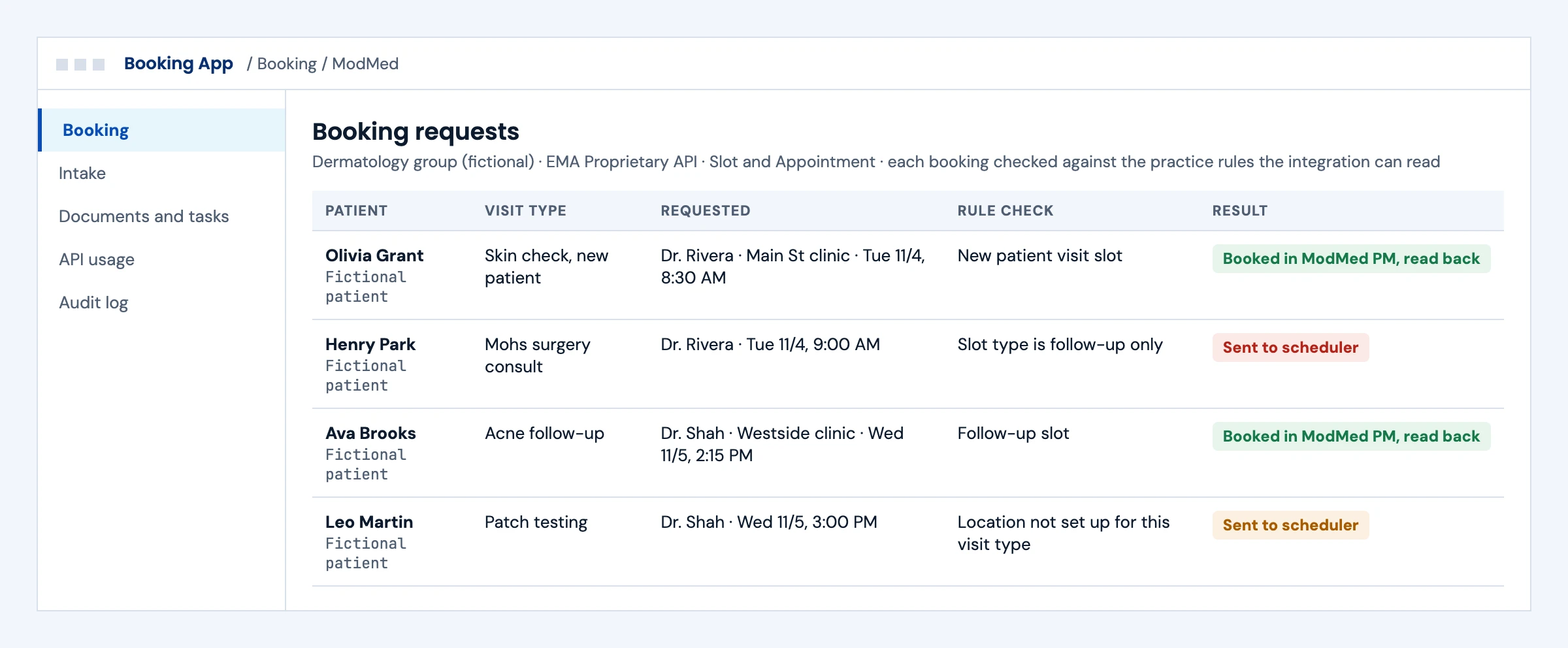
Each booking is checked against the provider, location and visit type rules the integration can read. Allowed bookings go to ModMed PM and are read back; conflicts go to the scheduler before anything is confirmed.

What we build
  • Slot and Appointment reads mapped to each practice's visit types and locations
  • Rule checks before every write, and read-back after
  • A scheduler queue for conflicts the integration cannot resolve
Dermatology booking requests checked against practice rules, with allowed bookings written to ModMed PM and conflicts sent to the scheduler
Illustrative screen with fictional patients: dermatology booking requests checked against practice rules, with allowed bookings written to ModMed PM and conflicts sent to the scheduler. Tap to open full size.

Intake That Goes Straight Into ModMed

Today

An intake form waits in an inbox until someone retypes it.

With the integration

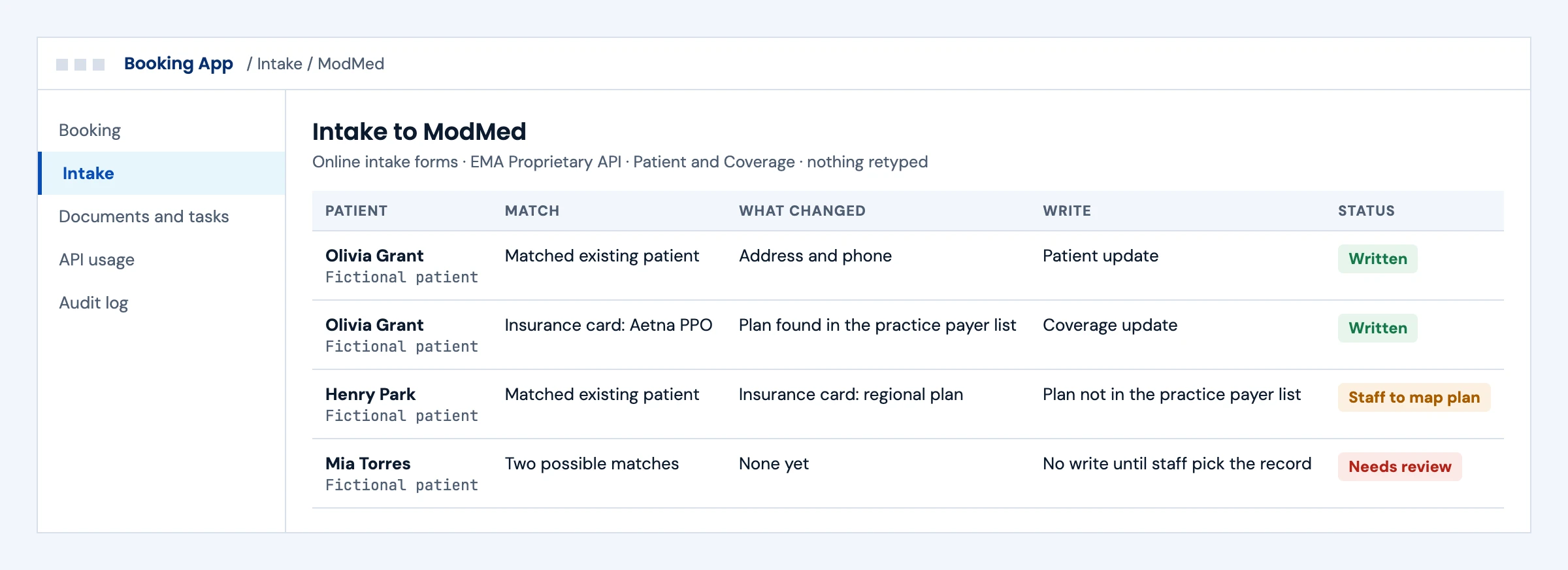
A confirmed patient match receives demographic and coverage updates. A plan that is not in the practice's payer list, or an uncertain match, waits for staff.

What we build
  • Patient matching with a review step for uncertain matches
  • Patient and Coverage writes through the EMA Proprietary API
  • Plan mapping against the practice's payer list
Intake to ModMed showing demographic and coverage updates written, an unmapped plan and an uncertain match waiting for staff
Illustrative screen with fictional patients: intake to ModMed showing demographic and coverage updates written, an unmapped plan and an uncertain match waiting for staff. Tap to open full size.

Documents Filed and the Right Person Told

Today

A pathology report sits in an outside inbox until someone notices it.

With the integration

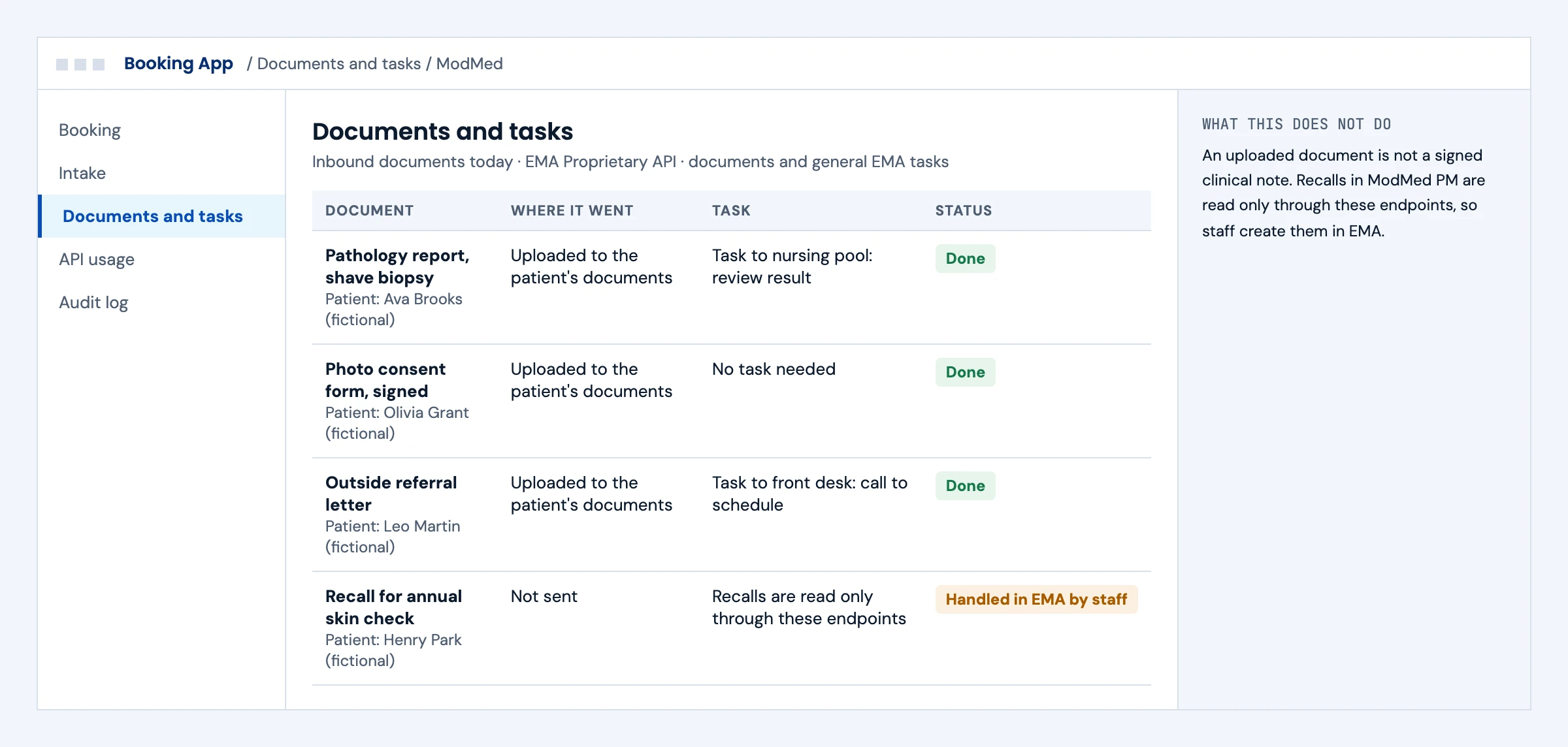
The document reaches the patient's documents in EMA and a general EMA task goes to the right staff group. Recalls stay with staff, because ModMed PM recalls are read only through these endpoints.

What we build
  • Document upload to the agreed EMA location
  • General EMA task creation with the assignee group your practice picks
  • No claim of note signing: an uploaded document is not a signed clinical note
Documents uploaded to ModMed EMA with tasks for nursing and front desk, and a recall left for staff
Illustrative screen with fictional patients: documents uploaded to ModMed EMA with tasks for nursing and front desk, and a recall left for staff. Tap to open full size.

Busy Mornings Without Rate-Limit Errors

Today

A background job and morning bookings share one key, and bookings start getting 429 errors.

With the integration

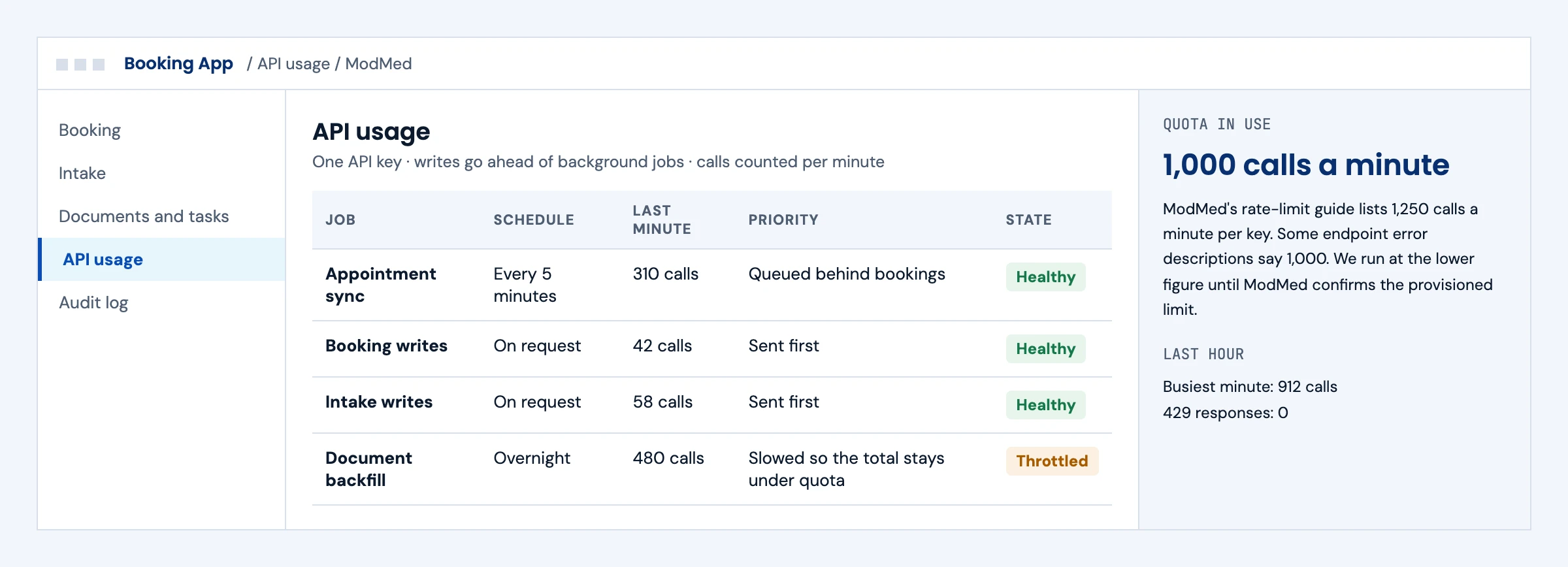
Writes go ahead of background jobs, and the integration runs at the lower documented quota until ModMed confirms the provisioned limit, so bookings keep working.

What we build
  • A per-key call budget with writes prioritized over background sync
  • Throttling and backoff before the limit, not after
  • Alerts when the busiest minute nears the quota
ModMed API usage dashboard with writes prioritized and a background job slowed to stay under the per-minute quota
Illustrative screen with fictional patients: modMed API usage dashboard with writes prioritized and a background job slowed to stay under the per-minute quota. Tap to open full size.

First call

Questions We Will Ask You on the First Call

The answers decide which ModMed interface each workflow uses and what to request from ModMed.

Which ModMed products do your practices run: EMA, ModMed PM or gGastro?

The EMA Proprietary API covers EMA and ModMed PM. gGastro uses the certified FHIR API and interface routes.

Which actions must your product take?

Booking, intake, documents, tasks and charges each need their own resources requested from ModMed.

Where should each result appear for staff?

A document folder, a task list and the schedule are different destinations. We agree them per practice.

How do your practices set up visit types and templates?

Booking rules come from those templates, so we read them before designing the flow.

How many calls will a busy practice make in a minute?

We size the call budget against the quota ModMed provisions for your key.

Do you need clinical reads or bulk export for analytics?

That runs on the certified FHIR API, with a practice admin adding your bulk app once.

Do you plan a synapSYS Marketplace listing?

ModMed runs that review. We prepare the technical evidence; ModMed decides.

Do any of your dermatology groups run EZDerm instead?

EZDerm is a separate vendor with its own partner access, so we check it separately.

The short answer

Does ModMed Have an API? Yes, Several Doors

ModMed, also known as Modernizing Medicine, offers a Certified FHIR API for EMA and gGastro that supports read, search and Bulk FHIR export with SMART on FHIR, but no writes. For writes, the EMA Proprietary API, built on FHIR R4, supports read, search, create and update for selected resources in EMA and ModMed Practice Management, such as patients, appointments, coverage, documents and charges; it does not cover gGastro. Access runs through ModMed's synapSYS program: a sandbox, a resource request, then a technical review that is a prerequisite for production access, not a guarantee. Start with the official ModMed API documentation on portal.api.modmed.com.

Who it is for
Scheduling, intake, patient engagement, revenue cycle, imaging, AI voice and analytics products serving specialty practices on ModMed.
What we build
Certified FHIR apps, EMA Proprietary API connectors, scheduling and demographic write-back, document upload, charge flows, HL7 interfaces and the synapSYS review pack.
The outcome we design for
A documented integration path for each ModMed product, supported writes where approved, and a practice setup checklist. ModMed owns review and each practice grants its own access.

ModMed APIs

What ModMed's APIs Let You Read and Write

ModMed's Certified FHIR and EMA Proprietary APIs have different product coverage and operations. From ModMed's developer portal and API reference, checked in October 2026; volatile limits are dated and linked in the sources below.

InterfaceProductsRead and writeWhat to plan for
Certified FHIR APIEMA (all non-GI specialties) and gGastroRead and search only, plus Bulk FHIR export in NDJSONSelf-service ClientId registration is not permission to read a practice's data: a practice admin adds bulk apps once, and provider and patient apps sign in with EHR or portal credentials
EMA Proprietary APIEMA and ModMed Practice Management (not gGastro)Read, search, create and update on many resources: Patient, Appointment, Slot, Coverage, documents, MedicationStatement, AllergyIntolerance, ChargeItem, referring providers and moresynapSYS sandbox, resource request (the portal said provisioning can take up to two weeks when we read it), then review; ModMed decides on production access
AuthenticationEMA Proprietary APIOAuth 2.0 client credentials for new integrations; the password grant is being sunsetAn x-api-key header on every call, including the token request; a token issued with the wrong application key can still fail downstream; separate generic sandbox, practice sandbox and production URLs
Rate limitsEMA Proprietary APIModMed's rate-limit guide lists 1,250 calls a minute per key; some endpoint error descriptions state 1,000We confirm the provisioned limit and design throttling and retries to the agreed quota; 429 errors above it
HL7 interfacesEMA, ModMed Practice Management and gGastroMessage-based exchange set up with ModMedMessage types and setup need confirmation from the synapSYS team, plus an interface engine
Direct messagingEMAOutbound CCD and visit note documentsUseful for document exchange where an API is not needed

ModMed's current proprietary API reference documents general EMA task creation and constrained updates. PM recalls are read only through these endpoints. We confirm task types, assignees, resource permissions and the receiving staff queue for your practice.

What we build

What Our ModMed Integration Builds

Pick the workstreams your product needs. Each one ships with a specification, sandbox tests and an owner.

01

Scheduling That Respects Practice Rules

Slots read and appointments created within each provider's visit types, durations, locations and templates. We validate each booking against the practice rules available to the integration and route unresolved conflicts to staff before confirmation.

Slot · Appointment · Practitioner · Location

02

Patient Demographics and Insurance

Patients and coverage created or updated from intake, with insurance plans matched to the practice's payer list.

Patient · Coverage · InsurancePlan · Organization

03

Documents, Tasks and Clinical Clipboard

Documents uploaded to the agreed EMA location, general EMA tasks assigned to the right staff group, and clipboard data such as medications and allergies read or updated where the API allows. An uploaded document is not a signed clinical note.

Documents · Task · MedicationStatement · AllergyIntolerance

04

Charges and Revenue Cycle

Charge items created in ModMed PM and read for billing, coding and analytics products, with encounters and referring providers linked. Charge creation is not payment posting.

ChargeItem · Encounter · referring providers

RCM integration →
05

Certified FHIR Apps and Bulk Export

SMART on FHIR apps for providers and patients, and practice-level bulk export for analytics and population health.

SMART on FHIR · US Core · Bulk FHIR NDJSON

SMART on FHIR app development →
06

synapSYS Review and Support

The resource request and the working walkthrough and proof of concept ModMed's review asks for, then monitoring, rate-limit handling and a runbook. ModMed makes the approval decision.

Resource ACLs · review pack · alerts

Integration monitoring and support →

Buyer decisions

ModMed Integration Options Compared

Most products need the EMA Proprietary API for anything they write and the Certified FHIR API for clinical reads.

OptionBest fitStrengthsWhat to plan for
Certified FHIR APIClinical reads, patient apps and bulk analyticsStandard resources across EMA and gGastroNo writes; practice approval still needed
EMA Proprietary APIScheduling, intake, documents and chargesCreate and update in EMA and ModMed PMDoes not cover gGastro; synapSYS review, resource approval and rate limits
HL7 interfaceHospitals, labs and systems that already speak HL7Mature and widely supportedInterface engine and ModMed setup per practice
synapSYS Marketplace listingProducts that want ModMed customers to find themReach inside the ModMed ecosystemModMed's review and commercial terms
Login-based automationWorkflows no API coversWorks where the APIs stopWritten authorization, ModMed's terms and strict controls

If the EMA Proprietary API covers your workflow, we build on it. We say so when ModMed's APIs cannot do what you need.

Integration boundaries

ModMed Integration Boundaries: Who Owns What

We write the split down before the build starts.

The practice

Grants your application access, sets up its scheduling templates and approves the data you use.

ModMed's synapSYS team

Owns resource approval, the technical review, production keys and rate limits. We prepare what the review asks for.

Your product team

Owns what your product does with ModMed data and how practices use it.

The integration layer (ours)

Connectors, rule checks before writes, throttling, retries, audit logs and alerts. Defects in this layer are ours to fix.

Clinical and scheduling rules

Each practice's templates and visit types decide what can be booked where. We read them, we do not override them.

Security and PHI

A BAA is available for agreed work involving PHI. We encrypt in transit and at rest, keep keys in a vault and keep operational logs to redacted metadata, inside our ISO 27001:2022 certified management system.

Deliverables

ModMed Integration Deliverables

Everything lands in your repository and your runbook.

01

API choice and resource list

Which ModMed API serves each workflow and the exact resources and actions to request from synapSYS.

02

Integration code in your repository

FHIR and proprietary API clients, rule checks, throttling and retry logic, with practice configuration kept out of the code.

03

synapSYS review pack

The walkthrough script, proof of concept and technical notes ModMed reviews before deciding on production access.

04

Test evidence

Recorded sandbox runs covering creates, updates, template conflicts, rate limits and duplicates.

05

Practice setup checklist

What each practice grants and configures so the next go-live is short.

06

Monitoring and runbook

Request logs, rate-limit and failure alerts, and a support runbook.

Delivery phases

ModMed Integration Timeline

Initial planning estimate: 8 to 12 weeks to a first live practice on the EMA Proprietary API, subject to practice access, resource permissions and ModMed's review. ModMed controls provisioning and review scheduling, so we request both early.

  1. 01

    Discovery and access

    Weeks 1 to 2

    Workflows mapped to ModMed APIs, synapSYS developer tools and sandbox requested

  2. 02

    Build in the sandbox

    Weeks 2 to 7

    Connectors, rule checks and throttling built and tested against the sandbox resources

  3. 03

    Resource request and review

    Weeks 6 to 10

    Resources requested, walkthrough and proof of concept prepared for synapSYS review

  4. 04

    First practice live

    Weeks 9 to 12

    Practice access granted, monitoring on, setup checklist handed over

Cost drivers

What Drives ModMed Integration Cost

Use the scoping call to pin down the workflow, the access you need and what goes into a scoped proposal. These are the factors that move cost.

Workflows and resources

Each workflow adds resources to request, map and test.

Write depth

Writing appointments, coverage and charges needs rule checks that reads do not.

Products covered

Supporting EMA, ModMed PM and gGastro means more than one API.

Call volume

High volumes need queueing to stay inside the rate limit.

Practices per year

A repeatable setup checklist matters most when you add many practices.

Support level

Monitoring and on-call support are priced per connection.

Book a call ↗

Proof

EHR API Work You Can Check

Client names are withheld. These resources show how we approach EHR API work; they do not prove synapSYS approval or a production ModMed write workflow.

Published engineering guide

Multi-EHR API Comparison

How major EHRs expose their APIs, and what that means for a product that must serve several of them.

Read the guide →

Open source

Open-source Headless FHIR EHR

A FHIR R4 EHR we publish openly. Its ONC (g)(10) SMART App Launch run is an open-source implementation test, dated June 2026; it does not establish ONC certification, vendor certification or production write access to any EHR.

See our SMART on FHIR work →

Published engineering guide

EHR Automation Without API Access

When an EHR's API stops short, this is how we decide between APIs, RPA and computer-use agents, and the controls each needs.

Read the guide →

Security

ISO 27001:2022 Certified, BAAs Signed

We are ISO 27001:2022 certified and sign Business Associate Agreements for work that touches patient data.

FAQ

ModMed Integration: Questions Buyers Ask

Does ModMed have an API?

Yes. ModMed offers a Certified FHIR API for EMA and gGastro, an EMA Proprietary API for EMA and ModMed Practice Management, HL7 interfaces and Direct messaging. They differ in what you can read and write and in how you get access.

Can you write data into ModMed EMA?

Yes, through the EMA Proprietary API, which supports create and update for resources such as patients, appointments, coverage, documents, medications, allergies and charge items. The Certified FHIR API is read and search only.

Can the ModMed API create tasks?

Yes, for general EMA tasks. ModMed's current proprietary API reference documents general EMA task creation and constrained updates, while ModMed PM recalls are read only through these endpoints. synapSYS is ModMed's program and marketplace for third-party applications, which reviews your integration before production access.

Does ModMed API access include practice approval?

No, they are separate. ModMed controls provisioning, review scheduling and production approval; when we read its portal in October 2026 it said provisioning can take up to two weeks. Each practice then grants your application access. We request resources early and confirm the current process with synapSYS, and we do not promise a vendor approval date.

What are ModMed's API rate limits?

ModMed's rate-limit guide lists 1,250 calls a minute per key, while some endpoint error descriptions state 1,000. Requests above the limit get 429 errors. We confirm the provisioned limit and design throttling and retries to the agreed quota.

How does ModMed API authentication work?

The EMA Proprietary API uses OAuth 2.0 with an x-api-key header on every call. New integrations use the client credentials grant; the older password grant is being sunset.

Does the ModMed FHIR API support bulk export?

Yes. The Certified FHIR API supports Bulk FHIR export in NDJSON. A practice admin adds a bulk app's client ID once to give it practice-level access.

Can an API upload replace a signed clinical note?

No. The EMA Proprietary API can upload documents and update clipboard data such as medications and allergies, but an uploaded document is not a completed, signed note. Note completion stays in EMA. For HL7, ModMed lists HL7 capabilities for EMA, ModMed PM and gGastro, with message types confirmed through synapSYS.

Can we write data to gGastro?

Not through the EMA Proprietary API, which covers EMA and ModMed Practice Management only. For gGastro, ModMed points integrators to the Certified FHIR API, which is read only, and HL7 interfaces.

Can you integrate with EZDerm too?

EZDerm is a separate vendor, not a ModMed interface. Medsender announced in March 2026 that EZDerm opened its API to selected technology partners, with Medsender as the first. Whether access is available for your product, and through which interfaces, needs confirmation with EZDerm before we scope it.

How long does a ModMed integration take?

Our initial planning estimate is 8 to 12 weeks to a first live practice on the EMA Proprietary API, subject to practice access, resource permissions and ModMed's review, which ModMed schedules.

How much does a ModMed integration cost?

Cost depends on the workflows and resources, how much you write, which ModMed products you cover, call volume, how many practices you add and the support level. A BAA is available under our ISO 27001:2022 certified management system. After a scoping call we send a scoped proposal with the access dependencies listed.

Next step

Plan Your ModMed Integration

Tell us the workflows your product needs and which ModMed products your practices run. An engineer replies with the likely API for each workflow, the resources to request and the open access questions.

Start with your workflow

Tell Us About Your ModMed Integration

Share the workflows, the ModMed products and your target date. Use de-identified examples only. Read by an engineer, answered within one business day.

Please exclude patient data and credentials. We use these details to respond to your enquiry. Privacy policy

Thank you. Your enquiry has been received. Our team will review your requirements.