X12 EDI for Healthcare Developers: Every Core Transaction, With 270/271 Eligibility in Depth

CTO & Co-Founder
CTO & Co-Founder at Nirmitee.io. Architects healthcare integrations across FHIR, SMART on FHIR, ABDM and NHCX, writing from production experience taking hospital software from sandbox to go-live.
Part of our complete guide to the race to a touchless revenue cycle.
If you are a developer building healthcare financial software — billing systems, clearinghouse integrations, revenue cycle tools, or payer connectivity — you will inevitably encounter X12 EDI. It is the standard that moves money in US healthcare. Every claim submission, every eligibility check, every remittance payment, and every prior authorization flows through X12 Electronic Data Interchange transactions.
The problem is that X12 documentation is notoriously impenetrable. The official implementation guides cost $600+ each from the Washington Publishing Company (WPC). The HIPAA-mandated transaction sets are specified across thousands of pages of dense technical prose. And most developer-facing resources either oversimplify to the point of uselessness or assume you already know the standard.
This guide bridges that gap. It covers the six X12 transaction sets that matter most for healthcare developers — 837 (claims), 835 (remittance), 270/271 (eligibility), 276/277 (claim status), and 278 (prior authorization) — with real message examples, field-by-field annotations, Python parsing code, and FHIR mapping tables. Bookmark this. You will come back to it.
X12 EDI Fundamentals: The Envelope Structure
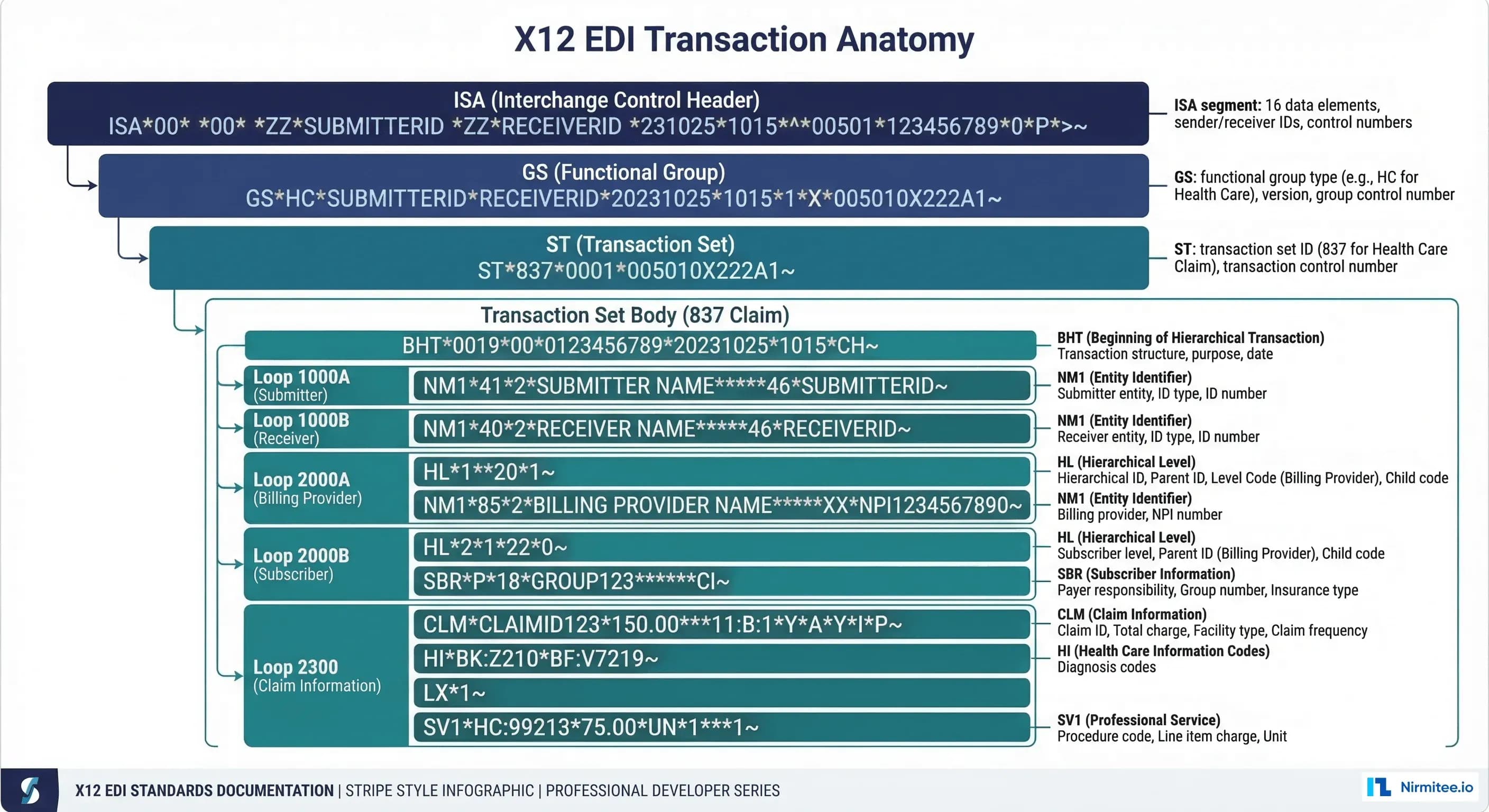
Every X12 transaction follows a nested envelope structure. Think of it like postal mail: the outer envelope (ISA/IEA) identifies the sender and receiver, the inner envelope (GS/GE) groups related transactions, and the letter inside (ST/SE) is the actual business document.
ISA/IEA: Interchange Control Envelope
The ISA segment is always exactly 106 characters (including separators). It is the first thing a parser sees and contains the metadata needed to route the transaction:
ISA*00* *00* *ZZ*SENDER_ID *ZZ*RECEIVER_ID *230615*1200*^*00501*000000001*0*P*:~Field-by-field breakdown:
| Position | Element | Value | Description |
|---|---|---|---|
| ISA01 | Auth Info Qualifier | 00 | No authorization info |
| ISA02 | Auth Information | (10 spaces) | Blank when ISA01=00 |
| ISA03 | Security Info Qualifier | 00 | No security info |
| ISA04 | Security Information | (10 spaces) | Blank when ISA03=00 |
| ISA05 | Sender ID Qualifier | ZZ | Mutually defined (most common) |
| ISA06 | Sender ID | SENDER_ID | 15 chars, right-padded |
| ISA07 | Receiver ID Qualifier | ZZ | Mutually defined |
| ISA08 | Receiver ID | RECEIVER_ID | 15 chars, right-padded |
| ISA09 | Date | 230615 | YYMMDD format |
| ISA10 | Time | 1200 | HHMM format |
| ISA11 | Repetition Separator | ^ | Used in 5010 version |
| ISA12 | Version | 00501 | 5010 = current HIPAA version |
| ISA13 | Control Number | 000000001 | Unique per interchange |
| ISA14 | Ack Requested | 0 | 0=no, 1=yes (TA1 requested) |
| ISA15 | Usage Indicator | P | P=production, T=test |
| ISA16 | Component Separator | : | Sub-element delimiter |
Critical developer note: The ISA segment uses fixed-width fields. ISA06 and ISA08 are always 15 characters, padded with spaces. If your parser trims whitespace automatically, it will break the ISA. This is the most common X12 parsing bug.
GS/GE: Functional Group
GS*HC*SENDER_CODE*RECEIVER_CODE*20230615*1200*1*X*005010X222A1~The GS segment groups transactions of the same type. GS01 identifies the functional group:
- HC — Health Care Claim (837)
- HP — Health Care Claim Payment/Advice (835)
- HB — Eligibility, Coverage, or Benefit Inquiry (270)
- HI — Health Care Services Review (278)
- HN — Health Care Claim Status (276/277)
GS08 contains the version/release/industry identifier — this tells the parser exactly which implementation guide to use for parsing the enclosed transactions.
The 837: Healthcare Claim Transaction
Going deeper: for 837P vs 837I and how the 835 answers an 837, see our EDI 837 and 835 guide.
The 837 is the workhorse of healthcare EDI. It submits claims from providers to payers via clearinghouses. There are two variants that developers must handle differently:
- 837P (Professional): Physician and outpatient services, maps to CMS-1500 paper form
- 837I (Institutional): Hospital inpatient and outpatient facility services, maps to UB-04 paper form
837P Example: Professional Claim
Here is a minimal but complete 837P for an office visit:
ISA*00*          *00*          *ZZ*SUBMITTER_ID   *ZZ*RECEIVER_ID    *230615*1200*^*00501*000000001*0*P*:~
GS*HC*SENDER_CODE*RECEIVER_CODE*20230615*1200*1*X*005010X222A1~
ST*837*0001*005010X222A1~
BHT*0019*00*CLAIM001*20230615*1200*CH~
NM1*41*2*SUBMITTER ORG*****46*SUBM_ID~
PER*IC*CONTACT NAME*TE*5551234567~
NM1*40*2*RECEIVER ORG*****46*RECV_ID~
HL*1**20*1~
NM1*85*2*BILLING PROVIDER ORG*****XX*1234567890~
N3*123 MAIN STREET~
N4*ANYTOWN*NY*10001~
REF*EI*123456789~
HL*2*1*22*0~
SBR*P*18*GROUP123******CI~
NM1*IL*1*DOE*JOHN****MI*MEMBER_ID123~
N3*456 OAK AVENUE~
N4*ANYTOWN*NY*10002~
DMG*D8*19800115*M~
NM1*PR*2*BLUE CROSS BLUE SHIELD*****PI*PAYER_ID~
CLM*PATIENT_ACCT_001*150***11:B:1*Y*A*Y*Y~
HI*ABK:J06.9~
LX*1~
SV1*HC:99213*75*UN*1***1~
DTP*472*D8*20230610~
LX*2~
SV1*HC:99000*75*UN*1***1~
DTP*472*D8*20230610~
SE*28*0001~
GE*1*1~
IEA*1*000000001~
Key 837P Segments Annotated
| Segment | Purpose | Key Fields |
|---|---|---|
| BHT | Beginning of Hierarchical Transaction | BHT02: 00=original, 18=resubmit; BHT06: CH=chargeable |
| NM1*85 | Billing Provider | NM109: NPI (10-digit, XX qualifier) |
| NM1*IL | Subscriber/Patient | NM109: Member ID (MI qualifier) |
| NM1*PR | Payer | NM109: Payer ID (PI qualifier) |
| CLM | Claim-level info | CLM02: total charge; CLM05: place/frequency (11:B:1 = office:initial) |
| HI | Diagnosis Codes | ABK = ICD-10 principal; ABF = additional diagnoses |
| SV1 | Service Line (Professional) | SV101: CPT code (HC qualifier); SV102: charge; SV104: units |
| DTP*472 | Service Date | Date of service in CCYYMMDD format |
837I Differences
The 837I (Institutional) uses different service line segments and adds UB-04 fields:
- SV2 instead of SV1 for service lines (includes revenue code, HCPCS, accommodation rate)
- CL1 for claim codes (admission type, source, patient status)
- HI*BG for condition codes, HI*BH for occurrence codes
- HI*BE for Value Codes (e.g., blood pints, covered days)
The 835: Electronic Remittance Advice
Going deeper: What is an 835 file? ERA explained with a real example.
The 835 is the return transaction — it tells you how a payer adjudicated your claim. Every payment, denial, adjustment, and patient responsibility is encoded in this transaction. Parsing 835s accurately is essential for payment posting, underpayment detection, and denial management.
835 Example: Remittance for the 837P Above
ISA*00*          *00*          *ZZ*PAYER_ID       *ZZ*PROVIDER_ID    *230715*0800*^*00501*000000002*0*P*:~
GS*HP*PAYER_CODE*PROVIDER_CODE*20230715*0800*2*X*005010X221A1~
ST*835*0001~
BPR*I*120.00*C*ACH*CCP*01*ROUTING_NO*DA*ACCT_NO********20230715~
TRN*1*TRACE_NUMBER*PAYER_TIN~
DTM*405*20230715~
N1*PR*BLUE CROSS BLUE SHIELD*XV*PAYER_TIN~
N1*PE*BILLING PROVIDER ORG*XX*1234567890~
CLP*PATIENT_ACCT_001*1*150.00*120.00**12*CLAIM_REF_001~
NM1*QC*1*DOE*JOHN~
NM1*IL*1*DOE*JOHN****MI*MEMBER_ID123~
NM1*82*2*BILLING PROVIDER ORG*****XX*1234567890~
SVC*HC:99213*75.00*65.00**1~
CAS*CO*45*10.00~
CAS*PR*2*0.00~1*0.00~
DTP*472*D8*20230610~
AMT*B6*65.00~
SVC*HC:99000*75.00*55.00**1~
CAS*CO*45*15.00~
CAS*PR*2*5.00~
DTP*472*D8*20230610~
AMT*B6*55.00~
SE*20*0001~
GE*1*2~
IEA*1*000000002~
Critical 835 Fields for Developers
BPR (Financial Information): BPR02 is the total payment amount. BPR04 tells you the payment method (ACH, CHK). This is the first thing your system reads to know how much money is coming.
CLP (Claim-Level Payment):
- CLP01: Patient account number (matches your CLM01 from the 837)
- CLP02: Claim status (1=processed as primary, 2=processed as secondary, 4=denied)
- CLP03: Total charge amount submitted
- CLP04: Total payment amount
CAS (Claim Adjustment): This is where the money trail lives. Every dollar difference between what you billed and what you got paid is explained by a CAS segment:
| Group Code | Meaning | Who Is Responsible |
|---|---|---|
| CO | Contractual Obligation | Provider write-off (per contract) |
| PR | Patient Responsibility | Patient owes (deductible, copay, coinsurance) |
| OA | Other Adjustment | Varies (COB, bundling) |
| PI | Payer Initiated | Payer-specific adjustment |
Common Reason Codes (CAS segment):
- 45: Charges exceed fee schedule/maximum allowable — the most common CO adjustment
- 1: Deductible amount — patient owes
- 2: Coinsurance amount — patient owes
- 3: Copayment amount — patient owes
- 4: Procedure modifier error
- 16: Claim/service lacks information needed for adjudication
- 18: Exact duplicate claim
- 96: Non-covered charge(s)
- 197: Precertification/authorization/notification absent
The 270/271: Eligibility Inquiry and Response
The 270 asks "Is this patient covered?" and the 271 answers with coverage details. This is the real-time eligibility check that prevents the $25 billion eligibility leak discussed in our revenue cycle analysis.
270 Example: Eligibility Inquiry
ISA*00*          *00*          *ZZ*PROVIDER_ID    *ZZ*PAYER_ID       *230615*0900*^*00501*000000003*0*P*:~
GS*HS*PROV_CODE*PAYER_CODE*20230615*0900*3*X*005010X279A1~
ST*270*0001*005010X279A1~
BHT*0022*13*ELIGREQ001*20230615*0900~
HL*1**20*1~
NM1*PR*2*BLUE CROSS BLUE SHIELD*****PI*PAYER_ID~
HL*2*1*21*1~
NM1*1P*2*BILLING PROVIDER*****XX*1234567890~
HL*3*2*22*0~
NM1*IL*1*DOE*JOHN****MI*MEMBER_ID123~
DMG*D8*19800115~
DTP*291*D8*20230620~
EQ*30~
SE*13*0001~
GE*1*3~
IEA*1*000000003~
Key segments: EQ*30 requests health benefit plan coverage information (service type code 30). Other common service type codes: 33 (chiropractic), 47 (hospital), 86 (emergency), 88 (pharmacy), MH (mental health).
271 Response: What You Get Back
The 271 response contains the EB (Eligibility/Benefit) segments — and there can be dozens of them. Each EB segment describes a specific benefit:
EB*1*IND*30*HM*GOLD PLAN~
EB*C*IND*30**25.00~
EB*G*IND*30*HM*500.00****23*1500.00~| EB01 | Code | Meaning |
|---|---|---|
| 1 | Active Coverage | Patient has active coverage |
| 6 | Inactive | Coverage terminated |
| C | Deductible | EB06 = deductible amount |
| A | Co-Insurance | EB07 = coinsurance percentage |
| B | Co-Payment | EB06 = copay amount |
| G | Out of Pocket Stop Loss | EB06 = OOP max, EB08 = remaining |
| F | Limitations | Visit or dollar limits |
The 276/277: Claim Status Inquiry and Response
After submitting a claim, you need to know its status. The 276 asks "where is my claim?" and the 277 responds with the current adjudication status.
277 Status Category Codes
| Code | Category | What It Means |
|---|---|---|
| A0 | Acknowledgement | Claim received, not yet processed |
| A1 | Certified in Total | Claim approved, full payment pending |
| A2 | Certified Partial | Partial approval — some lines denied |
| A3 | Not Certified | Claim denied entirely |
| A4 | Pended | Claim is in review, needs more info |
| A5 | Denied | Claim rejected — see reason codes |
The 278: Prior Authorization
Going deeper: for the FHIR route that CMS-0057-F relies on, see Da Vinci PAS and the X12 278.
The 278 Health Care Services Review handles prior authorization requests and responses. With prior authorization being a major bottleneck, automating the 278 transactions is increasingly important.
The 278 request contains: subscriber information, provider information, the service being requested (procedure codes, diagnosis codes), and clinical information supporting medical necessity. The 278 response returns an authorization number, certified dates, and the certification action (certified, not certified, pended, modified).
Python Parsing: Working with X12 EDI
Here is practical Python code for parsing the most common transactions. This uses a lightweight custom parser — no expensive commercial libraries needed.
Basic X12 Parser
class X12Parser:
    """Lightweight X12 EDI parser for healthcare transactions."""

    def __init__(self, raw_edi: str):
        self.raw = raw_edi.strip()
        # ISA defines the delimiters
        self.element_sep = self.raw[3]   # Usually *
        self.segment_sep = self.raw[105] # Usually ~
        self.sub_sep = self.raw[104]     # Usually :
        self.segments = self._parse_segments()

    def _parse_segments(self) -> list:
        raw_segments = self.raw.split(self.segment_sep)
        parsed = []
        for seg in raw_segments:
            seg = seg.strip()
            if not seg:
                continue
            elements = seg.split(self.element_sep)
            parsed.append({
                'id': elements[0],
                'elements': elements
            })
        return parsed

    def get_segments(self, segment_id: str) -> list:
        """Return all segments matching the given ID."""
        return [s for s in self.segments if s['id'] == segment_id]

    def get_transaction_type(self) -> str:
        """Return the ST01 transaction set identifier."""
        st = self.get_segments('ST')
        return st[0]['elements'][1] if st else 'Unknown'


def parse_835_payments(edi_text: str) -> list:
    """Parse an 835 remittance and return claim-level payment details."""
    parser = X12Parser(edi_text)
    claims = []
    current_claim = None

    for seg in parser.segments:
        sid = seg['id']
        els = seg['elements']

        if sid == 'CLP':
            if current_claim:
                claims.append(current_claim)
            current_claim = {
                'patient_account': els[1],
                'status': els[2],
                'billed_amount': float(els[3]),
                'paid_amount': float(els[4]),
                'adjustments': [],
                'service_lines': []
            }

        elif sid == 'CAS' and current_claim:
            group_code = els[1]  # CO, PR, OA, PI
            i = 2
            while i < len(els) and els[i]:
                reason = els[i]
                amount = float(els[i+1]) if i+1 < len(els) and els[i+1] else 0
                current_claim['adjustments'].append({
                    'group': group_code,
                    'reason': reason,
                    'amount': amount
                })
                i += 3

        elif sid == 'SVC' and current_claim:
            proc_parts = els[1].split(parser.sub_sep)
            current_claim['service_lines'].append({
                'procedure_qualifier': proc_parts[0],
                'procedure_code': proc_parts[1] if len(proc_parts) > 1 else '',
                'billed': float(els[2]) if els[2] else 0,
                'paid': float(els[3]) if len(els) > 3 and els[3] else 0,
                'units': els[5] if len(els) > 5 else '1'
            })

    if current_claim:
        claims.append(current_claim)

    return claims


# Usage example
edi_835 = open('remittance.835', 'r').read()
claims = parse_835_payments(edi_835)
for claim in claims:
    variance = claim['billed_amount'] - claim['paid_amount']
    patient_resp = sum(
        a['amount'] for a in claim['adjustments']
        if a['group'] == 'PR'
    )
    print(f"Claim {claim['patient_account']}: "
          f"Billed ${claim['billed_amount']:.2f}, "
          f"Paid ${claim['paid_amount']:.2f}, "
          f"Patient owes ${patient_resp:.2f}")
Parsing 271 Eligibility Responses
def parse_271_eligibility(edi_text: str) -> dict:
    """Parse a 271 eligibility response into structured data."""
    parser = X12Parser(edi_text)
    result = {
        'active': False,
        'plan_name': '',
        'copay': None,
        'deductible': None,
        'deductible_remaining': None,
        'coinsurance': None,
        'oop_max': None,
        'oop_remaining': None,
        'benefits': []
    }

    for seg in parser.segments:
        if seg['id'] != 'EB':
            continue
        els = seg['elements']
        eb01 = els[1] if len(els) > 1 else ''

        if eb01 == '1':  # Active coverage
            result['active'] = True
            if len(els) > 5:
                result['plan_name'] = els[5]

        elif eb01 == '6':  # Inactive
            result['active'] = False

        elif eb01 == 'B':  # Co-payment
            result['copay'] = float(els[6]) if len(els) > 6 and els[6] else None

        elif eb01 == 'C':  # Deductible
            amount = float(els[6]) if len(els) > 6 and els[6] else None
            result['deductible'] = amount

        elif eb01 == 'A':  # Co-insurance
            result['coinsurance'] = float(els[7]) if len(els) > 7 and els[7] else None

        elif eb01 == 'G':  # OOP max
            result['oop_max'] = float(els[6]) if len(els) > 6 and els[6] else None
            if len(els) > 8 and els[8]:
                result['oop_remaining'] = float(els[8])

    return result
X12 EDI to FHIR Mapping
As healthcare moves toward FHIR APIs, developers increasingly need to bridge X12 EDI and FHIR resources. The HL7 FHIR standard provides resources that map conceptually to X12 transactions, and the Da Vinci implementation guides provide the detailed mapping specifications.
| X12 Transaction | FHIR Resource | Da Vinci IG | Maturity |
|---|---|---|---|
| 837 (Claim) | Claim | PCDE | STU1 |
| 835 (Remittance) | ExplanationOfBenefit | PCDE | STU1 |
| 270 (Eligibility Inquiry) | CoverageEligibilityRequest | HRex | STU1 |
| 271 (Eligibility Response) | CoverageEligibilityResponse | HRex | STU1 |
| 276 (Claim Status Inquiry) | Task (claim-inquiry profile) | PAS | STU2 |
| 277 (Claim Status Response) | ClaimResponse | PAS | STU2 |
| 278 (Prior Auth) | Claim (preauthorization) + ClaimResponse | PAS | STU2 |
For developers working with both standards, our guide on HL7 vs FHIR and when you need both provides the architectural context for running X12 EDI alongside FHIR APIs.
Example: 835 CLP to ExplanationOfBenefit
def clp_to_eob(clp_data: dict) -> dict:
    """Convert parsed 835 CLP data to FHIR ExplanationOfBenefit."""
    status_map = {
        '1': 'active',
        '2': 'active',
        '4': 'cancelled',
        '22': 'active',
    }

    eob = {
        'resourceType': 'ExplanationOfBenefit',
        'status': status_map.get(clp_data['status'], 'active'),
        'type': {
            'coding': [{
                'system': 'http://terminology.hl7.org/CodeSystem/claim-type',
                'code': 'professional'
            }]
        },
        'use': 'claim',
        'patient': {
            'reference': f"Patient/{clp_data.get('patient_id', 'unknown')}"
        },
        'total': [
            {
                'category': {
                    'coding': [{'code': 'submitted'}]
                },
                'amount': {
                    'value': clp_data['billed_amount'],
                    'currency': 'USD'
                }
            },
            {
                'category': {
                    'coding': [{'code': 'benefit'}]
                },
                'amount': {
                    'value': clp_data['paid_amount'],
                    'currency': 'USD'
                }
            }
        ],
        'adjudication': []
    }

    group_to_category = {
        'CO': 'deductible',
        'PR': 'copay',
        'OA': 'eligible',
        'PI': 'benefit',
    }

    for adj in clp_data.get('adjustments', []):
        eob['adjudication'].append({
            'category': {
                'coding': [{
                    'code': group_to_category.get(adj['group'], 'eligible')
                }]
            },
            'reason': {
                'coding': [{
                    'system': 'https://x12.org/codes/claim-adjustment-reason-codes',
                    'code': adj['reason']
                }]
            },
            'amount': {
                'value': adj['amount'],
                'currency': 'USD'
            }
        })

    return eob
Common X12 Implementation Pitfalls
After building dozens of X12 integrations, here are the bugs and architectural mistakes developers encounter most frequently:
1. ISA Fixed-Width Parsing
ISA06 and ISA08 are always exactly 15 characters. If you split by the element separator and trim whitespace, you will break downstream routing. Always preserve padding in ISA segments.
2. Segment Terminator Detection
The segment terminator is not always ~. It is defined by ISA16 (position 105 in the ISA). Some implementations use newlines, carriage returns, or other characters. Always read the ISA before assuming delimiters.
3. Loop Identification
X12 uses hierarchical loops identified by HL segments. The same segment ID (like NM1) appears in multiple loops with different meanings. NM1*85 is the billing provider; NM1*IL is the subscriber; NM1*QC is the patient. Your parser must track loop context, not just segment IDs.
4. Claim Adjustment Math
For 835 processing, the math must balance: Billed Amount = Paid Amount + CO Adjustments + PR Adjustments + OA Adjustments. If the numbers do not balance, you have a parsing error. Build this validation into your 835 parser as an assertion.
5. Version Compatibility
HIPAA mandates version 5010 (ISA12=00501), but you will encounter 4010 transactions in the wild, especially from smaller payers and legacy systems. Your parser should handle both versions gracefully.
6. Testing with Real Data
Synthetic X12 test data often misses edge cases present in production. Work with your clearinghouse to obtain sanitized production samples for testing. The CMS CEDI (Common Electronic Data Interchange) site provides companion guides for Medicare-specific implementations.
Skip the spec PDFs: paste any X12 file into our free EDI Inspector — element-by-element reference on hover, plain-English narration, and a searchable 005010 dictionary.
Need expert help with healthcare data integration? Explore our Healthcare Interoperability Solutions to see how we connect systems seamlessly. We also offer specialized Agentic AI for Healthcare services. Talk to our team to get started.
Once the transaction set is clear, the next questions are quality and proof. See our guides to building a claim scrubber, rendering vs billing provider and EDI testing before go-live.
Hosted EDI APIs vs Running Your Own X12 Stack
Most healthcare product teams do not need to build X12 parsing, clearinghouse connectivity and payer enrollment from scratch. A hosted EDI API handles the envelope, transport and payer routing and returns JSON; a custom build gives you full control over data, cost at volume and edge cases, at the price of owning testing, acknowledgements and payer onboarding.
The right choice depends on three questions: which transactions you need, how many payers you must reach, and whether your team can own rejections, 999 and 277CA acknowledgements and enrollment. The table compares common hosted options with a custom build. Details come from each provider's own website as of 26 September 2026; confirm pricing, payer coverage and BAA terms with the provider before you commit.
| Option | What it offers | Best fit | Limitation to check |
|---|---|---|---|
| Stedi | JSON APIs for 270/271, 837P/837I/837D, 276/277, 277CA, 835 and 275 attachments; states 3,500+ payers; pay-as-you-go pricing | Healthtech platforms and RCM software that want an API-first clearinghouse | Prior authorization (278) is not listed among its healthcare transactions; check coverage for your payers |
| Availity | Developer APIs for claim status, service reviews (prior authorization), eligibility and benefits add-ons and claim attachments; remittance data API in beta | Teams whose provider customers already use Availity, or that need service-review workflows | Pricing is not published; access goes through Availity account plans and onboarding |
| Optum (formerly Change Healthcare) | Medical network APIs for eligibility, professional and institutional claims, claim status, attachments and claim responses, with X12 converted to JSON; sandbox available | Teams that want a large, established network behind JSON APIs | Pricing is not published on the developer portal; prior authorization is not listed among these APIs |
| SignalEDI | EDI platform with 837, 835 and 270/271 on paid plans, 276/277 and 278 documents, AS2/SFTP transport with API and webhooks on higher plans, published subscription tiers | Smaller teams that want a managed, fixed-price EDI setup with onboarding help | A general EDI platform whose core is retail and supply-chain EDI; production PHI requires an executed BAA and, on lower tiers, a HIPAA add-on |
| Custom build (with an engineering partner such as Nirmitee) | Your own X12 parsing, validation, clearinghouse or direct payer connections, and mapping into your data model and FHIR | High-volume products, unusual flows such as 278 alongside FHIR PAS, or strict data-control needs | Higher upfront effort; you own testing, acknowledgements and monitoring |
A common middle path is to use a hosted API for eligibility and claims transport and build your own layer for validation, mapping and exception handling. Payer connectivity stays off your plate while your product still controls the data and the edge cases. Our X12 EDI integration team designs that layer and can connect whichever API you choose to your platform. To check a file before any of that, paste it into the free EDI Inspector.
Conclusion
X12 EDI is not elegant. It was designed in the 1970s and carries decades of backward compatibility requirements. But it is the standard that moves over $3 trillion annually in healthcare payments, and any developer building in the healthcare financial space must understand it at the segment level.
The key transactions — 837 for claims, 835 for payments, 270/271 for eligibility, 276/277 for status, 278 for authorization — form the backbone of the revenue cycle. Understanding their structure, parsing them correctly, and mapping them to modern FHIR resources is an increasingly valuable skill as the industry bridges the gap between legacy EDI and modern APIs.
If your team is building healthcare financial integrations and needs help with X12 EDI parsing, clearinghouse connectivity, or FHIR-based revenue cycle automation, connect with our engineering team. We build the integration infrastructure that connects clinical and financial systems.
Connecting claims and remittance workflows?
Review the engineering scope for trading-partner access, X12 mappings, acknowledgements and reconciliation. Bring the systems and workflow you need to connect.
Frequently Asked Questions
Do I need to buy the X12 implementation guides?
Can I use FHIR instead of X12 EDI?
What Python libraries exist for X12?
How do clearinghouses fit into the X12 flow?
How does Nirmitee.io approach healthcare software development?
What healthcare standards does Nirmitee.io support?
Should I use a hosted EDI API or build my own X12 integration?