Nirmitee.io

Tebra integration · United States

Tebra API Integration for SOAP and FHIR

We build Tebra integrations for health tech products serving independent practices. Tebra combines Kareo and PatientPop; its SOAP API, inherited from Kareo, supports documented practice operations, and its FHIR R4 API supports clinical reads. We map your workflows to the right interface, set up practice access and polling, and prepare evidence for any registration or review the route requires.

  • Tebra SOAP API
  • Tebra FHIR R4
  • Customer key
  • ExternalId
  • Polling
  • appSphere
  • Kareo

Two Tebra APIs, two different jobs.
  1. 01Pick the API

    SOAP for patients, appointments, encounters, charges and payments. FHIR for reading clinical data such as problems, medications and allergies.

  2. 02Set up access

    The practice admin creates a customer key and permissions for SOAP. FHIR apps are registered in appSphere and approved by Tebra.

  3. 03Sync without webhooks

    Tebra's published SOAP guide states it does not push changes, so we poll with last-modified filters and keep IDs matched with ExternalId fields.

The problem

Sound Familiar?

Teams building for independent practices on Tebra run into these four problems first.

Duplicate patients after every intake

Your intake form creates a new patient when one already exists, and the front desk spends Monday merging records.

Reschedules that do not stick

Your booking app can create and cancel appointments, but nobody is sure how a change of time should reach Tebra.

No idea when something changed

Tebra's published guide says it does not push changes or call webhooks, so your product is always a few minutes behind or polling too hard.

Clinical data you can read but not write

Tebra's FHIR API is read only. Your roadmap assumed you could write clinical data back.

Use cases

What It Looks Like When It Works

Four use cases, each shown as the screen your team works in. The patients and practice are fictional; the API behavior follows Tebra's published SOAP and FHIR guides.

Intake That Never Creates a Second Patient

Today

A receptionist retypes intake details and sometimes creates a duplicate record.

With the integration

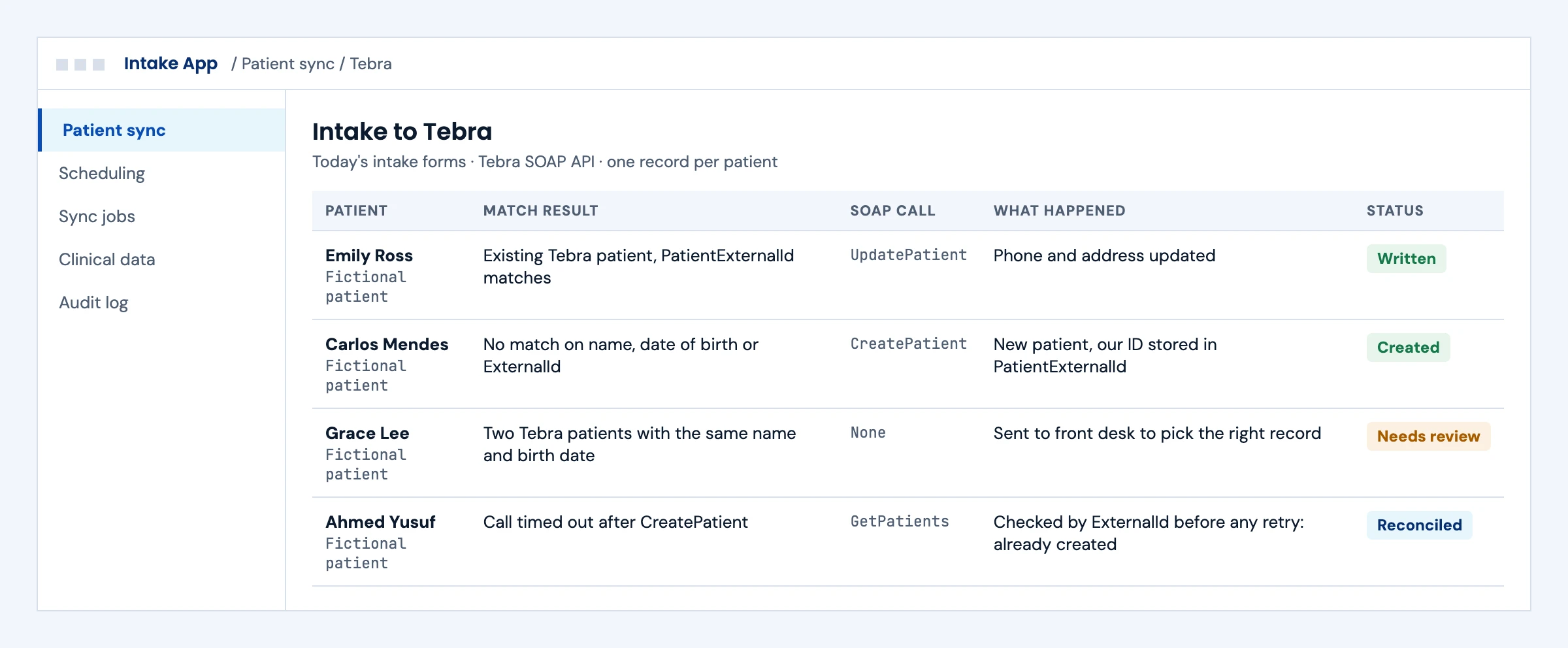
An existing match is updated, a new patient is created with your ID stored in PatientExternalId, and an uncertain match stops for staff. A timed-out create is checked before any retry.

What we build
  • Matching on name, date of birth and ExternalId before any write
  • CreatePatient and UpdatePatient calls with read-back
  • Reconciliation after a timeout, so a retry never creates a second record
Intake to Tebra log showing patient updates, new patients with ExternalId, an uncertain match sent for review and a reconciled timeout
Illustrative screen with fictional patients: intake to Tebra log showing patient updates, new patients with ExternalId, an uncertain match sent for review and a reconciled timeout. Tap to open full size.

Bookings and Cancellations From Your App

Today

The scheduler re-enters bookings made in another product.

With the integration

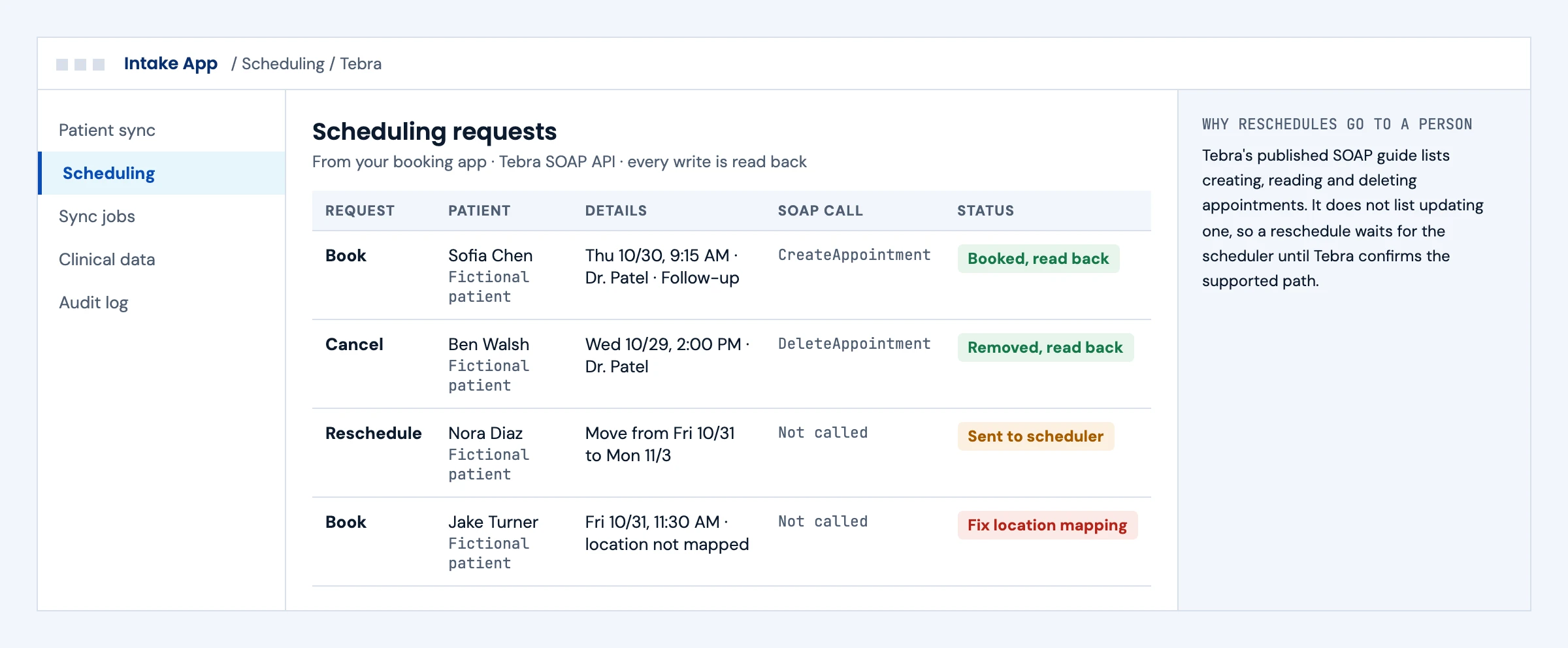
Bookings and cancellations go to Tebra through the documented create and delete calls and are read back. Reschedules go to the scheduler until Tebra confirms a supported update path.

What we build
  • CreateAppointment and DeleteAppointment with provider, location and type mapped
  • Read-back of every write
  • A staff queue for anything the published guide does not cover, such as reschedules
Scheduling requests to Tebra with bookings and cancellations written and a reschedule sent to the scheduler
Illustrative screen with fictional patients: scheduling requests to Tebra with bookings and cancellations written and a reschedule sent to the scheduler. Tap to open full size.

Staying in Sync Without Webhooks

Today

Your product misses changes made in Tebra, or polls so often it hits errors.

With the integration

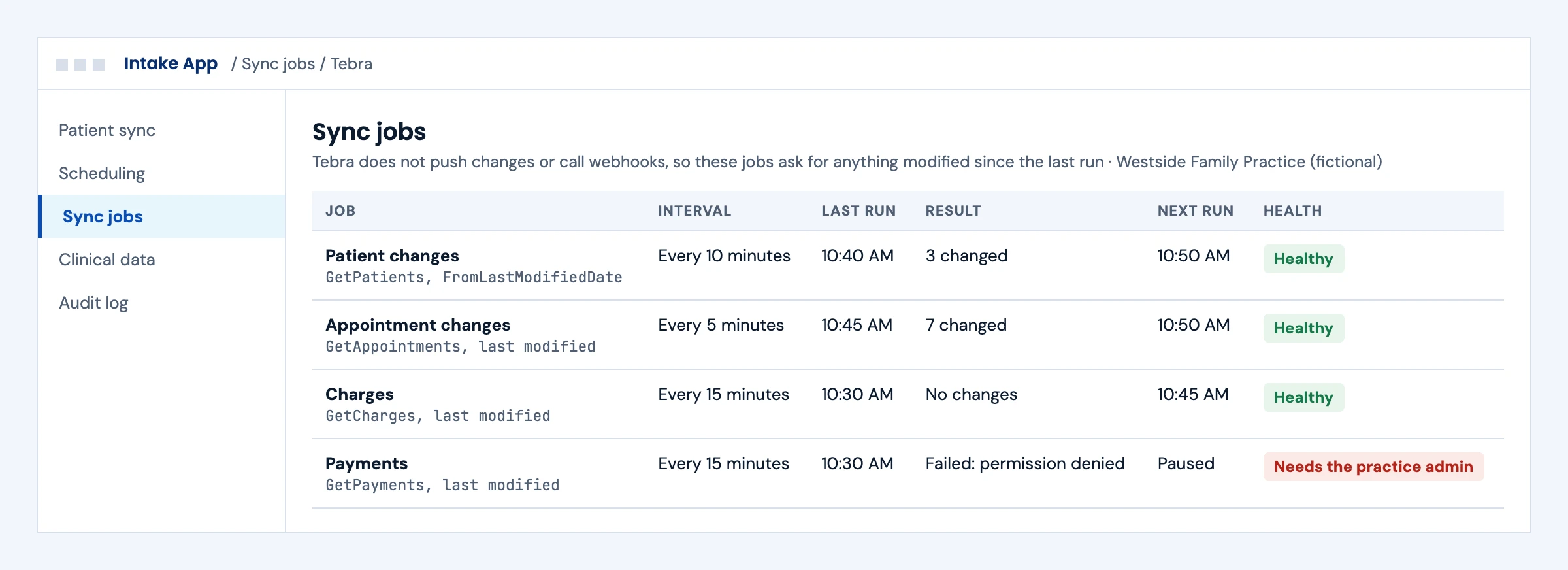
Jobs ask Tebra for anything modified since the last run, inside the 5 to 15 minute range Tebra's guide suggests, and a permission error pauses the job and tells the practice admin.

What we build
  • Last-modified polling per object, scheduled inside Tebra's suggested interval
  • Pause and alert on permission errors instead of silent retries
  • Redacted operational logs, with restricted diagnostic capture only when needed
Tebra sync jobs polling patients, appointments, charges and payments by last-modified date, one paused for the practice admin
Illustrative screen with fictional patients: tebra sync jobs polling patients, appointments, charges and payments by last-modified date, one paused for the practice admin. Tap to open full size.

Clinical Data in Your App, Read Only

Today

A care manager switches between your app and Tebra's chart screens.

With the integration

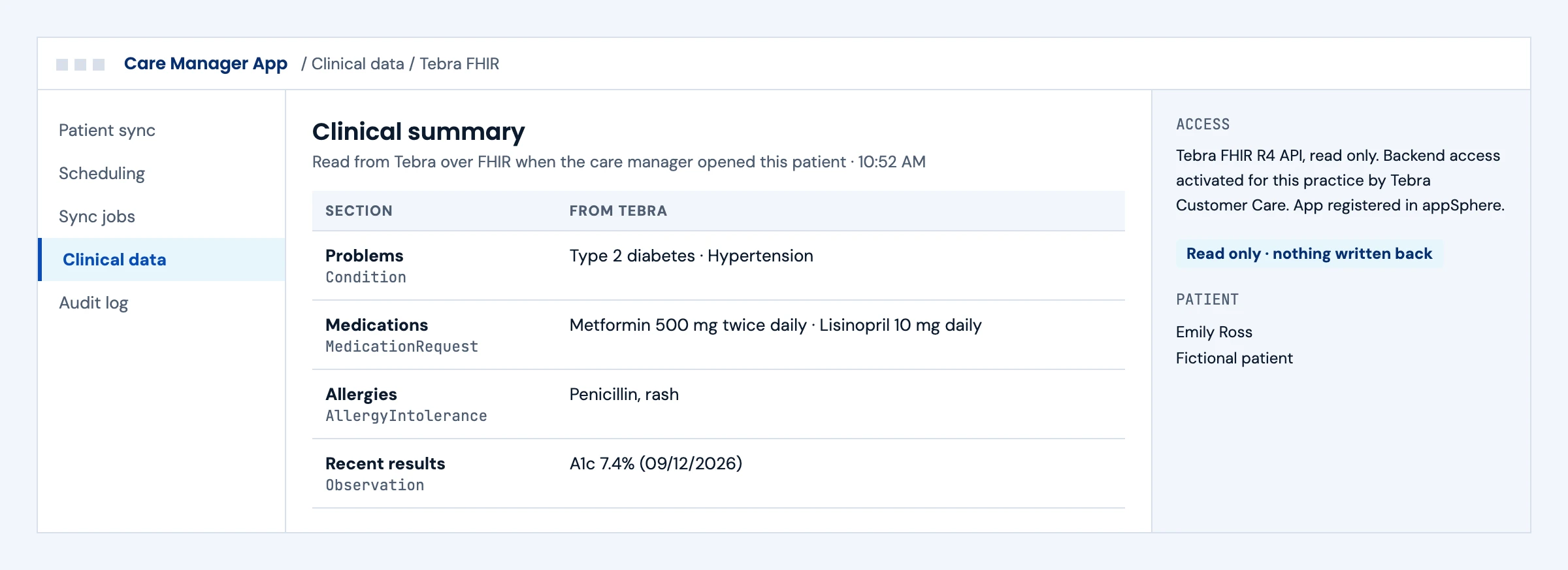
Problems, medications, allergies and results appear in your app, read from Tebra's FHIR API behind the practice's authorization, with nothing written back.

What we build
  • App registration in appSphere and per-practice backend activation by Tebra Customer Care
  • US Core reads mapped to your screens
  • A clear read-only boundary in the product, so nobody expects write-back
Clinical summary read from Tebra over FHIR showing problems, medications, allergies and results, read only
Illustrative screen with fictional patients: clinical summary read from Tebra over FHIR showing problems, medications, allergies and results, read only. Tap to open full size.

First call

Questions We Will Ask You on the First Call

The answers decide which Tebra interface each workflow uses and what access you need to request.

Which workflows must write to Tebra, and which only read?

SOAP covers documented practice operations; the FHIR API is read only. Many products need both.

Do you need to reschedule appointments?

Tebra's published SOAP guide lists create, retrieve and delete, not update, so we confirm rescheduling with Tebra before it goes into scope.

How fresh does data need to be?

Without webhooks, freshness is a polling interval. Tebra's guide suggests 5 to 15 minutes.

How many practices will you connect in the first year?

Each practice sets up its own customer key and permissions, so a repeatable setup checklist matters.

Do you plan to apply to Tebra's marketplace?

Listing is a separate review run by Tebra, with its own criteria. It is not needed for every SOAP connection.

Does your product create billing encounters or payments?

Encounter and payment creation are documented. Payment allocation and reconciliation need the technical guide and the practice's workflow.

How do you identify patients today?

We store your IDs in Tebra's ExternalId fields so records stay matched.

Are any of your practices in psychiatry or mental health?

Those practices often need more than Tebra; see our behavioral health EHR integration options.

The short answer

Does Tebra Have an API? Yes, Two

Tebra offers a SOAP practice management API inherited from Kareo and a FHIR R4 API for clinical reads. The published SOAP guide lists retrieving appointments, charges, encounters, patients, payments, providers and transactions, creating appointments, patients, encounters and payments, updating patients and deleting appointments; it does not list appointment updates. Every call needs the user login plus a customer key the practice's system administrator generates. The same guide states that Tebra does not push data to external systems, has no webhooks and does not support HL7 messaging (meaning HL7 v2; FHIR is itself an HL7 standard), so integrations poll for changes. The FHIR API reads USCDI v1 data only; patient-access reads carry no fee under that arrangement, while clinician and bulk apps need registration with the practice, business documents and fees. Read the official Tebra SOAP API documentation in Tebra's Help Center.

Who it is for
Billing, intake, scheduling, patient engagement, analytics and AI products that serve independent practices on Tebra.
What we build
SOAP and FHIR connectors, patient sync, supported appointment creation and deletion, billing encounter submission, payment creation where the workflow is confirmed, polling and matching, and the onboarding steps for each practice.
The outcome we design for
Supported practice workflows connected through the access Tebra grants, with a documented setup checklist for each practice. These are intended outcomes, not a promise about Tebra's decisions.

Tebra APIs

What Tebra's APIs Let You Read and Write

Tebra's SOAP and FHIR interfaces serve different needs. From Tebra's own Help Center (official Tebra SOAP API documentation, updated June 2024) and the 2025 FHIR API User Guide, checked in October 2026. SOAP customer-key setup, FHIR registration and marketplace listing are separate processes; we scope the ones your product needs.

InterfaceWhat it coversWrite accessWhat to plan for
SOAP practice management APIAppointments (single and bulk), charges, encounter details, patients, payments, practices, procedure codes, providers, service locations and transactionsCreate appointment, patient, encounter and payment; update patient; delete appointmentCustomer key plus user login on every call, user permissions set by the practice admin, XML from a WSDL
FHIR R4 API (US Core)USCDI v1 clinical data: Patient, AllergyIntolerance, Condition, Medication, Immunization, Observation, Procedure, CarePlan, Goal, DocumentReference and moreNone: read (GET) onlyRegistration in Tebra's appSphere, Tebra review, FHIR sandbox for testing
FHIR user-facing appsPatient and provider apps using the authorization code flowNonePublic client only; bulk transfer is not supported for these apps
FHIR backend servicesSystem access with client credentials for practice-level and bulk useNoneCustomer Care activates FHIR for each practice; clinician and bulk apps need a contract and fees
Change notificationsTebra's published SOAP guide states that Tebra does not push data to external systemsNot applicablePoll every 5 to 15 minutes with last-modified filters, as Tebra suggests
HL7 v2 messagingThe same guide states that Tebra does not support HL7 messagingNot applicablePlan on the SOAP or FHIR APIs; confirm other interface products with Tebra directly

Tebra also documented a REST clinical data API in 2023. That older interface needs current confirmation from Tebra; we do not choose it for a new build without vendor documentation and approved access.

What we build

What Our Tebra Integration Builds

Pick the workstreams your product needs. Each one ships with a specification, sandbox tests and an owner.

01

Patient Sync With ExternalId

Create patients when your product needs them, store your own IDs in Tebra's ExternalId fields, and pull Tebra-side edits with GetPatients by last-modified date.

CreatePatient · UpdatePatient · GetPatients · PatientExternalId

02

Scheduling

Appointments created, read and deleted from your product, with provider, location and appointment type mapped to the practice's setup. The published guide does not list appointment updates, so we confirm rescheduling with Tebra before it goes into scope.

CreateAppointment · GetAppointments · DeleteAppointment

03

Billing Encounters

Billing encounters submitted from your product with the required provider and procedure information, the patient checked or created first, and rejected submissions assigned to a biller. A billing encounter is not a signed clinical note.

CreateEncounter · GetCharges · procedure codes

RCM integration →
04

Payments and Transactions

Payments created and transactions read back for reporting. Allocation, adjustments and reconciliation are scoped against the technical guide and the practice's own workflow.

CreatePayment · GetPayments · GetTransactions

X12 EDI for developers: 270/271, 837, 835 →
05

Clinical Data Over FHIR

Problems, medications, allergies, results and documents read through Tebra's FHIR API for patient-facing or clinician-facing apps.

SMART on FHIR · US Core · USCDI v1

SMART on FHIR app development →
06

Polling, Monitoring and Support

A scheduler that polls inside Tebra's suggested interval, reconciles uncertain write responses before any retry, alerts on failures and keeps redacted operational metadata, with restricted, time-limited diagnostic capture only when a support case needs it.

Last-modified polling · alerts · runbook

Integration monitoring and support →

Buyer decisions

Tebra Integration Options Compared

Choose SOAP for documented practice operations and FHIR for supported clinical reads. A product can need both.

OptionBest fitStrengthsWhat to plan for
SOAP practice management APIBilling, scheduling, intake and paymentsThe only documented write pathCustomer key setup per practice, XML, polling instead of webhooks
FHIR R4 APIPatient apps and clinical read use casesStandard US Core resources; free for patient-access readsRead only; contracts and fees for clinician and bulk apps
Tebra marketplace listingProducts that want Tebra customers to find themVisibility to Tebra customersA separate commercial process with Tebra's criteria and rolling review as API capacity opens; not required for every SOAP connection
ExportsOne-time migrations and analytics backfillsNo build on Tebra's sideManual steps and no ongoing sync
Login-based automationWorkflows neither API coversWorks where the API stopsWritten authorization, Tebra's terms and strict controls

We choose SOAP, FHIR or both according to each workflow and the access Tebra grants, and we say so when Tebra's APIs cannot do what you need.

Integration boundaries

Tebra Integration Boundaries: Who Owns What

We write the split down before the build starts.

The practice

Generates the customer key, sets the integration user's permissions and approves the data you access.

Tebra

Owns its APIs, terms, app review and marketplace decisions, and supports the API only on its side. We build to the published interfaces.

Your product team

Owns what your product does with Tebra data and how it appears to users.

The integration layer (ours)

Connectors, polling, matching, reconciliation, redacted operational logs and alerts. Defects in this layer are ours to fix.

Tebra's security review

Tebra asks partners for a BAA and "SOC 2 or equivalent" security evidence, and Tebra decides what counts as equivalent. We provide our ISO 27001:2022 certification and documentation for your review pack.

Security and PHI

A BAA is available for agreed work involving PHI. We encrypt in transit and at rest, keep customer keys in a vault and keep raw payloads out of operational logs.

Deliverables

Tebra Integration Deliverables

Everything lands in your repository and your runbook.

01

API choice and data map

Which Tebra API serves each workflow, with field maps for patients, appointments, encounters, charges and payments.

02

Integration code in your repository

SOAP and FHIR clients, polling, matching and retry logic, with practice configuration kept out of the code.

03

Practice setup checklist

Step by step for the practice admin: customer key, permissions and FHIR activation where needed.

04

Test evidence

Recorded runs covering creates, updates, duplicates, permission errors and polling gaps.

05

Tebra review pack

The technical and security evidence for the review your integration requires, prepared for Tebra to assess.

06

Monitoring and runbook

Redacted operational logs, failure alerts and a support runbook that includes how to file a Tebra support case.

Delivery phases

Tebra Integration Timeline

Initial planning estimate: 6 to 10 weeks to a first live practice, subject to practice setup, any required registration and workflow validation. Discovery confirms the first workflow and access before you commit to a release date.

  1. 01

    Discovery and access

    Weeks 1 to 2

    Workflows mapped to the SOAP or FHIR API, test practice access and appSphere registration requested

  2. 02

    Build

    Weeks 2 to 6

    Connectors, sync, polling and matching built and tested

  3. 03

    Practice validation

    Weeks 5 to 8

    First practice's setup completed, data checked with the practice team

  4. 04

    Go-live and hypercare

    Weeks 7 to 10

    First practice live, monitoring on, setup checklist handed over

Cost drivers

What Drives Tebra Integration Cost

Use the scoping call to pin down the workflow, the access you need and what goes into a scoped proposal. These are the factors that move cost.

Workflows

Each workflow, such as scheduling, encounters or payments, adds mapping and tests.

APIs used

Using both SOAP and FHIR adds a second connector and access process.

Sync frequency

Near real time polling across many practices needs more careful scheduling.

Matching

Existing patients in both systems need matching rules and a review step.

Practices per year

A repeatable setup checklist matters most when you add many practices.

Support level

Monitoring and on-call support are priced per connection.

Book a call ↗

Proof

EHR API Work You Can Check

Client names are withheld. These published guides show how we approach EHR API work; they do not prove Tebra approval or a live practice integration.

Published engineering guide

Multi-EHR API Comparison

How Epic, Oracle Health, athenahealth and eClinicalWorks expose their APIs, and what that means for a product that must serve all of them.

Read the guide →

Published engineering guide

EHR Automation Without API Access

When an EHR's API stops short, this is how we decide between APIs, RPA and computer-use agents, and the controls each needs.

Read the guide →

Published engineering guide

X12 EDI for Practice Billing

The 270/271, 837 and 835 transactions that sit next to a practice management API in most billing products.

Read the guide →

Security

ISO 27001:2022 Certified, BAAs Signed

We are ISO 27001:2022 certified and sign Business Associate Agreements for work that touches patient data.

FAQ

Tebra Integration: Questions Buyers Ask

Does Tebra have an API?

Yes. Tebra offers a SOAP web service for practice management data, the former Kareo integration API, and a FHIR R4 API for clinical data. The SOAP API can read and create practice records; the FHIR API is read only.

Can the Tebra API update appointments?

Tebra's published SOAP guide lists appointment creation, retrieval and deletion. It does not list appointment updates. We confirm rescheduling behavior with Tebra before including it in scope. The SOAP API is defined by a WSDL and sent as XML; the clinical API is FHIR R4 over REST.

Can we write clinical notes to Tebra?

Not through the interfaces Tebra documents. The SOAP API can create appointments, patients, billing encounters and payments, update patients and delete appointments, but a billing encounter is not a signed clinical note. Tebra's FHIR API is read only.

How do you authenticate to the Tebra SOAP API?

Each call carries a user login and a customer key. The practice's system administrator generates the customer key and sets the security permissions for the user the integration runs as.

Does Tebra support webhooks or push notifications?

Tebra's published SOAP guide states that Tebra does not push data to external systems or call webhooks, and suggests polling every 5 to 15 minutes with last-modified filters, for example GetPatients with a FromLastModifiedDate.

What happens if a Tebra write times out?

We do not retry blindly. The integration first reads Tebra back, for example GetPatients by ExternalId, to see whether the create already happened, and only then retries or marks it done, so a timeout never creates a duplicate record. On HL7: the same guide states Tebra does not support HL7 messaging.

Does Tebra have a sandbox?

For FHIR, yes: a developer account in Tebra's appSphere portal includes a FHIR sandbox, then the app is registered and reviewed by Tebra, and backend apps are activated for each practice by Tebra Customer Care. For the SOAP API, test access is arranged with a practice or with Tebra, so we confirm it during discovery.

Is the Tebra FHIR API free?

Under the patient-access arrangement Tebra describes, patient apps read USCDI v1 data with no contract and no fee, though registration and API terms still apply. Clinician-focused and bulk export apps must be registered with the practice, sign business documents with Tebra and pay additional fees.

How do we get listed in the Tebra marketplace?

Tebra curates its marketplace. It looks for a live product with healthcare customers, demand from Tebra clients, HIPAA compliance with a BAA and security evidence, and the engineering capacity to support the integration, and it reviews interest as API capacity opens.

Is Tebra the same as Kareo?

Tebra combines Kareo and PatientPop. The SOAP practice API is inherited from Kareo, so Kareo API integration code often maps across, but we check hosts and fields against Tebra's current documentation instead of assuming a lift and shift.

How long does a Tebra integration take?

Our initial planning estimate is 6 to 10 weeks to a first live practice, subject to practice setup, any required registration and workflow validation. Later practices can differ in configuration and approval.

How much does a Tebra integration cost?

Cost depends on the workflows, whether you use SOAP, FHIR or both, how often you sync, patient matching, how many practices you add and the support level. A BAA is available under our ISO 27001:2022 certified management system. After a scoping call we send a scoped proposal with the access dependencies listed.

Next step

Plan Your Tebra Integration

Tell us the workflows your product needs and how many practices you serve. An engineer replies with the likely Tebra interface per workflow, the practice setup steps and the open access questions.

Start with your workflow

Tell Us About Your Tebra Integration

Share the workflows, the number of practices and your target date. Use de-identified examples only. Read by an engineer, answered within one business day.

Please exclude patient data and credentials. We use these details to respond to your enquiry. Privacy policy

Thank you. Your enquiry has been received. Our team will review your requirements.