Epic Bridges Integration: Connecting Epic With Labs, Billing & Radiology via HL7

Digital Growth Lead
Writes about healthcare technology, interoperability, and AI-driven transformation across modern care systems.
Part of our complete guide to Epic FHIR auth and sandbox setup.
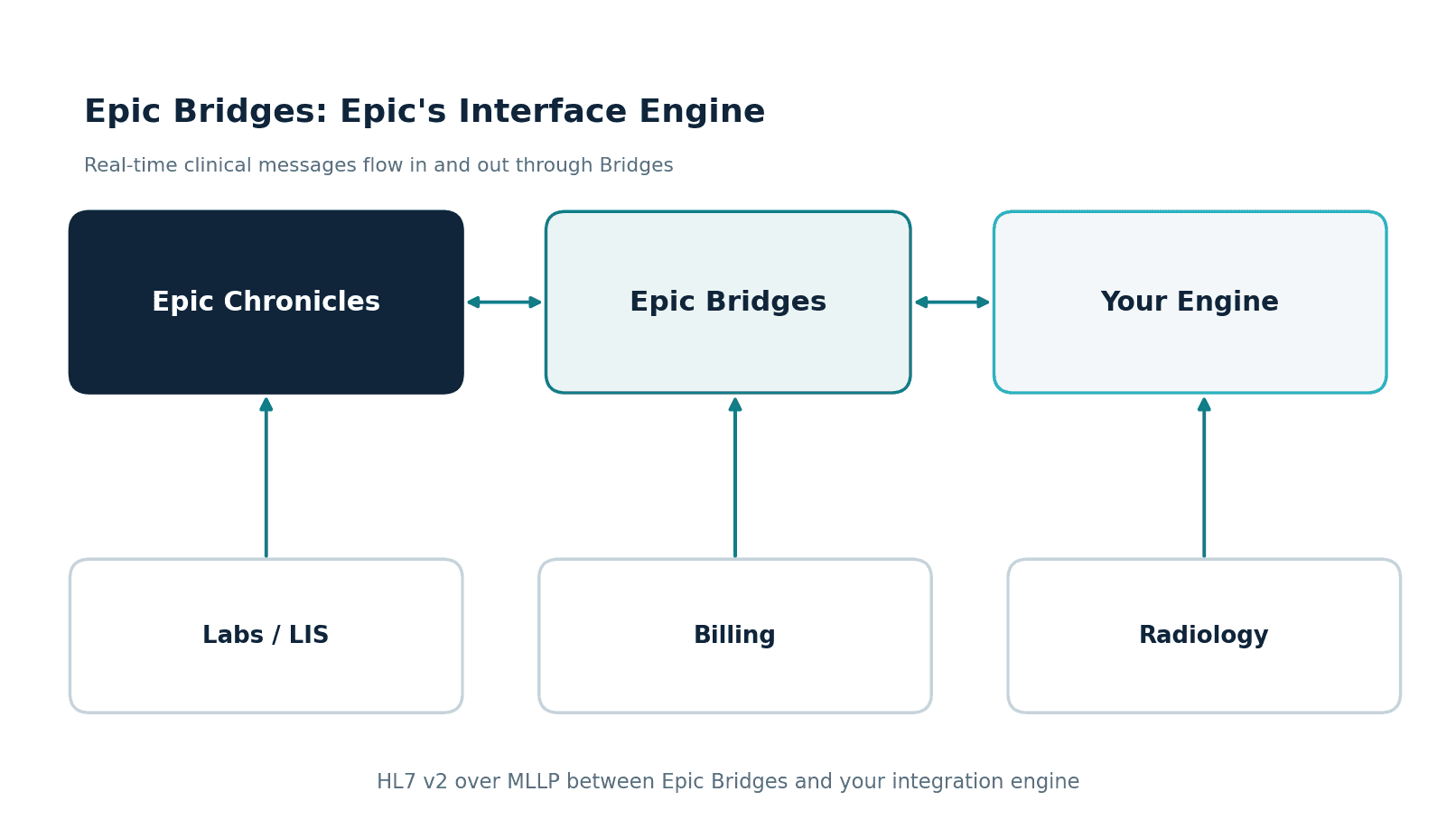
Epic Bridges is Epic's interface application. It builds and runs the HL7 v2 and other interfaces that move orders, results, admissions and charges between Epic and outside systems such as labs, radiology, billing and devices, alongside Epic's FHIR and other APIs.
All Epic modules in one place: see our Epic modules list for what each module does and where apps integrate.
When a hospital tells a vendor "we need this to talk to Epic," they almost always mean one of two things: an app that reads patient data over FHIR, or a real-time feed that moves lab results, orders, and charges in and out of Epic. The second job belongs to Epic Bridges, and it runs on HL7 v2. If your product needs to receive a result the moment it is resulted, or push an order into Epic as a clinician places it, this is the integration you are actually building.
This guide explains Epic Bridges integration for the people who have to scope and ship it: what Bridges is, the HL7 v2 message types that carry each clinical event, the difference between inbound and outbound interfaces, and the quirks that get a channel rejected in testing. For the full picture across FHIR, HL7, and every Epic module, our Epic integration services is the hub this guide links back to.
What Epic Bridges is
Bridges is Epic's interface engine. Every inbound and outbound HL7 v2 interface to Epic flows through it. When an external lab system sends a result, or Epic sends an order to a radiology system, that traffic passes through a Bridges connection that the hospital's Epic interface team has configured.
The detail that trips up new integrators: you do not get direct access to Chronicles, Epic's underlying database. You send messages to a Bridges endpoint, and Bridges decides what is validated and filed into Chronicles. Your side of the connection talks to Bridges over the wire, usually HL7 v2 framed in MLLP over TCP. Bridges owns the translation between that wire format and Epic's internal model.
For anyone building the external side, this means every interface has two halves: an upstream side facing your domain (a lab system, a RIS, a custom app) and a downstream side facing Bridges. Most teams put an integration engine in the middle to handle routing, transformation, retries, and acknowledgements. Our guide to integrating with Epic step by step shows where an HL7 feed sits next to FHIR APIs and SMART apps.
The HL7 v2 message types every Epic interface uses
HL7 v2 organizes clinical events into message types, each identified by a trigger in the MSH segment. You do not need all of them, but you need to know which one carries the event you care about.
ADT (Admit, Discharge, Transfer) carries patient demographics and encounter events. It is the backbone feed; many downstream systems subscribe to ADT just to keep their patient index in sync. ORM/OMG carries orders for labs, imaging, and procedures, and usually flows outbound from Epic to the system that fulfils the order. ORU carries observation results, typically inbound to Epic from a lab or diagnostic device.
DFT carries detailed financial transactions, the charges that flow to billing. SIU carries scheduling information, appointments and slot changes. MDM carries medical documents, such as transcribed notes flowing into the chart. Get the message type and direction right on paper before you write a single channel, because rework here is expensive.
Inbound versus outbound interfaces
Direction is not a small detail in Epic integration. It decides who owns the specification, who handles errors, and what an acknowledgement means.
An inbound interface brings data into Epic. A reference lab sending results uses an inbound results interface: your system builds an ORU message, Bridges validates it against the hospital's spec, and the result files to the patient's chart. If your message fails validation, Bridges rejects it, and your engine has to catch that and queue for retry or alerting.
An outbound interface sends data from Epic. When a clinician places an order, Epic generates an ORM and sends it out through Bridges to your system, which acknowledges receipt and routes it onward. Here Epic owns the message structure and you adapt to it. The acknowledgement (ACK) is part of the contract: an outbound interface that does not receive timely ACKs will back up, and the hospital's interface team will notice.
What an HL7 v2 message actually looks like
It helps to see the thing you are mapping. An HL7 v2 message is a set of segments, one per line, each made of fields separated by pipes. A lab result (ORU) carries an MSH header, a PID with patient identity, an OBR for the order, and one OBX per result value:
MSH|^~\&|LAB|REFLAB|EPIC|HOSPITAL|20260618093000||ORU^R01|MSG00001|P|2.5.1
PID|1||MRN12345^^^HOSP^MR||DOE^JANE||19850214|F
OBR|1|ORD789^LIS|RES456^EPIC|CBC^Complete Blood Count^L
OBX|1|NM|WBC^White Blood Cell^L||7.2|10*3/uL|4.0-11.0|N|||F
OBX|2|NM|HGB^Hemoglobin^L||13.8|g/dL|12.0-16.0|N|||F
Every field above is a place an integration can go wrong. The MSH application and facility values have to match the hospital's configuration. The PID identifiers have to use the assigning authority Epic expects. The OBX value type (NM for numeric here) has to be correct, or Bridges rejects the result. This is the level of detail an Epic interface spec gets into, and why the mapping work is where the hours go.
How a Bridges project actually runs
An Epic interface project is a sequence of cooperation with the hospital's interface team, not a solo build. You start by agreeing the interface spec, including any Z-segments. You build and unit-test your channel against sample messages. Then you move into connectivity testing with the hospital's non-production Epic environment, where the real surprises surface: an identifier format you did not expect, an ACK timeout, a Z-segment nobody documented. After both sides sign off, the interface is promoted to production and monitored. Each feed repeats this loop, which is why interface counts drive timelines more than raw complexity does.
The HL7 v2 quirks that get channels rejected
The HL7 v2 standard is loose enough that two "compliant" systems often cannot talk to each other without tuning. These are the issues that surface most in Epic Bridges testing:
- Z-segments. Epic and the hospital frequently use custom Z-segments to carry data the standard does not define. You have to map them explicitly; they will not appear in generic HL7 documentation.
- Field and component lengths. Bridges enforces lengths and data types more strictly than many sending systems. A name field that is too long or a malformed date will bounce the message.
- ACK handling. You must process application acknowledgements, not just transport-level confirmations. An AE or AR ACK means the message was received but not accepted, and your engine has to treat that differently from a clean AA.
- MSH configuration. Sending and receiving application and facility values in MSH have to match exactly what the hospital configured, or Bridges will not route the message.
- Character encoding and segment terminators. Subtle differences in encoding or line endings break parsing in ways that are painful to diagnose without good logging.
This is why an integration engine in the middle pays for itself. A tool like Mirth Connect lets you transform, validate, and re-queue messages without touching either Epic or your source system. We cover that pattern in depth in our Mirth Connect integration work and the Mirth + Epic production playbook.
If one of these issues is already blocking an interface in testing or production, discuss the interface issue with our team. Describe the affected interface, the failure you observe and its operational impact, and leave patient data out of what you send.
HL7 v2, FHIR, or Web Services: which one
Epic exposes more than one door, and choosing the wrong one means building the wrong thing.
Use HL7 v2 through Bridges for real-time clinical messaging: results, orders, charges, ADT, scheduling. It is event-driven, mature, and the default for hospital operational data. Use FHIR R4 when you need application data access, reading structured records into an app or analytics layer; our Epic FHIR integration guide covers that path. Use Web Services (the open.epic SOAP and REST calls) for specific transaction types like eligibility or targeted scheduling that neither of the others handles cleanly.
Real integrations usually combine them. A common shape: HL7 v2 for the operational feeds, FHIR for patient context and history, and a web service call for one or two specialized transactions.
How we approach Epic Bridges projects
Healthcare is the only industry we work in, and we have built EHR integrations and HL7 interfaces for healthtech startups and hospital teams. We have shipped Epic interfaces across ADT, ORM, ORU, SIU, and MDM feeds for US health systems, so the message types and Bridges quirks above are patterns we have already debugged, not things we learn on your budget.
We build to HIPAA requirements, sign BAAs and are ISO 27001:2022 certified, which matters when a hospital's interface team and security review get involved. Epic shops expect operational discipline: clean ACK handling, monitored channels, and clear error queues. That is the bar we build to from day one.
In practice, the feeds cluster by department, and that is the most useful way to scope them. The lab needs inbound ORU results and often outbound ORM orders. Billing needs outbound DFT charges and a clean ADT feed to keep accounts aligned. Radiology needs outbound orders and inbound results, frequently paired with a DICOM image flow alongside. Pharmacy, scheduling, and document management each add their own interfaces. Mapping your feeds to departments early gives the hospital interface team a shared plan, and it tells you how many of those build, test, and promote loops you are signing up for.
Where to start
Before you write a channel, produce a one-page interface inventory: every feed you need, its message type, its direction, and whether you own or adapt to the spec. That single document prevents most of the rework that sinks Bridges timelines.
If you want help building that inventory or shipping the interfaces, see our Epic integration services, or reach out to talk through your Epic feeds.
Related guides
Investigate the interface issues blocking your workflow.
Describe the affected interface, the observed failure and its operational impact. Discuss a review of acknowledgments, mappings, retries and monitoring, with a prioritized investigation plan.
Frequently Asked Questions
What is Epic Bridges?
What HL7 message types does Epic use?
What is the difference between Epic Bridges and Epic FHIR?
Why do HL7 interfaces get rejected by Epic Bridges?
Do I need an integration engine like Mirth Connect for Epic Bridges?
How long does an Epic Bridges integration take?