Epic Modules List (2026): What Each Module Does and Where Your App Integrates

CTO & Co-Founder
CTO & Co-Founder at Nirmitee.io. Architects healthcare integrations across FHIR, SMART on FHIR, ABDM and NHCX, writing from production experience taking hospital software from sandbox to go-live.
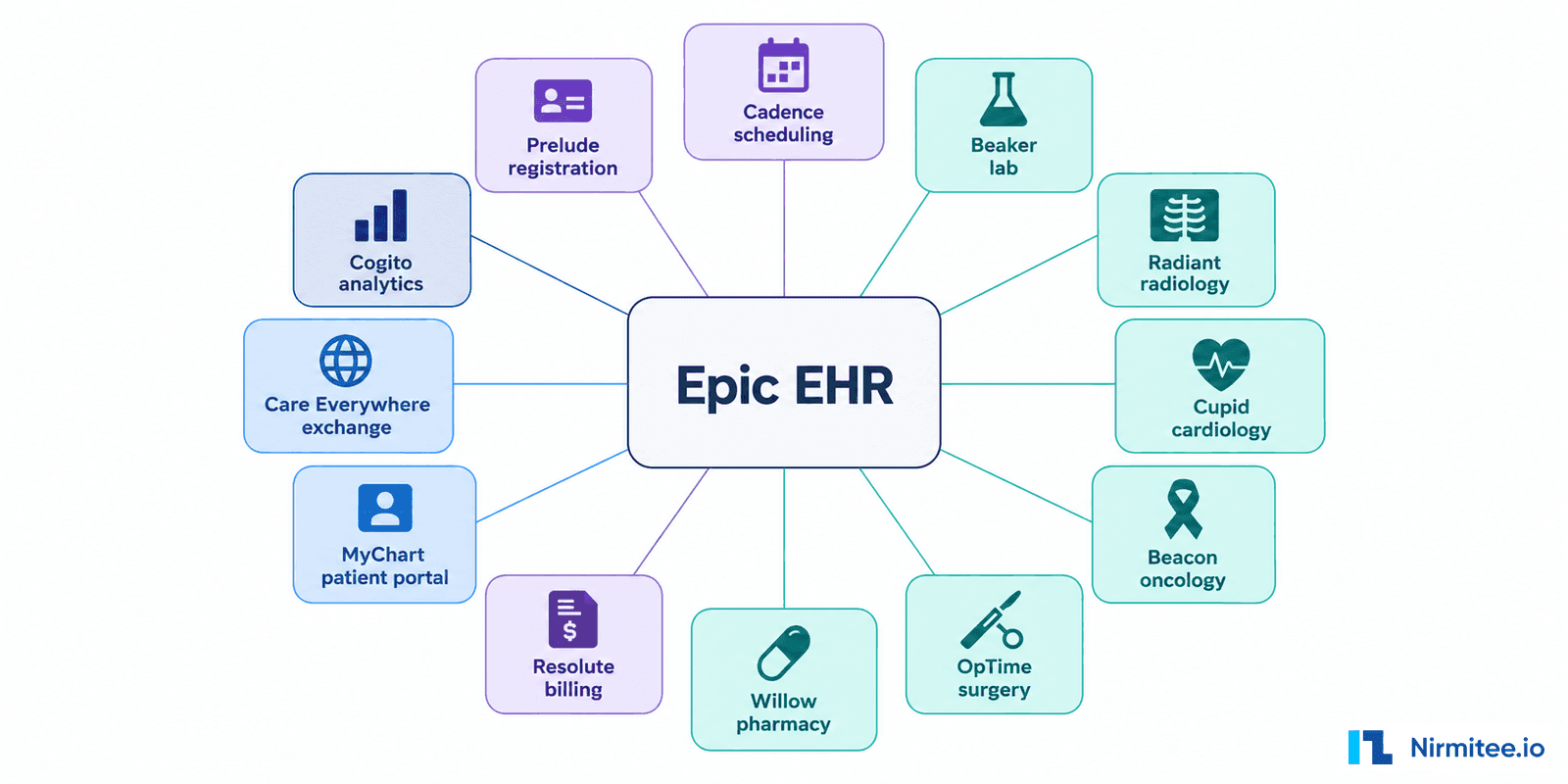
In brief: Epic organizes its EHR into applications, usually called modules, each run by a different team at the health system: Cadence for scheduling, Prelude for registration, Beaker for the lab, Radiant for radiology, Resolute for billing and dozens more. For a healthtech company the list matters for one reason: the module that owns your workflow decides which interface you use, who approves it and how long it takes. This guide maps the major Epic modules to what each does, the first integration question to ask, and our deeper guide where one exists.
It is a working map, not an official catalog. Epic's specialties page and open.epic, which publishes over 1,000 API and interface specifications, are the source of truth, and every health system licenses and configures a different set. Module names below were checked against Epic's pages and a health system's Epic training site on 26 September 2026. If you are scoping a project now, our Epic integration team starts from exactly this map.
The Epic modules list, grouped by workflow
Each table lists the module, what it does, the first question to settle before estimating an integration, and where to read more. "Go deeper" links point to our module guides; a dash means we have not published one yet.
Patient access and front-office modules
These modules decide who the patient is, when they are seen and how they reach the health system. Scheduling, registration and patient-portal apps connect here.
| Module | What it does | First integration question | Go deeper |
|---|---|---|---|
| Cadence | Scheduling, check-in and check-out, wait lists | Do you need to show availability, book appointments, receive changes, or all three? | FHIR scheduling APIs |
| Prelude | Registration, demographics, insurance and guarantor details | Which identifiers and registration events are authoritative for your product? | - |
| Grand Central | Patient flow: admissions, transfers, discharges and bed management | Do you need admission, transfer and discharge (ADT) events, and in real time? | - |
| MyChart | Patient portal and mobile app | Is your app patient-facing (patient launch) or clinician-facing (EHR launch)? | - |
| Cheers | Customer relationship management and patient outreach campaigns | Is the goal outreach, a contact-center workflow or campaign reporting? | - |
Clinical documentation modules
These are where clinicians chart, order and message. Apps that must appear inside a clinician's workflow usually meet one of these.
| Module | What it does | First integration question | Go deeper |
|---|---|---|---|
| EpicCare Ambulatory | Outpatient documentation, orders and care workflows | Does the user need a chart read, an in-workflow launch, an order, or a write-back? | Epic Ambulatory guide |
| EpicCare Inpatient (ClinDoc) | Inpatient orders, nursing and physician documentation | Which encounter and which clinician workflow owns the event? | - |
| ASAP | Emergency department and urgent care | Is the need triage, tracking-board data or ED documentation? | - |
| In Basket | Clinician messages, results and task routing | Should your product create a task or message, and who must act on it? | - |
Ancillary and specialty modules
Departmental systems with their own teams, devices and interfaces. Lab, imaging, cardiology and pharmacy vendors integrate here, often over HL7 v2 and DICOM rather than FHIR alone.
| Module | What it does | First integration question | Go deeper |
|---|---|---|---|
| Beaker | Clinical and anatomic pathology lab: orders, specimens, testing, results | Is Beaker the ordering system, the performing lab, or the result destination? | Lab and LIS integration guide |
| Radiant | Radiology: scheduling, performing and resulting imaging exams | Are you exchanging orders, results, images or viewer links? | Epic Radiant guide |
| Cupid | Cardiology (CVIS): invasive and non-invasive procedures | Which study, device result or report needs to move? | Epic Cupid guide |
| Beacon | Adult and pediatric oncology and hematology | Are you reading a treatment plan, recording an administration or showing results? | Epic Beacon guide |
| OpTime and Anesthesia | Surgery and the perioperative record, with anesthesia documentation | Which case, schedule or intraoperative event is required? | - |
| Stork | Obstetrics, labor and delivery | Which mother and newborn records and handoffs matter? | - |
| Willow | Pharmacy: inpatient, ambulatory and specialty | Is the need dispensing, medication orders or e-prescribing? | Pharmacy and e-prescribing guide |
| Kaleidoscope | Ophthalmology and optometry | Which device or diagnostic test output needs to reach the chart? | - |
| Phoenix | Transplant, from evaluation to follow-up | Which registry, organ or follow-up data must be exchanged? | - |
| Wisdom, Lumens, Beans, Bones | Dental, endoscopy, nephrology and orthopedics | Which specialty device, report or procedure record is involved? | - |
Revenue cycle and payer modules
Where charges become claims and where health plans run their own operations. Claims, remittance and prior authorization products connect here.
| Module | What it does | First integration question | Go deeper |
|---|---|---|---|
| Resolute | Hospital Billing, Professional Billing and Single Billing Office: claims (837) and payments (835) | Is the need an operational transaction or a reporting extract? | Epic Resolute guide |
| Tapestry | Health plan and managed care administration | Are you connecting to a payer's operations, such as referrals, authorizations or claims? | CMS-0057-F for payers |
Analytics and reporting
Not transactional interfaces. These decide how data leaves Epic for reporting, research and external products.
| Module | What it does | First integration question | Go deeper |
|---|---|---|---|
| Cogito | Epic's analytics suite: reporting, dashboards and data tools | Is this an analyst's question or a governed feed for an external product? | - |
| Clarity | Relational reporting database refreshed from Epic's operational system | Is a nightly extract acceptable, and who approves the queries? | Epic Clarity guide |
| Caboodle | Enterprise data warehouse built on Epic data | Do you need modeled, cross-source data rather than raw tables? | Epic Caboodle guide |
| SlicerDicer | Self-service cohort exploration for clinicians and analysts | Is a self-service report enough, or do you need an extract or API? | - |
Population health and care coordination
Programs that manage groups of patients over time, often across organizations.
| Module | What it does | First integration question | Go deeper |
|---|---|---|---|
| Healthy Planet | Population health and care coordination platform | Are you feeding risk, care-gap or outreach data into a program? | - |
| Compass Rose | Care coordination and case management | Which referrals, programs and handoffs does your product support? | - |
Interoperability and infrastructure
The layers that move data in and out of Epic and host the clinician workstation. Almost every integration touches at least one.
| Module | What it does | First integration question | Go deeper |
|---|---|---|---|
| Bridges | Epic's interface application for HL7 v2 and other interfaces | Which inbound or outbound interface carries your event, and who builds it? | Epic Bridges guide |
| Care Everywhere | Record exchange with other organizations, Epic and non-Epic | Is the data you need already exchanged between organizations? | - |
| Hyperspace and Hyperdrive | The clinician workstation; Hyperdrive is the newer web-based client | Does your app launch inside the workstation, and has it been tested in Hyperdrive? | Epic integration services |
| Showroom | Epic's marketplace for connecting apps | Do you need a listing, or only a connection for one customer? | Epic Showroom guide |
Mobile apps
Clinician apps on phones and tablets that extend the chart.
| Module | What it does | First integration question | Go deeper |
|---|---|---|---|
| Haiku | Clinician app for Android and iPhone | Does your workflow need to work on a clinician's phone? | - |
| Canto | Clinician app for iPad | Is your use case tablet-first, such as rounding or clinic review? | - |
| Rover | Mobile app for nurses and patient care | Is the task done at the bedside, such as scanning or charting? | - |
Modules are not integration methods
A module tells you where the work happens; an integration method tells you how data moves. An embedded clinician app may use SMART on FHIR to launch and read data. A lab instrument usually needs an HL7 v2 orders and results interface through Bridges. A reporting product may need a governed extract from Clarity or Caboodle. A FHIR resource you can read does not mean an external app can write the same data back, so confirm the write path before you promise it.
Epic's public HL7 v2 interface catalog and FHIR documentation show what exists; the health system's own build shows what is switched on. Our Epic FHIR integration guide covers the API side, and the Mirth Connect and Epic playbook covers interface engines.
Five questions to answer before you scope an Epic integration
- Workflow: what a user does, with one example patient journey from start to finish.
- Module and system of record: which Epic module owns the order, appointment, result or claim.
- Direction and timing: read, write, event or batch, and how fast it must happen.
- Identity and consent: how patients and encounters are matched, and what authorization and audit the customer requires.
- Customer dependencies: the interface owner, local configuration, security review and test environment the health system will provide.
Our Epic Integration Checklist turns these into a working document, and our guides on how long Epic integration takes and the Epic vendor security review cover the two questions that most often move go-live dates.
Example: scoping a lab result app
"Integrate with Beaker" is too broad to estimate. A useful statement is: for an existing patient and lab order, receive an instrument result, match it to the right specimen and order, acknowledge it, and show a corrected result without creating a duplicate. That one sentence names the module (Beaker), the method (an HL7 v2 results interface through Bridges), the identifiers (order and specimen), the error cases (corrections and duplicates) and the team that must approve it (the lab and interface team). It turns a vague request into a testable first release.
Where to start
Start from your product's workflow, find the module in the tables above, then read the guide for that module and the integration method it implies. If you would like a second pair of eyes, our Epic integration team reviews your target module, interface options and customer dependencies and returns a scoped plan. For FHIR-only use cases, see our Epic FHIR API integration service.
Map your product to the right Epic module and interface.
Tell us the workflow your product supports and which health system you are selling to. We identify the Epic modules involved, the interface or API path, and what the customer must approve before go-live.
Frequently Asked Questions
What are Epic modules?
How many Epic modules are there?
Which Epic module handles scheduling, lab and billing?
Do Epic modules have APIs?
Is there a list of Epic modules as a PDF?