Epic Clarity Integration: Using Epic Data for Reporting & Analytics

Digital Growth Lead
Writes about healthcare technology, interoperability, and AI-driven transformation across modern care systems.
Every analytics question a health system asks eventually runs into the same wall: the live Epic database, Chronicles, is built for running the hospital, not for reporting on it. Query it directly at scale and you slow down the system clinicians depend on. That is the problem Epic Clarity exists to solve, and it is where most reporting and analytics work on Epic data actually starts.
All Epic modules in one place: see our Epic modules list for what each module does and where apps integrate.
This guide explains Epic Clarity for the people who have to build on it: what it is, how the nightly ETL works, how it differs from Caboodle and FHIR, and what you can realistically build. It also covers getting Clarity data into your own analytics stack, which is the question we hear most from healthtech teams. For the full module-by-module view, our Epic integration services is the hub this guide links back to.
What Epic Clarity is
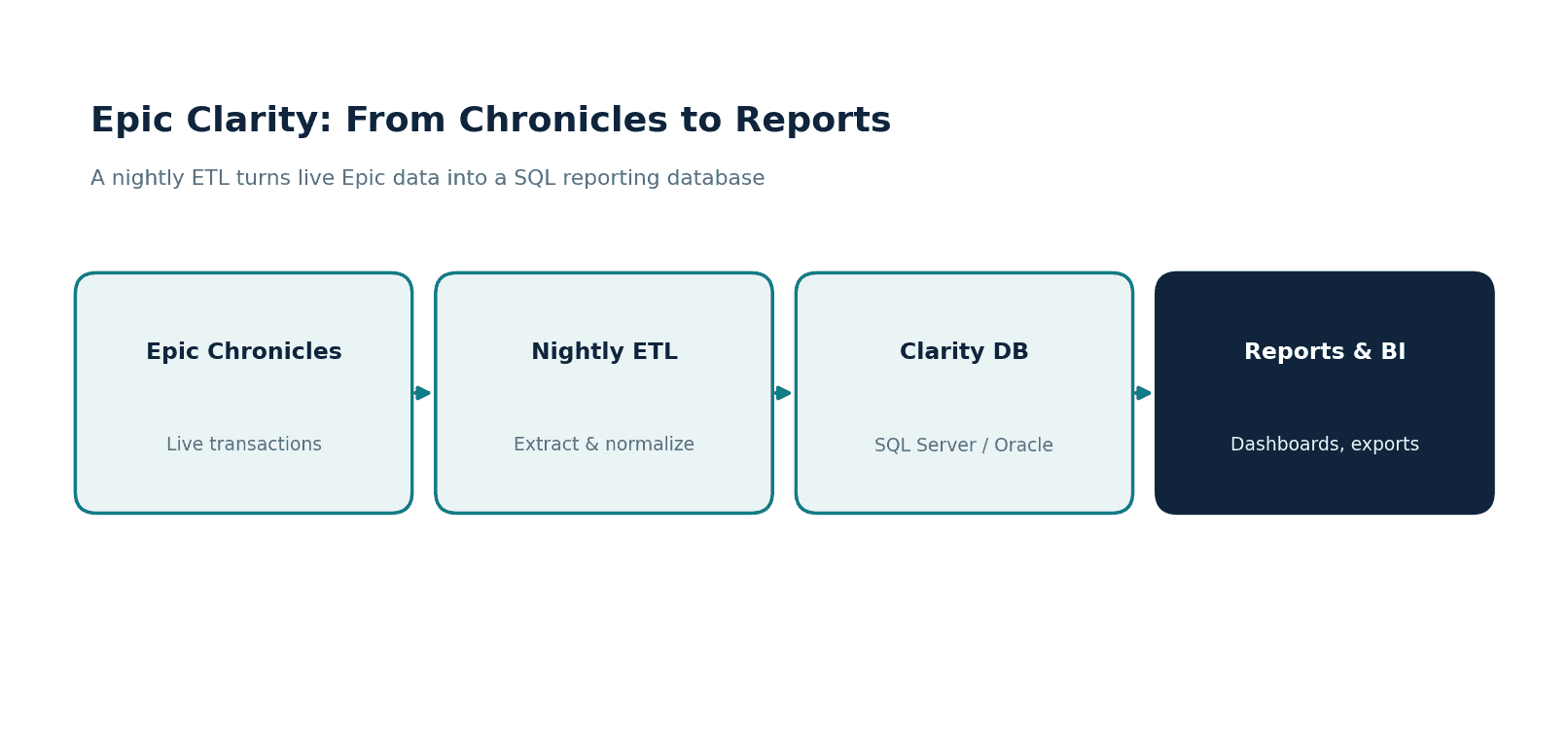
Clarity is Epic's relational reporting database. It runs on Microsoft SQL Server or Oracle, and a scheduled ETL process copies data out of Chronicles into Clarity's tables, usually once a night. Clarity restructures Epic's operational data into a more conventional relational model that report writers and BI tools can query without touching the live system.
The key trade-off is timing. Because Clarity refreshes on a nightly cycle, it is not the place to look for what happened in the last hour. It is the place to look for what happened yesterday, last month, or last year, across millions of rows, without slowing Chronicles down. For the overwhelming majority of reporting needs, that trade is exactly right.
Clarity vs Caboodle vs FHIR
Three Epic data layers get confused constantly, and picking the wrong one wastes weeks.
Clarity is the relational reporting database: Epic data, normalized, ideal for operational reports and extracts. Caboodle is Epic's enterprise data warehouse, built on a dimensional model and able to take in external data for cross-system analytics; we cover it in our Epic Caboodle analytics guide. FHIR is a real-time REST API for application data access, covered in our Epic FHIR integration guide; it is not built for heavy reporting. Reach for Clarity when you need to report on Epic data, Caboodle when you need enterprise analytics across sources, and FHIR when an app needs live records. When a product needs both reporting data and live app access, our Epic EHR integration guide shows how the two fit into one project.
How Clarity reporting works
The path from a clinical event to a finished report follows a predictable shape.
A clinical or operational event is captured in Chronicles in real time. Overnight, the Clarity ETL extracts that data and lands it in Clarity's relational tables. From there, a report writer queries Clarity using SQL or a tool like Reporting Workbench, and the output feeds a dashboard, a regulatory submission, or a scheduled extract. Once you understand that rhythm, the latency and the data freshness of every Clarity report make sense.
The schema is the part that humbles newcomers. Clarity has thousands of tables, and the relationships between them encode years of Epic's data model. Knowing which tables hold the data you need, and how to join them correctly, is most of the skill in Clarity reporting. This is where teams either invest in expertise or spend months guessing.
What teams build on Epic Clarity
Clarity work tends to fall into three buckets.
Operational reporting keeps the hospital running: patient volumes, throughput, department scorecards, and the daily numbers leaders rely on. Quality and regulatory reporting covers quality measures, mandated submissions, and audit-ready extracts where accuracy is not optional. Custom dashboards answer the questions leadership actually asks: executive KPIs, service-line performance, and ad hoc analysis that off-the-shelf reports do not cover.
The gotchas that stall Clarity projects
A few realities catch teams off guard, especially those coming from a general data-engineering background:
- Nightly latency, not real-time. Clarity is a day behind by design. If a use case needs live data, Clarity is the wrong tool and FHIR or an HL7 feed is the right one.
- The schema is enormous. Thousands of tables with non-obvious relationships. Mapping knowledge is the bottleneck, not SQL skill.
- Performance matters. Poorly written queries against large Clarity tables can run for hours. Indexing strategy and query design are real work.
- PHI governance. Clarity holds protected health information. Access control, de-identification for analytics, and audit logging are mandatory, not optional.
- Extract sprawl. Without governance, Clarity extracts multiply across the organization and become impossible to trust. A clear extract strategy saves pain later.
Getting Clarity data into your own stack
For healthtech teams, the question is rarely "how do I write a Clarity report" and more often "how do I get Epic data into my product or cloud warehouse." Clarity is usually the answer. A common pattern is to ETL selected Clarity tables into a cloud warehouse such as Snowflake or BigQuery, model the data with a tool like dbt, and serve it to your application or BI layer from there.
The work is in the modeling, not the copy. Clarity's relational structure has to be translated into the clean, documented data model your product expects, with PHI handling built in. Done well, this gives you a reliable, governed feed of Epic data without ever querying Chronicles. Done casually, it becomes a brittle pipeline that breaks on the next Epic upgrade.
A concrete look at the Clarity schema
To make the schema real, picture a simple report: encounters by department last month. Patient encounters live in tables such as PAT_ENC, departments in CLARITY_DEP, and you join them on the keys Epic defines. A trimmed version looks like this:
SELECT d.DEPARTMENT_NAME, COUNT(*) AS encounters
FROM PAT_ENC e
JOIN CLARITY_DEP d ON e.DEPARTMENT_ID = d.DEPARTMENT_ID
WHERE e.CONTACT_DATE >= '2026-05-01'
  AND e.CONTACT_DATE <  '2026-06-01'
GROUP BY d.DEPARTMENT_NAME
ORDER BY encounters DESC;
That is the friendly version. A real report joins a dozen tables, filters on Epic category values, and accounts for the way Epic models contacts, encounters, and visits differently. The query language is ordinary SQL. The difficulty is knowing the model well enough to ask the right question and trust the answer, which is why Clarity expertise is usually a hire or a partner rather than something a generalist analyst picks up in a week.
Full versus incremental extracts
When you pull Clarity into your own warehouse, one early decision shapes everything that follows: full reload or incremental. A full reload of large tables every night is simple but slow and heavy. Incremental loads, keyed off update timestamps or Epic's own change tracking, are far more efficient but require care so you do not miss late-arriving or back-dated records. Most production pipelines settle on incremental loads for the big fact-like tables and full reloads for small reference tables. Getting this wrong is a common reason a Clarity pipeline either runs too long or quietly drifts out of sync with Epic.
Who owns Clarity in a health system
In most organizations a dedicated reporting or BI team owns Clarity, frequently with Epic Clarity certification. They maintain the report catalog, manage extracts, and gatekeep changes to the environment. When a healthtech vendor needs Epic data, the practical path is to work with that team rather than around them, agreeing on the exact extract or feed you need and how often it refreshes. Respecting that ownership is often the difference between a project that moves and one that stalls in committee.
How we approach Epic Clarity work
Healthcare is the only industry we work in, and we have built EHR integrations and data pipelines for healthtech startups. We have moved Epic data into cloud warehouses and product databases, with PHI governance designed in rather than bolted on. We open-sourced a Headless EHR covering 28 clinical domains and more than 70 FHIR R4 resources, so the clinical data model is familiar ground for our team.
We build to HIPAA requirements, sign BAAs and are ISO 27001:2022 certified, which is what a health system's data-governance and security review will ask for. The pattern we see is that Clarity projects succeed when someone who knows the schema owns the mapping from day one.
When Clarity alone is not enough
Clarity covers reporting, but most products need a mix. An app that shows yesterday's labs can read Clarity; the same app showing a result the moment it posts needs the FHIR API or an HL7 feed. A durable design uses Clarity or Caboodle for history and analytics, FHIR for live reads inside the app, and HL7 v2 through Bridges for real-time clinical events. Deciding which data each feature needs, and refusing to force everything through one channel, is what keeps an Epic data architecture maintainable as the product grows. Our guides to Epic FHIR and Epic Bridges cover those real-time paths.
Where to start
Write down the exact reports or data feeds you need, and whether any of them truly need real-time data. That single distinction tells you whether Clarity is the right layer or whether you also need FHIR or an HL7 feed alongside it.
If you want help mapping Clarity or piping Epic data into your own stack, see our Epic integration services, or reach out to talk through your reporting needs.
Related guides
- Epic Caboodle Integration: Enterprise Healthcare Analytics
- Epic FHIR Integration Guide for Healthcare Apps
- Epic Integration Services (pillar guide)
Ready to scale?
Talk to our healthcare engineering team about building, integrating, and shipping faster.
Frequently Asked Questions
What is Epic Clarity?
What is the difference between Epic Clarity and Caboodle?
Is Epic Clarity real-time?
Can I move Epic Clarity data into Snowflake or BigQuery?
Why is Epic Clarity reporting considered difficult?