Epic Radiant Integration for Radiology Workflows, Imaging Orders & Results

Digital Growth Lead
Writes about healthcare technology, interoperability, and AI-driven transformation across modern care systems.
Part of our complete guide to Epic FHIR sandbox to production.
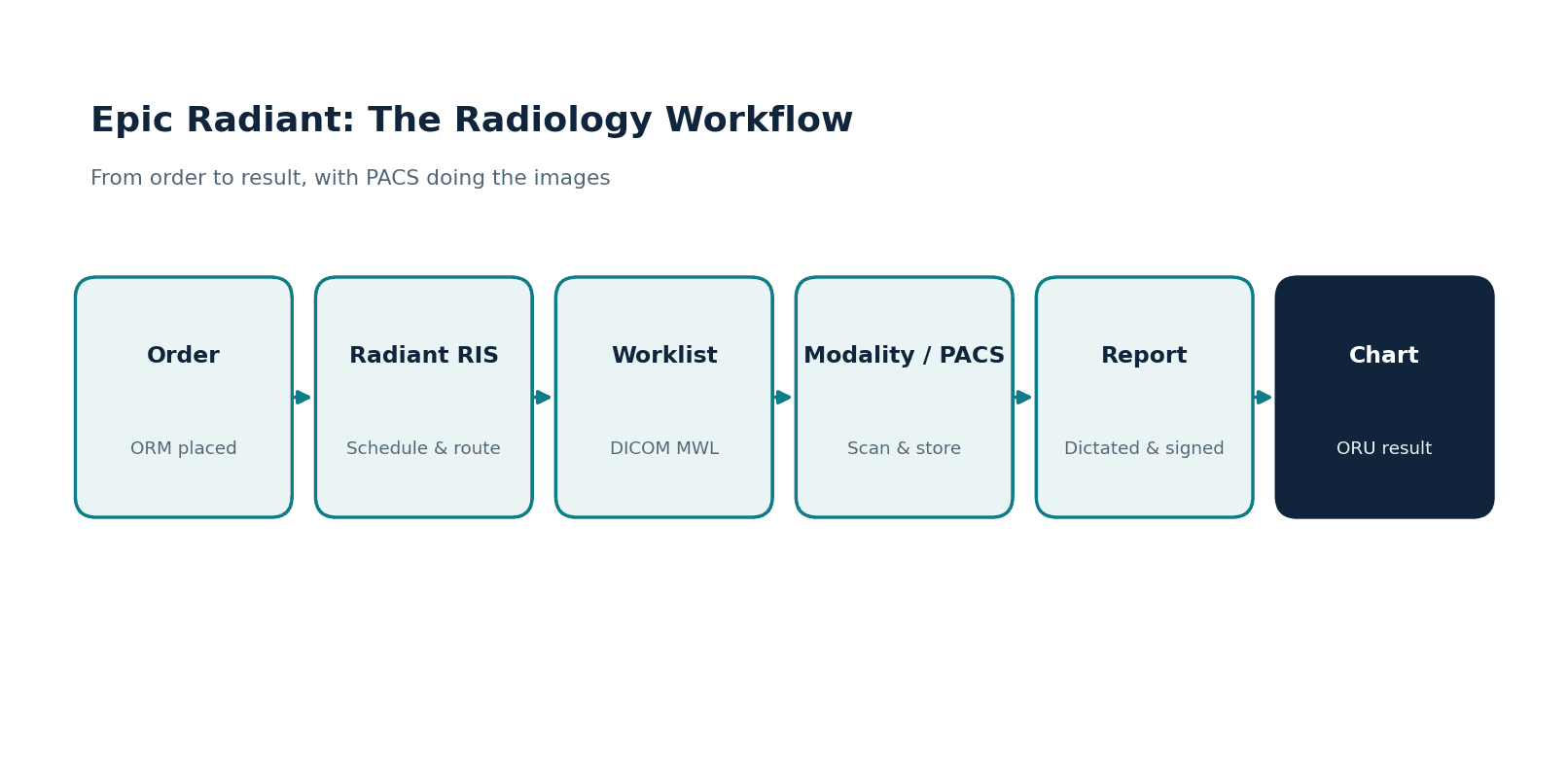
Epic Radiant is Epic's radiology information system (RIS). It manages imaging orders, scheduling, exam protocols and technologist workflow, and returns the radiologist's report to the patient's chart. The images themselves live in a PACS, which exchanges orders, status and results with Radiant over HL7 and DICOM.
All Epic modules in one place: see our Epic modules list for what each module does and where apps integrate.
Radiology is one of the most integration-heavy corners of any health system. An imaging order has to reach a scanner, the scanner has to know who the patient is, the images have to land in a place clinicians can view them, and the radiologist's report has to flow back into the chart. Epic Radiant sits at the center of that, and anyone connecting an imaging system, a PACS, or an AI tool to Epic has to understand what Radiant does and, just as importantly, what it does not.
This guide explains Epic Radiant for the people who build and scope imaging integrations: what the RIS handles, how it works with PACS over DICOM, and which standard carries which part of the workflow. For the full module-by-module view, our Epic integration services is the hub this guide links back to.
What is Epic Radiant?
Radiant is Epic's Radiology Information System (RIS). It manages the administrative and clinical coordination around imaging: order entry, scheduling, worklist generation, result routing, and reporting.
Because it lives inside Epic, a radiologist working in Radiant has the patient's results, allergies, medications, and history right there, which is a real advantage over a standalone RIS bolted onto an EHR.
The single most important thing to understand about Radiant is what it leaves to other systems. Radiant does not store or display the images themselves. That is the PACS's job. Radiant coordinates the workflow and points to the images; the PACS holds the pixels. Miss this distinction, and an imaging integration project starts on the wrong foot.
Watch: PACS integration on real CT images
Our 12-minute walkthrough shows a DICOMweb transfer of 62 real public CT images, including an interrupted transfer and its recovery, a patient association hold and a server-side HTTP 403 denial. The written version is our PACS integration guide: 4 ways to connect your product to hospital imaging.
What Radiant manages
Radiant's responsibilities fall into a few clear groups.
Orders and scheduling sit at the front: imaging orders come in, exams are scheduled, and Radiant generates the worklist that drives the modality. Results and routing close the loop, tracking exam status, and routing results back into the chart.
Reporting is the radiologist's output, covering dictation, sign-off, distribution, and any addenda or amendments. Each of these is a place where an external system, a transcription tool, a scheduling app, or an AI triage product, might plug in.
The workflow problems Radiant is meant to fix
It helps to remember what radiology looks like when none of this is wired up. An order gets faxed or re-entered by hand. A technologist types patient details at the scanner console. The report sits in a dictation queue, and the ordering physician calls the reading room to ask where it is.
Every one of those handoffs can go wrong. Retyped details produce wrong-patient and wrong-study errors. Manual scheduling leaves a scanner idle at 10 am and double-booked at 2. A signed report that nobody routed is, for practical purposes, a result that does not exist yet.
A properly integrated Radiant removes most of the handoffs. The order flows to the modality worklist without re-entry, the scanner already knows the patient, exam status is visible in the chart, and the signed report routes back on its own. None of this is glamorous. It is plumbing, and the value shows up as fewer errors, fewer phone calls, and shorter gaps between the steps of an exam.
How Radiant works with PACS over DICOM
The Radiant-to-PACS relationship runs on DICOM, and a handful of DICOM services do most of the work.
On the way out, Radiant produces the DICOM Modality Worklist (MWL), which tells the scanner who the patient is and what procedure to perform, so technologists are not retyping patient details at the console. Modality Performed Procedure Step (MPPS) reports back what the modality actually did. On the way back, Structured Reporting (SR) carries measurements and findings, and WADO lets a clinician pull an image into the Epic chart for viewing. Getting these services configured correctly between Radiant, the modalities, and the PACS is most of the work in an imaging integration.
This is also where a Vendor Neutral Archive (VNA) often enters the picture. Many enterprises store images in a VNA behind one or more PACS, and Radiant has to be configured so that orders, worklists, and image retrieval all resolve correctly across that architecture. The patterns are well established, but the details are specific to each site's imaging estate.
Radiology standards: HL7, DICOM, and FHIR
Three standards show up in every imaging integration, and they do not overlap as much as people assume.
HL7 v2 carries the orders and results: an ORM places the imaging order, an ORU returns the result, and both flow through Epic Bridges, which we cover in our Epic Bridges integration guide. DICOM handles the images and the devices, from the modality worklist to image storage and retrieval.
FHIR R4 is the modern app layer, with the ImagingStudy resource and diagnostic reports available to applications; our Epic FHIR integration guide covers that path. A real imaging integration usually touches all three: HL7 for the order and result, DICOM for the image, and FHIR for an app that needs to read the study.
How Radiant connects to other Epic modules
Radiant rarely works alone. A radiologist about to read a contrast CT checks the creatinine first, and that value comes from Epic Beaker, the laboratory module. Cardiology imaging, echo, cath, and structured cardiac reporting live in Epic Cupid, which splits the imaging world with Radiant roughly along service lines; our Epic Cupid integration guide covers that side. And many imaging orders start in a clinic visit, which means they originate in Epic Ambulatory workflows before Radiant ever sees them (see our Epic Ambulatory integration guide).
For anyone scoping an integration, the point is practical: if your product touches lab values, cardiac studies, or clinic ordering, you are integrating with more than Radiant. Finding that out during discovery is cheap. Finding it out during testing is not. Our guide on how to integrate with Epic covers the approvals and access steps that come before any module work.
Where AI and third-party imaging tools fit
The imaging space is full of AI products, triage tools that flag a likely stroke or pulmonary embolism, and worklist optimizers that reprioritize studies. These tools integrate with Radiant and the PACS rather than replacing them.
A triage tool reads images from the PACS, runs its model, and writes a flag or a result back into the workflow so the radiologist sees it in context. Scoping one of these integrations means deciding where the tool reads images, how it returns findings, and how its output reaches the radiologist without adding clicks.
The pattern we see is that these projects succeed when the integration respects the existing radiology workflow. A tool that forces radiologists out of their normal reading environment gets abandoned regardless of how good its model is. The integration work is what makes the AI usable.
The gotchas that stall imaging projects
A few realities catch teams off guard:
- RIS is not PACS. Confusing the two leads to scoping the wrong work. Radiant coordinates: the PACS stores and displays.
- DICOM configuration is detailed. Modality worklist and MPPS have to be set up per modality, and small mismatches cause exams to fail to start or to file incorrectly.
- Order and result mapping. The HL7 ORM/ORU side has the same Z-segment and field-mapping quirks as any Epic interface.
- Image retrieval paths. WADO and VNA configuration decide whether a clinician can actually open an image from the chart.
- PHI everywhere. Images and reports are PHI, so access control and audit logging apply across the whole imaging chain.
If you are mapping these pieces for your own product, discuss your imaging integration with our team. Bring your current system diagram and the order, image or report flow you need to support.
Enterprise imaging: RIS, PACS, and VNA together
In a large health system, imaging is rarely a single RIS talking to a single PACS. There is usually a Vendor Neutral Archive holding images long term, one or more PACS for different service lines, and a universal viewer that surfaces images across them.
Radiant has to sit cleanly on top of that estate so that an order placed in Epic resolves to the right worklist, the study lands in the right archive, and a clinician opening the chart sees the image regardless of where it is stored. Mapping this topology before writing interfaces is what prevents the "the exam happened, but the image will not open in Epic" class of problem.
This is also why imaging migrations are delicate. Moving from one PACS or VNA to another, or consolidating several, ripples through Radiant configuration, the modality worklist routing, and the viewer paths.
Treating the RIS, the archive, and the viewer as one connected system, rather than three separate projects, is the difference between a smooth cutover and weeks of broken studies.
Order and result mapping in practice
The HL7 side of a Radiant integration carries the same discipline as any Epic interface. Imaging orders arrive as ORM messages and results return as ORU, and both have to be mapped against the hospital's specification, including any custom segments.
Procedure codes have to line up between the ordering system, Radiant, and the modality, or exams get mismatched. Status messages have to be handled so that the chart reflects where a study really is. None of this is exotic, but it is exacting, and it is where an experienced interface team saves a project from a long tail of one-off data issues.
What a working Radiant integration changes day to day
The benefits are easiest to see role by role.
Technologists stop retyping patient details at the console, because the modality worklist carries them. That single change removes a whole class of wrong-patient errors and mislabeled studies. Radiologists read with the clinical picture in front of them, current labs, allergies, prior imaging, instead of flipping to a second system. Ordering physicians can see exam status in the chart and get the signed report routed to them, rather than calling the reading room.
Turnaround improves as a consequence. Not because any single feature is dramatic, but because the dead time between steps disappears: the exam starts when it should, files where it should, and the report reaches the chart without anyone pushing it. That is also a useful test for any new imaging tool you are considering: does it remove a step from this chain, or quietly add one?
How we approach Epic Radiant work
Healthcare is the only industry we work in, and we have built EHR and integration projects for healthtech startups and hospital teams, including HL7 interfaces on which imaging orders and results depend. When imaging orders start in an ambulatory EHR, the eClinicalWorks FHIR API and its HL7 lab interfaces are usually the other end of the chain.
We understand the split between RIS and PACS, the DICOM services that connect them, and the FHIR resources an imaging app needs.
We build to HIPAA requirements, sign BAAs and are ISO 27001:2022 certified, which matters when images and reports are in scope. The pattern we see is that imaging integrations succeed when the HL7, DICOM, and FHIR pieces are designed together, and the radiology workflow is respected, not worked around.
What an imaging integration timeline looks like
A focused Radiant interface, a single inbound results feed, or an outbound order feed, can move in weeks once the specification is agreed and a test environment is available.
A full imaging integration that spans modality worklist, MPPS, structured reporting, and image retrieval across multiple modalities and a VNA is a multi-month effort, because each modality and each archive has to be tested in turn.
The realistic plan stages the work: prove one feed end-to-end, then extend, rather than trying to light up the entire imaging estate at once. That sequencing is what keeps a radiology go-live calm instead of chaotic.
Where to start
List what your project actually touches: are you placing orders, generating worklists, retrieving images, returning AI findings, or reading studies into an app?
That list tells you which standards and which systems, Radiant, the PACS, the VNA, you have to integrate with, and it keeps the RIS-versus-PACS distinction front and center.
If you want help scoping or building a Radiant or imaging integration, see our Epic integration services, or reach out to talk through your imaging workflow.
Related guides
Map the connection between your imaging product and the hospital workflow.
Bring your current system diagram and the order, image or report flow you need to support. Discuss system responsibilities, routing dependencies and what must be tested before go-live.
Frequently Asked Questions
What is Epic Radiant?
Does Epic Radiant store medical images?
How does Epic Radiant integrate with PACS?
What standards are used in Epic radiology integration?
Can AI imaging tools integrate with Epic Radiant?
Is Epic Radiant a RIS or a PACS?
What is the difference between Epic Radiant and Epic Cupid?
How long does an Epic Radiant integration take?
Does Epic Radiant work with a Vendor Neutral Archive (VNA)?