Mirth Connect + Epic Integration: The Production Playbook

Software Development Expert
Writes about software development, scalable architecture, and practical problem-solving across modern digital products. Focuses on turning complex technical ideas into clear, real-world solutions.
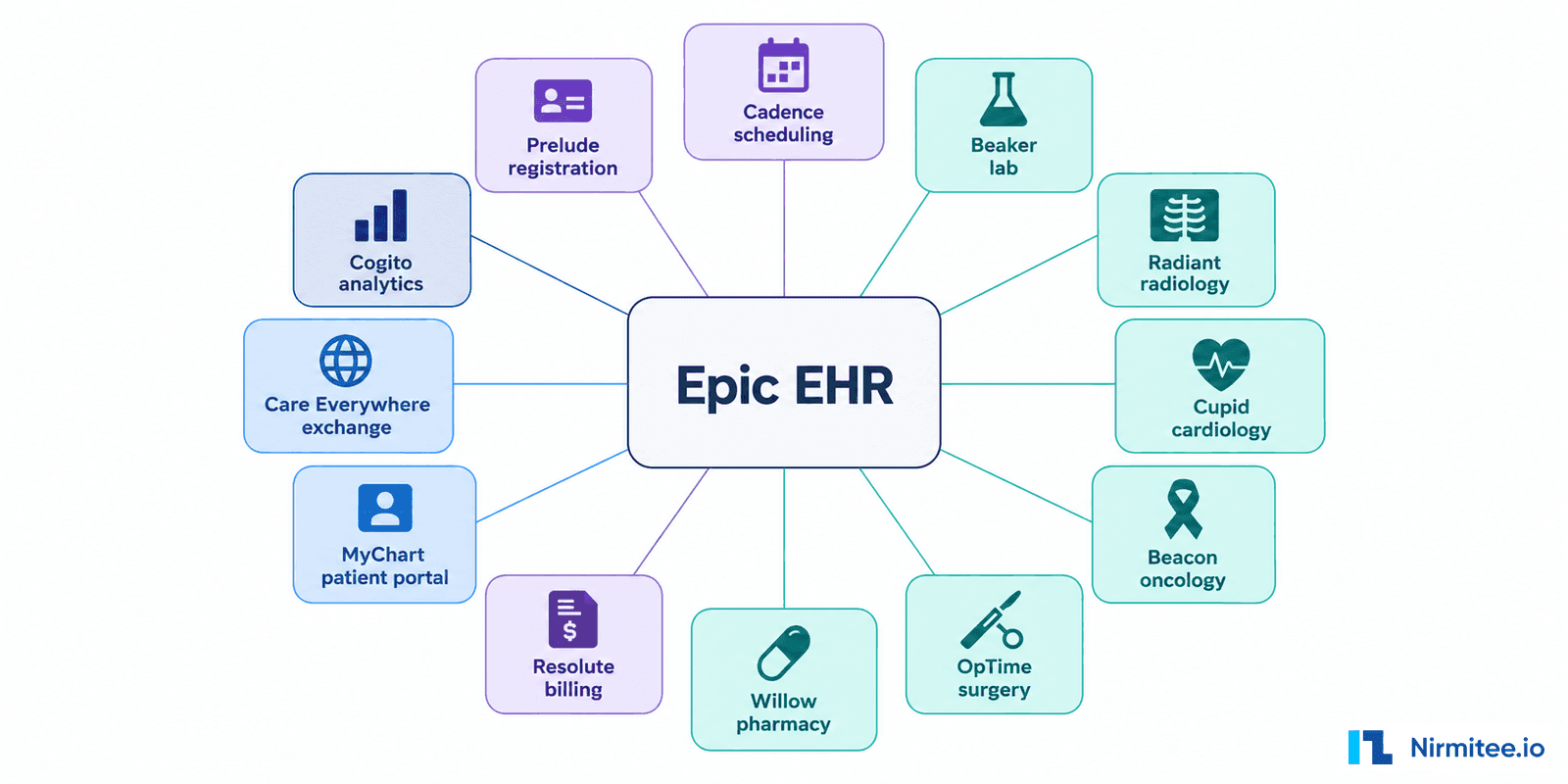
Every US health system above ~300 beds runs on Epic, and that single fact reshapes every integration RFP that lands on a vendor's desk in 2026. When a hospital says "we use Epic," it triggers a specific buyer profile: large IT budgets, mature procurement, executive sponsorship, and a tolerance for 6 to 18-month implementation cycles. Epic shops do not buy cheap, and they do not buy unsupported. They buy integrations that survive Epic version upgrades, App Orchard reviews, and the quarterly Epic XGM (eXternal Gateway Manager) audits.
This guide is the 2026 production playbook for connecting Mirth Connect to Epic — covering every clinical message type a real hospital sends, every Bridges spec gotcha, the App Orchard timeline, the HL7v2 quirks that get your channel rejected, and the SMART on FHIR launch flow that lets your app run inside Hyperdrive. We have built and shipped Epic integrations across ADT, ORM, ORU, SIU, and MDM feeds for hospital systems in California, Texas, and Massachusetts. The patterns below are what survived production.
The Epic Integration Landscape: Bridges, App Orchard, FHIR, and Hyperdrive
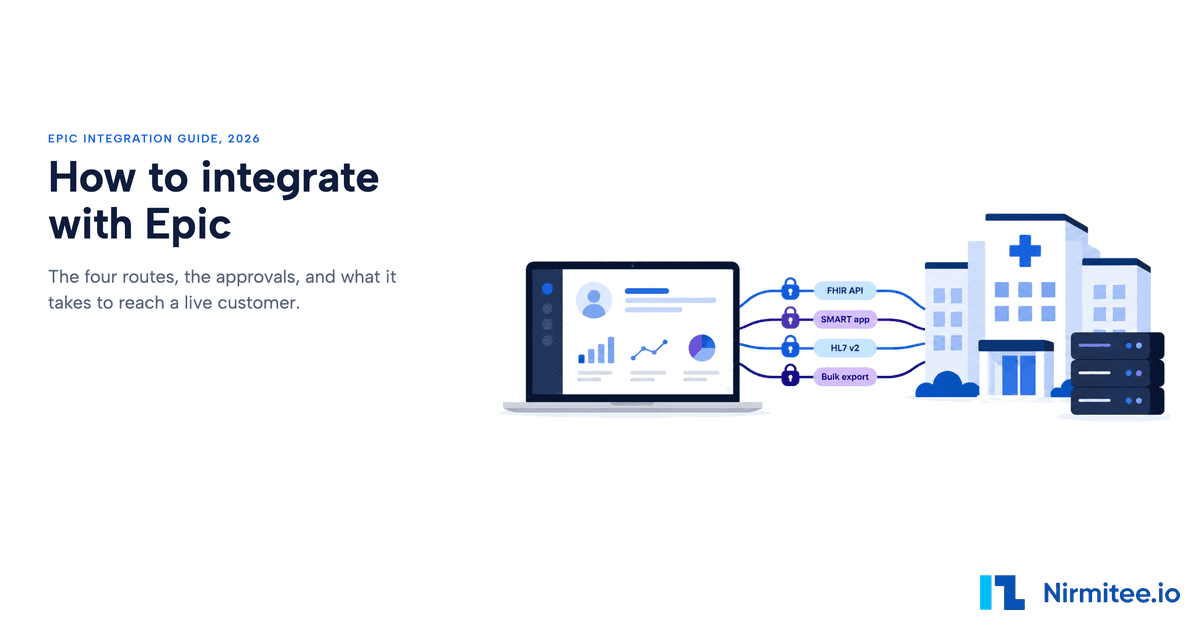
An Epic integration has four moving parts: Epic Bridges (the hospital's interface engine), App Orchard / Connection Hub (the multi-tenant vendor listing program), FHIR R4 Ignite APIs (modern REST read path), and HL7 v2 via Bridges (real-time event stream for ADT, ORM, ORU, SIU, MDM). Each requires a different setup in Mirth Connect, and getting them confused is the most common reason projects run three months late.
Before you write a single channel, you need to understand the four moving parts of an Epic integration. Get these wrong, and your project burns three months in clarification calls before the first message flows.
Epic Bridges
Bridges is Epic's interface engine — every inbound and outbound interface to Epic flows through it. When a third-party system sends ADT or receives ORU, it talks to a Bridges connection that the customer's Epic interface team has configured. You do not get direct access to Chronicles (Epic's database). You write to a Bridges endpoint, and Bridges decides what hits Chronicles.
For Mirth Connect implementers, this means every channel has an upstream side facing your domain (LIS, RIS, custom app) and a downstream side facing a Bridges endpoint that Epic publishes — usually an MLLP listener IP/port, an SFTP drop, or in modern shops a FHIR R4 REST endpoint. Bridges does the dialect translation between your HL7v2 wire format and the internal Epic representation.
Related reading: Mirth Connect RFP: 47-Point Vendor Eval Template.
App Orchard (now Connection Hub / Showroom)
If you are building a SaaS product that connects to many Epic customers (not just one hospital), you need to be in App Orchard. Epic renamed parts of the program in 2025, and the showroom is now where customers discover vendors. Listing is not free — annual fees scale with revenue, and a technical review takes 6 to 9 months for first-time vendors. Custom one-hospital integrations do not need App Orchard, but anything multi-tenant does.
FHIR R4 and the USCDI Mandate
Epic exposes a comprehensive FHIR R4 API covering Patient, Encounter, Observation, MedicationRequest, DocumentReference, Appointment, and more. The 21st Century Cures Act information-blocking rules require Epic customers to expose USCDI data via FHIR, which means even legacy HL7v2 shops now have a parallel FHIR endpoint. Modern Mirth Connect channels increasingly read from FHIR and push HL7v2 — or vice versa — depending on what the downstream system supports.
Hyperdrive and SMART on FHIR Launch
Hyperdrive is Epic's web-based front end, replacing Hyperspace. Clinicians launch SMART on FHIR apps directly from the patient chart, and the app receives an OAuth 2.0 token with a launch context (patient, encounter, user). Mirth Connect is not the right tool for the SMART app itself, but it is the right tool for the back-end data plumbing that the SMART app reads from. We will cover the integration pattern later.
The Five Message Type Channels You Must Build
Every Epic integration project starts with the same five channel families: ADT (patient movement), ORM (orders), ORU (lab and imaging results), SIU (scheduling), and MDM (document management). Get these right and 80% of clinical data flow is covered. The order matters — ADT first, because every other downstream system depends on knowing who the patient is.
Every Epic integration project starts with the same five channel families. Get these right, and 80% of clinical data flow is covered. Get them wrong, and the hospital's interoperability team will flag you in the first parallel-run week.
ADT — Admission, Discharge, Transfer (and Registration)
ADT is the heartbeat of every hospital integration. Every other downstream system — LIS, RIS, pharmacy, billing — depends on knowing who the patient is, where they are, and what their status is. Epic sends ADT messages on virtually every patient-state change.
The five ADT trigger events that matter:
- ADT^A01 — Admit a patient. Sent when a patient is formally admitted to an inpatient bed. Carries PID (patient demographics), PV1 (visit info), and often IN1 (insurance) and DG1 (diagnosis) segments.
- ADT^A03 — Discharge a patient. Sent on discharge. Critical for billing and for closing out downstream encounter records.
- ADT^A04 — Register a patient. Sent for outpatient registration. Same structure as A01 but PV1-2 carries an outpatient class code.
- ADT^A08 — Update patient information. The most common ADT event in production — fired on any PID change, address update, MRN merge, or insurance change. Idempotent handling is non-negotiable.
- ADT^A11 — Cancel admit. The "oops" event. Sent when an admission was entered in error. Your channel must reverse the encounter state, not just create a new one.
ORM — Order Messages
ORM^O01 is the order message — pharmacy orders, lab orders, radiology orders, nursing orders. ORM is bidirectional in most hospitals: Epic sends ORMs out to the LIS or pharmacy system, and the receiving system sends an ACK plus eventual results back via ORU.
The order message structure is OBR (the order itself), ORC (control), plus often OBX (observation) segments carrying clinical context like fasting status or relevant prior results. The big trap is OBR-4 — the universal service identifier, which usually carries a LOINC code. Epic lab masters map procedures to LOINC, but if your LIS uses local codes, you need a cross-walk table in Mirth.
ORU — Observation Results
ORU^R01 carries lab results, vital signs, imaging reports, EKG findings — anything observable about the patient. ORU messages from a LIS are inbound to Epic, where they hit the Bridges interface, get filed against the order, and appear in the patient chart.
The structural challenge with ORU is that a single message can carry dozens of OBX segments, each with a different data type (NM for numeric, ST for string, FT for formatted text, TX for plain text, ED for encapsulated data like a PDF, RP for reference pointer). Your Mirth transformer must preserve OBX-2 datatype indicator and route Base64 PDF results separately from numeric labs.
SIU — Scheduling Information Unsolicited
SIU messages handle the scheduling feed. The two events that cover 95% of traffic:
- SIU^S12 — New appointment booked. Carries AIS (appointment information service), AIL (location), AIP (provider/personnel). The full picture of "Dr. Patel will see John Smith at 2pm in Room 204 on June 12."
- SIU^S13 — Appointment rescheduled. Same structure as S12 but with the prior appointment ID referenced. Your channel must diff against the existing slot, not blindly create a duplicate.
MDM — Medical Document Management
MDM^T02 is the document notification message — sent when a transcribed note, scanned form, or external PDF is filed against a patient. It carries TXA (transcription document header) plus one or more OBX segments. The PDF payload itself sits in an OBX-5 field with datatype ED (encapsulated data) and is Base64-encoded.
The classic MDM gotcha is size. Epic enforces a 4MB practical limit per MDM message in most builds. If the source system sends a 15MB scanned radiology film, your Mirth channel must either chunk via DocumentReference + FHIR or route to a Document Library staging pattern. We have seen entire interfaces grind to a halt because nobody profiled the document size distribution before go-live.
The Architecture: How Mirth Sits Between Your Domain and Epic Bridges
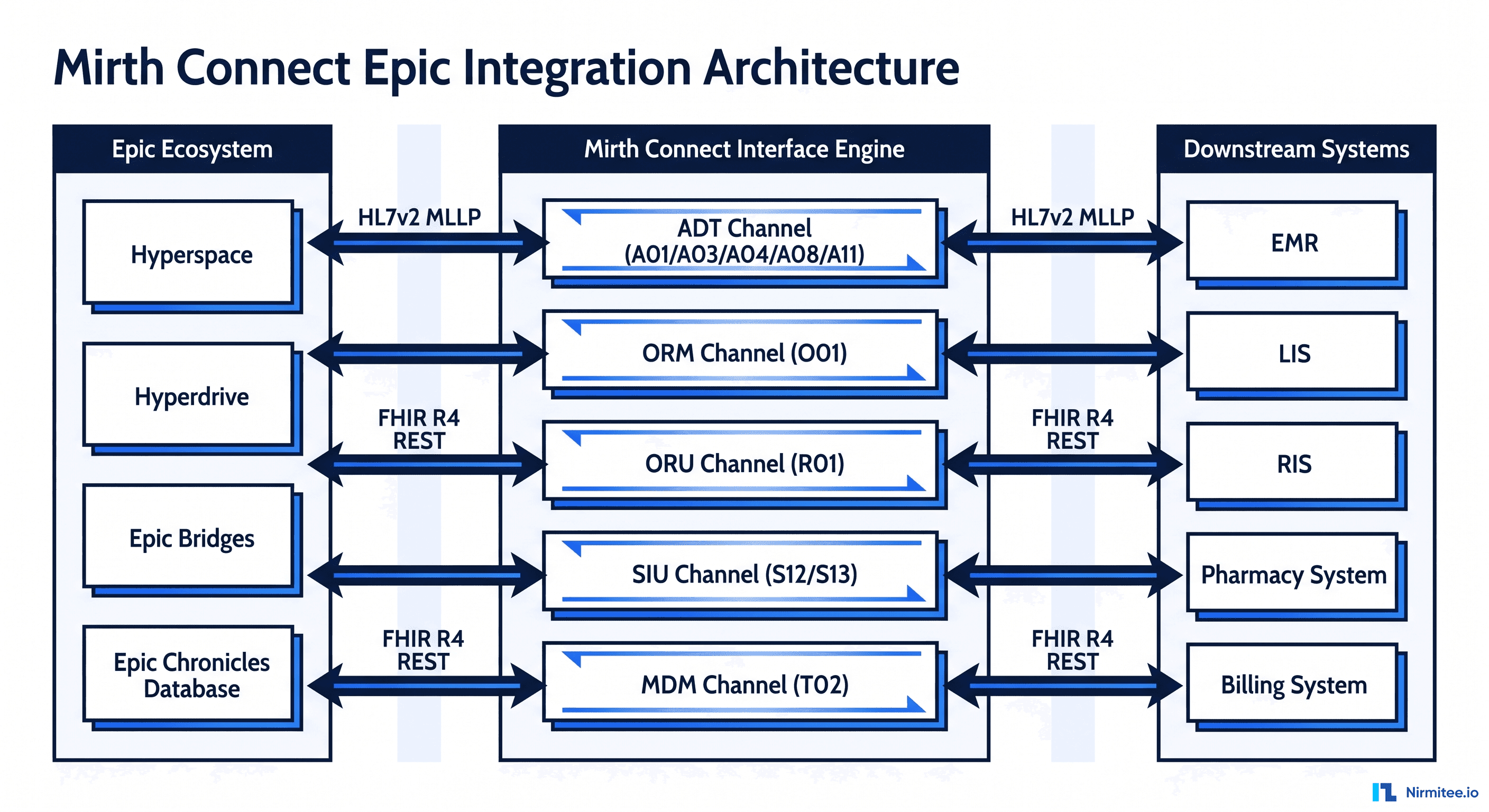
Mirth Connect sits on the vendor side as the buffer, translator, and audit log between your domain (LIS, RIS, custom apps) and Epic Bridges. Every channel follows the same pattern: TCP Listener (MLLP) → Filter (validate MSH-9) → Transformer (code cross-walks, FHIR mapping) → Destinations (Bridges endpoint + local FHIR server). Mirth is never the system of record and never the front door.
The reference architecture below is what we deploy for production Epic integrations. The key idea: Mirth Connect is the buffer, the translator, and the audit log between your domain (LIS, RIS, custom apps) and Epic Bridges. It is never the system of record, and it is never the front door.
Each channel follows a consistent pattern:
- Source connector. For inbound from Epic: TCP Listener on an MLLP port (Epic typically uses 6661 for ADT, 6662 for ORU, etc — assigned by the Epic interface team). For inbound from your domain to Epic: same MLLP listener pattern. For modern flows: HTTP Listener for FHIR REST or a Channel Reader for chained internal channels.
- Filter step. Validate MSH-9 against expected events. Reject obvious garbage before it pollutes downstream queues. We always check MSH-12 (version), MSH-3 (sending app), and MSH-9 (message type/trigger event) here.
- Transformer. The brain of the channel. HL7v2 to FHIR mapping, code system translations (LOINC, SNOMED, ICD-10, RxNorm), local code cross-walks, demographic normalization, time zone handling, and the dreaded "extended character" cleanup.
- Destinations. Usually two for resilience: the primary Epic Bridges endpoint and a parallel write to your local FHIR server (HAPI, Medplum, or Aidbox) so downstream systems can read from a single FHIR source of truth without hammering Epic.
Sample Mirth Transformer — ADT^A01 to FHIR Patient
The transformer below shows the core mapping pattern we use for inbound ADT^A01. The code reads HL7v2 segments off the channel map and builds a FHIR Patient resource that gets POSTed to a downstream FHIR server in the destination connector.
// Mirth transformer: ADT^A01 to FHIR Patient
var pid = msg['PID'];
var pv1 = msg['PV1'];

var patient = {
  resourceType: 'Patient',
  identifier: [],
  name: [],
  gender: '',
  birthDate: '',
  address: [],
  meta: {
    source: 'urn:mirth:adt-a01',
    lastUpdated: new Date().toISOString()
  }
};

// PID-3: identifier list (repeat field)
var ids = pid['PID.3'];
for (var i = 0; i < ids.length(); i++) {
  var idRoot = ids[i];
  patient.identifier.push({
    use: 'usual',
    system: 'urn:oid:' + idRoot['PID.3.4'].toString(),
    value: idRoot['PID.3.1'].toString()
  });
}

// PID-5: patient name
patient.name.push({
  use: 'official',
  family: pid['PID.5']['PID.5.1'].toString(),
  given: [pid['PID.5']['PID.5.2'].toString()]
});

// PID-7: birth date YYYYMMDD -> YYYY-MM-DD
var dob = pid['PID.7']['PID.7.1'].toString();
if (dob.length >= 8) {
  patient.birthDate = dob.substr(0,4) + '-' + dob.substr(4,2) + '-' + dob.substr(6,2);
}

// PID-8: administrative gender
var sex = pid['PID.8'].toString();
patient.gender = (sex == 'M') ? 'male' : (sex == 'F') ? 'female' : 'unknown';

channelMap.put('fhirPatient', JSON.stringify(patient));
channelMap.put('encounterClass', pv1['PV1.2'].toString());
This pattern keeps the transformer focused on data shape, with the destination connector handling HTTP, OAuth, and retry. We never put business logic in the destination — only transport.
Epic Bridges Spec Template — What to Ask For Before You Write Code
The Bridges spec is the contract between you and the customer's Epic interface team — it defines exactly what fields will be on the wire, what character set, what time zone, what code systems. The single most common reason Epic integrations slip is that the vendor starts coding before this spec is signed. Nothing should flow on the wire until you have it.
The single most common reason Epic integrations slip is that the vendor starts coding before the Bridges spec is signed. The Bridges spec is the contract between you and the customer's Epic team. It tells you exactly what fields will be on the wire, what character set, what time zone, what code systems. Without it, you are guessing.
The template we provide every customer asks for the following:
- MSH-3 sending application identifier. Epic registers each external app by name. If MSH-3 does not match, Bridges rejects the message.
- MSH-4 sending facility. Epic uses Department IDs here, not facility names. Get the EXACT department ID list.
- MSH-12 version ID. Usually 2.5 or 2.5.1. Epic will not accept a mismatch even on optional segments.
- MSH-18 character set. ASCII default, but if any Spanish or accented names will flow, request UNICODE UTF-8 explicitly.
- Trigger events supported. Confirm A01, A03, A04, A08, A11 — or whichever subset.
- PID-3 identifier list. Critical. Epic uses up to 8 identifier types per patient: MRN, Epic ID, SSN, driver's license, etc. Each has an assigning authority. Get the complete list with example values.
- Custom Z-segments. Almost every Epic shop has at least one Z-segment (ZPV, ZPD, ZIN). Get the field-by-field definition.
- ACK behavior. Application ACK vs Accept ACK. Timeout. Retry policy.
- Test patient list. Epic test environments have specific test MRNs. Get them before UAT.
The 16-Week Go-Live Roadmap
A basic 5-message-type Epic project runs 16 weeks from kickoff to production cutover: 2 weeks discovery, 2 weeks Bridges spec, 4 weeks channel development, 2 weeks UAT, 2 weeks parallel run, 2 weeks cutover, 2 weeks hypercare. The most commonly underestimated phase is the Bridges spec — revisions alone can take 6 weeks if the hospital's Epic team is busy.
Across the Epic integrations we have shipped, the realistic timeline from kickoff to production cutover is 16 weeks for a basic 5-message-type project. Below is the phase-by-phase plan we run.
Weeks 1-2: Discovery and Requirements
Workshops with the hospital's Epic interface team and the third-party system owners. Document the use case, identify the message types in scope, map the source-to-destination data flow at the field level, and confirm the test environments.
Weeks 3-4: Epic Bridges Specification
The Epic team drafts the Bridges spec based on the discovery. You review, push back on ambiguities, and get sign-off. Nothing flows on the wire until this is signed. We have seen Bridges spec revisions take 6 weeks alone — start early.
Weeks 5-8: Channel Development
This is the heads-down build. Set up the Mirth dev instance, build each channel, write transformer scripts, configure the code cross-walks, stand up the FHIR server, write the destination connectors. Unit-test every transformer with at least 20 representative messages per type.
Weeks 9-10: User Acceptance Testing
Connect to the Epic NON-PROD (PRD-equivalent test) environment. Send the agreed UAT message set. Verify every field rounds correctly. This is where the rejection codes start showing up. Track everyone in a defect log.
Weeks 11-12: Parallel Run
The hospital operations team runs both the existing process and the new Mirth-mediated process in parallel. Discrepancies are flagged and reconciled. This is where you find the edge cases you missed — the patient whose MRN was merged, the order with an obsolete LOINC code, the document over 4MB.
Weeks 13-14: Cutover
The hospital cuts the legacy path. Mirth is now the only path. Watch every channel like a hawk. We staff 24/7 on-call for the first 7 days of cutover.
Weeks 15-16: Hypercare
Stabilization. Address every defect found in the cutover. Tune the queues. Document the operational runbook. Hand off to the support team.
Epic-Specific HL7v2 Quirks That Get Your Channel Rejected
Epic does not implement HL7 v2 the way the standard documents it — it implements HL7 v2 the way Epic documents it. The six quirks that burn every vendor: MSH-9 trigger event strictness, PID-3 identifier order, extended character corruption, mandatory Z-segments, MLLP framing timeouts, and local hospital time without UTC offset. All are fixable in Mirth transformers once you know to look for them.
Epic does not implement HL7v2 the way the standard documents it. It implements HL7v2 the way Epic documents it — which is overlapping but not identical. The quirks below have burned every vendor we know.
1. MSH-9 Trigger Event Strictness
Epic Bridges is fanatically strict about MSH-9. If the spec says you will send A01 and A08, then sending A04 will be rejected even if it is a legal HL7v2 event. Always validate MSH-9 in your filter step against the allow-list from the Bridges spec.
2. PID-3 Identifier List Order Matters
Epic expects identifiers in a specific order: typically MRN first, with assigning authority EPI, then Epic ID, then other identifiers. If you send them in a different order, the Patient match may pick the wrong identifier. Always sort PID-3 by the order specified in the Bridges spec.
3. Extended Character Handling
Hispanic patient names with tildes (José, Núñez) and other extended Latin-1 characters cause silent corruption if MSH-18 is not set to UNICODE UTF-8. The corruption shows up days later when a clinician searches for the patient by exact name and gets no match. Default to UTF-8 unless the spec explicitly says ASCII.
4. Custom Z-Segments Are Mandatory, Not Optional
Even though Z-segments are non-standard, Epic shops treat them as mandatory once they are in the spec. If ZPV (patient visit extension) is in the spec, omitting it will be rejected. Use Mirth's raw HL7 mode to preserve unknown segments end-to-end — do not parse and rebuild, which strips Z-segments.
5. MLLP Framing and Acknowledgments
Mirth's default MLLP listener is correct: start byte 0x0B, end bytes 0x1C 0x0D. But Epic's MLLP timeout is typically 30 seconds — if your destination back-pressure makes Mirth slow to ACK, Epic will retransmit. Tune your queue retry to ACK fast and process slow.
6. Datetime Handling
Epic sends times in local hospital time without offset by default. If your downstream system stores UTC, you need to inject the time zone in the transformer. Worse: hospital systems in Arizona do not observe DST, so a "Mountain Time" assumption breaks for half the year.
The Top 12 Epic Rejections and the Mirth Fix for Each
Across every Epic integration we have shipped, the same 12 rejections account for ~80% of parallel-run defects: MSH-12 version mismatch, PID-3 missing assigning authority, PV1-2 invalid patient class, OBR-4 LOINC missing, MSH-9 event not in spec, Z-segment stripped, UTF-8 corruption, MSH-3 unknown to Bridges, NTE truncated at 80 chars, MLLP framing bytes missing, ACK timeout over 30 seconds, and duplicate MSH-10 IDs. Every one has a specific Mirth transformer fix.
Across the integrations we have shipped, the same 12 rejections account for ~80% of the parallel-run defects. Here is the cheat sheet.
- MSH-12 version mismatch (2.5 vs 2.5.1). Fix: Override MSH-12 in a pre-destination transformer to match Epic's expected version exactly.
- PID-3 missing assigning authority. Fix: Inject the assigning authority suffix (e.g., "^^^EPI") into every PID-3 component before send.
- PV1-2 patient class invalid. Fix: Map source values to Epic's allowed enum: I (inpatient), O (outpatient), E (emergency), P (preadmit), R (recurring), B (obstetrics).
- OBR-4 LOINC code missing. Fix: Build a code cross-walk table from your LIS local codes to LOINC. Cache in Mirth code templates.
- MSH-9 trigger event not in spec. Fix: Filter and route by MSH-9, drop or queue-for-review events outside the allow-list.
- Z-segment ZPV stripped on parse. Fix: Use Mirth's "Process HL7v2 messages" with "Strip namespaces: false" and preserve raw mode for Z-segments.
- UTF-8 characters break (José becomes Jos?). Fix: Set MSH-18 to "UNICODE UTF-8" and configure Mirth's channel encoding to UTF-8.
- MSH-3 sending app unknown to Bridges. Fix: Register your app name in Bridges before sending; never improvise MSH-3 values.
- NTE comments truncated at 80 chars. Fix: Disable Mirth's default line-wrap on serialization; allow long-string NTE-3.
- MLLP framing bytes missing. Fix: Configure Mirth TCP Sender with start byte 0x0B, end bytes 0x1C 0x0D, and end-of-record indicator enabled.
- ACK timeout greater than 30 seconds. Fix: Tune queue settings so Mirth sends ACK on receipt, not after destination success. Use asynchronous processing.
- Duplicate message rejection on MSH-10. Fix: Generate guaranteed-unique MSH-10 control IDs (UUID-based) and store an idempotency cache in Mirth's database.
SMART on FHIR App Launch from Hyperdrive
SMART on FHIR app launch from Hyperdrive is an OAuth 2.0 flow: clinician clicks your app icon in the patient chart → Epic passes a launch token and issuer URL → your app exchanges them for an access token with patient and encounter context → your app reads Epic FHIR R4 resources. Mirth Connect is not the SMART app itself — it is the data pipeline behind it, aggregating non-Epic sources into a unified FHIR server the app reads from.
If your project includes a clinician-facing app embedded in Epic's UI, you are building a SMART on FHIR app launched from Hyperdrive. The flow is OAuth 2.0 with EHR launch context. Mirth Connect is not the app, but it is often the data pipeline behind it.
The high-level flow:
- Clinician clicks the app icon in Hyperdrive while viewing a patient.
- Hyperdrive launches your app URL with a
launchparameter and aniss(issuer) parameter pointing to Epic's FHIR endpoint for that tenant. - Your app discovers the SMART configuration from the issuer's
/.well-known/smart-configuration, then redirects to Epic's authorize endpoint with the launch token. - Clinician (already authenticated to Epic) auto-approves; Epic redirects back with an authorization code.
- Your app exchanges the code for an access token plus the launch context (patient ID, encounter ID, user ID).
- Your app calls Epic's FHIR R4 endpoints using the bearer token to read Patient, Encounter, Observation, Condition, MedicationRequest, etc.
Where Mirth fits in: Mirth aggregates data from non-Epic sources (legacy LIS, custom devices, third-party imaging) into a unified FHIR server that your SMART app reads from in parallel with Epic's FHIR. This pattern lets you show clinicians a unified view without forcing every external system through Epic Bridges.
Epic App Orchard / Showroom Onboarding
App Orchard (now Connection Hub / Showroom) listing is required for any SaaS product connecting to multiple Epic hospitals. The five stages — application submission, technical review, production approval, app listing, and per-customer activation — run 6 to 9 months end-to-end for first-time vendors. Single-hospital custom integrations do not need App Orchard. Start the process before customers ask for it; the timeline runs on Epic's clock, not yours.
If your customer base spans multiple Epic hospitals, App Orchard listing is non-negotiable. Customers cannot discover or configure your integration through Epic's vendor catalog without it.
The five stages:
- Application Submission (2-4 weeks). Submit company profile, security questionnaire (SIG Lite or full), product demo video, intended scope.
- Technical Review (4-8 weeks). Epic engineers review your FHIR conformance, security posture, OAuth flow, error handling, and SMART app behavior. Failures here mean back to the queue.
- Production Approval (6-12 weeks). Submit pen test report, SOC 2 Type II or equivalent, signed BAA template, customer reference. Final sign-off from Epic legal.
- App Listing (1-2 weeks). Provide marketing assets, pricing tier, support documentation, video walkthrough. App appears in the Showroom.
- Customer Connections (ongoing). Each Epic customer who wants your app must activate it on their tenant. This is per-tenant config — you cannot self-onboard.
Total realistic timeline: 6 to 9 months for first-time vendors. Plan accordingly.
Epic FHIR R4 API Integration Patterns
Epic's FHIR R4 API supports Patient, Encounter, Observation, Condition, MedicationRequest, DocumentReference, AllergyIntolerance, Immunization, Procedure, ServiceRequest, DiagnosticReport, and dozens more. The four main patterns are: bulk export ($export) for population analytics, per-patient read for SMART app launches, FHIR Subscription for real-time push, and CDS Hooks for clinical decision support triggers. Mirth is the orchestrator for bulk and subscription patterns.
Increasingly, the cleanest pattern for read-heavy use cases is to skip HL7v2 entirely and read from Epic's FHIR R4 API. Epic's FHIR endpoint is comprehensive — Patient, Encounter, Observation, Condition, MedicationRequest, DocumentReference, AllergyIntolerance, Immunization, Procedure, ServiceRequest, DiagnosticReport, and dozens more.
Common patterns we deploy:
- Bulk export ($export). For population-level use cases (analytics, registries, quality measures). Pull millions of resources via the FHIR Bulk Data Access spec. Mirth can be the orchestrator that polls the export job, downloads NDJSON files, and routes them to your data lake.
- Per-patient read. For SMART app launches and clinician-facing flows. Use the launch context patient ID to read specific resources.
- Subscription/event notification. Epic supports FHIR Subscription for real-time push of resource changes. Configure a Mirth HTTP listener as the subscription endpoint.
- CDS Hooks. If your app participates in clinical decision support, Epic calls your CDS Hooks service at specific moments (patient-view, order-select, order-sign). Mirth is not the right tool for CDS Hooks, but the data Mirth aggregates feeds the CDS service.
Cost and Scope: What an Epic Integration Project Actually Costs
Epic integration project costs in 2026 run ~$50K for a basic 5-message-type inbound project, ~$120K for a standard 10-message bidirectional build with FHIR R4 and monitoring, and ~$300K for enterprise — full bi-directional, SMART on FHIR, App Orchard listing, and HA cluster. None of these figures include Epic Bridges licensing fees paid by the hospital, or customer-side configuration work.
The honest answer most vendors will not give you: it depends on scope. But here are the ranges we see across real projects in 2026.
Basic — ~$50K
5 message types, inbound to one downstream system, MLLP listener, basic monitoring. Team of 2 engineers plus a PM. Duration: 10 to 12 weeks. Best for a single-hospital, single-downstream-system project where Epic is sending you data.
Standard — ~$120K
10 message types, bi-directional, FHIR R4 read APIs included, error queues, Grafana dashboards, UAT environment, parallel run. Team of 3 engineers, PM, QA. Duration: 14 to 16 weeks. The most common project profile we see.
Enterprise — ~$300K
15+ message types, full bi-directional flow, SMART on FHIR app launching from Hyperdrive, Epic App Orchard listing, CDS Hooks integration, custom Z-segment handling, high-availability Mirth cluster, 24/7 hypercare. Team of 5+ engineers, architect, PM, 2 QA. Duration: 20 to 24 weeks. Multi-hospital SaaS vendors and large health systems.
None of these numbers include Epic Bridges licensing fees (paid by the hospital to Epic) or customer-side configuration work (also paid by the hospital). They cover the vendor-side build only.
The Epic Integration Estimator
Want a personalized estimate for your project? Use our Epic Integration Estimator — answer 8 questions about your scope (message types, hospitals, FHIR requirements, SMART app, timeline), and we will send a ballpark cost range, suggested team size, realistic timeline, and a calendar link to scope the project in detail.
Request your Epic Integration Estimator now — we respond within 24 hours with a written estimate and a 30-minute scoping call slot.
Production Patterns That Survive Epic Audits
Epic conducts XGM (eXternal Gateway Manager) audits periodically. The six patterns that survive every audit: audit every message with 7-year retention, idempotency on MSH-10, dead-letter queues with manual replay, version pinning against the tested Epic Chronicles build, synthetic monitoring via heartbeat ADT every 5 minutes, and quarterly code system version reviews for LOINC/SNOMED/ICD-10/RxNorm.
Epic conducts periodic audits of integrated vendors — XGM (eXternal Gateway Manager) reviews, security reviews, version-upgrade compatibility checks. The patterns below are what we deploy by default because they survive every audit we have been through.
- Audit every message. Mirth's message store is your audit trail. Configure retention to match the hospital's compliance policy — typically 7 years for clinical data under HIPAA. Compress and archive to S3 or equivalent.
- Idempotency on MSH-10. Every channel must handle the same message arriving twice without double-processing. Use Mirth's deduplication map keyed on MSH-10.
- Dead-letter queues with manual replay. Failed messages go to a parking lot channel with a UI for the ops team to inspect, fix, and replay. Never silently drop.
- Version pinning. Document the exact Epic Chronicles version, Bridges build, and HL7v2 conformance profile you tested against. Re-test on every Epic version upgrade.
- Synthetic monitoring. Send a heartbeat ADT every 5 minutes through every channel and alert if round-trip time exceeds the SLO. We use this pattern across all our customers.
- Code system version tracking. LOINC, SNOMED CT, ICD-10, RxNorm release new versions quarterly. Cache the version in Mirth and have a quarterly review cadence to update the cross-walks.
Common Anti-Patterns We Have Cleaned Up
The anti-patterns we see most in inherited Epic integrations: one mega-channel splitting all message types in a giant if-else (always split by message family), no idempotency on MSH-10 (creates duplicate patients), hard-coded ICD-10 values in transformers (breaks silently on code updates), no FHIR sidecar write (BI team has nothing when they ask), and plain-text PHI in logs (HIPAA violation from day one).
We have inherited dozens of Epic integrations from other vendors. Here are the anti-patterns we see most often.
- One mega-channel handles all message types. Splitting MSH-9 into a giant if-else. Painful to debug. Always: one channel per message family.
- No idempotency. Resent ACKs or retransmissions create duplicate patients, duplicate orders, and duplicate documents. Easy to fix in retrofit, easier to design in upfront.
- Hard-coded code values. ICD-10 codes baked into JavaScript transformers. When the codes update, the transformer breaks silently. Always externalize to code templates or a database lookup.
- No FHIR sidecar. Channels write directly to Bridges only. When the downstream BI team asks for unified FHIR data, you have nothing. Always: dual-write to Bridges and a local FHIR server.
- Plain-text logs of PHI. Mirth's default logs include message bodies. Without scrubbing, you are violating HIPAA. Configure log redaction from day one.
- No monitoring beyond Mirth's UI. When something fails at 3 a.m., no one knows until morning. Always: Grafana + PagerDuty wired to Mirth's JMX metrics.
Internal-Link Companions for This Playbook
This guide pairs with several other Mirth Connect deep dives we have published. Recommended reading order if you are starting from scratch:
- Build a Robust HL7 Interface Engine Using Mirth Connect — foundational architecture patterns.
- How to Set Up Mirth Connect for High Availability — HA cluster patterns required for Epic SLAs.
- Mirth Connect monitoring in production — Prometheus + Grafana wiring.
- Mirth Connect Performance Tuning: 10,000 Messages an Hour — JVM and queue tuning for Epic-scale loads.
- Top 10 Mirth Connect Integration Failures — every failure mode we have triaged.
- Log4j and HIPAA compliance in Mirth — required reading for App Orchard reviews.
- Healthcare Integration Architecture with Mirth and Kafka — when to add a streaming buffer between Mirth and downstream systems.
- a guide to FHIR, HL7 and C-CDA — refresher on the standards landscape.
- Mirth Connect Commercial Transition — Migration Strategies — context on the licensing landscape.
Work With Us on Your Epic Integration
Epic integration projects fail when the vendor underestimates Bridges' spec rigor, App Orchard timeline, or the operational discipline Epic shops expect. They succeed when an experienced team owns the playbook from week one.
If you are planning an Epic integration — whether you are a hospital IT team scoping the work, a SaaS vendor preparing for App Orchard, or an existing integration partner facing performance issues — we can help.
Related guides
This article is part of our complete guide to Mirth Connect: Mirth Connect overview for health systems. Related deep-dives:
- integrating Mirth with EHRbase
- exposing HL7 v2 data as FHIR APIs
- eliminating your HL7v2 interface backlog
Need production-grade Mirth Connect help? See our Mirth Connect integration services.
Ready to scale?
Talk to our healthcare engineering team about building, integrating, and shipping faster.
Frequently Asked Questions
Why use Mirth Connect for Epic integration instead of going directly to Epic Bridges?
How long does Epic App Orchard listing take for a first-time vendor?
What are the most common Epic interface rejections during UAT?
Should I use Epic FHIR R4 or HL7 v2 for my integration?
How do I preserve Epic's custom Z-segments in Mirth Connect without stripping them?
Can Mirth Connect work with Epic's SMART on FHIR Hyperdrive launch?