AI Agents vs Chatbots: What's the Real Difference in Healthcare?

Digital Growth Lead
Writes about healthcare technology, interoperability, and AI-driven transformation across modern care systems.

Part of our complete guide to code-level HIPAA requirements.
The American Medical Association's 2024 Burnout Survey reports physician burnout still above 50%, with documentation and administrative load as the top driver. Healthcare teams are reaching for AI to relieve the burden — but the term "AI agent" gets used interchangeably with "chatbot," and they are not the same thing.
If you are planning this for production, our healthcare AI agent team can build it with you.
A chatbot reacts. An AI agent acts. This blog breaks down the architectural difference, where each fits in a healthcare workflow, and how to pick the right one — before you've committed six months of engineering to the wrong abstraction. For the broader context on agentic AI in healthcare, see our pillar guide on AI Agents in Healthcare.
What Is an AI Agent (vs. a Chatbot)?
A chatbot is a conversation flow. The user types a question, the system matches it to an intent, and a scripted response is returned. It works for "what are your office hours?" It falls apart the moment the conversation requires reasoning, cross-system data, or multi-step action.
The architecture is deterministic by design: input goes in, intent is matched, output comes out. That predictability is the feature — and also the ceiling.
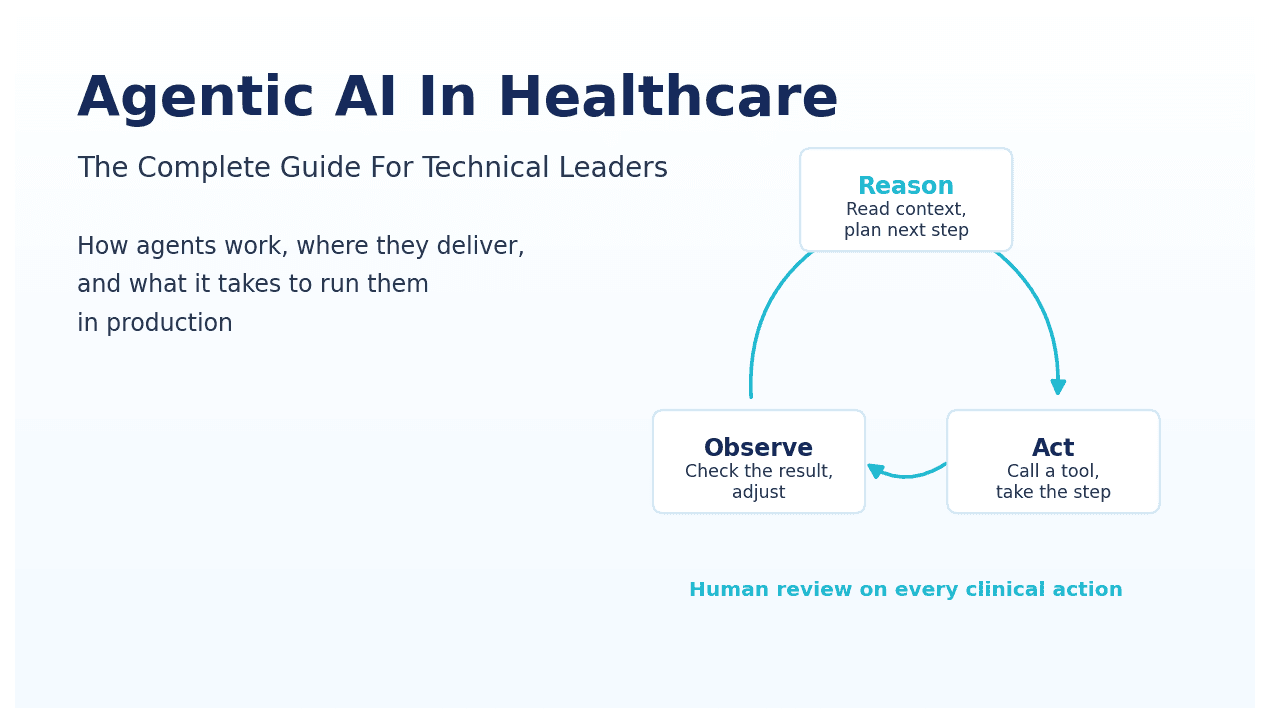
An AI agent is built around a reasoning loop. It has a model (typically an LLM) that decides what to do, tools it can call to act on real systems, memory across turns and sessions, and an execution loop that plans, acts, observes results, and re-plans if something went wrong. The agent doesn't just generate text — it executes tasks.
That loop is the thing chatbots fundamentally cannot do. A production AI agent can take a patient referral, check insurance eligibility, schedule the visit, draft the intake note, and notify the care team — without a human scripting each branch of that workflow in advance.
The user-facing interface often looks identical. Both can appear as a chat window. That's where the confusion starts.
The Four Components a Chatbot Doesn't Have
The architectural gap between a chatbot and an agent comes down to four things. Remove any one of them and you're back to a glorified FAQ bot.
1. Reasoning core (LLM) — An agent uses a language model to decide what to do next, not just what to say. It can look at ambiguous input, weigh options, and choose an action path — dynamically, not from a pre-written decision tree.
2. Tools — APIs the agent can call to actually do things: FHIR queries to pull patient data, claim status checks, scheduling system writes, eligibility verification calls. The agent picks which tool to use and when, based on the task at hand. A chatbot's integrations are hardwired; an agent's are dynamic.
3. Memory — Short-term context within a session (what did this patient say two turns ago?) and long-term recall across cases (what was this patient's last authorization outcome?). Without memory, the agent can't reason over time — every turn is a blank slate.
4. Execution loop — Plan, act, observe, re-plan. If the scheduling API returns an error, a chatbot fails. An agent retries, tries a different slot, or escalates — whatever the situation calls for. This is what makes agentic workflows recoverable instead of brittle.
Strip out even one of these and you don't have an agent. You have a chatbot with better marketing copy.
Where Chatbots Still Win
This isn't a case for replacing every chatbot. For narrow, low-risk workflows a chatbot is faster to ship, cheaper to maintain, and easier to test. Appointment cancellations, hours of operation, basic FAQ deflection, pre-visit reminders — all fine for a scripted bot.
Chatbots also have a compliance advantage in some settings. Because the outputs are deterministic and auditable by design, regulated organizations can more easily demonstrate control over what the system says. That matters in healthcare settings where a rogue AI response creates liability.
The line gets crossed when the workflow has to pull data from multiple systems, make a decision the user didn't explicitly ask for, remember context from a previous interaction, or handle exceptions that weren't in the training set. Those are agent workloads — and pushing a chatbot into them produces exactly the kind of confident-but-wrong behavior that creates clinical and billing risk. Once the workflow needs an agent, our guide to clinical agent timing examines real-time and asynchronous operation.
The practical test: if your workflow map has more than five decision branches that depend on live system data, a chatbot is going to force you to hard-code every one of them. That's a maintenance debt that compounds fast.
A Side-by-Side Comparison
| Capability | Chatbot | AI Agent |
|---|---|---|
| Conversation flow | Scripted, intent-based | Reasoning + autonomous decisions |
| Tool use | Hard-wired or none | Dynamic — agent picks the tool |
| Memory | Per-turn context only | Short-term + long-term |
| Error handling | Falls back to human | Self-corrects, retries, re-plans |
| Multi-step tasks | Limited; needs explicit flow | Plans and executes autonomously |
| Compliance audit trail | Straightforward — outputs are deterministic | Requires deliberate design — log every step |
| Time to first deployment | Faster (weeks) | Slower (weeks to months for production-grade) |
| Best fit | FAQ, scheduling, simple triage | Prior auth, claims, intake, RCM, ambient documentation |
Why the Confusion Persists
Two reasons. First, vendor marketing. Every chatbot product was rebranded as "AI agent" in 2024 — the label changed, the capability didn't. If a vendor shows you a demo where the AI "automatically handles prior auth" but the underlying system is a decision tree with a GPT wrapper on the response, that's a chatbot with a press release. For a product-level version of this scrutiny, read our questions for evaluating AI feature claims.
Second, the agent space is genuinely a spectrum. Some agents are barely more than chatbots with a couple of API calls bolted on. Others are full multi-step planners with evaluation suites, HIPAA-compliant audit trails, and human-in-the-loop override paths at every critical decision node. See our breakdown of the agentic AI vendor landscape for 2026 for where specific platforms actually sit.
The safest move when evaluating any "AI agent" product: ask to see the execution trace for a failed case. How does the system recover? What does the audit log look like? If the vendor can't show you that, the autonomy isn't real.
Healthcare Implications
The stakes are different in healthcare, and that changes the architecture conversation. A chatbot getting "when is my next appointment" wrong is annoying. An agent processing a prior authorization incorrectly creates clinical and billing risk — and potentially a HIPAA incident if PHI was mishandled in the process.
This is where most healthcare AI builds stumble. Teams pick an agent for the autonomy and then realize mid-build that they haven't designed for HIPAA compliance, audit trails, fallback paths, or clinician override. The compliance layer isn't something you retrofit — it has to be in the architecture from the start.
The teams that succeed treat agent design as a clinical safety problem first and an LLM problem second. They define the blast radius of a wrong action before they write any code: what's the worst thing this agent could do autonomously, and is there a guardrail for it? If the answer to that second question is no, the agent isn't ready for production.
Practically, this means every agentic healthcare system needs: a BAA with every model provider, PHI encryption at rest and in transit, a per-action audit log that clinical staff can review, a confidence threshold below which the agent hands off to a human, and a named override path for every automated decision.
Real-World Example
Major US health systems — Kaiser Permanente, Mayo Clinic, and Cleveland Clinic among them — have publicly discussed deploying AI in clinical workflows. The pattern is consistent: simple patient-facing FAQs run on chatbots, while higher-value workflows like inbox triage, prior authorization, and ambient documentation increasingly use agentic systems with reasoning, memory, and tool use.
The architectural choice isn't "AI or no AI." It's "chatbot or agent, and where in the stack does each belong?" Most implementations that work are hybrid: a chatbot handles the high-volume, low-complexity interactions at the front door, and an agent picks up the 40% of cases where the chatbot would otherwise escalate to a human. That handoff boundary — and what happens at it — is where the real engineering work lives.
How to Decide What You Need
Run three questions against the workflow before you write a single line of code:
1. Does the workflow have exceptions? Not edge cases — actual operational exceptions that show up weekly. If yes, lean agent.
2. Does it require pulling data from more than two systems? If the workflow needs to touch the EHR, the payer portal, and the scheduling system in sequence, that's an agent workload. Chatbots don't orchestrate.
3. Is the cost of a wrong automated action high? This one doesn't determine chatbot vs agent — it determines how much investment goes into your guardrail layer, regardless of which you pick. High cost of error means you need confidence thresholds, override paths, and audit logs built in before you ship anything.
See our list of top use cases of AI agents in healthcare for specific workflows mapped to each architecture.
Common Pitfalls When Choosing Between Them
Treating "AI agent" as a feature checkbox. A vendor demo with a chat UI doesn't make a product an agent. If the underlying system has no tool use, no memory, and no plan-act-observe loop, the autonomy isn't there — and you'll discover that the first time a real exception appears. Ask for the execution trace, not just the demo video.
Building an agent for a chatbot workflow. Some teams over-engineer. If the workflow is "show office hours" or "confirm appointment," an LLM-powered agent with FHIR access and a memory store is expensive overkill — and it introduces failure modes that a deterministic chatbot would never have. Pick the architecture that matches the problem, not the one that sounds more impressive in a board update.
No fallback design. The single most common production failure is the agent confidently doing the wrong thing. Both chatbots and agents need a "this looks wrong, escalate" path — designed in from day one, not retrofitted after the first incident. This path needs to be tested explicitly: simulate the failure, confirm the escalation fires, confirm a human actually receives it.
Key Takeaways
- A chatbot reacts to intent; an AI agent reasons, plans, and acts using tools and memory.
- Use a chatbot for narrow, scripted, low-risk workflows. Use an agent when there is variation, multi-system reasoning, or exception handling.
- Most successful healthcare deployments are hybrid — chatbot front-door, agent handoff for the complex 40%.
- Agent design is a clinical safety problem first and an LLM problem second. Compliance, audit, and override paths aren't optional.
- "Chatbot vs AI agent" is the wrong framing. The right question is: how much autonomy does this workflow need, and what's the blast radius if it goes wrong?
- When evaluating vendor claims, ask for the execution trace on a failed case. That's where the real architecture reveals itself.
Ready to Build the Right One?
This blog is one piece of a larger picture. For the full overview, read the pillar guide: what are AI agents in healthcare.
Want to build or evaluate an AI agent for your healthcare product? Get in touch with Nirmitee — we ship FHIR-native, HIPAA-compliant AI agents for US healthtech teams and global hospitals.
Ready to scale?
Talk to our healthcare engineering team about building, integrating, and shipping faster.
Frequently Asked Questions
Is an AI agent just a smarter chatbot?
When should I use a chatbot instead of an AI agent?
Are AI agents HIPAA-compliant out of the box?
Can a chatbot evolve into an agent over time?
What is the biggest mistake teams make when building healthcare AI agents?