Building AI Agents with FHIR APIs: A Practical Overview

Founder & CEO
15+ years building healthcare technology. Led 100+ EHR integrations, FHIR implementations, and clinical AI deployments.
What FHIR actually gives you, when you are building an agent
FHIR R4 is the lingua franca of modern healthcare integration. For an AI agent, what matters is not the entire spec — it is the four interaction types, the resource graph for your workflow, and the SMART on FHIR auth flow. This piece is for the engineer building an agent on top of a modern EHR's FHIR endpoint. It assumes you have read the EHR integration patterns piece and have decided FHIR is the right path. For the deep server-side mechanics, our FHIR R4 server build guide covers the implementation choices that bite in production.
The four interaction types
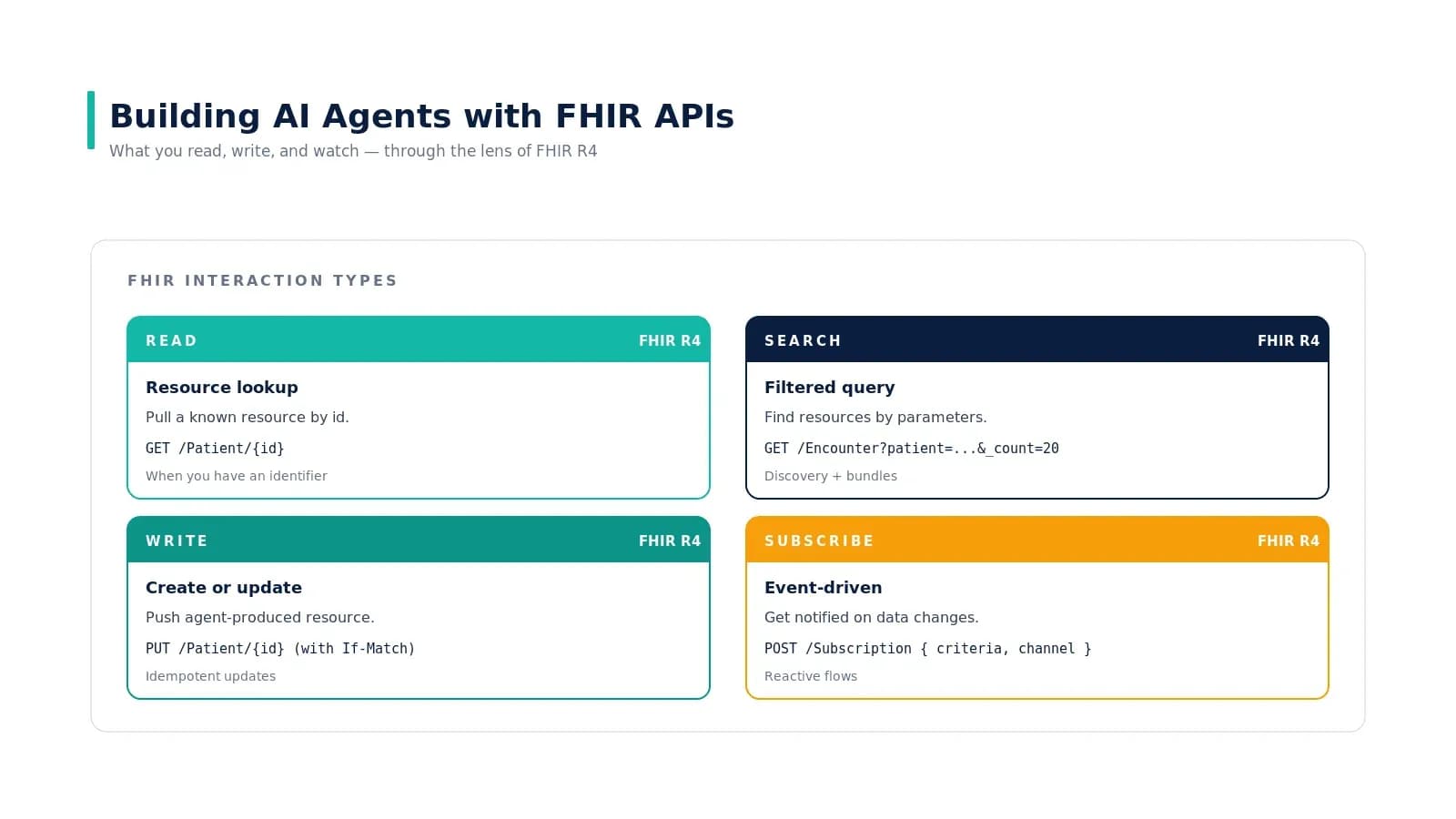
FHIR has more nouns than you will ever use, and four verbs you will use constantly:
READ — resource lookup by id
GET /Patient/{id}. You have an identifier; you want the resource. Cache the response if it is a stable resource (Patient, Practitioner); do not cache if it is a frequently-updated resource (Observation, Encounter).
SEARCH — filtered query returning a bundle
GET /Encounter?patient=12345&date=ge2025-01-01&_count=20. Searches return a bundle with paging links. Always page until done — never assume the first page contains the full result. Index your search params; some EHRs are slow on unindexed fields.
WRITE — create or update
PUT /Patient/{id} with an If-Match header for optimistic concurrency. Use POST /Patient for creates without an id. The agent should always treat writes as idempotent — if the same write retries, it should not create a duplicate. Use logical IDs from your side as identifier values to make this work.
SUBSCRIBE — event-driven notifications
POST /Subscription with a search criteria and a channel. The EHR pushes notifications when the criteria match. Latency varies — some vendors deliver within seconds, others poll every 5 minutes under the hood. Verify your vendor's actual SLA before designing a real-time workflow.
The resource graph for a single agent task
For a prior auth submission, the agent reads Patient, Encounter, relevant Conditions, the MedicationRequest, supporting Observations. It writes a Task referencing the patient and the requested medication, plus a Communication resource carrying the evidence pack and justification. It subscribes to Task.status changes to monitor approval/denial.
Every workflow has a similar graph. Patient intake centers on Patient, Encounter, Coverage, Consent. Eligibility centers on Patient and Coverage. Ambient documentation centers on Encounter, DocumentReference, Composition. The full mapping is in the resource cheat sheet from the EHR integration patterns piece.
Tools the agent calls — as functions
The pattern that holds across mature deployments: the LLM is a planner; the FHIR work is deterministic. The agent's tools are functions that wrap the FHIR client, with strict argument schemas, retries, and audit logging. The LLM never composes a raw FHIR URL — it picks a named tool and provides typed arguments.
# A representative tool set for a prior-auth agent
tools = [
  Tool(
    name="get_patient_chart",
    description="Bundle of Patient + Encounter + Conditions + recent Observations",
    parameters={ patient_id: str },
    fn=fhir.get_chart,
  ),
  Tool(
    name="lookup_payer_policy",
    description="Retrieve the payer's coverage policy for a given procedure code",
    parameters={ payer_id: str, cpt: str },
    fn=policy.lookup,
  ),
  Tool(
    name="submit_prior_auth",
    description="Create a Task referencing the patient, evidence, and payer policy",
    parameters={ patient_id, payer, justification, evidence_refs },
    fn=fhir.create_task,
  ),
  Tool(
    name="poll_task_status",
    description="Watch Task.status for accepted | rejected | additional-info",
    parameters={ task_id: str },
    fn=fhir.get_task,
  ),
]
The five things that bite in production
- Bundle paging. A search that returns 5 pages will silently return only the first page if your client does not follow the
nextlink. Test against datasets large enough to require paging. - Resource versioning. Always use If-Match on updates. Two agents (or two workflow runs) writing concurrently to the same resource without versioning produces lost updates that surface weeks later as data drift.
- Vendor extensions. Epic adds extensions; Oracle Health adds different extensions. Strip them when reading into your domain model; emit them when writing back if the vendor requires them.
- Subscription delivery. Some vendors deliver subscription events with seconds of delay; others poll under the hood every 5 minutes. Verify the actual delivery SLA, not the marketing SLA.
- Scope drift. The scope you got at the OAuth grant is the scope you have. Asking for
system/*.readand gettingpatient/*.readmeans your agent will hit 403s on system-wide queries. Always verify scope on token receipt.
Real-world example
The reference architecture in this guide mirrors patterns used in production agent deployments at health systems publishing on FHIR-based AI work — Mayo Clinic's revenue cycle automation, Geisinger's eligibility agents, and Mass General Brigham's ambient documentation pipeline. All three use the LLM-as-planner pattern with deterministic FHIR tools registered as functions, scoped tokens via SMART on FHIR backend services, and audit logging at the resource level. The five production failure modes listed below — paging, versioning, vendor extensions, subscription delivery, scope drift — are the exact failure modes those teams have publicly reported encountering and resolving.
Key takeaways
- Master the four FHIR verbs first. Read, search, write, subscribe — every agent workflow reduces to these four interactions.
- Build the resource graph before you build the agent. Map out which resources the workflow touches, in what order, with what scope.
- The LLM never composes a raw FHIR URL. Wrap every interaction as a typed tool the planner can choose; the tool builds the URL.
- Bundle paging is the most common silent failure. Test with datasets large enough to require paging before you trust your client.
- Verify vendor scope and SLA empirically. The marketing capability and the production behavior are usually different.
Call to Action
Want to build an AI Agent for your healthcare product? Get in touch with our team for a working session — we will scope the architecture, integration patterns, and 90-day plan against your own systems.
Learn more about AI Agents in Healthcare → read the full pillar guide.
Related reading:
- Also read: How AI Agents Integrate with EHR Systems
- Also read: How to Build an AI Agent for Patient Intake Automation
Related reading
- AWS HealthLake MCP server for FHIR agents
- Building a healthcare agent is an orchestration problem
Ready to scale?
Talk to our healthcare engineering team about building, integrating, and shipping faster.
Frequently Asked Questions
Do I need FHIR to build an AI agent for healthcare?
How do I prevent the LLM from composing wrong FHIR URLs?
What FHIR scope should the agent ask for?
How fast are FHIR Subscription notifications?
What is the most common production failure mode?
How does Nirmitee.io approach healthcare software development?