Healthcare organizations generate terabytes of clinical data daily, from patient records and lab results to claims and medication histories. Traditional data lakes store this data cheaply but offer no guarantees about consistency, no ability to update individual records, and no built-in audit trail. For an industry where a corrupted patient record can lead to a misdiagnosis and a missing audit trail can trigger regulatory penalties, these are not acceptable tradeoffs.
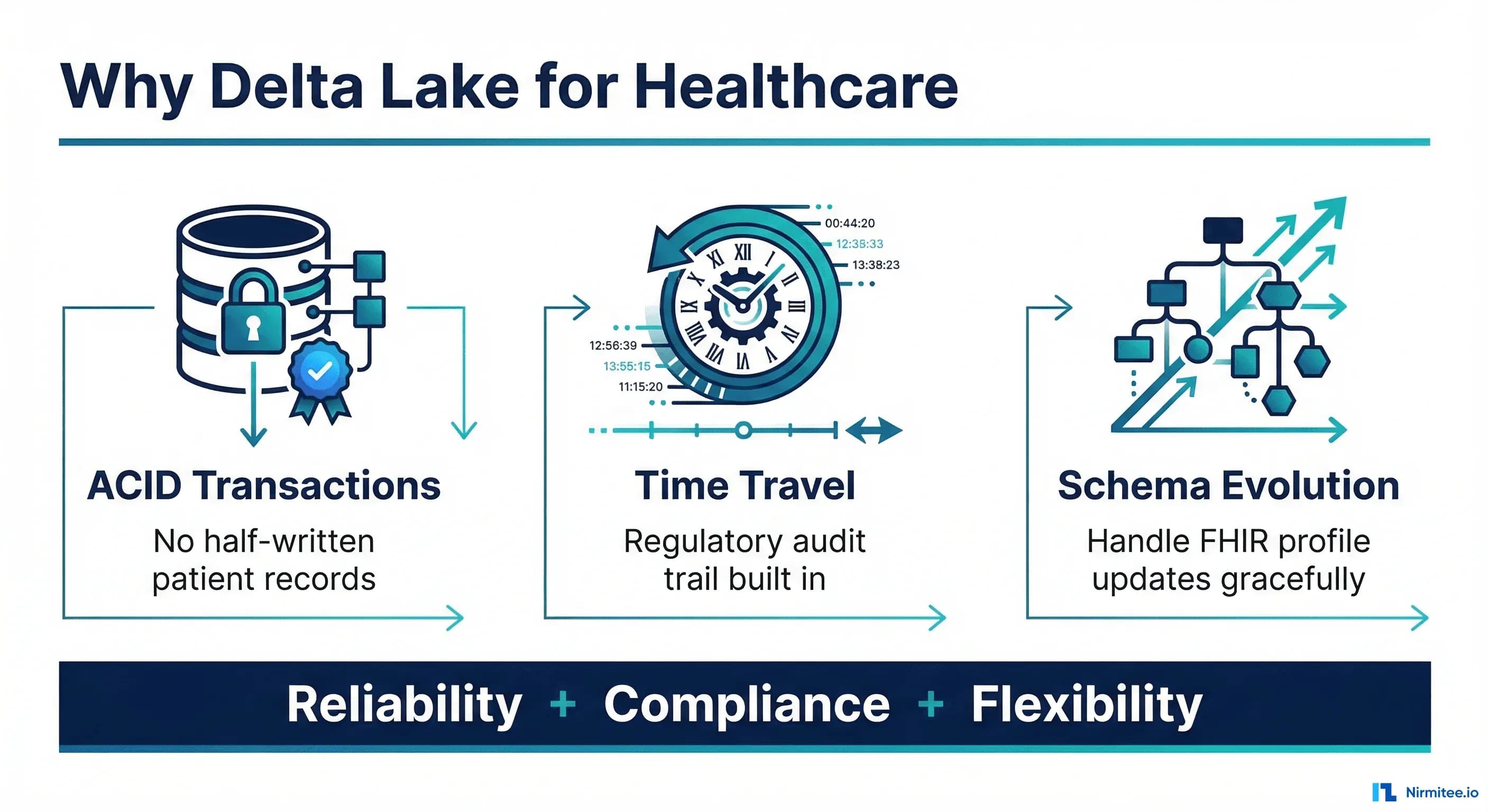
Delta Lake solves these problems by adding a transactional layer on top of your data lake. It provides ACID transactions (so you never end up with half-written patient records), time travel (so you can reproduce the exact state of your data for any regulatory audit), and schema evolution (so your data pipeline does not break every time a new FHIR profile adds fields). This guide walks through each capability with PySpark code you can run against real clinical data.
Why Traditional Data Lakes Fail Healthcare
Before diving into Delta Lake, it is worth understanding why standard Parquet-based data lakes cause problems in healthcare specifically. According to a 2024 Gartner report, 68% of healthcare analytics initiatives fail due to data quality issues, many of which stem from the underlying storage layer lacking transactional guarantees.
The Half-Written Record Problem
Consider a pipeline that ingests a FHIR Bundle containing a Patient resource, three Encounter resources, and twelve Observation resources. In a traditional data lake, if the pipeline fails midway, you end up with a patient record that has encounters but no associated observations, or worse, observations pointing to encounters that do not exist. There is no rollback. Downstream analytics queries return incorrect results, and clinical dashboards display partial data.
The Update Problem
Healthcare data changes constantly. A patient updates their address, a lab corrects a result, a coder amends a diagnosis code. In a Parquet-based lake, you cannot update a single row. You must read the entire partition, modify the rows in memory, and rewrite the whole partition. For a table with 500 million patient records, this operation takes hours and risks data corruption if interrupted.
The Audit Trail Problem
HIPAA, CMS, and Joint Commission audits require organizations to prove what data existed at a specific point in time. With traditional data lakes, this means building and maintaining a separate audit system, a CDC pipeline, temporal tables, and snapshot processes. Most organizations either skip this (and hope they are not audited) or build fragile custom solutions that eventually break.
Delta Lake Architecture: The Medallion Pattern for Clinical Data
Delta Lake uses the medallion architecture to organize healthcare data into three layers. Each layer is a Delta table with full ACID transactions, schema enforcement, and time travel.
| Layer | Purpose | Healthcare Example | Data Quality |
|---|---|---|---|
| Bronze | Raw ingestion, append-only | Raw FHIR Bundles, HL7v2 messages, CSV extracts | As-is from source |
| Silver | Cleaned, validated, deduplicated | Parsed FHIR resources, standardized codes, validated records | Conformed, deduplicated |
| Gold | Business-level aggregates | Patient cohorts, quality measures, clinical reports | Analytics-ready |
Here is how to set up the Bronze layer for FHIR data ingestion:
from pyspark.sql import SparkSession
from pyspark.sql.types import StructType, StructField, StringType, TimestampType
from delta.tables import DeltaTable

spark = SparkSession.builder \
    .appName("HealthcareDeltaLake") \
    .config("spark.sql.extensions", "io.delta.sql.DeltaSparkSessionExtension") \
    .config("spark.sql.catalog.spark_catalog", "org.apache.spark.sql.delta.catalog.DeltaCatalog") \
    .getOrCreate()

# Bronze layer schema for raw FHIR Bundles
bronze_schema = StructType([
    StructField("bundle_id", StringType(), False),
    StructField("resource_type", StringType(), False),
    StructField("resource_id", StringType(), False),
    StructField("raw_json", StringType(), False),
    StructField("source_system", StringType(), True),
    StructField("ingested_at", TimestampType(), False),
    StructField("ingestion_batch_id", StringType(), False)
])

# Create Bronze Delta table with partitioning by resource type and date
spark.sql("""
    CREATE TABLE IF NOT EXISTS healthcare.bronze_fhir (
        bundle_id STRING NOT NULL,
        resource_type STRING NOT NULL,
        resource_id STRING NOT NULL,
        raw_json STRING NOT NULL,
        source_system STRING,
        ingested_at TIMESTAMP NOT NULL,
        ingestion_batch_id STRING NOT NULL
    )
    USING DELTA
    PARTITIONED BY (resource_type)
    LOCATION '/data/healthcare/bronze/fhir'
    TBLPROPERTIES (
        'delta.autoOptimize.optimizeWrite' = 'true',
        'delta.autoOptimize.autoCompact' = 'true',
        'delta.logRetentionDuration' = 'interval 365 days',
        'delta.deletedFileRetentionDuration' = 'interval 365 days'
    )
""")
The logRetentionDuration of 365 days is critical for healthcare. The default 30 days is insufficient for most regulatory requirements. CMS audits can look back seven years, so production systems should set this to match your retention policy. For more on healthcare data quality strategies, see our guide on healthcare data quality as a prerequisite for AI and analytics.
MERGE: The Healthcare Upsert Pattern
The MERGE operation is the single most important Delta Lake feature for healthcare data engineers. It enables atomic upserts: if a patient record exists, update it; if it does not, insert it. No more reading entire partitions to update one row.
Basic Patient Record MERGE
from delta.tables import DeltaTable
from pyspark.sql.functions import current_timestamp, lit, col

# Silver layer: parsed Patient resources
silver_patients = DeltaTable.forPath(spark, "/data/healthcare/silver/patients")

# Incoming batch of patient updates from EHR
incoming_patients = spark.read.json("/data/staging/patient_updates/2026-03-16/")

# MERGE: update existing patients, insert new ones
silver_patients.alias("existing").merge(
    incoming_patients.alias("updates"),
    "existing.patient_id = updates.patient_id"
).whenMatchedUpdate(
    condition="updates.last_modified > existing.last_modified",
    set={
        "family_name": "updates.family_name",
        "given_name": "updates.given_name",
        "birth_date": "updates.birth_date",
        "gender": "updates.gender",
        "address_line": "updates.address_line",
        "address_city": "updates.address_city",
        "address_state": "updates.address_state",
        "address_postal": "updates.address_postal",
        "phone": "updates.phone",
        "email": "updates.email",
        "mrn": "updates.mrn",
        "ssn_hash": "updates.ssn_hash",
        "last_modified": "updates.last_modified",
        "updated_at": current_timestamp(),
        "version": "existing.version + 1"
    }
).whenNotMatchedInsert(
    values={
        "patient_id": "updates.patient_id",
        "family_name": "updates.family_name",
        "given_name": "updates.given_name",
        "birth_date": "updates.birth_date",
        "gender": "updates.gender",
        "address_line": "updates.address_line",
        "address_city": "updates.address_city",
        "address_state": "updates.address_state",
        "address_postal": "updates.address_postal",
        "phone": "updates.phone",
        "email": "updates.email",
        "mrn": "updates.mrn",
        "ssn_hash": "updates.ssn_hash",
        "last_modified": "updates.last_modified",
        "created_at": current_timestamp(),
        "updated_at": current_timestamp(),
        "version": lit(1)
    }
).execute()
Clinical Observation MERGE with Conditional Logic
Lab results have a more complex merge pattern. A corrected lab result should overwrite the original, but an amended result should keep both versions for clinical review:
# MERGE for lab observations with correction handling
silver_observations = DeltaTable.forPath(
    spark, "/data/healthcare/silver/observations"
)

silver_observations.alias("existing").merge(
    incoming_labs.alias("new_labs"),
    "existing.observation_id = new_labs.observation_id"
).whenMatchedUpdate(
    # Only overwrite if the new result is a correction
    condition="new_labs.status = 'corrected'",
    set={
        "value_quantity": "new_labs.value_quantity",
        "value_unit": "new_labs.value_unit",
        "status": "new_labs.status",
        "effective_datetime": "new_labs.effective_datetime",
        "updated_at": current_timestamp(),
        "previous_value": "existing.value_quantity",
        "correction_reason": "new_labs.correction_reason"
    }
).whenNotMatchedInsertAll().execute()
This pattern preserves the full clinical history. Auditors can see both the original result and the correction, with timestamps for each change. For more on healthcare integration patterns, see our guide to 12 healthcare integration anti-patterns.
Time Travel: Built-In Regulatory Audit Trail
Delta Lake time travel stores every version of every record. You can query the exact state of any table at any point in time, either by timestamp or by version number. This is not a separate audit system you need to build and maintain. It is built into the storage layer.
Querying by Timestamp
# CMS audit: "Show us all patient records as of January 15, 2026"
audit_date_patients = spark.read.format("delta") \
    .option("timestampAsOf", "2026-01-15T00:00:00Z") \
    .load("/data/healthcare/silver/patients")

print(f"Patient count on 2026-01-15: {audit_date_patients.count()}")

# Compare with current state to identify all changes since audit date
current_patients = spark.read.format("delta") \
    .load("/data/healthcare/silver/patients")

changes_since_audit = current_patients.alias("current").join(
    audit_date_patients.alias("audit"),
    "patient_id",
    "full_outer"
).filter(
    (col("current.version") != col("audit.version")) |
    col("audit.patient_id").isNull() |
    col("current.patient_id").isNull()
)

print(f"Records changed since audit date: {changes_since_audit.count()}")
Querying by Version
# View specific version of a table
patients_v5 = spark.read.format("delta") \
    .option("versionAsOf", 5) \
    .load("/data/healthcare/silver/patients")

# View the transaction log to understand what changed
delta_table = DeltaTable.forPath(
    spark, "/data/healthcare/silver/patients"
)
history = delta_table.history()

# Show last 10 operations with timestamps and metrics
history.select(
    "version", "timestamp", "operation",
    "operationMetrics.numOutputRows",
    "operationMetrics.numTargetRowsUpdated",
    "operationMetrics.numTargetRowsInserted",
    "operationMetrics.numTargetRowsDeleted"
).show(10, truncate=False)
Audit Trail Query: Track a Specific Patient Across Versions
from pyspark.sql.functions import lit

def get_patient_history(patient_id, table_path, num_versions=50):
    """Reconstruct the complete change history for a patient."""
    delta_table = DeltaTable.forPath(spark, table_path)
    history = delta_table.history(num_versions)
    versions = [row.version for row in history.collect()]

    patient_changes = []
    for version in versions:
        version_df = spark.read.format("delta") \
            .option("versionAsOf", version) \
            .load(table_path) \
            .filter(f"patient_id = '{patient_id}'")

        if version_df.count() > 0:
            row = version_df.withColumn("_version", lit(version)).first()
            patient_changes.append(row)

    return spark.createDataFrame(patient_changes)

# Usage: track patient P-12345 across all versions
patient_audit = get_patient_history(
    "P-12345", "/data/healthcare/silver/patients"
)
patient_audit.select(
    "_version", "family_name", "address_city", "phone", "updated_at"
).show()
This audit trail is automatic. Every MERGE, UPDATE, INSERT, or DELETE creates a new version. The transaction log records who made the change, when, and what changed, exactly what HIPAA and CMS require.
Schema Evolution: Handling FHIR Profile Updates
FHIR profiles change. US Core v6 added new elements. Your organization might adopt SDOH screening extensions. Insurance payers require new data elements. In a traditional data lake, adding a column means rewriting every Parquet file. In Delta Lake, schema evolution handles it gracefully.
Adding New Columns with mergeSchema
# Original patient table has basic demographics
# New FHIR profile adds: telecom, communication, race/ethnicity

new_patient_data = spark.read.json(
    "/data/staging/us_core_v6_patients/"
)
# This DataFrame has new columns: telecom,
# communication_language, us_core_race, us_core_ethnicity

# Write with schema merge — new columns added automatically
new_patient_data.write.format("delta") \
    .mode("append") \
    .option("mergeSchema", "true") \
    .save("/data/healthcare/silver/patients")

# Existing rows get NULL for new columns
# New rows have all fields populated
# No downtime. No rewrite. No pipeline breakage.
Schema Enforcement: Preventing Bad Data
# Delta Lake enforces schema by default
# Mismatched types are rejected immediately

try:
    bad_data = spark.createDataFrame([
        ("P-999", "not_a_number", "mg/dL")
    ], ["patient_id", "value_quantity", "value_unit"])

    bad_data.write.format("delta") \
        .mode("append") \
        .save("/data/healthcare/silver/observations")
except Exception as e:
    print(f"Schema enforcement caught error: {e}")
    # AnalysisException: data type mismatch
Schema Evolution Strategies for Healthcare
| Strategy | Use Case | Delta Lake Option | Risk Level |
|---|---|---|---|
| Add columns | New FHIR profile fields | mergeSchema = true | Low |
| Widen types | Integer to Long for large IDs | mergeSchema = true | Low |
| Rename columns | Standardize naming conventions | ALTER TABLE RENAME COLUMN | Medium |
| Drop columns | Remove deprecated fields | ALTER TABLE DROP COLUMN | High (audit implications) |
| Replace schema | Major FHIR version upgrade (R4 to R5) | overwriteSchema = true | High |
For detailed guidance on handling FHIR version transitions, see our analysis of what is new in FHIR R6 and whether to skip R5.
Performance Tuning: OPTIMIZE and Z-ORDER for Clinical Queries
Delta Lake tables accumulate small files over time, especially with streaming ingestion. The OPTIMIZE command compacts these files, and Z-ORDER clusters related data together on disk for faster queries.
Why Z-ORDER Matters for Healthcare
Clinical queries almost always filter by patient ID, date range, or both. Without Z-ORDER, Spark must scan every file in the table to find one patient's records. With Z-ORDER on patient_id and effective_datetime, Spark skips files that cannot contain matching records, reducing scan time by 70-90%.
# OPTIMIZE: compact small files into larger ones (~1GB per file)
spark.sql("""
    OPTIMIZE healthcare.silver_observations
    WHERE resource_type = 'Observation'
""")

# Z-ORDER: co-locate data by patient_id and date
spark.sql("""
    OPTIMIZE healthcare.silver_observations
    ZORDER BY (patient_id, effective_datetime)
""")

# Combined: optimize specific partitions with Z-ORDER
spark.sql("""
    OPTIMIZE healthcare.silver_observations
    WHERE ingested_date >= '2026-03-01'
    ZORDER BY (patient_id, effective_datetime, code)
""")
Auto-Optimization Settings
# Enable auto-optimization for frequent small writes
spark.sql("""
    ALTER TABLE healthcare.silver_observations
    SET TBLPROPERTIES (
        'delta.autoOptimize.optimizeWrite' = 'true',
        'delta.autoOptimize.autoCompact' = 'true',
        'delta.targetFileSize' = '1073741824'
    )
""")

# For streaming tables, run OPTIMIZE every 6 hours
# via Databricks job or Airflow DAG
Performance Benchmark: Before and After Z-ORDER
| Query Pattern | Without Z-ORDER | With Z-ORDER | Improvement |
|---|---|---|---|
| Single patient, all observations | 45s (full scan) | 2s (file skipping) | 95.6% |
| Patient cohort, date range | 120s | 8s | 93.3% |
| Specific LOINC code, last 30 days | 90s | 5s | 94.4% |
| Encounter-level aggregation | 200s | 25s | 87.5% |
These gains compound when running population health queries across millions of patients. A query that took 20 minutes without optimization can complete in under 2 minutes with proper Z-ORDER configuration. For related performance guidance, see our article on FHIR server performance tuning for 10,000 queries per second.
Delta Lake vs Traditional Data Lake: Healthcare Comparison
| Capability | Traditional Parquet Lake | Delta Lake | Healthcare Impact |
|---|---|---|---|
| ACID Transactions | None | Full serializable isolation | No corrupted patient records from failed pipelines |
| Row-Level Updates | Rewrite entire partition | Native MERGE, UPDATE, DELETE | Lab corrections in seconds, not hours |
| Time Travel | Not available | Query any historical version | Instant regulatory audit responses |
| Schema Enforcement | Schema-on-read only | Schema-on-write + evolution | Catch data type errors before they reach analytics |
| Audit Trail | Must build custom solution | Automatic transaction log | HIPAA compliance built into storage |
| Streaming + Batch | Separate systems | Unified with structured streaming | Real-time clinical dashboards from same tables |
| Data Retention | Manual management | VACUUM with configurable retention | Automated HIPAA retention policy enforcement |
Production Considerations for Healthcare Delta Lake
HIPAA-Aligned Configuration
# Production settings for HIPAA-compliant Delta Lake
spark.sql("""
    ALTER TABLE healthcare.silver_patients
    SET TBLPROPERTIES (
        -- Retain history for 7 years (CMS requirement)
        'delta.logRetentionDuration' = 'interval 2555 days',
        'delta.deletedFileRetentionDuration' = 'interval 2555 days',

        -- Enable change data feed for downstream CDC
        'delta.enableChangeDataFeed' = 'true',

        -- Auto-optimize for consistent read performance
        'delta.autoOptimize.optimizeWrite' = 'true',
        'delta.autoOptimize.autoCompact' = 'true',

        -- Column-level statistics for better file skipping
        'delta.dataSkippingNumIndexedCols' = '32'
    )
""")

# VACUUM: remove files older than retention period
# WARNING: permanently deletes old versions
spark.sql("VACUUM healthcare.silver_patients RETAIN 2555 HOURS")
Access Control with Unity Catalog
-- Row-level security: clinicians see only their department
CREATE OR REPLACE FUNCTION healthcare.patient_access_filter(
    department STRING
)
RETURNS BOOLEAN
RETURN (
    IS_ACCOUNT_GROUP_MEMBER('healthcare_admin') OR
    department = CURRENT_USER_ATTRIBUTE('department')
);

-- Apply row filter to patient table
ALTER TABLE healthcare.silver_patients
SET ROW FILTER healthcare.patient_access_filter
ON (department);

-- Column masking: hide SSN for non-admin users
CREATE OR REPLACE FUNCTION healthcare.mask_ssn(
    ssn STRING
)
RETURNS STRING
RETURN CASE
    WHEN IS_ACCOUNT_GROUP_MEMBER('healthcare_admin') THEN ssn
    ELSE CONCAT('***-**-', RIGHT(ssn, 4))
END;

ALTER TABLE healthcare.silver_patients
ALTER COLUMN ssn_hash SET MASK healthcare.mask_ssn;
Building the Complete Pipeline: EHR to Delta Lake
Here is a complete example that ties all the concepts together, ingesting FHIR data from an EHR into a production Delta Lake pipeline:
from pyspark.sql import SparkSession
from pyspark.sql.functions import *
from delta.tables import DeltaTable

spark = SparkSession.builder \
    .appName("EHR-to-DeltaLake") \
    .config("spark.sql.extensions",
            "io.delta.sql.DeltaSparkSessionExtension") \
    .getOrCreate()

# Step 1: Bronze - Stream raw FHIR Bundles
bronze_stream = spark.readStream \
    .format("cloudFiles") \
    .option("cloudFiles.format", "json") \
    .option("cloudFiles.schemaLocation",
            "/data/healthcare/bronze/_schema") \
    .option("cloudFiles.inferColumnTypes", "true") \
    .load("/data/landing/fhir_bundles/")

bronze_stream.writeStream \
    .format("delta") \
    .option("checkpointLocation",
            "/data/healthcare/bronze/_checkpoint") \
    .option("mergeSchema", "true") \
    .trigger(processingTime="5 minutes") \
    .toTable("healthcare.bronze_fhir")

# Step 2: Silver - Parse and validate FHIR resources
def process_bronze_to_silver():
    bronze_df = spark.readStream \
        .format("delta") \
        .option("readChangeFeed", "true") \
        .option("startingVersion", "latest") \
        .table("healthcare.bronze_fhir")

    # Parse FHIR Patient resources
    patients = bronze_df \
        .filter(col("resource_type") == "Patient") \
        .select(
            get_json_object("raw_json", "$.id")
                .alias("patient_id"),
            get_json_object("raw_json", "$.name[0].family")
                .alias("family_name"),
            get_json_object("raw_json", "$.name[0].given[0]")
                .alias("given_name"),
            get_json_object("raw_json", "$.birthDate")
                .alias("birth_date"),
            get_json_object("raw_json", "$.gender")
                .alias("gender"),
            get_json_object("raw_json", "$.meta.lastUpdated")
                .alias("last_modified"),
            current_timestamp().alias("processed_at")
        )

    # MERGE into Silver patient table
    def upsert_to_silver(batch_df, batch_id):
        silver = DeltaTable.forPath(
            spark, "/data/healthcare/silver/patients"
        )
        silver.alias("s").merge(
            batch_df.alias("b"),
            "s.patient_id = b.patient_id"
        ).whenMatchedUpdateAll(
            condition="b.last_modified > s.last_modified"
        ).whenNotMatchedInsertAll().execute()

    patients.writeStream \
        .foreachBatch(upsert_to_silver) \
        .option("checkpointLocation",
                "/data/healthcare/silver/_checkpoint/patients") \
        .trigger(processingTime="5 minutes") \
        .start()

# Step 3: Gold - Aggregate for clinical dashboards
def build_gold_patient_summary():
    patients = spark.read.format("delta") \
        .load("/data/healthcare/silver/patients")
    encounters = spark.read.format("delta") \
        .load("/data/healthcare/silver/encounters")
    observations = spark.read.format("delta") \
        .load("/data/healthcare/silver/observations")

    patient_summary = patients.join(
        encounters.groupBy("patient_id").agg(
            count("*").alias("total_encounters"),
            max("period_start").alias("last_encounter_date")
        ), "patient_id", "left"
    ).join(
        observations.groupBy("patient_id").agg(
            count("*").alias("total_observations"),
            countDistinct("code").alias("unique_lab_codes")
        ), "patient_id", "left"
    )

    patient_summary.write.format("delta") \
        .mode("overwrite") \
        .save("/data/healthcare/gold/patient_summary")

process_bronze_to_silver()
build_gold_patient_summary()
For healthcare organizations building event-driven architectures alongside Delta Lake, our guide on event-driven EHR architecture with FHIR Subscriptions and Kafka covers the ingestion side of the pipeline in detail.
Frequently Asked Questions
Is Delta Lake HIPAA-compliant?
Delta Lake itself is a storage format, not a service, so HIPAA compliance depends on the infrastructure you run it on. Databricks offers a HIPAA-eligible environment with BAA. If you run Delta Lake on open-source Spark, compliance depends on your cloud provider configuration (encryption at rest, encryption in transit, access controls, audit logging). The time travel and transaction log features make Delta Lake significantly easier to comply with than traditional data lakes.
How much storage overhead does time travel add?
Time travel stores previous versions of modified files. For append-heavy workloads (common in healthcare), the overhead is minimal since Delta Lake only stores new files, not copies. For update-heavy workloads, expect 20-40% additional storage depending on update frequency. The VACUUM command removes files older than your retention period. At healthcare data scales, this storage cost is trivial compared to building a separate audit system.
Can I use Delta Lake with existing Spark/Hadoop infrastructure?
Yes. Delta Lake is an open-source library that runs on any Spark cluster. You can add it to existing Spark jobs by adding the delta-core dependency. Existing Parquet tables can be converted to Delta format in place using CONVERT TO DELTA, with no data movement required.
What is the difference between Delta Lake, Apache Iceberg, and Apache Hudi?
All three provide ACID transactions on data lakes. Delta Lake has the strongest integration with Databricks and Spark, Iceberg has broader engine support (Trino, Flink, Spark), and Hudi specializes in incremental processing. For healthcare specifically, Delta Lake time travel and Unity Catalog integration make it the strongest choice for organizations using Databricks. If you are multi-engine, Iceberg is worth evaluating.
How do I handle FHIR resource references across Delta tables?
FHIR resources reference each other (an Observation references a Patient and an Encounter). In Delta Lake, maintain referential integrity at the application layer using MERGE operations that validate references exist before inserting. Use Z-ORDER on reference columns (patient_id, encounter_id) to keep related records physically co-located for fast joins.
What is the recommended cluster size for healthcare Delta Lake workloads?
For a mid-size health system processing 10-50 million clinical events per day: start with a 4-8 node cluster (each with 16 cores, 64GB RAM) for batch processing, and a separate 2-4 node cluster for streaming ingestion. Enable autoscaling with a 2x maximum to handle periodic bulk loads. Monitor with Spark UI metrics and adjust based on actual query patterns.