Why Containerization Is Non-Negotiable for Clinical ML
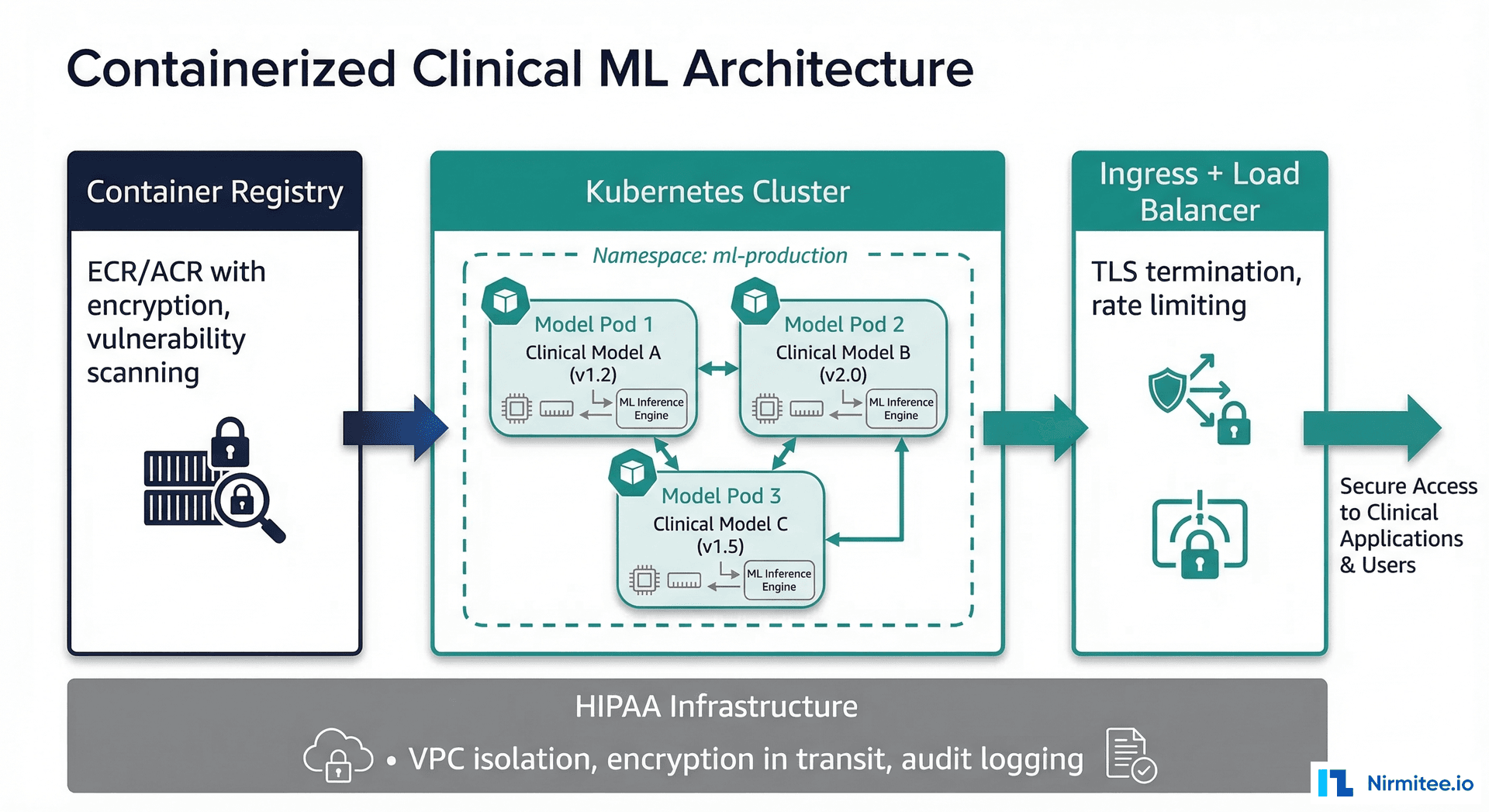
A machine learning model that works on your laptop but fails in production is not a useful model. In healthcare, this gap between development and production is not just an engineering nuisance — it is a patient safety issue. A model that produces different results because of a library version mismatch or an operating system difference can lead to inconsistent clinical decisions. Docker and Kubernetes solve this problem by guaranteeing that the exact environment your model was validated in is the exact environment it runs in production.
This guide provides complete, production-ready configurations for containerizing and deploying clinical ML models. We cover Dockerfiles for CPU and GPU models, Kubernetes deployment manifests, Horizontal Pod Autoscaler configurations, health check patterns, security scanning pipelines, and HIPAA-compliant container registry setups. Every code example is ready to adapt for your clinical ML deployment. For the broader MLOps context, see our introduction to MLOps for healthcare and the complete ML model lifecycle guide.
Dockerfile for a Clinical ML Model
A well-structured Dockerfile for a clinical model has five layers: base image, system dependencies, Python packages, model artifacts, and serving code. The order matters — Docker caches layers, so putting frequently changing layers (your model file) near the end minimizes rebuild time.
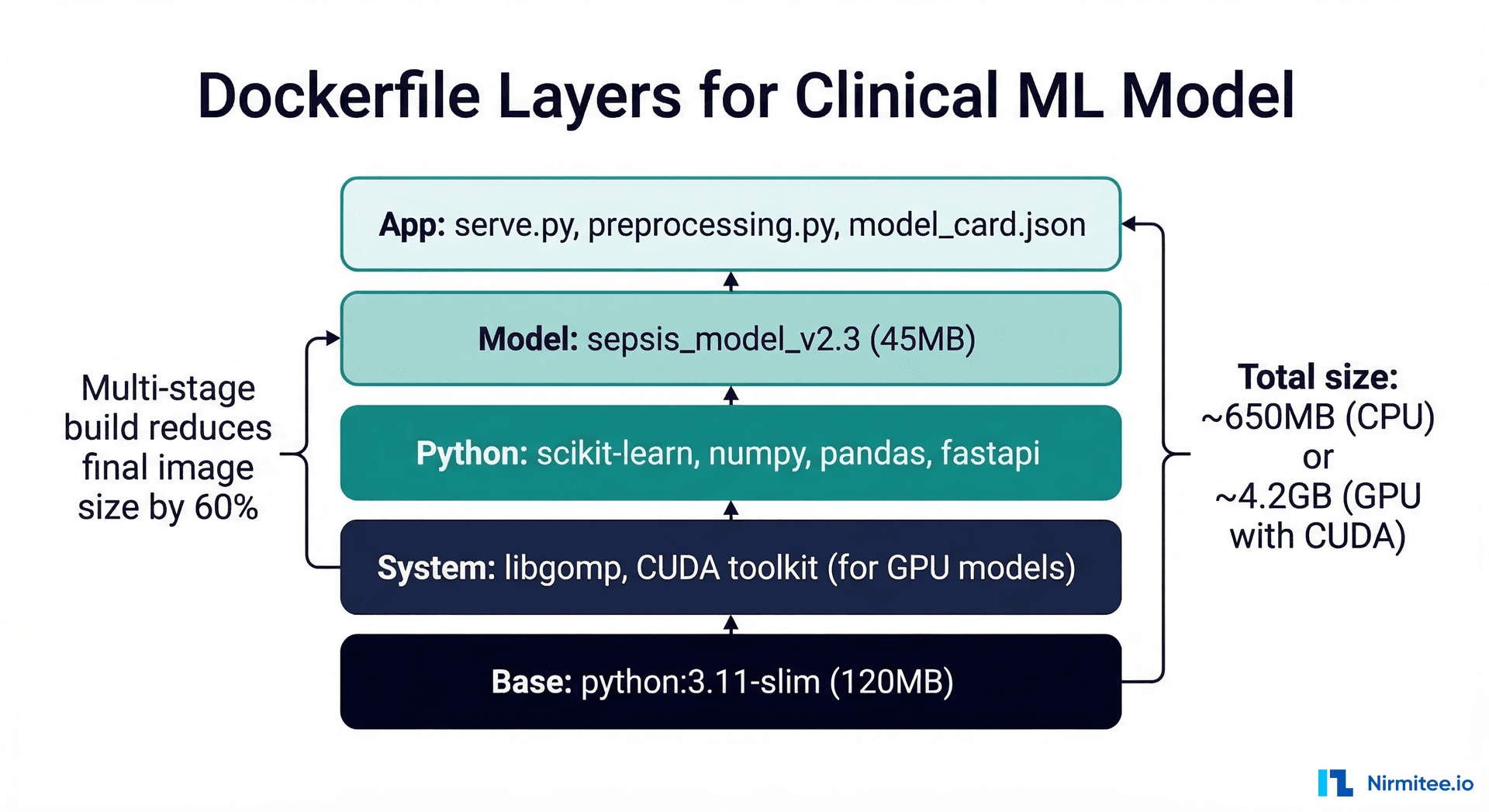
CPU Model: scikit-learn / XGBoost
# Dockerfile — Clinical ML Model (CPU)
# Multi-stage build for smaller production image

# === Stage 1: Build dependencies ===
FROM python:3.11-slim AS builder

WORKDIR /build
COPY requirements.txt .
RUN pip install --no-cache-dir --prefix=/install -r requirements.txt

# === Stage 2: Production image ===
FROM python:3.11-slim AS production

# System dependencies
RUN apt-get update && apt-get install -y --no-install-recommends \
    libgomp1 \
    curl \
    && rm -rf /var/lib/apt/lists/*

# Copy installed packages from builder
COPY --from=builder /install /usr/local

WORKDIR /app

# Copy application code
COPY serve.py .
COPY preprocessing.py .
COPY model_card.json .

# Copy model artifact (this layer changes most frequently)
COPY model/ ./model/

# Security: run as non-root user
RUN groupadd -r appuser && useradd -r -g appuser -d /app -s /sbin/nologin appuser
RUN chown -R appuser:appuser /app
USER appuser

# Health check
HEALTHCHECK --interval=30s --timeout=10s --start-period=60s --retries=3 \
    CMD curl -f http://localhost:8080/health || exit 1

EXPOSE 8080

# Production ASGI server
CMD ["uvicorn", "serve:app", "--host", "0.0.0.0", "--port", "8080", "--workers", "2"]
# requirements.txt — Pin EVERY dependency
scikit-learn==1.4.2
xgboost==2.0.3
pandas==2.2.1
numpy==1.26.4
fastapi==0.109.2
uvicorn[standard]==0.27.1
pydantic==2.6.1
joblib==1.3.2
prometheus-client==0.20.0
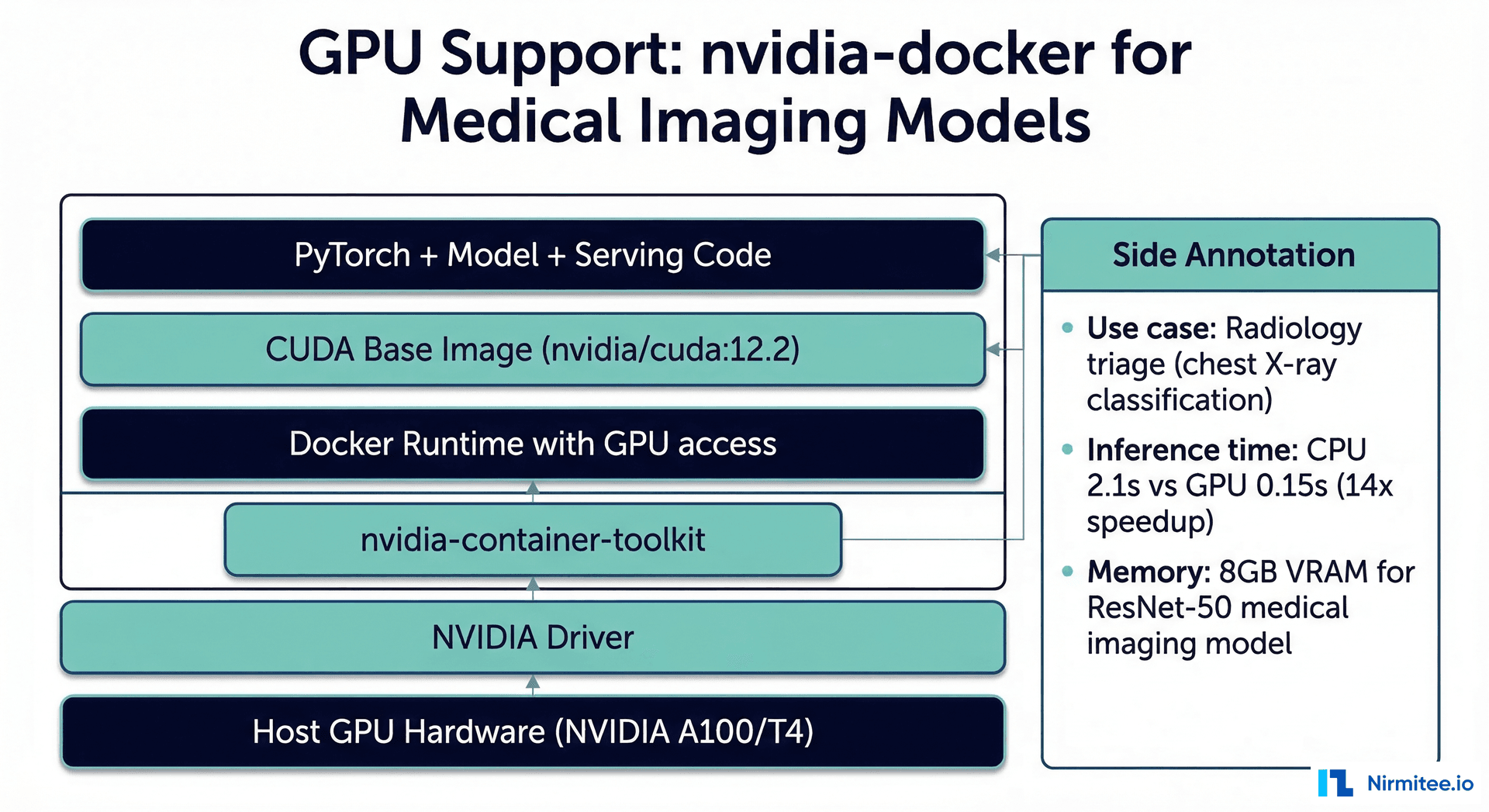
GPU Model: PyTorch for Medical Imaging
# Dockerfile — Clinical ML Model (GPU / Medical Imaging)
FROM nvidia/cuda:12.2.2-runtime-ubuntu22.04 AS production

# System dependencies
RUN apt-get update && apt-get install -y --no-install-recommends \
    python3.11 \
    python3-pip \
    curl \
    libgl1-mesa-glx \
    libglib2.0-0 \
    && rm -rf /var/lib/apt/lists/*

WORKDIR /app

# Python dependencies
COPY requirements-gpu.txt .
RUN pip3 install --no-cache-dir -r requirements-gpu.txt

# Copy application
COPY serve_imaging.py .
COPY preprocessing_imaging.py .
COPY model/ ./model/
COPY model_card.json .

# Security
RUN groupadd -r appuser && useradd -r -g appuser -d /app appuser
RUN chown -R appuser:appuser /app
USER appuser

# GPU model may take longer to load
HEALTHCHECK --interval=30s --timeout=15s --start-period=120s --retries=3 \
    CMD curl -f http://localhost:8080/health || exit 1

EXPOSE 8080
CMD ["python3", "-m", "uvicorn", "serve_imaging:app", "--host", "0.0.0.0", "--port", "8080"]
Kubernetes Deployment for Clinical Models
Kubernetes provides the orchestration layer that manages scaling, self-healing, and rolling updates for your containerized models. For healthcare, the key Kubernetes features are: guaranteed resource allocation (your model always has enough CPU/memory), automatic restart on failure, and zero-downtime deployments.
Deployment Manifest
# deployment.yaml — Clinical ML Model
apiVersion: apps/v1
kind: Deployment
metadata:
  name: sepsis-prediction
  namespace: ml-production
  labels:
    app: sepsis-prediction
    model-version: "v2.3"
    compliance: hipaa
spec:
  replicas: 3
  strategy:
    type: RollingUpdate
    rollingUpdate:
      maxSurge: 1
      maxUnavailable: 0  # Zero-downtime: never remove a pod before new one is ready
  selector:
    matchLabels:
      app: sepsis-prediction
  template:
    metadata:
      labels:
        app: sepsis-prediction
        model-version: "v2.3"
      annotations:
        prometheus.io/scrape: "true"
        prometheus.io/port: "8080"
        prometheus.io/path: "/metrics"
    spec:
      serviceAccountName: ml-model-sa
      securityContext:
        runAsNonRoot: true
        runAsUser: 1000
        fsGroup: 1000
      containers:
      - name: model
        image: 123456789.dkr.ecr.us-east-1.amazonaws.com/sepsis-model:v2.3
        imagePullPolicy: Always
        ports:
        - containerPort: 8080
          name: http
          protocol: TCP
        resources:
          requests:
            cpu: "500m"
            memory: "1Gi"
          limits:
            cpu: "1000m"
            memory: "2Gi"
        livenessProbe:
          httpGet:
            path: /health
            port: 8080
          initialDelaySeconds: 30
          periodSeconds: 10
          timeoutSeconds: 5
          failureThreshold: 3
        readinessProbe:
          httpGet:
            path: /ready
            port: 8080
          initialDelaySeconds: 45
          periodSeconds: 10
          timeoutSeconds: 5
          failureThreshold: 3
        startupProbe:
          httpGet:
            path: /health
            port: 8080
          initialDelaySeconds: 10
          periodSeconds: 5
          failureThreshold: 12  # 60 seconds for model loading
        env:
        - name: MODEL_VERSION
          value: "v2.3"
        - name: LOG_LEVEL
          value: "INFO"
        - name: METRICS_ENABLED
          value: "true"
        volumeMounts:
        - name: audit-logs
          mountPath: /var/log/model
      volumes:
      - name: audit-logs
        persistentVolumeClaim:
          claimName: model-audit-logs
Service and Ingress
# service.yaml
apiVersion: v1
kind: Service
metadata:
  name: sepsis-prediction-svc
  namespace: ml-production
spec:
  selector:
    app: sepsis-prediction
  ports:
  - port: 80
    targetPort: 8080
    protocol: TCP
  type: ClusterIP

---
# ingress.yaml — TLS termination
apiVersion: networking.k8s.io/v1
kind: Ingress
metadata:
  name: sepsis-prediction-ingress
  namespace: ml-production
  annotations:
    nginx.ingress.kubernetes.io/ssl-redirect: "true"
    nginx.ingress.kubernetes.io/rate-limit-connections: "10"
    nginx.ingress.kubernetes.io/rate-limit-rps: "50"
spec:
  tls:
  - hosts:
    - ml.internal.hospital.org
    secretName: ml-tls-cert
  rules:
  - host: ml.internal.hospital.org
    http:
      paths:
      - path: /sepsis
        pathType: Prefix
        backend:
          service:
            name: sepsis-prediction-svc
            port:
              number: 80
Horizontal Pod Autoscaler (HPA)
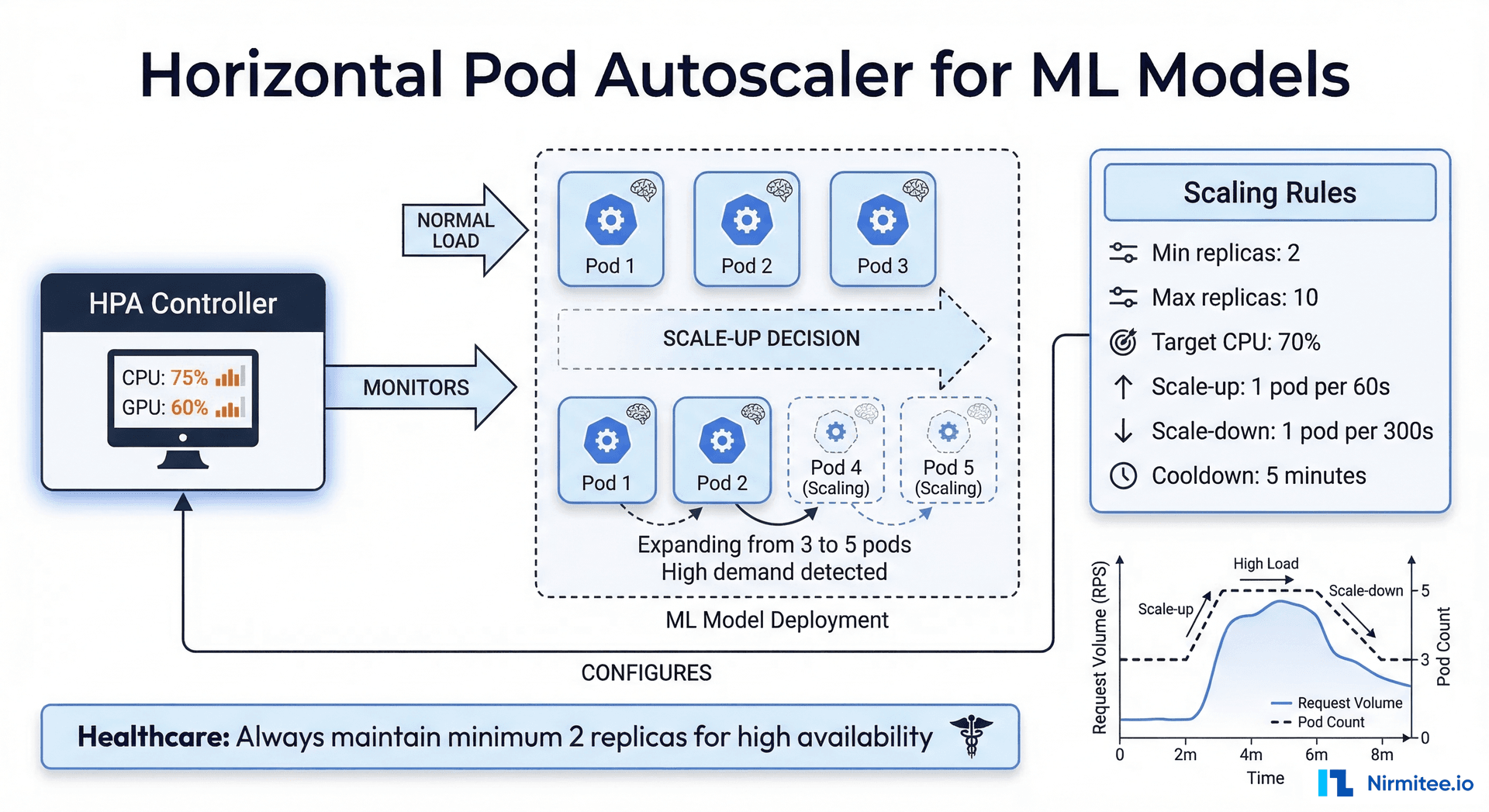
The HPA automatically adjusts the number of model replicas based on observed metrics. For ML models, CPU utilization is the most common scaling metric, but custom metrics (inference latency, queue depth) provide more accurate scaling signals.
# hpa.yaml — Auto-scale based on CPU utilization
apiVersion: autoscaling/v2
kind: HorizontalPodAutoscaler
metadata:
  name: sepsis-prediction-hpa
  namespace: ml-production
spec:
  scaleTargetRef:
    apiVersion: apps/v1
    kind: Deployment
    name: sepsis-prediction
  minReplicas: 2        # Healthcare: always at least 2 for HA
  maxReplicas: 10
  metrics:
  - type: Resource
    resource:
      name: cpu
      target:
        type: Utilization
        averageUtilization: 70
  behavior:
    scaleUp:
      stabilizationWindowSeconds: 60
      policies:
      - type: Pods
        value: 2
        periodSeconds: 60
    scaleDown:
      stabilizationWindowSeconds: 300  # 5 min cooldown before scaling down
      policies:
      - type: Pods
        value: 1
        periodSeconds: 120
Why minReplicas Should Be 2 in Healthcare
A single replica means a single point of failure. During pod restarts (node maintenance, OOM kills, liveness probe failures), your model is unavailable. In healthcare, model unavailability can block clinical workflows — imagine a decision support tool that returns errors during a time-sensitive diagnosis. Always run at least two replicas, and consider three for critical models.
Health Checks: What They Mean for ML Models
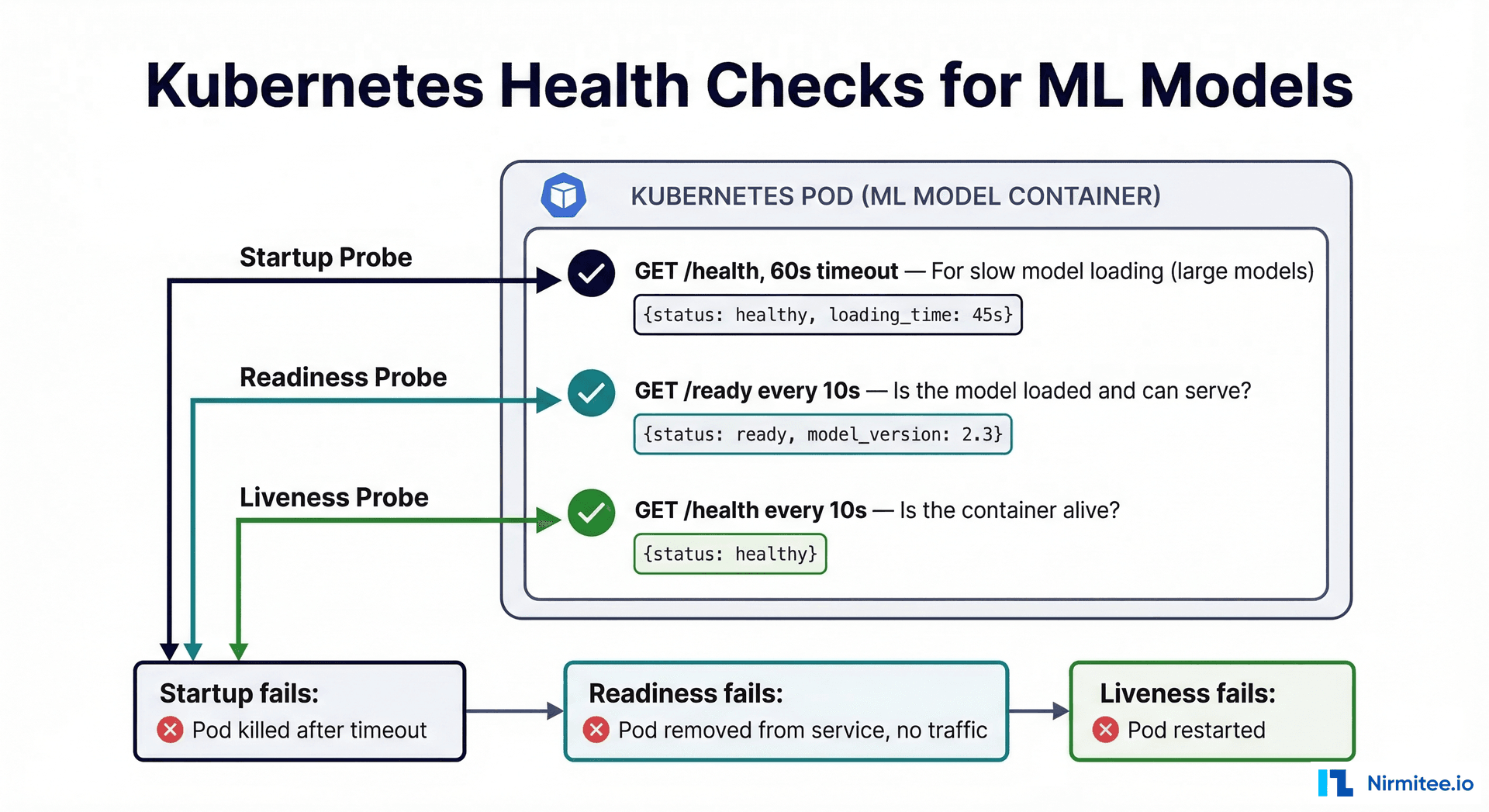
Kubernetes health checks (probes) determine whether your model is alive, ready to serve, and properly started. ML models have unique health check requirements compared to traditional web services:
| Probe Type | Purpose | ML-Specific Considerations |
|---|---|---|
| Liveness | Is the container process alive? | Check that the model server process is running |
| Readiness | Can the container serve requests? | Check that the model is loaded into memory and can make predictions |
| Startup | Has the container finished initialization? | Large models (imaging, NLP) may take 30-120s to load; startup probe prevents premature liveness checks |
# Health check endpoints for clinical ML model
from fastapi import FastAPI
import numpy as np
import time

app = FastAPI()
model = None
model_load_time = None

@app.on_event("startup")
async def load_model():
    global model, model_load_time
    import joblib
    model = joblib.load("model/sepsis_model_v2.3.joblib")
    model_load_time = time.time()

@app.get("/health")
def liveness():
    """Liveness probe - is the process alive?"""
    return {
        "status": "healthy",
        "uptime_seconds": int(time.time() - model_load_time) if model_load_time else 0
    }

@app.get("/ready")
def readiness():
    """Readiness probe - can we serve predictions?"""
    if model is None:
        return {"status": "not_ready", "reason": "model not loaded"}, 503

    # Verify model can actually predict (not just loaded)
    try:
        test_input = np.zeros((1, 7))
        prediction = model.predict_proba(test_input)
        return {
            "status": "ready",
            "model_version": "v2.3",
            "can_predict": True
        }
    except Exception as e:
        return {"status": "not_ready", "reason": str(e)}, 503
HIPAA-Compliant Container Registries
Container images for clinical models must be stored in registries with encryption at rest, access logging, and vulnerability scanning. All three major cloud providers offer HIPAA-eligible container registries under their Business Associate Agreements.
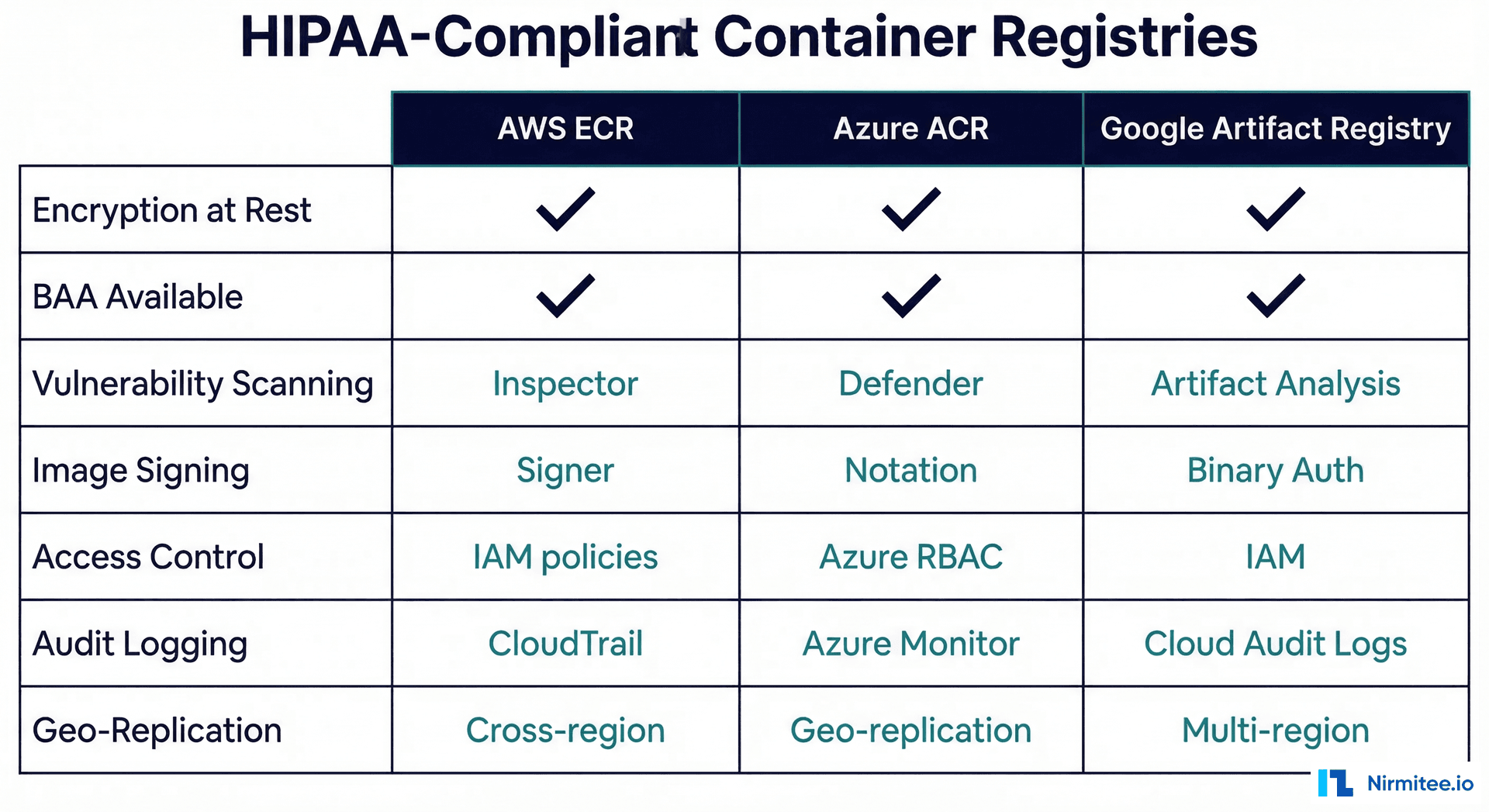
# AWS ECR setup with encryption and scanning
# Create encrypted repository
aws ecr create-repository \
  --repository-name clinical-models/sepsis \
  --encryption-configuration encryptionType=KMS,kmsKey=arn:aws:kms:us-east-1:123456789:key/your-key-id \
  --image-scanning-configuration scanOnPush=true \
  --image-tag-mutability IMMUTABLE

# Enable lifecycle policy (retain last 10 versions)
aws ecr put-lifecycle-policy \
  --repository-name clinical-models/sepsis \
  --lifecycle-policy-text '{
    "rules": [{
      "rulePriority": 1,
      "description": "Keep last 10 model versions",
      "selection": {
        "tagStatus": "tagged",
        "tagPrefixList": ["v"],
        "countType": "imageCountMoreThan",
        "countNumber": 10
      },
      "action": {"type": "expire"}
    }]
  }'

# Verify scan results before deployment
aws ecr describe-image-scan-findings \
  --repository-name clinical-models/sepsis \
  --image-id imageTag=v2.3 \
  --query 'imageScanFindings.findingSeverityCounts'
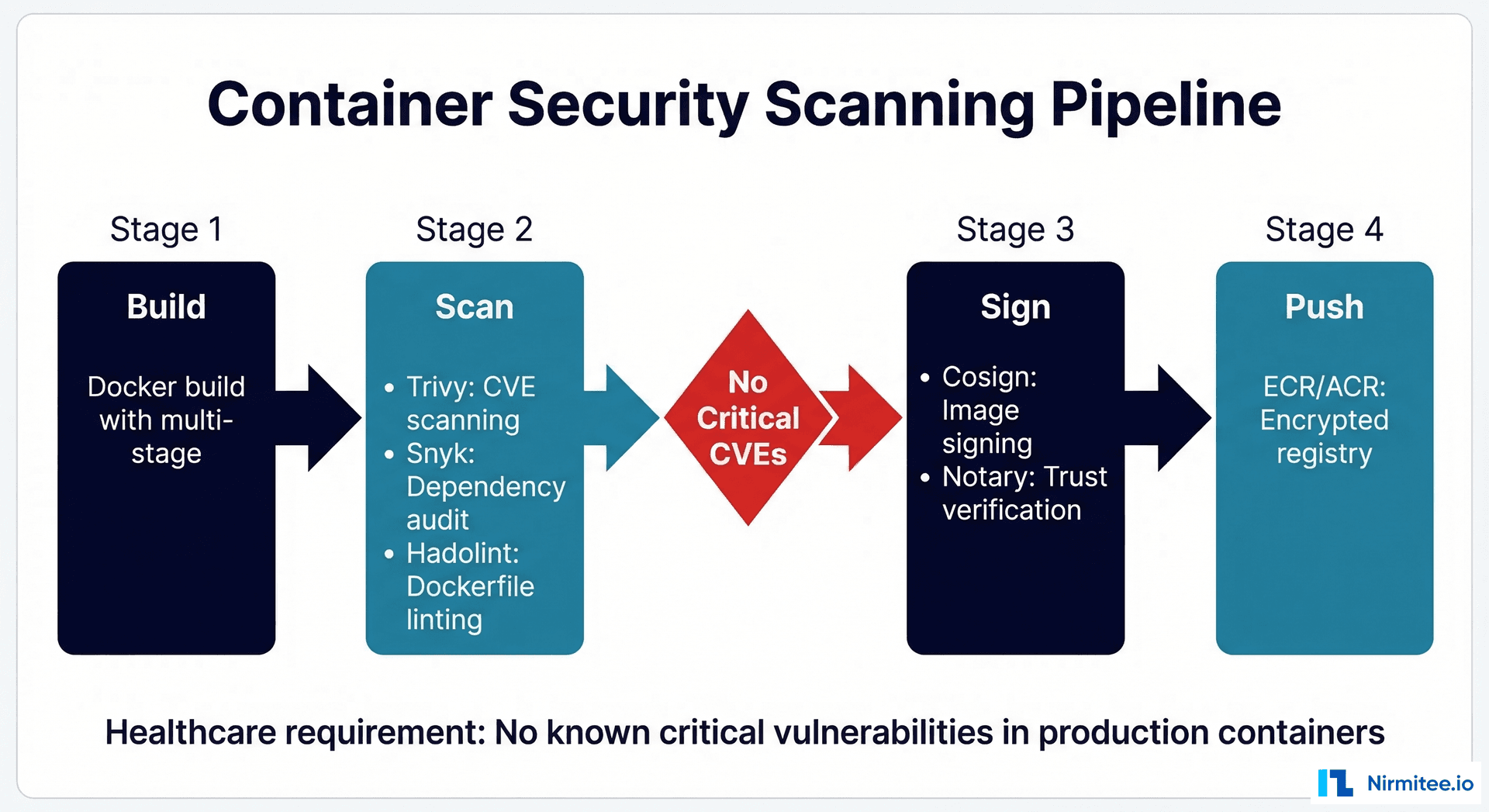
Security Scanning Pipeline
Before any container image reaches your production registry, it must pass through a security scanning pipeline. In healthcare, container vulnerabilities are not just a security risk — they are a compliance violation. The 2026 HIPAA Security Rule explicitly requires vulnerability management for systems that process PHI.
# GitHub Actions CI/CD pipeline for clinical ML containers
name: Clinical ML Container Pipeline
on:
  push:
    tags: ['v*']

jobs:
  build-scan-push:
    runs-on: ubuntu-latest
    steps:
    - uses: actions/checkout@v4

    - name: Build Docker image
      run: |
        docker build -t clinical-model:${{ github.ref_name }} .

    - name: Run Trivy vulnerability scan
      uses: aquasecurity/trivy-action@master
      with:
        image-ref: clinical-model:${{ github.ref_name }}
        format: 'sarif'
        output: 'trivy-results.sarif'
        severity: 'CRITICAL,HIGH'
        exit-code: '1'  # Fail pipeline on critical vulnerabilities

    - name: Hadolint Dockerfile linting
      uses: hadolint/hadolint-action@v3.1.0
      with:
        dockerfile: Dockerfile

    - name: Login to ECR
      uses: aws-actions/amazon-ecr-login@v2

    - name: Push to encrypted registry
      run: |
        docker tag clinical-model:${{ github.ref_name }} \
          ${{ env.ECR_REGISTRY }}/clinical-models/sepsis:${{ github.ref_name }}
        docker push ${{ env.ECR_REGISTRY }}/clinical-models/sepsis:${{ github.ref_name }}
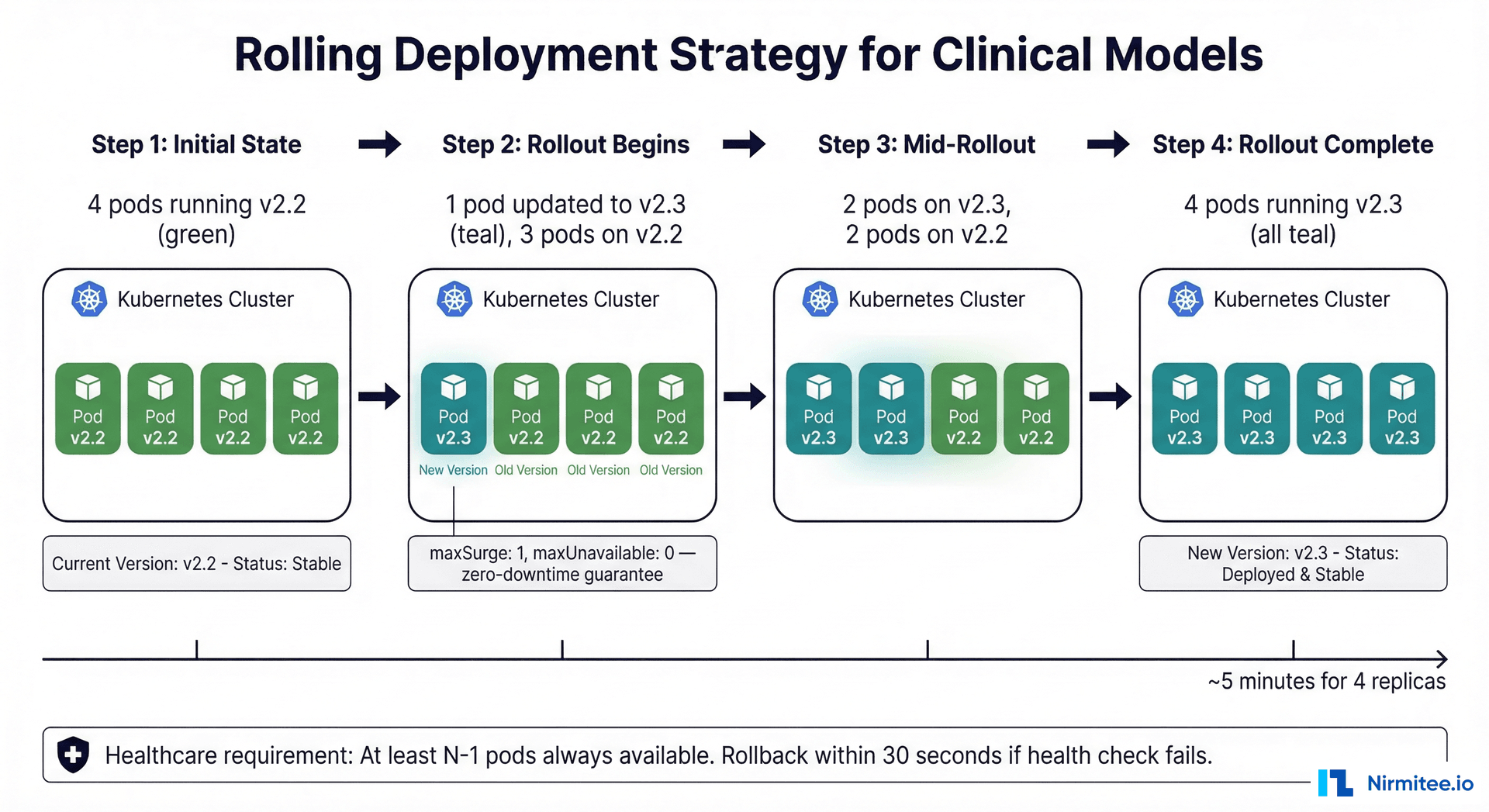
Rolling Deployments: Zero-Downtime Model Updates
When deploying a new model version, the rolling update strategy ensures that clinical workflows are never interrupted. The key configuration is maxUnavailable: 0 — Kubernetes will always bring up a new pod and verify it is healthy before removing an old one.
For clinical models, consider a more conservative approach: deploy the new version in shadow mode first (see our ML model lifecycle guide), validate against production data, and only then perform the rolling update. This two-phase approach — shadow validation followed by rolling deployment — provides the highest safety guarantee.
Frequently Asked Questions
Should we use Docker or Podman for healthcare ML containers?
Both are OCI-compatible and produce identical images. Docker has broader ecosystem support and tooling. Podman offers rootless containers by default, which is a security advantage. For most healthcare teams, Docker is the pragmatic choice because of its ecosystem. If your security team mandates rootless containers, Podman is the drop-in replacement.
How do we handle model files that are too large for Docker images?
Large models (multi-gigabyte NLP or imaging models) should be stored in artifact storage (S3, GCS) and downloaded at container startup, not baked into the Docker image. Use an init container or a startup script that pulls the model from encrypted storage. This keeps your Docker image small and allows model updates without rebuilding the container.
What resource limits should we set for ML model pods?
Start with profiling: run your model under realistic load and measure peak CPU, memory, and GPU utilization. Set requests to your average utilization (typically 40-60% of peak) and limits to your peak plus a 30% buffer. For healthcare, err on the side of generous limits — an OOM-killed pod means unavailable predictions. A typical clinical model (scikit-learn/XGBoost) needs 500m-1000m CPU and 1-2Gi memory. GPU imaging models need 1-2 GPU devices and 4-8Gi GPU memory.
How do we handle model versioning in Kubernetes?
Use image tags that match your model version (e.g., sepsis-model:v2.3). Set imagePullPolicy: Always for mutable tags or use immutable tags. The deployment manifest should include a model-version label for easy identification and rollback. Use kubectl rollout undo for instant rollback to the previous version if the new model underperforms.
Do we need a service mesh (Istio) for healthcare ML?
A service mesh adds mTLS (mutual TLS between pods), traffic management (canary deployments, traffic splitting), and observability (distributed tracing). For healthcare, the mTLS capability is valuable — it encrypts all intra-cluster traffic without code changes, which helps satisfy HIPAA encryption-in-transit requirements. However, it adds operational complexity. Start without a mesh, add it when you have multiple models that need traffic management or when your security team requires intra-cluster encryption. For observability without a mesh, see our guide on OpenTelemetry for healthcare.
How do we manage secrets in Kubernetes for ML models?
Never store database credentials, API keys, or encryption keys in your Docker image or deployment manifest. Use Kubernetes Secrets (at minimum) or an external secrets manager (AWS Secrets Manager, HashiCorp Vault) with the External Secrets Operator. For HIPAA compliance, secrets must be encrypted at rest in etcd (enable etcd encryption) and rotated on a regular schedule.