FHIR search is the most performance-sensitive surface area in any healthcare API. Every clinical workflow -- patient lookup, medication reconciliation, lab result retrieval, care plan assembly -- depends on search queries that return the right data in the right shape at the right speed. Yet most FHIR implementations ship with search patterns that work during development against a few hundred resources and collapse under production load with millions of records.
The performance gap between naive and optimized FHIR search is not incremental. A single query pattern change can reduce response times from 8 seconds to 200 milliseconds. A missing _include parameter can turn one request into 47. An unnecessary _total=accurate can force a full table scan on every paginated request. These are not edge cases -- they are the default patterns most teams ship with.
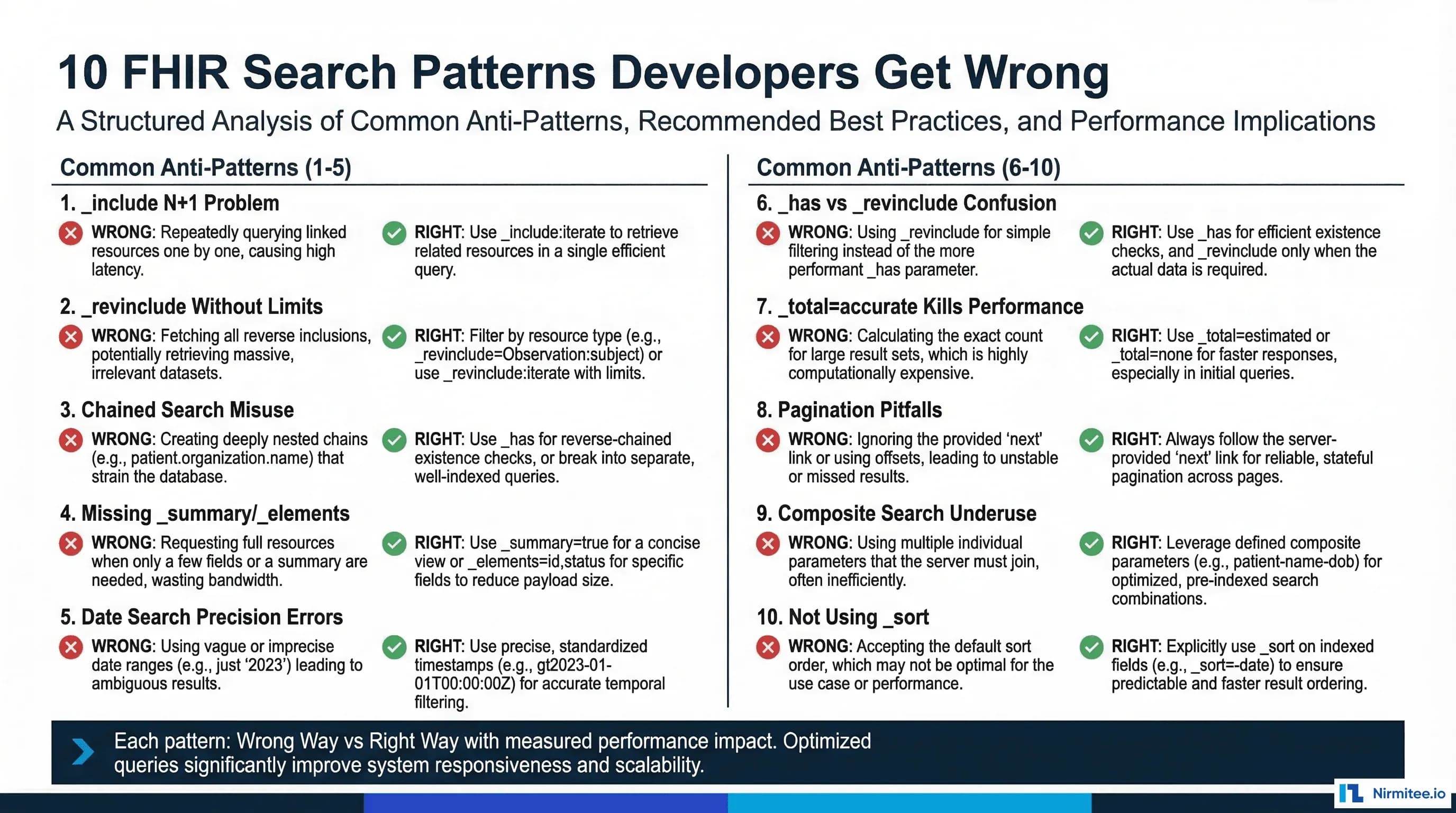
This guide covers the 10 most common FHIR search anti-patterns, with concrete before-and-after query examples, measured performance impacts, and the specific server-side behaviors that make each pattern expensive. If you are building or maintaining a FHIR server, these patterns will determine whether your API serves clinical workflows or blocks them.
Pattern 1 — The _include N+1 Problem
The N+1 query problem is well-known in database engineering, but FHIR makes it uniquely easy to trigger. When a client needs a Patient along with their Practitioner, Organization, and insurance Coverage, the naive approach issues separate requests for each referenced resource.
Specifically, the
# Step 1: Get the patient
GET /fhir/Patient/12345

# Step 2: Parse the response, extract generalPractitioner reference
# generalPractitioner: [{"reference": "Practitioner/789"}]

# Step 3: Fetch the practitioner
GET /fhir/Practitioner/789

# Step 4: Parse patient.managingOrganization
# managingOrganization: {"reference": "Organization/456"}

# Step 5: Fetch the organization
GET /fhir/Organization/456

# Step 6: Search for coverage
GET /fhir/Coverage?beneficiary=Patient/12345

# Result: 4 HTTP round trips, 4 database queries
# At 50ms per request = 200ms minimum latency
The Right Way
# Single request with _include
GET /fhir/Patient?_id=12345&_include=Patient:general-practitioner&_include=Patient:organization&_revinclude=Coverage:beneficiary

# Returns a Bundle with:
#   - Patient/12345
#   - Practitioner/789 (via _include)
#   - Organization/456 (via _include)
#   - Coverage resources (via _revinclude)

# Result: 1 HTTP round trip, 1-2 database queries
# Typical latency: 40-80ms
Performance impact: Eliminating N+1 patterns typically reduces request count by 70-90% and end-to-end latency by 60-80%. For a patient summary screen that references 8-12 related resources, this is the difference between a 400ms page load and a 2.5-second one. On the server side, each individual request carries connection overhead, authentication validation, audit logging, and response serialization -- all of which compound with N+1 patterns.
Pattern 2 — _revinclude Without Limits
While _include follows forward references from the searched resource, _revinclude searches for other resources that reference the searched resource. This is inherently more expensive because it requires a reverse lookup, and the result set is unbounded by default.
The Wrong Way
# Get a patient with ALL their observations
GET /fhir/Patient?_id=12345&_revinclude=Observation:subject

# Problem: A patient with 5 years of vitals, labs, and assessments
# could have 10,000+ Observations. This query returns ALL of them
# in a single Bundle response.
# Response size: 15-50 MB
# Database query time: 3-12 seconds
# Memory consumption: spikes on both server and client
The Right Way
# Option 1: Use _revinclude with _count to limit Bundle size
GET /fhir/Patient?_id=12345&_revinclude=Observation:subject&_count=50

# Option 2: Separate search with specific filters (preferred)
GET /fhir/Patient/12345
GET /fhir/Observation?subject=Patient/12345&category=vital-signs&date=ge2025-01-01&_count=20&_sort=-date

# Option 3: Use _revinclude:iterate for controlled depth
GET /fhir/Patient?_id=12345&_revinclude=Encounter:subject&_revinclude:iterate=Observation:encounter&_count=25
Performance impact: Unbounded _revinclude is the single most common cause of FHIR server timeouts in production. A patient with chronic conditions can accumulate tens of thousands of Observations, Procedures, and DocumentReferences over time. The server must join across these tables, serialize all results into a Bundle, and stream the response -- often exceeding memory limits or gateway timeouts. Adding category and date filters with _count limits typically reduces response size by 95-99%.
Pattern 3 — Chained Search Misuse
Chained search parameters allow querying resources based on properties of referenced resources. For example, finding all Observations for patients in a specific organization. The syntax is powerful but generates complex SQL joins that can defeat query optimization.
In practice, the
# Find observations for patients at a specific organization
# using deeply chained search
GET /fhir/Observation?subject.managingOrganization.name=General Hospital&subject.birthdate=gt1990-01-01&category=laboratory

# This generates a 3-table JOIN:
# Observation -> Patient -> Organization
# With filters on Organization.name, Patient.birthdate, and Observation.category
# Most FHIR servers cannot optimize this efficiently
# Query plan: sequential scan on Organization, nested loop join to Patient, nested loop to Observation
The Right Way
# Step 1: Find the organization (fast, usually cached)
GET /fhir/Organization?name=General Hospital&_elements=id
# Returns Organization/456

# Step 2: Find patients at that org born after 1990
GET /fhir/Patient?organization=Organization/456&birthdate=gt1990-01-01&_elements=id
# Returns list of Patient IDs

# Step 3: Search observations for those specific patients
GET /fhir/Observation?subject=Patient/101,Patient/102,Patient/103&category=laboratory&_sort=-date&_count=50

# Alternative: Use a single-level chain (much more optimizable)
GET /fhir/Observation?subject.organization=Organization/456&category=laboratory&_sort=-date&_count=50
Performance impact: Multi-level chained searches (3+ levels deep) can be 10-50x slower than equivalent two-step queries because the database optimizer cannot efficiently plan multi-table joins with filters at each level. Single-level chains (one hop) are generally well-optimized by mature FHIR servers because they map to simple indexed joins. The rule of thumb: chains deeper than one level should be broken into separate requests.
Pattern 4 — Missing _summary and _elements
By default, FHIR search returns complete resources with every element populated. For many use cases -- patient lists, search typeaheads, dropdown populations -- the client needs only a subset of fields. Transferring full resources wastes bandwidth, serialization time, and client parsing time.
The Wrong Way
# Patient search for a dropdown/typeahead
GET /fhir/Patient?name=smith&_count=20

# Returns 20 complete Patient resources with:
# - All identifiers, addresses, telecoms, contacts
# - Extensions, meta, narrative text
# - Average: 4-8 KB per resource
# Total response: 80-160 KB for a typeahead dropdown
The Right Way
# Using _summary=true (returns only mandatory + summary elements)
GET /fhir/Patient?name=smith&_count=20&_summary=true
# Returns ~800 bytes per resource (id, name, gender, birthDate)
# Total response: ~16 KB

# Using _elements for precise field selection
GET /fhir/Patient?name=smith&_count=20&_elements=id,name,birthDate,gender
# Returns only the requested elements
# Total response: ~10 KB

# For existence checks (does this patient exist?)
GET /fhir/Patient?identifier=http://hospital.org|MRN12345&_summary=count
# Returns only the total count, no resource data
# Response: {"total": 1} -- approximately 50 bytes
Performance impact: Using _summary or _elements typically reduces response payload by 70-90%. On the server side, the benefit goes beyond bandwidth: the server can skip deserializing and serializing unused elements, and in some implementations, the database query itself can be optimized to read fewer columns. For high-volume operations like patient search typeaheads that fire on every keystroke, this optimization directly impacts perceived application responsiveness.
Pattern 5 — Date Search Precision Errors
FHIR date searching follows specific precision rules that developers routinely misunderstand, leading to either missing results or excessive results. The core issue: FHIR date comparisons respect the precision of the search parameter value.
Notably, the
# "Find all observations from March 2025"
# WRONG: This searches for observations at the exact instant 2025-03-01T00:00:00
GET /fhir/Observation?date=2025-03-01
# Misses: Observations from March 2-31
# Returns: Only observations with effectiveDateTime = 2025-03-01 (any time that day)

# "Find observations from the last 7 days"
# WRONG: ge without le creates an unbounded range
GET /fhir/Observation?date=ge2025-03-09
# Returns: All observations from March 9 onward -- including future-dated errors

# WRONG: Using eq with a full timestamp for range queries
GET /fhir/Observation?date=eq2025-03-15T10:30:00Z
# Misses: Observations at 10:30:01 or 10:29:59
The Right Way
# "Find all observations from March 2025"
# CORRECT: Use month precision -- FHIR interprets this as the entire month
GET /fhir/Observation?date=2025-03
# Matches: Any effectiveDateTime within March 2025

# "Find observations from the last 7 days"
# CORRECT: Bounded range with both ge and le
GET /fhir/Observation?date=ge2025-03-09&date=le2025-03-16
# Matches: March 9 through March 16, inclusive

# "Find observations from a specific date"
# CORRECT: Day precision matches the entire day
GET /fhir/Observation?date=2025-03-15
# Matches: Any time on March 15 (00:00:00 through 23:59:59)

# For Period-based searches (e.g., Encounter.period)
# CORRECT: Use the appropriate prefix
GET /fhir/Encounter?date=ge2025-03-01&date=le2025-03-31
# Matches encounters that overlap with March 2025
Performance impact: Incorrect date precision does not just return wrong results -- it can also cause poor query performance. An overly broad date range (missing upper bound) forces index scans across the entire date range. A too-precise timestamp match (eq with seconds) may bypass date-range indexes entirely, falling back to sequential scans. Using appropriate precision with bounded ranges allows the database to use date-range indexes efficiently. In production systems with millions of Observations, the difference between an indexed range scan and a sequential scan is typically 100-500x.
Pattern 6 — _has vs _revinclude -- Choosing Wrong
Both _has and _revinclude deal with reverse references, but they serve fundamentally different purposes. Conflating them leads to either fetching too much data or writing unnecessarily complex queries.
The Wrong Way
# "Find patients who have an active MedicationRequest"
# WRONG: Using _revinclude when you only need the Patients
GET /fhir/Patient?_revinclude=MedicationRequest:subject
# Returns: All patients + ALL their MedicationRequests
# Then client-side filters for status=active
# Result: Massive over-fetching

# WRONG: Using _has when you need both resources
GET /fhir/Patient?_has:MedicationRequest:subject:status=active
# Returns: Only Patients (correct filtering, but no MedicationRequest data)
# Then separately: GET /fhir/MedicationRequest?subject=Patient/X for each
# Result: N+1 problem
The Right Way
# "Find patients who have active medications" (need patients only)
# CORRECT: _has filters the primary resource without returning the reference
GET /fhir/Patient?_has:MedicationRequest:subject:status=active&_count=20

# "Find patients with their active medications" (need both)
# CORRECT: Search MedicationRequests, _include the Patient
GET /fhir/MedicationRequest?status=active&_include=MedicationRequest:subject&_count=50

# "How many patients have active medications?" (existence check)
GET /fhir/Patient?_has:MedicationRequest:subject:status=active&_summary=count
Performance impact: Using _revinclude when you only need filtered existence checking (_has) can return 10-100x more data than necessary. Conversely, using _has when you need the referenced data forces N+1 follow-up queries. The correct choice depends on one question: do you need the referencing resources in the response, or are you using them only as filter criteria?
Pattern 7 — _total=accurate Killing Performance
The _total parameter controls whether the server includes a total count in paginated search results. Most FHIR servers default to _total=none or _total=estimate for performance reasons. Requesting _total=accurate forces a full count query that can be devastating.
Specifically, the
# Paginated search with accurate total
GET /fhir/Observation?subject=Patient/12345&_count=20&_total=accurate

# Server must execute TWO queries:
# 1. SELECT ... FROM observations WHERE subject='Patient/12345' LIMIT 20  (fast: 5ms)
# 2. SELECT COUNT(*) FROM observations WHERE subject='Patient/12345'     (slow: 800ms-3s)

# The COUNT query scans the entire matching result set
# For a patient with 50,000 observations, this is a full index scan
# And this count query runs on EVERY page request
The Right Way
# Option 1: Skip the total entirely (fastest)
GET /fhir/Observation?subject=Patient/12345&_count=20&_total=none
# Server returns Bundle.total = null
# Client uses Bundle.link.next to determine if more pages exist

# Option 2: Use estimate (fast approximation)
GET /fhir/Observation?subject=Patient/12345&_count=20&_total=estimate
# Server uses statistics/sampling: SELECT reltuples FROM pg_class
# Returns approximate count in less than 1ms

# Option 3: Request accurate total only on first page
# Page 1 (with count):
GET /fhir/Observation?subject=Patient/12345&_count=20&_total=accurate
# Cache the total client-side
# Page 2+ (no count):
GET /fhir/Observation?subject=Patient/12345&_count=20&_total=none&_offset=20
Performance impact: On PostgreSQL, COUNT(*) requires a full sequential scan of matching rows because MVCC does not maintain a live row count. For a table with 10 million Observations, SELECT COUNT(*) WHERE subject='Patient/X' can take 2-8 seconds even with indexes. Requesting _total=none eliminates this entirely. If you must show a total, cache it from the first page request and do not re-request it on subsequent pages.
Pattern 8 — Pagination Pitfalls
FHIR pagination uses Bundle links (next, previous, self) rather than traditional offset/limit patterns. Misusing pagination creates consistency problems, duplicate results, and performance degradation.
The Wrong Way
# Using offset-based pagination (fragile)
GET /fhir/Patient?_count=20&_offset=0    # Page 1
GET /fhir/Patient?_count=20&_offset=20   # Page 2
GET /fhir/Patient?_count=20&_offset=40   # Page 3

# Problems:
# 1. If a Patient is created between page 1 and 2, page 2 may
#    duplicate the last record from page 1
# 2. If a Patient is deleted, page 2 may skip a record
# 3. Large offsets are slow: _offset=10000 requires scanning 10,000 rows
#    before returning the next 20

# Using _page parameter (non-standard, not portable)
GET /fhir/Patient?_count=20&_page=3
# Not defined in the FHIR spec -- server-specific behavior
The Right Way
# Use server-provided Bundle.link.next URLs
# Step 1: Initial search
GET /fhir/Patient?_count=20&_sort=_lastUpdated

# Step 2: Follow the next link from the Bundle response
# Response includes:
# "link": [{"relation": "next", "url": "/fhir/Patient?_count=20&_sort=_lastUpdated&_cursor=eyJ..."}]

# Step 3: Use the next link as-is (cursor-based pagination)
GET /fhir/Patient?_count=20&_sort=_lastUpdated&_cursor=eyJ...

# For keyset pagination (if server supports it)
GET /fhir/Observation?subject=Patient/12345&_sort=date&_count=50&date=gt2025-01-15T10:30:00Z
# Use the last resource's date as the starting point for the next page
Performance impact: Offset-based pagination degrades linearly: page 1 scans 20 rows, page 100 scans 2,000 rows but only returns 20. Cursor-based pagination (using Bundle.link.next) maintains constant performance regardless of page depth. For datasets with more than 1,000 pages, offset pagination can be 50-100x slower than cursor pagination on the later pages.
Pattern 9 — Composite Search Parameter Underuse
Composite search parameters allow searching on combinations of values that belong together on the same element. The most common example: searching for Observations by both code and value. Without composite parameters, independent parameters can produce incorrect matches.
In practice, the
# "Find observations with systolic BP > 140"
# WRONG: Independent parameters match across different components
GET /fhir/Observation?code=http://loinc.org|85354-9&component-value-quantity=gt140

# This matches ANY observation where:
#   - code = 85354-9 (blood pressure panel) AND
#   - ANY component has value > 140
# Problem: A BP of 120/150 would match because the diastolic (150) > 140
# But the systolic (120) is normal -- this is a false positive

# Also wrong: trying to chain component code and value separately
GET /fhir/Observation?component-code=http://loinc.org|8480-6&component-value-quantity=gt140
# Same problem: code and value are matched independently across components
The Right Way
# CORRECT: Use the composite parameter to bind code and value together
GET /fhir/Observation?component-code-value-quantity=http://loinc.org|8480-6$gt140||mmHg

# This matches observations where the SAME component has:
#   - code = 8480-6 (systolic BP) AND
#   - value > 140 mmHg
# The $ separator binds the code and value to the same component

# Another example: Lab results by code and value
GET /fhir/Observation?code-value-quantity=http://loinc.org|2339-0$gt200||mg/dL
# Glucose > 200 mg/dL -- code and value matched on same Observation

# Composite date and code
GET /fhir/Observation?code-value-date=http://loinc.org|30525-0$gt2025-01-01
# Age observation after a specific date
Performance impact: Beyond correctness, composite search parameters are more efficient because the server can use composite indexes that cover both the code and value columns in a single index lookup. With independent parameters, the server must perform two separate index lookups and intersect the results. For Observation tables with millions of rows, composite index lookups are typically 3-5x faster than intersecting independent index results.
Pattern 10 — Not Using _sort
Without explicit sorting, FHIR servers return results in an undefined order (often insertion order or primary key order). This creates two problems: clients cannot reliably paginate, and they cannot get the most clinically relevant results first.
Notably, the
# Get recent lab results -- no sort specified
GET /fhir/Observation?subject=Patient/12345&category=laboratory&_count=10

# Server returns results in database insertion order
# Problem: The first 10 results might be from 2019
# The clinically relevant results (this week's labs) are on page 50

# Attempting client-side sort
GET /fhir/Observation?subject=Patient/12345&category=laboratory&_count=1000
# Fetch everything, sort in the client
# Problem: Transfers 1000 resources when you need 10
The Right Way
# Sort by date descending (most recent first)
GET /fhir/Observation?subject=Patient/12345&category=laboratory&_sort=-date&_count=10

# Multiple sort keys (date descending, then code ascending)
GET /fhir/Observation?subject=Patient/12345&_sort=-date,code&_count=20

# Sort by last updated (useful for sync/polling patterns)
GET /fhir/Observation?subject=Patient/12345&_sort=-_lastUpdated&_count=50

# Combined with _elements for maximum efficiency
GET /fhir/Observation?subject=Patient/12345&category=vital-signs&_sort=-date&_count=10&_elements=id,code,valueQuantity,effectiveDateTime
Performance impact: Proper _sort usage has a compound benefit: it ensures the most relevant results are on the first page (reducing the need for subsequent page requests), and it enables the server to use sorted indexes for both filtering and ordering in a single index scan. Without _sort, clients often over-fetch to compensate for undefined ordering, multiplying both bandwidth and server load. In clinical UIs that display "most recent vitals" or "latest lab results," sorting server-side eliminates the need to transfer and process hundreds of irrelevant historical records.
Putting It All Together
These 10 patterns are not independent optimizations -- they compound. A well-optimized FHIR query combines multiple techniques:
# Optimized clinical dashboard query: recent vitals for a patient
GET /fhir/Observation?subject=Patient/12345&category=vital-signs&date=ge2025-03-01&_sort=-date&_count=10&_elements=id,code,valueQuantity,effectiveDateTime,status&_total=none

# This single query:
# 1. Avoids N+1 by using search parameters instead of individual reads
# 2. Bounds the reverse lookup with category + date filters
# 3. Uses single-level filtering (no deep chains)
# 4. Requests only needed elements with _elements
# 5. Uses proper date precision (day-level ge)
# 6. Skips expensive total counting with _total=none
# 7. Sorts server-side for clinical relevance
# 8. Limits response size with _count

# Result: ~2 KB response in ~15ms
# vs. Naive approach: ~500 KB response in ~3 seconds
The difference between a FHIR API that supports real-time clinical workflows and one that frustrates clinicians often comes down to these query patterns. Every additional second of latency in a clinical application translates directly to clinician time lost -- and in a hospital running thousands of queries per minute, these optimizations compound into significant operational impact.
At Nirmitee, we build FHIR-native EHR platforms where these search optimization patterns are baked into the query engine from day one. If your team is struggling with FHIR search performance or building a new healthcare data platform, we would welcome the conversation.
Shipping healthcare software that scales requires deep domain expertise. See how our Healthcare Software Product Development practice can accelerate your roadmap. We also offer specialized Healthcare Interoperability Solutions services.